
vue中的checkbox全选和反选
前几天有个博客园的朋友问小颖,小颖之前写的vue2.0在table中实现全选和反选 、Vue.js实现checkbox的全选和反选,为什么他将里面的js复制下来,但是实现不了全选和反选。小颖当时看他给的截图,也没太明白,后来手动巧了一下,发现一个疑问,虽然问题是解决了,但是至于为什么小颖还是不太明白,希望有哪位vue大神看到了能帮忙解答一下,嘻嘻,小颖先在这里提前说声:谢谢啦,嘻嘻。
我们先来看看第一种实现全选和反选的方法:直接使用 script 标签调用vue。
    <div id="app">

        <input type="checkbox" v-model='checked' v-on:click='checkedAll'> 全选{{checked}}

        <template v-for="(list,index) in checkboxList">

            <input type="checkbox" v-model='checkList' :value="list.id"> {{list.product_inf}}

        </template>

        {{checkList}}

    </div>
    <script>

    var vm = new Vue({

        el: '#app',

        data: {

            checkboxList: [{

                'id': '1',

                'product_inf': '女士银手链'

            }, {

                'id': '2',

                'product_inf': '女士银手镯'

            }, {

                'id': '3',

                'product_inf': '女士银耳环'

            }],

            checked: false, //全选框

            checkList: []

        },

        methods: {

            checkedAll: function() {

                var _this = this;

                console.log(_this.checkList);

                console.log(_this.checked);

                if (!_this.checked) { //实现反选

                    _this.checkList = [];

                } else { //实现全选

                    _this.checkList = [];

                    this.checkboxList.forEach(function(item, index) {

                        _this.checkList.push(item.id);

                    });

                }

            }

        },

        watch: {

            'checkList': {

                handler: function(val, oldVal) {

                    if (val.length === this.checkboxList.length) {

                        this.checked = true;

                    } else {

                        this.checked = false;

                    }

                },

                deep: true

            }

        },

    })

    </script>
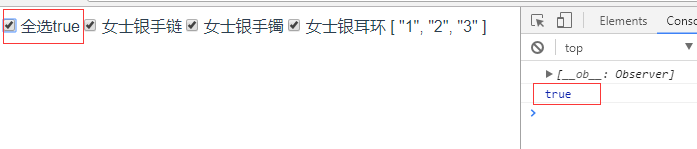
打印结果:

第二种实现方式:在vue脚手架环境中:
  <div class="container">

    <input type="checkbox" v-model='checked' v-on:click='checkedAll'> 全选{{checked}}

    <template v-for="(list,index) in checkboxList">

      <input type="checkbox" v-model='checkList' :value="list.id">{{list.product_inf}}

    </template>

    {{checkList}}

    <button @click="ceshi">ceshi</button>

  </div>
<script>

export default {

  data() {

    return {

      checkboxList: [{

        'id': '1',

        'product_inf': '女士银手链'

      }, {

        'id': '2',

        'product_inf': '女士银手镯'

      }, {

        'id': '3',

        'product_inf': '女士银耳环'

      }],

      checked: false, //全选框

      checkList: []

    }

  },

  methods: {

    ceshi: function() {

      console.log(this.checked)

    },

    checkedAll: function() {

      var _this = this;

      console.log(_this.checkList);

      console.log(_this.checked);

      this.$nextTick(function() {

        // DOM 现在更新了

        console.log(_this.checked);

      });

      if (_this.checked) { //实现反选

        _this.checkList = [];

      } else { //实现全选

        _this.checkList = [];

        _this.checkboxList.forEach(function(item, index) {

          _this.checkList.push(item.id);

        });

      }

    }

  },

  watch: { //深度 watcher

    'checkList': {

      handler: function(val, oldVal) {

        if (val.length === this.checkboxList.length) {

          this.checked = true;

        } else {

          this.checked = false;

        }

      },

      deep: true

    }

  }

}

</script>
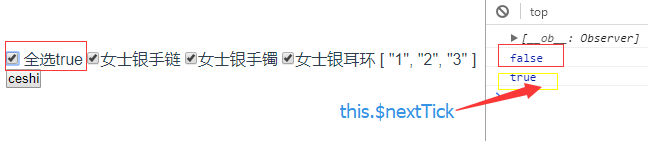
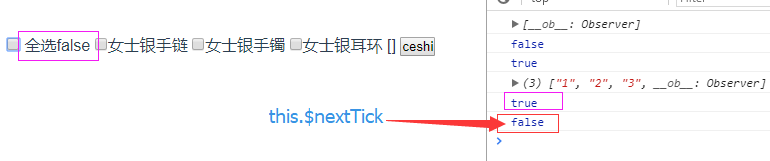
打印结果:
大家看完上面的四张图有没有发现一个问题:
同样是在 click 事件 checkedAll 中执行: console.log(_this.checked); 但是结果却不一样,第一种环境中,在修改数据之后checkedAll事件中的_this.checked立马就变了,但是在第二种环境中,在修改数据之后checkedAll事件中的_this.checked不会立马变,而是等到下一次调用时,才发生变化,但是在 click 事件 checkedAll 的this.$nextTick事件中,能将回调延迟到下次 DOM 更新循环之后执行。在修改数据之后立即使用它,然后等待 DOM 更新。
所以在两种环境中,判断全选和反选的条件也不一样:
第一种
                if (!_this.checked) { //实现反选

                    _this.checkList = [];

                } else { //实现全选

                    _this.checkList = [];

                    this.checkboxList.forEach(function(item, index) {

                        _this.checkList.push(item.id);

                    });

                }
第二种:
      if (_this.checked) { //实现反选

        _this.checkList = [];

      } else { //实现全选

        _this.checkList = [];

        _this.checkboxList.forEach(function(item, index) {

          _this.checkList.push(item.id);

        });

      }
当然也可以将第二种修改为:
    checkedAll: function() {

      var _this = this;

      console.log(_this.checkList);

      this.$nextTick(function() {

        console.log(_this.checked);

        // DOM 现在更新了

        if (!_this.checked) { //实现反选

          _this.checkList = [];

        } else { //实现全选

          _this.checkList = [];

          _this.checkboxList.forEach(function(item, index) {

            _this.checkList.push(item.id);

          });

        }

      });

    }
好啦今天的分享就到这里啦,希望大神们能帮小颖解答这个疑惑呦。。。。嘻嘻。
疑问解决啦,哈哈,原来是版本问题,之前博友给的低版本的,用了最新的版本后发现也要用Vue.nextTick方法
用新版本后,点击事件:
            checkedAll: function() {

                var _this = this;

                console.log(_this.checkList);

                Vue.nextTick(function() {

                    // DOM 更新了

                    console.log(_this.checked);

                    if (!_this.checked) { //实现反选

                        _this.checkList = [];

                    } else { //实现全选

                        _this.checkList = [];

                        _this.checkboxList.forEach(function(item, index) {

                            _this.checkList.push(item.id);

                        });

                    }

                })

            }
vue中的checkbox全选和反选的更多相关文章
- 关于Winform下DataGridView中实现checkbox全选反选、同步列表项的处理
近期接手一个winform 项目,虽然之前有.net 的经验,但是对一些控件的用法还不是很熟悉. 这段时间将会记录一些在工作中遇到的坎坷以及对应的解决办法,写出来与大家分享并希望大神提出更好解决方法来 ...
- checkbox全选,反选,取消选择 jquery
checkbox全选,反选,取消选择 jquery. //checkbox全部选择 $(":checkbox[name='osfipin']").each(function(){ ...
- checkbox全选与反选
用原生js跟jquery实现checkbox全选反选的一个例子 原生js: <!DOCTYPE html> <html lang="en"> <hea ...
- checkbox 全选,反选 ,全不选
在表格或者列表中经常会遇到要全选或者反选等交互,今天总结了一下代码,保留着以后直接拿来用 原理: 1. 全选:当全选checkbox被点击(不管点击之前是什么状态)后,获取其checked状态.然后对 ...
- 练习-checkbox 全选 ,反选, 单选,以及取值
1.方法1 <!DOCTYPE HTML PUBLIC "-//W3C//DTD HTML 4.01 Transitional//EN" "http://www.w ...
- Android中购物车的全选、反选、问题和计算价格
此Demo主要解决的是购物车中的全选,反选计算价格和选中的条目个数的问题,当选中几条时,点击反选,会把当先选中的变为不选中,把不选中的变为选中.点击全选会全部选中,再次点击时,变为全部不选中. //- ...
- angularjs实现 checkbox全选、反选的思考
之前做了一周的打酱油测试,其实感觉其实测试也是上辈子折翼的天使. 好长时间没写代码,感觉好多都不会了. 感谢这周没有单休,我能看熬夜看奥运了.我能有时间出去看个电影,我能有时间出去逛个商城,我能有时间 ...
- Checkbox 全选、反选
1.全选.反选 <html xmlns="http://www.w3.org/1999/xhtml"> <head> <title></t ...
- jquery一键控制checkbox全选,反选,全不选。
jquery attr()方法获取标签的 checked 会有问题,所以用了 prop() 方法. Hml的checkbox没有加name,只用了 div 嵌套. 如有更好的方法,望指点!! //全选 ...
随机推荐
- This version of the rendering library is more recent than your version of IntelliJ IDEA.
今天往idea里导入其它项目时又遇到了一个问题.单独标记一下. 导入后打开一个布局xml文件,发现不能渲染,报错为: This version of the rendering library is ...
- 在linux上手动搭建svn服务器
svn服务器的搭建 环境: linux CentOS 7 安装: 1.安装svn服务器 yum install subversion 2.查看版本 svnserve --version 3.创建版本库 ...
- js中常见的一些兼容性问题
1)滚动条: document.documentElement.scrollTop||document.body.scrollTop 2) 网页可视区域兼容 window.innerHeight || ...
- JAVA入门[11]-jsp几点基础语法
一.include <%@include file="copyright.jsp"%> <jsp:include page="copyright.jsp ...
- Struts2.5 伪静态的配置
伪静态 伪静态是相对真实静态来讲的,通常我们为了增强搜索引擎的友好面,都将文章内容生成静态页面,但是有的朋友为了实时的显示一些信息.或者还想运用动态脚本解决一些问题.不能用静态的方式来展示网站内容.但 ...
- springboot 项目maven 打包错误
Execution default of goal org.springframework.boot:spring-boot-maven-plugin:1.5.6.RELEASE:repackage ...
- Git使用简单总结
创建版本库git add加入到暂存区git commit -m" "加入到分支 时光机穿梭git satus查看仓库的当前状态git diff file 查看修改内容 版本回退HE ...
- MySQL学习(一) 概述
MySQL是一个开源的数据库系统,近些年来使用率越来越高,目前属于Oracle公司所有,其拥有MySQL的商标,属于主流版本,由于其开源特性,出现了一些分支,常见的有MariaDB.Perco ...
- go编程之常见工具函数
1.时间格式化 基于模式的布局进行时间格式化和解析 package main import "fmt" import "time" func main() { ...
- ABP .Net Core 部署到IIS 问题汇总
在ABP官网创建一个.Net Core项目编译完成 1. 发布网站 2. IIS新建站点 目录指向发布的目录 3.安装WindowsHosting IIS安装服务器上安装DotNetCore.X.X. ...