
apache ranger源码编译
官方文档 http://ranger.apache.org/quick_start_guide.html
Quick Start Guide
Build Process
1. Check out the code from GIT repository
    git clone https://gitbox.apache.org/repos/asf/ranger.git

    cd ranger
Alternatively, you can checkout the code from github:
    git clone https://github.com/apache/ranger

    cd ranger
2. Please execute the following Maven command:
    $ export JAVA_HOME=%jdk  Home%

    $ mvn clean

    $ mvn -DskipTests=false clean compile package install assembly:assembly
3. After the above build command execution, you should see the following TAR files in the target folder:
ranger-%version-number%-%module-name%.tar.gz
Create an Apache Release
1. Checkout from ranger release branch
$ git checkout ranger-%version%
2. Run maven commands to build and validate the build is working fine (See Build Process: step 2):
    $ export JAVA_HOME=%jdk  Home%

    $ mvn clean

    $ mvn -DskipTests=false clean compile package install assembly:assembly
3. Clean all generated files for building the source build
$ mvn clean
4. Create a TAR source file using the following command:
$ ant -f release-build.xml -Dranger-release-version=%version-number%
5. Now, the following files are ready to be published for release:
     ./target/apache-ranger-%version-number%.tar.gz

    ./target/apache-ranger-%version-number%.tar.gz.asc

    ./target/apache-ranger-%version-number%.tar.gz.mds
实战
编译环境:
root@greenvm-v1:~/Downloads/ranger# java -version

java version "1.8.0_181"

Java(TM) SE Runtime Environment (build 1.8.0_181-b13)

Java HotSpot(TM) -Bit Server VM (build 25.181-b13, mixed mode)

root@greenvm-v1:~/Downloads/ranger# mvn -v

Apache Maven 3.5. (1edded0938998edf8bf061f1ceb3cfdeccf443fe; --18T02::+:)

Maven home: /home/h/pkg/mvn

Java version: 1.8.0_181, vendor: Oracle Corporation, runtime: /home/h/pkg/jdk1..0_181/jre

Default locale: en_US, platform encoding: UTF-

OS name: "linux", version: "4.4.0-31-generic", arch: "amd64", family: "unix"
编译命令:
mvn -DskipTests clean compile package install assembly:assembly
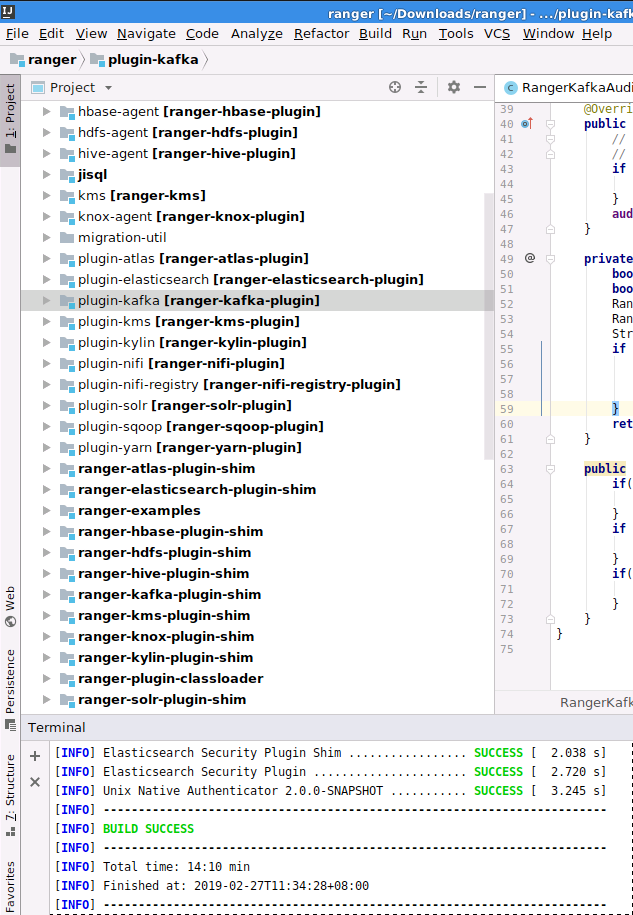
编译结果:(我这里是导入ubuntu系统中idea编译的,方便查看源码)
apache ranger源码编译的更多相关文章
- apache atlas源码编译打包 centos
参考:https://atlas.apache.org/InstallationSteps.html https://blog.csdn.net/lingbo229/article/details/8 ...
- Apache Spark源码走读之9 -- Spark源码编译
欢迎转载,转载请注明出处,徽沪一郎. 概要 本来源码编译没有什么可说的,对于java项目来说,只要会点maven或ant的简单命令,依葫芦画瓢,一下子就ok了.但到了Spark上面,事情似乎不这么简单 ...
- apache kafka & CDH kafka源码编译
Apache kafka编译 前言 github网站kafka项目的README.md有关于kafka源码编译的说明 github地址:https://github.com/apache/kafka ...
- 基于cdh5.10.x hadoop版本的apache源码编译安装spark
参考文档:http://spark.apache.org/docs/1.6.0/building-spark.html spark安装需要选择源码编译方式进行安装部署,cdh5.10.0提供默认的二进 ...
- Linux学习日记——源码编译Apache
[本文为笔者在学习Linux 下的软件安装时,尝试使用源码安装Apache 的过程,事后进行一个小小的总结,发现错误望指正.] 一.典型的源码编译安装软件的过程包括以下3步: 1) 运行 config ...
- apache源码编译安装
源码安装apche 下载apache的源码包文件 访问http://mirror.bit.edu.cn/apache/httpd/,复制如下gz文件的链接地址,并使用wget下载到本地 wget -P ...
- 源码编译路径错误导致的Apache 无法重启问题解决方法
问题现象: 第一次源码编译安装Apache设置路径错误,安装到/usr/local/src/ 目录下了. 删掉该目录下的安装文件,重新编译安装到/usr/local/目录下 重启apache服务时报这 ...
- Apache源码编译安装脚本
Apache是开源的的.最流行的Web服务器软件之一,它快速.可靠并且可通过简单的API扩充,将Perl/Python/PHP等解释器编译到服务器中.Apache的模块超多,以及具有运行稳定,强大 ...
- 源码编译apache报错的解决方法
源码编译apache报错的解决方法 问题介绍 在源码编译安装httpd时,./configure执行无错误,到make时就报错,在网络上搜索了很多文章,很多方法如换apr-util的低版本并不能很 ...
随机推荐
- Golang随机数生成
需求:10以内随机生成2个幸运数字 package main import ( "fmt" "math/rand" ) func main() { fmt.Pr ...
- NodePort,LoadBalancer还是Ingress?我该如何选择 - kubernetes
原文:http://mp.weixin.qq.com/s/dHaiX3H421jBhnzgCCsktg 当我们使用k8s集群部署好应用的Service时,默认的Service类型是ClusterIP, ...
- React 与 React-Native 使用同一个 meteor 后台
meteor 可以快速构建 pc,移动端,桌面端应用. 最大的优点是:数据库的数据发生变化时,可以实时推送到前端,非常适用于实时展示的应用开发. 在 react,react-native 应用中,可以 ...
- 混淆矩阵、准确率、精确率/查准率、召回率/查全率、F1值、ROC曲线的AUC值
准确率.精确率(查准率).召回率(查全率).F1值.ROC曲线的AUC值,都可以作为评价一个机器学习模型好坏的指标(evaluation metrics),而这些评价指标直接或间接都与混淆矩阵有关,前 ...
- ASP.NET Core中使用GraphQL - 第一章 Hello World
前言 你是否已经厌倦了REST风格的API? 让我们来聊一下GraphQL. GraphQL提供了一种声明式的方式从服务器拉取数据.你可以从GraphQL官网中了解到GraphQL的所有优点.在这一系 ...
- Python:os 模块常用方法简介
返回当前工作目录 os.getcwd() 返回 path 的绝对路径 os.path.abspath(path) os.path.abspath('.') 相当于 os.getcwd() 分割目录和文 ...
- 一个多阶段库存订货问题的 +Leapms 求解要点
一个多阶段库存订货问题的 +Leapms 求解要点 问题来自微信公众号“运筹分享交流”——“互助·运筹擂台3 多阶段库存订货问题”. 数学概念模型 求解结果 +Leapms>mip relexe ...
- 面试被问烂的 Spring IOC(求求你别再问了)
广义的 IOC IoC(Inversion of Control) 控制反转,即"不用打电话过来,我们会打给你". 两种实现: 依赖查找(DL)和依赖注入(DI). IOC 和 D ...
- DSAPI QQ用户相关
获取指定QQ号头像 Label1.Image=DSAPI.QQ用户相关.下载QQ头像("20353841") 获取指定QQ群头像 Label1.Image = DSAPI.QQ用户 ...
- 【网摘】C#中TransactionScope的使用方法和原理
时间 2013-08-12 19:59:34 51CTO推荐博文 原文 http://cnn237111.blog.51cto.com/2359144/1271600 在.net 1.1的时代,还 ...