
009.Working with SQL Server LocalDB --【在sql server localdb 上操作数据】
索引:
Working with SQL Server LocalDB
在sql server localdb 上操作数据
2017-3-7 2 分钟阅读时长
本文内容
SQL Server Express LocalDB sql server 的一个简化免费版本
初始化数据库的初始表数据
The MvcMovieContext object handles the task of connecting to the database and mapping Movie objects to database records.
MvcMovieContext 对象处理了链接数据库与映射Movie 对象到表记录的任务.
The database context is registered with the Dependency Injection container in the ConfigureServices method in the Startup.cs file:
DB上下文在Startup.cs 文件的ConfigureServices 方法中被注册到了DI容器中:
 public void ConfigureServices(IServiceCollection services)

 {

     // Add framework services.

     services.AddMvc();

     services.AddDbContext<MvcMovieContext>(options =>

             options.UseSqlServer(Configuration.GetConnectionString("MvcMovieContext")));

 }
C# code
The ASP.NET Core Configuration system reads the ConnectionString.
Asp.net core 的配置系统读取了ConnectionString 的配置的值。
For local development, it gets the connection string from the appsettings.json file:
对于本地开发,它从appsettings.json 文件获取链接字符串的值:
 "ConnectionStrings": {

   "MvcMovieContext": "Server=(localdb)\\mssqllocaldb;Database=MvcMovieContext-20613a4b-deb5-4145-b6cc-a5fd19afda13;Trusted_Connection=True;MultipleActiveResultSets=true"

 }
JSON Code
When you deploy the app to a test or production server, you can use an environment variable or another approach to set the connection string to a real SQL Server.
当你将应用部署到一个测试或生产服务器,你可以使用环境变量或其它的方法来设置一个真实的db链接字符串的值。
See Configuration for more information.
查看Configuration 获取更多信息。
SQL Server Express LocalDB
(一个简化的免费的轻量的sql server 版本)
LocalDB is a lightweight version of the SQL Server Express Database Engine that is targeted for program development.
LocalDB 是 SQL Server Express Database Engine 的一个轻量版本,目的是本地的程序开发。
LocalDB starts on demand and runs in user mode, so there is no complex configuration.
LocalDB 以用户模式直接开始查询即可,因此没有复杂的配置。
By default, LocalDB database creates "*.mdf" files in the C:/Users/<user> directory.
默认情况下,LocalDB 会在C:/Users/<user> 文件夹下创建"*.mdf" 数据库文件。
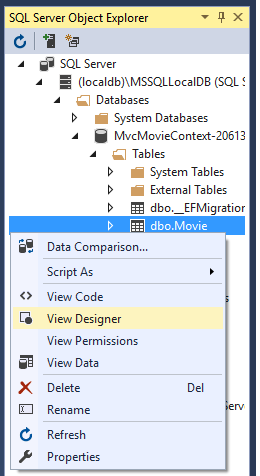
- From the View menu, open SQL Server Object Explorer (SSOX).
从 View 菜单,打开 SQL Server Object Explorer :

- Right click on the Movie table > View Designer
右击 Movie 表,点击 > View Designer 菜单
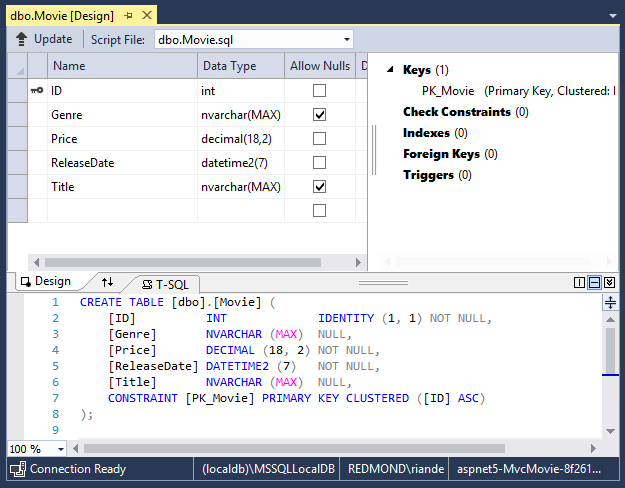
Note the key icon next to ID. By default, EF will make a property named ID the primary key.
注意PK图标在ID 字段旁边,EF默认会使用ID做为一个PK。
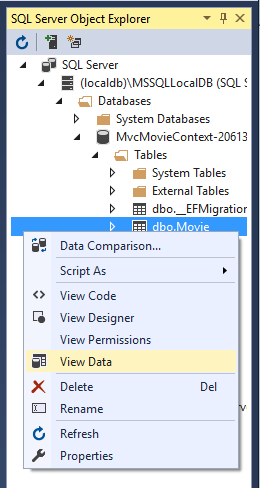
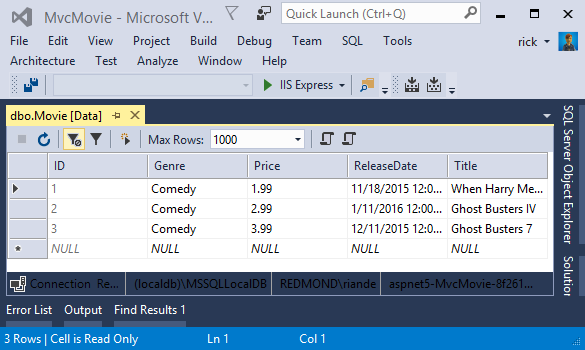
- Right click on the Movie table > View Data
右击 Movie 表,选择 > View Data 菜单
Seed the database
向数据库初始化值
Create a new class named SeedData in the Models folder. Replace the generated code with the following:
在 Models 文件夹下新建一个名为SeedData 类,用下面的代码替换掉自动生成的代码:
 using Microsoft.EntityFrameworkCore;

 using Microsoft.Extensions.DependencyInjection;

 using System;

 using System.Linq;

 namespace MvcMovie.Models

 {

     public static class SeedData

     {

         public static void Initialize(IServiceProvider serviceProvider)

         {

             using (var context = new MvcMovieContext(

                 serviceProvider.GetRequiredService<DbContextOptions<MvcMovieContext>>()))

             {

                 // Look for any movies.

                 if (context.Movie.Any())

                 {

                     return;   // DB has been seeded

                 }

                 context.Movie.AddRange(

                      new Movie

                      {

                          Title = "When Harry Met Sally",

                          ReleaseDate = DateTime.Parse("1989-1-11"),

                          Genre = "Romantic Comedy",

                          Price = 7.99M

                      },

                      new Movie

                      {

                          Title = "Ghostbusters ",

                          ReleaseDate = DateTime.Parse("1984-3-13"),

                          Genre = "Comedy",

                          Price = 8.99M

                      },

                      new Movie

                      {

                          Title = "Ghostbusters 2",

                          ReleaseDate = DateTime.Parse("1986-2-23"),

                          Genre = "Comedy",

                          Price = 9.99M

                      },

                    new Movie

                    {

                        Title = "Rio Bravo",

                        ReleaseDate = DateTime.Parse("1959-4-15"),

                        Genre = "Western",

                        Price = 3.99M

                    }

                 );

                 context.SaveChanges();

             }

         }

     }

 }
C# Code
If there are any movies in the DB, the seed initializer returns and no movies are added.
如果数据库中有数据记录,就会直接返回,如果没有就会添加这些初始数据。
 if (context.Movie.Any())

 {

     return;   // DB has been seeded.

 }
C# Code
Add the seed initializer to the end of the Configure method in the Startup.cs file:
把数据初始化类添加到Startup.cs 文件的Configure 方法的最后一行:
             app.UseStaticFiles();

             app.UseMvc(routes =>

             {

                 routes.MapRoute(

                     name: "default",

                     template: "{controller=Home}/{action=Index}/{id?}");

             });

             SeedData.Initialize(app.ApplicationServices);

         }

     }

 }
C# Code
Test the app
测试应用
- Delete all the records in the DB. You can do this with the delete links in the browser or from SSOX.
要删除db中的所有数据记录,你可以在 SSOX 中点击删除链接即可。
- Force the app to initialize (call the methods in the Startup class) so the seed method runs.
强制应用初始化,在 Startup 类中seed 方法会被执行。
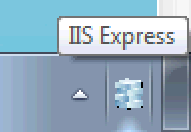
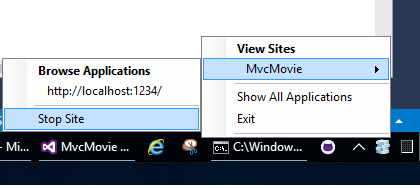
To force initialization, IIS Express must be stopped and restarted. You can do this with any of the following approaches:
为了强制初始化,iis express 必须重启一下。你可以使用以下方法的任一种来做到:
- Right click the IIS Express system tray icon in the notification area and tap Exit or Stop Site
右击系统托盘上通知区域的iis图标,并点击 Exit or Stop Site 。
- If you were running VS in non-debug mode, press F5 to run in debug mode
如果你运行vs在非调试模式,按F5运行进入调试模式
- If you were running VS in debug mode, stop the debugger and press F5
如果你运行vs在调试模式,停止调试并按下F5
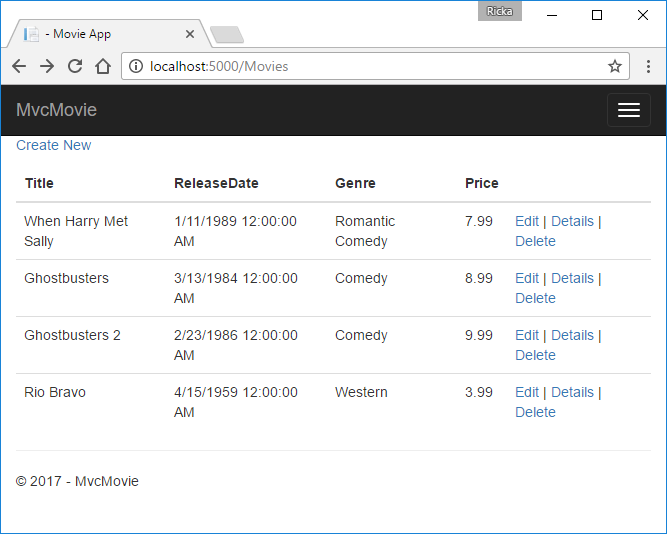
The app shows the seeded data.
应用显示出初始化后的数据:
蒙
2017-08-14 15:22 周一
009.Working with SQL Server LocalDB --【在sql server localdb 上操作数据】的更多相关文章
- Comparison of SQL Server Compact, SQLite, SQL Server Express and LocalDB
Information about LocalDB comes from here and SQL Server 2014 Books Online. LocalDB is the full SQL ...
- Azure SQL Database (20) 使用SQL Server 2016 Upgrade Advisor
<Windows Azure Platform 系列文章目录> Azure SQL Database (19) Stretch Database 概览 Azure SQL Da ...
- SQL SERVER如何通过SQL语句获服务器硬件和系统信息
在SQL SERVER中如何通过SQL语句获取服务器硬件和系统信息呢?下面介绍一下如何通过SQL语句获取处理器(CPU).内存(Memory).磁盘(Disk)以及操作系统相关信息.如有不足和遗漏,敬 ...
- 使用sql语句创建修改SQL Server标识列(即自动增长列)
一.标识列的定义以及特点SQL Server中的标识列又称标识符列,习惯上又叫自增列.该种列具有以下三种特点:1.列的数据类型为不带小数的数值类型2.在进行插入(Insert)操作时,该列的值是由系统 ...
- SQL Server如何在变长列上存储索引
这篇文章我想谈下SQL Server如何在变长列上存储索引.首先我们创建一个包含变长列的表,在上面定义主键,即在上面定义了聚集索引,然后往里面插入80000条记录: -- Create a new t ...
- MS SQL Server2014链接MS SQL Server 2000
开发与企业应用中,好几个版本SQL Server相互链接.分布式读取与存储,需要实现sp_addlinkedserver.SQL Server 2000, SQL Server 2008, SQL S ...
- SQL Server:查看SQL日志文件大小命令:dbcc sqlperf(logspace)
SQL Server:查看SQL日志文件大小命令:dbcc sqlperf(logspace) DBA 日常管理工作中,很重要一项工作就是监视数据库文件大小,及日志文件大小.如果你管理数据库的有很 ...
- SQL Server 2012:SQL Server体系结构——一个查询的生命周期(第1部分)
为了缩小读取操作所涉及范围,本文首先着眼于简单的SELECT查询,然后引入执行更新操作有关的附加过程.最后你会读到,优化性能时SQLServer使用还原工具的相关术语和流程. 关系和存储引擎 如图所示 ...
- SQL Server 2012:SQL Server体系结构——一个查询的生命周期(第2部分)
计划缓存(Plan Cache) 如果SQL Server已经找到一个好的方式去执行一段代码时,应该把它作为随后的请求重用,因为生成执行计划是耗费时间且资源密集的,这样做是有有意义的. 如果没找到被缓 ...
随机推荐
- 基于哈夫曼编码的文件压缩(c++版)
本博客由Rcchio原创 我了解到很多压缩文件的程序是基于哈夫曼编码来实现的,所以产生了自己用哈夫曼编码写一个压缩软件的想法,经过查阅资料和自己的思考,我用c++语言写出了该程序,并通过这篇文章来记录 ...
- 在类的成员函数中调用delete this
最近面试的时候被问到一个问题是,在C++中,能否在类的成员函数中调用delete this,后来网上查了一下资料,关于这个问题说得比较好的有http://blog.sina.com.cn/s/blog ...
- 告知服务器意图的http方法
1.GET 用来获取资源,返回已有的结果 2.POST 传输实体主体,返回处理过后的结果 3.PUT 向服务器传输文件,返回是否成功的状态码 4.DELETE 删除服务器文件,返回是否成功的状态码 5 ...
- Web SCADA 电力接线图工控组态编辑器
前言 SVG并非仅仅是一种图像格式, 由于它是一种基于XML的语言,也就意味着它继承了XML的跨平台性和可扩展性,从而在图形可重用性上迈出了一大步.如SVG可以内嵌于其他的XML文档中,而SVG文档中 ...
- JavaScript初探之字符串与数组
一直在研究JS以至于忘记跟新博客... 字符串:// str.charAt(x); //获取下标为x的字符// str.indexOf(",",1); //获取",&qu ...
- [LeetCode] Output Contest Matches 输出比赛匹配对
During the NBA playoffs, we always arrange the rather strong team to play with the rather weak team, ...
- VINS 估计器之结构初始化
为什么要初始化 非线性VINS估计器的性能对于初始的速度,尺度,重力向量,空间点3D位置,以及外参等非常敏感.在很多场合中,能做到相机和IMU即插即用,线上自动校准与初始化,将会给用户带来极大的方便性 ...
- Log4j1.2配置详解
Log4j是Apache的一个开源项目,通过使用Log4j,我们可以控制日志的输出到控制台,或者文件等等. 同时,在各大框架中也主要是使用log4j来进行日志的输出. 下面是log4j1.x版本的详细 ...
- .Net Core小技巧 - 使用Swagger上传文件
前言 随着前后端分离开发模式的普及,后端人员更多是编写服务端API接口.调用接口实现文件上传是一个常见的功能,同时也需要一个选择文件上传的界面,可以编写前端界面上传,可以使用Postman.curl来 ...
- [NOIp 2017]列队
Description Sylvia 是一个热爱学习的女孩子. 前段时间,Sylvia 参加了学校的军训.众所周知,军训的时候需要站方阵. Sylvia 所在的方阵中有$n \times m$名学生, ...