
携程Apollo一键编译脚本+部署实现
系统编译安装
- ubuntu16.11
- java 1.8
系统规划
- Portal共用
- 其它环境每个两台机器
- mysql都做主从,所以每个环境的机器上都会安装admin 服务,config服务,以及一个mysql服务
| env | ip | usage |
|---|---|---|
| all | 192.168.1.1 | portal |
| dev | 192.168.2.1 | admin+config+configdb |
| dev | 192.168.2.2 | admin+config+configdb |
| test | 192.168.3.1 | admin+config+configdb |
| test | 192.168.3.2 | admin+config+configdb |
| pre | 192.168.4.1 | admin+config+configdb |
| pre | 192.168.4.2 | admin+config+configdb |
| pro | 192.168.5.1 | admin+config+configdb |
| pro | 192.168.5.2 | admin+config+configdb |
#!/bin/bash

## 先安装jdk1.8以上到/usr/local/java 并设置系统环境变量

java -version

base_home="/home/test/Desktop"

############################################################################

dev_meta="http://192.168.2.1:8080,http://192.168.2.2:8080"

fat_meta="http://192.168.3.1:8080,http://192.168.3.2:8080"

uat_meta="http://192.168.4.1:8080,http://192.168.4.2:8080"

pro_meta="http://192.168.5.1:8080,http://192.168.5.2:8080"

########### portal 数据库 ,共用一个

# apollo portal db info

apollo_portal_db_url=jdbc:mysql://192.168.1.1:3306/ApolloPortalDB?characterEncoding=utf8

apollo_portal_db_password=portal_root_db_password

############ 四个环境的配置数据库

# apollo dev config db info

dev_apollo_config_db_url=jdbc:mysql://192.168.2.1:3306/ApolloConfigDB?characterEncoding=utf8

dev_apollo_config_db_password=dev_config_root_db_password

# apollo fat config db info

fat_apollo_config_db_url=jdbc:mysql://192.168.3.1:3306/ApolloConfigDB?characterEncoding=utf8

fat_apollo_config_db_password=fat_config_root_db_password

# apollo uat config db info

uat_apollo_config_db_url=jdbc:mysql://192.168.4.1:3306/ApolloConfigDB?characterEncoding=utf8

uat_apollo_config_db_password=uat_config_root_db_password

# apollo pro config db info

pro_apollo_config_db_url=jdbc:mysql://192.168.5.1:3306/ApolloConfigDB?characterEncoding=utf8

pro_apollo_config_db_password=pro_config_root_db_password

########################## 以下勿更改

build_sh() {

    cd "$base_home/apollo"

    cp -pr apollo apollo_$1

    cd apollo_$1/scripts

    # apollo config db info

    apollo_config_db_url=$2

    apollo_config_db_username=root

    apollo_config_db_password=$3

    # apollo portal db info

    apollo_portal_db_url=$4

    apollo_portal_db_username=root

    apollo_portal_db_password=$5

    # meta server url, different environments should have different meta server addresses

    dev_meta=$6

    fat_meta=$7

    uat_meta=$8

    pro_meta=$9

    META_SERVERS_OPTS="-Ddev_meta=$dev_meta -Dfat_meta=$fat_meta -Duat_meta=$uat_meta -Dpro_meta=$pro_meta"

    # =============== Please do not modify the following content =============== #

    # go to script directory

    cd "${0%/*}"

    cd ..

    # package config-service and admin-service

    echo "==== starting to build config-service and admin-service ===="

    mvn clean package -DskipTests -pl apollo-configservice,apollo-adminservice -am -Dapollo_profile=github -Dspring_datasource_url=$apollo_config_db_url -Dspring_datasource_username=$apollo_config_db_username -Dspring_datasource_password=$apollo_config_db_password

    echo "==== building config-service and admin-service finished ===="

    echo "==== starting to build portal ===="

    mvn clean package -DskipTests -pl apollo-portal -am -Dapollo_profile=github,auth -Dspring_datasource_url=$apollo_portal_db_url -Dspring_datasource_username=$apollo_portal_db_username -Dspring_datasource_password=$apollo_portal_db_password $META_SERVERS_OPTS

    echo "==== building portal finished ===="

    echo "==== starting to build client ===="

    mvn clean install -DskipTests -pl apollo-client -am $META_SERVERS_OPTS

    echo "==== building client finished ===="

}

####################初始化环境,下载apollo

sudo apt-get install -y maven git

sudo sed -i '/<mirrors>/a\<mirror> <id>nexus-aliyun</id> <mirrorOf>central</mirrorOf> <name>Nexus aliyun</name><url>http://maven.aliyun.com/nexus/content/groups/public/</url></mirror>' /etc/maven/settings.xml

mkdir -p apollo

cd apollo

git clone https://github.com/ctripcorp/apollo.git

source /etc/profile

sudo mv /usr/bin/java /usr/bin/java_bak

sudo ln -s /usr/local/java/bin/java /usr/bin/

###########################################

##### dev

build_sh "dev" "$dev_apollo_config_db_url" \

    "$dev_apollo_config_db_password" \

    "$apollo_portal_db_url" \

    "$apollo_portal_db_password" \

    "$dev_meta" "$fat_meta" "$uat_meta" "$pro_meta"

build_sh "fat" "$fat_apollo_config_db_url" \

    "$fat_apollo_config_db_password" \

    "$apollo_portal_db_url" \

    "$apollo_portal_db_password" \

    "$dev_meta" "$fat_meta" "$uat_meta" "$pro_meta"

build_sh "uat" "$uat_apollo_config_db_url" \

    "$uat_apollo_config_db_password" \

    "$apollo_portal_db_url" \

    "$apollo_portal_db_password" \

    "$dev_meta" "$fat_meta" "$uat_meta" "$pro_meta"

build_sh "pro" "$pro_apollo_config_db_url" \

    "$pro_apollo_config_db_password" \

    "$apollo_portal_db_url" \

    "$apollo_portal_db_password" \

    "$dev_meta" "$fat_meta" "$uat_meta" "$pro_meta"

######################### 添加本地jar包到本地mvn

dev_home="$base_home/apollo/apollo_dev"

apollo_version=`ls $dev_home/apollo-client/target/apollo-client-*.jar |grep -v sources |sed 's/.jar//g' |sed "s#.*apollo-client-##g"`

mvn install:install-file -DgroupId=com.ctrip.framework.apollo -DartifactId=apollo-client -Dversion=$apollo_version -Dpackaging=jar -Dfile=$dev_home/apollo-client/target/apollo-client-$apollo_version.jar

mvn install:install-file -DgroupId=com.ctrip.framework.apollo -DartifactId=apollo-core -Dversion=$apollo_version -Dpackaging=jar -Dfile=$dev_home/apollo-core/target/apollo-core-$apollo_version.jar

mvn install:install-file -DgroupId=com.ctrip.framework.apollo -DartifactId=apollo-buildtools -Dversion=$apollo_version -Dpackaging=jar -Dfile=$dev_home/apollo-buildtools/target/apollo-buildtools-$apollo_version.jar

mvn install:install-file -DgroupId=com.ctrip.framework.apollo -DartifactId=apollo-common -Dversion=$apollo_version -Dpackaging=jar -Dfile=$dev_home/apollo-common/target/apollo-common-$apollo_version.jar

#mkdir -p /opt/setting

#echo 'env=DEV' > /opt/setting/server.properties
安装Portal
Portal是共用的,代码都一样,所以这里从dev环境拿个编译包就可以
- portal服务器的mysql上面执行该SQL : apollo/apollo_dev/scripts/sql/apolloportaldb.sql
- 修改数据表ApolloPortalDB.ServerConfig配置如下,修改 apollo.portal.envs : dev,fat,uat,pro
- 上传 apollo/apollo_dev/apollo-portal/target/apollo-portal-0.11.0-SNAPSHOT-github.zip 到 portal服务器(192.168.1.1)/data/apollo_portal
- unzip apollo-portal-0.11.0-SNAPSHOT-github.zip
- 启动portal ./scripts/startup.sh
- 访问portal管理后台 http://192.168.1.1:8080/ . 默认管理员 : apollo / admin
安装config服务
···这里以DEV环境设置为例···
- dev环境的两个mysql做好主从,执行 apollo/apollo_dev/scripts/sql/apolloconfigdb.sql 的sql文件创建库表
- 修改apolloconfigdb库中的ServerConfig
- 修改 eureka.service.url : http://192.168.2.1:8080/eureka/,http://192.168.2.1:8080/eureka/
- 这里根据环境不同修改,这里配置的是dev环境的IP
- 上传apollo/apollo_dev/apollo-configservice/target/apollo-configservice-0.11.0-SNAPSHOT-github.zip 到 dev两个机器的/data/apollo_config 目录里面
- unzip apollo-configservice-0.11.0-SNAPSHOT-github.zip
- 启动: ./scripts/startup.sh
安装admin服务
- 上传apollo/apollo_dev/apollo-adminservice/target/apollo-adminservice-0.11.0-SNAPSHOT-github.zip 到dev两个服务器的/data/apollo_admin 目录里面
- unzip apollo-adminservice-0.11.0-SNAPSHOT-github.zip
- 启动 scripts/startup.sh
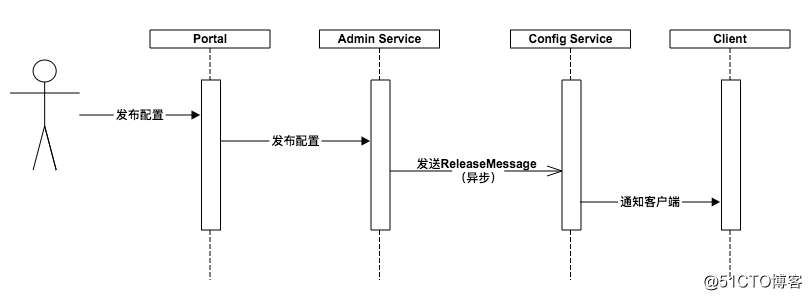
- 如果能看懂这个图,Apollo的基本架构也就理解了。下一篇就开始来讲讲Apollo的一些组件,或是服务
携程Apollo一键编译脚本+部署实现的更多相关文章
- 携程apollo系列-个人开发环境搭建
本博客讲详细讲解如何在 Windows 搭建携程 Apollo 服务器 (用户个人开发). 开发服务器有多种搭建方式:(1) docker, 搭建过程非常简单, 推荐有 docker 环境(2) 部署 ...
- 携程apollo系列-客户端集成
本文讲解如何在 Java 程序中集成 Apollo 配置, 主要涉及到一些基础用法. 对于一些高级用法, 比如如何加密/解密配置项 (可用于数据库密码配置), 如何动态切换数据源地址,如何动态切换日志 ...
- 分布式配置中心 携程(apollo)
1.传统配置文件与分布式配置文件区别 传统配置文件:如果修改了配置文件,需要重新打包发布,重新发布服务,而且每个环境的变更配置文件,比较繁琐. 分布式配置文件:将配置文件注册到配置中心上去,可以使用分 ...
- Spring Boot 2.0 整合携程Apollo配置中心
原文:https://www.jianshu.com/p/23d695af7e80 Apollo(阿波罗)是携程框架部门研发的分布式配置中心,能够集中化管理应用不同环境.不同集群的配置,配置修改后能够 ...
- 携程Apollo统一配置中心的搭建和使用
原文链接:https://blog.csdn.net/luhong327/article/details/81453001 一.Apollo配置中心介绍 1.What is Apollo 1.1 Ap ...
- CentOS 7 搭建基于携程Apollo(阿波罗)配置中心单机模式
Apollo(阿波罗)是携程框架部门研发的配置管理平台,能够集中化管理应用不同环境.不同集群的配置,配置修改后能够实时推送到应用端,并且具备规范的权限.流程治理等特性.服务端基于Spring Boot ...
- 携程Apollo配置中心架构深度剖析
转自:http://www.uml.org.cn/wfw/201808153.asp 一.介绍 Apollo(阿波罗)[参考附录]是携程框架部研发并开源的一款生产级的配置中心产品,它能够集中管理应用在 ...
- SpringBoot 整合携程Apollo配置管理中心
携程官网对apollo的使用讲解了很多种方式的使用,但是感觉一些细节还是没讲全,特别是eureka配置中心地址的配置 这里对springboot整合apollo说一下 >SpringBoot启动 ...
- .Net Core 商城微服务项目系列(十四):分布式部署携程Apollo构建配置中心
一.开场白 在系统设计里我们有很多配置希望独立于系统之外,而又能够被系统实时读取.但是在传统的系统设计里,配置信息通常是耦合在系统内的,比如.net里通常会放在App.config或者web.conf ...
随机推荐
- 基于docker 如何部署surging分布式微服务引擎
1.前言 转眼间surging 开源已经有1年了,经过1年的打磨,surging已从最初在window 部署的分布式微服务框架,到现在的可以在docker部署利用rancher 进行服务编排的分布式微 ...
- 如何将markdown转换为wxml
话说我要为技术博客写一个小程序版,我的博客解决方案是 hexo + github-page,格式当然是技术控们喜欢的 markdown 了 .但小程序使用的却是独有的模版语言 WXML.我总不能把之前 ...
- 从壹开始微服务 [ DDD ] 之十二 ║ 核心篇【下】:事件驱动EDA 详解
缘起 哈喽大家好,又是周二了,时间很快,我的第二个系列DDD领域驱动设计讲解已经接近尾声了,除了今天的时间驱动EDA(也有可能是两篇),然后就是下一篇的事件回溯,就剩下最后的权限验证了,然后就完结了, ...
- 有道云笔记MarkDown 插入图片
前言: 在网上找了很多有道云笔记的markdown笔记如何插入本地图片,试了好几种方式都是一时可以显示而已,只要电脑重启或者换终端查看就无法显示图片了.网上常用的方法无非两种有效:github.博客. ...
- Python猫荐书系列之五:Python高性能编程
稍微关心编程语言的使用趋势的人都知道,最近几年,国内最火的两种语言非 Python 与 Go 莫属,于是,隔三差五就会有人问:这两种语言谁更厉害/好找工作/高工资…… 对于编程语言的争论,就是猿界的生 ...
- 学习JVM是如何从入门到放弃的?
前言 只有光头才能变强 JVM在准备面试的时候就有看了,一直没时间写笔记.现在到了一家公司实习,闲的时候就写写,刷刷JVM博客,刷刷电子书. 学习JVM的目的也很简单: 能够知道JVM是什么,为我们干 ...
- WAF开放规则定义权:专家策略+用户自定义策略=Web安全
在第一期“漫说安全”栏目中,我们用四格漫画的形式介绍了基于深度学习的阿里云WAF到底智能在哪里,能帮客户解决什么问题. 在今天的这期栏目里,我们依然通过漫画这种通俗易懂的方式,与大家分享阿里云WAF的 ...
- 欢迎使用IdentityModel文档!- IdentityModel 中文文档(v1.0.0)
IdentityModel是基于声明的身份,OAuth 2.0和OpenID Connect的.NET标准帮助程序库. 它具有以下高级功能: 标准OAuth 2.0和OpenID Connect端点的 ...
- 关于Vue.use()使用详解
问题 相信很多人在用Vue使用别人的组件时,会用到 Vue.use() .例如:Vue.use(VueRouter).Vue.use(MintUI).但是用 axios时,就不需要用 Vue.use( ...
- openlayers4 入门开发系列之地图属性查询篇(附源码下载)
前言 openlayers4 官网的 api 文档介绍地址 openlayers4 api,里面详细的介绍 openlayers4 各个类的介绍,还有就是在线例子:openlayers4 官网在线例子 ...