
org.springframework.web.HttpMediaTypeNotSupportedException: Content type 'application/json;charset=UTF-8' not supported
最后找到我的问题,springmvc配置文件中没加 <mvc:annotation-driven/>
java代码:
@RequestMapping(value="/requestJsonResposeJson",method=RequestMethod.POST,produces={"application/json;charset=UTF-8"})
public @ResponseBody TestSupervisorCustomer requestJsonResposeJson(@RequestBody TestJson testJson) throws Exception
restclient测试的:
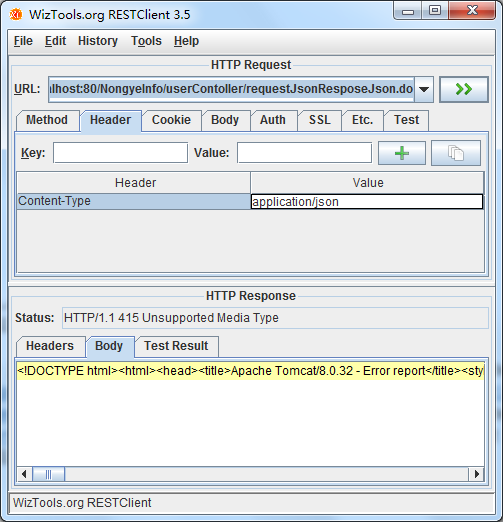
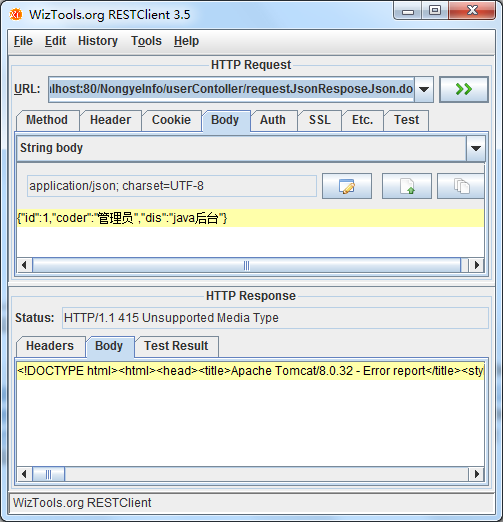
错误信息:
org.springframework.web.servlet.DispatcherServlet]DispatcherServlet with name 'springMvc' processing POST request for [/NongyeInfo/userContoller/requestJsonResposeJson.do]
[org.springframework.web.servlet.mvc.annotation.DefaultAnnotationHandlerMapping]Matching patterns for request [/userContoller/requestJsonResposeJson.do] are [/userContoller/requestJsonResposeJson.*]
[org.springframework.web.servlet.mvc.annotation.DefaultAnnotationHandlerMapping]URI Template variables for request [/userContoller/requestJsonResposeJson.do] are {}
[org.springframework.web.servlet.mvc.annotation.DefaultAnnotationHandlerMapping]Mapping [/userContoller/requestJsonResposeJson.do] to HandlerExecutionChain with handler [slc.controller.UserContoller@3c655b15] and 1 interceptor
[org.springframework.web.servlet.mvc.annotation.AnnotationMethodHandlerExceptionResolver]Resolving exception from handler [slc.controller.UserContoller@3c655b15]: org.springframework.web.HttpMediaTypeNotSupportedException: Content type 'application/json;charset=UTF-8' not supported
[org.springframework.web.servlet.mvc.annotation.ResponseStatusExceptionResolver]Resolving exception from handler [slc.controller.UserContoller@3c655b15]: org.springframework.web.HttpMediaTypeNotSupportedException: Content type 'application/json;charset=UTF-8' not supported
[org.springframework.web.servlet.mvc.support.DefaultHandlerExceptionResolver]Resolving exception from handler [slc.controller.UserContoller@3c655b15]: org.springframework.web.HttpMediaTypeNotSupportedException: Content type 'application/json;charset=UTF-8' not supported
[org.springframework.web.servlet.DispatcherServlet]Null ModelAndView returned to DispatcherServlet with name 'springMvc': assuming HandlerAdapter completed request handling
[org.springframework.web.servlet.DispatcherServlet]Successfully completed request
[org.springframework.beans.factory.support.DefaultListableBeanFactory]Returning cached instance of singleton bean 'sqlSessionFactory'
org.springframework.web.HttpMediaTypeNotSupportedException: Content type 'application/json;charset=UTF-8' not supported的更多相关文章
- org.springframework.web.HttpMediaTypeNotSupportedException: Content type 'application/json;charset=UTF-8' not supported或其他Content type不支持处理
很久没从头到尾搭框架,今天搭的过程中,springmvc controller方法入参用@RequestBody自动绑定参数时一直提示各种 not supported 排查问题有两个解决路径: 1)使 ...
- ajax使用向Spring MVC发送JSON数据出现 org.springframework.web.HttpMediaTypeNotSupportedException: Content type 'application/x-www-form-urlencoded;charset=UTF-8' not supported错误
ajax使用向Spring MVC发送JSON数据时,后端Controller在接受JSON数据时报org.springframework.web.HttpMediaTypeNotSupportedE ...
- Content type 'application/json;charset=UTF-8' not supported异常的解决过程
首先说一下当时的场景,其实就是一个很简单的添加操作,后台传递的值是json格式的,如下图 ,后台对应的实体类, @Data @EqualsAndHashCode(callSuper = false) ...
- org.springframework.web.HttpMediaTypeNotSupportedException: Content type 'multipart/form-data;boundary=----WebKitFormBoundaryRAYPKeHKTYSNdzc1;charset=UTF-8' not supported
原文:https://www.cnblogs.com/yueli/p/7552888.html 最近同事在做一个图片上传功能.在入参 body 中同时传入文件和其它基本信息结果出现如题异常.在此记录下 ...
- SpringMVC在使用JSON时报错信息为:Content type 'application/json;charset=UTF-8' not supported
直接原因是:我的(maven)项目parent父工程pom.xml缺少必要的三个jar包依赖坐标. 解决方法是:在web子模块的pom.xml里面添加springMVC使用JSON实现AJAX请求. ...
- jmeter报"msg":"Content type 'application/x-www-form-urlencoded;charset=UTF-8' not supported"的解决方法
1.报"msg":"Content type 'application/x-www-form-urlencoded;charset=UTF-8' not supporte ...
- Jmeter发送post请求报错Content type 'application/x-www-form-urlencoded;charset=UTF-8' not supported
常识普及: Content-type,在Request Headers里面,告诉服务器,我们发送的请求信息格式,在JMeter中,信息头存储在信息头管理器中,所以在做接口测试的时候,我们维护Conte ...
- Content type 'application/x-www-form-urlencoded;charset=UTF-8' not supported
Content type 'application/x-www-form-urlencoded;charset=UTF-8' not supported告诉你,你的请求头是application/x- ...
- 接入WxPusher微信推送服务出现错误:Content type 'application/x-www-form-urlencoded;charset=UTF-8' not supported
背景 使用WxPusher微信推送服务 ,可以及时的将服务的一些运行异常信息,发送到自己的微信上,方便了解服务的运行状态(PS:这个服务是免费的). 你可以在这里看到WxPusher微信推送服务的接入 ...
随机推荐
- (十二)Bind读取配置到C#实例
继续上一节的,接下来用Options或者Bind把json文件里的配置转成C#的实体,相互之间映射起来.首先新建一个asp.net core mvc项目OptionsBindSample Startu ...
- python基础篇(文件操作)
Python基础篇(文件操作) 一.初始文件操作 使用python来读写文件是非常简单的操作. 我们使用open()函数来打开一个文件, 获取到文件句柄. 然后通过文件句柄就可以进行各种各样的操作了. ...
- 【记录】jquery动态控制div隐藏或者显示
1.jQuery判断一个元素当前状态是显示还是隐藏 $("#id").is(':visible'); //true为显示,false为隐藏 $("#id").i ...
- 2018-8-10-win10-uwp-横向-AppBarButton
title author date CreateTime categories win10 uwp 横向 AppBarButton lindexi 2018-08-10 19:16:50 +0800 ...
- 一、Redis的安装
1.下载.解压.编译.安装 # 下载地址 wget http://download.redis.io/redis-stable.tar.gz # 解压 tar xzf redis-stable.tar ...
- Android功耗评测系列之——软件评测方案原理
软件评测方案也有很多种,但核心原理都是同一个. 软件评测方案中,所有Android功耗的统计都是通过代码进行估算,没有任何实体电路和硬件设备参与统计汇报. 这个配置文件存储在Android ...
- H5 移动调试全攻略
H5 移动调试全攻略 随着移动设备的高速发展,H5 开发也成为了 F2E 不可或缺的能力.而移动开发的重中之重就是掌握调试技巧,定 Bug于无形. 一.概要 因为移动端操作系统分为 iOS 和 And ...
- OAuth_3
端点: 授权断点.令牌断点.重定向端点 除了重定向端点在客户端应用上,其他在服务器端 授权端点: 资源拥有者所登录的授权服务器,并授权给客户端应用的端点 令牌端点: 授权服务器上为了一个访问令牌,客户 ...
- Magolor的数据结构作业
\(CodeForces 706E ~Working routine\) 给出一个矩阵,每次操作交换两个子矩阵,求最后状态. 使用链表存储,每次交换后,影响到的之后矩阵边缘的指针,暴力修改. \(~~ ...
- ganglia监控部署
1.ganglia组件 ganglia 相比于falcon和zabbix主要在于集群的状态集中显示,可以很便捷的对比各主机的性能状态. gmond:相当于是agent端,主要用于收集各node的性能状 ...