
org.springframework.web.HttpMediaTypeNotSupportedException: Content type 'application/json;charset=UTF-8' not supported
最后找到我的问题,springmvc配置文件中没加 <mvc:annotation-driven/>
java代码:
@RequestMapping(value="/requestJsonResposeJson",method=RequestMethod.POST,produces={"application/json;charset=UTF-8"})
public @ResponseBody TestSupervisorCustomer requestJsonResposeJson(@RequestBody TestJson testJson) throws Exception
restclient测试的:
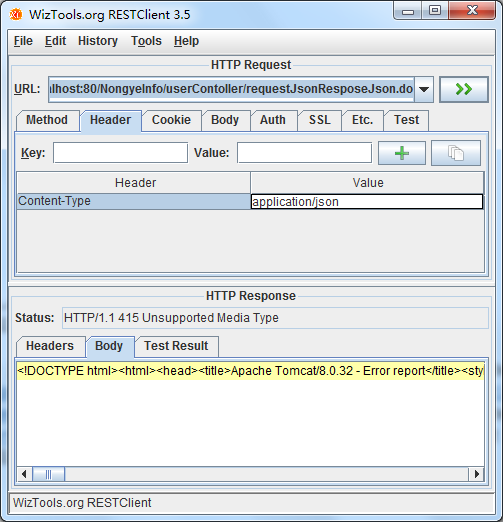
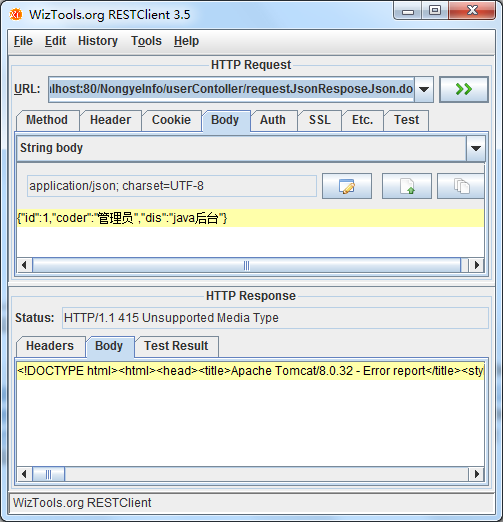
错误信息:
org.springframework.web.servlet.DispatcherServlet]DispatcherServlet with name 'springMvc' processing POST request for [/NongyeInfo/userContoller/requestJsonResposeJson.do]
[org.springframework.web.servlet.mvc.annotation.DefaultAnnotationHandlerMapping]Matching patterns for request [/userContoller/requestJsonResposeJson.do] are [/userContoller/requestJsonResposeJson.*]
[org.springframework.web.servlet.mvc.annotation.DefaultAnnotationHandlerMapping]URI Template variables for request [/userContoller/requestJsonResposeJson.do] are {}
[org.springframework.web.servlet.mvc.annotation.DefaultAnnotationHandlerMapping]Mapping [/userContoller/requestJsonResposeJson.do] to HandlerExecutionChain with handler [slc.controller.UserContoller@3c655b15] and 1 interceptor
[org.springframework.web.servlet.mvc.annotation.AnnotationMethodHandlerExceptionResolver]Resolving exception from handler [slc.controller.UserContoller@3c655b15]: org.springframework.web.HttpMediaTypeNotSupportedException: Content type 'application/json;charset=UTF-8' not supported
[org.springframework.web.servlet.mvc.annotation.ResponseStatusExceptionResolver]Resolving exception from handler [slc.controller.UserContoller@3c655b15]: org.springframework.web.HttpMediaTypeNotSupportedException: Content type 'application/json;charset=UTF-8' not supported
[org.springframework.web.servlet.mvc.support.DefaultHandlerExceptionResolver]Resolving exception from handler [slc.controller.UserContoller@3c655b15]: org.springframework.web.HttpMediaTypeNotSupportedException: Content type 'application/json;charset=UTF-8' not supported
[org.springframework.web.servlet.DispatcherServlet]Null ModelAndView returned to DispatcherServlet with name 'springMvc': assuming HandlerAdapter completed request handling
[org.springframework.web.servlet.DispatcherServlet]Successfully completed request
[org.springframework.beans.factory.support.DefaultListableBeanFactory]Returning cached instance of singleton bean 'sqlSessionFactory'
org.springframework.web.HttpMediaTypeNotSupportedException: Content type 'application/json;charset=UTF-8' not supported的更多相关文章
- org.springframework.web.HttpMediaTypeNotSupportedException: Content type 'application/json;charset=UTF-8' not supported或其他Content type不支持处理
很久没从头到尾搭框架,今天搭的过程中,springmvc controller方法入参用@RequestBody自动绑定参数时一直提示各种 not supported 排查问题有两个解决路径: 1)使 ...
- ajax使用向Spring MVC发送JSON数据出现 org.springframework.web.HttpMediaTypeNotSupportedException: Content type 'application/x-www-form-urlencoded;charset=UTF-8' not supported错误
ajax使用向Spring MVC发送JSON数据时,后端Controller在接受JSON数据时报org.springframework.web.HttpMediaTypeNotSupportedE ...
- Content type 'application/json;charset=UTF-8' not supported异常的解决过程
首先说一下当时的场景,其实就是一个很简单的添加操作,后台传递的值是json格式的,如下图 ,后台对应的实体类, @Data @EqualsAndHashCode(callSuper = false) ...
- org.springframework.web.HttpMediaTypeNotSupportedException: Content type 'multipart/form-data;boundary=----WebKitFormBoundaryRAYPKeHKTYSNdzc1;charset=UTF-8' not supported
原文:https://www.cnblogs.com/yueli/p/7552888.html 最近同事在做一个图片上传功能.在入参 body 中同时传入文件和其它基本信息结果出现如题异常.在此记录下 ...
- SpringMVC在使用JSON时报错信息为:Content type 'application/json;charset=UTF-8' not supported
直接原因是:我的(maven)项目parent父工程pom.xml缺少必要的三个jar包依赖坐标. 解决方法是:在web子模块的pom.xml里面添加springMVC使用JSON实现AJAX请求. ...
- jmeter报"msg":"Content type 'application/x-www-form-urlencoded;charset=UTF-8' not supported"的解决方法
1.报"msg":"Content type 'application/x-www-form-urlencoded;charset=UTF-8' not supporte ...
- Jmeter发送post请求报错Content type 'application/x-www-form-urlencoded;charset=UTF-8' not supported
常识普及: Content-type,在Request Headers里面,告诉服务器,我们发送的请求信息格式,在JMeter中,信息头存储在信息头管理器中,所以在做接口测试的时候,我们维护Conte ...
- Content type 'application/x-www-form-urlencoded;charset=UTF-8' not supported
Content type 'application/x-www-form-urlencoded;charset=UTF-8' not supported告诉你,你的请求头是application/x- ...
- 接入WxPusher微信推送服务出现错误:Content type 'application/x-www-form-urlencoded;charset=UTF-8' not supported
背景 使用WxPusher微信推送服务 ,可以及时的将服务的一些运行异常信息,发送到自己的微信上,方便了解服务的运行状态(PS:这个服务是免费的). 你可以在这里看到WxPusher微信推送服务的接入 ...
随机推荐
- C#的扩展方法学习
一,什么是扩展方法? 1,扩展方法使你能够向现有类型“添加”方法,而无需创建新的派生类型.重新编译或以其他方式修改原始类型. 2,扩展方法是一种特殊的静态方法,但可以像扩展类型上的实例方法一样进行调用 ...
- C语言中的关键字初识
C89标准定义的32个关键字 关键字 含义 void 声明函数无返回值或者无参数,声明空类型指针 char 声明字符型变量 short 声明短整型变量 int 声明整型变量 long 声明长整型变量 ...
- Flask-Login的实现
Flask-Login Flask-Login 为 Flask 提供用户 session 的管理机制.它可以处理 Login.Logout 和 session 等服务. 作用: 将用户的 id 储存在 ...
- android中返回数据给上一个活动,可以用来回显数据
(一)who简介:没错,就是startActivityForResult()方法,这个方法用来在活动被销毁的时候返回数据给上一个方法.参数说明: startActivityForResult(inte ...
- React 滚动事件
代码: <!DOCTYPE html> <html lang="zh-cn"> <head> <meta charset="UT ...
- webpack第一节(2)
安装webpack在文件夹中 安装完成如图所示 牛刀小试 在webpack-test根目录下新建一个hello.js (不新建在node-modules文件夹下面的目的是,该文件夹是webpack的依 ...
- 安装JDK,并检测JDK是否安装成功
方法/步骤 首先,我们需要先安装好我们的JDK软件,安装好之后,我们需要对我们的电脑进行环境变量配置的设置,这样我们安装的JDK才能真正起到作用. 第一步:我们需要将光标放在“计算机”上面,然 ...
- List Comprehension ()(二)
在list comprehension中加入if条件判断: >>> lines = [line.rstrip() for line in open('script2.py') if ...
- 【leetcode】922. Sort Array By Parity II
题目如下: 解题思路:非常简单的题目,引入两个变量oddInx = 1和evenInx = 0,和与A等长的结果数组res.然后遍历A,如果A[i]为偶数,则令res[evenInx] = A[i], ...
- vim常用的骚操作
1.设置~/.vimrc syntax on 支持语法高亮 set nu 显示行号set nonu 不显示行号 set ai 设置自动缩进 set ...