
Linux文件读写笔记
读文件:
#include <stdio.h>

#include <stdlib.h>

#include <unistd.h> //linux下面的头文件

#include <string.h>

#include <sys/types.h>

#include <sys/stat.h>

#include <fcntl.h>

#include <errno.h>

int main(int avg, char* avgs[])

{

	if (avg < 2)

	{

		printf("参数错误\n");

		return EXIT_FAILURE;

	}

	char s[] = "abc.txt";

	int fd = open(avgs[1], O_RDONLY);

	if (fd == -1)

	{

		printf("error :%s\n", strerror(errno));

	}

	else

	{

		printf("fd=%d\n", fd);

		char buf[100];

		memset(buf, 0, sizeof(buf));

		//循环读取文件

		while (read(fd, buf, sizeof(buf)-1)>0)

		{

			printf("buf:%s\n", buf);

			memset(buf, 0, sizeof(buf));

		}

		close(fd);

	}

	return 0;

}
写文件:
#include <stdio.h>

#include <stdlib.h>

#include <unistd.h> //linux下面的头文件

#include <string.h>

#include <sys/types.h>

#include <sys/stat.h>

#include <fcntl.h>

#include <errno.h>

int main(int avg, char* avgs[])

{

	if (avg < 2)

	{

		printf("参数错误\n");

		return EXIT_FAILURE;

	}

	int fd = open(avgs[1], O_RDWR | O_APPEND);

	if (fd==-1)

	{

		printf("file open error : %s \n", strerror(errno));

		return EXIT_FAILURE;

	}

	else

	{

		printf("fd= %d\n", fd);

		char buf[100];

		memset(buf, 0, sizeof(buf));

		strcpy(buf, "RtesttesttestR");

		int i = write(fd, buf, strlen(buf));

		close(fd);

	}

	return 0;

}
获取文件详细信息:
#include <stdio.h>

#include <stdlib.h>

#include <unistd.h> //linux下面的头文件

#include <string.h>

#include <sys/types.h>

#include <sys/stat.h>

#include <fcntl.h>

#include <errno.h>

int main(int avg, char* avgs[])

{

	if (avg < 2)

	{

		printf("参数错误\n");

		return EXIT_FAILURE;

	}

	int fd = open(avgs[1], O_RDWR | O_APPEND);

	if (fd==-1)

	{

		printf("file open error : %s \n", strerror(errno));

		return EXIT_FAILURE;

	}

	else

	{

		struct stat buf;

		//获取文件信息

		fstat(fd, &buf);

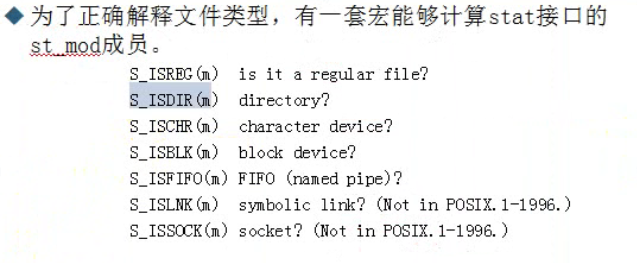
		//判断文件是否为标准文件

		if (S_ISREG(buf.st_mode))

		{

			printf("%s is a char file \n", avgs[1]);

		}

		//判断文件是否为目录

		if (S_ISDIR(buf.st_mode))

		{

			printf("%s is a directory \n", avgs[1]);

		}

		//打印文件的大小

		printf("%s file size is %d\n",avgs[1], buf.st_size);

	}

	return 0;

}
c语言读文件
#include <stdio.h>

#include <stdlib.h>

#include <string.h>

int main(int avg, char* avgs[])

{

	if (avg < 2)

	{

		printf("avg error\n");

		return EXIT_FAILURE;

	}

	FILE* fp = fopen(avgs[1], "r");

	if (fp == NULL)

	{

		printf("file open error");

		return EXIT_FAILURE;

	}

	char buf[10];

	memset(buf, 0, sizeof(buf));

	size_t rc = 0;

	while (1)

	{

		//fr返回读了几条记录数(fread第三个参数表示读多少条记录)

		size_t fr = fread(buf, 1, 10, fp);

		rc += fr;

		if (fr == 0)

		{

			break;

		}

		printf("%s \n", buf);

		memset(buf, 0, sizeof(buf));

	}

	printf("size:%d\n", rc);

	return EXIT_SUCCESS;

}
c语言写文件
#include <stdio.h>

#include <stdlib.h>

#include <string.h>

//写文件

int main(int avg, char* avgs[])

{

	if (avg < 2)

	{

		printf("avg error !\n");

		return EXIT_FAILURE;

	}

	FILE* fp = fopen(avgs[1], "a+");

	if (fp == NULL)

	{

		printf("file open error!\n");

		return EXIT_FAILURE;

	}

	else

	{

		char buf[100];

		memset(buf, 0, sizeof(buf));

		strcpy(buf, "hello world\n");

		fwrite(buf, strlen(buf), 1, fp);

		fclose(fp);

	}

	getchar();

}
二进制文件的读和写操作
#include <stdio.h>

#include <stdlib.h>

#include <string.h>

#include <errno.h>

typedef struct _Person {

	char name[20];

	int age;

}Person;

//二进制文件读操作

int main(int avg, char* avgs[])

{

	if (avg < 2)

	{

		printf("avg count error!\n");

		return EXIT_SUCCESS;

	}

	FILE* fp = fopen(avgs[1], "r");

	if (printf == NULL)

	{

		printf("file open error %s\n", strerror(errno));

	}

	else

	{

		Person parray[10];

		memset(&parray, 0, sizeof(Person));

		while (fread(&parray[0],sizeof(Person),1,fp))

		{

			printf("age:%d,name:%s\n", parray[0].age, parray[0].name);

		}

		fclose(fp);

	}

	return EXIT_SUCCESS;

}

//二进制文件写操作

int main(int avg, char* avgs[])

{

	if (avg<2)

	{

		printf("avg count error!\n");

		return EXIT_SUCCESS;

	}

	FILE* fp = fopen(avgs[1], "w");

	if (printf==NULL)

	{

		printf("file open error %s\n", strerror(errno));

	}

	else

	{

		Person parray[10];

		parray[0].age = 0;

		strcpy(parray[0].name, "caoruipeng");

		parray[1].age = 1;

		strcpy(parray[1].name, "jiaruixin");

		fwrite(&parray, sizeof(Person), 2, fp);

		fclose(fp);

	}

	return EXIT_SUCCESS;

}
文件目录读写
#include <stdio.h>

#include <stdlib.h>

#include <string.h>

#include <errno.h>

#include <time.h>

#include <dirent.h>

int main(int arg, char* args[])

{

	DIR* dp;

	struct dirent* dirp;

	dp = opendir(args[1]);

	if (dp == NULL)

	{

		printf("open dir error %s\n", strerror(errno));

		return 0;

	}

	while ((dirp = readdir(dp)) != NULL)

	{

		printf("name:%s\n", dirp->d_name);

	}

	closedir(dp);

}
Linux文件读写笔记的更多相关文章
- Linux文件读写机制及优化方式
导读 Linux是一个可控性强的,安全高效的操作系统.本文只讨论Linux下文件的读写机制,不涉及不同读取方式如read,fread,cin等的对比,这些读取方式本质上都是调用系统api read,只 ...
- (转)linux文件读写的流程
转自http://hi.baidu.com/_kouu/item/4e9db87580328244ef1e53d0 在<linux内核虚拟文件系统浅析>这篇文章中,我们看到文件是如何被打开 ...
- Linux 文件读写操作与磁盘挂载
文件读写 [文件描述符] Linux下,通常通过open打开一个文件,它然后返回给我们一个整数,通过这个整数便可以操作文件,这个整数我们称文件描述符(fd).对应被打开的文件,它也是一种系统资源,那么 ...
- python的文件读写笔记
读写文件是最常见的IO操作.Python内置了读写文件的函数,用法和C是兼容的. 读写文件前,我们先必须了解一下,在磁盘上读写文件的功能都是由操作系统提供的,现代操作系统不允许普通的程序直接操作磁盘, ...
- Linux 文件类型笔记
在UNIX中一切都是文件https://ph7spot.com/musings/in-unix-everything-is-a-file在UNIX中,一切都是字节流 ==== linux系统的文件类型 ...
- Linux文件权限-笔记
文件权限共10个字符,第一个字符表示该文件是[文件夹]或[文件]——如果是字符“d"则表示该文件是文件夹:如果是字符“-”则表示是文件. 后九个字符,三个一组,共三组,分别表示[所有者权限] ...
- Linux文件操作 笔记
fstat stat lstat 原型 #include <unistd.h> #include <sys/stat.h> #include <sys/types.h&g ...
- linux文件读写 文件锁、select、poll【转】
本文转载自:http://blog.csdn.net/fansongy/article/details/6853395 一.文件锁 文件锁用于多个用户共同使用或操作同一个文件.有读锁的时候可以再加读锁 ...
- LINUX - 文件读写缓存
遇到一个进程core掉后日志打印不出来的问题: 参考如下: [引用] 只有正常退出,才能做到flush.否则将写失败. 之后有百度了下中文资料,发现同样的结论. "fflush库函数的作用是 ...
随机推荐
- TCP定时器 之 延迟确认定时器
TCP在收到数据段但是无需马上确认时设定,如果在超时时间之内有数据要发送到对端,则确认会随着数据一起发送,即捎带ACK,如果达到超时时间则执行定时器回调立即发送ack: 启动定时器: 延迟确认定时器调 ...
- MVC 小demo
.field-validation-error { color: #f00; } .field-validation-valid { display: none; } .input-validatio ...
- vue指令之v-cloak
vue指令之v-cloak 一起学 vue指令 v-cloak 指令可看作标签属性 某些情况下可能由于机器性能故障或者网络原因,导致传输有问题,那么浏览器无法成功解析数据,此时浏览器输出的内容就是纯 ...
- jenkins 内置变量
Jenkins 有一些内置的变量可以使用.主要是: 邮件的配置变量,可以在发送邮件的时候使用. 环境变量 1. 邮件的配置变量 ${GIT_BRANCH} - build 的 Git 分支 ${FIL ...
- 整理ing
RT 要学习的 专克bzoj权限题 钟神p系列
- redhat下配置SEED DVS6446开发环境1
Linux NFS服务详解 1.什么是NFS(Network FileSystem) NFS 就是 Network FileSystem 的缩写,最早之前是由 Sun 所发展出来的.他最大的 功 ...
- [VBA]利用正则表达式创建函数处理字符串
1.去除字符串中的数字 Function aa(sr As Range)Set reg = CreateObject("vbscript.regexp")With reg.Glob ...
- Spliterator介绍
一.Spliterator Spliterator<T> trySplit();trySplit接口就相当于我们之前写的AccumulatorRecursiveTask类里面的分割任务,如 ...
- 阶段3 2.Spring_06.Spring的新注解_3 AnnotationConfigApplicationContext的使用
目前这个配置文件除了导约束就没有其他的内容了. 删除这个bean.xml文件 但是测试类里面还是读取的xml的信息 注解 查看ApplicationContext的 关系图 查看实现类的实现类 之前我 ...
- fcitx无法切换到中文(manjaro)
安装fcitx后不能切换到中文输入法,在.bashrc或者.profile中添加以下代码: #fcitx export GTK_IM_MODULE=fcitx export QT_IM_MODULE ...