
vue mock数据(模拟后台)
本文转载自:https://blog.csdn.net/benben513624/article/details/78562529
vue实现ajax获取后台数据是通过vue-resource,首先通过npm安装vue-resource
npm install vue-resource --save
安装完成以后,把vue-resource引入到main.js文件中
src/main.js
// The Vue build version to load with the `import` command

// (runtime-only or standalone) has been set in webpack.base.conf with an alias.

import Vue from 'vue'

import App from './App'

import router from './router'

import VueResource from 'vue-resource'

import Layout from './components/layout'

Vue.use(VueResource);

/* eslint-disable no-new */

new Vue({

  el: '#app',

  router,

  template: '<Layout/>',

  components: { Layout }

})
把vue-resource引入项目以后,就可以在任何组件里面直接用了
<template>

    <div class="index-wrap">

      <div class="index-left">

        <div class="index-left-block lastest-news">

          <h2>最新消息</h2>

          <ul>

            <li v-for="news in newsList">

              <a :href="news.url" class="new-item">{{news.title}}</a>

            </li>

          </ul>

        </div>

      </div>

      <div class="index-right">

      </div>

    </div>

</template>

<script type="text/ecmascript-6">

    export default{

      created(){

        this.$http.get('api/getNewsList').then((res)=>{  //可用post请求,this.$http.post('api/getNewsList',{'userId':123})

          console.log(res.data);

          this.newsList=res.data;

          console.log( this.newsList);

        },(err)=>{

          console.log(err);

        });

      },

        data(){

            return {

              newsList:[],

            }

        }

    }

</script>

<style scoped>

  .index-wrap{

    width: 1200px;

    margin:  auto;

    overflow: hidden;

    background: blue;

  }

  .index-left{

    float: left;

    width: 300px;

    text-align: left;

    background: red;

  }

  .index-right {

    float: left;

    width: 900px;

  }

  .index-left-block{

    margin: 15px;

    background: #fff;

    box-shadow:   1px #ddd;

  }

  .index-left-block .hr {

    margin-bottom: 20px;

    border-bottom: 1px solid #ddd;

  }

  .index-left-block h2 {

    background: #4fc08d;

    color: #fff;

    padding: 10px 15px;

    margin-bottom: 20px;

  }

  .index-left-block h3 {

    padding:  15px 5px 15px;

    font-weight: bold;

    color: #;

  }

  .index-left-block ul {

    padding: 10px 15px;

  }

  .index-left-block li {

    padding: 5px;

  }

  .hot-tag{

    background: red;

    color:#fff;

    font-size: 10px;

    border-radius: 10px;

  }

</style>
上面这个就是用vue-resource来进行数据请求的大体流程,作为前端,在开发的过程,遇到这种调用后端接口调试起来还是很麻烦的,我们要找后端的一个服务器,然后关联起来 ,或者把前端代码放上去,这样都是挺麻烦的,解决的办法就是前端放mock data,主要有两种方式:
(1)json-server模拟数据
使用json-server这个工具,可以虚构出后端接口对应的数据,然后在项目里发送特定的请求,就可以发请求拿到模拟的数据,首先npm安装
npm install json-server --save
然后在build/webpack.dev.conf.js中进行配置,参考json-server
'use strict'

const utils = require('./utils')

const webpack = require('webpack')

const config = require('../config')

const merge = require('webpack-merge')

const baseWebpackConfig = require('./webpack.base.conf')

const HtmlWebpackPlugin = require('html-webpack-plugin')

const FriendlyErrorsPlugin = require('friendly-errors-webpack-plugin')

const portfinder = require('portfinder')

const devWebpackConfig = merge(baseWebpackConfig, {

  module: {

    rules: utils.styleLoaders({ sourceMap: config.dev.cssSourceMap, usePostCSS: true })

  },

  // cheap-module-eval-source-map is faster for development

  devtool: config.dev.devtool,

  // these devServer options should be customized in /config/index.js

  devServer: {

    clientLogLevel: 'warning',

    historyApiFallback: true,

    hot: true,

    host: process.env.HOST || config.dev.host,

    port: process.env.PORT || config.dev.port,

    open: config.dev.autoOpenBrowser,

    overlay: config.dev.errorOverlay ? {

      warnings: false,

      errors: true,

    } : false,

    publicPath: config.dev.assetsPublicPath,

    proxy: config.dev.proxyTable,

    quiet: true, // necessary for FriendlyErrorsPlugin

    watchOptions: {

      poll: config.dev.poll,

    }

  },

  plugins: [

    new webpack.DefinePlugin({

      'process.env': require('../config/dev.env')

    }),

    new webpack.HotModuleReplacementPlugin(),

    new webpack.NamedModulesPlugin(), // HMR shows correct file names in console on update.

    new webpack.NoEmitOnErrorsPlugin(),

    // https://github.com/ampedandwired/html-webpack-plugin

    new HtmlWebpackPlugin({

      filename: 'index.html',

      template: 'index.html',

      inject: true

    }),

  ]

})

//这里是json-server配置信息

// json-server.js

const jsonServer = require('json-server')

const apiServer = jsonServer.create()

const apiRouter = jsonServer.router('db.json') //数据关联server,db.json与index.html同级

const middlewares = jsonServer.defaults()

apiServer.use(middlewares)

apiServer.use('/api',apiRouter)

apiServer.listen(, () => {                 //监听端口

  console.log('JSON Server is running')

})

module.exports = new Promise((resolve, reject) => {

  portfinder.basePort = process.env.PORT || config.dev.port

  portfinder.getPort((err, port) => {

    if (err) {

      reject(err)

    } else {

      // publish the new Port, necessary for e2e tests

      process.env.PORT = port

      // add port to devServer config

      devWebpackConfig.devServer.port = port

      // Add FriendlyErrorsPlugin

      devWebpackConfig.plugins.push(new FriendlyErrorsPlugin({

        compilationSuccessInfo: {

          messages: [`Your application is running here: http://${config.dev.host}:${port}`],

        },

        onErrors: config.dev.notifyOnErrors

        ? utils.createNotifierCallback()

        : undefined

      }))

      resolve(devWebpackConfig)

    }

  })

})
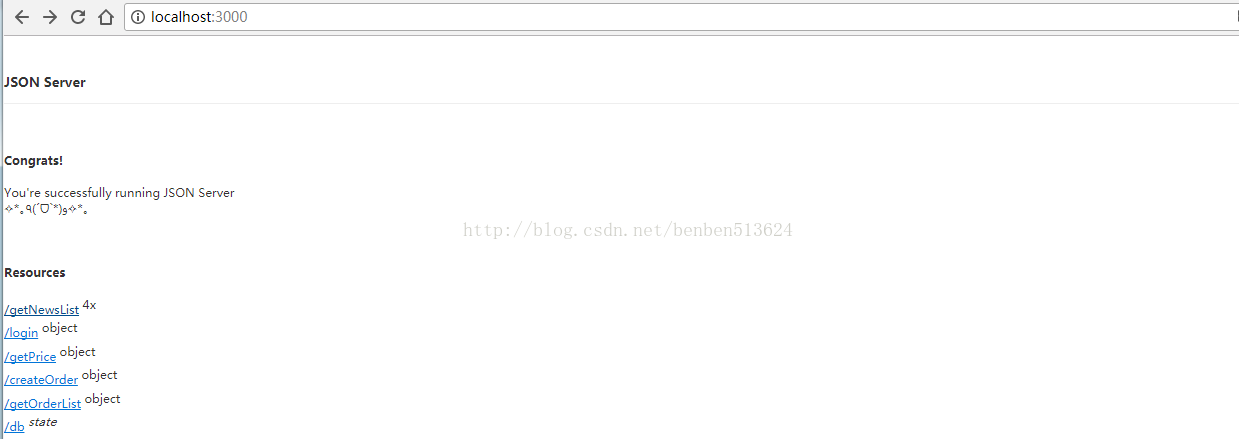
配置完成以后,npm run dev 启动,浏览器输入localhost:3000,出现如下图,说明配置成功
那么现在还有一个问题,我们代码的服务端接口是8080,json-server的服务端端口是3000,由于浏览器的同源策略问题,这样请求会存在一个跨域问题,所以这里要做一个服务端代理的配置,配置build/index.js中的proxyTable:
    host: 'localhost', // can be overwritten by process.env.HOST

    port: , // can be overwritten by process.env.HOST, if port is in use, a free one will be determined

    autoOpenBrowser: false,

    errorOverlay: true,

    notifyOnErrors: true,

    poll: false, // https://webpack.js.org/configuration/dev-server/#devserver-watchoptions-

    proxyTable:{

      '/api/':'http://localhost:3000/'

    },
这样就可以在localhost:8080下访问接口了

(2)express启动数据服务
在实际开发中,发现json-server只能用于get请求,不能进行post请求,在网上找的另外一种方法,express既能用于get请求,又能用于post请求,下面说一下express启动服务的配置方法:
'use strict'

const utils = require('./utils')

const webpack = require('webpack')

var express = require('express')

const config = require('../config')

const merge = require('webpack-merge')

const baseWebpackConfig = require('./webpack.base.conf')

const HtmlWebpackPlugin = require('html-webpack-plugin')

const FriendlyErrorsPlugin = require('friendly-errors-webpack-plugin')

const portfinder = require('portfinder')

const devWebpackConfig = merge(baseWebpackConfig, {

  module: {

    rules: utils.styleLoaders({ sourceMap: config.dev.cssSourceMap, usePostCSS: true })

  },

  // cheap-module-eval-source-map is faster for development

  devtool: config.dev.devtool,

  // these devServer options should be customized in /config/index.js

  devServer: {

    clientLogLevel: 'warning',

    historyApiFallback: true,

    hot: true,

    host: process.env.HOST || config.dev.host,

    port: process.env.PORT || config.dev.port,

    open: config.dev.autoOpenBrowser,

    overlay: config.dev.errorOverlay ? {

      warnings: false,

      errors: true,

    } : false,

    publicPath: config.dev.assetsPublicPath,

    proxy: config.dev.proxyTable,

    quiet: true, // necessary for FriendlyErrorsPlugin

    watchOptions: {

      poll: config.dev.poll,

    }

  },

  plugins: [

    new webpack.DefinePlugin({

      'process.env': require('../config/dev.env')

    }),

    new webpack.HotModuleReplacementPlugin(),

    new webpack.NamedModulesPlugin(), // HMR shows correct file names in console on update.

    new webpack.NoEmitOnErrorsPlugin(),

    // https://github.com/ampedandwired/html-webpack-plugin

    new HtmlWebpackPlugin({

      filename: 'index.html',

      template: 'index.html',

      inject: true

    }),

  ]

})

// json-server.js

//const jsonServer = require('json-server')

//const apiServer = jsonServer.create()

//const apiRouter = jsonServer.router('db.json')

//const middlewares = jsonServer.defaults()

//

//apiServer.use(middlewares)

//apiServer.use('/api',apiRouter)

//apiServer.listen(3000, () => {

//  console.log('JSON Server is running')

//})

//express 配置server

var apiServer = express()

var bodyParser = require('body-parser')

apiServer.use(bodyParser.urlencoded({ extended: true }))

apiServer.use(bodyParser.json())

var apiRouter = express.Router()

var fs = require('fs')

apiRouter.route('/:apiName') //接口路径

  .all(function (req, res) {

    fs.readFile('./db.json', 'utf8', function (err, data) {  //读取接口文件

      if (err) throw err

      var data = JSON.parse(data)

      if (data[req.params.apiName]) {

        res.json(data[req.params.apiName])

      }

      else {

        res.send('no such api name')

      }

    })

  })

apiServer.use('/api', apiRouter);

apiServer.listen(, function (err) {

  if (err) {

    console.log(err)

    return

  }

  console.log('Listening at http://localhost:' +  + '\n')

})

module.exports = new Promise((resolve, reject) => {

  portfinder.basePort = process.env.PORT || config.dev.port

  portfinder.getPort((err, port) => {

    if (err) {

      reject(err)

    } else {

      // publish the new Port, necessary for e2e tests

      process.env.PORT = port

      // add port to devServer config

      devWebpackConfig.devServer.port = port

      // Add FriendlyErrorsPlugin

      devWebpackConfig.plugins.push(new FriendlyErrorsPlugin({

        compilationSuccessInfo: {

          messages: [`Your application is running here: http://${config.dev.host}:${port}`],

        },

        onErrors: config.dev.notifyOnErrors

        ? utils.createNotifierCallback()

        : undefined

      }))

      resolve(devWebpackConfig)

    }

  })

})
在浏览器中输入接口地址,如下:

vue mock数据(模拟后台)的更多相关文章
- Vue+Mock.js模拟登录和表格的增删改查
有三类人不适合此篇文章: "喜欢站在道德制高点的圣母婊" -- 适合去教堂 "无理取闹的键盘侠" -- 国际新闻版块欢迎你去 "有一定基础但又喜欢逼逼 ...
- vue mock数据设置
1.新建mock文件夹 2.添加你需要的数据例如新建商品表goods.json { "status":"0", "result":[ { & ...
- vue 项目初始化、mock数据以及安装less
vue 创建一个项目 1.首先建立一个空文件夹,然后将这个文件夹要放到码云或者其他代码管理平台. 例如码云: 在码云上建立一个项目,然后在控制台进入这文件夹执行 git clone 地址是码云上创建的 ...
- 深入浅出的webpack4构建工具--webpack4+vue+vuex+mock模拟后台数据(十九)
mock的官网文档 mock官网 关于mockjs的优点,官网这样描述它:1)可以前后端分离.2)增加单元测试的真实性(通过随机数据,模拟各种场景).3)开发无侵入(不需要修改既有代码,就可以拦截 A ...
- vue mock(模拟后台数据) +axios 简单实例(二)
需装上axios,build文件夹中webpack.dev.conf.js文件添加上vue mock配置的东东, 如,继(一) //组件<template> <div> &l ...
- Vue笔记:使用 mock.js 模拟数据
在我们的项目实际开发过程中,后端的接口往往是较晚才会提供出来,并且还要写接口文档,如果前端的开发都要等到接口开发完成才开始就非常影响项目整体开发进度了,mock.js 的出现使前后端分离并行开发成为可 ...
- mock数据(模拟后台数据)
mock数据(模拟后台数据) - Emily恩 - 博客园 https://www.cnblogs.com/enboke/p/vue.html Mock.js http://mockjs.com/ 前 ...
- vue项目中使用mockjs+axios模拟后台数据返回
自己写练手项目的时候常常会遇到一个问题,没有后台接口,获取数据总是很麻烦,于是在网上找了下,发现一个挺好用的模拟后台接口数据的工具:mockjs.现在把自己在项目中使用的方法贴出来 先看下项目的目 ...
- vue从mock数据过渡到使用后台接口
说明: 最近在搭建一个前端使用vue-element-admin,后端使用springBoot的项目. 由于vue-element-admin使用的是mock的模拟数据跑起来的项目,所以在开发过程中难 ...
随机推荐
- C# DotNetZip压缩单、多文件以及文件夹
有些项目为了更好的用户体验,会把下载文件做成一个压缩的文件,直接下载,免得去一个个的点击下载文件.网上有很多压缩文件的方法,也有第三方的分装DLL文件,本文主要介绍DotNetZip压缩方法. Dot ...
- spring boot 尚桂谷学习笔记11 数据访问03 JPA
整合JPA SpringData 程序数据交互结构图 (springdata jpa 默认使用 hibernate 进行封装) 使用之后就关注于 SpringData 不用再花多经历关注具体各个交互框 ...
- Java +selenium Navigation接口介绍
Navigation接口主要实现对浏览器的前进.后退.打开网址.刷新当前页面等操作的. void back():就是操作当前页面后退,相当于网页的后退按钮. void forward():就是操作当前 ...
- Mr. Panda and Crystal(最短路+完全背包)
http://codeforces.com/gym/101206/attachments 题意: T组输入,每组给出m,n,k,m为能量总数,n为水晶种类数,k为合成方案数.有的水晶可以用能量制造,有 ...
- 未找到源文件:C:\loadrunner-11\urunner MSI\bin\icudt36.dll.o1d解决方法
安装HP LoadRunner 11.00 未找到源文件:C:\loadrunner-11\urunner MSI\bin\icudt36.dll.o1d 下载loadrunner11 使用迅雷下载, ...
- Jquery中input:type=radio的监听,获取设置值
一.html <div id='demo'> <input type='radio' name='sex' value='男' > <input type='radio' ...
- django创建web页面
https://blog.csdn.net/ImagineCode/article/details/54586326 https://blog.csdn.net/qq_29186489/article ...
- cf:c题
题目: 代码: #include<iostream> #include<algorithm> #include<vector> #include<string ...
- HDU 6469 /// 二分
题目大意: 分裂怪有1到n种等级, 第1级的分裂怪称为原子怪,它不会分裂,被击杀时会产生a[1]点经验: 而第k级的分裂怪死亡时则会分裂成a[k]个第k - 1级的分裂怪. 一个体力可以杀死一个怪物. ...
- 北京邀请赛 B. Beautiful Garden
题意:给你坐标和n个点,求最少移动的点使得n个点成等差数列 思路:既然要成等差数列,那么最起码有两个点是不动的,然后枚举这两个点中间的点的个数,近期水的要死,看了队友的代码做的 #include &l ...