
【Shiro】二、Apache Shiro配置
1、配置
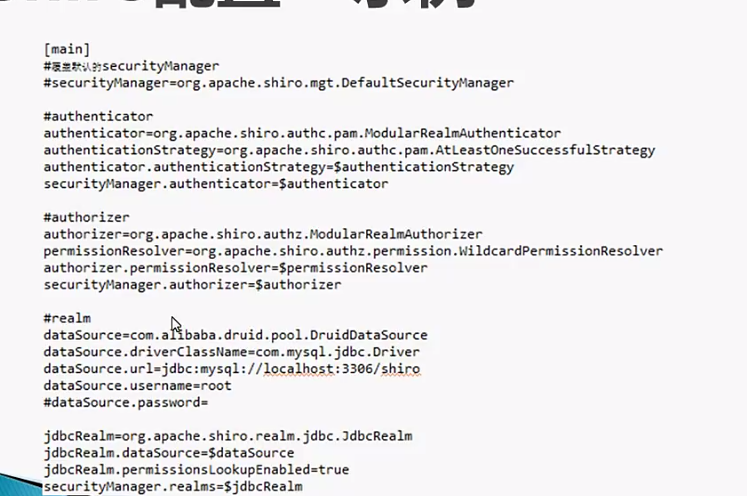
使用配置获得SecurityManager,SecurityManager是核心,配置好并获取到SecurityManager,Shiro就算正式运行起来了。
两种方式:通过ini文件;通过ini实例
ini文件的格式
段:一个ini文件分为4段内容,段用[]表示;每段用键值对来进行配置
[main]:SecurityManager相关对象及其属性
[users]:静态定义的用户信息
[roles]:静态定义的角色信息
[urls]:Web应用中基于URL的安全控制
[main]

#定义对象

sha256Matcher = org.apache.shiro.authc.credential.Sha256CredentialsMatcher

#定义对象及其属性

myRealm = com.company.security.shiro.DatabaseRealm

myRealm.connectionTimeout = 30000

myRealm.username = jsmith

myRealm.password = secret

#引用对象

myRealm.credentialsMatcher = $sha256Matcher

#定义嵌套属性

securityManager.sessionManager.globalSessionTimeout = 1800000

#集合属性

securityManager.sessionManager.sessionListeners = $listen1,$listen2

anObject = some.class.with.a.Map.property

anObject.mapProperty = key1:$obj1,key2:$obj2

#重写覆盖

myRealm = com.company.security.MyRealm

myRealm = com.company.security.DatabaseRealm

#自定义SecurityManager

securityManager = com....MyCustomerSecurityManager

[users]

#格式:用户名 = 密码,角色1,角色2,角色3...

admin = secret

louis = 520,admin

yang = 1234,customer,controller

[roles]

#格式:角色名 = 权限表达式1,权限表达式2.....

#权限表达式的格式:类型:操作:id,使用*通配符

#admin角色拥有所有权限

admin = *

#louis角色可以做sale类型的任何事

louis = sale:*

#yang角色可以做sale类型下confirm事件,且只能操作0001id

yang = sale:confirm:0001

[urls]

后面再讲

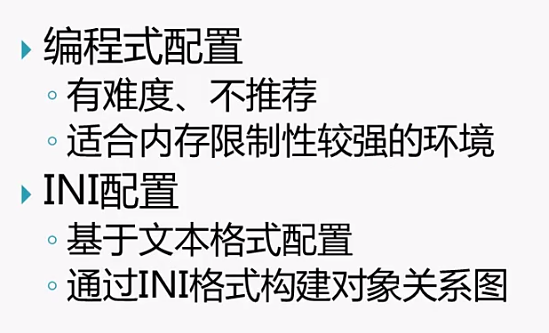
一般使用ini的方式配置,除非运行环境内存小,有限制,才用编程模式
2、术语
了解一下Shiro中用到的一些英文术语
Authentication:认证
Authorization:授权
Credential:用户凭证,如密码、token
Principal:用户标识,如用户名
Subject:用户
Role:角色
Permission:功能权限
Session:会话
Realm:安全DAO
Cryptography:密码术
Cipher:加密算法
Hash:散列算法
【Shiro】二、Apache Shiro配置的更多相关文章
- 【Shiro】Apache Shiro架构之集成web
Shiro系列文章: [Shiro]Apache Shiro架构之身份认证(Authentication) [Shiro]Apache Shiro架构之权限认证(Authorization) [Shi ...
- 【Shiro】Apache Shiro架构之自定义realm
[Shiro]Apache Shiro架构之身份认证(Authentication) [Shiro]Apache Shiro架构之权限认证(Authorization) [Shiro]Apache S ...
- 【Shiro】Apache Shiro架构之权限认证(Authorization)
Shiro系列文章: [Shiro]Apache Shiro架构之身份认证(Authentication) [Shiro]Apache Shiro架构之集成web [Shiro]Apache Shir ...
- 【Shiro】Apache Shiro架构之身份认证(Authentication)
Shiro系列文章: [Shiro]Apache Shiro架构之权限认证(Authorization) [Shiro]Apache Shiro架构之集成web [Shiro]Apache Shiro ...
- [转载] 【Shiro】Apache Shiro架构之实际运用(整合到Spring中)
写在前面:前面陆陆续续对Shiro的使用做了一些总结,如题,这篇博文主要是总结一下如何将Shiro运用到实际项目中,也就是将Shiro整到Spring中进行开发.后来想想既然要整,就索性把Spring ...
- SpringBoot整合Shiro 二:Shiro配置类
环境搭建见上篇:SpringBoot整合Shiro 一:搭建环境 Shiro配置类配置 shiro的配置主要集中在 ShiroFilterFactoryBean 中 关于权限: anon:无需认证就可 ...
- Apache Shiro 手册
(一)Shiro架构介绍 一.什么是Shiro Apache Shiro是一个强大易用的Java安全框架,提供了认证.授权.加密和会话管理等功能: 认证 - 用户身份识别,常被称为用户"登录 ...
- Apache Shiro 使用手册---转载
原文地址:http://www.360doc.com/content/12/0104/13/834950_177177202.shtml (一)Shiro架构介绍 一.什么是Shiro Apache ...
- Apache Shiro 使用手册
http://kdboy.iteye.com/blog/1154644 (一)Shiro架构介绍 一.什么是Shiro Apache Shiro是一个强大易用的Java安全框架,提供了认证.授权.加 ...
- apache shiro整合spring(一)
apache shiro整合spring 将shiro配置文件整合到spring体系中 方式一:直接在spring的配置文件中import shiro的配置文件 方式二:直接在web.xml中配置sh ...
随机推荐
- [CSP-S模拟测试73]题解
A.小P的2048 作为一个看B哥玩了一个寒假的人这种题闭眼切好吧 模拟即可.程序模块化后直接复制粘贴. 说什么模拟不能复制粘贴的都没水平 #include<cstdio> #includ ...
- [CSP-S模拟测试]:party?(霍尔定理+最小割+树链剖分)
题目描述 $Treeland$国有$n$座城市,其中$1$号城市是首都,这些城市被一些单向高铁线路相连,对于城市$i\neq 1$,有一条线路从$i$到$p_i(p_i<i)$.每条线路都是一样 ...
- Spring中Bean的作用域和生命周期
作用域的种类 Spring 容器在初始化一个 Bean 的实例时,同时会指定该实例的作用域.Spring3 为 Bean 定义了五种作用域,具体如下. 1)singleton 单例模式,使用 sing ...
- Java牛角尖【007】:Java中的Error能不能被Catch
Java牛角尖[007]:Java中的Error能不能被Catch 网上看到很多朋友说Java中Error是无法Catch到的,而Java中定义的Error类型又很难测试到,那就估且以为确是如此吧 ...
- springBoot JPA PageAble分页查询出错,PropertyReferenceException: No property creation found for type
PropertyReferenceException: No property creation found for type @RequestParam(required = false, defa ...
- 115、TensorFlow变量的使用
# To use the value of a tf.Variable in a Tesnorflow graph , simply treat it like a normal tf.Tensor ...
- 用 Flask 来写个轻博客 (26) — 使用 Flask-Celery-Helper 实现异步任务
Blog 项目源码:https://github.com/JmilkFan/JmilkFan-s-Blog 目录 目录 前文列表 扩展阅读 Celery 将 Celery 加入到应用中 实现向新用户发 ...
- Yahoo34条军规——雅虎WEB前端网站优化
雅虎给出了优化网站加载速度的34条法则(包括Yslow规则22条) 详细说明,下载转发 ponytail 的译文(来自帕兰映像). 1.Minimize HTTP Requests 减少HTTP请求 ...
- LeetCode 数组中两个数的最大异或值
题目链接:https://leetcode-cn.com/problems/maximum-xor-of-two-numbers-in-an-array/ 题目大意: 略. 分析: 字典树 + 贪心. ...
- CF561做题
C题: 一期思路:我们发现如果x,y满足条件,那么{x,-y} {-x,y} {-x,-y}也满足条件.那么我们可以只讨论|x| |y|是否满足条件,如果满足条件,那么对ans的贡献是|x|出现次数* ...