
【Shiro】二、Apache Shiro配置
1、配置
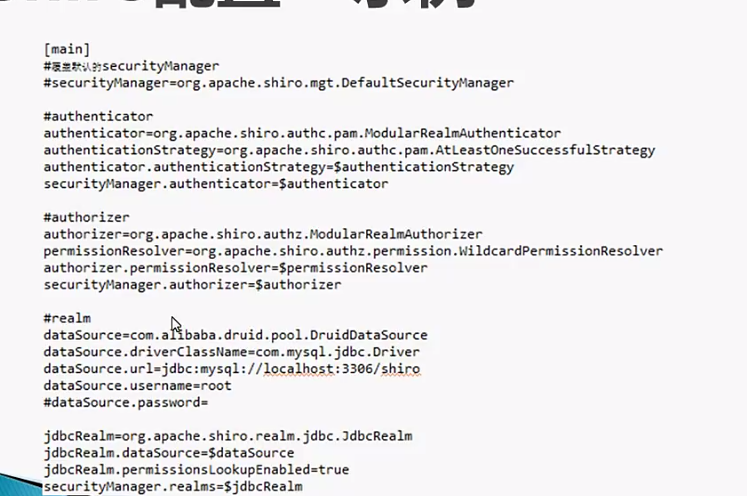
使用配置获得SecurityManager,SecurityManager是核心,配置好并获取到SecurityManager,Shiro就算正式运行起来了。
两种方式:通过ini文件;通过ini实例
ini文件的格式
段:一个ini文件分为4段内容,段用[]表示;每段用键值对来进行配置
[main]:SecurityManager相关对象及其属性
[users]:静态定义的用户信息
[roles]:静态定义的角色信息
[urls]:Web应用中基于URL的安全控制
[main]

#定义对象

sha256Matcher = org.apache.shiro.authc.credential.Sha256CredentialsMatcher

#定义对象及其属性

myRealm = com.company.security.shiro.DatabaseRealm

myRealm.connectionTimeout = 30000

myRealm.username = jsmith

myRealm.password = secret

#引用对象

myRealm.credentialsMatcher = $sha256Matcher

#定义嵌套属性

securityManager.sessionManager.globalSessionTimeout = 1800000

#集合属性

securityManager.sessionManager.sessionListeners = $listen1,$listen2

anObject = some.class.with.a.Map.property

anObject.mapProperty = key1:$obj1,key2:$obj2

#重写覆盖

myRealm = com.company.security.MyRealm

myRealm = com.company.security.DatabaseRealm

#自定义SecurityManager

securityManager = com....MyCustomerSecurityManager

[users]

#格式:用户名 = 密码,角色1,角色2,角色3...

admin = secret

louis = 520,admin

yang = 1234,customer,controller

[roles]

#格式:角色名 = 权限表达式1,权限表达式2.....

#权限表达式的格式:类型:操作:id,使用*通配符

#admin角色拥有所有权限

admin = *

#louis角色可以做sale类型的任何事

louis = sale:*

#yang角色可以做sale类型下confirm事件,且只能操作0001id

yang = sale:confirm:0001

[urls]

后面再讲

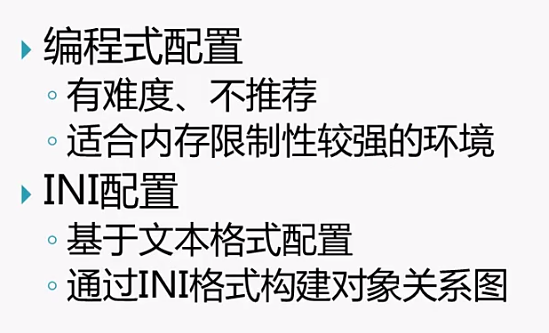
一般使用ini的方式配置,除非运行环境内存小,有限制,才用编程模式
2、术语
了解一下Shiro中用到的一些英文术语
Authentication:认证
Authorization:授权
Credential:用户凭证,如密码、token
Principal:用户标识,如用户名
Subject:用户
Role:角色
Permission:功能权限
Session:会话
Realm:安全DAO
Cryptography:密码术
Cipher:加密算法
Hash:散列算法
【Shiro】二、Apache Shiro配置的更多相关文章
- 【Shiro】Apache Shiro架构之集成web
Shiro系列文章: [Shiro]Apache Shiro架构之身份认证(Authentication) [Shiro]Apache Shiro架构之权限认证(Authorization) [Shi ...
- 【Shiro】Apache Shiro架构之自定义realm
[Shiro]Apache Shiro架构之身份认证(Authentication) [Shiro]Apache Shiro架构之权限认证(Authorization) [Shiro]Apache S ...
- 【Shiro】Apache Shiro架构之权限认证(Authorization)
Shiro系列文章: [Shiro]Apache Shiro架构之身份认证(Authentication) [Shiro]Apache Shiro架构之集成web [Shiro]Apache Shir ...
- 【Shiro】Apache Shiro架构之身份认证(Authentication)
Shiro系列文章: [Shiro]Apache Shiro架构之权限认证(Authorization) [Shiro]Apache Shiro架构之集成web [Shiro]Apache Shiro ...
- [转载] 【Shiro】Apache Shiro架构之实际运用(整合到Spring中)
写在前面:前面陆陆续续对Shiro的使用做了一些总结,如题,这篇博文主要是总结一下如何将Shiro运用到实际项目中,也就是将Shiro整到Spring中进行开发.后来想想既然要整,就索性把Spring ...
- SpringBoot整合Shiro 二:Shiro配置类
环境搭建见上篇:SpringBoot整合Shiro 一:搭建环境 Shiro配置类配置 shiro的配置主要集中在 ShiroFilterFactoryBean 中 关于权限: anon:无需认证就可 ...
- Apache Shiro 手册
(一)Shiro架构介绍 一.什么是Shiro Apache Shiro是一个强大易用的Java安全框架,提供了认证.授权.加密和会话管理等功能: 认证 - 用户身份识别,常被称为用户"登录 ...
- Apache Shiro 使用手册---转载
原文地址:http://www.360doc.com/content/12/0104/13/834950_177177202.shtml (一)Shiro架构介绍 一.什么是Shiro Apache ...
- Apache Shiro 使用手册
http://kdboy.iteye.com/blog/1154644 (一)Shiro架构介绍 一.什么是Shiro Apache Shiro是一个强大易用的Java安全框架,提供了认证.授权.加 ...
- apache shiro整合spring(一)
apache shiro整合spring 将shiro配置文件整合到spring体系中 方式一:直接在spring的配置文件中import shiro的配置文件 方式二:直接在web.xml中配置sh ...
随机推荐
- CocoaPods中pod search报错的解决办法
pod search报错的原因: 每次使用pod search命令的使用会在该目录下生成一个search_index.json文件,会逐渐的增大,文件达到一定大小后,ruby解析里面的json字符就会 ...
- [CSP-S模拟测试]:reverse(模拟)
题目传送门(内部题56) 输入格式 第一行包含一个整数:$T$,表示数据组数.接下来$T$行,每行包含两个字符串:$a\ b$. 输出格式 对于每组数据,如果存在$c$,输出最长的情况下字典序最大的$ ...
- [CSP-S模拟测试]:小奇的矩阵(matrix)(DP+数学)
题目背景 小奇总是在数学课上思考奇怪的问题. 题目描述 给定一个$n\times m$的矩阵,矩阵中的每个元素$a_{i,j}$为正整数.接下来规定: $1.$合法的路径初始从矩阵左上角出发,每 ...
- HTTP返回码中200,302,304,404,500得意思
状态码的职责是当客户端向服务器端发送请求时,描述返回请求结果.借助状态码,用户可以知道服务器端是正常处理了请求,还是出现了什么错误. 2开头的,响应成功,客户端请求服务器正常响应处理了. 3开头的,响 ...
- 团队冲刺DAY1
团队冲刺DAY1 今天的内容是对未来6天的突击有一个大致的规划. 我们小组的选题是客户端-服务器安全信息传递系统,通过讨论,我们认为大概有四个难题. 第一个是服务器和客户端,我们打算用第二天来完成. ...
- DirectX - External Overlay - 源代码
Today i'm going to release a new version of my overlay.It's coded for beginners & users who want ...
- VS2017/VS2019 git Authentication failed for "XXXXXXXXXx"
解决办法: 控制面板,凭证管理==>删掉 对应代码仓库地址的凭证.删掉,是删掉.因为我更新了还是没有用.
- 解决产生的空白行
<script> var a=document.body.innerHTML; document.body.innerHTML=a.replace(/\ufeff/g,''); </ ...
- java异常不匹配问题
java的异常处理是为了提高程序健壮性的. 当发生异常的时候,我们把这个异常捕获到,或者throw出去.然后对这些异常的情况进行处理.并且异常发生之后的代码仍然会执行,这样就能提高程序的健壮性.如下 ...
- windows 如何配置 Go 环境(Zip archive 方式)?
windows 如何配置 Go 环境(Zip archive 方式)? 下载地址:https://dl.google.com/go/go1.12.5.windows-amd64.zip 解压 go1. ...