
[功能集锦] 002 - mysql查询数据库字典+导出+样式一键整合至excel
写在前面:
因为工作时候经常遇到半路接手项目的情况,由于年代久远,数据库字典这块经常缺失。故写此篇,以便复用,也希望对大家有点帮助。
随笔内容不高级,如有不妥,不吝指正。
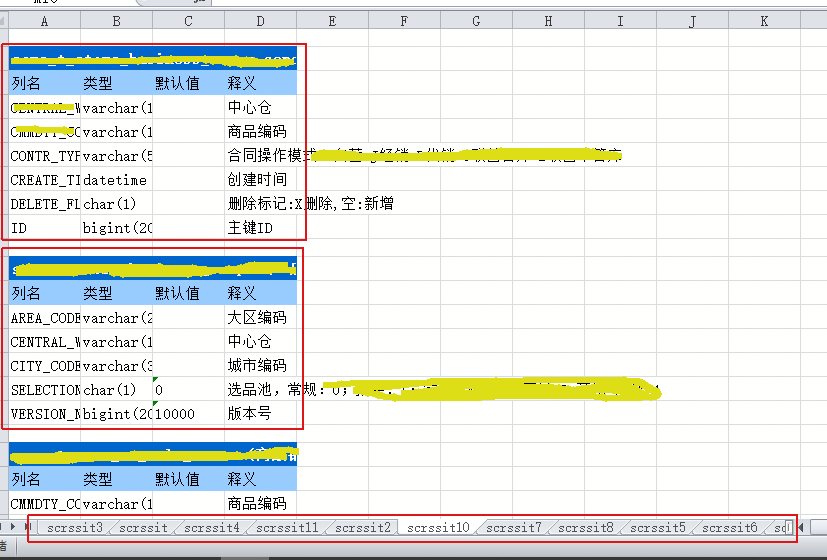
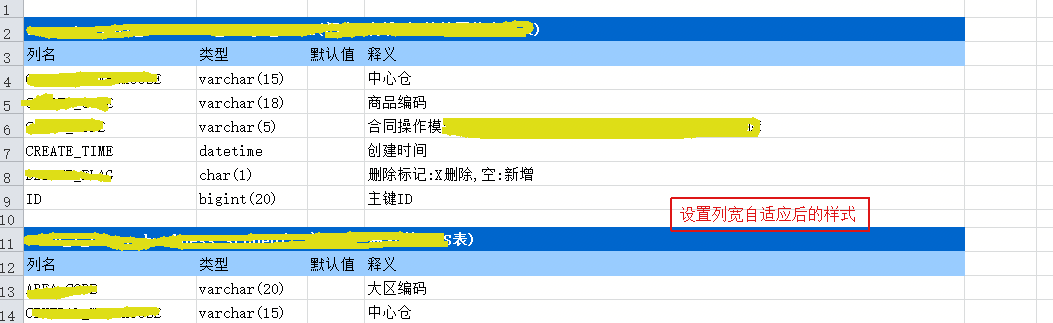
20190730-加了一些简单样式,生成的excel文件,只需要人为操作设置列宽度自适应,样式就基本ok了;
------------------------------------------------------------分-割-线------------------------------------------------------------
第一步:查询数据库
查询语句:
SELECT pretab.TABLE_NAME AS 表名,pretab.TABLE_COMMENT AS 表释义,precol.COLUMN_NAME AS 字段名,precol.COLUMN_TYPE AS 字段类型,precol.COLUMN_DEFAULT AS 字段默认值,precol.COLUMN_COMMENT AS 表字段释义 FROM information_schema.`TABLES` AS pretab RIGHT JOIN information_schema.`COLUMNS` AS precol ON precol.TABLE_NAME=pretab.TABLE_NAME WHERE pretab.TABLE_SCHEMA ="此处填写库名" GROUP BY precol.TABLE_NAME,precol.COLUMN_NAME ORDER BY precol.TABLE_NAME;
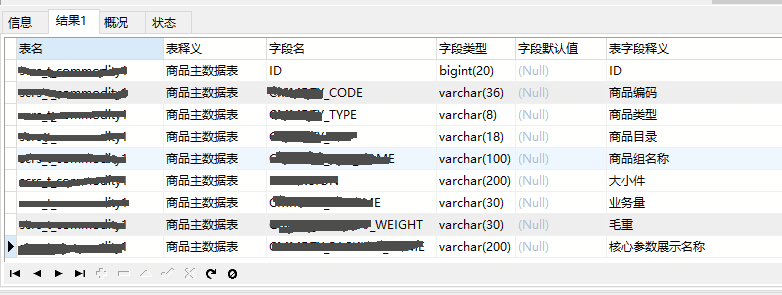
结果图示:
第二步:导出查询结果
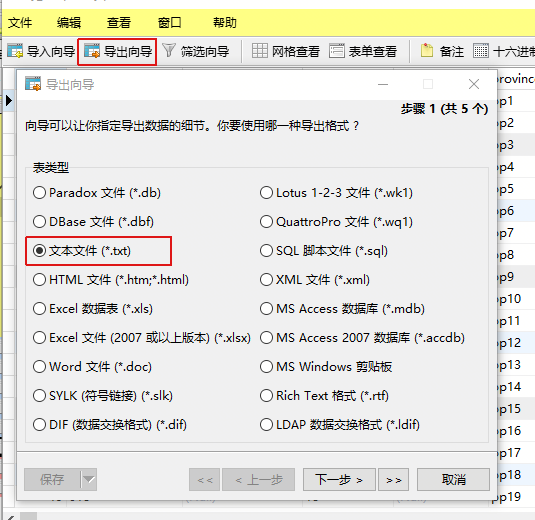
导出txt:

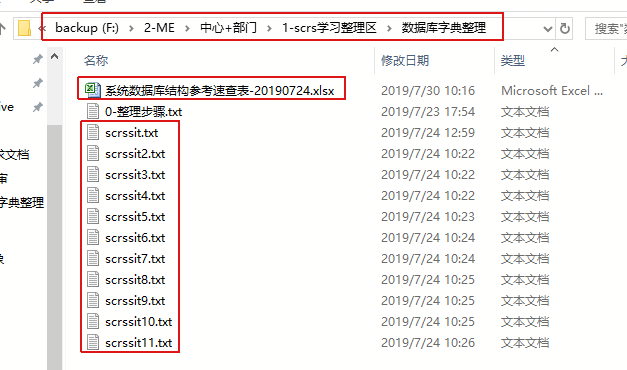
导出结果:


第三步:一键整合至excel
运行下方代码:
import java.io.BufferedReader;
import java.io.FileInputStream;
import java.io.FileOutputStream;
import java.io.InputStreamReader;
import java.util.HashMap;
import java.util.Map;
import java.util.Set; import org.apache.commons.collections4.MapUtils;
import org.apache.poi.hssf.usermodel.HSSFCell;
import org.apache.poi.hssf.usermodel.HSSFRow;
import org.apache.poi.hssf.usermodel.HSSFSheet;
import org.apache.poi.hssf.usermodel.HSSFWorkbook;
import org.apache.poi.ss.usermodel.CellStyle;
import org.apache.poi.ss.usermodel.FillPatternType;
import org.apache.poi.ss.usermodel.Font;
import org.apache.poi.ss.usermodel.HorizontalAlignment;
import org.apache.poi.ss.usermodel.IndexedColors;
import org.apache.poi.ss.usermodel.VerticalAlignment;
import org.apache.poi.ss.usermodel.Workbook;
import org.apache.poi.ss.util.CellRangeAddress;
import org.apache.poi.xssf.usermodel.XSSFCell;
import org.apache.poi.xssf.usermodel.XSSFRow;
import org.apache.poi.xssf.usermodel.XSSFSheet;
import org.apache.poi.xssf.usermodel.XSSFWorkbook; /**
* 生成数据库数据结构速查文件(数据库字典)
*
* @author ruran
* @since 2019年7月4日 下午3:25:13
*/
public class ProduceGuideOfDatabase { /*
* 数据来源
*
* SELECT pretab.TABLE_NAME AS 表名,pretab.TABLE_COMMENT AS 表释义,
* precol.COLUMN_NAME AS 字段名,precol.COLUMN_TYPE AS 字段类型,
* precol.COLUMN_DEFAULT AS 字段默认值,precol.COLUMN_COMMENT AS 表字段释义 FROM
* information_schema.`TABLES` AS pretab RIGHT JOIN
* information_schema.`COLUMNS` AS precol ON
* precol.TABLE_NAME=pretab.TABLE_NAME WHERE pretab.TABLE_SCHEMA ="此处填写库名"
* GROUP BY precol.TABLE_NAME,precol.COLUMN_NAME ORDER BY precol.TABLE_NAME;
*/
public static void main(String[] args) {
System.out.println("开始运行程序。。。");
long preTime = System.currentTimeMillis();
// navicat导出txt-程序整理生成字典文件(人工参与步骤多,繁琐,不智能)
reArrangeFromSQLtxt();
System.out.println("运行完成,耗时:" + (System.currentTimeMillis() - preTime) + "ms");
} /**
* 从TXT文件中重整成excel
*
* @author ruran
* @since 2019年7月24日 下午4:40:10
*/
private static void reArrangeFromSQLtxt() {
String url = "F:\\2-ME\\中心+部门\\1-scrs学习整理区\\数据库字典整理\\";
String[] fromFiles = "scrssit-scrssit2-scrssit3-scrssit4-scrssit5-scrssit6-scrssit7-scrssit8-scrssit9-scrssit10-scrssit11"
.split("-");
String forFile = "系统数据库结构参考速查表-20190724.xlsx";
Map<String, Map<String, TablePojo>> database_tables = reDataFromSQLtxt(url, fromFiles, "@");
if (MapUtils.isNotEmpty(database_tables)) {
if (forFile.contains(".xlsx")) {
arrangeToXLSX(database_tables, url, forFile);
} else {
arrangeToXLS(database_tables, url, forFile);
}
}
} /**
* 整理数据库字典
*
* 可防止分表多次输出
*
* @author ruran
* @since 2019年7月22日 下午2:06:54
* @param url
* @param fileName
* @param splitStr
*/
private static Map<String, Map<String, TablePojo>> reDataFromSQLtxt(String url, String[] fromFileNames,
String splitStr) {
Map<String, Map<String, TablePojo>> database_table = new HashMap<>();
for (String fromFileName : fromFileNames) {
try (FileInputStream fis = new FileInputStream(url + fromFileName + ".txt");
InputStreamReader isr = new InputStreamReader(fis);
BufferedReader br = new BufferedReader(isr);) {
String readLine = "";
String columnLines = "";
int countAll = 0;// 表总数
Map<String, TablePojo> tableNames = new HashMap<>();
String preTableName = "";
String preTableComment = "";
while (isNotBlank((readLine = br.readLine()))) {
String[] lineSplit = readLine.split(splitStr);
int lineSplitLenght = lineSplit.length;
String currentTableName = "";
if (lineSplitLenght > 0) {
currentTableName = lineSplit[0];
}
if (tableNames.containsKey(getRealTablename(currentTableName))) {
continue;
}
String currentTableComment = "";
String currentColumnName = "";
String currentColumnType = "";
String currentColumnDefault = "";
String currentColumnComment = "";
if (lineSplitLenght > 1) {
currentTableComment = lineSplit[1];
}
if (lineSplitLenght > 2) {
currentColumnName = lineSplit[2];
}
if (lineSplitLenght > 3) {
currentColumnType = lineSplit[3];
}
if (lineSplitLenght > 4) {
currentColumnDefault = lineSplit[4];
}
if (lineSplitLenght > 5) {
currentColumnComment = lineSplit[5];
}
if (currentTableName.equals(preTableName)) {
columnLines += currentColumnName + "#" + currentColumnType + "#" + currentColumnDefault + "#"
+ currentColumnComment + "@";
continue;
}
if (countAll != 0 && !tableNames.containsKey(getRealTablename(preTableName))) {
TablePojo tablePojo = new TablePojo(preTableName, preTableComment, columnLines.substring(0,
columnLines.length() - 1));
tableNames.put(getRealTablename(preTableName), tablePojo);
}
countAll++;
columnLines = currentColumnName + "#" + currentColumnType + "#" + currentColumnDefault + "#"
+ currentColumnComment + "@";
preTableName = currentTableName;
preTableComment = currentTableComment;
}
// 最后一组数据判断+保存
if (!tableNames.containsKey(getRealTablename(preTableName))) {
TablePojo tablePojo = new TablePojo(preTableName, preTableComment, columnLines.substring(0,
columnLines.length() - 1));
tableNames.put(getRealTablename(preTableName), tablePojo);
}
database_table.put(fromFileName, tableNames);
} catch (Exception e) {
e.printStackTrace();
continue;
}
}
return database_table;
} /**
* 取数据整合到excel-xls
*
* @author ruran
* @since 2019年7月23日 下午5:32:50
* @param tableNamesMap
* @param fos
*/
private static void arrangeToXLS(Map<String, Map<String, TablePojo>> database_tables, String url, String forFile) {
try (FileOutputStream fos = new FileOutputStream(url + forFile);) {
if (MapUtils.isNotEmpty(database_tables)) {
HSSFWorkbook currentWorkbook = new HSSFWorkbook();
// 获取所有样式
Map<String, CellStyle> cellStyles = getCellStyles(currentWorkbook);
Set<String> databaseNames = database_tables.keySet();
for (String databaseName : databaseNames) {
HSSFSheet currentSheet = currentWorkbook.createSheet(databaseName);
HSSFRow currentRow = null;
HSSFCell currentCell = null;
int rowIndex = -1;
Map<String, TablePojo> tableNames = database_tables.get(databaseName);
for (TablePojo tablePojo : tableNames.values()) {
// 空行
currentSheet.createRow(++rowIndex);
// 表头
currentRow = currentSheet.createRow(++rowIndex);
currentRow.setHeightInPoints(18);
currentCell = currentRow.createCell(0);
currentCell.setCellStyle(cellStyles.get("bluesStyle"));
currentCell.setCellValue(tablePojo.getTableName() + "(" + tablePojo.getTableComment() + ")");
CellRangeAddress region = new CellRangeAddress(rowIndex, rowIndex, 0, 3);
currentSheet.addMergedRegion(region);
// 表-标题栏
currentRow = currentSheet.createRow(++rowIndex);
currentRow.setHeightInPoints(18);
currentCell = currentRow.createCell(0);
currentCell.setCellStyle(cellStyles.get("blueStyle"));
currentCell.setCellValue("列名");
currentCell = currentRow.createCell(1);
currentCell.setCellStyle(cellStyles.get("blueStyle"));
currentCell.setCellValue("类型");
currentCell = currentRow.createCell(2);
currentCell.setCellStyle(cellStyles.get("blueStyle"));
currentCell.setCellValue("默认值");
currentCell = currentRow.createCell(3);
currentCell.setCellStyle(cellStyles.get("blueStyle"));
currentCell.setCellValue("释义");
// 表字段
String tableColumnsStr = tablePojo.getTableColumns();
for (String tableColumns : tableColumnsStr.split("@")) {
currentRow = currentSheet.createRow(++rowIndex);
currentRow.setHeightInPoints(18);
String[] tableColumnArr = tableColumns.split("#");
for (int i = 0; i < tableColumnArr.length; i++) {
currentCell = currentRow.createCell(i);
currentCell.setCellStyle(cellStyles.get("baseStyle"));
currentCell.setCellValue(tableColumnArr[i]);
}
}
}
}
currentWorkbook.write(fos);
}
} catch (Exception e) {
e.printStackTrace();
}
} /**
* 取数据整合到excel-xlsx
*
* @author ruran
* @since 2019年7月24日 上午11:51:56
* @param tableNamesMap
* @param fos
*/
private static void arrangeToXLSX(Map<String, Map<String, TablePojo>> database_tables, String url, String forFile) {
try (FileOutputStream fos = new FileOutputStream(url + forFile);) {
if (MapUtils.isNotEmpty(database_tables)) {
XSSFWorkbook currentWorkbook = new XSSFWorkbook();
// 获取所有样式
Map<String, CellStyle> cellStyles = getCellStyles(currentWorkbook);
Set<String> databaseNames = database_tables.keySet();
for (String databaseName : databaseNames) {
XSSFSheet currentSheet = currentWorkbook.createSheet(databaseName);
XSSFRow currentRow = null;
XSSFCell currentCell = null;
int rowIndex = -1;
Map<String, TablePojo> tableNames = database_tables.get(databaseName);
for (TablePojo tablePojo : tableNames.values()) {
// 空行
currentSheet.createRow(++rowIndex);
// 表头
currentRow = currentSheet.createRow(++rowIndex);
currentRow.setHeightInPoints(18);
currentCell = currentRow.createCell(0);
currentCell.setCellStyle(cellStyles.get("bluesStyle"));
currentCell.setCellValue(tablePojo.getTableName() + "(" + tablePojo.getTableComment() + ")");
CellRangeAddress region = new CellRangeAddress(rowIndex, rowIndex, 0, 3);
currentSheet.addMergedRegion(region);
// 表-标题栏
currentRow = currentSheet.createRow(++rowIndex);
currentRow.setHeightInPoints(18);
currentCell = currentRow.createCell(0);
currentCell.setCellStyle(cellStyles.get("blueStyle"));
currentCell.setCellValue("列名");
currentCell = currentRow.createCell(1);
currentCell.setCellStyle(cellStyles.get("blueStyle"));
currentCell.setCellValue("类型");
currentCell = currentRow.createCell(2);
currentCell.setCellStyle(cellStyles.get("blueStyle"));
currentCell.setCellValue("默认值");
currentCell = currentRow.createCell(3);
currentCell.setCellStyle(cellStyles.get("blueStyle"));
currentCell.setCellValue("释义");
// 表字段
String tableColumnsStr = tablePojo.getTableColumns();
for (String tableColumns : tableColumnsStr.split("@")) {
currentRow = currentSheet.createRow(++rowIndex);
currentRow.setHeightInPoints(18);
String[] tableColumnArr = tableColumns.split("#");
for (int i = 0; i < tableColumnArr.length; i++) {
currentCell = currentRow.createCell(i);
currentCell.setCellStyle(cellStyles.get("baseStyle"));
currentCell.setCellValue(tableColumnArr[i]);
}
}
}
}
currentWorkbook.write(fos);
}
} catch (Exception e) {
e.printStackTrace();
}
} /**
* 样式集锦
*
* @author ruran
* @since 2019年7月24日 下午7:32:26
* @param workbook
* @return
*/
private static Map<String, CellStyle> getCellStyles(Workbook workbook) {
// 实线边框
// style1.setBorderTop(BorderStyle.THIN);
// style1.setBorderBottom(BorderStyle.THIN);
// style1.setBorderLeft(BorderStyle.THIN);
// style1.setBorderRight(BorderStyle.THIN);
// 设置自动换行
// baseStyle.setWrapText(true); Map<String, CellStyle> cellStylesMap = new HashMap<>();
// baseStyle
CellStyle baseStyle = workbook.createCellStyle();
// 水平对齐方式
baseStyle.setAlignment(HorizontalAlignment.LEFT);
// 垂直对齐方式
baseStyle.setVerticalAlignment(VerticalAlignment.CENTER);
// 宋体设置
Font baseFont = workbook.createFont();
baseFont.setFontName("宋体");
baseStyle.setFont(baseFont);
cellStylesMap.put("baseStyle", baseStyle);// 存放样式-baseStyle // 深蓝色底部、白色字体、加粗
CellStyle bluesStyle = workbook.createCellStyle();
bluesStyle.cloneStyleFrom(cellStylesMap.get("baseStyle"));// 继承某样式
// 背景色
bluesStyle.setFillForegroundColor(IndexedColors.ROYAL_BLUE.getIndex());
bluesStyle.setFillPattern(FillPatternType.SOLID_FOREGROUND);// 这一行是必须的,不然会得不到想要的结果
// 白色加粗字体
Font bluesFont = workbook.createFont();
bluesFont.setColor(IndexedColors.WHITE.getIndex());
bluesFont.setBold(true);
bluesFont.setFontName("宋体");
bluesStyle.setFont(bluesFont);
cellStylesMap.put("bluesStyle", bluesStyle);// 存放样式-bluesStyle // 浅蓝色底部
CellStyle blueStyle = workbook.createCellStyle();
blueStyle.cloneStyleFrom(cellStylesMap.get("baseStyle"));// 继承某样式
// 背景色
blueStyle.setFillForegroundColor(IndexedColors.PALE_BLUE.getIndex());
blueStyle.setFillPattern(FillPatternType.SOLID_FOREGROUND);// 这一行是必须的,不然会得不到想要的结果
cellStylesMap.put("blueStyle", blueStyle);// 存放样式-blueStyle return cellStylesMap;
} /**
* 字符串判非空
*
* @author ruran
* @since 2019年7月23日 下午2:29:38
* @param str
* @return
*/
private static boolean isNotBlank(String str) {
if (null == str) {
return false;
}
if (str.trim().length() == 0) {
return false;
}
return true;
} /**
* 字符串判非空
*
* @author ruran
* @since 2019年7月23日 下午3:48:57
* @param str
* @return
*/
private static boolean isBlank(String str) {
if (null == str) {
return true;
}
if (str.trim().length() == 0) {
return true;
}
return false;
} /**
* 获取真实的表名 - 逻辑是去除末尾的数字
*
* @author ruran
* @since 2019年7月23日 下午3:51:03
* @param tableName
* @return
*/
private static String getRealTablename(String tableName) {
if (isBlank(tableName)) {
return null;
}
return tableName.replaceAll("\\d+$", ""); } /**
* 表数据内部类
*
* @author ruran
* @since 2019年7月23日 下午4:16:28
*/
@SuppressWarnings("unused")
private static class TablePojo {
String tableName = "";
String tableComment = "";
String tableColumns = ""; public TablePojo() { } public TablePojo(String tablename, String tablecomment, String tablecolumns) {
tableName = tablename;
tableComment = tablecomment;
tableColumns = tablecolumns;
} public String getTableName() {
return tableName;
} public void setTableName(String tableName) {
this.tableName = tableName;
} public String getTableComment() {
return tableComment;
} public void setTableComment(String tableComment) {
this.tableComment = tableComment;
} public String getTableColumns() {
return tableColumns;
} public void setTableColumns(String tableColumns) {
this.tableColumns = tableColumns;
} } }
生成结果:
[功能集锦] 002 - mysql查询数据库字典+导出+样式一键整合至excel的更多相关文章
- Mysql:数据库导入导出
Mysql:数据库导入导出 Mysql数据库导出 mysqldump -h IP -u 用户名 -p 数据库名 > 导出的文件名 1.mysqldump是在cmd下的命令,需要在linux命令行 ...
- Mysql中文乱码以及导出为sql语句和Excel问题解决
Mysql中文乱码以及导出为sql语句和Excel问题解决 这几天基于Heritrix写了一个爬虫,用到mysql,在导入导出数据时,遇到一些乱码问题,好不容易解决了,记录一下,以备查看.一.导出数据 ...
- [功能集锦] 003 - 一键生成mysql数据字典/数据库速查表
写在前面: 因为工作时候经常遇到半路接手项目的情况,由于年代久远,数据库字典这块经常缺失.故写此篇,以便复用,也希望对大家有点帮助. 随笔内容不高级,如有不妥,不吝指正. ps:有另一篇详细随笔可以参 ...
- mysql查询数据库大小和表
每个mysql都有一个库information_schema,里面有一张表TABLES存储了所有数据库表的信息,因此,可以从这张表中查看数据库大小和表大小 查询数据库大小 ,),'GB') as da ...
- mysql 查询数据库或某张表有多大(字节)
转载:https://www.cnblogs.com/diandiandidi/p/5582309.html 1.要查询表所占的容量,就是把表的数据和索引加起来就可以了 select sum(DATA ...
- MySql 查询数据库中所有表名
查询数据库中所有表名select table_name from information_schema.tables where table_schema='csdb' and table_type= ...
- MYSQL查询数据库表索引的硬盘空间占用
查询数据库的占用 SELECT CONCAT(ROUND(SUM(index_length)/(1024*1024), 2), ' MB') AS 'Total Index Size' , CONCA ...
- mysql查询数据库中包含某字段(列名)的所有表
SELECT TABLE_NAME '表名',TABLE_SCHEMA '数据库名',ORDINAL_POSITION '顺序',COLUMN_NAME '字段',DATA_TYPE '类型' ,CH ...
- 【MySQL】MySQL查询数据库各表的行数
#倒序查询数据库[各表记录数] use information_schema; select table_name,table_rows from tables where TABLE_SCHEMA ...
随机推荐
- C# Lodop与C-Lopdop选择打印机
原文:https://www.cnblogs.com/huaxie/p/9766886.html https://www.cnblogs.com/huaxie/p/10857490.html http ...
- python学习笔记(8):
一.变量和类型 1.Python基本变量类型: 整数 ,浮点数 ,字符串, 布尔值 ,空值 ,函数, 模块, 类型, 自定义类型 2.变量定义 :变量存储在内存中的值.这就意味着在创建变量时会在内存中 ...
- Mysql 数据库中9大对象
MySql 数据库9中对象1.表2.索引3.视图4.图表:数据库表之间的关系视图,并不常用5.规则6.缺省值:数据列的默认值7.触发器8.存储过程9.用户
- Python语言为什么被称为高级程序设计语言?
Python是一种令人惊叹的编程语言,毫无疑问.从1991年的卑微开始,它现在几乎无处不在.无论您是在进行Web开发,系统管理,测试自动化,devop还是数据科学,Python在您的工作中发挥作用的可 ...
- [POJ 1911] 棋盘
问题描述 将一个8*8的棋盘进行如下分割:将原棋盘割下一块矩形棋盘并使剩下部分也是矩形,再将剩下的部分继续如此分割,这样割了(n-1)次后,连同最后剩下的矩形棋盘共有n块矩形棋盘.(每次切割都只能沿着 ...
- 【leetcode】1048. Longest String Chain
题目如下: Given a list of words, each word consists of English lowercase letters. Let's say word1 is a p ...
- luoguP3806 【模板】点分治1
#include<bits/stdc++.h> #define setIO(s) freopen(s".in","r",stdin) #define ...
- FFT IP核调用与仿真之SCALE压缩因子设置
关于FFT IP核的配置,网上有很多相关的资料可以参考,但是唯独涉及到scaled压缩因子设置这个参数,资料却非常匮乏,这是个什么参数,应该整么设置,设置后对结果输出会有什么影响,整样才能知道它设置的 ...
- MAC下MySQL初始密码忘记怎么办
解决MAC下MySQL忘记初始密码的方法分享给大家,供大家参考,具体内容如下 第一步: 点击系统偏好设置->最下边点MySQL,在弹出页面中,关闭服务 第二步:进入终端输入:cd /usr/lo ...
- PHP读取XML文件数据获取节点值
最近在接入渠道的时候遇到接口返回是xml数据.现在接口数据返回json数据格式比较常见. 如何获取xml里面真正数据? 对象结果集合单个值的强制转换处理.(直接代码说明) demo示例: 创建xml ...