
第2章 构建springboot工程 2-2 使用Spring官方STS搭建SpringBoot工程
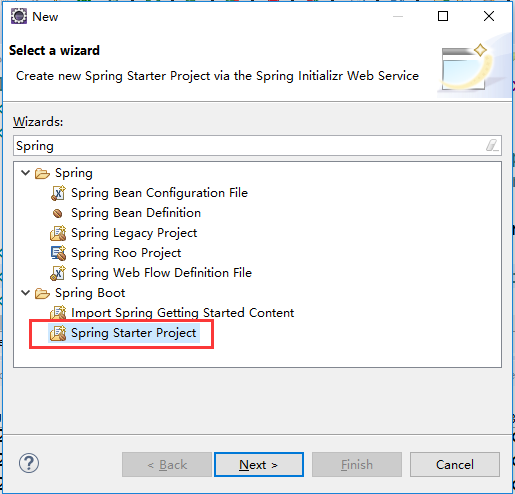
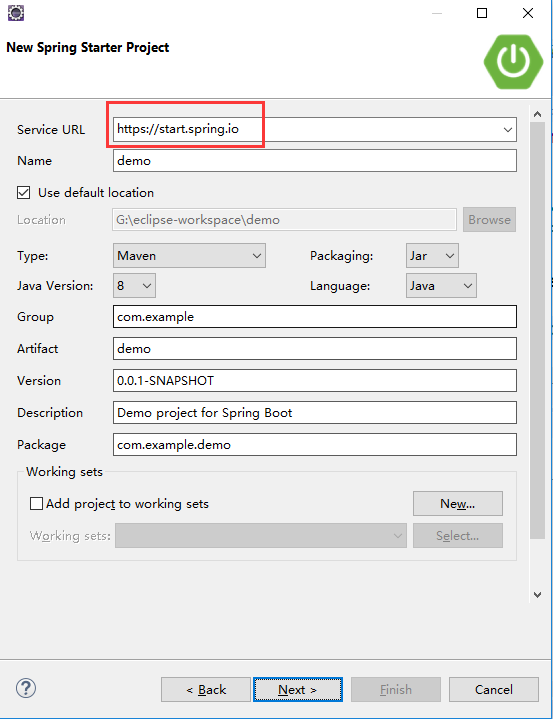
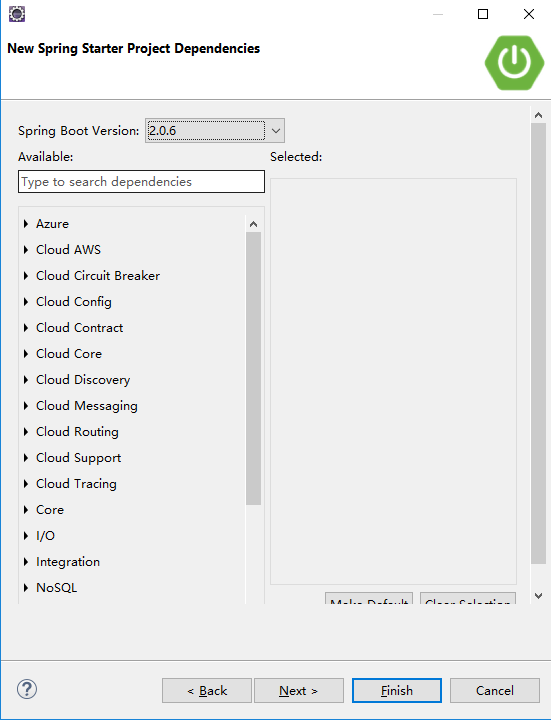
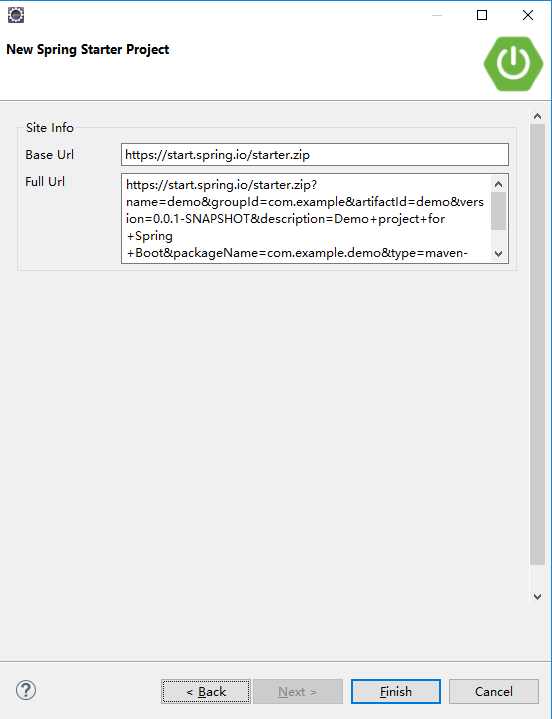
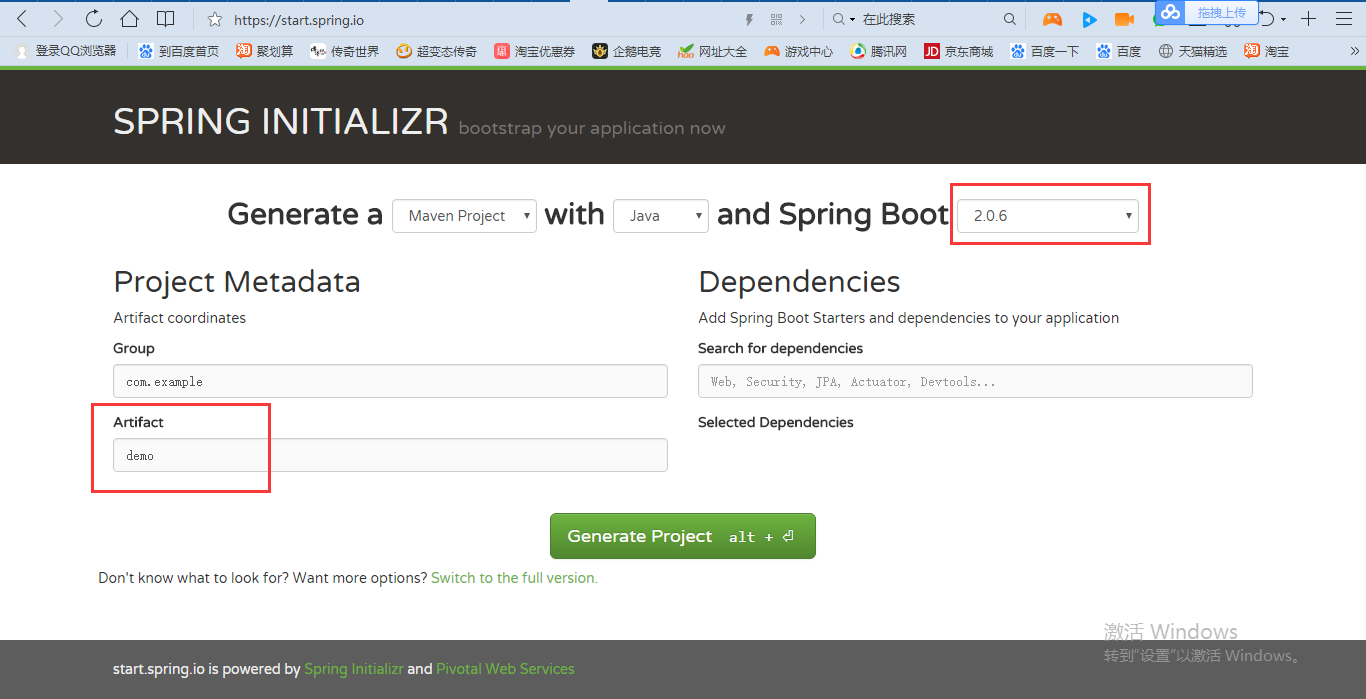
项目名demo,SpringBoot的版本2.0.6
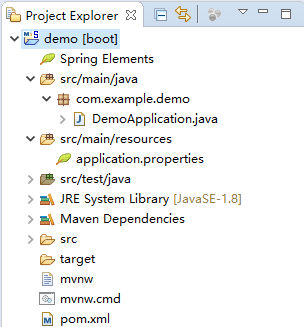
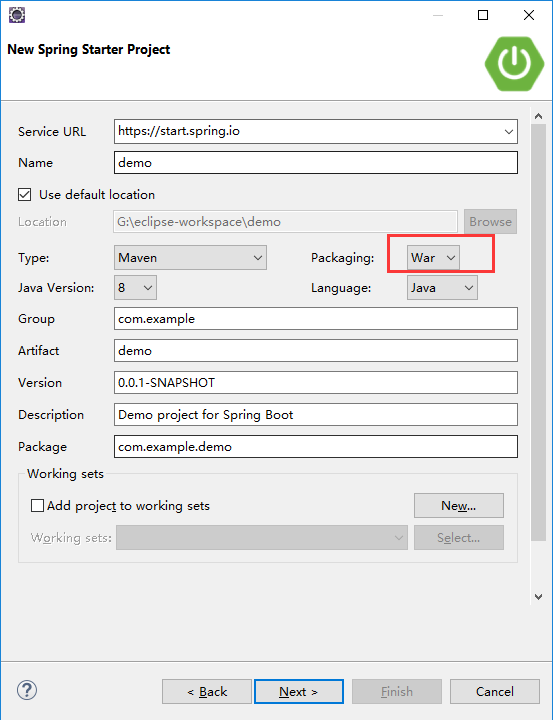
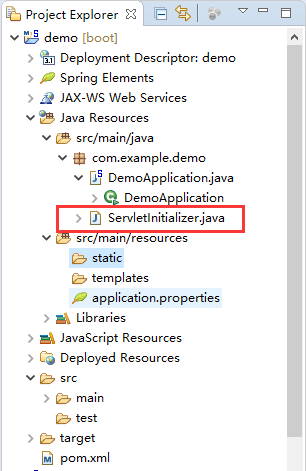
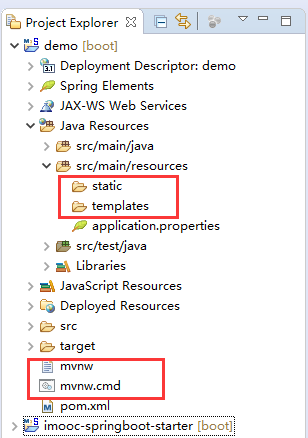
删了/demo/mvnw和/demo/mvnw.cmd。static文件夹包含静态文件,比如CSS、JS。templates文件夹是放模板的,SpringBoot官方推荐的模板是使用thymeleaf,SSM使用freemarker比较多。国产的Beetl也可以放到templates文件夹里面。
删掉/demo/src/test的内容,pom.xml删掉这一段
        <dependency>

            <groupId>org.springframework.boot</groupId>

            <artifactId>spring-boot-starter-test</artifactId>

            <scope>test</scope>

        </dependency>
运行/demo/src/main/java/com/example/demo/DemoApplication.java
  .   ____          _            __ _ _

 /\\ / ___'_ __ _ _(_)_ __  __ _ \ \ \ \

( ( )\___ | '_ | '_| | '_ \/ _` | \ \ \ \

 \\/  ___)| |_)| | | | | || (_| |  ) ) ) )

  '  |____| .__|_| |_|_| |_\__, | / / / /

 =========|_|==============|___/=/_/_/_/

 :: Spring Boot ::        (v2.0.6.RELEASE)

2018-10-27 05:21:21.096  INFO 19680 --- [           main] com.example.demo.DemoApplication         : Starting DemoApplication on DESKTOP-S07DGSI with PID 19680 (G:\eclipse-workspace\demo\target\classes started by ZHONGZHENHUA in G:\eclipse-workspace\demo)

2018-10-27 05:21:21.104  INFO 19680 --- [           main] com.example.demo.DemoApplication         : No active profile set, falling back to default profiles: default

2018-10-27 05:21:21.308  INFO 19680 --- [           main] ConfigServletWebServerApplicationContext : Refreshing org.springframework.boot.web.servlet.context.AnnotationConfigServletWebServerApplicationContext@7d68ef40: startup date [Sat Oct 27 05:21:21 CST 2018]; root of context hierarchy

2018-10-27 05:21:25.219  INFO 19680 --- [           main] o.s.b.w.embedded.tomcat.TomcatWebServer  : Tomcat initialized with port(s): 8080 (http)

2018-10-27 05:21:25.315  INFO 19680 --- [           main] o.apache.catalina.core.StandardService   : Starting service [Tomcat]

2018-10-27 05:21:25.316  INFO 19680 --- [           main] org.apache.catalina.core.StandardEngine  : Starting Servlet Engine: Apache Tomcat/8.5.34

2018-10-27 05:21:25.341  INFO 19680 --- [ost-startStop-1] o.a.catalina.core.AprLifecycleListener   : The APR based Apache Tomcat Native library which allows optimal performance in production environments was not found on the java.library.path: [C:\Program Files\Java\jre1.8.0_144\bin;C:\WINDOWS\Sun\Java\bin;C:\WINDOWS\system32;C:\WINDOWS;C:/Program Files/Java/jre1.8.0_144/bin/server;C:/Program Files/Java/jre1.8.0_144/bin;C:/Program Files/Java/jre1.8.0_144/lib/amd64;C:\Program Files\NVIDIA GPU Computing Toolkit\CUDA\v8.0\bin;C:\Program Files\NVIDIA GPU Computing Toolkit\CUDA\v8.0\libnvvp;C:\Program Files\NVIDIA GPU Computing Toolkit\CUDA\v9.0\bin;C:\Program Files\NVIDIA GPU Computing Toolkit\CUDA\v9.0\libnvvp;C:\Program Files\NVIDIA GPU Computing Toolkit\CUDA\v9.2\bin;C:\Program Files\NVIDIA GPU Computing Toolkit\CUDA\v9.2\libnvvp;C:\ProgramData\Oracle\Java\javapath;C:\WINDOWS\system32;C:\WINDOWS;C:\WINDOWS\System32\Wbem;C:\WINDOWS\System32\WindowsPowerShell\v1.0\;D:\BaiduNetdiskDownload\adt-bundle-windows-x86_64_20140101\adt-bundle-windows-x86_64_20140101\sdk\platform-tools;D:\BaiduNetdiskDownload\adt-bundle-windows-x86_64_20140101\adt-bundle-windows-x86_64_20140101\sdk\platform-tools;C:\Program Files\Java\jdk1.8.0_144\bin;C:\Program Files\Java\jdk1.8.0_144\jre\bin;I:\数据库\数据库3\mysql-5.7.21-winx64\mysql-5.7.21-winx64\bin;H:\NDK\android-ndk-r9d-windows-x86_64\android-ndk-r9d;D:\Users\ZHONGZHENHUA\Anaconda3\;C:\Program Files\Git\cmd;C:\Program Files\nodejs\;C:\Users\ZHONGZHENHUA\Server\maven\apache-maven-3.5.2\bin;C:\Program Files\TortoiseGit\bin;C:\WINDOWS\System32\OpenSSH\;C:\Program Files (x86)\NVIDIA Corporation\PhysX\Common;C:\Program Files\NVIDIA GPU Computing Toolkit\cudnn\bin;D:\Users\ZHONGZHENHUA\Anaconda3\Scripts;C:\Program Files\NVIDIA GPU Computing Toolkit\cudnn\bin;C:\ProgramData\NVIDIA GPU Computing Toolkit\v9.0;C:\Users\ZHONGZHENHUA\.dnx\bin;C:\Program Files\Microsoft DNX\Dnvm\;C:\Program Files\Microsoft SQL Server\130\Tools\Binn\;C:\ProgramData\NVIDIA GPU Computing Toolkit\v8.0;C:\Users\ZHONGZHENHUA\AppData\Local\Microsoft\WindowsApps;C:\Users\ZHONGZHENHUA\AppData\Roaming\npm;D:\Wind\Wind.NET.Client\WindNET\bin\;G:\eclipse-jee-2018-09-win32-x86_64\eclipse;;.]

2018-10-27 05:21:25.599  INFO 19680 --- [ost-startStop-1] o.a.c.c.C.[Tomcat].[localhost].[/]       : Initializing Spring embedded WebApplicationContext

2018-10-27 05:21:25.599  INFO 19680 --- [ost-startStop-1] o.s.web.context.ContextLoader            : Root WebApplicationContext: initialization completed in 4296 ms

2018-10-27 05:21:25.830  INFO 19680 --- [ost-startStop-1] o.s.b.w.servlet.ServletRegistrationBean  : Servlet dispatcherServlet mapped to [/]

2018-10-27 05:21:25.840  INFO 19680 --- [ost-startStop-1] o.s.b.w.servlet.FilterRegistrationBean   : Mapping filter: 'characterEncodingFilter' to: [/*]

2018-10-27 05:21:25.841  INFO 19680 --- [ost-startStop-1] o.s.b.w.servlet.FilterRegistrationBean   : Mapping filter: 'hiddenHttpMethodFilter' to: [/*]

2018-10-27 05:21:25.841  INFO 19680 --- [ost-startStop-1] o.s.b.w.servlet.FilterRegistrationBean   : Mapping filter: 'httpPutFormContentFilter' to: [/*]

2018-10-27 05:21:25.841  INFO 19680 --- [ost-startStop-1] o.s.b.w.servlet.FilterRegistrationBean   : Mapping filter: 'requestContextFilter' to: [/*]

2018-10-27 05:21:26.137  INFO 19680 --- [           main] o.s.w.s.handler.SimpleUrlHandlerMapping  : Mapped URL path [/**/favicon.ico] onto handler of type [class org.springframework.web.servlet.resource.ResourceHttpRequestHandler]

2018-10-27 05:21:26.457  INFO 19680 --- [           main] s.w.s.m.m.a.RequestMappingHandlerAdapter : Looking for @ControllerAdvice: org.springframework.boot.web.servlet.context.AnnotationConfigServletWebServerApplicationContext@7d68ef40: startup date [Sat Oct 27 05:21:21 CST 2018]; root of context hierarchy

2018-10-27 05:21:26.786  INFO 19680 --- [           main] s.w.s.m.m.a.RequestMappingHandlerMapping : Mapped "{[/error]}" onto public org.springframework.http.ResponseEntity<java.util.Map<java.lang.String, java.lang.Object>> org.springframework.boot.autoconfigure.web.servlet.error.BasicErrorController.error(javax.servlet.http.HttpServletRequest)

2018-10-27 05:21:26.790  INFO 19680 --- [           main] s.w.s.m.m.a.RequestMappingHandlerMapping : Mapped "{[/error],produces=[text/html]}" onto public org.springframework.web.servlet.ModelAndView org.springframework.boot.autoconfigure.web.servlet.error.BasicErrorController.errorHtml(javax.servlet.http.HttpServletRequest,javax.servlet.http.HttpServletResponse)

2018-10-27 05:21:26.889  INFO 19680 --- [           main] o.s.w.s.handler.SimpleUrlHandlerMapping  : Mapped URL path [/webjars/**] onto handler of type [class org.springframework.web.servlet.resource.ResourceHttpRequestHandler]

2018-10-27 05:21:26.892  INFO 19680 --- [           main] o.s.w.s.handler.SimpleUrlHandlerMapping  : Mapped URL path [/**] onto handler of type [class org.springframework.web.servlet.resource.ResourceHttpRequestHandler]

2018-10-27 05:21:27.412  INFO 19680 --- [           main] o.s.j.e.a.AnnotationMBeanExporter        : Registering beans for JMX exposure on startup

2018-10-27 05:21:27.573  INFO 19680 --- [           main] o.s.b.w.embedded.tomcat.TomcatWebServer  : Tomcat started on port(s): 8080 (http) with context path ''

2018-10-27 05:21:27.582  INFO 19680 --- [           main] com.example.demo.DemoApplication         : Started DemoApplication in 7.287 seconds (JVM running for 8.204)
因为没有配置controler,所以它运行了一遍就关掉了。
/demo/pom.xml
<?xml version="1.0" encoding="UTF-8"?>

<project xmlns="http://maven.apache.org/POM/4.0.0" xmlns:xsi="http://www.w3.org/2001/XMLSchema-instance"

    xsi:schemaLocation="http://maven.apache.org/POM/4.0.0 http://maven.apache.org/xsd/maven-4.0.0.xsd">

    <modelVersion>4.0.0</modelVersion>

    <groupId>com.example</groupId>

    <artifactId>demo</artifactId>

    <version>0.0.1-SNAPSHOT</version>

    <packaging>war</packaging>

    <name>demo</name>

    <description>Demo project for Spring Boot</description>

    <parent>

        <groupId>org.springframework.boot</groupId>

        <artifactId>spring-boot-starter-parent</artifactId>

        <version>2.0.6.RELEASE</version>

        <relativePath/> <!-- lookup parent from repository -->

    </parent>

    <properties>

        <project.build.sourceEncoding>UTF-8</project.build.sourceEncoding>

        <project.reporting.outputEncoding>UTF-8</project.reporting.outputEncoding>

        <java.version>1.8</java.version>

    </properties>

    <dependencies>

        <dependency>

            <groupId>org.springframework.boot</groupId>

            <artifactId>spring-boot-starter-web</artifactId>

        </dependency>

        <dependency>

            <groupId>org.springframework.boot</groupId>

            <artifactId>spring-boot-starter-tomcat</artifactId>

            <scope>provided</scope>

        </dependency>

    </dependencies>

    <build>

        <plugins>

            <plugin>

                <groupId>org.springframework.boot</groupId>

                <artifactId>spring-boot-maven-plugin</artifactId>

            </plugin>

        </plugins>

    </build>

</project>
第2章 构建springboot工程 2-2 使用Spring官方STS搭建SpringBoot工程的更多相关文章
- springboot入门系列(一):简单搭建springboot项目
Spring Boot 简单介绍 Spring Boot 本身并不提供Spring框架的核心特性以及扩展功能,只是用于快速.敏捷地开发新一代基于Spring框架的应用程序.也就是说,它并不是用来替代S ...
- Spring Boot快速搭建Web工程
先想一下,正常我们想要创建一个web服务,首先需要下载tomcat,创建web工程,配置各种web.xml,引入spring的配置,各种配置文件一顿倒腾.....下载有了spring boot,你创建 ...
- SpringBoot从入门到精通一(idea优雅搭建SpringBoot项目)
前言 在没有SpringBoot之前,我们搭建的是SSM(SpingMVC+Spring+Mybatis)项目,在搭建SSM项目的时候,我们要经过一系列的繁琐配置,例如:application,web ...
- SpringBoot入门教程(一)详解intellij idea搭建SpringBoot
最近公司有一个内部比赛(黑客马拉松),报名参加了这么一个赛事,在准备参赛作品的同时,由于参赛服务器需要自己搭建且比赛产生的代码不能外泄的,所以借着这个机会,本地先写了个测试的demo,来把tomcat ...
- STS搭建SpringBoot项目
开发工具:推荐IDEA . Spring Tool Suit 虽然很简单,但还是记录一下,图个热闹. 开始 >>> 1. File --> New --> Spring ...
- Springboot监控之二:Spring Boot Admin对Springboot服务进行监控
概述 Spring Boot 监控核心是 spring-boot-starter-actuator 依赖,增加依赖后, Spring Boot 会默认配置一些通用的监控,比如 jvm 监控.类加载.健 ...
- SpringBoot学习:在Interillj Idea上快速搭建SpringBoot项目
一.创建SpringBoot项目 二.导入Jar包(pom.xml) <?xml version="1.0" encoding="UTF-8"?> ...
- Spring Boot-IntelliJ IDEA搭建SpringBoot
点击create new project 点击next 这里基本都已经自动生成了,简单介绍下: Name:项目名称 Type:我们是Maven构建的,那么选择第一个Maven Project Pack ...
- 2019最新 Java商城秒杀系统的设计与实战视频教程(SpringBoot版)_2-2微服务项目的搭建-SpringBoot搭建多模块项目二
一些重要的配置文件直接复制过来了 jdbc和shiro的配置 application.properties里面的相关配置项的含义 日志界别的配置 数据返回到前端的json的配置 数据源的配置 需要新建 ...
随机推荐
- P1216 [IOI1994][USACO1.5]数字三角形 Number Triangles
P1216 [IOI1994][USACO1.5]数字三角形 Number Triangles 这个题吧,之前学DP的时候就做过一次了,其实还是挺简单的,如果一步一步按照找状态定义,找边界条件,找转移 ...
- IE跨Iframe时Session丢失问题
例如IIS下,可以打开IIS窗口——〉选择一个网站——〉属性——〉http头,增加一个http头 然后输入头名:P3P 输入头内容:CP=CAO PSA OUR 点评:与上一个方法类似,此方法也要求第 ...
- element-ui树结构懒加载
在实际项目中,往往树结构数据量较大,这时树节点必须懒加载 element-ui树的懒加载: <div style="width:100%;height:420px;overflow: ...
- 一个丰富的通知工具类 --第三方开源--NotifyUtil
把NotifyUtil Copy进自己的项目就好 实现有八种,作者在Demo里全部演示齐了,分别是 普通类型通知(单行) 普通类型通知(多行) 消息列表通知(含双图标) 含大图类型通知 自定义视图通知 ...
- nyoj-1092-数字分隔(二)
java大法好啊 思路:单独拿出整数部分分隔 题目链接 import java.math.BigDecimal; import java.util.Scanner; public class Main ...
- BEC translation exercise 2
Forest fires are a regular feature of Chile's hot, arid summers.智利夏天炙热.干燥,常发生森林火灾.A nearly decade-lo ...
- 细说移动前端Android联调
为什么要联调 A:正在疯狂coding的时候,产品MM过来,焦急的说两周前的一个页面在手机上显示略微错位,但小本上显示正常! B:本着爱折腾的原则,作为大前端,在移动互联网时代的基本技能. 联调的方式 ...
- uva10780(分解质因数)
可以直接用高精度来暴力求. 也可以不用高精度: 把m分解质因数,记录每个因数和它的次数.然后计算每个因数在n的阶乘里出现了多少次,再把这个次数除以它在m中的次数,就是可能的k值.取最小的k. #inc ...
- linux大于2T的磁盘格式化
fdisk默认只能格式小于2T的磁盘,我们经常会碰到大于2T的磁盘,我们不能fdisk 格式化. 我们得用parted 来的格式化 parted 命令可能没有,yum install -y parte ...
- swing之UI选择文件
package gui1; import java.awt.Container; import java.awt.FlowLayout; import java.awt.event.ActionEve ...