
MyBatis基于注解----增删改查
select sysdate from dual;

--账户表

--账户编号,账户卡号,账户密码,账户余额,账户状态,创建时间

drop table account;

create table account

(

 id  number(10) primary key,

 account_number varchar2(50) not null,

 account_pwd varchar2(10) not null,

 account_money number(10,2) not null,

 account_status number(5) check(account_status in(0,1)),

 creation_time date default sysdate

);

--创建序列

drop sequence seq_account;

create sequence seq_account;

--添加数据

insert into account(

id,account_number,account_pwd,

account_money,account_status,creation_time

)

values

(seq_account.nextval,'6402211990052633201','123',

10.00,1,to_date('2010-08-09 12:12:12','yyyy-MM-dd hh24:mi:ss'));

insert into account(

id,account_number,account_pwd,

account_money,account_status,creation_time

)

values

(seq_account.nextval,'6402211990052633202','123',

20.00,1,to_date('2010-08-10 12:12:12','yyyy-MM-dd hh24:mi:ss'));

insert into account(

id,account_number,account_pwd,

account_money,account_status,creation_time

)

values

(seq_account.nextval,'6402211990052633203','123',

30.00,1,to_date('2010-08-11 12:12:12','yyyy-MM-dd hh24:mi:ss'));

insert into account(

id,account_number,account_pwd,

account_money,account_status,creation_time

)

values

(seq_account.nextval,'6402211990052633204','123',

40.00,1,to_date('2010-08-12 12:12:12','yyyy-MM-dd hh24:mi:ss'));

insert into account(

id,account_number,account_pwd,

account_money,account_status,creation_time

)

values

(seq_account.nextval,'6402211990052633205','123',

50.00,1,to_date('2010-08-13 12:12:12','yyyy-MM-dd hh24:mi:ss'));

insert into account(

id,account_number,account_pwd,

account_money,account_status,creation_time

)

values

(seq_account.nextval,'6402211990052633206','123',

60.00,1,to_date('2010-08-14 12:12:12','yyyy-MM-dd hh24:mi:ss'));

insert into account(

id,account_number,account_pwd,

account_money,account_status,creation_time

)

values

(seq_account.nextval,'6402211990052633207','123',

70.00,1,to_date('2010-08-15 12:12:12','yyyy-MM-dd hh24:mi:ss'));

select * from (select rownum r,a.* from account a where rownum<=6)t where t.r>3

select * from (select rownum r,a.* from account a where rownum<=#{endrow})t where t.r>#{startrow}

insert into account(id,account_number,account_pwd,account_money,account_status,creation_time) values(seq_account.nextval,#{account_number},#{account_pwd},#{account_money},#{account_status},#{creation_time});

update account set account_number=#{account_number},account_pwd=#{account_pwd},account_money=#{account_money},account_status=#{account_status},creation_time=#{creation_time} where id=#{id}
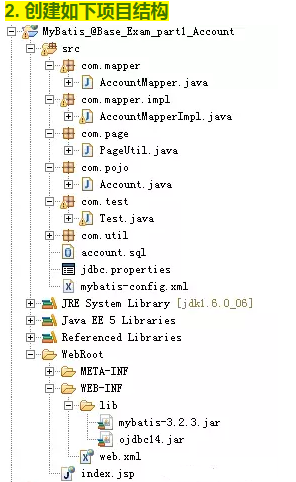
3.在com.pojo包下创建Account.java类
public class Account {

	  private Integer id               ;

	  private String account_number   ;

	  private String account_pwd      ;

	  private Double account_money    ;

	  private Integer account_status   ;

	  private Date creation_time    ;

	public Account() {

		super();

	}

	public Account(String accountNumber, String accountPwd,

			Double accountMoney, Integer accountStatus, Date creationTime) {

		account_number = accountNumber;

		account_pwd = accountPwd;

		account_money = accountMoney;

		account_status = accountStatus;

		creation_time = creationTime;

	}

	public Account(Integer id, String accountNumber, String accountPwd,

			Double accountMoney, Integer accountStatus, Date creationTime) {

		super();

		this.id = id;

		account_number = accountNumber;

		account_pwd = accountPwd;

		account_money = accountMoney;

		account_status = accountStatus;

		creation_time = creationTime;

	}

	public Integer getId() {

		return id;

	}

	public void setId(Integer id) {

		this.id = id;

	}

	public String getAccount_number() {

		return account_number;

	}

	public void setAccount_number(String accountNumber) {

		account_number = accountNumber;

	}

	public String getAccount_pwd() {

		return account_pwd;

	}

	public void setAccount_pwd(String accountPwd) {

		account_pwd = accountPwd;

	}

	public Double getAccount_money() {

		return account_money;

	}

	public void setAccount_money(Double accountMoney) {

		account_money = accountMoney;

	}

	public Integer getAccount_status() {

		return account_status;

	}

	public void setAccount_status(Integer accountStatus) {

		account_status = accountStatus;

	}

	public Date getCreation_time() {

		return creation_time;

	}

	public void setCreation_time(Date creationTime) {

		creation_time = creationTime;

	}

	@Override

	public String toString() {

		return "Account [account_money=" + account_money + ", account_number="

				+ account_number + ", account_pwd=" + account_pwd

				+ ", account_status=" + account_status + ", creation_time="

				+ creation_time + ", id=" + id + "]";

	}

}
4.在com.page包下创建分页工具类PageUtil.java
public class PageUtil {

	private Integer pageno; //当前页

	private Integer pagesize; //页面大小

	private Integer totalcount; //同条数

	private Integer totalpage;  //同页数

	private Integer startrow;   //起始行

	private Integer endrow;     //结束行

	public PageUtil() {

	}

	/**

	 * 普通分页

	 * @param pageno

	 * @param pagesize

	 * @param totalcount

	 */

    public PageUtil(Integer pageno, Integer pagesize, Integer totalcount) {

    	this.pageno = pageno;

		this.pagesize = pagesize;

		this.startrow=(pageno-1)*pagesize;

		this.endrow=pageno*pagesize;

		this.totalcount = totalcount;

		this.setTotalpage(totalcount, pagesize);

	}

	public Integer getPageno() {

		return pageno;

	}

	public void setPageno(Integer pageno) {

		this.pageno = pageno;

	}

	public Integer getPagesize() {

		return pagesize;

	}

	public void setPagesize(Integer pagesize) {

		this.pagesize = pagesize;

	}

	public Integer getTotalcount() {

		return totalcount;

	}

	public void setTotalcount(Integer totalcount) {

		this.totalcount = totalcount;

	}

	public Integer getTotalpage() {

		return totalpage;

	}

   /**

    * 设置总页数

    * @param totalcount

    * @param pagesize

    */

	public void setTotalpage(Integer totalcount,Integer pagesize) {

		this.totalpage = totalcount%pagesize==0?totalcount/pagesize:totalcount/pagesize+1;

	}

	public Integer getStartrow() {

		return startrow;

	}

	public void setStartrow(Integer startrow) {

		this.startrow = startrow;

	}

	public Integer getEndrow() {

		return endrow;

	}

	public void setEndrow(Integer endrow) {

		this.endrow = endrow;

	}

}
5.在com.mapper包下创建数据访问层映射接口AccountMapper.java
public interface AccountMapper {

	/**

	 * 1.分页查询

	 * @param pageutil

	 * @return

	 */

	 @Select("select * from (select rownum r,a.* from account a where rownum<=#{endrow})t where t.r>#{startrow}")

	 List<Account> finaAll(PageUtil pageutil);

	 /**

	  * 2.根据id查询

	  * @param id

	  * @return

	  */

	 @Select("select * from account where id=#{id}")

	 Account findById(Integer id);

	 /**\

	  * 3.保存账户对象

	  * @param account

	  * @return

	  */

	 @Insert("insert into account(id,account_number,account_pwd,account_money,account_status,creation_time) values(seq_account.nextval,#{account_number},#{account_pwd},#{account_money},#{account_status},#{creation_time})")

	 Integer saveAccount(Account account);

	 /**\

	  * 4.修改对象

	  * @param account

	  * @return

	  */

	 @Update("update account set account_number=#{account_number},account_pwd=#{account_pwd},account_money=#{account_money},account_status=#{account_status},creation_time=#{creation_time} where id=#{id}")

	 Integer updateAccount(Account account);

	 /**

	  * 5.根据id删除

	  * @param id

	  * @return

	  */

	 @Delete("delete from account where id=#{id}")

	 Integer deleteById(Integer id);

}
6.在src下创建数据库属性文件jdbc.properties

driver=oracle.jdbc.driver.OracleDriver

url=jdbc\:oracle\:thin\:@127.0.0.1\:1521\:orcl

username=****

password=****
7.在src下创建主配置文件mybatis-config.xml
<configuration>

  <properties resource="jdbc.properties"/>

  <environments default="development">

    <environment id="development">

       <transactionManager type="JDBC"/>

       <dataSource type="POOLED">

         <property name="driver" value="${driver}"/>

         <property name="url" value="${url}"/>

         <property name="username" value="${username}"/>

         <property name="password" value="${password}"/>

       </dataSource>

    </environment>

  </environments>

  <mappers>

    <mapper class="com.mapper.AccountMapper"/>

  </mappers>

</configuration>
8.在com.util包下创建获取SqlSession工具类MyBatisUtil.java
public class MyBatisUtil {

	private static SqlSessionFactory sqlSessionFactory=null;

	static{

		try {

			Reader reader=Resources.getResourceAsReader("mybatis-config.xml");

			sqlSessionFactory=new SqlSessionFactoryBuilder().build(reader);

		} catch (IOException e) {

			e.printStackTrace();

			System.out.println("解析xml文件或创建工厂出错!");

		}

	}

	/**

	 * 获取SqlSession对象

	 * @param isCommit

	 * @return

	 */

	public static SqlSession getSqlSession(boolean isCommit){

		return sqlSessionFactory.openSession(isCommit);

	}

}
9.在com.mapper包下创建数据访问层映射接口实现类AccountMapperImpl.java
public class AccountMapperImpl implements AccountMapper {

	private SqlSession sqlSession=MyBatisUtil.getSqlSession(true);

    private AccountMapper mapper=sqlSession.getMapper(AccountMapper.class);

	public Integer deleteById(Integer id) {

		return mapper.deleteById(id);

	}

	public List<Account> finaAll(PageUtil pageutil) {

		return mapper.finaAll(pageutil);

	}

	public Account findById(Integer id) {

		return mapper.findById(id);

	}

	public Integer saveAccount(Account account) {

		return mapper.saveAccount(account);

	}

	public Integer updateAccount(Account account) {

		return mapper.updateAccount(account);

	}

	public SqlSession getSqlSession() {

		return sqlSession;

	}

	public void setSqlSession(SqlSession sqlSession) {

		this.sqlSession = sqlSession;

	}

	public AccountMapper getMapper() {

		return mapper;

	}

	public void setMapper(AccountMapper mapper) {

		this.mapper = mapper;

	}

}
10.在com.test包下创建测试类Test.java
public class Test {

	public static void main(String[] args) {

		AccountMapper mapper=new AccountMapperImpl();

		System.out.println("---------------1.分页查询前三条:------------------");

		List<Account> list=mapper.finaAll(new PageUtil(1, 3, 7));

		for (Account account : list) {

			System.out.println(account);

		}

		System.out.println("---------------1.根据id查询第5条:------------------");

		Account account=mapper.findById(5);

		System.out.println(account);

	}

}
MyBatis基于注解----增删改查的更多相关文章
- MyBatis -- 对表进行增删改查(基于注解的实现)
1.MyBatis对数据库表进行增/删/改/查 前一篇使用基于XML的方式实现对数据库的增/删/改/查 以下我们来看怎么使用注解的方式实现对数据库表的增/删/改/查 1.1 首先须要定义映射sql的 ...
- MyBatis简单的增删改查以及简单的分页查询实现
MyBatis简单的增删改查以及简单的分页查询实现 <? xml version="1.0" encoding="UTF-8"? > <!DO ...
- Mybatis入门之增删改查
Mybatis入门之增删改查 Mybatis如果操作成功,但是数据库没有更新那就是得添加事务了.(增删改都要添加)----- 浪费了我40多分钟怀疑人生后来去百度... 导入包: 引入配置文件: sq ...
- Mybatis实现简单增删改查
Mybatis的简单应用 学习内容: 需求 环境准备 代码 总结: 学习内容: 需求 使用Mybatis实现简单增删改查(以下是在IDEA中实现的,其他开发工具中,代码一样) jar 包下载:http ...
- 基于SSM之Mybatis接口实现增删改查(CRUD)功能
国庆已过,要安心的学习了. SSM框架以前做过基本的了解,相比于ssh它更为优秀. 现基于JAVA应用程序用Mybatis接口简单的实现CRUD功能: 基本结构: (PS:其实这个就是用的Mapper ...
- mybatis中的增删改查操作
在这一个部分,主要进行增删改查的示例书写. 增删改查可以基于xml的,也可以基于注解的方式. 一:对单条数据的查询 1.目录结构 这个使得目录更加清晰 2.User.java 这个使用以前的user表 ...
- SpringMVC,MyBatis商品的增删改查
一.需求 商品的增删改查 二.工程结构 三.代码 1.Mapper层 (1) ItemsMapperCustom.java package com.tony.ssm.mapper; import ja ...
- SpringBoot2+Druid+MyBatis+MySql实现增删改查
1.配置pom.xml文件 <?xml version="1.0" encoding="UTF-8"?> <project xmlns=&qu ...
- Mybatis的简单增删改查
刚开始学习Mybatis可以先看下官方文档,MyBatis是支持定制化SQL.存储过程以及高级映射的优秀的持久层框架.MyBatis避免了几乎所有的JDBC代码和手工设置参数以及抽取结果集.MyBat ...
随机推荐
- struts2实现文件的上传和下载实例[转]
实现原理 Struts 2是通过Commons FileUpload文件上传. Commons FileUpload通过将HTTP的数据保存到临时文件夹,然后Struts使用fileUpload拦截器 ...
- R语言学习笔记(2)
第二章:创建数据集 一 R中的数据 二 数据的输入 一R中的数据 数据集:通常是由数据构成的一个矩形数组,行表示观测,列表示变量 R可以处理的数据类型:数值型.字符型.逻辑型.复数型(虚数).原生型( ...
- nodejs mysql 操作数据库方法二
node.js 开发指南 – Node.js 连接 MySQL 并进行数据库操作 通常在NodeJS开发中我们经常涉及到操作数据库,尤其是 MySQL ,作为应用最为广泛的开源数据库则成为我们的首选, ...
- keystone uwsgi failed
~$ /usr/local/bin/uwsgi /etc/keystone/keystone-uwsgi-public.ini[uWSGI] getting INI configuration fro ...
- 用外部物理路由器时使用Neutron dhcp-agent提供的metadata服务(by quqi99)
作者:张华 发表于:2015-12-29版权声明:可以任意转载,转载时请务必以超链接形式标明文章原始出处和作者信息及本版权声明 ( http://blog.csdn.net/quqi99 ) 环境搭 ...
- 维度属性的KeyColumns,NameColumn和ValueColumn
维度的每一个属性都有KeyColumns,NameColumn和ValueColumn 1,如何理解KeyColumns,NameColumn和ValueColumn?对一行记录有不同的标识列,但 ...
- linux查看网卡速度
ethtool eth0 会包含速度模式等各项属性信息 lspci|grep -i ether 可以查看硬件设备具体型号,会包含硬件厂商及信息 dmesg |grep -i eth 会显示系统 ...
- JS将数字转换成三位逗号分隔的样式
function formatNum(num) { if(!/^(\+|-)?(\d+)(\.\d+)?$/.test(num)){alert("wrong!"); return ...
- 一直想写的关于tarjan算法的理解——向struct edge大佬低头
tarjan的算法精髓就是dfn[]和low[]数组 dfn[i]表示在该节点被搜索的次序(时间戳) low[i]表示i或i的子树可以追溯到的最早的栈中节点 判断有强连通分量的条件就是 dfn[i]= ...
- C#中DEV控件,XtraTabPage得小方法
DEV控件设计窗体程序,XtraTabPage用到的小方法,欢迎大家评论,分享技术! //DEV中的选项卡 private bool TabCtlPageExist(string pageName) ...