
利用PHP连接数据库——实现用户登录注册功能以及管理员对用户注册的审核功能
1.用户注册页面
页面效果: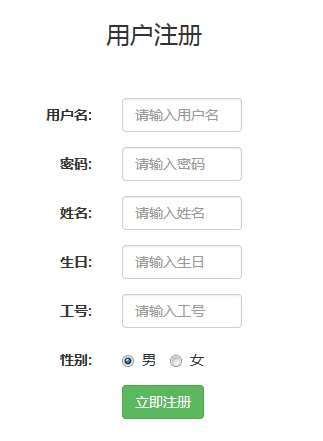
代码如下:
<!DOCTYPE html>
<html>
<head>
<meta charset="UTF-8">
<title></title>
<script src="bootstrap/js/jquery-1.11.2.min.js"></script>
<script src="bootstrap/js/bootstrap.min.js"></script>
<link href="bootstrap/css/bootstrap.min.css" rel="stylesheet" type="text/css"/>
</head>
<body>
<style>
.title{
margin-left: 550px;
margin-top: 50px;
}
.quanju{
margin-left: 400px;
margin-top: -50px;
}
.uid,.pwd,.name{
max-width: 120px;
}
.yangshi1{
margin-top: 100px;
}
.code{
max-width: 120px;
}
.birthday{
max-width: 120px;
}
</style>
<body>
<form class="form-horizontal" role="form" action="zhucechuli.php" method="post">
<h3 class="title">用户注册</h3>
<div class="quanju">
<div class="form-group yangshi1">
<label for="firstname" class="col-sm-2 control-label">用户名:</label>
<div class="col-sm-10">
<input type="text" class="form-control uid" name="uid" placeholder="请输入用户名">
</div>
</div>
<div class="form-group yangshi2">
<label for="lastname" class="col-sm-2 control-label">密码:</label>
<div class="col-sm-10">
<input type="text" class="form-control pwd" name="pwd" placeholder="请输入密码">
</div>
</div>
<div class="form-group yangshi2">
<label for="lastname" class="col-sm-2 control-label">姓名:</label>
<div class="col-sm-10">
<input type="text" class="form-control name" name="name" placeholder="请输入姓名">
</div>
</div>
<div class="form-group yangshi2">
<label for="lastname" class="col-sm-2 control-label">生日:</label>
<div class="col-sm-10">
<input type="text" class="form-control birthday" name="birthday" placeholder="请输入生日">
</div>
</div>
<div class="form-group yangshi2">
<label for="lastname" class="col-sm-2 control-label">工号:</label>
<div class="col-sm-10">
<input type="text" class="form-control code" name="code" placeholder="请输入工号">
</div>
</div>
<div class="form-group yangshi2">
<label for="lastname" class="col-sm-2 control-label">性别:</label>
<div class="col-sm-10">
<label class="radio-inline">
<input type="radio" name="sex" value="男" checked="checked"> 男
</label>
<label class="radio-inline">
<input type="radio" name="sex" value="女" > 女
</label>
</div>
</div>
<div class="form-group">
<div class="col-sm-offset-2 col-sm-10">
<button type="submit" class="btn btn-success" value="注册" onclick="return zhuce()">
立即注册
</button>
</div>
</div>
</div>
</form>
</body>
<script>
function zhuce(){
var uid = document.getElementsByTagName("input")[0].value;
if(uid==""){
alert("输入的用户名有误!");
return false;
}
var pwd = document.getElementsByTagName("input")[1].value;
if(pwd==""){
alert("输入的密码有误!");
return false;
}
var name = document.getElementsByTagName("input")[2].value;
if(name==""){
alert("输入的姓名有误!");
return false;
}
var birthday = document.getElementsByTagName("input")[3].value;
if(birthday==""){
alert("输入的生日有误!");
return false;
}
var code = document.getElementsByTagName("input")[4].value;
if(code==""){
alert("输入的工号有误!");
return false;
}
}
</script>
</html>
php处理
<?php
$uid = $_POST["uid"];
$pwd = $_POST["pwd"];
$name = $_POST["name"];
$sex = $_POST["sex"];
$birthday = $_POST["birthday"];
$code = $_POST["code"];
require_once "./DBDA.class.php";
$db = new DBDA();
$sql ="insert into userinfo values('{$uid}','{$pwd}','{$name}','{$sex}','{$birthday}','{$code}',0)";
$r = $db->query($sql,1);
if($r){
header("location:login.php");
}else{
echo "登录失败!";
}
2.用户登录页面
页面效果: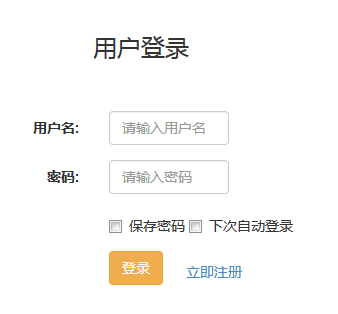
代码如下:
<!DOCTYPE html>
<html>
<head>
<meta charset="UTF-8">
<title></title>
<script src="bootstrap/js/jquery-1.11.2.min.js"></script>
<script src="bootstrap/js/bootstrap.min.js"></script>
<link href="bootstrap/css/bootstrap.min.css" rel="stylesheet" type="text/css"/>
</head>
<style>
.title{
margin-left: 550px;
margin-top: 150px;
}
.quanju{
margin-left: 400px;
margin-top: -150px;
}
.name,.pwd{
max-width: 120px;
}
.yangshi1{
margin-top: 200px;
}
</style>
<body>
<form class="form-horizontal" role="form" action="loginchuli.php" method="post">
<h3 class="title">用户登录</h3>
<div class="quanju">
<div class="form-group yangshi1">
<label for="firstname" class="col-sm-2 control-label">用户名:</label>
<div class="col-sm-10">
<input type="text" class="form-control name" name="uid" placeholder="请输入用户名">
</div>
</div>
<div class="form-group yangshi2">
<label for="lastname" class="col-sm-2 control-label">密码:</label>
<div class="col-sm-10">
<input type="text" class="form-control pwd" name="pwd" placeholder="请输入密码">
</div>
</div>
<div class="form-group">
<div class="col-sm-offset-2 col-sm-10">
<div class="checkbox">
<label>
<input type="checkbox">
保存密码 </label>
<label>
<input type="checkbox">
下次自动登录 </label>
</div>
</div>
</div>
<div class="form-group">
<div class="col-sm-offset-2 col-sm-10">
<button type="submit" class="btn btn-warning" value="登录" onclick="return login()" >
登录
</button>
</div>
</div>
</div>
</form>
<a href="register.php">
<button type="submit" value="立即注册" class="btn btn-link" style="margin-left: 630px; margin-top: -80px;">
立即注册
</button>
</a>
</body>
<script>
function login(){
var uid = document.getElementsByTagName("input")[0].value;
if(uid==""){
alert("请输入用户名!");
return false;
}
var pwd = document.getElementsByTagName("input")[1].value;
if(pwd==""){
alert("请输入密码!");
return false;
}
}
</script>
</html>
php处理
<?php
$uid = $_POST["uid"];
$pwd = $_POST["pwd"];
require_once "./DBDA.class.php";
$db = new DBDA();
$sql = "select * from userinfo where uid='{$uid}'";
$arr = $db->query($sql,0);
if($arr[0][1]==$pwd && !empty($pwd)){
if($arr[0][6]){
echo "登录成功!";
}else{
echo "该账号未通过审核!";
}
}else{
echo "用户名或密码错误!";
}
3.管理员审核页面
页面效果: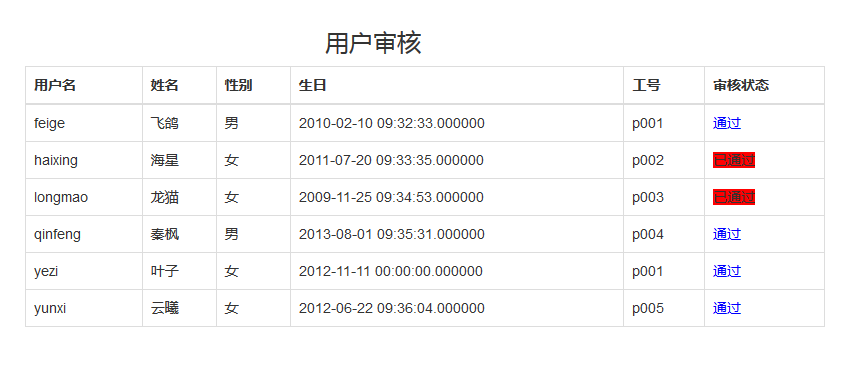
代码如下:
<!DOCTYPE html>
<html>
<head>
<meta charset="UTF-8">
<title></title>
<script src="bootstrap/js/jquery-1.11.2.min.js"></script>
<script src="bootstrap/js/bootstrap.min.js"></script>
<link href="bootstrap/css/bootstrap.min.css" rel="stylesheet" type="text/css"/>
</head>
<body>
<h3 style="margin-left: 550px; margin-top: 100px;">用户审核</h3>
<table class="table table-bordered" style="max-width: 800px; margin-left: 250px;">
<thead>
<tr>
<th>用户名</th>
<th>姓名</th>
<th>性别</th>
<th>生日</th>
<th>工号</th>
<th>审核状态</th>
</tr>
</thead>
<tbody>
<?php
require_once "./DBDA.class.php";
$db = new DBDA();
$sql = "select * from userinfo";
$arr = $db->query($sql,0);
foreach($arr as $v){
//使用三元运算符进行审核状态的判断
$status = $v[6]?"<span style=''>已通过</span>":"<a href='reviewchuli.php?uid={$v[0]}' style='color: blue'>通过</a>";
echo "<tr>
<td>{$v[0]}</td>
<td>{$v[1]}</td>
<td>{$v[2]}</td>
<td>{$v[3]}</td>
<td>{$v[4]}</td>
<td>{$v[5]}</td>
<td>{$status}</td>
</tr>";
}
?>
</tbody>
</table>
</body>
</html>
php处理
<?php
$uid = $_GET["uid"];
require_once "./DBDA.class.php";
$db = new DBDA();
$sql = "update userinfo set status=1 where uid='{$uid}'";
$arr = $db->query($sql,1);
if($arr){
header("location:administrators.php");
}else{
echo "审核失败!";
}
利用PHP连接数据库——实现用户登录注册功能以及管理员对用户注册的审核功能的更多相关文章
- Java Spring+Mysql+Mybatis 实现用户登录注册功能
前言: 最近在学习Java的编程,前辈让我写一个包含数据库和前端的用户登录功能,通过看博客等我先是写了一个最基础的servlet+jsp,再到后来开始用maven进行编程,最终的完成版是一个 Spri ...
- JavaWeb实现用户登录注册功能实例代码(基于Servlet+JSP+JavaBean模式)
一.Servlet+JSP+JavaBean开发模式(MVC)介绍 Servlet+JSP+JavaBean模式(MVC)适合开发复杂的web应用,在这种模式下,servlet负责处理用户请求,jsp ...
- flask 开发用户登录注册功能
flask 开发用户登录注册功能 flask开发过程议案需要四个模块:html页面模板.form表单.db数据库操作.app视图函数 1.主程序 # app.py # Auther: hhh5460 ...
- javaweb学习总结(二十二)——基于Servlet+JSP+JavaBean开发模式的用户登录注册
一.Servlet+JSP+JavaBean开发模式(MVC)介绍 Servlet+JSP+JavaBean模式(MVC)适合开发复杂的web应用,在这种模式下,servlet负责处理用户请求,jsp ...
- JavaWeb学习 (二十一)————基于Servlet+JSP+JavaBean开发模式的用户登录注册
一.Servlet+JSP+JavaBean开发模式(MVC)介绍 Servlet+JSP+JavaBean模式(MVC)适合开发复杂的web应用,在这种模式下,servlet负责处理用户请求,jsp ...
- 基于Servlet+JSP+JavaBean开发模式的用户登录注册
http://www.cnblogs.com/xdp-gacl/p/3902537.html 一.Servlet+JSP+JavaBean开发模式(MVC)介绍 Servlet+JSP+JavaBea ...
- javaweb(二十二)——基于Servlet+JSP+JavaBean开发模式的用户登录注册
一.Servlet+JSP+JavaBean开发模式(MVC)介绍 Servlet+JSP+JavaBean模式(MVC)适合开发复杂的web应用,在这种模式下,servlet负责处理用户请求,jsp ...
- android安卓Sqlite数据库实现用户登录注册
看了很多别人写的安卓SQlite数据的操作代码,一点也不通俗易懂,我觉得我写的不错,而且安卓项目也用上了,所以在博客园里保存分享一下!建立一个类 并继承SQLiteOpenHelper public ...
- Django实现用户登录注册
本文将会介绍小白如何完成一个用户登录注册系统 新建一个Django项目,名字为login_register,并且使用命令manage.py startapp.User(名字自己随便起) 最终djang ...
随机推荐
- deque双端队列容器
//deque双端队列容器 //deque双端队列容器与vector一样,采用线性表顺序存储结构,但与vector不同的是, //deque采用的分块线性存储结构来存储数据,每块的大小一般为512字节 ...
- 【BZOJ3289】Mato的文件管理 莫队+树状数组
题目大意:给定一个长度为 N 的序列,M 个询问,每次询问区间逆序对的个数. 题解:用树状数组加速答案转移. 代码如下 #include <bits/stdc++.h> #define f ...
- C# 中Web.config文件的读取与写入
asp.net2.0新添加了对web.config直接操作的功能.开发的时候有可能用到在web.config里设置配置文件,其实是可以通过程序来设置这些配置节的. asp.net2.0需要添加引用: ...
- JavaScrip相关知识总结
1.javascript是一种基于对象的语言,其中有四个常用的“全局对象”的成员使用,因为没有“全局对象关键字global”而直接使用,所以感觉像违背了JavaScript基于对象编程的原则,但其实是 ...
- IE jQuery ajax 请求缓存问题
我最近在IE下测试开发我们的系统,经常出现改过的jsp页面,刷新IE后也不能显示,这就是IE的缓存问题,查了一下百度,说是IE9在ajax进行请求时,如果两次请求url相同,则不会请求服务器,而是从缓 ...
- C++ template一些体悟(2)
class template的一般化设计之外,特别针对某些参数做特殊设计 #include <iostream> using namespace std; //一般设计 template& ...
- 7.Django
1.遍历数据 2.正则表达式匹配数字 ##url超链接 ##配置url ##POST请求需要设置csrf_token
- phpcms 标签含义大全
{template "content","header"} ---------- 调用根目录下phpcms\template\content\header ...
- 关于MyBase 7.0 破解的方法
Mybase 是一个功能强劲且可随心所欲自定义格式及层次关系的通用资料管理软件, 可用于管理各种各样的信息,如一:各类文档.文件.资料.名片.事件.日记.项目.笔记.下载的精华.收集的各种资料等等,即 ...
- Go-day06
今日内容概要: 1.interface接口 2.反射 一.接口 接口定义 1.Interface类型可以定义一组方法,当时不需要实现,并且interface不能包含任何变量 2.接口定义 type e ...