
SpringBoot系列——Thymeleaf模板
前言
thymeleaf是springboot官方推荐使用的java模板引擎,在springboot的参考指南里的第28.1.10 Template Engines中介绍并推荐使用thymeleaf,建议我们应该避免使用jsp,jsp的本质是一个java的servlet类,jsp引擎将jsp的内容编译成.class,"out.write"输出到response再响应到浏览器,虽然java是一次编译,到处运行,但也大大增加了服务器压力,而且jsp将后台java语言嵌入页面,还要放入服务容器才能打开,前后端不分离,严重增加了前端工程师的开发工作、效率。
thymeleaf官网对thymeleaf的介绍:
Thymeleaf is a modern server-side Java template engine for both web and standalone environments.
Thymeleaf's main goal is to bring elegant natural templates to your development workflow — HTML that can be correctly displayed in browsers and also work as static prototypes, allowing for stronger collaboration in development teams.
With modules for Spring Framework, a host of integrations with your favourite tools, and the ability to plug in your own functionality, Thymeleaf is ideal for modern-day HTML5 JVM web development — although there is much more it can do.
thymeleaf使用教程,骚操作:鼠标右键,翻译成简体中文再看。
thymeleaf使用th属性赋予每个标签与后台交互的能力,当html文件在本地直接用浏览器打开,浏览器引擎会忽略掉th属性,并正常渲染页面,当把html文件放到服务容器访问,th属性与后台交互,获取数据替换原先的内容,这样前端工程师在编写html页面时,在本地开发,正常实现页面逻辑效果即可,数据先写死,当放到服务容器时数据从后台获取。
spring对thymeleaf的配置,来自springboot参考手册,Common application properties:https://docs.spring.io/spring-boot/docs/2.1.0.RELEASE/reference/htmlsingle/#common-application-properties
# THYMELEAF (ThymeleafAutoConfiguration)

spring.thymeleaf.cache=true # Whether to enable template caching.

spring.thymeleaf.check-template=true # Whether to check that the template exists before rendering it.

spring.thymeleaf.check-template-location=true # Whether to check that the templates location exists.

spring.thymeleaf.enabled=true # Whether to enable Thymeleaf view resolution for Web frameworks.

spring.thymeleaf.enable-spring-el-compiler=false # Enable the SpringEL compiler in SpringEL expressions.

spring.thymeleaf.encoding=UTF- # Template files encoding.

spring.thymeleaf.excluded-view-names= # Comma-separated list of view names (patterns allowed) that should be excluded from resolution.

spring.thymeleaf.mode=HTML # Template mode to be applied to templates. See also Thymeleaf's TemplateMode enum.

spring.thymeleaf.prefix=classpath:/templates/ # Prefix that gets prepended to view names when building a URL.

spring.thymeleaf.reactive.chunked-mode-view-names= # Comma-separated list of view names (patterns allowed) that should be the only ones executed in CHUNKED mode when a max chunk size is set.

spring.thymeleaf.reactive.full-mode-view-names= # Comma-separated list of view names (patterns allowed) that should be executed in FULL mode even if a max chunk size is set.

spring.thymeleaf.reactive.max-chunk-size=0B # Maximum size of data buffers used for writing to the response.

spring.thymeleaf.reactive.media-types= # Media types supported by the view technology.

spring.thymeleaf.render-hidden-markers-before-checkboxes=false # Whether hidden form inputs acting as markers for checkboxes should be rendered before the checkbox element itself.

spring.thymeleaf.servlet.content-type=text/html # Content-Type value written to HTTP responses.

spring.thymeleaf.servlet.produce-partial-output-while-processing=true # Whether Thymeleaf should start writing partial output as soon as possible or buffer until template processing is finished.

spring.thymeleaf.suffix=.html # Suffix that gets appended to view names when building a URL.

spring.thymeleaf.template-resolver-order= # Order of the template resolver in the chain.

spring.thymeleaf.view-names= # Comma-separated list of view names (patterns allowed) that can be resolved.
使用
maven引入依赖
        <!--Thymeleaf模板依赖-->

        <dependency>

            <groupId>org.springframework.boot</groupId>

            <artifactId>spring-boot-starter-thymeleaf</artifactId>

        </dependency>
项目结构
thymeleaf默认,页面跳转默认路径:src/main/resources/templates,静态资源默认路径:src/main/resources/static;
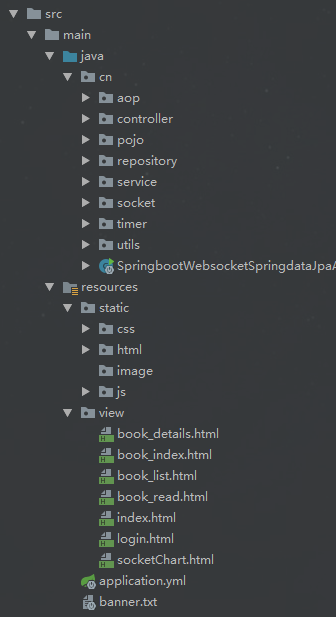
yml配置文件
我们也可以再配置文件中修改它:classpath:/view/
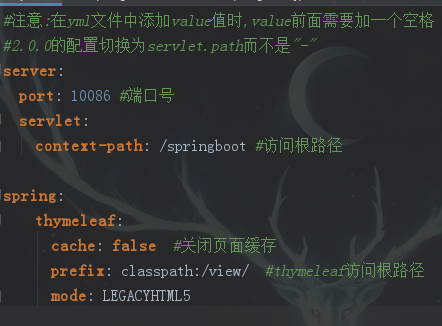
controller页面跳转
使用ModelAndView进行跳转,将数据add进去
    @RequestMapping("/login.do")

    public ModelAndView login(User user){

        Result result=userService.login(user);

        ModelAndView mv=new ModelAndView();

        mv.addObject("newText","你好,Thymeleaf!");

        mv.addObject("gender","1");

        mv.addObject("userList",result.getData());

        if(result.getData()!=null) {

            mv.addObject("loginUser",result.getData());

        }

        mv.setViewName("index.html");

        return mv;

    }
html页面取值
引入命名空间,避免校验错误<html xmlns:th="http://www.thymeleaf.org">
<!DOCTYPE html>

<!--解决idea thymeleaf 表达式模板报红波浪线-->

<!--suppress ALL -->

<html xmlns:th="http://www.thymeleaf.org">

<head>

    <meta charset="UTF-8" />

    <title>srpingboot</title>

</head>

<body>

    <!-- 属性替换,其他属性同理 -->

    <h1 th:text="${newText}">Hello World</h1>

    <!--

        设置多个attr

        th:attr="id=${user.id},data-xxx=${user.xxx},data-yyy=${user.yyy}"

        片段的使用、传值和调用

        <div th:fragment="common(text1,text2)">

            ...

        </div>

        th:insert 是最简单的:它只是插入指定的片段作为其主机标签的主体。

        <div th:insert="base ::common(${text1},${text2})"></div>

        th:replace实际上用指定的片段替换它的主机标签。

        <div th:replace="base ::common(${text1},${text2})"></div>

     三目表达式:
     <h3 th:text="${loginUser != null} ? ${loginUser.username} : '请登录'"></h3>

    -->

    <!-- if-else -->

    <h3 th:if="${loginUser} ne null" th:text="${loginUser.username}"></h3>

    <h3 th:unless="${loginUser} ne null">请登录</h3>

    <!-- switch -->

    <div th:switch="${gender}">

        <p th:case="'1'">男</p>

        <p th:case="'0'">女</p>

        <!-- th:case="*"  类似switch中的default -->

        <p th:case="*">其他</p>

    </div>

    <!--
    each
    其中,iterStat参数为状态变量,常用的属性有
    index 迭代下标,从0开始
    count 迭代下标,从1开始
    size 迭代元素的总量
    current 当前元素
   -->

    <table>

        <thead>

            <tr>

                <th>id</th>

                <th>username</th>

                <th>password</th>

                <th>created</th>

                <th>description</th>

            </tr>

        </thead>

        <tbody>

            <tr th:each="user,iterStat : ${userList}">

                <td th:text="${user.id}"></td>

                <td th:text="${user.username}"></td>

                <td th:text="${user.password}"></td>

                <td th:text="${user.created}"></td>

                <td th:text="${user.description}"></td>

            </tr>

        </tbody>

    </table>

</body>

<!-- 引入静态资源 -->

<script th:src="@{/js/jquery-1.9.1.min.js}" type="application/javascript"></script>

</html>
本地打开
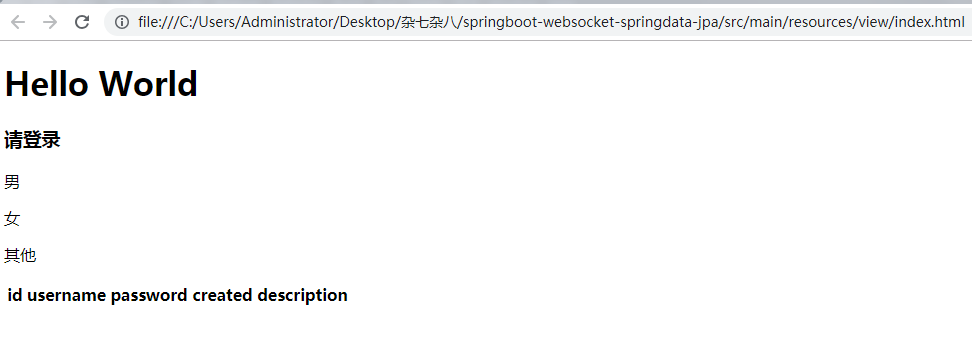
服务容器打开,登录失败页面效果
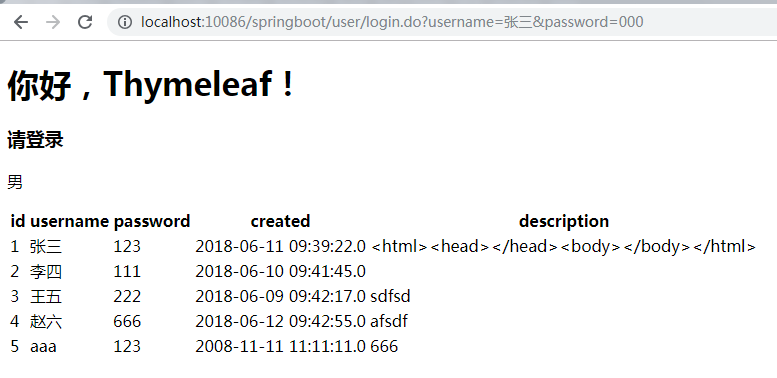
服务容器打开,登录成功页面效果

标准表达式
简单表达
变量表达式: ${...}
选择变量表达式: *{...}
消息表达式: #{...}
链接网址表达式: @{...}
片段表达式: ~{...}
字面
文本文字:'one text','Another one!',...
号码文字:0,34,3.0,12.3,...
布尔文字:true,false
空字面: null
文字标记:one,sometext,main,...
文字操作:
字符串连接: +
文字替换: |The name is ${name}|
算术运算
二元运算符:+,-,*,/,%
减号(一元运算符): -
布尔运算
二元运算符:and,or
布尔否定(一元运算符): !,not
比较和平等
比较:>,<,>=,<=(gt,lt,ge,le)
等值运算符:==,!=(eq,ne)
条件运算符
if-then: (if) ? (then)
if-then-else: (if) ? (then) : (else)
default: (value) ?: (defaultvalue)
特殊特征符
无操作: _
所有这些功能都可以组合和嵌套,例:
'User is of type ' + (${user.isAdmin()} ? 'Administrator' : (${user.type} ?: 'Unknown'))
官网表达式介绍:https://www.thymeleaf.org/doc/tutorials/3.0/usingthymeleaf.html#standard-expression-syntax
后记
springboot+thymeleaf,前后端分离已经成为了趋势,这里进行学习记录整理,以免以后又要到处查资料。
补充
2019-07-24补充:除此之外,thymeleaf还内置了很多对象,可以从上下文获取数据,还有好多对象的操作方法,具体请看:
附录A:表达式基本对象:https://www.thymeleaf.org/doc/tutorials/3.0/usingthymeleaf.html#appendix-a-expression-basic-objects
附录B:表达式实用程序对象:https://www.thymeleaf.org/doc/tutorials/3.0/usingthymeleaf.html#appendix-b-expression-utility-objects
比如:
在页面获取项目路径
    //项目路径

    var ctx = [[${#request.getContextPath()}]];
判断集合长度
<p th:if="${#lists.size(list)} < 25">

    <p>list集合长度小于25!</p>

</p>
字符串全大写、小写
<p th:text="${#strings.toUpperCase(name)}"></p>

<p th:text="${#strings.toLowerCase(name)}"></p>
有一点要注意,使用这些内置对象,方法传参里面不需要再用${}来取值了,例如,后台传过来的名称叫name
错误使用:
<p th:text="${#strings.toUpperCase($(name))}"></p>
正确使用:
<p th:text="${#strings.toUpperCase(name)}"></p>
更多内置对象方法请看官网!
补充:本地环境不报错,Linux环境下报错,模板不存在:Error resolving template [/bam/login], template might not exist or might not be accessible by any of the configured Template Resolvers
解决:

把/去掉就可以了

代码开源
代码已经开源、托管到我的GitHub、码云:
GitHub:https://github.com/huanzi-qch/springBoot
码云:https://gitee.com/huanzi-qch/springBoot
SpringBoot系列——Thymeleaf模板的更多相关文章
- SpringBoot 之Thymeleaf模板.
一.前言 Thymeleaf 的出现是为了取代 JSP,虽然 JSP 存在了很长时间,并在 Java Web 开发中无处不在,但是它也存在一些缺陷: 1.JSP 最明显的问题在于它看起来像HTML或X ...
- springboot整合Thymeleaf模板引擎
引入依赖 需要引入Spring Boot的Thymeleaf启动器依赖. <dependency> <groupId>org.springframework.boot</ ...
- Springboot整合thymeleaf模板
Thymeleaf是个XML/XHTML/HTML5模板引擎,可以用于Web与非Web应用. Thymeleaf的主要目标在于提供一种可被浏览器正确显示的.格式良好的模板创建方式,因此也可以用作静态建 ...
- (二)springboot整合thymeleaf模板
在我们平时的开发中,用了很久的jsp作view显示层,但是标签库和JSP缺乏良好格式的一个副作用就是它很少能够与其产生的HTML类似.所以,在Web浏览器或HTML编辑器中查看未经渲染的JSP模板是非 ...
- 【Springboot】Springboot整合Thymeleaf模板引擎
Thymeleaf Thymeleaf是跟Velocity.FreeMarker类似的模板引擎,它可以完全替代JSP,相较与其他的模板引擎,它主要有以下几个特点: 1. Thymeleaf在有网络和无 ...
- SpringBoot使用thymeleaf模板引擎
(1).添加pom依赖 <dependency> <groupId>org.springframework.boot</groupId> <artifactI ...
- springboot 引入 thymeleaf 模板
第一步pom中: <!-- 引入 thymeleaf 模板依赖 --> <dependency> <groupId>org.springframework.boot ...
- SpringBoot日记——Thymeleaf模板引擎篇
开发通常我们都会使用模板引擎,比如:JSP.Velocity.Freemarker.Thymeleaf等等很多,那么模板引擎是干嘛用的? 模板引擎,顾名思义,是一款模板,模板中可以动态的写入一些参数, ...
- SpringBoot使用Thymeleaf模板
© 版权声明:本文为博主原创文章,转载请注明出处 Thymeleaf模板简介 Thymeleaf模板是一个现代化的服务端java模板引擎对于所有的web和独立环境 Thymeleaf的主要目标是为你的 ...
随机推荐
- 20155205 郝博雅 Exp4 恶意代码分析
20155205 郝博雅 Exp4 恶意代码分析 一.实验目标 1.监控你自己系统的运行状态,看有没有可疑的程序在运行. 2.分析一个恶意软件,就分析Exp2或Exp3中生成后门软件:分析工具尽量使用 ...
- WBS分析
我们的产品是2048是一个基于安卓平台开发的小游戏,WBS如下: 进一步优化版本: 小组最终版本:
- 使用Eclipse的代码追踪功能
在使用Java编写复杂一些的程序时,你会不会常常对一层层的继承关系和一次次方法的调用感到迷惘呢?幸亏我们有了Eclipse这么好的IDE可以帮我们理清头绪--这就要使用Eclipse强大的代码追踪功能 ...
- selenium自动化常用函数
前段时间弄一个测试框架,满足公司简单网站的测试,整合了一个函数模块,包括常用的截图.邮件发送.测试报告生成,具体代码如下 import smtplib from BSTestRunner import ...
- Sqlalchemy python经典第三方orm
Ⅰ. 安装 pip install sqlalchemy Ⅱ. 起步链接 import time import threading import sqlalchemy from sqlalchemy ...
- Oracle 12c client with .NET legacy Oracle driver
如果使用Oracle 12c Client和.NET的Oracle driver,你很可能会碰到跟下面一样的问题: https://www.codeproject.com/Questions/8767 ...
- hdu 4370
这个题说实话我没看出来,我看的别人的博客 https://blog.csdn.net/u013761036/article/details/39377499 这个人讲的很清楚,可以直接去看他的 题目给 ...
- C++ 虚函数的两个例子
1. 第一个例子是朋友告诉我Qt中的某个实现 1 #include <iostream> 2 3 // Qt中的某个实现 4 class A{ 5 public: 6 A() = defa ...
- TCP/IP(一)之开启计算机网络之路
阅读目录(Content) 一.局域网.广域网和Internet 1.1.局域网 1.2.广域网 1.3.Internet 二.计算机数据之间通信的过程 2.1.路由器的功能(转发收到的分组) 三.O ...
- Eclipse常用20个快捷键
Eclipse常用20个快捷键 1. Ctrl+F : 本文查找Find与替换Replace 2. Ctrl+H : 全局搜索,可按照文件类型搜索 3. Ctrl+1 : 快速修复,能快速的显示光标所 ...