
nginx,hello World!
向nginx中添加第一个最简单的hello world模块
一、编写ngx_http_mytest_module模块
1. ngx_http_mytest_module.c
 #include <ngx_config.h>

 #include <ngx_core.h>

 #include <ngx_http.h>

 //mytest module define

 static ngx_int_t ngx_http_mytest_handler(ngx_http_request_t* r)

 {

     //不是GET或者HEAD方法,返回405

     if (!(r->method & (NGX_HTTP_GET | NGX_HTTP_HEAD))){

         return NGX_HTTP_NOT_ALLOWED;

     }

     //忽略接收到的包体

     ngx_int_t rc = ngx_http_discard_request_body(r);

     if (rc != NGX_OK)

         return rc;

     //设置响应头

     ngx_str_t type = ngx_string("text/plain");

     ngx_str_t response = ngx_string("Hello World!");

     //设置http状态码

     r->headers_out.status = NGX_HTTP_OK;

     //设置响应Content-Type

     r->headers_out.content_length_n = response.len;

     r->headers_out.content_type = type;

     //发送响应头

     rc = ngx_http_send_header(r);

     if (rc == NGX_ERROR || rc > NGX_OK || r->header_only)

         return rc;

     //设置响应内容

     ngx_buf_t* b;

     b = ngx_create_temp_buf(r->pool, response.len);

     if (b == NULL)

         return NGX_HTTP_INTERNAL_SERVER_ERROR;

     ngx_memcpy(b->pos, response.data, response.len);

     b->last = b->pos + response.len;

     b->last_buf = ;

     //设置响应内容到chain中

     ngx_chain_t out;

     out.buf = b;

     out.next = NULL;

     return ngx_http_output_filter(r, &out);

 }

 //set handler

 static char* ngx_http_mytest(ngx_conf_t* cf, ngx_command_t* cmd, void* conf)

 {

     ngx_http_core_loc_conf_t* clcf;

     clcf = ngx_http_conf_get_module_loc_conf(cf, ngx_http_core_module);

     clcf->handler = ngx_http_mytest_handler;

     return NGX_CONF_OK;

 }

 //conf structure

 static ngx_command_t ngx_http_mytest_commands[] =

 {

     {

         ngx_string("mytest"),

         NGX_HTTP_MAIN_CONF | NGX_HTTP_SRV_CONF | NGX_HTTP_LOC_CONF |

             NGX_HTTP_LMT_CONF | NGX_CONF_NOARGS,

         ngx_http_mytest,

         NGX_HTTP_LOC_CONF_OFFSET,

         ,

         NULL

     },

     ngx_null_command

 };

 //module ctx

 static ngx_http_module_t ngx_http_mytest_module_ctx = { NULL, NULL, NULL, NULL, NULL, NULL,NULL, NULL};

 //mytest module

 ngx_module_t ngx_http_mytest_module = {

     NGX_MODULE_V1,

     &ngx_http_mytest_module_ctx,

     ngx_http_mytest_commands,

     NGX_HTTP_MODULE,

     NULL, NULL, NULL, NULL, NULL, NULL, NULL,

     NGX_MODULE_V1_PADDING

 };
ngx_http_mytest_module.c
2.config
 ngx_addon_name=ngx_http_mytest_module

 HTTP_MODULES="$HTTP_MODULES ngx_http_mytest_module"

 NGX_ADDON_SRCS="$NGX_ADDON_SRCS $ngx_addon_dir/ngx_http_mytest_module.c"
config
二、安装nginx
./configure --prefix=/usr/local/nginx --add-module=/usr/local/src/ngx-mytest-module/
三、修改配置文件
 location /test {

         mytest;

 }
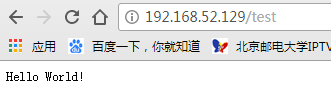
四、启动nginx,并通过浏览器访问
五、查看日志文件

倒数第二行对/test的响应。
六、对过程一些问题的总结
1. 执行configure后,objs文件夹下ngx_modules.c文件中只有3部分:
1)extern模块

2)ngx_modules数组


3)ngx_module_names数组

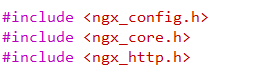
2. nginx自定义模块需要添加的头文件
3. 如果主机不能访问虚拟机web服务器,可能是需要关闭防火墙
 iptables -F

 iptables -P INPUT ACCEPT
nginx,hello World!的更多相关文章
- 看完这篇还不了解 Nginx,那我就哭了!
作者:蔷薇Nina www.cnblogs.com/wcwnina/p/8728391.html 想必大家一定听说过 Nginx,若没听说过它,那么一定听过它的"同行"Apache ...
- 就是要让你搞懂Nginx,这篇就够了!
开源Linux 长按二维码加关注~ 作者:渐暖° 出处:blog.csdn.net/yujing1314/article/details/107000737 来源:公众号51CTO技术栈 Nginx ...
- 【转】linux 编译安装nginx,配置自启动脚本
linux 编译安装nginx,配置自启动脚本 本文章来给各位同学介绍一篇关于linux 编译安装nginx,配置自启动脚本教程,希望有需要了解的朋友可一起来学习学习哦. 在公司的suse服务器装ng ...
- Startssl 现在就启用 HTTPS,免费的!
为什么要使用HTTPS 主要是为了安全,虽然没有100%的安全,但是我们可以尽量提高安全级别,目前大型网站都已经使用HTTPS了 注册StartSSL 注册页面 选择国家 和 输入 邮箱 他们会通过 ...
- 话说Centos下nginx,php,mysql以及phpmyadmin的配置
大话centos下部署phalcon框架 Centos还是ubuntu? 当我沿用这个标题的时候,心里在想"我能说我之前用的windows吗?",windows下xampp,wam ...
- CentOS源码安装搭建LNMP全过程(包括nginx,mysql,php,svn)【转】
转自:http://blog.csdn.net/yanzi1225627/article/details/49123659 服务器环境为:CentOS6.5 64位 目标:搭建LNMP(Linux + ...
- nginx,wsgi,flask之间的关系
之前看写flask 应用的一些疑问,百度上的答案解释的不错,这里记着以后可以看看Web 服务器层对于传统的客户端 - 服务器架构,客户端向服务器发送请求,服务器接收请求,处理请求,最后给客户端返回请求 ...
- PHP学习笔记--1,不总结,不掌握,不明白!
不总结,不掌握,不明白! 前言: 学php一开始就是语法,变量,数组,函数,OOP(面向对象[封装,继承,多态,抽象]) 这些都是最基础的东西,但你还要懂一些在实际开发中要用的东西,比如基本的HTML ...
- 阿里云上,Ubuntu下配置Nginx,在tomcat中加了https协议就不可以了
问题 阿里云上,Ubuntu服务器,本来部署的是tomcat,并且使用了https 协议.后来为了静态资源分离集成了 nginx,nginx代理跳转到 tomcat.刚开始直接访问http 网址发现, ...
随机推荐
- 重写COMBOXEDIT
一.需求 C#种的下拉框ComboBox不支持下拉复选框列表与下拉树形列表等,系统中需要用到的地方使用了第三方组件,现在需要将第三方组件替换掉. 二.设计 基本思路:重写ComboBox,将原生的下拉 ...
- 既然还看不到未来之光,那就从骄阳开始的地方--IT携行
对于还没真正踏入IT的小白菜来说,哪有资格把刚学到的鸡毛蒜皮儿,三脚猫都不算的东西逮出来献丑,献丑都不算,还不如我们来谈谈人生,练练脸皮...... 我出发的起点肯定不同,多方限制,可能缺乏时光;那正 ...
- 内网主机使用yum安装软件
经常遇到这样的情况:有一台内网linux主机需要安装软件,但是主机又无法连接外网,通常情况下可以使用rpm包或者使用源码编译安装.但常常会遇到依赖缺少的情况,这就麻烦了,要一一找到缺少的软件包. 这种 ...
- LeetCode Smallest Range
数据范围是3500,3500也就是说n的平方是可以接受的.这里告诉你就是有序的,也就是在提醒你可能会是一个类似于二分的算法,所以的话其实基于这两个认识的话我们就可以利用一个枚举叫二分的算法来解决这道题 ...
- 第八周博客作业 <西北师范大学| 周安伟>
第八周博客作业 助教博客链接https://home.cnblogs.com/u/zaw-315/ 作业要求博客链接https://www.cnblogs.com/nwnu-daizh/p/10687 ...
- oracle 按表数据新增一行
在功能实现时,能尽量用一个sql语句直接实现业务逻辑的话,就不要去写C#代码,便于维护. 以下sql的逻辑是:给明细表新增一条数据,前提是传入的债券代码存在与债券表,否则不新增.此sql返回受影响行数 ...
- 关于fftshift----将零频率的分量移到频谱的中心
fftshift 作用:将零频点移到频谱的中间 用法: Y=fftshift(X) Y=fftshift(X,dim) 描述:fftshift移动零频点到频谱中间,重新排列fft,fft2和fftn的 ...
- windows平台MySQL密码设置与破解
一:制作系统服务: 1.在cmd下输入 mysql 这个相当于启动服务端了,然后该启动客户端了 .就表示安装成功. 2.再重新开启一个 cmd 窗口.kill 进程. 输入 mysql 即可进入 my ...
- luogu||P1776||宝物筛选||多重背包||dp||二进制优化
题目描述 终于,破解了千年的难题.小FF找到了王室的宝物室,里面堆满了无数价值连城的宝物……这下小FF可发财了,嘎嘎.但是这里的宝物实在是太多了,小FF的采集车似乎装不下那么多宝物.看来小FF只能含泪 ...
- Spring Boot 启动(四) EnvironmentPostProcessor
Spring Boot 启动(四) EnvironmentPostProcessor Spring 系列目录(https://www.cnblogs.com/binarylei/p/10198698. ...