<view class="bc">
<view>
<text bc_text>demo</text>
</view>
<view class="bc_2">
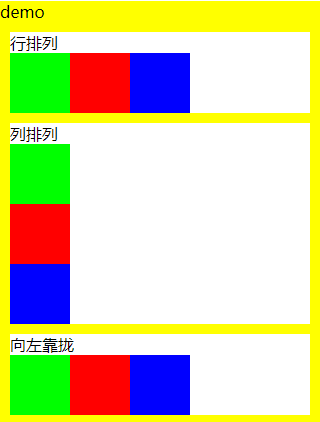
<view>行排列</view>
<view style="display:flex; flex-direction:row;">
<view class='flex_item green'></view>
<view class='flex_item red'></view>
<view class='flex_item blue'></view>
</view>
</view>
<view class="bc_2">
<view>列排列</view>
<view style="display:flex; flex-direction:column;">
<view class='flex_item green'></view>
<view class='flex_item red'></view>
<view class='flex_item blue'></view>
</view>
</view>
<view class="bc_2">
<view>向左靠拢</view>
<view style="display:flex; flex-direction:row;justify-content:flex-start;">
<view class='flex_item green'></view>
<view class='flex_item red'></view>
<view class='flex_item blue'></view>
</view>
</view>
<view class="bc_2">
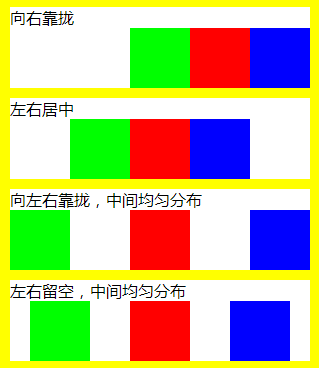
<view>向右靠拢</view>
<view style="display:flex; flex-direction:row;justify-content:flex-end;">
<view class='flex_item green'></view>
<view class='flex_item red'></view>
<view class='flex_item blue'></view>
</view>
</view>
<view class="bc_2">
<view>左右居中</view>
<view style="display:flex; flex-direction:row;justify-content:center;">
<view class='flex_item green'></view>
<view class='flex_item red'></view>
<view class='flex_item blue'></view>
</view>
</view>
<view class="bc_2">
<view>向左右靠拢,中间均匀分布</view>
<view style="display:flex; flex-direction:row;justify-content:space-between;">
<view class='flex_item green'></view>
<view class='flex_item red'></view>
<view class='flex_item blue'></view>
</view>
</view>
<view class="bc_2">
<view>左右留空,中间均匀分布</view>
<view style="display:flex; flex-direction:row;justify-content:space-around;">
<view class='flex_item green'></view>
<view class='flex_item red'></view>
<view class='flex_item blue'></view>
</view>
</view>
<view class="bc_2">
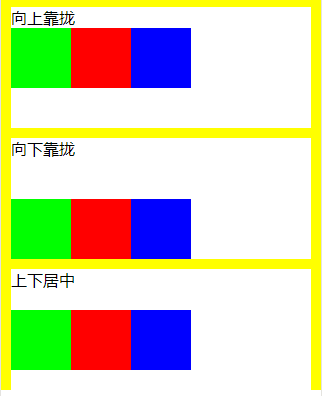
<view>向上靠拢</view>
<view style="display:flex; flex-direction:row;align-items:flex-start; height:100px;">
<view class='flex_item green'></view>
<view class='flex_item red'></view>
<view class='flex_item blue'></view>
</view>
</view>
<view class="bc_2">
<view>向下靠拢</view>
<view style="display:flex; flex-direction:row;align-items:flex-end; height:100px;">
<view class='flex_item green'></view>
<view class='flex_item red'></view>
<view class='flex_item blue'></view>
</view>
</view>
<view class="bc_2">
<view>上下居中</view>
<view style="display:flex; flex-direction:row;align-items:center; height:100px;">
<view class='flex_item green'></view>
<view class='flex_item red'></view>
<view class='flex_item blue'></view>
</view>
</view>
</view>
 
 
.bc{
"> #ffff00;
font-size: 16px;
}
.bc_2{
"> #ffffff;
margin: 10px;
}
.bc_text{
padding:40px;
}
.flex_item{
width: 60px;
height: 60px;
}
.green{
"> #00ff00;
}
.red{
"> #ff0000;
}
.blue{
"> #0000ff;
}


小程序view排版的更多相关文章

  1. 微信小程序 View:flex 布局

    微信小程序 View 支持两种布局方式:Block 和 Flex 所有 View 默认都是 block 要使用 flex 布局的话需要显式的声明: display:flex; 下面就来介绍下微信小程序 ...

  2. 微信小程序view不能换行 text实现转义换行符

    在html中可以直接使用<br />换行,但是小程序wxml中使用<br />无效,可以换成\n Page({ data: { title: '至少5个字\n请多说些感受吧' ...

  3. 第十篇、微信小程序-view组件

    视图容器 常用的样式的属性: 详情:http://www.jianshu.com/p/f82262002f8a display :显示的模式.可选项有:flex(代表view可以伸缩,弹性布局)- f ...

  4. 微信小程序view标签以及display:flex的测试

    一:testview.wxml,testview.js自动生成示例代码 //testview.wxml <view class="section"> <view ...

  5. 小程序View内的文字不换行

    今天发现View内的文字一行过去直接被屏幕右边吃掉,没有预期的换行,设置width也不管用,最后用它解决了 1. white-space:pre-line(不会保留空白和tabs) 2. white- ...

  6. 微信小程序-view组件

    <view class="section"> <view class="section__title">flex-direction: ...

  7. 微信小程序 view 布局

    刚看到这个效果的时候还真是和ReactNative的效果一致,属性也基本的一样. view这个组件就是一个视图组件使用起来非常简单. 主要属性: flex-direction: 主要两个特性”row” ...

  8. 微信小程序 view中的image水平垂直居中

    当 display: flex 配合 justify-content: center 使用时可以让view水平居中 而配合 align-items: center 用时可以实现垂直居中效果 .card ...

  9. 小程序view的显示与隐藏

    需要在全局数据块中,设定一个控制键. data: { ......//省略其他代码 showView: true }, 然后是在wxml中,view的class中设置2个class,并用三目表达式来进 ...

随机推荐

  1. GUI制作仿qq窗口

    使用工具:python3.6,   pycharm 使用模块: tkinter模块:("Tk 接口")是Python的标准Tk GUI工具包的接口,位Python的内置模块,直接i ...

  2. Ubuntu: Windows Help Tools For Ubuntu

    Virtual Box https://www.virtualbox.org/wiki/Linux_Downloads 装不上Wine时直接装虚拟机吧.RTX真是个坑爹的东西,找不到替代的客户端 迅雷 ...

  3. Codeforces Round #525 (Div. 2) C. Ehab and a 2-operation task

    传送门 https://www.cnblogs.com/violet-acmer/p/10068786.html 题意: 给定一个长度为 n 的数组a[ ],并且有两种操作: ①将前 i 个数全都加上 ...

  4. tput

    tput : 改变终端显示特性,常见用法如下: tput lines : 显示终端的行数 tput cols : 显示终端的列数 tput cup line_number collum_number ...

  5. DBMS客户端是否安装:Make sure DBMS client is installed and this required library is available for dynamic loading

    Symptom The full error message is as follows:Error logging in.  Unable to process the database trans ...

  6. python中执行shell命令的几个方法小结

    原文 http://www.jb51.net/article/55327.htm 最近有个需求就是页面上执行shell命令,第一想到的就是os.system, os.system('cat /proc ...

  7. fiddler模拟返回

    先把正常的请求响应报文保存为文件,操作方法为选中对应请求>右键> save >reponse>entire response 点击改请求,点击右侧autoresponder,点 ...

  8. puppeteer,新款headless chrome

    puppeteer puppeteer是一种谷歌开发的Headless Chrome,因为puppeteer的出现,业内许多自动化测试库停止维护,比如PhantomJS,Selenium IDE fo ...

  9. /etc/fstab 文件挂载配置文件

    (1)/etc/fstab 每行定义一个要挂载的文件系统 mount -a 自动挂载/etc/fstab文件没有挂载的设备,不管已挂载过的设备 如果想刷新修改过已挂载的设备,mount -o remo ...

  10. 网络编程基础【day09】:socketserver使用(九)

    本节内容 1.概述 2.socketserver类型 3.创建socketserver步骤 4.简单的代码实现 一.概述 我们之前的用户都是不支持多并发的,所以我们现在需要一个支持多用户,实现一个并发 ...