
react-native中的动画
先看效果

这个一个渐渐显示的动画,代码如下
import React from 'react';

import { Animated, Text, View } from 'react-native';

class FadeInView extends React.Component {

  //定义状态

  state = {

    fadeAnim: new Animated.Value(0),  // Initial value for opacity: 0

  }

  componentDidMount() {

    Animated.timing(                  // Animate over time

      this.state.fadeAnim,            // The animated value to drive

      {

        toValue: 1,                   // Animate to opacity: 1 (opaque)

        duration: 10000,              // Make it take a while

      }

    ).start();                        // Starts the animation

  }

  render() {

    let { fadeAnim } = this.state;

    return (

      <Animated.View                 // Special animatable View

        style={{

          ...this.props.style,

          opacity: fadeAnim,         // Bind opacity to animated value

        }}

      >

        {this.props.children}

      </Animated.View>

    );

  }

}

// You can then use your `FadeInView` in place of a `View` in your components:

export default class App extends React.Component {

  render() {

    return (

      <View style={{flex: 1, alignItems: 'center', justifyContent: 'center'}}>

        <FadeInView style={{width: 250, height: 50, backgroundColor: 'powderblue'}}>

          <Text style={{fontSize: 28, textAlign: 'center', margin: 10}}>Fading in</Text>

        </FadeInView>

      </View>

    )

  }

}
第二个demo
点击图形变大
先看效果
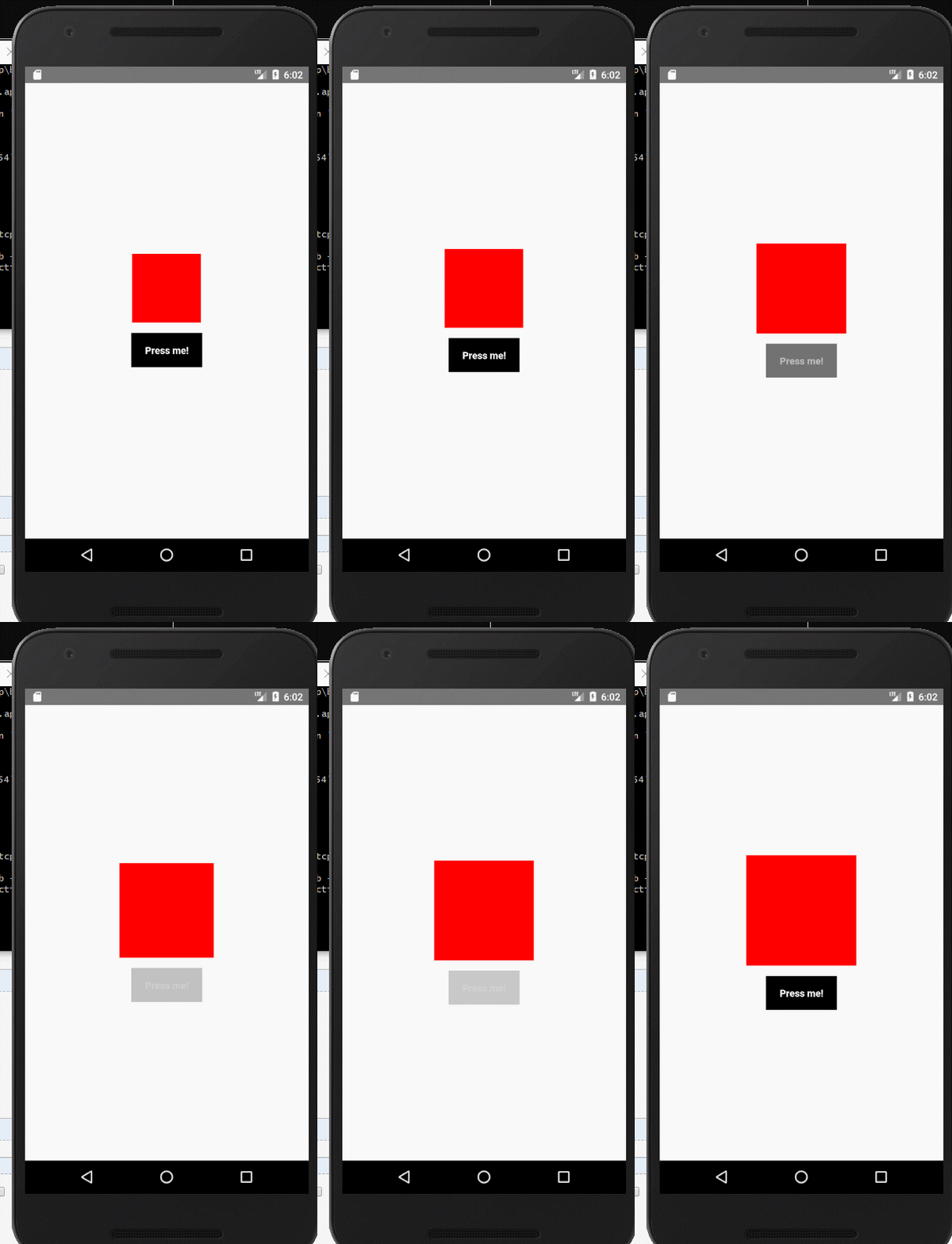
再看代码如下
import React from 'react';

import {

  NativeModules,

  LayoutAnimation,

  Text,

  TouchableOpacity,

  StyleSheet,

  View,

} from 'react-native';

const { UIManager } = NativeModules;

UIManager.setLayoutAnimationEnabledExperimental &&

  UIManager.setLayoutAnimationEnabledExperimental(true);

export default class App extends React.Component {

  state = {

    w: 100,

    h: 100,

  };

  _onPress = () => {

    // Animate the update

    LayoutAnimation.spring();

    this.setState({w: this.state.w + 15, h: this.state.h + 15})

  }

  render() {

    return (

      <View style={styles.container}>

        <View style={[styles.box, {width: this.state.w, height: this.state.h}]} />

        <TouchableOpacity onPress={this._onPress}>

          <View style={styles.button}>

            <Text style={styles.buttonText}>Press me!</Text>

          </View>

        </TouchableOpacity>

      </View>

    );

  }

}

const styles = StyleSheet.create({

  container: {

    flex: 1,

    alignItems: 'center',

    justifyContent: 'center',

  },

  box: {

    width: 200,

    height: 200,

    backgroundColor: 'red',

  },

  button: {

    backgroundColor: 'black',

    paddingHorizontal: 20,

    paddingVertical: 15,

    marginTop: 15,

  },

  buttonText: {

    color: '#fff',

    fontWeight: 'bold',

  },

});
react-native中的动画的更多相关文章
- React Native中加载指示器组件ActivityIndicator使用方法
这里讲一下React Native中的一个组件——ActivityIndicator,这是一个加载指示器,俗称菊花,很常见的,效果如下所示: 可以看到图中有两个加载指示器,一大一小,这是尺寸不是我设置 ...
- 在 React Native 中使用 Redux 架构
前言 Redux 架构是 Flux 架构的一个变形,相对于 Flux,Redux 的复杂性相对较低,而且最为巧妙的是 React 应用可以看成由一个根组件连接着许多大大小小的组件的应用,Redux 也 ...
- React Native 中 CSS 的使用
首先声明,此文原作者为黎 跃春 React Native中CSS 内联样式 对象样式 使用Stylesheet.Create 样式拼接 导出样式对象 下面的代码是index.ios.js中的代码: / ...
- react native中的欢迎页(解决首加载白屏)
参照网页: http://blog.csdn.net/fengyuzhengfan/article/details/52712829 首先是在原生中写一些方法,然后通过react native中js去 ...
- React Native中的网络请求fetch和简单封装
React Native中的网络请求fetch使用方法最为简单,但却可以实现大多数的网络请求,需要了解更多的可以访问: https://segmentfault.com/a/1190000003810 ...
- [转] 「指尖上的魔法」 - 谈谈 React Native 中的手势
http://gold.xitu.io/entry/55fa202960b28497519db23f React-Native是一款由Facebook开发并开源的框架,主要卖点是使用JavaScrip ...
- [转] 在React Native中使用ART
http://bbs.reactnative.cn/topic/306/%E5%9C%A8react-native%E4%B8%AD%E4%BD%BF%E7%94%A8art 前半个月捣腾了一下Rea ...
- react native中使用echarts
开发平台:mac pro node版本:v8.11.2 npm版本:6.4.1 react-native版本:0.57.8 native-echarts版本:^0.5.0 目标平台:android端收 ...
- react native中一次错误排查 Error:Error: Duplicate resources
最近一直在使用react native中,遇到了很多的坑,同时也学习到了一些移动端的开发经验. 今天在做一个打包的测试时,遇到了一个问题,打包过程中报错“Error:Error: Duplicate ...
- 在React Native中,使用fetch网络请求 实现get 和 post
//在React Native中,使用fetch实现网络请求 /* fetch 是一个封装程度更高的网络API, 使用了Promise * Promise 是异步编程的一种解决方案 * Promise ...
随机推荐
- 关于@Param
1,使用@Param注解 当以下面的方式进行写SQL语句时: @Select("select column from table where userid = #{userid} " ...
- python设计模式第二十天【迭代器模式】
1.不使用迭代器出现的问题 (1)容器承担了太多的功能,一方面提供添加和删除等功能,还需提供遍历访问功能 (2)在容器访问遍历过程中,需要保存遍历状态,当和元素的添加和删除混杂在一起时,容易引起混乱 ...
- sql 保留2位小数/换行
2.176544保留两位小数 1.select Convert(decimal(18,2),2.176544) 结果:2.18 2.select Round(2.176544,2) 结果:2.180 ...
- fiddler 学习笔记1-下载安装、开启、关闭抓包功能
1 下载安装(安装于C盘之外的空间中) https://www.telerik.com/fiddler 2 开启抓包功能:安装后默认为开启状态 点击 file-capture 或左下角capture ...
- Python学习之路—————day04
今日内容: 1. 循环语句 1.1 if判断 1.2 while循环 1.3 for循环 一.if判断 语法一: if 条件 代码块1 代码块2 代码块3 # 例: sex='female' age= ...
- Nginx CGI反向代理对照
陶辉104 CGI是什么? CGI全称是“通用网关接口”(Common Gateway Interface),HTTP服务器与你的或其它机器上的程序进行“交谈”的一种工具
- 【建模应用】PLS偏最小二乘回归原理与应用
@author:Andrew.Du 声明:本文为原创,转载请注明出处:http://www.cnblogs.com/duye/p/9031511.html,谢谢. 一.前言 1.目的: 我写这篇文章的 ...
- 清北澡堂 Day2 上午 一些比较重要的关于数论的知识整理
1.算数基本定理: 对于任意的大于1的正整数N,N一定能够分解成有限个质数的乘积,即 其中P1<P2<...<Pk,a1,a2,...,ak>=1; 证: 存在性: 若存在最小 ...
- HUST 1541 解方程
参考自:https://www.cnblogs.com/ECJTUACM-873284962/p/6394836.html 1541 - Student’s question 时间限制:1秒 内存限制 ...
- Peaceful Commission HDU - 1814(输出最小的一组解)
Description 根据宪法,Byteland民主共和国的公众和平委员会应该在国会中通过立法程序来创立. 不幸的是,由于某些党派代表之间的不和睦而使得这件事存在障碍. 此委员会必须满足下列条件: ...