
JAVA微信公众号通过openid发送模板消息~
1,问题产生
在微信公众号开发过程中,我们有时候做不同权限的时候,比如在注册的时候,需要审核,然后我们要想办法让对方知道审核的结果。这时候我们可以通过模板消息来通知。
2,第一步,首先在微信公众号上获取模板消息
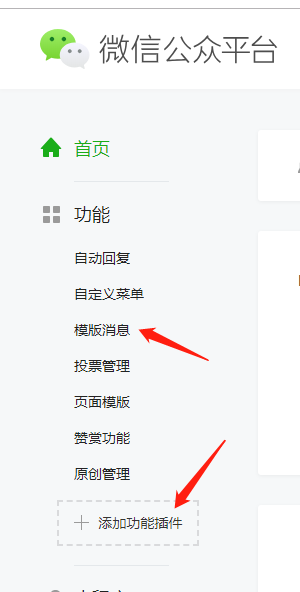
首先,登录微信公众平台,看有没有模板消息这一块,没有的话点击添加功能插件,去添加,这里就省略不说了,这个主要就是选择你公众号的行业对应的模板消息,然后通过审核之后就可以使用了,说是几个工作日
但是一般很快就审核通过的。
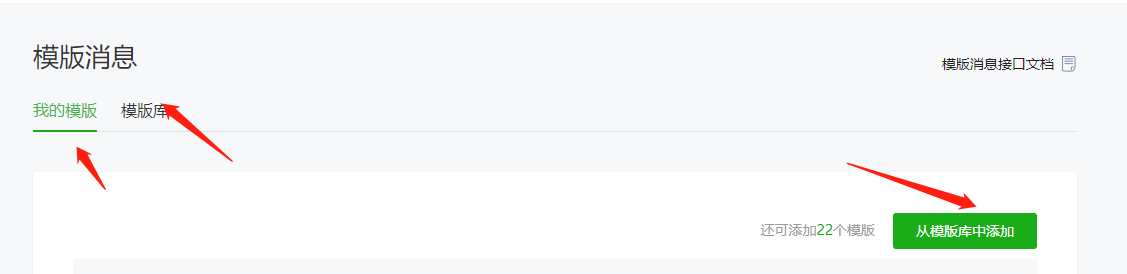
有模板消息之后点进来,对应自己所需要的模板消息进行添加,比如,我添加了一个审核的模板,在模板使用介绍上面其实也是没说的很清楚,我看了感觉完全就是不会用,就是给你个数据类型,数据样式查看
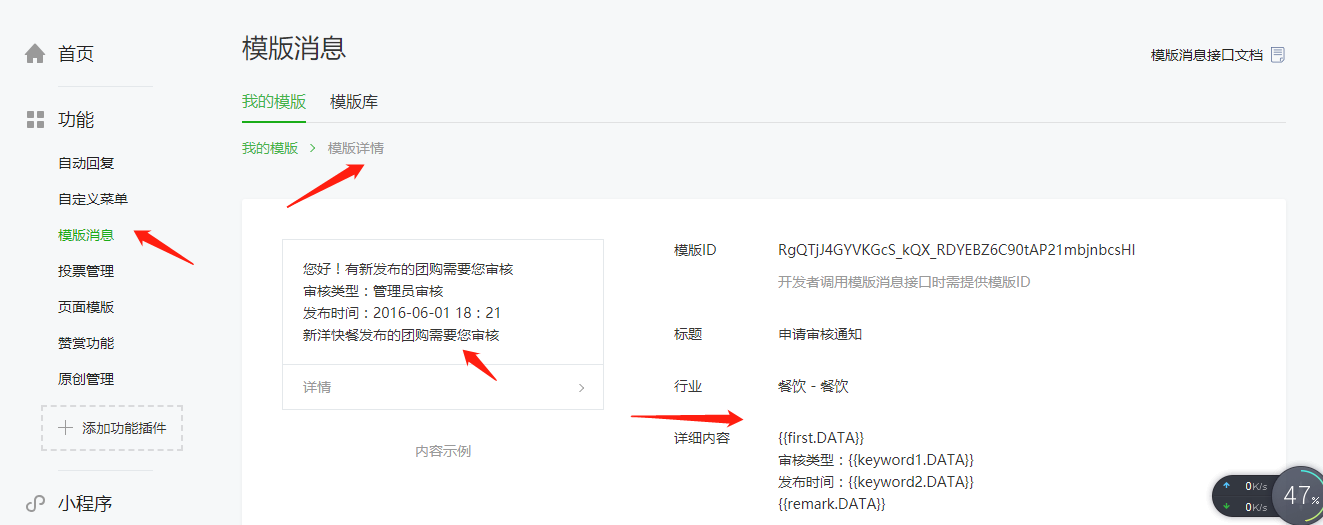
好了,这些大概百度下了解是什么意思,我们现在主要还是上代码部分吧。
3,用JAVA代码实现通过openid发送模板消息
(一)首先我们先上一个工具类
 import java.io.BufferedReader;

 import java.io.InputStream;

 import java.io.InputStreamReader;

 import java.io.OutputStream;

 import java.net.ConnectException;

 import java.net.URL;

 import javax.net.ssl.HttpsURLConnection;

 import javax.net.ssl.SSLContext;

 import javax.net.ssl.SSLSocketFactory;

 import javax.net.ssl.TrustManager;

 import net.sf.json.JSONException;

 import net.sf.json.JSONObject;

 import org.slf4j.Logger;

 import org.slf4j.LoggerFactory;

 import com.mj.agriculturalByProduct.templatemessage.pojo.Token;

 import com.mj.templatemessage.util.MyX509TrustManager;

 public class CommonUtil {

 private static Logger log = LoggerFactory.getLogger(CommonUtil.class);

     // 凭证获取(GET)

     public final static String token_url = "https://api.weixin.qq.com/cgi-bin/token?grant_type=client_credential&appid=APPID&secret=APPSECRET";

     /**

      * 发送 https 请求

      *

      * @param requestUrl 请求地址

      * @param requestMethod 请求方式(GET、POST)

      * @param outputStr 提交的数据

      * @return JSONObject(通过 JSONObject.get(key) 的方式获取 JSON 对象的属性值)

      */

     public static JSONObject httpsRequest(String requestUrl, String requestMethod, String outputStr) {

         JSONObject jsonObject = null;

         try {

             // 创建 SSLContext 对象,并使用我们指定的信任管理器初始化

             TrustManager[] tm = { new MyX509TrustManager() };

             SSLContext sslContext = SSLContext.getInstance("SSL", "SunJSSE");

             sslContext.init(null, tm, new java.security.SecureRandom());

             // 从上述 SSLContext 对象中得到 SSLSocketFactory 对象

             SSLSocketFactory ssf = sslContext.getSocketFactory();

             URL url = new URL(requestUrl);

             HttpsURLConnection conn = (HttpsURLConnection) url.openConnection();

             conn.setSSLSocketFactory(ssf);

             conn.setDoOutput(true);

             conn.setDoInput(true);

             conn.setUseCaches(false);

             // 设置请求方式(GET/POST)

             conn.setRequestMethod(requestMethod);

             // 当 outputStr 不为 null 时,向输出流写数据

             if (null != outputStr) {

                 OutputStream outputStream = conn.getOutputStream();

                 // 注意编码格式

                 outputStream.write(outputStr.getBytes("UTF-8"));

                 outputStream.close();

             }

             // 从输入流读取返回内容

             InputStream inputStream = conn.getInputStream();

             InputStreamReader inputStreamReader = new InputStreamReader(inputStream, "utf-8");

             BufferedReader bufferedReader = new BufferedReader(inputStreamReader);

             String str = null;

             StringBuffer buffer = new StringBuffer();

             while ((str = bufferedReader.readLine()) != null) {

                 buffer.append(str);

             }

             // 释放资源

             bufferedReader.close();

             inputStreamReader.close();

             inputStream.close();

             inputStream = null;

             conn.disconnect();

             jsonObject = JSONObject.fromObject(buffer.toString());

         } catch (ConnectException ce) {

             log.error(" 连接超时:{}", ce);

         } catch (Exception e) {

             log.error("https 请求异常:{}", e);

         }

         return jsonObject;

     }

     /**

      * 获取接口访问凭证

      *

      * @param appid 凭证

      * @param appsecret 密钥

      * @return

      */

     public static Token getToken(String appid, String appsecret) {

         Token token = null;

         String requestUrl = token_url.replace("APPID", appid).replace("APPSECRET", appsecret);

         // 发起GET请求获取凭证

         JSONObject jsonObject = httpsRequest(requestUrl, "GET", null);

         if (null != jsonObject) {

             try {

                 token = new Token();

                 token.setAccessToken(jsonObject.getString("access_token"));

                 token.setExpiresIn(jsonObject.getInt("expires_in"));

                 System.out.println(jsonObject.getString("access_token")+"=========");

             } catch (JSONException e) {

                 token = null;

                 // 获取token失败

                 log.error("获取token失败 errcode:{} errmsg:{}", jsonObject.getInt("errcode"), jsonObject.getString("errmsg"));

             }

         }

         return token;

     }

 }
public class Token {
//接口访问凭证
private String accessToken;
//接口有效期,单位:秒
private int expiresIn;
public String getAccessToken() {
return accessToken;
}
public void setAccessToken(String accessToken) {
this.accessToken = accessToken;
}
public int getExpiresIn() {
return expiresIn;
}
public void setExpiresIn(int expiresIn) {
this.expiresIn = expiresIn;
}
}
(二)一个模板消息类
 import java.text.SimpleDateFormat;

 import java.util.Date;

 import net.sf.json.JSONObject;

 import org.slf4j.Logger;

 import org.slf4j.LoggerFactory;

 import org.springframework.stereotype.Service;

 import com.mj.agriculturalByProduct.templatemessage.pojo.Data;

 import com.mj.agriculturalByProduct.templatemessage.pojo.Data_style;

 import com.mj.agriculturalByProduct.templatemessage.pojo.NewOrdersTemplate;

 import com.mj.agriculturalByProduct.templatemessage.pojo.Token;

 import com.mj.basic.util.TTResult;

 @Service

 public class Template {

     private static Logger log = LoggerFactory.getLogger(Template.class);

        /**

         * 发送模板消息

         * appId 公众账号的唯一标识

         * appSecret 公众账号的密钥

         * openId 用户标识

      * @return

         */

        public TTResult send_template_message(String appId, String appSecret, String openId) {

     //因为我申请的模板是需要填写当前时间戳的,所以在这里我获取了当前的时间

           SimpleDateFormat simpleDateFormat = new SimpleDateFormat("yyyy-HH-MM");

           String format = simpleDateFormat.format(new Date());

           Token token = CommonUtil.getToken(appId, appSecret);//这里要注意,如果你是申请的正式公众号的话,获取token的时候,一定要在后台加上你的ip,不然获取token的时候会报错

           String access_token = token.getAccessToken();

           String url = "https://api.weixin.qq.com/cgi-bin/message/template/send?access_token="+access_token;

           String templateId = "填写你所使用的模板id";

           String goUrl = "填写接收模板消息之后,你想要跳转的url页面。";

           Data_style first = new Data_style();

           Data_style keyword1 = new Data_style();

           Data_style keyword2 = new Data_style();

           Data_style remark = new Data_style();

           NewOrdersTemplate temp = new NewOrdersTemplate();

           Data data = new Data();

           first.setValue(format);

           first.setColor("#173177");

           keyword1.setValue("您申请的审核已通过,请到PC端浏览器输入以下链接进行管理后台的设置:(这些都是自定义内容)"

                   + "自定义内容");

           keyword1.setColor("#173177");

           keyword2.setValue(format);

           keyword2.setColor("#173177");

           remark.setValue("");

           remark.setColor("#173177");

           data.setFirst(first);

           data.setKeyword1(keyword1);

           data.setKeyword2(keyword2);

           data.setRemark(remark);

           temp.setTouser(openId);

           temp.setTemplate_id(templateId);

           temp.setUrl(goUrl);

           temp.setTopcolor("#173177");

           temp.setData(data);

           String jsonString = JSONObject.fromObject(temp).toString().replace("day", "Day");

           JSONObject jsonObject = CommonUtil.httpsRequest(url, "POST", jsonString);

           System.out.println(jsonObject);

           int result = 0;

           if (null != jsonObject) {

              if (0 != jsonObject.getInt("errcode")) {

                 result = jsonObject.getInt("errcode");

                 log.error("错误 errcode:{} errmsg:{}", jsonObject.getInt("errcode"), jsonObject.getString("errmsg"));

              }

           }

           log.info("模板消息发送结果:"+result);

         return TTResult.ok();

        }
}
https://mp.weixin.qq.com/advanced/tmplmsg?action=faq&token=1244423508&lang=zh_CN  这个是模板消息接口文档地址。
上面的
Data_style first = new Data_style();

Data_style keyword1 = new Data_style();

Data_style keyword2 = new Data_style();

Data_style remark = new Data_style();
根据你实际的模板消息的参数个数添加修改。我这里是两个参数的模板。
(三)controller层接口
 1 @Controller

 2 public class TemplateController {

 3

 4     @Autowired

 5     private Template template;

 6

 7     /**

 8      * @param openid

 9      * @param request

10      * @return

11      */

12     @RequestMapping("/template/adopt")

13     public @ResponseBody TTResult test(String openid,HttpServletRequest request){

14         try {

15             return template.send_template_message("你的APPID", "APPID对应的秘钥", openid);

16 //openid  你想发送给你公众号上的人    这个openid获取方法下次写,到这一步的话openid应该早就获取过了吧。

17         } catch (Exception e) {

18             // TODO: handle exception

19         }

20         return TTResult.fail();

21     }

22 这个TTresult的话就是一个返回值的一个参数说明  这个大家的定义都不一样,这个无所谓的  就是  200成功   500失败   之类的  自定义code
(4)问我还是把我的TTresult贴出来吧
 import java.util.List;

 import com.fasterxml.jackson.databind.JsonNode;

 import com.fasterxml.jackson.databind.ObjectMapper;

 public class TTResult {

     // 定义jackson对象

     private static final ObjectMapper MAPPER = new ObjectMapper();

     // 响应业务状态

     private Integer status;  // 200 代表成功, 500 代表失败

     // 响应消息

     private String msg;

     // 响应中的数据

     private Object data;

     public static TTResult build(Integer status, String msg, Object data) {

         return new TTResult(status, msg, data);

     }

     public static TTResult ok(Object data) {

         return new TTResult(data);

     }

     public static TTResult ok() {

         return new TTResult(null);

     }

     public static TTResult fail(){

         return new TTResult(500,"fail",null);

     }

     public static TTResult fail(Object data){

         return new TTResult(500,"fail",data);

     }

     public TTResult() {

     }

     public static TTResult build(Integer status, String msg) {

         return new TTResult(status, msg, null);

     }

     public TTResult(Integer status, String msg, Object data) {

         this.status = status;

         this.msg = msg;

         this.data = data;

     }

     public TTResult(Object data) {

         this.status = 200;

         this.msg = "OK";

         this.data = data;

     }

     // public Boolean isOK() {

     // return this.status == 200;

     // }

     public Integer getStatus() {

         return status;

     }

     public void setStatus(Integer status) {

         this.status = status;

     }

     public String getMsg() {

         return msg;

     }

     public void setMsg(String msg) {

         this.msg = msg;

     }

     public Object getData() {

         return data;

     }

     public void setData(Object data) {

         this.data = data;

     }

     /**

      * 将json结果集转化为TTResult对象

      *

      * @param jsonData

      *            json数据

      * @param clazz

      *            TTResult中的object类型

      * @return

      */

     public static TTResult formatToPojo(String jsonData, Class<?> clazz) {

         try {

             if (clazz == null) {

                 return MAPPER.readValue(jsonData, TTResult.class);

             }

             JsonNode jsonNode = MAPPER.readTree(jsonData);

             JsonNode data = jsonNode.get("data");

             Object obj = null;

             if (clazz != null) {

                 if (data.isObject()) {

                     obj = MAPPER.readValue(data.traverse(), clazz);

                 } else if (data.isTextual() || data.isNumber()) {

                     obj = MAPPER.readValue(data.asText(), clazz);

                 }

             }

             return build(jsonNode.get("status").intValue(), jsonNode.get("msg")

                     .asText(), obj);

         } catch (Exception e) {

             return null;

         }

     }

     /**

      * 没有object对象的转化

      *

      * @param json

      * @return

      */

     public static TTResult format(String json) {

         try {

             return MAPPER.readValue(json, TTResult.class);

         } catch (Exception e) {

             e.printStackTrace();

         }

         return null;

     }

     /**

      * Object是集合转化

      *

      * @param jsonData

      *            json数据

      * @param clazz

      *            集合中的类型

      * @return

      */

     public static TTResult formatToList(String jsonData, Class<?> clazz) {

         try {

             JsonNode jsonNode = MAPPER.readTree(jsonData);

             JsonNode data = jsonNode.get("data");

             Object obj = null;

             if (data.isArray() && data.size() > 0) {

                 obj = MAPPER.readValue(data.traverse(), MAPPER.getTypeFactory()

                         .constructCollectionType(List.class, clazz));

             }

             return build(jsonNode.get("status").intValue(), jsonNode.get("msg")

                     .asText(), obj);

         } catch (Exception e) {

             return null;

         }

     }

 }
MyX509TrustManager 工具类
import java.security.cert.CertificateException;

import java.security.cert.X509Certificate;

import javax.net.ssl.X509TrustManager;

/**

 * 信任管理器

 *

 */

public class MyX509TrustManager implements X509TrustManager {

    @Override

    public void checkClientTrusted(X509Certificate[] arg0, String arg1)

            throws CertificateException {

    }

    @Override

    public void checkServerTrusted(X509Certificate[] arg0, String arg1)

            throws CertificateException {

    }

    @Override

    public X509Certificate[] getAcceptedIssuers() {

        return null;

    }

}
还有上面所用到的一些类,接口
public class Data_style {

	private String value;

    private String color;

    public String getValue() {

            return value;

        }

    public void setValue(String value) {

            this.value = value;

        }

    public String getColor() {

            return color;

        }

    public void setColor(String color) {

            this.color = color;

        }

}
public class Data {

    private Data_style first;

    private Data_style keyword1;

    private Data_style keyword2;

    private Data_style remark;

   public Data_style getFirst() {

      return first;

   }

   public void setFirst(Data_style first) {

      this.first = first;

   }

   public Data_style getKeyword1() {

      return keyword1;

   }

   public void setKeyword1(Data_style keyword1) {

      this.keyword1 = keyword1;

   }

   public Data_style getKeyword2() {

      return keyword2;

   }

   public void setKeyword2(Data_style keyword2) {

      this.keyword2 = keyword2;

   }

   public Data_style getRemark() {

      return remark;

   }

   public void setRemark(Data_style remark) {

      this.remark = remark;

   }

}
public class NewOrdersTemplate {

    private String touser; //用户OpenID

    private String template_id; //模板消息ID

    private String url; //URL置空,则在发送后,点击模板消息会进入一个空白页面(ios),或无法点击(android)。

    private String topcolor; //标题颜色

    private Data data; //详细内容

    public String getTouser() {

        return touser;

    }

    public void setTouser(String touser) {

        this.touser = touser;

    }

    public String getTemplate_id() {

        return template_id;

    }

    public void setTemplate_id(String templateId) {

        template_id = templateId;

    }

    public String getUrl() {

        return url;

    }

    public void setUrl(String url) {

        this.url = url;

    }

    public String getTopcolor() {

        return topcolor;

    }

    public void setTopcolor(String topcolor) {

        this.topcolor = topcolor;

    }

    public Data getData() {

        return data;

    }

    public void setData(Data data) {

        this.data = data;

    }

}
public class Token {

    //接口访问凭证

    private String accessToken;

    //接口有效期,单位:秒

    private int expiresIn;

    public String getAccessToken() {

        return accessToken;

    }

    public void setAccessToken(String accessToken) {

        this.accessToken = accessToken;

    }

    public int getExpiresIn() {

        return expiresIn;

    }

    public void setExpiresIn(int expiresIn) {

        this.expiresIn = expiresIn;

    }

}
4,测试结果

方法二:
不详细说明了,直接贴代码吧
import java.util.List;

public class Template {

    // 消息接收方

    private String toUser;

    // 模板id

    private String templateId;

    // 模板消息详情链接

    private String url;

    // 消息顶部的颜色

    private String topColor;

    // 参数列表

    private List<TemplateParam> templateParamList;

    //省略getter、setter方法

    //按微信接口要求格式化模板

    public String toJSON() {

        StringBuffer buffer = new StringBuffer();

        buffer.append("{");

        buffer.append(String.format("\"touser\":\"%s\"", this.toUser)).append(",");

        buffer.append(String.format("\"template_id\":\"%s\"", this.templateId)).append(",");

        buffer.append(String.format("\"url\":\"%s\"", this.url)).append(",");

        buffer.append(String.format("\"topcolor\":\"%s\"", this.topColor)).append(",");

        buffer.append("\"data\":{");

        TemplateParam param = null;

        for (int i = 0; i < this.templateParamList.size(); i++) {

             param = templateParamList.get(i);

            // 判断是否追加逗号

            if (i < this.templateParamList.size() - 1){

                buffer.append(String.format("\"%s\": {\"value\":\"%s\",\"color\":\"%s\"},", param.getName(), param.getValue(), param.getColor()));

            }else{

                buffer.append(String.format("\"%s\": {\"value\":\"%s\",\"color\":\"%s\"}", param.getName(), param.getValue(), param.getColor()));

            }

        }

        buffer.append("}");

        buffer.append("}");

        return buffer.toString();

    }

    public String getToUser() {

        return toUser;

    }

    public void setToUser(String toUser) {

        this.toUser = toUser;

    }

    public String getTemplateId() {

        return templateId;

    }

    public void setTemplateId(String templateId) {

        this.templateId = templateId;

    }

    public String getUrl() {

        return url;

    }

    public void setUrl(String url) {

        this.url = url;

    }

    public String getTopColor() {

        return topColor;

    }

    public void setTopColor(String topColor) {

        this.topColor = topColor;

    }

    public List<TemplateParam> getTemplateParamList() {

        return templateParamList;

    }

    public void setTemplateParamList(List<TemplateParam> templateParamList) {

        this.templateParamList = templateParamList;

    }

}
import java.io.BufferedReader;

import java.io.InputStream;

import java.io.InputStreamReader;

import java.io.OutputStream;

import java.io.UnsupportedEncodingException;

import java.net.ConnectException;

import java.net.HttpURLConnection;

import java.net.URL;

import javax.net.ssl.HttpsURLConnection;

import javax.net.ssl.SSLContext;

import javax.net.ssl.SSLSocketFactory;

import javax.net.ssl.TrustManager;

import net.sf.json.JSONObject;

public class CommonUtil {

    public static JSONObject httpsRequest(String requestUrl, String requestMethod, String outputStr) {

        JSONObject jsonObject = null;

        StringBuffer buffer = new StringBuffer();

        try {

            // 创建SSLContext对象,并使用我们指定的信任管理器初始化

            TrustManager[] tm = { new MyX509TrustManager() };

            SSLContext sslContext = SSLContext.getInstance("SSL", "SunJSSE");

            sslContext.init(null, tm, new java.security.SecureRandom());

            // 从上述SSLContext对象中得到SSLSocketFactory对象

            SSLSocketFactory ssf = sslContext.getSocketFactory();

            URL url = new URL(requestUrl);

            HttpsURLConnection httpUrlConn = (HttpsURLConnection) url.openConnection();

            httpUrlConn.setSSLSocketFactory(ssf);

            httpUrlConn.setDoOutput(true);

            httpUrlConn.setDoInput(true);

            httpUrlConn.setUseCaches(false);

            // 设置请求方式(GET/POST)

            httpUrlConn.setRequestMethod(requestMethod);

            if ("GET".equalsIgnoreCase(requestMethod)) {

                 httpUrlConn.connect();

            }

            // 当有数据需要提交时

            if (null != outputStr) {

                OutputStream outputStream = httpUrlConn.getOutputStream();

                // 注意编码格式,防止中文乱码

                outputStream.write(outputStr.getBytes("UTF-8"));

                outputStream.close();

            }

            // 将返回的输入流转换成字符串

            InputStream inputStream = httpUrlConn.getInputStream();

            InputStreamReader inputStreamReader = new InputStreamReader(inputStream, "utf-8");

            BufferedReader bufferedReader = new BufferedReader(inputStreamReader);

            String str = null;

            while ((str = bufferedReader.readLine()) != null) {

                buffer.append(str);

            }

            bufferedReader.close();

            inputStreamReader.close();

            // 释放资源

            inputStream.close();

            inputStream = null;

            httpUrlConn.disconnect();

            jsonObject = JSONObject.fromObject(buffer.toString());

        } catch (ConnectException ce) {

            ce.printStackTrace();

        } catch (Exception e) {

            e.printStackTrace();

        }

        return jsonObject;

    }

    public static String httpRequest(String requestUrl, String requestMethod, String outputStr) {

        StringBuffer buffer = new StringBuffer();

        try {

            URL url = new URL(requestUrl);

            HttpURLConnection httpUrlConn = (HttpURLConnection) url.openConnection();

            httpUrlConn.setDoOutput(true);

            httpUrlConn.setDoInput(true);

            httpUrlConn.setUseCaches(false);

            // 设置请求方式(GET/POST)

            httpUrlConn.setRequestMethod(requestMethod);

            if ("GET".equalsIgnoreCase(requestMethod)) {

                 httpUrlConn.connect();

            }

            // 当有数据需要提交时

            if (null != outputStr) {

                OutputStream outputStream = httpUrlConn.getOutputStream();

                // 注意编码格式,防止中文乱码

                outputStream.write(outputStr.getBytes("UTF-8"));

                outputStream.close();

            }

            // 将返回的输入流转换成字符串

            InputStream inputStream = httpUrlConn.getInputStream();

            InputStreamReader inputStreamReader = new InputStreamReader(inputStream, "utf-8");

            BufferedReader bufferedReader = new BufferedReader(inputStreamReader);

            String str = null;

            while ((str = bufferedReader.readLine()) != null) {

                buffer.append(str);

            }

            bufferedReader.close();

            inputStreamReader.close();

            // 释放资源

            inputStream.close();

            inputStream = null;

            httpUrlConn.disconnect();

            //jsonObject = JSONObject.fromObject(buffer.toString());

        } catch (ConnectException ce) {

            ce.printStackTrace();

        } catch (Exception e) {

            e.printStackTrace();

        }

        return buffer.toString();

    }

    public static String urlEncodeUTF8(String source){

        String result = source;

        try {

            result = java.net.URLEncoder.encode(source,"utf-8");

        } catch (UnsupportedEncodingException e) {

            e.printStackTrace();

        }

        return result;

    }

    public static String httpsRequestForStr(String requestUrl, String requestMethod, String outputStr) {

        String result="";

        StringBuffer buffer = new StringBuffer();

        try {

            // 创建SSLContext对象,并使用我们指定的信任管理器初始化

            TrustManager[] tm = { new MyX509TrustManager() };

            SSLContext sslContext = SSLContext.getInstance("SSL", "SunJSSE");

            sslContext.init(null, tm, new java.security.SecureRandom());

            // 从上述SSLContext对象中得到SSLSocketFactory对象

            SSLSocketFactory ssf = sslContext.getSocketFactory();

            URL url = new URL(requestUrl);

            HttpsURLConnection httpUrlConn = (HttpsURLConnection) url.openConnection();

            httpUrlConn.setSSLSocketFactory(ssf);

            httpUrlConn.setDoOutput(true);

            httpUrlConn.setDoInput(true);

            httpUrlConn.setUseCaches(false);

            // 设置请求方式(GET/POST)

            httpUrlConn.setRequestMethod(requestMethod);

            if ("GET".equalsIgnoreCase(requestMethod)) {

                 httpUrlConn.connect();

            }

            // 当有数据需要提交时

            if (null != outputStr) {

                OutputStream outputStream = httpUrlConn.getOutputStream();

                // 注意编码格式,防止中文乱码

                outputStream.write(outputStr.getBytes("UTF-8"));

                outputStream.close();

            }

            // 将返回的输入流转换成字符串

            InputStream inputStream = httpUrlConn.getInputStream();

            InputStreamReader inputStreamReader = new InputStreamReader(inputStream, "utf-8");

            BufferedReader bufferedReader = new BufferedReader(inputStreamReader);

            String str = null;

            while ((str = bufferedReader.readLine()) != null) {

                buffer.append(str);

            }

            bufferedReader.close();

            inputStreamReader.close();

            // 释放资源

            inputStream.close();

            inputStream = null;

            httpUrlConn.disconnect();

            result=buffer.toString();

        } catch (ConnectException ce) {

            ce.printStackTrace();

        } catch (Exception e) {

            e.printStackTrace();

        }

        return result;

    }

}
public class TemplateParam {

    // 参数名称

    private String name;

    // 参数值

    private String value;

    // 颜色

    private String color;

    public TemplateParam(String name,String value,String color){

        this.name=name;

        this.value=value;

        this.color=color;

    }

    public String getName() {

        return name;

    }

    public void setName(String name) {

        this.name = name;

    }

    public String getValue() {

        return value;

    }

    public void setValue(String value) {

        this.value = value;

    }

    public String getColor() {

        return color;

    }

    public void setColor(String color) {

        this.color = color;

    }

}
public interface TemplateMessageService {

    /**

     *

     * @param inform

     * @param defeated

     * @param instructions

     * @param createds

     * @param request

     */

     boolean sendMessage(String openid,String title,String defeated,

                String instructions,HttpServletRequest request);

}
import java.util.ArrayList;

import java.util.Date;

import java.util.List;

import javax.servlet.http.HttpServletRequest;

import org.springframework.stereotype.Service;

import com.mj.agriculturalByProduct.templatemessage.pojo.Template;

import com.mj.agriculturalByProduct.templatemessage.pojo.TemplateParam;

import com.mj.templatemessage.util.CommonUtil;

import net.sf.json.JSONObject;

@Service

public class TemplateMessageServiceImpl implements TemplateMessageService{

    /**

     * 处理要通知的数据(完善模板消息)

     */

    @Override

    public boolean sendMessage(String openid,String title, String defeated, String instructions,

            HttpServletRequest request) {

        Template tem=new Template();

        tem.setTemplateId("模板消息id");

        tem.setTopColor("#00DD00");//颜色

        tem.setToUser(openid);//接收方ID

        System.out.println(openid+"=====================");

        //设置超链接(点击模板可跳转相应链接中)

        tem.setUrl("你要跳转的链接");

        List<TemplateParam> paras=new ArrayList<TemplateParam>();//消息主体

        paras.add(new TemplateParam("first",title,"#333")); //标题

        paras.add(new TemplateParam("keyword1",defeated,"#333"));//审核类型

        paras.add(new TemplateParam("keyword2",instructions,"#333"));//时间

//        paras.add(new TemplateParam("keyword3",createds,"#333"));

        paras.add(new TemplateParam("remark","点击此消息查看详情","#333"));

        tem.setTemplateParamList(paras);

        boolean result=sendTemplateMsg(tem);

        System.out.println(result);

        return result;

    }

    /**

     * 发送模板消息

     * @param template

     * @return

     */

     public static boolean sendTemplateMsg(Template template){

           String token = getToken(template);

//           String token = "";

           boolean flag=false;

            String requestUrl="https://api.weixin.qq.com/cgi-bin/message/template/send?access_token=ACCESS_TOKEN";

            requestUrl=requestUrl.replace("ACCESS_TOKEN", token);

            String jsonString = template.toJSON();//把String拼接转为json类型

            JSONObject jsonResult=CommonUtil.httpsRequest(requestUrl, "POST", jsonString);

            if(jsonResult!=null){

                int errorCode=jsonResult.getInt("errcode");

                String errorMessage=jsonResult.getString("errmsg");

                if(errorCode==0){

                    flag=true;

                }else{

                    System.out.println("模板消息发送失败:"+errorCode+","+errorMessage);

                    System.out.println(token+"================");

                    flag=false;

                }

            }

            return flag;

        }

     /**

         *获取token

         * @param template

         * @return

         */

        public static String getToken(Template template){

            String requestUrl="https://api.weixin.qq.com/cgi-bin/token?grant_type=client_credential&appid=你的appid&secret=你的appid对应的秘钥";

            JSONObject jsonResult=CommonUtil.httpsRequest(requestUrl, "POST", template.toJSON());

            if(jsonResult!=null){

                String access_token=jsonResult.getString("access_token");

                return access_token;

            }else{

                  return "";

            }

        }

}
大概就是这样的,controller层根据上面方法一中类似的。这个自己根据service层的一些来写就好。
有啥不对的地方请指教,谢谢。
JAVA微信公众号通过openid发送模板消息~的更多相关文章
- .NET微信公众号开发-6.0模板消息
一.前言 为了保证用户不受到骚扰,在开发者出现需要主动提醒.通知用户时,才允许开发者在公众平台网站中模板消息库中选择模板,选择后获得模板ID,再根据模板 ID向用户主动推送提醒.通知消息.这个意思也就 ...
- Java微信公众号开发梳理
Java微信公众号开发梳理 现在微信公众平台的开发已经越来越普遍,这次开发需要用到微信公众平台.因此做一个简单的记录,也算是给那些没踩过坑的童鞋一些启示吧.我将分几块来简单的描述一下,之后会做详细的说 ...
- Java微信公众号安全模式消息解密
这篇文章主要为大家详细介绍了Java微信公众号安全模式消息解密,具有一定的参考价值,感兴趣的小伙伴们可以参考一下 1.微信公众平台下载解密工具,导入项目中,根据demo解密消息 public stat ...
- Java 微信公众号上传永久素材的方法
Java 微信公众号上传永久素材的方法 学习了:http://blog.csdn.net/u013791374/article/details/53258275 膜拜一下,源码如下: @Request ...
- 微信公众号获取openid(php实例)
微信公众号获取openid 公众号获取openid的方法跟小程序获取openid其实是一样的,只是code获取的方式不一样 小程序获取code: 用户授权登录时调用wx.login即可获取到code ...
- JAVA微信公众号网页开发——通过接收人的openid发送模板消息
TemplateData.java 1 package com.weixin.weixin.template; 2 3 public class TemplateData { 4 private St ...
- JAVA微信公众号网页开发 —— 用户授权获取openid
官方文档:https://mp.weixin.qq.com/wiki?t=resource/res_main&id=mp1421140842 HttpClientUtil.java packa ...
- Java 微信公众号迁移
背景:公众号换主体,要迁移,粉丝(openId)的业务数据要做处理. 第一步:参照我的另一篇文章,Java 导出微信公众号粉丝. 第二部:数据处理(master-worker模式) 程序主入口:Mai ...
- java微信公众号JSAPI支付以及所遇到的坑
上周做了个支付宝微信扫码支付,今天总结一下.微信相比支付宝要麻烦许多 由于涉及到代理商,没办法,让我写个详细的申请流程,懵逼啊. 笔记地址 http://note.youdao.com/notesha ...
随机推荐
- 关于spring boot 的事务类型配置留存
一.在声明式的事务处理中,要配置一个切面,其中就用到了propagation,表示打算对这些方法怎么使用事务,是用还是不用,其中propagation有七种配置,REQUIRED.SUPPORTS.M ...
- Rocket MQ 2 - Namesrv
通过上文中使用可以看到,主要逻辑还是在NamesrvController中包含KVConfigManager负责配置相关的读写,RouteInfoManager负责路由信息的管理; 启动定时任务定时打 ...
- 修复windows通过局域网文件共享访问失败的问题
参考链接1:https://blog.csdn.net/lmlmopenrtion/article/details/84378163 参考链接2:https://answers.microsoft.c ...
- [PHP] 常备的现代 PHP 项目开发准备
[ Windows 开发环境 ] phpStudy(http://phpstudy.php.cn/) 现在一般选择版本: php7.1 + nginx,常用 curl.openssl 扩展选择打开. ...
- Mongodb到mysql数据库的数据迁移(Java,Windows)
运行环境为windows 测试过260万的数据表,迁移大概要10分钟左右,当然肯定和网络,字段大小什么的有关系. 遇到的坑和注意点都用紫色标记了(对,就是我大乃团的高冷紫--Nogizaka 46) ...
- IDE 设备(磁盘/CD-ROM)配置不正确。“ide1:1”上具有一个 IDE 从设备,但没有主设备。此配置在虚拟机中无法正常运行。请使用配置编辑器将磁盘/CD-ROM 从“ide1:1”移到“ide1:0”。
开启vmware报这个错: IDE 设备(磁盘/CD-ROM)配置不正确.“ide1:1”上具有一个 IDE 从设备,但没有主设备.此配置在虚拟机中无法正常运行.请使用配置编辑器将磁盘/CD-ROM ...
- runners
saltstack return 除了在配置文件中可以定义外(太繁琐),还可以自定义retunner,当然,这需要通过代码实现了,实现方式和自定义的pillar和grains类似,步骤如下: #创建_ ...
- 小A的位运算-(前缀和+位运算)
https://ac.nowcoder.com/acm/contest/549/D 题意:从N个数里面选出N-1个数要让它们或起来的值最大. 解题: 假设n个数分别存在a数组里. 从左到右连续或运算结 ...
- 转载:IIS 之 连接数、并发连接数、最大并发工作线程数、队列长度、最大工作进程数
一.IIS连接数 一般购买过虚拟主机的朋友都熟悉购买时,会限制IIS连接数,顾名思义即为IIS服务器可以同时容纳客户请求的最高连接数,准确的说应该叫“IIS限制连接数”. 客户请求的连接内容包括: [ ...
- Celery 1
Celery是一个用Python开发的异步的分布式任务调度模块 Celery有以下优点: 简单:一但熟悉了celery的工作流程后,配置和使用还是比较简单的 高可用:当任务执行失败或执行过程中发生连接 ...