
删除了原有的offset之后再次启动会报错park Streaming from Kafka has error numRecords must not ...

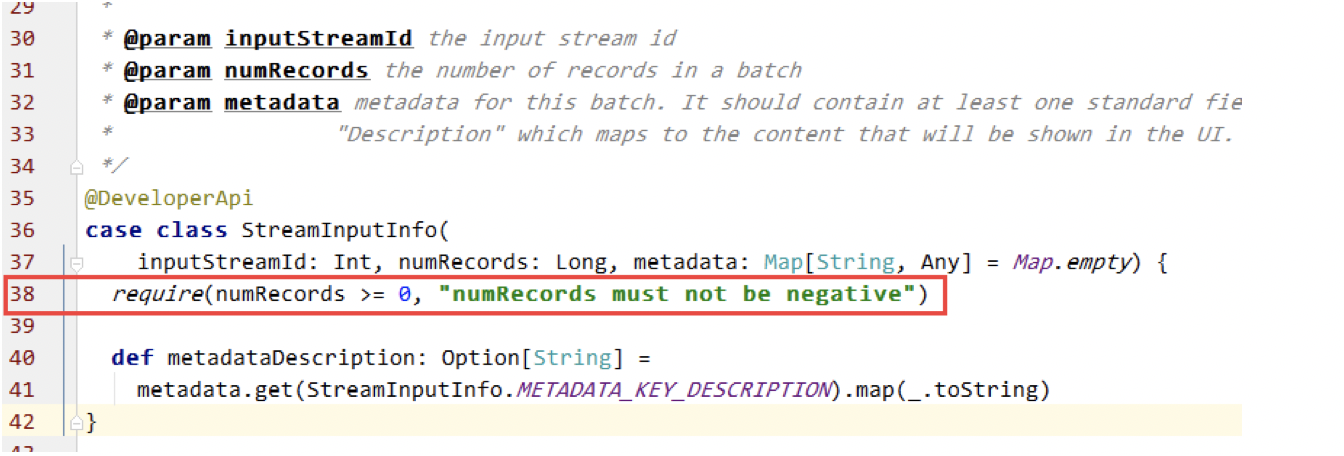
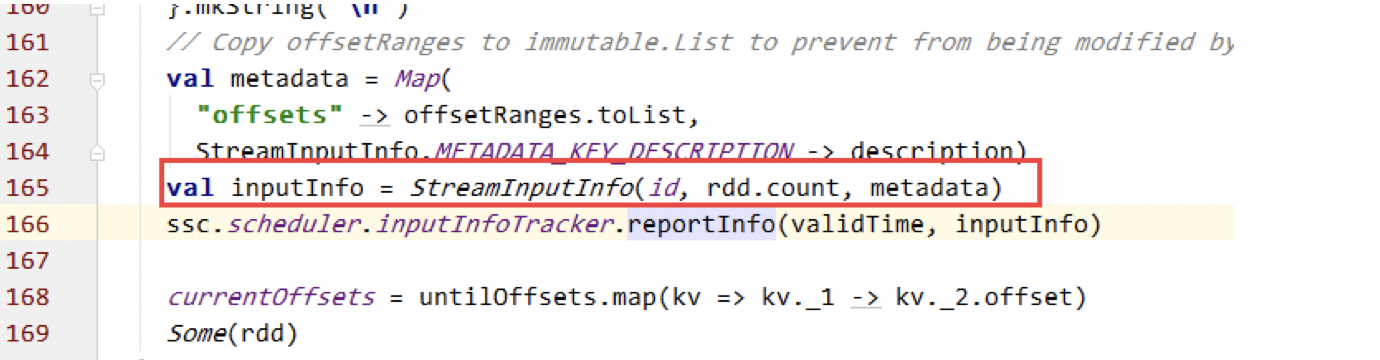


- 从zk获取topic/partition 的fromOffset(获取方法链接)
- 利用SimpleConsumer获取每个partiton的lastOffset(untilOffset )
- 判断每个partition lastOffset与fromOffset的关系
- 当lastOffset < fromOffset时,将fromOffset赋值为0
获取kafka topic partition lastoffset代码:

package org.frey.example.utils.kafka;

import com.google.common.collect.Lists;

import com.google.common.collect.Maps;

import kafka.api.PartitionOffsetRequestInfo;

import kafka.cluster.Broker;

import kafka.common.TopicAndPartition;

import kafka.javaapi.*;

import kafka.javaapi.consumer.SimpleConsumer;

import java.util.Date;

import java.util.HashMap;

import java.util.List;

import java.util.Map;

/**

 * KafkaOffsetTool

 *

 * @author angel

 * @date 2016/4/11

 */

public class KafkaOffsetTool {

  private static KafkaOffsetTool instance;

  final int TIMEOUT = 100000;

  final int BUFFERSIZE = 64 * 1024;

  private KafkaOffsetTool() {

  }

  public static synchronized KafkaOffsetTool getInstance() {

    if (instance == null) {

      instance = new KafkaOffsetTool();

    }

    return instance;

  }

  public Map<TopicAndPartition, Long> getLastOffset(String brokerList, List<String> topics,

      String groupId) {

    Map<TopicAndPartition, Long> topicAndPartitionLongMap = Maps.newHashMap();

    Map<TopicAndPartition, Broker> topicAndPartitionBrokerMap =

        KafkaOffsetTool.getInstance().findLeader(brokerList, topics);

    for (Map.Entry<TopicAndPartition, Broker> topicAndPartitionBrokerEntry : topicAndPartitionBrokerMap

        .entrySet()) {

      // get leader broker

      Broker leaderBroker = topicAndPartitionBrokerEntry.getValue();

      SimpleConsumer simpleConsumer = new SimpleConsumer(leaderBroker.host(), leaderBroker.port(),

          TIMEOUT, BUFFERSIZE, groupId);

      long readOffset = getTopicAndPartitionLastOffset(simpleConsumer,

          topicAndPartitionBrokerEntry.getKey(), groupId);

      topicAndPartitionLongMap.put(topicAndPartitionBrokerEntry.getKey(), readOffset);

    }

    return topicAndPartitionLongMap;

  }

  /**

   * 得到所有的 TopicAndPartition

   *

   * @param brokerList

   * @param topics

   * @return topicAndPartitions

   */

  private Map<TopicAndPartition, Broker> findLeader(String brokerList, List<String> topics) {

    // get broker's url array

    String[] brokerUrlArray = getBorkerUrlFromBrokerList(brokerList);

    // get broker's port map

    Map<String, Integer> brokerPortMap = getPortFromBrokerList(brokerList);

    // create array list of TopicAndPartition

    Map<TopicAndPartition, Broker> topicAndPartitionBrokerMap = Maps.newHashMap();

    for (String broker : brokerUrlArray) {

      SimpleConsumer consumer = null;

      try {

        // new instance of simple Consumer

        consumer = new SimpleConsumer(broker, brokerPortMap.get(broker), TIMEOUT, BUFFERSIZE,

            "leaderLookup" + new Date().getTime());

        TopicMetadataRequest req = new TopicMetadataRequest(topics);

        TopicMetadataResponse resp = consumer.send(req);

        List<TopicMetadata> metaData = resp.topicsMetadata();

        for (TopicMetadata item : metaData) {

          for (PartitionMetadata part : item.partitionsMetadata()) {

            TopicAndPartition topicAndPartition =

                new TopicAndPartition(item.topic(), part.partitionId());

            topicAndPartitionBrokerMap.put(topicAndPartition, part.leader());

          }

        }

      } catch (Exception e) {

        e.printStackTrace();

      } finally {

        if (consumer != null)

          consumer.close();

      }

    }

    return topicAndPartitionBrokerMap;

  }

  /**

   * get last offset

   * @param consumer

   * @param topicAndPartition

   * @param clientName

   * @return

   */

  private long getTopicAndPartitionLastOffset(SimpleConsumer consumer,

      TopicAndPartition topicAndPartition, String clientName) {

    Map<TopicAndPartition, PartitionOffsetRequestInfo> requestInfo =

        new HashMap<TopicAndPartition, PartitionOffsetRequestInfo>();

    requestInfo.put(topicAndPartition, new PartitionOffsetRequestInfo(

        kafka.api.OffsetRequest.LatestTime(), 1));

    OffsetRequest request = new OffsetRequest(

        requestInfo, kafka.api.OffsetRequest.CurrentVersion(),

        clientName);

    OffsetResponse response = consumer.getOffsetsBefore(request);

    if (response.hasError()) {

      System.out

          .println("Error fetching data Offset Data the Broker. Reason: "

              + response.errorCode(topicAndPartition.topic(), topicAndPartition.partition()));

      return 0;

    }

    long[] offsets = response.offsets(topicAndPartition.topic(), topicAndPartition.partition());

    return offsets[0];

  }

  /**

   * 得到所有的broker url

   *

   * @param brokerlist

   * @return

   */

  private String[] getBorkerUrlFromBrokerList(String brokerlist) {

    String[] brokers = brokerlist.split(",");

    for (int i = 0; i < brokers.length; i++) {

      brokers[i] = brokers[i].split(":")[0];

    }

    return brokers;

  }

  /**

   * 得到broker url 与 其port 的映射关系

   *

   * @param brokerlist

   * @return

   */

  private Map<String, Integer> getPortFromBrokerList(String brokerlist) {

    Map<String, Integer> map = new HashMap<String, Integer>();

    String[] brokers = brokerlist.split(",");

    for (String item : brokers) {

      String[] itemArr = item.split(":");

      if (itemArr.length > 1) {

        map.put(itemArr[0], Integer.parseInt(itemArr[1]));

      }

    }

    return map;

  }

  public static void main(String[] args) {

    List<String> topics = Lists.newArrayList();

    topics.add("ys");

    topics.add("bugfix");

    Map<TopicAndPartition, Long> topicAndPartitionLongMap =

        KafkaOffsetTool.getInstance().getLastOffset("broker001:9092,broker002:9092", topics, "my.group.id");

    for (Map.Entry<TopicAndPartition, Long> entry : topicAndPartitionLongMap.entrySet()) {

     System.out.println(entry.getKey().topic() + "-"+ entry.getKey().partition() + ":" + entry.getValue());

    }

  }

}

矫正offset核心代码:

    /** 以下 矫正 offset */

    // 得到Topic/partition 的lastOffsets

    Map<TopicAndPartition, Long> topicAndPartitionLongMap =

        KafkaOffsetTool.getInstance().getLastOffset(kafkaParams.get("metadata.broker.list"),

            topicList, "my.group.id");

    // 遍历每个Topic.partition

    for (Map.Entry<TopicAndPartition, Long> topicAndPartitionLongEntry : fromOffsets.entrySet()) {

      // fromOffset > lastOffset时

      if (topicAndPartitionLongEntry.getValue() >

          topicAndPartitionLongMap.get(topicAndPartitionLongEntry.getKey())) {

         //矫正fromoffset为offset初始值0

        topicAndPartitionLongEntry.setValue(0L);

      }

    }

    /** 以上 矫正 offset */
删除了原有的offset之后再次启动会报错park Streaming from Kafka has error numRecords must not ...的更多相关文章
- 【转】Eclipse下启动tomcat报错:/bin/bootstrap.jar which is referenced by the classpath, does not exist.
转载地址:http://blog.csdn.net/jnqqls/article/details/8946964 1.错误: 在Eclipse下启动tomcat的时候,报错为:Eclipse下启动to ...
- Sql Server 2008卸载后再次安装一直报错
sql server 2008卸载之后再次安装一直报错问题. 第一:由于上一次的卸载不干净,可参照百度完全卸载sql server2008 的方式 1. 用WindowsInstaller删除所有与S ...
- Eclipse中启动tomcat报错:A child container failed during start
我真的很崩溃,先是workspace崩了,费了好久重建的workspace,然后建立了一个小demo项目,tomcat中启动却报错,挑选其中比较重要的2条信息如下: A child container ...
- 启动Mysql报错:Another MySQL daemon already running with the same unix socket.
启动Mysql报错: Another MySQL daemon already running with the same unix socket. 删除如下文件即可解决 /var/lib/mysql ...
- 启动MySQL报错
安装完MySQL,启动MySQL报错,报错信息如下:Starting MySQL....The server quit without updating PID file (/data/mysqlda ...
- C# 解决SharpSvn启动窗口报错 Unable to connect to a repository at URL 'svn://....'
在远程机打开sharpsvn客户端测试,结果报错 Svn启动窗口报错 Unable to connect to a repository at URL 'svn://...' 咋整,我在win10我的 ...
- Svn启动窗口报错 Could not load file or assembly 'SharpSvn.dll' or one of its
win10 64位系统生成没问题,测试都没问题,结果换到win7 64位系统上,点开就出现,网上搜了下,通过以下方式解决, 必须把bin 文件夹全部删除,重新生成.要不还是会报错. Solve it. ...
- Eclipse启动项目正常,放到tomcat下单独启动就报错的 一例
一个老的ssh的项目,进行二次开发(增加一些新功能)后, 首先用Eclipse中集成的Tomcat启动没有任何问题,但是把启动后的webapps下得目录放到 windows的普通tomcat下单独启动 ...
- (转)启动网卡报错(Failed to start LSB: Bring up/down networking )解决办法总结
启动网卡报错(Failed to start LSB: Bring up/down networking )解决办法总结 原文:http://blog.51cto.com/11863547/19059 ...
随机推荐
- python学习第天14天。
模块 什么是模块 常见的场景:一个模块就是一个包含了python定义和声明的文件,文件名就是模块名字加上.py的后缀. 但其实import加载的模块分为四个通用类别: 1 使用python编写的代码( ...
- [swoole]swoole常见问题总汇
1.在daemon模式下Task异步任务写入文件需要采用绝对路径: 1.Task异步任务中操作数据库,如果仅仅只是在启动程序之初进行一次数据库链接,链接会在一定的时间后自动断开,应对这样的情况的最好办 ...
- 注册InstallShield
安装InstallShield 下载installshield limitededition版本,这个版本是免费的 注册 安装打开后会给一个网址要求进行注册 其中,国籍是必填项但是下拉菜单中没有内容, ...
- C# 将Excel转换为PDF
C# 将Excel转换为PDF 转换场景 将Excel转换为PDF是一个很常用的功能,常见的转换场景有以下三种: 转换整个Excel文档到PDF转换Excel文档的某一个工作表到PDF转换Excel文 ...
- Oracle 中 nvl、nvl2、nullif、coalesce、decode 函数的用法详解
NVL(EXPR1,EXPR2) NVL2(EXPR1,EXPR2,EXPR3) NULLIF(EXPR1,EXPR2) COALESCE(EXPR1,,..,EXPRn) decode ------ ...
- 高性能JavaScript读后感
这本书让lz对js性能优化有了更深刻的理解,现在因为我们通常用第三方构建工具webpack.gulp等诸如此类,之前总是听说什么dom操作影响性能呢,对这个概念总是有点模糊,但看完这本书之后后,相对而 ...
- doy09 文件处理,拷贝文件
一\在python中打开文件,得到文件语句并赋值给一个变量 f=open('a.txt','r',encoding='utf-8')) 默认打开模式就为r: 2.通过句柄对文件进行操作 data=f ...
- 二.Rsync备份服务
自己动手部署一遍 期中架构-第二章-备份服务笔记====================================================================== 01. 课 ...
- unity 3D 学习笔记
1.父对象的初始位置设,即刚开始的空对象的根节点位置应当设置成(0,0,0) 这样设置可以避免以后出现奇怪的坐标. GameObject实际上就是一些组件的容器. unity 使用公用变量原因是,在U ...
- Unity3D用户手册
Unity Manual 用户手册 Welcome to Unity. 欢迎使用Unity. Unity is made to empower users to create the best int ...