
利用 Windows API Code Pack 修改音乐的 ID3 信息
朋友由于抠门 SD 卡买小了,结果音乐太多放不下,又不舍得再买新卡,不得已决定重新转码,把音乐码率压低一点,牺牲点音质来换空间(用某些人的话说,反正不是搞音乐的,听不出差别)…
结果千千静听(百度音乐)转码后会把音乐 ID3 信息里的标题当文件名…(PS:怀念当年的 千千静听…)
结果成了这个模样:
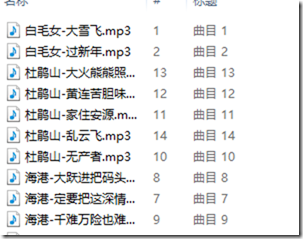

由于数量较多,收工改会死人的..
所以只好想办法用程序来批量改
找到了园友的老文章:http://www.cnblogs.com/TianFang/archive/2009/09/27/1574722.html
于是决定用 Windows API Code Pack
不过 MS 网站已经木有 Windows API Code Pack 的链接了
不过找起来也不麻烦
找到后新建工程,添加引用这两个 dll 就可以了

然后在工程里新建类 MediaTags,写入内容如下 :
class MediaTags
{
#region Mp3文件属性
/// <summary>
/// 标题
/// </summary>
[MediaProperty("Title")]
public string Title { get; set; }
/// <summary>
/// 子标题
/// </summary>
[MediaProperty("Media.SubTitle")]
public string SubTitle { get; set; }
/// <summary>
/// 星级
/// </summary>
[MediaProperty("Rating")]
public uint? Rating { get; set; }
/// <summary>
/// 备注
/// </summary>
[MediaProperty("Comment")]
public string Comment { get; set; }
/// <summary>
/// 艺术家
/// </summary>
[MediaProperty("Author")]
public string Author { get; set; }
/// <summary>
/// 唱片集
/// </summary>
[MediaProperty("Music.AlbumTitle")]
public string AlbumTitle { get; set; }
/// <summary>
/// 唱片集艺术家
/// </summary>
[MediaProperty("Music.AlbumArtist")]
public string AlbumArtist { get; set; }
/// <summary>
/// 年
/// </summary>
[MediaProperty("Media.Year")]
public uint? Year { get; set; }
/// <summary>
/// 流派
/// </summary>
[MediaProperty("Music.Genre")]
public string Genre { get; set; }
/// <summary>
/// #
/// </summary>
[MediaProperty("Music.TrackNumber")]
public uint? TrackNumber { get; set; }
/// <summary>
/// 播放时间
/// </summary>
[MediaProperty("Media.Duration")]
public string Duration { get; private set; }
/// <summary>
/// 比特率
/// </summary>
[MediaProperty("Audio.EncodingBitrate")]
public string BitRate { get; private set; }
#endregion
public MediaTags(string mediaPath)
{
//var obj = ShellObject.FromParsingName(mp3Path); //缩略图,只读
//obj.Thumbnail.Bitmap.Save(@"R:\2.jpg");
Init(mediaPath);
}
void Init(string mediaPath)
{
using (var obj = ShellObject.FromParsingName(mediaPath))
{
var mediaInfo = obj.Properties;
foreach (var properItem in this.GetType().GetProperties())
{
var mp3Att = properItem.GetCustomAttributes(typeof(MediaPropertyAttribute), false).FirstOrDefault();
var shellProper = mediaInfo.GetProperty("System." + mp3Att);
var value = shellProper == null ? null : shellProper.ValueAsObject;
if (value == null)
{
continue;
}
if (shellProper.ValueType == typeof(string[])) //艺术家,流派等多值属性
{
properItem.SetValue(this, string.Join(";", value as string[]), null);
}
else if (properItem.PropertyType != shellProper.ValueType) //一些只读属性,类型不是string,但作为string输出,避免转换 如播放时间,比特率等
{
properItem.SetValue(this, value == null ? "" : shellProper.FormatForDisplay(PropertyDescriptionFormatOptions.None), null);
}
else
{
properItem.SetValue(this, value, null);
}
}
}
}
public void Commit(string mp3Path)
{
var old = new MediaTags(mp3Path);
using (var obj = ShellObject.FromParsingName(mp3Path))
{
var mediaInfo = obj.Properties;
foreach (var proper in this.GetType().GetProperties())
{
var oldValue = proper.GetValue(old, null);
var newValue = proper.GetValue(this, null);
if (oldValue == null && newValue == null)
{
continue;
}
if (oldValue == null || !oldValue.Equals(newValue))
{
var mp3Att = proper.GetCustomAttributes(typeof(MediaPropertyAttribute), false).FirstOrDefault();
var shellProper = mediaInfo.GetProperty("System." + mp3Att);
Console.WriteLine(mp3Att);
SetPropertyValue(shellProper, newValue);
}
}
}
}
#region SetPropertyValue
static void SetPropertyValue(IShellProperty prop, object value)
{
if (prop.ValueType == typeof(string[])) //只读属性不会改变,故与实际类型不符的只有string[]这一种
{
string[] values = (value as string).Split(new char[] { ';' }, StringSplitOptions.RemoveEmptyEntries);
(prop as ShellProperty<string[]>).Value = values;
}
if (prop.ValueType == typeof(string))
{
(prop as ShellProperty<string>).Value = value as string;
}
else if (prop.ValueType == typeof(ushort?))
{
(prop as ShellProperty<ushort?>).Value = value as ushort?;
}
else if (prop.ValueType == typeof(short?))
{
(prop as ShellProperty<short?>).Value = value as short?;
}
else if (prop.ValueType == typeof(uint?))
{
(prop as ShellProperty<uint?>).Value = value as uint?;
}
else if (prop.ValueType == typeof(int?))
{
(prop as ShellProperty<int?>).Value = value as int?;
}
else if (prop.ValueType == typeof(ulong?))
{
(prop as ShellProperty<ulong?>).Value = value as ulong?;
}
else if (prop.ValueType == typeof(long?))
{
(prop as ShellProperty<long?>).Value = value as long?;
}
else if (prop.ValueType == typeof(DateTime?))
{
(prop as ShellProperty<DateTime?>).Value = value as DateTime?;
}
else if (prop.ValueType == typeof(double?))
{
(prop as ShellProperty<double?>).Value = value as double?;
}
}
#endregion
#region MediaPropertyAttribute
[AttributeUsage(AttributeTargets.Property, Inherited = false, AllowMultiple = true)]
sealed class MediaPropertyAttribute : Attribute
{
public string PropertyKey { get; private set; }
public MediaPropertyAttribute(string propertyKey)
{
this.PropertyKey = propertyKey;
}
public override string ToString()
{
return PropertyKey;
}
}
#endregion
}
剩下的就很简单了
读取当前文件夹下的所有mp3,批量替换标题
        static void Main(string[] args)

        {

            string fileDirectory = System.IO.Directory.GetCurrentDirectory();

            DirectoryInfo folder = new DirectoryInfo(fileDirectory);

            foreach (FileInfo file in folder.GetFiles("*.mp3"))

            {

                MediaTags mt = new MediaTags(file.FullName);

                mt.Title = file.FullName.Replace(fileDirectory + "\\", "").Replace(".mp3", "");

                mt.Commit(file.FullName);

            }

        }
完成效果,剩下批量转换就可以了

利用 Windows API Code Pack 修改音乐的 ID3 信息的更多相关文章
- 关于Windows® API Code Pack for Microsoft® .NET Framework
相比之前的操作系统,Window 7(or Vista)提供了很多新特性,我们在应用实现中可以利用这些特性来提升用户体验. 这些特性主要包括以下几个方面: Shell Enhancements Dir ...
- nodejs利用windows API读取文件属性(dll)
nodejs调用delphi编写的dll中,使用了dll调用windows api转读取文件属性,感觉使用nodejs也可直接调用windows api. 此处需用到windows系统的version ...
- C#利用Windows API 实现关机、注销、重启等操作
using System; using System.Text; using System.Diagnostics; using System.Runtime.InteropServices; nam ...
- 利用windows api共享内存通讯
主要涉及CreateFile,CreateFileMapping,GetLastError,MapViewOfFile,sprintf,OpenFileMapping,CreateProcess Cr ...
- Windows API 进程相关笔记
0. 前言 最近做了一个进程信息相关的项目,整理了一下自己做项目时的笔记,分享给大家 1. 相关概念 1.1 HANDLE 概念 HANDLE(句柄)是Windows操作系统中的一个概念. 在Wind ...
- Python调用Windows API函数编写录音机和音乐播放器
功能描述: 1)使用tkinter设计程序界面: 2)调用Windows API函数实现录音机和音乐播放器. . 参考代码: 运行界面:
- Windows API Hooking in Python
catalogue . 相关基础知识 . Deviare API Hook Overview . 使用ctypes调用Windows API . pydbg . winappdbg . dll inj ...
- 逆向实用干货分享,Hook技术第一讲,之Hook Windows API
逆向实用干货分享,Hook技术第一讲,之Hook Windows API 作者:IBinary出处:http://www.cnblogs.com/iBinary/版权所有,欢迎保留原文链接进行转载:) ...
- Windows API 函数列表 附帮助手册
所有Windows API函数列表,为了方便查询,也为了大家查找,所以整理一下贡献出来了. 帮助手册:700多个Windows API的函数手册 免费下载 API之网络函数 API之消息函数 API之 ...
随机推荐
- eMMC基础技术7:Bus Speed Modes
1. 前言 eMMC有多种速率模式,主要根据如下几个方面进行划分: single rate or dual rate I/O电压 BUS宽度 支持的clock频率范围 最大的传输速率 2. 概览 图 ...
- uniGUI -- Web 应用框架 Delphi + Ext JS
uniGUI -- Web 应用框架 ,基于 Delphi + Ext JS 技术.
- Keepalived详解(三):Keepalived基础功能应用实例【转】
Keepalived基础功能应用实例: 1.Keepalived基础HA功能演示: 在默认情况下,Keepalived可以实现对系统死机.网络异常及Keepalived本身进行监控,也就是说当系统出现 ...
- linux系统设置静态IP,DHCP网络服务,DNS
一.设置静态IP及DHCP网络服务 kk@yuanqiangfei:~$ cat /etc/network/interfaces # This file describes the network i ...
- 专题2:最长上升子序列LIS
A HDU 1025 Constructing Roads In JGShining's Kingdom B POJ 3903 Stock Exchange C OpenJ_B ...
- Gitbook
2017年9月13日 17:12:20 星期三 gitbook 可以将markdown格式的文件编译成html格式 放在当前目录里的_book目录里(需要手动创建, 也可以指定编译后的html文件放到 ...
- js设置睡眠N秒后再执行
function sleep(NumMillis) { var nowTime = new Date(); var exitTime = nowTime .getTime() + NumMillis; ...
- IPFS环境安装
IPFS是一个分布式的P2P的协议,可能会取代这个http,全球的点都可能存储这个数据 IPFS搭建环境 1.首先是下载节点软件到官网下载windows版本的ipfs节点软件,如果不能访问官网的话,可 ...
- word在线预览编辑器
https://blog.csdn.net/liuli283/article/details/73776685 https://blog.csdn.net/mxljiayou/article/deta ...
- idea Unable to open debugger port (127.0.0.1:58006) Address already in use: JVM_Bind 的解决办法
报错说端口58006 被占用了,于是去修改端口 重新dubug 发现换个端口号还是不行,同样的错误.有时候你把idea关闭重新打开依旧不起作用.最暴力的办法就是重启电脑... 问题解决: 查看使用中的 ...