
MongoDB Sharding分片配置
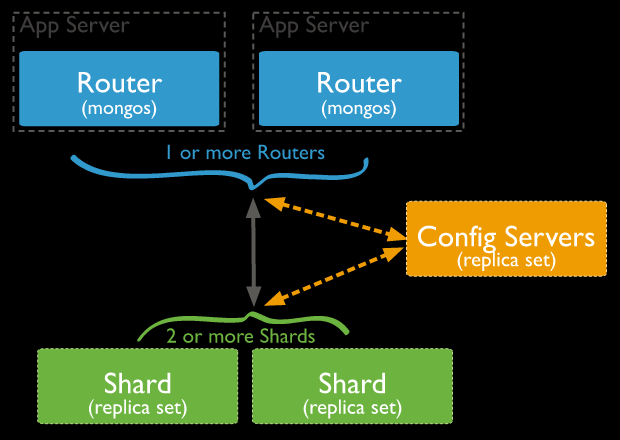
- shard key在sharding搭建完毕后是不能修改的,一个collection上只能有一个shard key。
- shard key上必须有索引(可以是以shard key开头的联合索引),如果没有mongodb会为shard key创建索引。如果是已经存在的collection那么必须手动为shard key创建索引。
- 在sharding的collection中只有_id和shard key前缀的索引可以是unique index,其他索引只能是普通索引。如果一个普通key上有unique index那么你不能以其他key为shard key对collection进行sharding。
- shard key的选择将会影响整个集群的效率,可扩展性和性能。而且也会影响你所能选择的分片策略。
- sh.addShardTag() 给shard设置标签A
- sh.addTagRange() 给集合的某个chunk范围设置标签A,最终MongoDB会保证设置标签 A 的chunk范围(或该范围的超集)分布设置了标签 A 的 shard 上。
MongoDB版本:3.2.9

节点:192.168.20.70/71/72

架构说明:

70:包含mongos、config server(master)、3个shards(master)

71:包含config server(slave)、3个shards(slave)

72:包含3个shards(arbiter)

--网上很多资料说config server必须是奇数个,但至少在本次搭建的3.2.9版本中2个也是可以的。
--master的mongo.conf(192.168.20.70)

directoryperdb=true

replSet=config

configsvr=true

logpath=/home/mongod/config_master/mongod.log

logappend=true

fork=true

port=27018

dbpath=/home/mongod/config_master

pidfilepath=/home/mongod/config_master/mongod.pid
--slave的mongo.conf(192.168.20.71)

directoryperdb=true

replSet=config

configsvr=true

logpath=/home/mongod/config_slave/mongod.log

logappend=true

fork=true

port=27018

dbpath=/home/mongod/config_slave

pidfilepath=/home/mongod/config_slave/mongod.pid
mongod -f /home/mongod/config_master/mongo.conf

mongod -f /home/mongod/config_slave/mongo.conf

use admin

cfg={_id:"config",members:[{_id:0,host:'192.168.20.70:27018',priority:2}, {_id:1,host:'192.168.20.71:27018',priority:1}]};

rs.initiate(cfg)
--shard1的master、slave、arbiter的配置文件(分别在70、71、72上)

--master:

directoryperdb=true

replSet=shard1

shardsvr = true

logpath=/home/mongod/shard1_master/mongod.log

logappend=true

fork=true

port=27017

dbpath=/home/mongod/shard1_master

pidfilepath=/home/mongod/shard1_master/mongod.pid
--slave:

directoryperdb=true

replSet=shard1

shardsvr = true

logpath=/home/mongod/shard1_slave/mongod.log

logappend=true

fork=true

port=27017

dbpath=/home/mongod/shard1_slave

pidfilepath=/home/mongod/shard1_slave/mongod.pid
--arbiter:

directoryperdb=true

replSet=shard1

shardsvr = true

logpath=/home/mongod/shard1_arbiter/mongod.log

logappend=true

fork=true

port=27017

dbpath=/home/mongod/shard1_arbiter

pidfilepath=/home/mongod/shard1_arbiter/mongod.pid
use admin

cfg={_id:"shard1",members:[{_id:0,host:'192.168.20.70:27017',priority:2}, {_id:1,host:'192.168.20.71:27017',priority:1},{_id:2,host:'192.168.20.72:27017',arbiterOnly:true}]};

rs.initiate(cfg)
--注意:dbpath、directoryperdb等参数是不能出现在mongos的配置文件中的,简单起见只配置如下参数即可:

configdb = config/192.168.20.70:27018,192.168.20.71:27018 --这里的config是config server副本集的名称,后接config server的2个副本集节点。

logpath=/home/mongod/mongos/mongod.log

logappend=true

fork=true

port=27019

pidfilepath=/home/mongod/mongos/mongod.pid
mongos -f /home/mongod/mongos/mongo.conf
登录mongos服务器:

mongo --port=27019

use admin

sh.addShard("shard1/192.168.20.70:27017,192.168.20.71:27017,192.168.20.72:27017");

sh.addShard("shard2/192.168.20.70:27020,192.168.20.71:27020,192.168.20.72:27020");

sh.addShard("shard3/192.168.20.70:27021,192.168.20.71:27021,192.168.20.72:27021");

然后在mongos上为具体的数据库配置sharding:

sh.enableSharding("test") --允许test数据库进行sharding

sh.shardCollection("test.t",{id:"hashed"}) --对test.t集合以id列为shard key进行hashed sharding

通过db.t.getIndexes()可以看到自动为id列创建了索引。
mongo --port=27019 --27019是mongos的端口号

use test

for(i=1,i<=1000,i++){db.t.insert({id:i,name:"Leo"})}
sh.shardCollection("test.t",{id:1}) --对test.t集合以id列为shard key进行ranged sharding
for(i=1;i<=1000;i++){db.t.insert({id:i,name:"Leo"})}
--sh.status()的相关结果:

test.t

shard key: { "id" : 1 }

unique: false

balancing: true

chunks:

shard1 1

shard2 1

shard3 1

{ "id" : { "$minKey" : 1 } } -->> { "id" : 2 } on : shard1 Timestamp(2, 0)

{ "id" : 2 } -->> { "id" : 22 } on : shard3 Timestamp(3, 0)

{ "id" : 22 } -->> { "id" : { "$maxKey" : 1 } } on : shard2 Timestamp(3, 1)

从sh.status的结果可以看到id为[1,2)的被分配至shard1,[2,22)被分配至shard2,其他的全部被分配至shard3,分布极其不均匀。
sh.splitAt("test.t",{id:500})

sh.splitAt("test.t",{id:1000})

sh.splitAt("test.t",{id:1500})

sh.splitAt("test.t",{id:2000})

for(i=1;i<=3000;i++){db.t.insert({id:i,name:"Leo"})}

--sh.status()显示的分片结果如下:

test.t

shard key: { "id" : 1 }

unique: false

balancing: true

chunks:

shard1 2 --shard2上有2个chunks,分别是[1500,2000]和[2000,$maxKey)

shard2 2

shard3 1

{ "id" : { "$minKey" : 1 } } -->> { "id" : 500 } on : shard1 Timestamp(2, 0)

{ "id" : 500 } -->> { "id" : 1000 } on : shard3 Timestamp(3, 0)

{ "id" : 1000 } -->> { "id" : 1500 } on : shard1 Timestamp(4, 0)

{ "id" : 1500 } -->> { "id" : 2000 } on : shard2 Timestamp(4, 1)

{ "id" : 2000 } -->> { "id" : { "$maxKey" : 1 } } on : shard2 Timestamp(3, 3)
directoryperdb=true

shardsvr = true

logpath=/home/mongod/shard4/mongod.log

logappend=true

fork=true

port=27022

dbpath=/home/mongod/shard4

pidfilepath=/home/mongod/shard4/mongod.pid
sh.addShard("192.168.20.70:27022")
test.t

shard key: { "id" : 1 }

unique: false

balancing: true

chunks:

shard1 1

shard0004 1 --mongos自动将新的单实例mongoDB的chunk命名为shard0004

shard2 2

shard3 1

{ "id" : { "$minKey" : 1 } } -->> { "id" : 500 } on : shard0004 Timestamp(5, 0)

{ "id" : 500 } -->> { "id" : 1000 } on : shard3 Timestamp(3, 0)

{ "id" : 1000 } -->> { "id" : 1500 } on : shard1 Timestamp(5, 1)

{ "id" : 1500 } -->> { "id" : 2000 } on : shard2 Timestamp(4, 1)

{ "id" : 2000 } -->> { "id" : { "$maxKey" : 1 } } on : shard2 Timestamp(3, 3)

--可以看到balancer自动将chunk进行了迁移,迁移机制为mongodb内部决定,原理参见第八部分。
mongo --port=27019 --连接到mongos

use config

db.settings.update(

{ _id: "balancer" },

{ $set: { activeWindow : { start : "02:00", stop : "06:00" } } },

{ upsert: true }

)

Balancer会在服务器local time的凌晨2-6点才执行chunk的balance。
sh.setBalancerState("false")

或者:

sh.stopBalancer()
PRIMARY> db.isMaster()

{

"hosts" : [

"host1:9003",

"host2:9003",

"host3:9003"

],

"setName" : "mongo-9003",

"setVersion" : 9,

"ismaster" : false, // primary 的 ismaster 为 false???

"secondary" : true,

"primary" : "host1:9003",

"me" : "host1:9003",

"electionId" : ObjectId("57c7e62d218e9216c70aa3cf"),

"maxBsonObjectSize" : 16777216,

"maxMessageSizeBytes" : 48000000,

"maxWriteBatchSize" : 1000,

"localTime" : ISODate("2016-09-01T12:29:27.113Z"),

"maxWireVersion" : 4,

"minWireVersion" : 0,

"ok" : 1

}
MongoDB Sharding分片配置的更多相关文章
- mongodb数据库集群及sharding分片配置
复制集群的配置 1.安装mongodb数据库 在主节点和从节点上都安装mongodb # rpm -ivh mongo-10gen-2.4.6-mongodb_1.x86_64.rpm mongo-1 ...
- MongoDB Sharding分片 shell 脚本
#!/bin/sh CONFIG_NAME=$ CONFIG_PORT=$ SERIAL_NUM=$ STORAGE_HOME=$ if [ ! -n "$CONFIG_NAME" ...
- 第41章:MongoDB-集群--Sharding(分片)
①Sharding分片概念 分片(sharding)是指将数据库拆分,将其分散在不同的机器上的过程.将数据分散到不同的机器上,不需要功能强大的服务器就可以存储更多的数据和处理更大的负载. 分片是每个分 ...
- mongodb sharding配置
mongodb集群配置 1 Mongo使用sharding集群 mongodb副本集群 mongos1 192.168.20.137 mongos2 192.168.20.138 mongo_conf ...
- MongoDB之分片集群(Sharding)
MongoDB之分片集群(Sharding) 一.基本概念 分片(sharding)是一个通过多台机器分配数据的方法.MongoDB使用分片支持大数据集和高吞吐量的操作.大数据集和高吞吐量的数据库系统 ...
- mongodb集群配置分片集群
测试环境 操作系统:CentOS 7.2 最小化安装 主服务器IP地址:192.168.197.21 mongo01 从服务器IP地址:192.168.197.22 mongo02 从服务器IP地址: ...
- MongoDB学习笔记(六)--复制集+sharding分片 && 总结
复制集+sharding分片 背景 主机 IP 服务及端口 Server A ...
- MongoDB学习笔记(五)--复制集 && sharding分片
主从复制 主从节点开启 主节 ...
- MongoDB 自动分片 auto sharding
MongoDB部署实验系列文章 MongoDB做为NoSQL数据库,最近几年持续升温,越来越多的企业都开始尝试用MongoDB代替原有Database做一些事情.MongoDB也在集群,分片,复制上也 ...
随机推荐
- eclipse连接github,链接不上 cannot open git-upload-pack(git-receive-pack)
2018年2月8日后禁止通过TLSv1.1协议连接https://github.com 和 https://api.github.com. 原文地址为https://githubengineering ...
- 记一次SSM项目小结(一)
记一次SSM项目小结(一) ssm框架 环境配置 服务器配置 解决方法 拦截器重定向到localhost nginx和tomcat中session失效 mybatis的xml文件不生效 数据库用户创 ...
- Go Web:Cookie
Cookie用来解决http协议无状态的问题. 首先,在服务端生成Cookie,然后在http响应header中设置Set-Cookie字段,客户端会读取到Set-Cookie字段后,会将cookie ...
- SVN服务器本地搭建与使用
转载请注明原文地址:http://www.cnblogs.com/ygj0930/p/6623026.html 使用SVN进行代码管理,需要搭建服务端资源库,然后在使用SVN的电脑安装SVN客户端或 ...
- 使用Mybatis Generator插件自动生成映射文件(cmd无法进入文件,dns服务器对区域没有权威等问题)遇到问题
使用Mybatis Genertor插件自动生MyBatis所需要的DAO接口,实体模型类,Mapping映射文件,将生成的代码赋值到项目工程中即可. 有命令行,Eclipse插 ...
- MyBatis:GeneratorConfig生成mapper以及pojo
首先我们需要导入相应的依赖 之后需要针对的配置一些数据 接着我们需要针对性的写配置文件,在根目录下写mybatis的主要配置文件 如上图我们配置了数据库连接.对应的一些pojo.mapper.java ...
- Java学习笔记之——单例模式
(1)懒汉式:对象在方法中,第一次调用时创建对象,线程不安全的 public class Singleton { //外部不可以创建对象,就要在内部创建一个对象,还能够在外部获取 private ...
- js中字符串和数组的使用
函数: 函数在调用的时候,会形成一个私有作用域,内部的变量不会被外面访问,这种保护机制叫闭包.这就意味着函数调用完毕,这个函数形成的栈内存会被销毁. 但有时候我们不希望他被销毁. 函数归属谁跟它在哪调 ...
- 掌握PHP垃圾回收机制
php的垃圾回收机制可以简单总结为 引用计数 写时复制 COW机制, 本文主要和大家分享掌握php垃圾回收机制的知识,希望能帮助到大家. 引用计数基本知识 官网的解答如下 每个php变量存在一个叫”z ...
- Go开发之路 -- strings以及strconv的使用
strings的使用 HasPrefix 语法: strings.HasPrefix(s, prefix string) bool // 判断字符串s是否以prefix开头 // 判断一个url是否以 ...