
android RecyclerView的瀑布流布局案例
1、先创建 activity_water_fall.xml 和 activity_water_fall_item.xml
<?xml version="1.0" encoding="utf-8"?>

<androidx.constraintlayout.widget.ConstraintLayout xmlns:android="http://schemas.android.com/apk/res/android"

    xmlns:app="http://schemas.android.com/apk/res-auto"

    xmlns:tools="http://schemas.android.com/tools"

    android:layout_width="match_parent"

    android:layout_height="match_parent"

    tools:context=".WaterFallActivity">

    <androidx.recyclerview.widget.RecyclerView

        android:id="@+id/rv3"

        android:layout_width="match_parent"

        android:layout_height="match_parent"

        tools:layout_editor_absoluteX="207dp"

        tools:layout_editor_absoluteY="62dp" />

</androidx.constraintlayout.widget.ConstraintLayout>
<?xml version="1.0" encoding="utf-8"?>

<androidx.constraintlayout.widget.ConstraintLayout xmlns:android="http://schemas.android.com/apk/res/android"

    xmlns:app="http://schemas.android.com/apk/res-auto"

    xmlns:tools="http://schemas.android.com/tools"

    android:layout_width="wrap_content"

    android:layout_height="wrap_content"

    tools:context=".WaterFallItemActivity">

    <ImageView

        android:id="@+id/imageView"

        android:layout_width="wrap_content"

        android:layout_height="wrap_content"

        android:contentDescription="@string/ivdesc"

        app:layout_constraintBottom_toBottomOf="parent"

        app:layout_constraintEnd_toEndOf="parent"

        app:srcCompat="@drawable/p1" />

</androidx.constraintlayout.widget.ConstraintLayout>
2、创建Adapter
package com.example.myapplication;

import android.content.Context;

import android.view.LayoutInflater;

import android.view.View;

import android.view.ViewGroup;

import android.widget.ImageView;

import androidx.annotation.NonNull;

import androidx.annotation.WorkerThread;

import androidx.recyclerview.widget.RecyclerView;

public class WaterFallAdapter extends RecyclerView.Adapter<WaterFallAdapter.WaterFallViewHolder> {

    private Context context;

    public WaterFallAdapter(Context context) {

        this.context = context;

    }

    @NonNull

    @Override

    public WaterFallAdapter.WaterFallViewHolder onCreateViewHolder(@NonNull ViewGroup parent, int viewType) {

        return new WaterFallViewHolder(LayoutInflater.from(context).inflate(R.layout.activity_water_fall_item,parent,false));

    }

    @Override

    public void onBindViewHolder(@NonNull WaterFallAdapter.WaterFallViewHolder holder, int position) {

        if(position %2==0) {

            holder.iv.setImageResource(R.drawable.p1);

        }else{

            holder.iv.setImageResource(R.drawable.p2);

        }

    }

    @Override

    public int getItemCount() {

        return 60;

    }

    class WaterFallViewHolder extends RecyclerView.ViewHolder{

        private ImageView iv;

        public WaterFallViewHolder(@NonNull View itemView) {

            super(itemView);

            iv = itemView.findViewById(R.id.imageView);

        }

    }

}
3、WaterFallActivity.java
package com.example.myapplication;

import androidx.appcompat.app.AppCompatActivity;

import androidx.recyclerview.widget.RecyclerView;

import androidx.recyclerview.widget.StaggeredGridLayoutManager;

import android.os.Bundle;

public class WaterFallActivity extends AppCompatActivity {

    private RecyclerView rv;

    @Override

    protected void onCreate(Bundle savedInstanceState) {

        super.onCreate(savedInstanceState);

        setContentView(R.layout.activity_water_fall);

        rv = findViewById(R.id.rv3);

        rv.setLayoutManager(new StaggeredGridLayoutManager(2,StaggeredGridLayoutManager.VERTICAL));

        rv.setAdapter(new WaterFallAdapter(WaterFallActivity.this));

    }

}
ps:图片路径,直接复制到drawable目录里面:

4、效果:
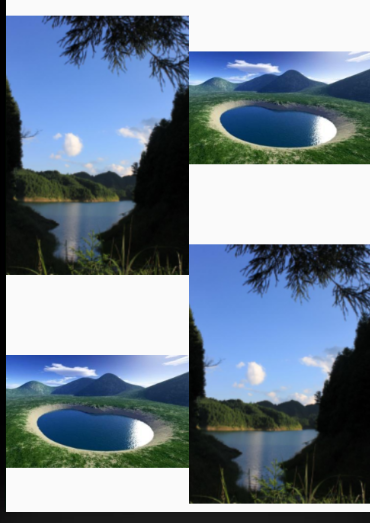
android RecyclerView的瀑布流布局案例的更多相关文章
- Android RecyclerView(瀑布流)水平/垂直方向分割线
Android RecyclerView(瀑布流)水平/垂直方向分割线 Android RecyclerView不像过去的ListView那样随意的设置水平方向的分割线,如果要实现Recycle ...
- RecyclerView实现瀑布流布局
RecyclerView本身提供了三个LayoutManager的实现 LinearLayoutManager GridLayoutManager StaggeredGridLayoutManager ...
- android RecyclerView的Grid布局案例
1.先创建activity_grid.xml 和 activity_grid_item.xml <?xml version="1.0" encoding="utf- ...
- android RecyclerView的Linear布局案例
1.先创建 activity_recycle_view.xml 和 activity_recycler_linear_item.xml 如下: <?xml version="1.0&q ...
- 基于RecyclerView的瀑布流实现
fragment的布局: <FrameLayout xmlns:android="http://schemas.android.com/apk/res/android" xm ...
- 【Android】14.0 UI开发(五)——列表控件RecyclerView的瀑布布局排列实现
1.0 列表控件RecyclerView的瀑布布局排列实现,关键词StaggeredGridLayoutManager LinearLayoutManager 实现顺序布局 GridLayoutMan ...
- JS案例之6——瀑布流布局(1)
在实际的项目中,偶尔会用到一种布局——瀑布流布局.瀑布流布局的特点是,在多列布局时,可以保证内容区块在水平方向上不产生大的空隙,类似瀑布的效果.简单的说,在垂直列表里,内容区块是一个挨着一个的.当内容 ...
- Android RecyclerView初体验
很早之前就听说过RecyclerView这个组件了,但一直很忙没时间学习.趁着周末,就花了一天时间来学习RecyclerView. 准备工作 在Android Studio里新建一个Android项目 ...
- Android RecyclerView与ListView比较
RecyclerView 概述 RecyclerView 集成自 ViewGroup .RecyclerView是Android-support-V7版本中新增的一个Widgets,官方对于它的介绍是 ...
随机推荐
- 详解python3如何调用c语言代码
本文链接:https://blog.csdn.net/u012247418/article/details/80170690开发环境linux: python3.5.2 + ubuntu-gnome- ...
- kafka发送超大消息设置
最近开发一cdc框架,为了测试极端情况,需要kafka传递100万条数据过去,1个G左右,由于其他环节限制,不便进行拆包(注:测下来,大包走kafka不一定性能更好,甚至可能更低). 测试百万以上的变 ...
- 记某app内购破解 – 安卓逆向菜鸟的初体验
前言 因为某个机缘,我拿到一个赛车app,玩了一会想买个装备,居然要我掏钱包,作为一名cracker,我觉得我的尊严受到了严重的蔑视(无奈钱包空空),我觉得要捍卫我那脆弱的玻璃心(钱包),所以,开干吧 ...
- Windows安装VMware并在VMware中安装Ubuntu
安装 VMware 去官方下载 VMware 安装包,一路默认到底即可 VMware 安装Ubuntu 参考链接:VMware12安装虚拟机教程.Ubuntu16.04安装教程 VM1 ...
- k8s记录-helm部署(九)
helm 组件配置在 192.168.0.1 192.168.0.2 192.168.0.3 app 用户下操作tar xvf helm-v2.14.3-linux-amd64.tar.gzsudo ...
- springboot项目中使用spring-data-Redis对map序列化时报错
错误信息: java.lang.ClassCastException: java.lang.Integer cannot be cast to java.lang.String at org.spri ...
- 关于/r与/n 以及 /r/n 的区别总结
应该说还是区别的,\r就是回到行首,\n就是到下一行的,但是一般我们输出程序时,看不到明显的差别的 '\r'是回车,'\n'是换行,前者使光标到行首,后者使光标下移一格.通常用的Enter是两个加起来 ...
- Jenkins - 插件管理
1 - Jenkins插件 Jenkins通过插件来增强功能,可以集成不同的构建工具.云平台.分析和发布工具等,从而满足不同组织或用户的需求. Jenkins 提供了不同的的方法来安装插件(需要不同级 ...
- 【Python学习之四】集合类型
环境 虚拟机:VMware 10 Linux版本:CentOS-6.5-x86_64 客户端:Xshell4 FTP:Xftp4 python3.6 一.字符串:字符串实际上就是字符的数组1.切片是指 ...
- Consul1.5.0 带ACL控制集群搭建
Consul Cluster with ACL1.机器规划2.先配置好三个Server,并启动一遍.3.生成并配置agent-token,解决server agent ACL block问题4.启动一 ...