
Qt widget中使用QML自定义电池
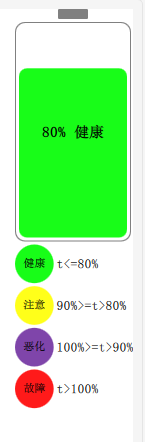
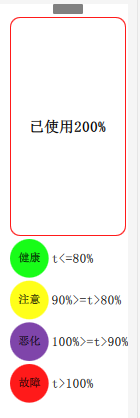
1、效果
2、QML
在资源里新建Mybattery.qml:
import QtQuick 2.0

import QtQuick 2.12

Item {

    id: root

    property color color1: "#18FD18"//绿色,健康

    property color color2: "#FFFF1A"//黄色,注意

    property color color3: "#7F45AA"//紫色,恶化

    property color color4: "#FF1A1A"//红色,故障

    property color colorBase: color1

    property bool colorChangeFlag: true

    property int bat_value: 80

    signal setBat(double batValue)//对外接口,batValue是已经使用了多少电量,比如已经使用了80%则=80

    onSetBat: {

        console.log("in bat")

        if(batValue<0)//不能小于0

        {

            text_bat_text.text="err param";

            return;

        }

        else if(batValue>100)

        {

            bat_value=0;

            rect_bat_body.border.color=color4;

        }

        else

        {

            bat_value=100-batValue;

            rect_bat_body.border.color="gray"

        }

        if(batValue<=80)

        {

            text_bat_text.text="已使用"+batValue+"%"

            colorBase = color1;

        }

        else if((batValue>80)&&(batValue<=90))

        {

            text_bat_text.text="已使用"+batValue+"%"

            colorBase = color2;

        }

        else if((batValue>90)&&(batValue<=100))

        {

            text_bat_text.text="已使用"+batValue+"%"

            colorBase = color3;

        }

        else

        {

            text_bat_text.text="已使用"+batValue+"%"

            colorBase = color4;

        }

    }

    Rectangle {

        color: "#ffffff"

        width: parent.width

        height: parent.height

        Rectangle {

            id: rect_bat_head

            width: 30

            height: 10

            radius: 1

            color: "gray"

            anchors.horizontalCenter: parent.horizontalCenter

            anchors.topMargin: 3

        }

        Rectangle {

            id: rect_bat_body

            anchors.horizontalCenter: parent.horizontalCenter

            anchors.top: rect_bat_head.bottom

            anchors.topMargin: 3

            width: parent.width-4

            height: parent.height/2

            color: "#ffffff"

            radius: 10

            border.width: 1

            border.color: "gray"

            Rectangle {

                id: rect_bat_value

                width: parent.width-8

                height: (parent.height-8)*(bat_value/100.0)

                anchors.bottom: parent.bottom

                anchors.bottomMargin: 4

                anchors.horizontalCenter: parent.horizontalCenter

                radius: 8

                color: colorBase

            }

            Text {

                id: text_bat_text

                anchors.centerIn: parent

                font.pixelSize: 15

                font.bold: true

                color: "black"

                text: bat_value+"% 健康"

            }

        }

        Grid {

            rows: 4

            columns: 2

            width: parent.width-4

            height: parent.height/2

            anchors.top: rect_bat_body.bottom

            anchors.topMargin: 3

            anchors.horizontalCenter: parent.horizontalCenter

            horizontalItemAlignment:Grid.AlignLeft

            verticalItemAlignment: Grid.AlignVCenter

            spacing: 3

            Rectangle {

                color: color1

                width: parent.width/3

                height: parent.width/3

                radius: width/2

                Text {

                    anchors.centerIn: parent

                    font.pixelSize: 11

                    text: qsTr("健康")

                }

            }

            Text {

                font.pixelSize: 13

                text: qsTr("t<=80%")

            }

            Rectangle {

                color: color2

                width: parent.width/3

                height: parent.width/3

                radius: width/2

                Text {

                    anchors.centerIn: parent

                    font.pixelSize: 11

                    text: qsTr("注意")

                }

            }

            Text {

                font.pixelSize: 13

                text: qsTr("90%>=t>80%")

            }

            Rectangle {

                color: color3

                width: parent.width/3

                height: parent.width/3

                radius: width/2

                Text {

                    anchors.centerIn: parent

                    font.pixelSize: 11

                    text: qsTr("恶化")

                }

            }

            Text {

                font.pixelSize: 13

                text: qsTr("100%>=t>90%")

            }

            Rectangle {

                color: color4

                width: parent.width/3

                height: parent.width/3

                radius: width/2

                Text {

                    anchors.centerIn: parent

                    font.pixelSize: 11

                    text: qsTr("故障")

                }

            }

            Text {

                font.pixelSize: 13

                text: qsTr("t>100%")

            }

        }

    }

}
解读:C++访问QML有多种方式,如调用函数啥的,我都试过了,widget和qml结合的方式下,目前就c++信号触发qml信号能成功。
所有定义一个信号,并且在其回调里改变界面。
3、在ui中拖动一个quickWidget
在cpp中将其绑定成qml界面:
QUrl source("qrc:/qml/Mybattery.qml");

ui->quickWidget->setResizeMode(QQuickWidget::SizeRootObjectToView );

ui->quickWidget->setSource(source);

ui->quickWidget->setClearColor(QColor(Qt::transparent));
4、在C++中通过信号连接QML的信号
没错,你没听错,就是信号连接信号!!!
mainwindow.h中定义信号
signals:

    void set(double value);
mainwindow.cpp中
 QObject *root = ui->quickWidget->rootObject();

 QObject::connect(this,SIGNAL(set(double)),root,SIGNAL(setBat(double)));//信号连接信号
 emit set(80);//效果上面1图

 emit set();//效果上面2图
注意加头文件:
#include <QQuickItem>
#include <QQuickView>
Qt widget中使用QML自定义电池的更多相关文章
- qt quick中qml编程语言
Qt QML 入门 — 使用C++定义QML类型 发表于 2013 年 3 月 11 日 注册C++类 注册可实例化的类型 注册不实例化的QML类型 附带属性 注册C++类 注册可实例化的类型 如 ...
- 自定义的插件如何加载到Qt Designer中(详细)
要想在Qt Designer中使用自定义控件,必须要使Qt Designer能够知道我们的自定义控件的存在.有两种方法可以把新自定义控件的信息通知给Qt Designer:“升级(promotion) ...
- QtQuick 中的 qml 与 Qt 的 C++
QtQuick 可以使用内置的 JavaScript 引擎加载相应的 JS 代码,使用起来特别方便. 在 Qt 中使用 C++ 开发底层,QtQuick 用来加载.处理图像,然后使用 Qt 提供的接口 ...
- VS2008 Qt Designer 中自定义信号槽
一.Qt Designer自定义槽函数 发现:在VS2008 +Qt4.7 中打开ui文件,所用的英文QT Designer工具,没有转到槽函数的功能,不如QtCreator自带的QtDesigne ...
- 在自定义的widget中引入图表后,运行时出现TypeError #1009错误
本人网上查找了很多资料,其中大部分都是关于Flash中的动画效果问题,与这里的问题关系型不太大.故把问题的解决方法写在这里,与人方便,与己方便. 方法一: 1.在自定义的widget中添加如下两个方法 ...
- Qt开发中的实用笔记三--关于各种类的零碎知识点:
1,QUuid()创建唯一标识码,在创建数据库实体ID和链接数据库QSqlDatabase时非常方便 2,QScrollArea与QScrollBar,如果是要在widget中添加窗口滑动QScrol ...
- Qt Quick编程(1)——QML的核心部分ECMAScript
说道QML,不得不先说一下ECMAScript: ECMAScript语言的标准是由Netscape.Sun.微软.Borland等公司基于JavaScript和JScript锤炼.定义出来的. EC ...
- [转载]震惊!QWidget竟然可以嵌入到QML中,QMl窗口句柄竟然是这样获取
背景 记得在初学qml时,就被大佬告知Qml的实现有两种方式“view+item”和“engine+widow”,那么能不能将QWidget嵌入到QML中来呢,我收到的答案是不可以,原因是QML的 ...
- QT QQuickView嵌入到QT MDI中
在学习QT的过程中发现有一个特别炫酷的行星例子“planets”,有两种实现版本: 一种是基于Qt 3D QML(planets-qml),另一种则是基于Quick和强大的Three.js(plane ...
随机推荐
- RestTemplate将字符串以文件的方式上传
背景 在java后台将内容拼接为字符串,然后使用RestTemplate将字符串以文件的方式上传到指定接口 思路 使用 RestTemplate 时,将字符串封装为字节流,然后上传 代码 /** * ...
- ES中的分析和分析器
在ES存储的文档,进行存储时,会对文档的内容进行分析和分词 分析的过程: 首先,将一块文本分成适合于倒排索引的独立的 词条 , 之后,将这些词条统一化为标准格式以提高它们的“可搜索性”,或者 reca ...
- 开放API接口安全处理
一.开放API接口定义 顾名思义,开放出来给其他人调用的API接口就是开放API接口.例如,短信接口.邮件接口. 二.开放API的弱点 数据窃取 用户的密码等信息被不轨之人窃取,登录账号发布敏感信息, ...
- [TypeScript] Optional Chaining with TypeScript 3.7
TypeScript 3.7 adds support for optional chaining. This lesson shows you how to use it in your code ...
- MongoDB 查看集合的统计信息
和 RDBMS 一样, MongoDB 同样存储集合的统计信息,通过调用命令 db.collection.stats() 可以方便的查看集合的统计信息. --1 查看集合 things 的统计信息 r ...
- php使用WebUploader做大文件的分块和断点续传
核心原理: 该项目核心就是文件分块上传.前后端要高度配合,需要双方约定好一些数据,才能完成大文件分块,我们在项目中要重点解决的以下问题. * 如何分片: * 如何合成一个文件: * 中断了从哪个分片开 ...
- cube.js 学习(六)cube.js segments 说明
segments 是你需要查询的数据的子集,实际上filter 也可以做类似的事情,但是,目前这个设计估计是为了更好的数据 查询吧,同时在操作界面上我们也可以看出来 参考格式 segments: { ...
- local
用于在脚本中声明局部变量, 典型用法是在函数体内,其作用域也在该变量的函数体内,如果试图在函数外使用local声明变量,将提示错误
- 2017.10.3 国庆清北 D3T3 解迷游戏
题目描述 LYK进了一家古董店,它很想买其中的一幅画.但它带的钱不够买这幅画. 幸运的是,老板正在研究一个问题,他表示如果LYK能帮他解出这个问题的话,就把这幅画送给它. 老板有一个n*m的矩阵,他想 ...
- LibreOJ #527. 「LibreOJ β Round #4」框架
二次联通门 : LibreOJ #527. 「LibreOJ β Round #4」框架 /* LibreOJ #527. 「LibreOJ β Round #4」框架 %% xxy dalao 对于 ...