
Eclipse注释模版
打开Window->Preferences->Java->Code Style->Code Templates
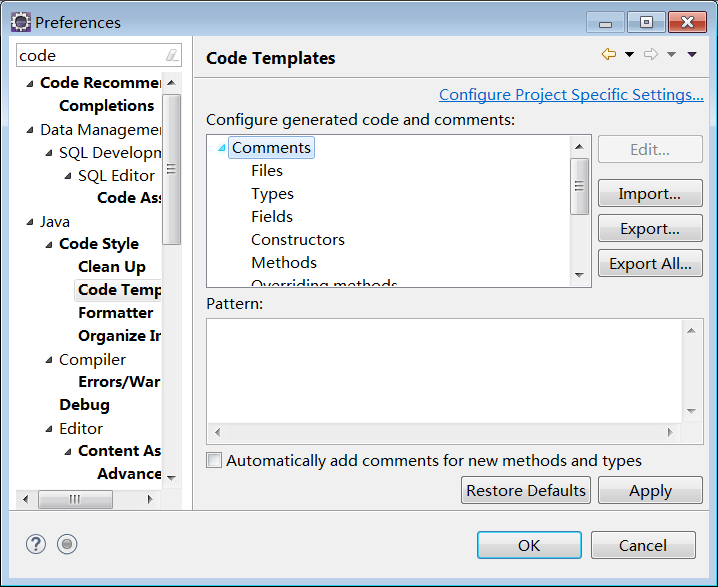
点击"Import",导入模板codetemplates.xml文件。
codetemplates.xml内容是我们自己预先定义好的,在这里先不详细描述,我们可以看到Eclipse Code Templates界面中间Configure generated code and comments区域包含了两个菜单树:Comment、Code,如下图所示:

Comments代表注释模板,Code代表代码模板,其中每一个子菜单代表子项的模板。
我们只要点击某一个子项,就会在界面下方的Pattern区域看到该项我们所定义的模板内容和格式,如下图所示:

如上图所示,当我们点击Comments下的Files子菜单时,下面的Pattern会显示Java文件的头部注释。
下面详细列出每一个子项的模板格式:
Comments-->Files(Java文件注释)
- /**
- * Project Name:${project_name}
- * File Name:${file_name}
- * Package Name:${package_name}
- * Date:${date}${time}
- * Copyright (c) ${year}, chenzhou1025@126.com All Rights Reserved.
- *
- */
Comments-->Types(Java类注释)
- /**
- * ClassName: ${type_name} <br/>
- * Function: ${todo} ADD FUNCTION. <br/>
- * Reason: ${todo} ADD REASON(可选). <br/>
- * date: ${date} ${time} <br/>
- *
- * @author ${user}
- * @version ${enclosing_type}${tags}
- * @since JDK 1.6
- */
Comments-->Fields(类字段注释)
- /**
- * ${field}:${todo}(用一句话描述这个变量表示什么).
- * @since JDK 1.6
- */
Comments-->Constructors(构造函数注释)
- /**
- * Creates a new instance of ${enclosing_type}.
- *
- * ${tags}
- */
Comments-->Methods(Java方法注释)
- /**
- * ${enclosing_method}:(这里用一句话描述这个方法的作用). <br/>
- * ${todo}(这里描述这个方法适用条件 – 可选).<br/>
- * ${todo}(这里描述这个方法的执行流程 – 可选).<br/>
- * ${todo}(这里描述这个方法的使用方法 – 可选).<br/>
- * ${todo}(这里描述这个方法的注意事项 – 可选).<br/>
- *
- * @author ${user}
- * ${tags}
- * @since JDK 1.6
- */
Comments-->Overriding methods(重写方法注释)
- /**
- * ${todo} 简单描述该方法的实现功能(可选).
- * ${see_to_overridden}
- */
Comments-->Delegate methods(代理方法注释)
- /**
- * ${tags}
- * ${see_to_target}
- */
Comments-->Getters(Java Getter方法注释)
- /**
- * ${bare_field_name}.
- *
- * @return the ${bare_field_name}
- * @since JDK 1.6
- */
Comments-->Setters(Java Setters方法注释)
- /**
- * ${param}.
- *
- * @param ${param} the ${bare_field_name} to set
- * @since JDK 1.6
- */
Code-->New Java files(新建java文件代码模板)
- /**
- * Project Name:${project_name}
- * File Name:${file_name}
- * Package Name:${package_name}
- * Date:${date}${time}
- * Copyright (c) ${year}, chenzhou1025@126.com All Rights Reserved.
- *
- */
- ${filecomment}
- ${package_declaration}
- /**
- * ClassName:${type_name} <br/>
- * Function: ${todo} ADD FUNCTION. <br/>
- * Reason: ${todo} ADD REASON. <br/>
- * Date: ${date} ${time} <br/>
- * @author ${user}
- * @version
- * @since JDK 1.6
- * @see
- */
- ${typecomment}
- ${type_declaration}
Code-->Method body(方法体模板)
- // ${todo} Auto-generated method stub
- ${body_statement}
Code-->Constructor body(构造函数模板)
- ${body_statement}
- // ${todo} Auto-generated constructor stub
Code-->Getter body(字段Getter方法模板)
- return ${field};
Code-->Setter body(字段Setter方法模板)
- ${field} = ${param};
Code-->Catch block body(异常catch代码块模板)
- // ${todo} Auto-generated catch block
- ${exception_var}.printStackTrace();
其中codetemplates.xml内容如下:
eclipse--windows-preference--java--Code style--code Templater 处导入
操作
1.复制以下xml代码保存到xml空文件中,保存后使用eclipse到code Templater 导入即可。
2.查看效果代码
<?xml version="1.0" encoding="UTF-8" standalone="no"?><templates><template autoinsert="false" context="delegatecomment_context" deleted="false" description="Comment for delegate methods" enabled="true" id="org.eclipse.jdt.ui.text.codetemplates.delegatecomment" name="delegatecomment">/** ${tags}
效果代码:
/**
- * @Title: PageController
- * @Description: 页面跳转控制类
- * @Company: 北京钻天猴科技有限公司
- * @author MrLu
- * @date 2017年2月16日 上午10:41:24
- */
- @Controller
- @RequestMapping("page")
- public class PageController {
- /**
- * @Title: toPage
- * @Description: 一级页面跳转
- * @param: @param pageName
- * @param: @param request
- * @param: @return
- * @return: String
- * @throws
- * @author MrLu
- * @Date 2017年2月16日 上午10:41:37
- */
- @RequestMapping(value="{pageName}",method=RequestMethod.GET)
- public String toPage(@PathVariable("pageName") String pageName,HttpServletRequest request){
- if(pageName.equals("reCaptcha")){
- return "reCaptcha";
- }
- Manager user = (Manager)request.getSession().getAttribute("user");
- if(user!=null){
- return pageName;
- }else{
- return "login";
- }
- }
- }
设置Code Templates的目的主要是为了统一各种注释的格式以及代码的模板,只要设定好Code Templates之后利用Eclipse就可以方便地生成我们自定义的注释,开发人员也容易接受!
Eclipse注释模版的更多相关文章
- eclipse code templates 设置(eclipse注释模版配置)
文件(Files)注释标签:/** * @Title: ${file_name} * @Package ${package_name} * @Description: ${todo} * Copyri ...
- IDE-Ecplise-代码注释 模版 编码规范 配色
说明: 代码注释主要用于方便代码后期维护,编码规范,增加代码阅读性和维护性.因网上看到的很多博客中片段局多,故整理后重写一篇,方便交流学习. 先看下加过注释模版后的效果. 如上图所示,创建类,方法和继 ...
- 【转载】 Eclipse注释模板设置详解
Eclipse注释模板设置详解 网站推荐: 金丝燕网(主要内容是 Java 相关) 木秀林网(主要内容是消息队列)
- Eclipse设置类,方法注释模版
首先打开Eclipse配置选项:Window->Preference->Java->Code Style->Code Template 配置Comments下的每个选项的模版, ...
- eclipse代码注释模版
设置注释模板的入口: Window->Preference->Java->Code Style->Code Template 然后展开Comments节点就是所有需设置注释的元 ...
- 【记录】eclipse / STS 设置注释模版格式/导入注释模版格式
设置注释模板的入口:Window->Preference->Java->Code Style->Code Template 将如下保存在新创建的xml文件中,导入进去 < ...
- Eclipse ADT 代码注释模版
具体怎么用: 将下面的内容拷贝出来保存为XML文件,进入,Eclipse :Window --> Java --> Code Style --> Code Templates-> ...
- Eclipse注释模板设置详解
设置注释模板的入口:Window->Preference->Java->Code Style->Code Template 然后展开Comments节点就是所有需设置注释的元素 ...
- eclipse注释快捷键(含方法注释)
整段注释: /*public boolean executeUpdate(String sql) { System.out.println(sql); boolean mark=false; try ...
随机推荐
- Tensorflow细节-P54-变量
1.首先复习前面所学知识: (1)g = tf.Graph() (2)别忘了初始化时的initializer (3)with tf.name_scope("generate_constant ...
- 任晓蕊 2019-2020-1 20199302《Linux内核原理与分析》第四周作业
实验内容 在实验楼的环境中敲入命令 cd LinuxKernel/ qemu -kernel linux-3.18.6/arch/x86/boot/bzImage -initrd rootfs.img ...
- 【mssql】增删改查笔记
一.插入数据 1.插入数据返回当前主键ID 当我们插入一条数据的时候,我们很多时候都想立刻获取当前插入的主键值返回以做它用.我们通常的做法有如下几种: 1. 先 select max(id) +1 , ...
- C# 异常 抛异常的时候 同时抛出 传入的参数
abp的审计日志都把这些功能实现了 可以借鉴 抛异常的时候 同时抛出 传入的参数 大致这样实现,aop,方法执行先,先把参数写入到栈中,抛异常时,栈中自然就有此时的参数了. 可用于重现该异常. 获取把 ...
- 洛谷P1514引水入城
题目 搜索加贪心其实并不需要用到\(DP\),搜索也是比较简单地搜索. 对于每个第一行的城市进行类似于滑雪那道题的搜索,然后记录最后一行它所覆盖的区间,易得一个一行城市只会有一个区间.然后可以在最后进 ...
- 【一起来烧脑】一步Sass学会体系
[外链图片转存失败(img-G32u6UQ8-1563572536495)(https://upload-images.jianshu.io/upload_images/11158618-a03a58 ...
- Python逆向(一)—— 前言及Python运行原理
一.前言 最近在学习Python逆向相关,涉及到python字节码的阅读,编译及反汇编一些问题.经过长时间的学习有了一些眉目,为了方便大家交流,特地将学习过程整理,形成了这篇专题.专题对python逆 ...
- sys 模块常用方法
sys.argv 命令行参数List,第一个元素是程序本身路径 sys.modules.keys() 返回所有已经导入的模块列表 sys.exc_info() 获取当前正在处理的异常类,exc_typ ...
- Codeforces 1264C/1265E Beautiful Mirrors with queries (概率期望、DP)
题目链接 http://codeforces.com/contest/1264/problem/C 题解 吐槽:为什么我赛后看cf的题就经常1h内做出Div.1 C, 一打cf就动不动AB题不会啊-- ...
- 【随记】安装SQL Server 2008 R2 提示创建usersettings/microsoft.sqlserver.configuration.landingpage.properties.se
在安装SQL Server 2008 R2 提示创建usersettings/microsoft.sqlserver.configuration.landingpage.properties.se.. ...