
Springboot token令牌验证解决方案 在SpringBoot实现基于Token的用户身份验证
1.首先了解一下Token
1、token也称作令牌,由uid+time+sign[+固定参数]组成:
- uid: 用户唯一身份标识
- time: 当前时间的时间戳
- sign: 签名, 使用 hash/encrypt 压缩成定长的十六进制字符串,以防止第三方恶意拼接
- 固定参数(可选): 将一些常用的固定参数加入到 token 中是为了避免重复查数据库
2.token 验证的机制(流程)
- 用户登录校验,校验成功后就返回Token给客户端。
- 客户端收到数据后保存在客户端
- 客户端每次访问API是携带Token到服务器端。
- 服务器端采用filter过滤器校验。校验成功则返回请求数据,校验失败则返回错误码
3.使用SpringBoot搭建基于token验证
3.1 引入 POM 依赖
        <dependency>

              <groupId>com.auth0</groupId>

              <artifactId>java-jwt</artifactId>

              <version>3.4.0</version>

        </dependency>
3.2 新建一个拦截器配置 用于拦截前端请求 实现 WebMvcConfigurer
 /***

  * 新建Token拦截器

 * @Title: InterceptorConfig.java

 * @author MRC

 * @date 2019年5月27日 下午5:33:28

 * @version V1.0

  */

 @Configuration

 public class InterceptorConfig implements WebMvcConfigurer {

     @Override

     public void addInterceptors(InterceptorRegistry registry) {

         registry.addInterceptor(authenticationInterceptor())

                 .addPathPatterns("/**");    // 拦截所有请求,通过判断是否有 @LoginRequired 注解 决定是否需要登录

     }

     @Bean

     public AuthenticationInterceptor authenticationInterceptor() {

         return new AuthenticationInterceptor();// 自己写的拦截器

     }

    //省略其他重写方法

 }
3.3 新建一个 AuthenticationInterceptor 实现HandlerInterceptor接口 实现拦截还是放通的逻辑
 public class AuthenticationInterceptor implements HandlerInterceptor {

     @Autowired

     UserService userService;

     @Override

     public boolean preHandle(HttpServletRequest httpServletRequest, HttpServletResponse httpServletResponse, Object object) throws Exception {

         String token = httpServletRequest.getHeader("token");// 从 http 请求头中取出 token

         // 如果不是映射到方法直接通过

         if(!(object instanceof HandlerMethod)){

             return true;

         }

         HandlerMethod handlerMethod=(HandlerMethod)object;

         Method method=handlerMethod.getMethod();

         //检查是否有passtoken注释,有则跳过认证

         if (method.isAnnotationPresent(PassToken.class)) {

             PassToken passToken = method.getAnnotation(PassToken.class);

             if (passToken.required()) {

                 return true;

             }

         }

         //检查有没有需要用户权限的注解

         if (method.isAnnotationPresent(UserLoginToken.class)) {

             UserLoginToken userLoginToken = method.getAnnotation(UserLoginToken.class);

             if (userLoginToken.required()) {

                 // 执行认证

                 if (token == null) {

                     throw new RuntimeException("无token,请重新登录");

                 }

                 // 获取 token 中的 user id

                 String userId;

                 try {

                     userId = JWT.decode(token).getAudience().get(0);

                 } catch (JWTDecodeException j) {

                     throw new RuntimeException("401");

                 }

                 User user = userService.findUserById(userId);

                 if (user == null) {

                     throw new RuntimeException("用户不存在,请重新登录");

                 }

                 // 验证 token

                 JWTVerifier jwtVerifier = JWT.require(Algorithm.HMAC256(user.getPassword())).build();

                 try {

                     jwtVerifier.verify(token);

                 } catch (JWTVerificationException e) {

                     throw new RuntimeException("401");

                 }

                 return true;

             }

         }

         return true;

     }

     @Override

     public void postHandle(HttpServletRequest httpServletRequest, HttpServletResponse httpServletResponse, Object o, ModelAndView modelAndView) throws Exception {

     }

     @Override

     public void afterCompletion(HttpServletRequest httpServletRequest, HttpServletResponse httpServletResponse, Object o, Exception e) throws Exception {

     }

 }
3.4 新建两个注解 用于标识请求是否需要进行Token 验证
/***

 * 用来跳过验证的 PassToken

 * @author MRC

 * @date 2019年4月4日 下午7:01:25

 */

@Target({ElementType.METHOD, ElementType.TYPE})

@Retention(RetentionPolicy.RUNTIME)

public @interface PassToken {

    boolean required() default true;

}
/**

 * 用于登录后才能操作

 * @author MRC

 * @date 2019年4月4日 下午7:02:00

 */

@Target({ElementType.METHOD, ElementType.TYPE})

@Retention(RetentionPolicy.RUNTIME)

public @interface UserLoginToken {

    boolean required() default true;

}
3.5 新建一个Server 用于下发Token
/***

 * token 下发

* @Title: TokenService.java

* @author MRC

* @date 2019年5月27日 下午5:40:25

* @version V1.0

 */

@Service("TokenService")

public class TokenService {

    public String getToken(User user) {

        Date start = new Date();

        long currentTime = System.currentTimeMillis() + 60* 60 * 1000;//一小时有效时间

        Date end = new Date(currentTime);

        String token = "";

        token = JWT.create().withAudience(user.getId()).withIssuedAt(start).withExpiresAt(end)

                .sign(Algorithm.HMAC256(user.getPassword()));

        return token;

    }

}
3.6 新建一个工具类 用户从token中取出用户Id
 /*

 * @author MRC

 * @date 2019年4月5日 下午1:14:53

 * @version 1.0

 */

 public class TokenUtil {

     public static String getTokenUserId() {

         String token = getRequest().getHeader("token");// 从 http 请求头中取出 token

         String userId = JWT.decode(token).getAudience().get(0);

         return userId;

     }

     /**

      * 获取request

      *

      * @return

      */

     public static HttpServletRequest getRequest() {

         ServletRequestAttributes requestAttributes = (ServletRequestAttributes) RequestContextHolder

                 .getRequestAttributes();

         return requestAttributes == null ? null : requestAttributes.getRequest();

     }

 }
3.7 新建一个简单的控制器 用于验证
@RestController

public class UserApi {

    @Autowired

    UserService userService;

    @Autowired

    TokenService tokenService;

    // 登录

    @GetMapping("/login")

    public Object login(User user, HttpServletResponse response) {

        JSONObject jsonObject = new JSONObject();

        User userForBase = new User();

        userForBase.setId("1");

        userForBase.setPassword("123");

        userForBase.setUsername("mrc");

        if (!userForBase.getPassword().equals(user.getPassword())) {

            jsonObject.put("message", "登录失败,密码错误");

            return jsonObject;

        } else {

            String token = tokenService.getToken(userForBase);

            jsonObject.put("token", token);

            Cookie cookie = new Cookie("token", token);

            cookie.setPath("/");

            response.addCookie(cookie);

            return jsonObject;

        }

    }

    /***

     * 这个请求需要验证token才能访问

     *

     * @author: MRC

     * @date 2019年5月27日 下午5:45:19

     * @return String 返回类型

     */

    @UserLoginToken

    @GetMapping("/getMessage")

    public String getMessage() {

        // 取出token中带的用户id 进行操作

        System.out.println(TokenUtil.getTokenUserId());

        return "你已通过验证";

    }

}
3.8 开始测试
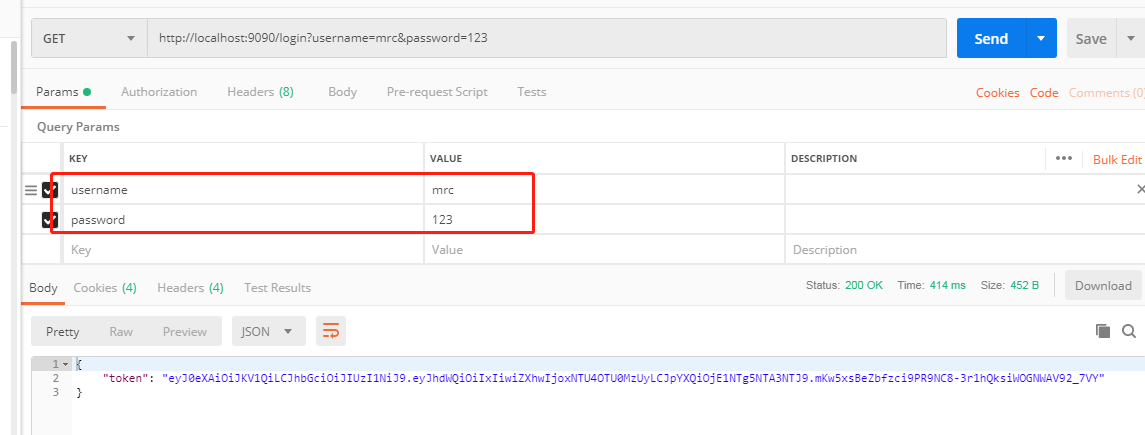
## 成功登陆后保存token到前端cookie 以后的请求带上token即可区别是哪个用户的请求!
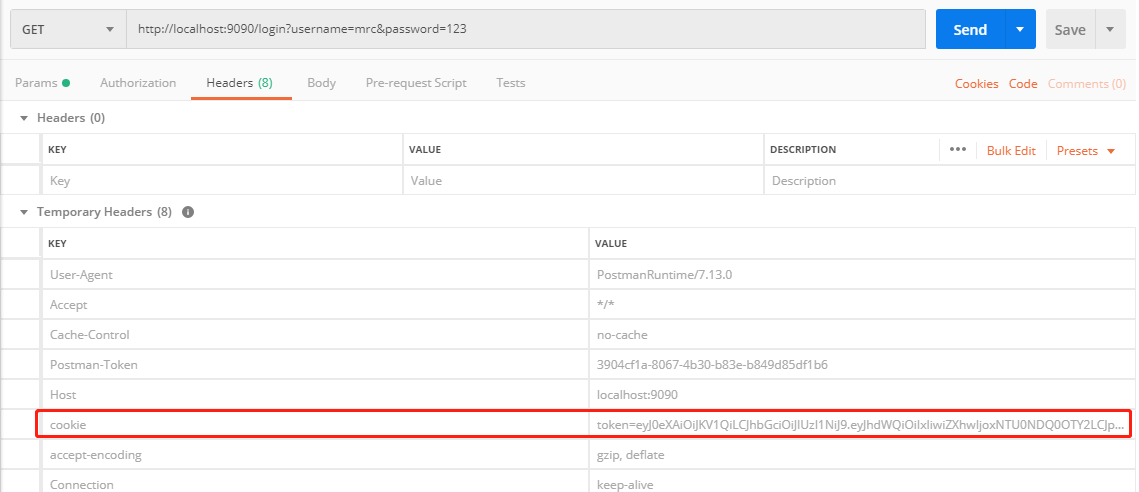
我们下一个请求在请求的时候带上这个token试试

成功通过验证! 我们看一下后端控制台打印的结果!

打印出带这个token的用户
DEMO测试版本:https://gitee.com/mrc1999/springbootToken
参考博客:https://www.jianshu.com/p/310d307e44c6
Springboot token令牌验证解决方案 在SpringBoot实现基于Token的用户身份验证的更多相关文章
- Nginx集群之基于Redis的WebApi身份验证
目录 1 大概思路... 1 2 Nginx集群之基于Redis的WebApi身份验证... 1 3 Redis数据库... 2 4 Visualbox ...
- 第11章 使用OpenID Connect添加用户身份验证 - Identity Server 4 中文文档(v1.0.0)
在本快速入门中,我们希望通过OpenID Connect协议向我们的IdentityServer添加对交互式用户身份验证的支持. 一旦到位,我们将创建一个将使用IdentityServer进行身份验证 ...
- 802.11X用户身份验证
静态WEP企图同时解决802.11无线网络安全的两个问题.它即打算提供身份验证以限定拥有特定密钥方能进行网络访问,也想要提供机密性以在数据经过无线链路时予以加密.然而,它在这两方面的表现都不是特别好. ...
- HTTP 请求未经客户端身份验证方案“Anonymous”授权。从服务器收到的身份验证标头为“Negotiate,NTLM”
转自:http://www.cnblogs.com/geqinggao/p/3270499.html 近来项目需要Web Service验证授权,一般有两种解决方案: 1.通过通过SOAP Heade ...
- 基于表单的身份验证(FBA)
https://technet.microsoft.com/zh-cn/library/ee806890(office.15).aspx http://www.tuicool.com/articles ...
- 写给大忙人的centos下ftp服务器搭建(以及启动失败/XFTP客户端一直提示“用户身份验证失败”解决方法)
注:个人对偏向于底层基本上拿来就用的应用,倾向于使用安装包,直接yum或者rpm安装:而对于应用层面控制较多或者需要大范围维护的,倾向于直接使用tar.gz版本. 对于linux下的ftp服务器,实际 ...
- IdentityServer4 使用OpenID Connect添加用户身份验证
使用IdentityServer4 实现OpenID Connect服务端,添加用户身份验证.客户端调用,实现授权. IdentityServer4 目前已更新至1.0 版,在之前的文章中有所介绍.I ...
- MVC4商城项目二:用户身份验证的实现
用户身份验证,依赖于 forms 身份验证类:FormsAuthentication,它是一串加密的cookie 来实现对控制器访问限制和登陆页面的访问控制.它在浏览器端是这样子的: 需求:我们要实现 ...
- asp.net用户身份验证时读不到用户信息的问题 您的登录尝试不成功。请重试。 Login控件
原文:asp.net用户身份验证时读不到用户信息的问题 您的登录尝试不成功.请重试. Login控件 现象1.asp.net使用自定义sql server身份验证数据库,在A机器新增用户A,可以登录成 ...
- Github官方app分析——用户身份验证模块
这篇文章记述的是我对Giuhub官方app的用户身份验证模块的分析. Giuhub的官方app虽然是一个非常小众的程序,但是从程序的设计的角度看,这是一个非常优秀的项目.对于其用户身份验证模块,给我留 ...
随机推荐
- CSP内容安全策略总结及如何抵御 XSS 攻击
跨域脚本攻击 XSS 是最常见.危害最大的网页安全漏洞.为了防止它们,要采取很多编程措施,非常麻烦.很多人提出,能不能根本上解决问题,浏览器自动禁止外部注入恶意脚本?这就是"网页安全政策&q ...
- ORACLE多条件的统计查询(case when)
前几天要做一个统计查询的功能,因为涉及多张表,多种条件的统计分析.一开始便想到了UNION和IF语句,然后写了1000多行代码,就为了查30条数据觉得不应该. 然后就开始百度,多种条件下的统计.然后有 ...
- D3.js的v5版本入门教程(第十二章)—— D3.js中各种精美的图形
D3.js的v5版本入门教程(第十二章) D3中提供了各种制作常见图形的函数,在d3的v3版本中叫布局,通过d3.layout.xxx,来新建,但是到了v5,新建一个d3中基本的图形的方式变了(我也并 ...
- 统一异常处理@ControllerAdvice
一.异常处理 有异常就必须处理,通常会在方法后面throws异常,或者是在方法内部进行try catch处理. 直接throws Exception 直接throws Exception,抛的异常太过 ...
- vue中使用百度地图vue-baidu-map
安装 npm install vue-baidu-map --save 全局注册 全局注册将一次性引入百度地图组件库的所有组件.需在入口文件main.js中引入vue-baidu-map import ...
- shell | crontab 定时任务
crontab工具 linux下自带的定时任务执行器 常用命令:crontab -l //显示用户的crontab文件的内容crontab -e //编辑用户的crontab文件的内容crontab ...
- php7 yum安装
CentOs 7.X: rpm -Uvh https://mirror.webtatic.com/yum/el7/epel-release.rpm rpm -Uvh https://mirror.we ...
- 微信小程序的跳转navigateTo()和redirectTo()用法和区别
原文链接:https://blog.csdn.net/u013128651/article/details/79736410 wx.navigateTo({}) ,保留当前页面,跳转到应用内的某个页 ...
- maven引入CDH依赖包
1. POM文件加入仓库 注意:id要和仓库配置中的id一致. <repositories> <repository> <id>cloudera</id> ...
- vue-admin-template 切换回中文
使用vue-admin-template开发项目,使用的是element-ui的控件,但这个框架走的是国际化,是英文版,好吧!快速切换为中文版: 找到main.js 第七行: 替换为: import ...