
maven-archetype-plugin 的正确打开方式
1. 准备好一个编辑好的模板工程
2. 在 pom.xml 中添加 maven-archetype-plugin 插件
<plugin>

    <groupId>org.apache.maven.plugins</groupId>

    <artifactId>maven-archetype-plugin</artifactId>

    <version>2.4</version>

</plugin>
3. 执行: mvn archetype:create-from-project,生成对应的 archetype 工程
(IDEA 可以直接在 Maven Projects 面板上点击)
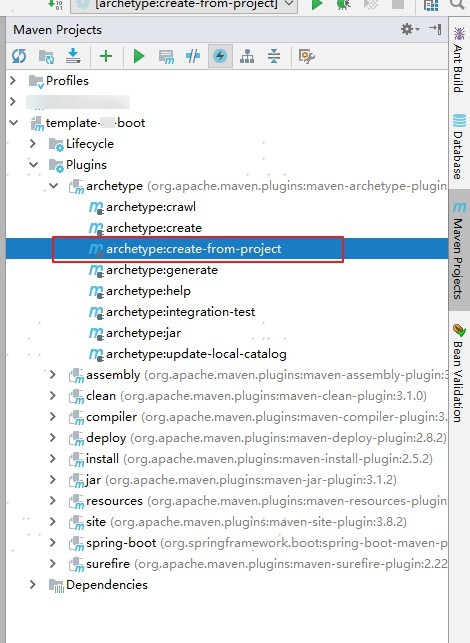
4. 导入刚刚生成的 archetype 工程
在 target\generated-sources\archetype 目录下有个 pom.xml,IDEA 可以直接拖放到 Maven Projects 面板上,就可以导入了
5. 编辑 target\generated-sources\archetype\src\main\resources\META-INF\maven\archetype-metadata.xml,设置模板工程需要使用到的文件,删除不必要配置(比如:pom 中 maven-archetype-plugin 的配置)。
我这里设置成如下:
(为了避免每次生成 archetype 工程都重新编辑 archetype-metadata.xml,可以将修改好的 archetype-metadata.xml 放在模板工程里面)
<?xml version="1.0" encoding="UTF-8"?>

<archetype-descriptor xsi:schemaLocation="http://maven.apache.org/plugins/maven-archetype-plugin/archetype-descriptor/1.0.0 http://maven.apache.org/xsd/archetype-descriptor-1.0.0.xsd" name="template-sf-boot"

                      xmlns="http://maven.apache.org/plugins/maven-archetype-plugin/archetype-descriptor/1.0.0"

                      xmlns:xsi="http://www.w3.org/2001/XMLSchema-instance">

    <fileSets>

        <fileSet filtered="true" packaged="true" encoding="UTF-8">

            <directory>src/main/java</directory>

            <includes>

                <include>**/**</include>

            </includes>

        </fileSet>

        <fileSet filtered="true" encoding="UTF-8">

            <directory>src/main/resources</directory>

            <includes>

                <include>**/**</include>

            </includes>

        </fileSet>

        <fileSet filtered="true" encoding="UTF-8">

            <directory>src/main/assembly</directory>

            <includes>

                <include>**/**</include>

            </includes>

        </fileSet>

    </fileSets>

</archetype-descriptor>
filtered="true" 表示这些文件需要替换里面的占位符: ${}
6. mvn install 这个 archetype(注意:是 archetype 工程)
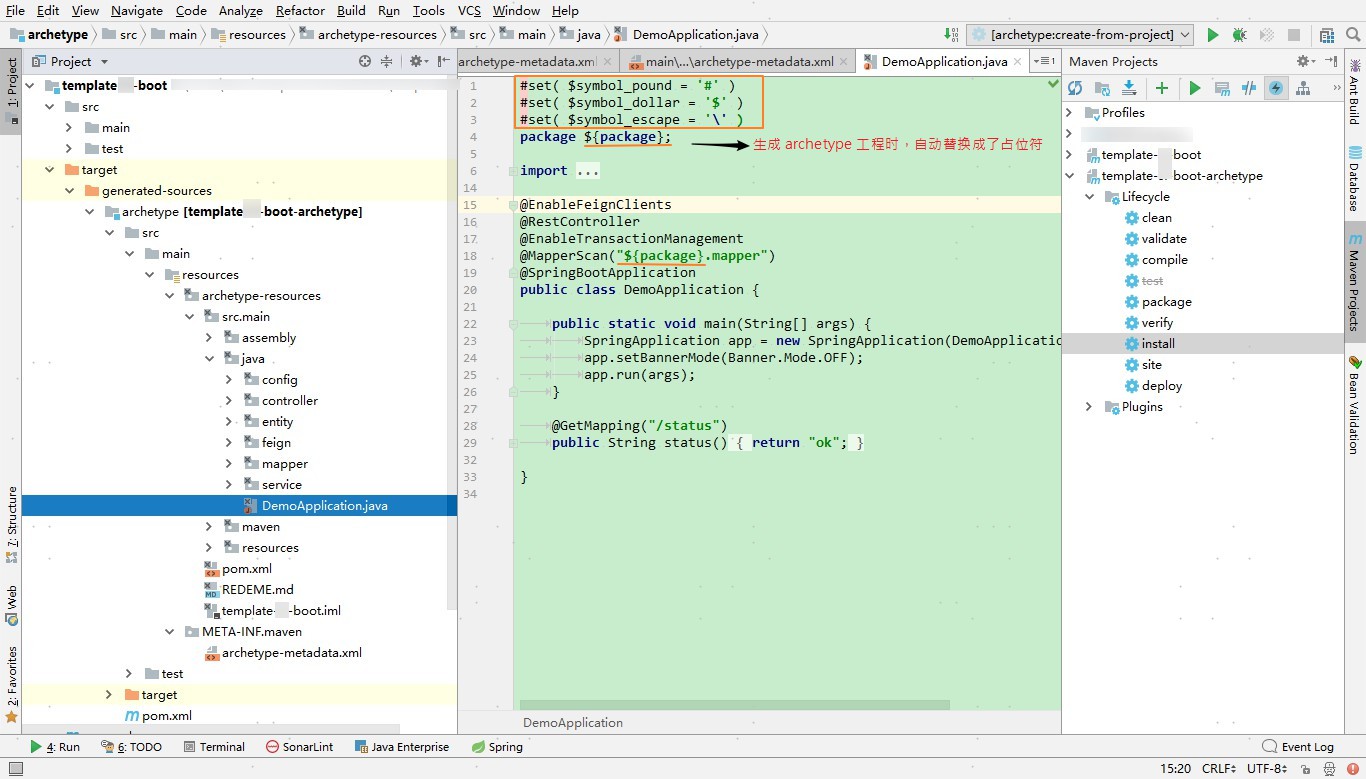
7. 通过 archetype 生成工程
有三种方式:
a. maven 命令
mvn archetype:generate -DarchetypeRepository=local -DarchetypeGroupId=com.xx.xx -DarchetypeArtifactId=template-xxx-archetype -DarchetypeVersion=1.0-SNAPSHOT -DgroupId=com.kvn.demo -DartifactId=demo-test
(关闭对话模式,添加参数:-DinteractiveMode=false )
b. IDEA 或者 eclipse
参考: https://www.cnblogs.com/fengpingfan/p/5179735.html
https://github.com/alonWang/maven-custom-archetype
maven-archetype-plugin 的正确打开方式的更多相关文章
- iOS开发小技巧--相机相册的正确打开方式
iOS相机相册的正确打开方式- UIImagePickerController 通过指定sourceType来实现打开相册还是相机 UIImagePickerControllerSourceTypeP ...
- Xcode 的正确打开方式——Debugging(转载)
Xcode 的正确打开方式——Debugging 程序员日常开发中有大量时间都会花费在 debug 上,从事 iOS 开发不可避免地需要使用 Xcode.这篇博客就主要介绍了 Xcode 中几种能 ...
- C#语法——泛型的多种应用 C#语法——await与async的正确打开方式 C#线程安全使用(五) C#语法——元组类型 好好耕耘 redis和memcached的区别
C#语法——泛型的多种应用 本篇文章主要介绍泛型的应用. 泛型是.NET Framework 2.0 版类库就已经提供的语法,主要用于提高代码的可重用性.类型安全性和效率. 泛型的定义 下面定义了 ...
- InnoDB缓冲池预加载在MySQL 5.7中的正确打开方式
InnoDB缓冲池预加载在MySQL 5.7中的正确打开方式 https://mp.weixin.qq.com/s/HGa_90XvC22anabiBF8AbQ 在这篇文章里,我将讨论在MySQL 5 ...
- Console控制台的正确打开方式
Console控制台的正确打开方式 console对象提供了访问浏览器调试模式的信息到控制台 -- Console对象 |-- assert() 如果第一个参数断言为false,则在控制台输出错误信息 ...
- 任务队列和异步接口的正确打开方式(.NET Core版本)
任务队列和异步接口的正确打开方式 什么是异步接口? Asynchronous Operations Certain types of operations might require processi ...
- (一)Redis for Windows正确打开方式
目录 (一)Redis for Windows正确打开方式 (二)Redis for 阿里云公网连接 (三)Redis for StackExchange.Redis 下载地址 官网.中文网1 及 中 ...
- List的remove()方法的三种正确打开方式
转: java编程:List的remove()方法的三种正确打开方式! 2018年08月12日 16:26:13 Aries9986 阅读数 2728更多 分类专栏: leetcode刷题 版权声 ...
- C++11随机数的正确打开方式
C++11随机数的正确打开方式 在C++11之前,现有的随机数函数都存在一个问题:在利用循环多次获取随机数时,如果程序运行过快或者使用了多线程等方法,srand((unsigned)time(null ...
- Pull Request的正确打开方式(如何在GitHub上贡献开源项目)
Pull Request的正确打开方式(如何在GitHub上贡献开源项目) GitHub的官方帮助如下: Fork A Repo: https://help.github.com/articles/f ...
随机推荐
- docker学习9-搭建rabbitMQ环境
前言 docker搭建rabbitMQ环境 下载镜像 rabbitMQ 镜像仓库地址https://hub.docker.com/_/rabbitmq 找带有 mangement的版本,会带后台管理界 ...
- Vue基本用法
在学习Vue的基本用法之前,我们先简单的了解一些es6的语法 let: 特点:1.局部作用域 2.不会存在变量提升 3.变量不能重复声明 const: 特点:1.局部作用域 2.不会存在变量提升 3. ...
- python正则表达式(5)--findall、finditer方法
findall方法 相比其他方法,findall方法有些特殊.它的作用是查找字符串中所有能匹配的字符串,并以结果存于列表中,然后返回该列表 注意: match 和 search 是匹配一次 finda ...
- vue实现分页组件
创建pagination.vue /* * 所需参数 * total Number 总页数 * current Number 当前页面下标 * pageSize Number 页面显示条数 * siz ...
- wordpress自定义菜单间添加分隔符
我们知道wordpress自定义菜单每个item是用<li></li>来固定的,那如果想在</li>加分隔符要如何操作呢?如下图所示.我们可以用PHP的str_re ...
- CSS进阶之路
下面主要引用http://www.cnblogs.com/wangfupeng1988/tag/css知多少/ CSS进阶笔记: 一.学习CSS的三个突破点 1.浏览器如何加载和解析CSS——CSS的 ...
- BAT脚本一键启动多个程序
最近写代码,开机要开各种环境,IDE,每次都要对着桌面图标一个个点击,感觉非常麻烦,简直浪费生命,每天开机要花好几分钟打开这些东西,于是稍微学习了一下window下的bat脚本语言,写了一个极为简单而 ...
- js spread object
What’s is the benefit / drawback of these two alternatives? Using object spread options = {...option ...
- 重温Elasticsearch
什么是 Elasticsearch ? Elasticsearch (ES) 是一个基于 Lucene 构建的开源.分布式.RESTful 接口全文搜索引擎.还是一个分布式文档数据库,其中每个字段均是 ...
- HDU 6595 Everything Is Generated In Equal Probability (期望dp,线性推导)
Everything Is Generated In Equal Probability \[ Time Limit: 1000 ms\quad Memory Limit: 131072 kB \] ...