
音视频入门-05-RGB-TO-BMP使用开源库
RGB-TO-BMP 回顾
将 RGB 数据转成 BMP 图片:
- 了解 BMP 文件格式
- 准备 BMP 文件头信息
- 准备 BMP 信息头
- BMP 存储 RGB 的顺序是 B-G-R
- BitmapInfoHeader 中的 biHeight 字段,biHeight 为正,位图自底向顶扫描,biHeight 为负,位图自顶向底扫描。
- BMP 图像四字节对齐
实际开发过程,通常会使用第三方开源库来简化开发,屏蔽一些底层的复杂度,节省大量编写代码的时间。
使用开源库的方式
libbmp (C 库)
#include <stdio.h>

#include "libbmp/libbmp.h"

// 彩虹的七种颜色

u_int32_t rainbowColors[] = {

        0XFF0000, // 红

        0XFFA500, // 橙

        0XFFFF00, // 黄

        0X00FF00, // 绿

        0X007FFF, // 青

        0X0000FF, // 蓝

        0X8B00FF  // 紫

};

int main() {

    int width = 711, height = 711;

    bmp_img img;

    bmp_img_init_df (&img, width, height);

    for (int i = 0; i < width; ++i) {

        // 当前颜色

        u_int32_t currentColor = rainbowColors[0];

        if(i < 100) {

            currentColor = rainbowColors[0];

        } else if(i < 200) {

            currentColor = rainbowColors[1];

        } else if(i < 300) {

            currentColor = rainbowColors[2];

        } else if(i < 400) {

            currentColor = rainbowColors[3];

        } else if(i < 500) {

            currentColor = rainbowColors[4];

        } else if(i < 600) {

            currentColor = rainbowColors[5];

        } else if(i < 700) {

            currentColor = rainbowColors[6];

        }

        // 当前颜色 R 分量

        u_int8_t R = (currentColor & 0xFF0000) >> 16;

        // 当前颜色 G 分量

        u_int8_t G = (currentColor & 0x00FF00) >> 8;

        // 当前颜色 B 分量

        u_int8_t B = currentColor & 0x0000FF;

        for (int j = 0; j < height; ++j) {

            bmp_pixel_init (&img.img_pixels[i][j], R, G, B);

        }

    }

    bmp_img_write (&img, "/Users/staff/Desktop/test-libbmp.bmp");

    bmp_img_free (&img);

    return 0;

}
google libbmp(C 库)
#include <stdio.h>

#include "google/libbmp/src/bmpfile.h"

// 彩虹的七种颜色

u_int32_t rainbowColors[] = {

        0XFF0000, // 红

        0XFFA500, // 橙

        0XFFFF00, // 黄

        0X00FF00, // 绿

        0X007FFF, // 青

        0X0000FF, // 蓝

        0X8B00FF  // 紫

};

int main(int argc, char **argv) {

    int width = 711, height = 711;

    bmpfile_t *bmp;

    if ((bmp = bmp_create(width, height, 24)) == NULL) {

        return -1;

    }

    for (int i = 0; i < width; ++i) {

        // 当前颜色

        u_int32_t currentColor = rainbowColors[0];

        if(i < 100) {

            currentColor = rainbowColors[0];

        } else if(i < 200) {

            currentColor = rainbowColors[1];

        } else if(i < 300) {

            currentColor = rainbowColors[2];

        } else if(i < 400) {

            currentColor = rainbowColors[3];

        } else if(i < 500) {

            currentColor = rainbowColors[4];

        } else if(i < 600) {

            currentColor = rainbowColors[5];

        } else if(i < 700) {

            currentColor = rainbowColors[6];

        }

        // 当前颜色 R 分量

        u_int8_t R = (currentColor & 0xFF0000) >> 16;

        // 当前颜色 G 分量

        u_int8_t G = (currentColor & 0x00FF00) >> 8;

        // 当前颜色 B 分量

        u_int8_t B = currentColor & 0x0000FF;

        rgb_pixel_t pixel = {B, G, R, 0};

        for (int j = 0; j < height; ++j) {

            bmp_set_pixel(bmp, j, i, pixel);

        }

    }

    bmp_save(bmp, "/Users/staff/Desktop/test-google-libbmp.bmp");

    bmp_destroy(bmp);

    return 0;

}
bmp(C 库)
#include <stdio.h>

#include "bmp/bmp.h"

// 彩虹的七种颜色

u_int32_t rainbowColors[] = {

        0XFF0000, // 红

        0XFFA500, // 橙

        0XFFFF00, // 黄

        0X00FF00, // 绿

        0X007FFF, // 青

        0X0000FF, // 蓝

        0X8B00FF  // 紫

};

int main() {

    int width = 711, height = 711;

    char bmp[BMP_SIZE(width, height)];

    bmp_init(bmp, width, height);

    for (int i = 0; i < width; ++i) {

        // 当前颜色

        u_int32_t currentColor = rainbowColors[0];

        if(i < 100) {

            currentColor = rainbowColors[0];

        } else if(i < 200) {

            currentColor = rainbowColors[1];

        } else if(i < 300) {

            currentColor = rainbowColors[2];

        } else if(i < 400) {

            currentColor = rainbowColors[3];

        } else if(i < 500) {

            currentColor = rainbowColors[4];

        } else if(i < 600) {

            currentColor = rainbowColors[5];

        } else if(i < 700) {

            currentColor = rainbowColors[6];

        }

        for (int j = 0; j < height; ++j) {

            bmp_set(bmp, j, i, currentColor);

        }

    }

    FILE *f = fopen("/Users/hubin/Desktop/test-bmp.bmp", "wb");

    fwrite(bmp, sizeof(bmp), 1, f);

    fclose(f);

    return 0;

}
qdbmp(C 库)
#include <stdio.h>

#include "qdbmp/qdbmp.h"

// 彩虹的七种颜色

u_int32_t rainbowColors[] = {

        0XFF0000, // 红

        0XFFA500, // 橙

        0XFFFF00, // 黄

        0X00FF00, // 绿

        0X007FFF, // 青

        0X0000FF, // 蓝

        0X8B00FF  // 紫

};

int main() {

    int width = 711, height = 711;

    BMP* bmp = BMP_Create(width, height, 24);

    for (int i = 0; i < width; ++i) {

        // 当前颜色

        u_int32_t currentColor = rainbowColors[0];

        if(i < 100) {

            currentColor = rainbowColors[0];

        } else if(i < 200) {

            currentColor = rainbowColors[1];

        } else if(i < 300) {

            currentColor = rainbowColors[2];

        } else if(i < 400) {

            currentColor = rainbowColors[3];

        } else if(i < 500) {

            currentColor = rainbowColors[4];

        } else if(i < 600) {

            currentColor = rainbowColors[5];

        } else if(i < 700) {

            currentColor = rainbowColors[6];

        }

        // 当前颜色 R 分量

        u_int8_t R = (currentColor & 0xFF0000) >> 16;

        // 当前颜色 G 分量

        u_int8_t G = (currentColor & 0x00FF00) >> 8;

        // 当前颜色 B 分量

        u_int8_t B = currentColor & 0x0000FF;

        for (int j = 0; j < height; ++j) {

            BMP_SetPixelRGB(bmp, j, i, R, G, B);

        }

    }

    /* Save result */

    BMP_WriteFile( bmp, "/Users/hubin/Desktop/test-qdbmp.bmp");

    BMP_CHECK_ERROR( stderr, -2 );

    /* Free all memory allocated for the image */

    BMP_Free( bmp );

    return 0;

}
easybmp(C++ 库)
#include "EasyBMP/EasyBMP.h"

using namespace std;

// 彩虹的七种颜色

u_int32_t rainbowColors[] = {

        0XFF0000, // 红

        0XFFA500, // 橙

        0XFFFF00, // 黄

        0X00FF00, // 绿

        0X007FFF, // 青

        0X0000FF, // 蓝

        0X8B00FF  // 紫

};

int main( int argc, char* argv[]) {

    int width = 711, height = 711;

    int bitDepth = 24;

    BMP bmp;

    bmp.SetSize(width, height);

    bmp.SetBitDepth(bitDepth);

    for (int i = 0; i < width; ++i) {

        // 当前颜色

        u_int32_t currentColor = rainbowColors[0];

        if(i < 100) {

            currentColor = rainbowColors[0];

        } else if(i < 200) {

            currentColor = rainbowColors[1];

        } else if(i < 300) {

            currentColor = rainbowColors[2];

        } else if(i < 400) {

            currentColor = rainbowColors[3];

        } else if(i < 500) {

            currentColor = rainbowColors[4];

        } else if(i < 600) {

            currentColor = rainbowColors[5];

        } else if(i < 700) {

            currentColor = rainbowColors[6];

        }

        // 当前颜色 R 分量

        u_int8_t R = (currentColor & 0xFF0000) >> 16;

        // 当前颜色 G 分量

        u_int8_t G = (currentColor & 0x00FF00) >> 8;

        // 当前颜色 B 分量

        u_int8_t B = currentColor & 0x0000FF;

        RGBApixel pixel;

        pixel.Red = R;

        pixel.Green = G;

        pixel.Blue = B;

        pixel.Alpha = 0;

        for (int j = 0; j < height; ++j) {

            bmp.SetPixel(j, i, pixel);

        }

    }

    bmp.WriteToFile("/Users/hubin/Desktop/test-easybmp.bmp");

    return 0;

}
bitmap(C++ 库)
#include "bitmap/bitmap_image.hpp"

using namespace std;

// 彩虹的七种颜色

u_int32_t rainbowColors[] = {

        0XFF0000, // 红

        0XFFA500, // 橙

        0XFFFF00, // 黄

        0X00FF00, // 绿

        0X007FFF, // 青

        0X0000FF, // 蓝

        0X8B00FF  // 紫

};

int main() {

    int width = 711, height = 711;

    bitmap_image image(width, height);

    image.clear();

    for (int i = 0; i < width; ++i) {

        // 当前颜色

        u_int32_t currentColor = rainbowColors[0];

        if(i < 100) {

            currentColor = rainbowColors[0];

        } else if(i < 200) {

            currentColor = rainbowColors[1];

        } else if(i < 300) {

            currentColor = rainbowColors[2];

        } else if(i < 400) {

            currentColor = rainbowColors[3];

        } else if(i < 500) {

            currentColor = rainbowColors[4];

        } else if(i < 600) {

            currentColor = rainbowColors[5];

        } else if(i < 700) {

            currentColor = rainbowColors[6];

        }

        // 当前颜色 R 分量

        u_int8_t R = (currentColor & 0xFF0000) >> 16;

        // 当前颜色 G 分量

        u_int8_t G = (currentColor & 0x00FF00) >> 8;

        // 当前颜色 B 分量

        u_int8_t B = currentColor & 0x0000FF;

        for (int j = 0; j < height; ++j) {

            image.set_pixel(j, i, R, G, B);

        }

    }

    image.save_image("/Users/hubin/Desktop/test-bitmap.bmp");

    return 0;

}
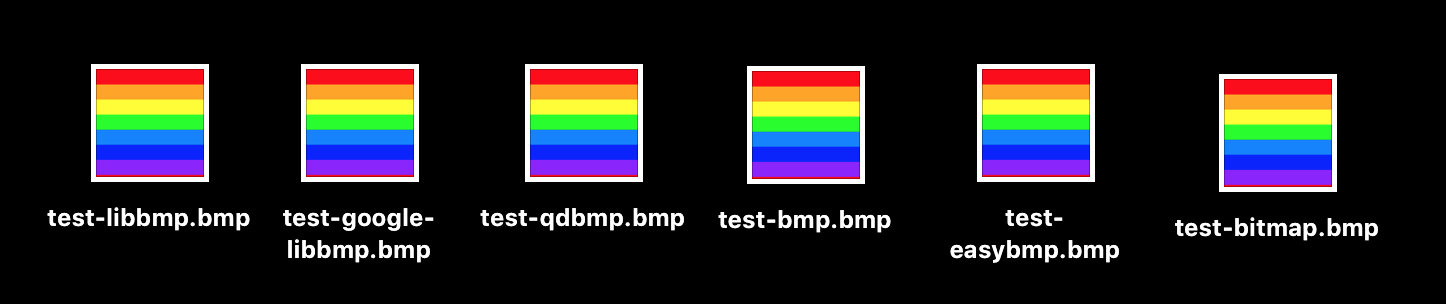
查看开源库的效果
六个开源库都可以大大减少我们的工作量!
代码:
参考资料:
内容有误?联系作者:

音视频入门-05-RGB-TO-BMP使用开源库的更多相关文章
- 音视频入门-09-RGB&YUV互转-使用开源库
* 音视频入门文章目录 * 介绍开源库 使用第三方开源库来简化开发,屏蔽一些底层的复杂度,节省大量编写代码的时间. libyuv: Google 开源的实现各种 YUV 与 RGB 之间相互转换.旋转 ...
- 音视频入门-03-RGB转成BMP图片
* 音视频入门文章目录 * BMP 文件格式解析 BMP 文件由文件头.位图信息头.颜色信息和图形数据四部分组成. 位图文件头(14个字节) 位图信息头(40个字节) 颜色信息 图形数据 文件头与信息 ...
- 音视频入门-01-认识RGB
* 音视频入门文章目录 * RGB 简介 RGB 色彩模式是工业界的一种颜色标准,是通过对红(R).绿(G).蓝(B)三个颜色通道的变化以及它们相互之间的叠加来得到各式各样的颜色的,RGB 即是代表红 ...
- 音视频入门-11-PNG文件格式详解
* 音视频入门文章目录 * PNG 文件格式解析 PNG 图像格式文件由一个 8 字节的 PNG 文件署名域和 3 个以上的后续数据块(IHDR.IDAT.IEND)组成. PNG 文件包括 8 字节 ...
- 音视频入门-10-使用libyuv对YUV数据进行缩放、旋转、镜像、裁剪、混合
* 音视频入门文章目录 * libyuv libyuv 是 Google 开源的实现各种 YUV 与 RGB 之间相互转换.旋转.缩放等的库.它是跨平台的,可在 Windows.Linux.Mac.A ...
- 音视频入门-08-RGB&YUV
* 音视频入门文章目录 * YUV & RGB 相互转换公式 YCbCr 的 Y 与 YUV 中的 Y 含义一致,Cb 和 Cr 与 UV 同样都指色彩,Cb 指蓝色色度,Cr 指红色色度,在 ...
- 音视频入门-04-BMP图像四字节对齐的问题
* 音视频入门文章目录 * BMP 图像四字节对齐 表示 BMP 位图中像素的位元是以行为单位对齐存储的,每一行的大小都向上取整为4字节(32 位 DWORD)的倍数.如果图像的高度大于 1,多个经过 ...
- 音视频入门-20-BMP、PNG、JPG、GIF静态图生成GIF动态图
* 音视频入门文章目录 * 静态图 -> 动态图 前面 [18-手动生成一张GIF图片] 和 [19-使用giflib处理GIF图片] 生成的 GIF 每一帧都是一个颜色,平时用到的 GIF 每 ...
- 音视频入门-12-手动生成一张PNG图片
* 音视频入门文章目录 * 预热 上一篇 [PNG文件格式详解]详细介绍了 PNG 文件的格式. PNG 图像格式文件由一个 8 字节的 PNG 文件署名域和 3 个以上的后续数据块(IHDR.IDA ...
随机推荐
- 性能分析 函数粒度 函数里的一条语句 汇编 反编译 机器指令 %rbx,%rbp
在Linux下做性能分析3:perf - 知乎 https://zhuanlan.zhihu.com/p/22194920 Linux Perf 性能分析工具及火焰图浅析 - 知乎 https://z ...
- JMS与消息队列
JMS,Java Message Service,即Java消息服务. MOM,Message Oriented Miiddleware的英文缩写,指的是利用高效可靠的消息传递机制进行平台无关的数据交 ...
- Netty服务器连接池管理设计思路
应用场景: 在RPC框架中,使用Netty作为高性能的网络通信框架时,每一次服务调用,都需要与Netty服务端建立连接的话,很容易导致Netty服务器资源耗尽.所以,想到连接池技术,将与同一个Nett ...
- python的url正则表达式
网上有很多的正则表达式版本,大部分都不好使,下面这个比较好用: http[s]?://(?:[a-zA-Z]|[0-9]|[$-_@.&+]|[!*\(\),]|(?:%[0-9a-fA-F] ...
- Navigator的使用:
1.路由直接跳转到下一个页面: Navigator.pushNamed(context,"/login"); 2.跳转的下一个页面,替换当前的页面: Navigator.of(co ...
- 深入学习c++--容器
1. 简介 1. 序列式容器: array, vector, deque, list, forward_list --- 数组 或者 指针实现 2. 关联容器: set, map, multiset, ...
- ES6深入浅出-13 Proxy 与 Reflect-2.Proxy 代理
阮一峰http://es6.ruanyifeng.com/#docs/proxy MDN https://developer.mozilla.org/zh-CN/docs/Web/JavaScript ...
- php cURL error 60: SSL certificate problem: unable to get local issuer certificate 解决办法
错误例子如下: php5.6以上的版本会出现这种问题 关于“SSL证书问题:无法获取本地颁发者证书”错误.很明显,这适用于发送CURL请求的系统(并且没有服务器接收请求) 1)从https://cur ...
- Linux记录-Nginx+Tomcat负载均衡配置
Nginx负载均衡配置及策略: 轮询(默认) 优点:实现简单缺点:不考虑每台服务器的处理能力配置示例如下:upstream www.xxx.com {# 需要负载的server列表server www ...
- win8(x64)下,重新安装delphi 2007时出现“Invalid Serial Number”,如何解决?
1)在添加删除程序里卸载delphi 2007 2)删除C:\ProgramData\CodeGear 3)删除C:\Program Files (x86)CodeGear 4)删除d:\Progra ...