
git之fatal: Could not read from remote repository
问题背景:
在git bash中使用hexo g -d命令进行文章发布
详细错误信息:
fatal: Could not read from remote repository.

Please make sure you have the correct access rights

and the repository exists.

FATAL Something's wrong. Maybe you can find the solution here: http://hexo.io/docs/troubleshooting.html

Error: Connection reset by 13.250.177.223 port 22

fatal: Could not read from remote repository.

Please make sure you have the correct access rights

and the repository exists.

    at ChildProcess.<anonymous> (E:\Hexo\node_modules\hexo-util\lib\spawn.js:37:17)

    at emitTwo (events.js:126:13)

    at ChildProcess.emit (events.js:214:7)

    at ChildProcess.cp.emit (E:\Hexo\node_modules\cross-spawn\lib\enoent.js:40:29)

    at maybeClose (internal/child_process.js:915:16)

    at Socket.stream.socket.on (internal/child_process.js:336:11)

    at emitOne (events.js:116:13)

    at Socket.emit (events.js:211:7)

    at Pipe._handle.close [as _onclose] (net.js:561:12)
错误原因是因为ssh key有问题,连接不上服务器。
于是我参考如下链接,一步一步操作,最终解决了这个问题:
git遇到的问题之“Please make sure you have the correct access rights and the repository exists.”
虽然已经有了问题的解决答案,但是我觉得还是需要列举一下相关步骤,梳理一下:
1.重新在git设置一下身份的名字和邮箱
git config --global user.name "yourname"

git config --global user.email "your@email.com"
这里的yourname必须与github的用户名一致
这里your@email.com必须与github登录邮箱一致
2.删除.ssh文件夹下的known_hosts文件(该文件主要作用是域名解析)
3.ssh-keygen -t rsa -C “your@email.com(填写github对应的邮箱)”
一路回车即可,无需输入
4.进入github设置界面
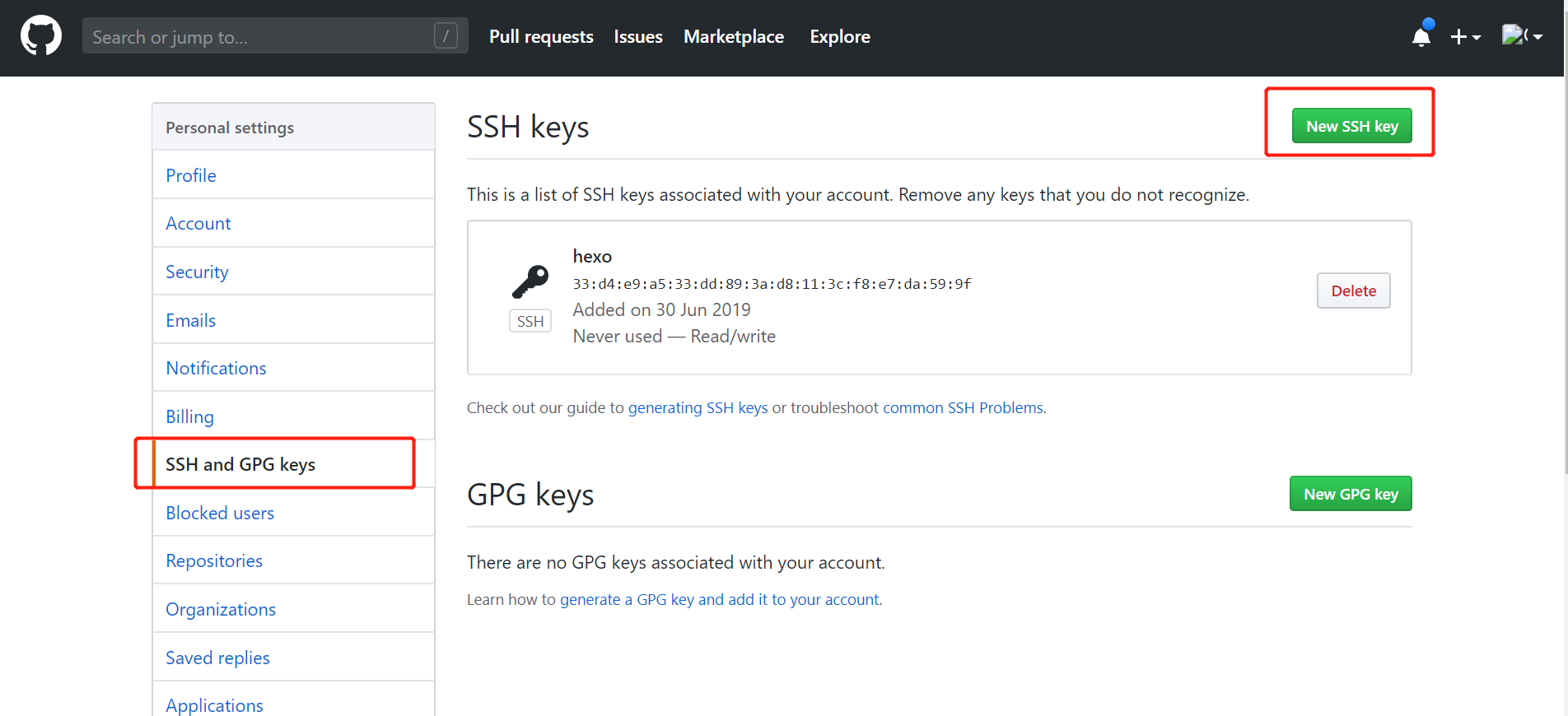
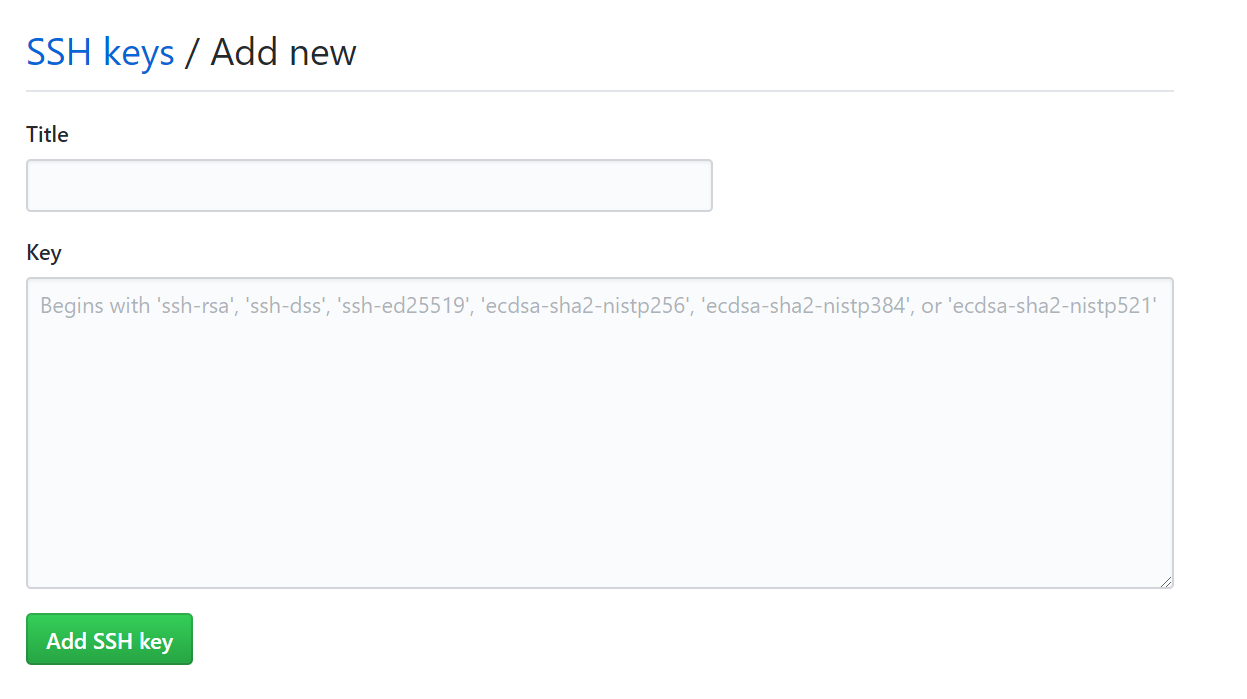
新增SSH key将id_rsa.pub内容添加到如图中的Key上(title可任意命名):
5.最后完美解决这个问题
git之fatal: Could not read from remote repository的更多相关文章
- git pull 出错 fatal: Could not read from remote repository.Please make sure you have the correct access rights.and the repository exists.
Warning: Permanently added the RSA host key for IP address '192.30.252.131' to the list of known hos ...
- git提示错误关于错误:ssh: Could not resolve hostname github.com: Name or service not known.fatal: Could not read from remote repository.
关于 Git 使用中出现的错误 饥人谷_楠柒 关注 2016.11.02 15:33* 字数 746 阅读 3607评论 5喜欢 10赞赏 1 关于错误:ssh: Could not resolve ...
- 用ssh进行git clone出现 fatal: Could not read from remote repository.
问题:在通过MobaXterm进行ssh连接的服务器上用ssh进行git clone出现 fatal: Could not read from remote repository. 解决方法:prox ...
- gitlab 安装遇到 fatal:does not appear to be a git repository fatal: Could not read from remote repository. 问题
Cloning into 'door_lock_bsp'... git@192.168.1.5's password: fatal: 'door_lock/door_lock_bsp.git' do ...
- fatal:'origin' does not appear to be a git repository fatal:Could not read from remote repository
天gitlab中遇到的问题: 当 git push origin branch_name时遇到报错如下: fatal:'origin' does not appear to be a git repo ...
- 【git基础】Permission denied (publickey). fatal: Could not read from remote repository
运行以下git命令的时候出现错误 git push -u origin master error The authenticity of host 'github.com (13.250.177.22 ...
- git clone ssh 时出现 fatal: Could not read from remote repository
一.问题及解决办法参考: 在 ubuntu 中,要把 GitHub 上的储存库克隆到计算机上时,执行如下命令: git clone git@github.com:USER-NAME/REPOSITOR ...
- github Permission denied (publickey). fatal: Could not read from remote repository.
github Permission denied (publickey).fatal: Could not read from remote repository. ----------------- ...
- Permission denied (publickey). fatal: Could not read from remote repository.
博主在github上下载tiny face的的源代码的时候,遇到git clone命令为:git clone --recursive git@github.com:peiyunh/tiny.git 而 ...
随机推荐
- 【JVM】记录一次线上SWAP偏高告警的故障分析过程
近期遇到一个堆外内存导致swap飙高的问题,这类问题比较罕见,因此将整个排查过程记录下来了 现象描述 最近1周线上服务器时不时出现swap报警(swap超过内存10%时触发报警,内存是4G,因此swa ...
- C#中的委托、事件及事件的订阅
using System; using System.Collections.Generic; using System.Linq; using System.Text; using System.T ...
- Vue父子,子父,非父子组件之间传值
Vue组件基础 纯属随笔记录,具体详细教程,请查阅vue.js网站 子组件给父组件传值: <body> <div id="app"> <my-app& ...
- Leetcode刷题python
Two Sum 两数==target 方法二更好 题1,对时间复杂度有要求O(n),所以维护一个字典,遍历过的数值放在字典中,直接遍历时候查找字典中有没有出现差,查找字典时间复杂度是O(1),所以O( ...
- 超详细的纯净windows系统重装示例
之前说过通过使用大白菜制作启动盘,再去系统之家下载系统.虽然系统能安装,但是有时安装的是ghost版本,安装方便,只要引导后面就是等待自动安装,驱动什么的都不用管.但是有时会带上很多软件,不好清理甚至 ...
- hadoop2.8 ha 集群搭建
简介: 最近在看hadoop的一些知识,下面搭建一个ha (高可用)的hadoop完整分布式集群: hadoop的单机,伪分布式,分布式安装 hadoop2.8 集群 1 (伪分布式搭建 hadoop ...
- CentOS 7 使用 firewalld 打开关闭防火墙与端口
1.firewalld的基本使用启动: systemctl start firewalld关闭: systemctl stop firewalld查看状态: systemctl status fire ...
- 详解shell脚本括号区别--$()、$「 」、$「 」 、$(()) 、「 」 、「[ 」]
概述 很多时候我们在写shell脚本的时候总会碰到不同的括号,那么这些不同的括号有什么区别呢? $() 用于命令交换 说明:平时脚本用的``符号也是用于命令交换的哦,和$() 的操作是一样的 ${ } ...
- yum仓库的部署
https://segmentfault.com/a/1190000013968371 私有yum仓库在企业中的应用还是比较广泛,有方便.快捷.灵活等优势.如某公司安全部门不允许大批量的主机连接互联网 ...
- Python +appium logger
封装日志模块 import logging def get_log(): # 配置日志参数 logger = logging.getLogger() logger.setLevel(logging.I ...