
DIY一个Web框架
一、前言
二、框架结构及实现流程
三、总结
一、前言
当我们了解了Web应用和Web框架,以及HTTP协议的原理之后,我们可以自己动手DIY一个最简单的WEB框架,以加深对Web框架的理解,并为即将学习的Django探探路。
二、框架结构及实现流程
1.框架结构的内容如下图所示
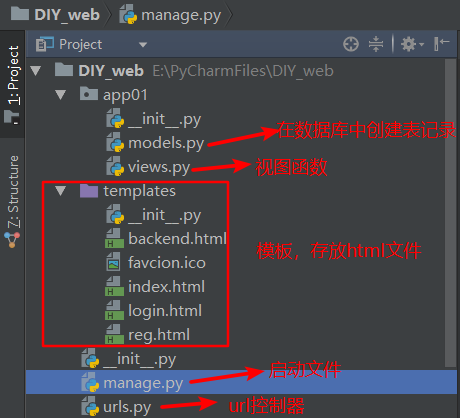
我们DIY的这个Web框架按照启动的先后顺序,大致分为这样几个部分,分别是models.py、manage.py、urls.py、views.py、templates(html文件)五个部分,下面我们分别对这五个部分进行实现,最后,进行运行测试,验证框架的的可用性。
2.实现流程
(1) models.py -- 与数据库相关的,在我们的项目启动前,利用models.py在数据库中创建表结构,注意,仅运行一次。
#!/usr/bin/env python3

#!-*- coding:utf-8-*-

# write by cc

import pymysql

# 1.建立连接

conn = pymysql.connect(

    host = 'localhost',

    port = 3306,

    user = 'cc1',

    password = 'cc111',

    db = 'db1',

    charset = 'utf8'

)

# 2.获取游标

cursor = conn.cursor()

# cursor = conn.cursor(pymysql.cursor.DictCursor) # 设游标类型为字典类型

# 3.执行sql语句

sql = "create table users(id int,user char(12),pwd char(12))"

rows = cursor.execute(sql)

print(rows) # 打印受影响的记录条数

# 4.提交(必须提交,才能实现操作)

conn.commit()

# 5.关闭游标和连接

cursor.close()

conn.close()
(2) manage.py -- 项目的启动文件
from wsgiref.simple_server import make_server

from urls import url_list

def application(environ,start_response):

    path = environ.get("PATH_INFO")

    print(path)

    start_response("200 OK",[('Content-Type','text/html')])

    func = None

    for item in url_list:

        if path == item[0]:

            func = item[1]

            break

    if func:

        return [func(environ)]

    else:

        return [b'404 Not found']

if __name__ == '__main__':

    httpd = make_server("",8080,application) # 指定端口

    print('Serving HTTP on port 8080...')

    httpd.serve_forever() # 开启监听
(3) urls.py -- url控制器,反映路径与视图函数的映射关系
from app01.views import *

url_list = [

    ('/favcion.ico',fav),

    ('/index',index),

    ('/login',login),

    ('/reg',reg),

    ('/timer',timer),

    ('/auth',auth)

]
(4) views.py -- 视图函数,固定接收一个形式参数:environ
from urllib.parse import parse_qs

def fav(environ):

    with open('templates/favcion.ico','rb') as f:

        data = f.read()

    return data

def index(environ):

    with open('templates/index.html','rb') as f:

        data = f.read()

    return data

def login(environ):

    with open('templates/login.html','rb') as f:

        data = f.read()

    return data

def reg(environ):

    with open('templates/reg.html','rb') as f:

        data = f.read()

    return data

def timer(environ):

    import datetime

    now = datetime.datetime.now().strftime("%y-%m-%d %X")

    return now.encode('utf-8')

def auth(environ):

    try:

        request_body_size = int(environ.get('CONTENT_LENGTH',0))

    except(ValueError):

        request_body_size = 0

    request_body = environ['wsgi.input'].read(request_body_size)

    data = parse_qs(request_body)

    # 解析出用户输入的用户名和密码

    user = data.get(b'user')[0].decode('utf8')

    pwd = data.get(b'pwd')[0].decode('utf8')

    # 连接数据库

    import pymysql

    conn = pymysql.connect(host='localhost',port=3306,user='cc1',password='cc111',db='db1',charset='utf8')

    # 创建游标

    cursor = conn.cursor()

    # 执行数据查询、插入等操作

    sql = 'select * from users where user=%s and pwd=%s'

    cursor.execute(sql,(user,pwd))

    # 验证是否能取出相关记录

    if cursor.fetchone():

        print(cursor.fetchone())

        f = open('templates/backend.html','rb')

        data = f.read()

        data = data.decode('utf8')

        return data

    else:

        return b'user or password is wrong'
(5) templates -- 储存 html 文件,当用户输入的路径正确存在与url控制器中时,为用户展示指定的页面。
favcion.ico 是一个缩略图,可自由指定。
index.html
<!DOCTYPE html>

<html lang="en">

<head>

    <meta charset="UTF-8">

    <title>首页</title>

</head>

<body>

    <h1>Hello world!</h1>

    <h2>Boys and girls!</h2>

    <h3><a href="https://www.cnblogs.com/schut"/>This is my web</a></h3>

    <img src="https://pic.cnblogs.com/avatar/1209144/20170813234607.png">

</body>

</html>
login.html
<!DOCTYPE html>

<html lang="en">

<head>

    <meta charset="UTF-8">

    <title>登录</title>

</head>

<body>

    <h1>Hello world!</h1>

    <h2>Boys and girls!</h2>

    <form action="http://127.0.0.1:8080/auth" method="post">

        姓名<input type="text" name="user">

        密码<input type="password" name="pwd">

        <input type="submit">

    </form>

</body>

</html>
reg.html
<!DOCTYPE html>

<html lang="en">

<head>

    <meta charset="UTF-8">

    <title>注册页面</title>

</head>

<body>

    <h3>欢迎来到注册页面</h3>

    <form action="" method="post">

        用户名:<input type="text" name="username"><br/>

        密 码:<input type="password" name="pwd"><br/>

        再次输入密码:<input type="password" name="pwd2"><br/>

        <input type="submit">

        <input type="reset">

    </form>

</body>

</html>
backend.html
<!DOCTYPE html>

<html lang="en">

<head>

    <meta charset="UTF-8">

    <title>index</title>

</head>

<body>

    <h2>欢迎登录</h2>

</body>

</html>
三、总结
以上DIY的简易框架,大致可以分为五个部分,各自承担不同的作用,缺一不可。
manage.py -- 启动文件,封装socket

1   urls.py -- 路径与视图函数的映射关系 ------------- url控制器

2   views.py -- 视图函数,固定接收一个形式参数:environ ------- 视图函数

3   templates文件夹 -- html文件 -------模板

4   models --在项目启动前,在数据库中创建表结构  ----- 与数据库相关
DIY一个Web框架的更多相关文章
- 2、基于wsgiref模块DIY一个web框架
一 web框架 Web框架(Web framework)是一种开发框架,用来支持动态网站.网络应用和网络服务的开发.这大多数的web框架提供了一套开发和部署网站的方式,也为web行为提供了一套通用的方 ...
- 第一个web框架tornado
简介 tornado,是我学到的第一个web框架是 FriendFeed 使用的可扩展的非阻塞式 web 服务器及其相关工具的开源版本.这个 Web 框架看起来有些像web.py 或者 Google ...
- Go语言笔记[实现一个Web框架实战]——EzWeb框架(一)
Go语言笔记[实现一个Web框架实战]--EzWeb框架(一) 一.Golang中的net/http标准库如何处理一个请求 func main() { http.HandleFunc("/& ...
- 手把手和你一起实现一个Web框架实战——EzWeb框架(二)[Go语言笔记]Go项目实战
手把手和你一起实现一个Web框架实战--EzWeb框架(二)[Go语言笔记]Go项目实战 代码仓库: github gitee 中文注释,非常详尽,可以配合食用 上一篇文章我们实现了框架的雏形,基本地 ...
- 手把手和你一起实现一个Web框架实战——EzWeb框架(三)[Go语言笔记]Go项目实战
手把手和你一起实现一个Web框架实战--EzWeb框架(三)[Go语言笔记]Go项目实战 代码仓库: github gitee 中文注释,非常详尽,可以配合食用 本篇代码,请选择demo3 这一篇文章 ...
- 手把手和你一起实现一个Web框架实战——EzWeb框架(四)[Go语言笔记]Go项目实战
手把手和你一起实现一个Web框架实战--EzWeb框架(四)[Go语言笔记]Go项目实战 代码仓库: github gitee 中文注释,非常详尽,可以配合食用 这一篇文章主要实现路由组功能.实现路由 ...
- 手把手和你一起实现一个Web框架实战——EzWeb框架(五)[Go语言笔记]Go项目实战
手把手和你一起实现一个Web框架实战--EzWeb框架(五)[Go语言笔记]Go项目实战 代码仓库: github gitee 中文注释,非常详尽,可以配合食用 本篇代码,请选择demo5 中间件实现 ...
- Python高级网络编程系列之终极篇---自己实现一个Web框架
通过前面几个小节的学习,现在我们想要把之前学到的知识点给串联起来,实现一个很小型的Web框架.虽然很小,但是用到的知识点都是比较多的.如Socket编程,装饰器传参在实际项目中如何使用.通过这一节的学 ...
- luci框架-LUA的一个web框架使用
转自:http://blog.csdn.net/initphp/article/details/17527639 LUCI 这个在百度上搜索除了一篇我的百度文库 luci 的介绍文章之外,前三页都是些 ...
随机推荐
- 【大数据作业十】分布式文件系统HDFS 练习
作业要求来自: https://edu.cnblogs.com/campus/gzcc/GZCC-16SE2/homework/3292 利用Shell命令与HDFS进行交互 以”./bin/dfs ...
- Remind Me
创建2d人物:live2d 创建3d人物:adobe fuse
- SQLSERVER根据提成比率区间计算业绩提成
USE [Employee] GO /****** Object: Table [dbo].[Commission] Script Date: 2019/11/17 14:10:21 ******/ ...
- Java文件上传下载原理
文件上传下载原理 在TCP/IP中,最早出现的文件上传机制是FTP.它是将文件由客户端发送到服务器的标准机制. 但是在jsp编程中不能使用FTP方法来上传文件,这是由jsp运行机制所决定的 文件上传原 ...
- numpy模块常用函数解析
https://blog.csdn.net/lm_is_dc/article/details/81098805 numpy模块以下命令都是在浏览器中输入. cmd命令窗口输入:jupyter note ...
- ubuntu16.04安装wkhtmltopdf参考
wkhtmltopdf是一款Html转pdf的工具, 下载地址:https://wkhtmltopdf.org/downloads.html 安装步骤: ----下载ubuntu下的wkhtmltop ...
- linux系统(centos6)的目录结构
/bin:bin是Binary的缩写, 这个目录存放着最经常使用的命令. /boot:这里存放的是启动Linux时使用的一些核心文件,包括一些连接文件以及镜像文件. /dev :dev是Device( ...
- Microsoft Office Project 2016使用心得(一)
Microsoft Office Project 2016使用心得(一) 新创建一个项目后的准备工作 1.修改项目开始时间 因为项目默认显示的是2009年的信息,所有视图都是从2009年开始,不便于查 ...
- Flutter Android 正式打包、以及升级应用 重新打包
Flutter Android 正式打包 打开androidStudio软件 1.修改版本号. android->app->src->main->AndroidManifest ...
- Spring IOC 三种注入方式(构造器,setter,接口)
Spring的依赖注入有三种方式: 1,构造器注入 2,setter注入 3,接口注入 下面我给大家介绍一下这三种注入 1.构造器注入 构造器注入主要是依赖于构造方法去实现,构造方法可以是有参也可以是 ...