
sass登陆页面实例
sass登陆页面实例
一、总结
一句话总结:
sass使用非常方便:使用就是将sass转化为css引入,并且动态监听让sass转化为css,可以很方便的所见即所得
1、sass安装?
npm就可以按照了:npm install -g sass
2、sass文件如何使用?
Sass使用.scss作为文件后缀名,不能直接在<link>标签中使用,需要编译为.css文件。
将sass文件转化为css文件:sass input.scss output.css
3、sass的作用是什么?
Sass可以让我们使用一些CSS中没有实现的功能,例如变量、嵌套、组合、继承等等;
4、实时监控并且将sass文件转化为css文件?
sass--watch input.scss:output.css
sass --watch scss:dist/css 将sass文件夹中的sass文件转化为dist/css文件夹中的css文件
5、弹性布局居中?
display: flex;
justify-content: center;
align-items: center;
6、弹性布局左右分布实例?
display: flex;
justify-content: space-between;
7、after做body的颜色块?
after里面可以定义内容,样式等,很方便
  &::after {

    content: "";

    position: absolute;

    top:;

    left:;

    width: 100%;

    height: 100%;

    z-index: -1;

    background: $main-color;

    opacity: 0.8;

  }
8、css动画实例?
有hover属性后,可以加个transition: all 0.4s;
&:last-child {

  color: #fff;

  background: $second-color;

  transition: all 0.4s;

  &:hover {

    background: $main-color;

  }

}
9、vh使用实例?
min-height: 100vh;
body {

  position: relative;

  min-height: 100vh;

  background: url(../img/bg.jpg) no-repeat center center/cover;

  display: flex;

  justify-content: center;

  align-items: center;

}
二、sass登陆页面实例
1、效果图
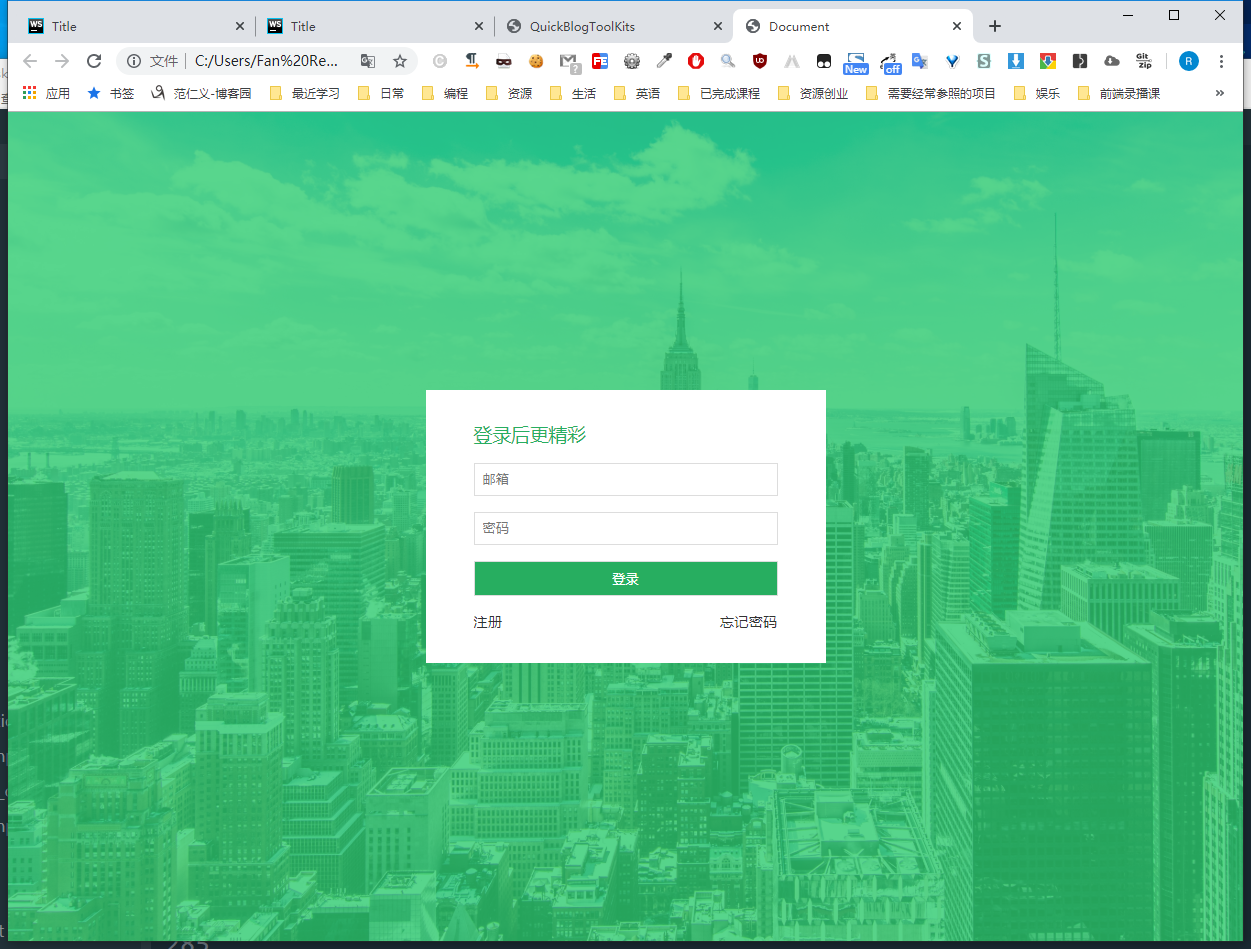
2、代码
1)html代码:index.html
 <!DOCTYPE html>

 <html lang="en">

   <head>

     <meta charset="UTF-8" />

     <meta name="viewport" content="width=device-width, initial-scale=1.0" />

     <meta http-equiv="X-UA-Compatible" content="ie=edge" />

     <link rel="stylesheet" href="css/main.css" />

     <title>Document</title>

   </head>

   <body>

     <div class="card">

       <h3>登录后更精彩</h3>

       <form>

         <input type="email" id="email" name="email" placeholder="邮箱" />

         <input type="password" id="password" name="password" placeholder="密码" />

         <input type="submit" value="登录" />

       </form>

       <ul>

         <li><a href="#">注册</a></li>

         <li><a href="#">忘记密码</a></li>

       </ul>

     </div>

   </body>

 </html>
2)sass代码:main.scss
 $main-color: #2ecc71;

 $second-color: #27ae60;

 * {

   margin:;

   padding:;

   box-sizing: border-box;

 }

 body {

   position: relative;

   min-height: 100vh;

   background: url(../img/bg.jpg) no-repeat center center/cover;

   display: flex;

   justify-content: center;

   align-items: center;

   &::after {

     content: "";

     position: absolute;

     top:;

     left:;

     width: 100%;

     height: 100%;

     z-index: -1;

     background: $main-color;

     opacity: 0.8;

   }

   .card {

     width: 400px;

     padding: 2rem 3rem;

     background: #fff;

     h3 {

       font-weight:;

       color: $second-color;

       margin-bottom: 1rem;

     }

     form input {

       display: block;

       width: 100%;

       border: 1px solid #ddd;

       padding: 0.5rem;

       margin-bottom: 1rem;

       &:last-child {

         color: #fff;

         background: $second-color;

         transition: all 0.4s;

         &:hover {

           background: $main-color;

         }

       }

       &:focus {

         outline: 1px solid $main-color;

       }

     }

     ul {

       list-style: none;

       display: flex;

       justify-content: space-between;

       font-size: 0.9rem;

       li a {

         color: #333;

         text-decoration: none;

         border-bottom: 1px solid transparent;

         transition: all 0.4s;

         &:hover {

           color: $main-color;

           border-bottom: 1px solid $main-color;

         }

       }

     }

   }

 }
3)css代码:main.css
 * {

   margin:;

   padding:;

   box-sizing: border-box;

 }

 body {

   position: relative;

   min-height: 100vh;

   background: url(../img/bg.jpg) no-repeat center center/cover;

   display: flex;

   justify-content: center;

   align-items: center;

 }

 body::after {

   content: "";

   position: absolute;

   top:;

   left:;

   width: 100%;

   height: 100%;

   z-index: -1;

   background: #2ecc71;

   opacity: 0.8;

 }

 body .card {

   width: 400px;

   padding: 2rem 3rem;

   background: #fff;

 }

 body .card h3 {

   font-weight:;

   color: #27ae60;

   margin-bottom: 1rem;

 }

 body .card form input {

   display: block;

   width: 100%;

   border: 1px solid #ddd;

   padding: 0.5rem;

   margin-bottom: 1rem;

 }

 body .card form input:last-child {

   color: #fff;

   background: #27ae60;

   transition: all 0.4s;

 }

 body .card form input:last-child:hover {

   background: #2ecc71;

 }

 body .card form input:focus {

   outline: 1px solid #2ecc71;

 }

 body .card ul {

   list-style: none;

   display: flex;

   justify-content: space-between;

   font-size: 0.9rem;

 }

 body .card ul li a {

   color: #333;

   text-decoration: none;

   border-bottom: 1px solid transparent;

   transition: all 0.4s;

 }

 body .card ul li a:hover {

   color: #2ecc71;

   border-bottom: 1px solid #2ecc71;

 }

 /*# sourceMappingURL=main.css.map */
sass登陆页面实例的更多相关文章
- web系统登陆页面增加验证码
传统登陆页面中包含两个输入项: • 用户名 • 密码有时为了防止机器人进行自动登陆操作,或者防止恶意用户进行用户信息扫描,需增加动态验证码功能.此时,登陆页面中包含了三个输入项: • 用户名 • 密码 ...
- Shrio登陆验证实例详细解读(转)
摘要:本文采用了Spring+SpringMVC+Mybatis+Shiro+Msql来写了一个登陆验证的实例,下面来看看过程吧!整个工程基于Mavevn来创建,运行环境为JDK1.6+WIN7+to ...
- 用java编写一个微博登陆页面
上次也写了一个微博登陆页面,不过功能还不够完善.今天重新完善了一些功能,分享出来给大家. 基本功能如下: (1)具有类似新浪微博的用户注册图形界面. (2)使用用户名或手机号注册,注册时需要提供新密码 ...
- [ExtJS5学习笔记]第二十五节 利用window.open()函数实现ExtJS5的登陆页面跳转
本文地址:http://blog.csdn.net/sushengmiyan/article/details/40427543 mvvm方式实现登陆的博客:http://blog.csdn.net/s ...
- Shiro学习总结(4)——Shrio登陆验证实例详细解读
最终效果如下: 工程整体的目录如下: Java代码如下: 配置文件如下: 页面资源如下: 好了,下面来简单说下过程吧! 准备工作: 先建表: [sql] view plain copy drop ta ...
- 编写大型项目web页面 从写web登陆页面开始
web页面搭建需要准备什么工具 首先我们会和设计师沟通 我们需要一些检验设计的工具 ps 自动裁图 自动测量工具 (我这里安利一下一个工具 我用的cutterman) sketch 可以使用阿里的工具 ...
- Springsecurity3.1.3配置多个登陆页面
需求:网站的前台和后台不同的url需要不同的登陆页面,不同的异常捕获方式. spring-security3.1以后的版本支持多个<http>标签,因此本文所采用的方式就是使用两个,实际上 ...
- MUI APP防止登陆页面出现白屏
最近在用MUI开发APP,总体效果,在IOS上,是完美的,但是在低端的Android手机上,就会出现性能问题,我个人觉得最严重的是,就是首页,就是APP打开的第一个页面,在iOS上,由于性能高,所以, ...
- Ajax 提交session实效跳转到完整的登陆页面
在spring security 中 Ajax提交时,session超时,局部加载登陆页面,为解决这个问题,重写ajax提交,返回的是modeview或者没有制定datatype时; 如果检测到加载到 ...
随机推荐
- nginx mirror/post_action+gor实现https流量复制
关于gor: 参考: https://www.cnblogs.com/jinjiangongzuoshi/p/11773070.html https://github.com/buger/gorepl ...
- django admin日期变为可以修改
Django - 日期.时间字段 阅读目录 DateTimeField.auto_now DateTimeField.auto_now_add admin中的日期时间字段 如何将创建时间设置为“默 ...
- django同一个项目中连接多个数据库
一.场景与思路 同一个项目中需要连接多个数据库. 二.代码 代码中主要是三个部分,settings.models以及自己写的一个类. 1.自己写的文件:database_app_router.py ...
- MySQL Hardware--FIO压测
FIO参数 .txt 支持文件系统或者裸设备,-filename=/dev/sda2或-filename=/dev/sdb direct= 测试过程绕过机器自带的buffer,使测试结果更真实 rw= ...
- 一:MySQL系列之基本介绍(一)
本篇主要介绍关于MySQL数据的基本知识,包括数据存储的变化,什么是MySQL以及其有什么优点.以及什么是RDBMS概念性知识等,以及关于MySQL语句的SOL的基本用法: 一.数据库 数据库,顾名思 ...
- Python工程目录组织
Python工程目录组织 from: https://zhuanlan.zhihu.com/p/36221226 Python工程目录组织 关于如何组织一个较好的Python工程目录结构,已经有一些得 ...
- 【Bug档案01】Spring Boot的控制器+thymeleaf模板 -使用中出现静态资源加载路径不当的问题 -解决时间:3h
总结 - thymeleaf的模板解析规则不清楚,或者忘了; - 出现bug时,瞎调试, 没有打开NETWORK 进行查看资源的加载情况 - 控制器中的其他代码,可以先注释掉,这样就可以迅速屏蔽掉其他 ...
- [Exception] java.util.MissingFormatArgumentException
java.util.MissingFormatArgumentException: Format specifier 's' at java.util.Formatter.format(Formatt ...
- 一个Python小白如何快速完成爬虫
很人或多或少都听说过python爬虫,但不知道如何通过python爬虫来爬取自己想要的内容,今天我就给大家说一个爬虫教程来实现自己第一次python爬虫. 环境搭建 既然用python,那么自然少不了 ...
- Oracle 按指定顺序排序
select * from (select 'Nick' as item from dual union all select 'Viki' as item from dual union all s ...