
web dom api中的Selection和Range
如果你做过wysiwyg这样的app,一个很让人头疼的问题是如何保证执行bold,italic等格式化操作后保持先前鼠标所在的位置。要好好的解决这个问题,就必须将Selection和Range的api搞搞清楚。
https://javascript.info/selection-range
Selection and Range
js可以获得当前的选中区域信息,可以选择或者去选择部分或者全部内容,清楚document中的选中部分,使用一个心的tag来进行包裹等操作。所有这些操作的基石就是Selction和Range这两个api.
Range
选择区的基本概念是Range:它是一对边界点组成,分别定义range的start和end.
每一个端点都是以相对于父DOM Node的offset这些信息来表达的point。如果父亲node是一个element element node,那么offset就是child的number号,儿对于text node,则是在text中的位置。我们以例子来说明,我们以选中某些内容为例:
首先,我们可以创建一个range:
let range = new Range();
然后我们可以通过使用 range.setStart(node, offset), range.setEnd(node, offset) 这两个api函数来设定range的边界,比如,如果我们的html代码如下:
<p id="p">Example: <i>italic</i> and <b>bold</b></p>
其对应的dom树如下:
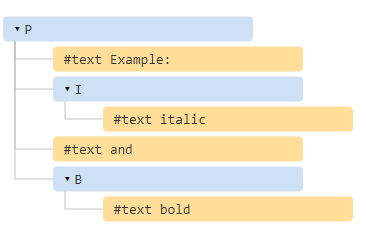
我们来选择 Example: <i>italic</i> 这一部分内容。它实际上是p这个父元素的前面两个儿子节点(包含text node)

我们来看实际的代码:
<p id="p">Example: <i>italic</i> and <b>bold</b></p>

<script>

  let range = new Range();

  range.setStart(p, 0);

  range.setEnd(p, 2);

  // toString of a range returns its content as text (without tags)

  alert(range); // Example: italic

  // apply this range for document selection (explained later)
document.getSelection().removeAllRanges();document.getSelection().addRange(range);
</script>
- range.setStart(p,0)- 设定该选择范围是p父元素的第0个child节点(也就是一个text node: Example: )
- range.setEnd(p,2)-指定该range将延展到p父元素的第2个child(也就是" and "这个text node),但是注意这里是不包含额,也就是说实际上是到第1个child,因此也就是 i 节点
需要注意的是我们实际上不需要在setStart和setEnd调用中使用同一个参考node节点,一个范围可能延展涵盖到多个不相关的节点。唯一需要注意的是end必须是在start的后面
选中text nodes的部分,而非全部
假设我们想像下面的情况来做选中操作:

这也可以使用代码轻松实现,我们需要做的是设定start和end时使用相对于text nodes的offset位置就好了。
我们需要先创建一个range:
1. range的start是p父亲元素的first child的position 2,也就是"ample:"
2.range的end则是b父亲元素的position 3,也就是"bol"
<p id="p">Example: <i>italic</i> and <b>bold</b></p>

<script>

  let range = new Range();

  range.setStart(p.firstChild, 2);

  range.setEnd(p.querySelector('b').firstChild, 3);

  alert(range); // ample: italic and bol

  // use this range for selection (explained later)

  document.getSelection().removeAllRanges();??

  window.getSelection().addRange(range);

</script>
这时,range属性如下图取值:
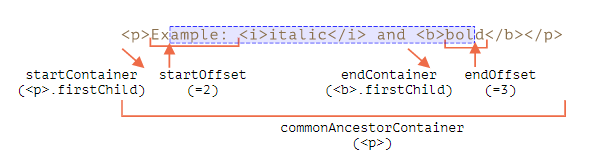
- startContainer,startOffset-分别指定start点的node和相对于该node的offset,本例中是p节点的首个text node子节点,以及第2个position
- endContainer,endOffset-分别指定end点的node和offset,本例中是b节点的首个text node子节点,以及position 3
- collapsed - 布尔值,如果star和end point都指向了同一个point的话为true,也意味着在该range中没有内容被选中,本例中取值为false
- commonAncestorContainer - 在本range中所有节点的最近的共同祖先节点,本例中为p节点
Range的方法methods
range对象有很多有用的方法用于操作range:
设定range的start:
setEnd(node, offset) set end at: position offset in node

setEndBefore(node) set end at: right before node

setEndAfter(node) set end at: right after node
正如前面演示的那样,node可以是一个text或者element node,对于text node, offset意思是忽略几个字符,而如果是element node,则指忽略多少个child nodes
其他的方法:
selectNode(node)set range to select the wholenodeselectNodeContents(node)set range to select the wholenodecontentscollapse(toStart)iftoStart=trueset end=start, otherwise set start=end, thus collapsing the rangecloneRange()creates a new range with the same start/end
用于操作range的内容的方法:
deleteContents()– remove range content from the documentextractContents()– remove range content from the document and return as DocumentFragmentcloneContents()– clone range content and return as DocumentFragmentinsertNode(node)– insertnodeinto the document at the beginning of the rangesurroundContents(node)– wrapnodearound range content. For this to work, the range must contain both opening and closing tags for all elements inside it: no partial ranges like<i>abc.
有了这些有用的方法,我们就可以基本上针对选中的nodes做任何事情了,看下面一个比价复杂的例子:
Click buttons to run methods on the selection, "resetExample" to reset it.

<p id="p">Example: <i>italic</i> and <b>bold</b></p>

<p id="result"></p>

<script>

  let range = new Range();

  // Each demonstrated method is represented here:

  let methods = {

    deleteContents() {

      range.deleteContents()

    },

    extractContents() {

      let content = range.extractContents();

      result.innerHTML = "";

      result.append("extracted: ", content);

    },

    cloneContents() {

      let content = range.cloneContents();

      result.innerHTML = "";

      result.append("cloned: ", content);

    },

    insertNode() {

      let newNode = document.createElement('u');

      newNode.innerHTML = "NEW NODE";

      range.insertNode(newNode);

    },

    surroundContents() {

      let newNode = document.createElement('u');

      try {

        range.surroundContents(newNode);

      } catch(e) { alert(e) }

    },

    resetExample() {

      p.innerHTML = `Example: <i>italic</i> and <b>bold</b>`;

      result.innerHTML = "";

      range.setStart(p.firstChild, 2);

      range.setEnd(p.querySelector('b').firstChild, 3);

      window.getSelection().removeAllRanges();

      window.getSelection().addRange(range);

    }

  };

  for(let method in methods) {

    document.write(`<div><button onclick="methods.${method}()">${method}</button></div>`);

  }

  methods.resetExample();

</script>
除此之外,还有一些很少使用的用于比较range的api,https://developer.mozilla.org/en-US/docs/Web/API/Range
Selection
Range是一个用于管理selection ranges的通用对象。我们可以创建这些range对象,然后传递给dom api
document的selection是由Selection对象来表征的,这可以通过 window.getSelection()或者document.getSelection() 来获得。
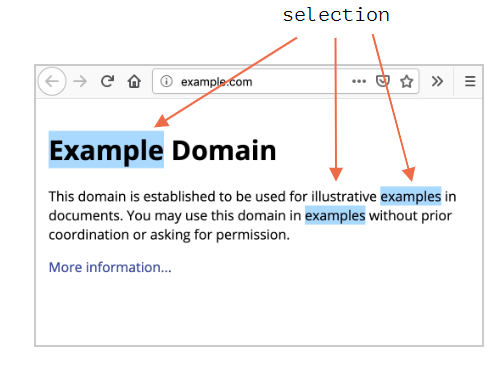
一个selection可以包括0个或者多个ranges,但是在实际使用中,仅仅firefox允许选中多个ranges,这需要通过ctrl+click来实现,比如下图:
selection对象的属性
和range类似,一个selection也有start,被称为"anchor",和一个end,被称为"focus",主要的属性如下:
anchorNode– the node where the selection starts,anchorOffset– the offset inanchorNodewhere the selection starts,focusNode– the node where the selection ends,focusOffset– the offset infocusNodewhere the selection ends,isCollapsed–trueif selection selects nothing (empty range), or doesn’t exist.rangeCount– count of ranges in the selection, maximum1in all browsers except Firefox.
selection events
1. elem.onselectstart -当一个selection从elem这个元素开始发生时,比如用户当按下左键同时拖动鼠标时就会发生该事件。需要注意的是,如果elem被prevent default时,不发生该事件
2. document.onselectionchange,这个事件只能在document上发生,只要有selection发生变化就会触发该事件
看以下代码

selection的常用methods:
getRangeAt(i)– get i-th range, starting from0. In all browsers except firefox, only0is used.addRange(range)– addrangeto selection. All browsers except Firefox ignore the call, if the selection already has an associated range.removeRange(range)– removerangefrom the selection.removeAllRanges()– remove all ranges.empty()– alias toremoveAllRanges
以下方法无需操作底层的range对象就可以直接完成对应的功能:
collapse(node, offset)– replace selected range with a new one that starts and ends at the givennode, at positionoffset.setPosition(node, offset)– alias tocollapse.collapseToStart()– collapse (replace with an empty range) to selection start,collapseToEnd()– collapse to selection end,extend(node, offset)– move focus of the selection to the givennode, positionoffset,setBaseAndExtent(anchorNode, anchorOffset, focusNode, focusOffset)– replace selection range with the given startanchorNode/anchorOffsetand endfocusNode/focusOffset. All content in-between them is selected.selectAllChildren(node)– select all children of thenode.deleteFromDocument()– remove selected content from the document.containsNode(node, allowPartialContainment = false)– checks whether the selection containsnode(partically if the second argument istrue)
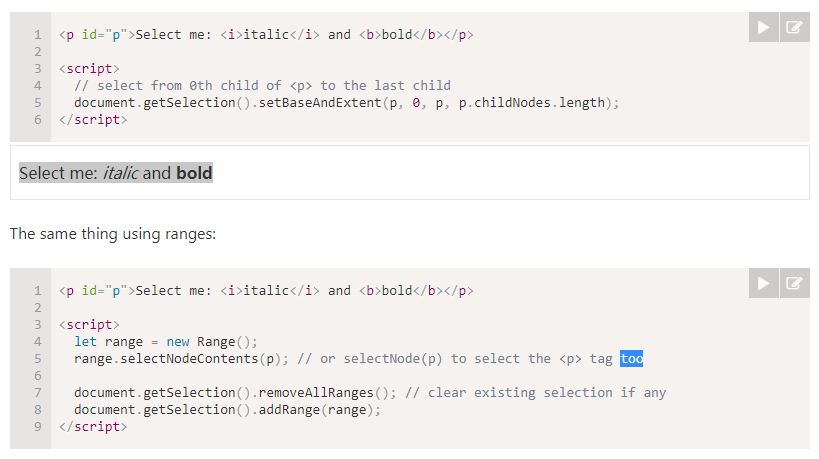
我们再来看看以下例子代码及其效果:
Selection in form controls
Form元素,比如input, textarea则提供了更多的api用于selection操作和处理,而没有selection或者说range对象。由于input的value仅仅是text,而非html,因此也没有必要提供这些selection和range对象,事情会变得更加简单。
input.selectionStart– position of selection start (writeable),input.selectionEnd– position of selection start (writeable),input.selectionDirection– selection direction, one of: “forward”, “backward” or “none” (if e.g. selected with a double mouse click)
input.onselect – triggers when something is selected.
web dom api中的Selection和Range的更多相关文章
- 抛弃jQuery:DOM API之选择元素
原文链接:http://blog.garstasio.com/you-dont-need-jquery/selectors/ 我的Blog:http://cabbit.me/you-dont-need ...
- C# 调用百度地图Web服务API
最近公司项目中需要根据两个地点的交通路径和距离做一些数据推荐,为了程序的稳定和用户体验所以想从百度地图 API 采集数据保存到数据库中,经过一翻研究之后选定了百度地图 Web 服务 API 中的 Di ...
- C# 调用百度地图 Web 服务 API
最近公司项目中需要根据两个地点的交通路径和距离做一些数据推荐,为了程序的稳定和用户体验所以想从百度地图 API 采集数据保存到数据库中,经过一翻研究之后选定了百度地图 Web 服务 API 中的 Di ...
- web API简介(三):客户端储存之Web Storage API
概述 前篇:web API简介(二):客户端储存之document.cookie API 客户端储存从某一方面来说和动态网站差不多.动态网站是用服务端来储存数据,而客户端储存是用客户端来储存数据. W ...
- 【ASP.NET Web API教程】4.1 ASP.NET Web API中的路由
原文:[ASP.NET Web API教程]4.1 ASP.NET Web API中的路由 注:本文是[ASP.NET Web API系列教程]的一部分,如果您是第一次看本博客文章,请先看前面的内容. ...
- ASP.NET Web API中的JSON和XML序列化
ASP.NET Web API中的JSON和XML序列化 前言 阅读本文之前,您也可以到Asp.Net Web API 2 系列导航进行查看 http://www.cnblogs.com/aehyok ...
- ASP.NET Web API中的Routing(路由)
[译]Routing in ASP.NET Web API 单击此处查看原文 本文阐述了ASP.NET Web API是如何将HTTP requests路由到controllers的. 如果你对ASP ...
- ASP.NET MVC和Web API中的Angular2 - 第1部分
下载源码 - 903.5 KB 内容 第1部分:Visual Studio 2017中的Angular2设置,基本CRUD应用程序,第三方模态弹出控件 第2部分:使用Angular2管道进行过滤/搜索 ...
- Web API中的模型验证
一.模型验证的作用 在ASP.NET Web API中,我们可以使用 System.ComponentModel.DataAnnotations 命名空间中的属性为模型上的属性设置验证规则. 一个模型 ...
随机推荐
- 201871010108-高文利《面向对象程序设计(java)》第十五周学习总结
项目 内容 这个作业属于哪个课程 <任课教师博客主页链接> https://www.cnblogs.com/nwnu-daizh/ 这个作业的要求在哪里 <作业链接地址> ht ...
- android主流开源自动化框架(monkeyrunner,robotium,uiautomator)转载
摘要: android自动化框架小结:monkey,monkeyrunner,cts,robotium,uiautomator android自动化框架: Uiautomator: 优点:可以对所有操 ...
- socket服务
1.socket_server import socket import threading server = socket.socket(socket.AF_INET, socket.SOCK_ST ...
- CF1045B Space Isaac
原题链接 DOWNLOAD AS PDF 题目大意 \(0\sim m-1\)的数被分成两个集合,你可以分别从两个集合中取一个数相加并对\(m\)取模,求一不能构造出的数. 题解 感觉如果\(\col ...
- Docker常用安装(九)
一.安装mysql 1. docker hub上面查找mysql镜像 2. 拉取镜像 #获取mysql镜像 docker pull mysql:5.6 3. 运行容器 docker run -p 1 ...
- TCP三次握手及四次断开,TCP有限状态机
TCP 的连接建立 上图画出了 TCP 建立连接的过程.假定主机 A 是 TCP 客户端,B是服务端.最初两端的 TCP 进程都处于 CLOSED 状态.图中在主机下面的是 TCP进程所处的状态.A ...
- vijos2055 移动金币
题目链接 思路 首先这是一个阶梯博弈. 我们将金币两两组合,如果对方移动前一个,那么我们把后一个移动相同的距离,局面相当于没有变化.如果对方移动后一个,就相当于\(NIM\)游戏中,取走了一些石子. ...
- 开源推荐 - CoDo开源一站式DevOps平台
一群有梦想的年轻人开源了一个云管理平台,他们的口号是:让天下没有996的运维 有幸参与到CoDo项目的开发,这是一个非常棒的一站式开源运维平台,分享给大家 平台介绍 CODO是一款为用户提供企业多混合 ...
- [LeetCode] 53. Maximum Subarray 最大子数组
Given an integer array nums, find the contiguous subarray (containing at least one number) which has ...
- 苹果开发之App签名
如果你的Apple ID账号(可使用邮箱来注册)为Apple developer类型的话,登录之后是看不到Certificates, Indentifiers & Profiles信息的 Ap ...