
C# TcpListener TcpClient
C# TcpListener TcpClient 使用,新建从控制台项目,引用System.Net
代码如下:
using System;

using System.Collections.Generic;

using System.Diagnostics;

using System.Globalization;

using System.IO;

//using System.IO.Pipes;

using System.Net;

using System.Net.Mail;

using System.Reflection;

using System.Text;

using System.Text.RegularExpressions;

namespace LongtengSupremeConsole

{

    class Program

    {

        static void Main(string[] args)

        {

             new Thread(new ThreadStart(TcpListenerMethod)).Start();

            Thread.Sleep(TimeSpan.FromSeconds());

            TcpClientSendDataMethod();

            Console.ReadKey();

        }

     public static void TcpClientSendDataMethod()

        {

            try

            {

                int i = ;

                while (true)

                {

                    TcpClient client = new TcpClient();

                    client.Connect("127.0.0.1", );

                    using (NetworkStream n = client.GetStream())

                    {

                        BinaryWriter binaryWriter = new BinaryWriter(n);

                        binaryWriter.Write($"{i}");

                        binaryWriter.Flush();

                        Console.ForegroundColor = ConsoleColor.Green;

                        Console.WriteLine($"客户端 发送数据是:{i}");

                        string  binaryReader = new BinaryReader(n).ReadString();

                        Console.ForegroundColor = ConsoleColor.Blue;

                        Console.WriteLine($"客户端 收到数据是:{binaryReader}");

                        //using (StreamWriter streamWriter = new StreamWriter(n))

                        //{

                        //    Console.ForegroundColor = ConsoleColor.Yellow;

                        //    Console.WriteLine($"客户端 发送数据是:{i}");

                        //    streamWriter.WriteLine("{i}");

                        //}

                        //using (StreamReader streamReader = new StreamReader(n))

                        //{

                        //    Console.ForegroundColor = ConsoleColor.Green;

                        //    Console.WriteLine($"客户端 收到数据是:{streamReader.ReadToEnd()}");

                        //}

                        i++;

                    }

                    Thread.Sleep(TimeSpan.FromSeconds());

                }

            }

            catch (Exception)

            {

                throw;

            }

        }

        public static TcpListener listener = null;

        public static void TcpListenerMethod()

        {

            try

            {

                //listener = new TcpListener(new IPEndPoint(new IPAddress(new byte[] { 127, 0, 0, 1 }), 49153));

                listener = new TcpListener(IPAddress.Any, );

                //listener.Server.SetSocketOption(SocketOptionLevel.Socket, SocketOptionName.ReuseAddress, 1);

                listener.Start();

                while (true)

                {

                    using (TcpClient c = listener.AcceptTcpClient())

                    {

                        //c.LingerState.Enabled = false;

                        using (NetworkStream n = c.GetStream())

                        {

                            string binaryReader = new BinaryReader(n).ReadString();

                            Console.ForegroundColor = ConsoleColor.Blue;

                            Console.WriteLine($"服务端 收到数据是:{binaryReader}");

                            BinaryWriter binaryWriter = new BinaryWriter(n);

                            binaryWriter.Write($"服务端 回复 {binaryReader}");

                            binaryWriter.Flush();

                            Console.ForegroundColor = ConsoleColor.Green;

                            Console.WriteLine($"服务端 回复 {binaryReader}");

                            //using (StreamReader streamReader = new StreamReader(n))

                            //{

                            //    Console.ForegroundColor = ConsoleColor.Green;

                            //    Console.WriteLine($"服务端:收到数据:{streamReader.ReadToEnd()}");

                            //}

                            //using (StreamWriter streamWriter = new StreamWriter(n))

                            //{

                            //    Console.ForegroundColor = ConsoleColor.Yellow;

                            //    Console.WriteLine($"服务端:发送数据:我已经收到数据了");

                            //    streamWriter.WriteLine("我已经收到数据了。。。。");

                            //}

                        }

                    }

                }

            }

            catch (Exception)

            {

                listener.Stop();

                throw;

            }

        }

        public static void TcpListenerStopMethod()

        {

            try

            {

                listener.Stop();

            }

            catch (Exception)

            {

                throw;

            }

        }

    }

}
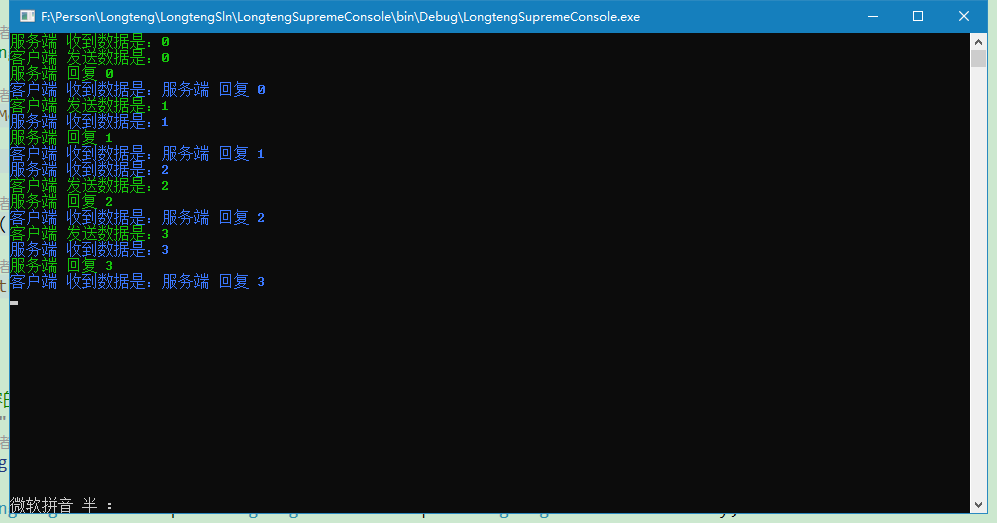
测试结果如下:
C# TcpListener TcpClient的更多相关文章
- Socket聊天室-TcpListener,TcpClient
参考自:http://blog.csdn.net/liguo9860/article/details/6148614 服务端:
- 【socket】一分钟理清 socket udpsocket tcpsocket tcplistener TCPClient和 UDPClient
socket 套接字接口是各种语言tcp udp的网络操作的基础. 直接用socket 对象开发 可以选择 udpsocket 或者 tcpsocket ,两者在使用上仅一些方法和参数不同,所有的底 ...
- .net 网络编程
1.首先说下计算机网络中的TCP/IP参考模型 TCP/IP把网络分为5层,每一层负责完成不同的功能 1)应用层:传输报文,提供各种网络应用,有FTP.SMTP.HTTP等协议 2)运输层:传输报文段 ...
- TCP同步传送数据示例以及可能出现问题分析
TCP传送数据可以分为同步传送和异步传送,首先这里使用了TCP的同步传送方式,学习了TCP同步传送数据的原理. 同步工作方式是指利用TCP编写的程序执行到监听或者接受数据语句的时候,在未完成当前工作( ...
- Simple TCP/IP Echo Server & Client Application in C#
1. TCP Server The server’s job is to set up an endpoint for clients to connect to and passively wait ...
- TCP listener
调试时未关闭之前开启的TCP SERVER: 应该关闭: TcpListener TcpClient 1.开启TCP listener (1)Start()方法失败 异常位置:该异常的产生位置为 tc ...
- C# - 网络编程 之 TcpClient与TcpListener
TcpClient类 TcpListener类 TCP通信 UDP通信 参考:
- TcpClient类与TcpListener类
TcpClient类 //构造方法1 TcpClient t = new TcpClient(); t.Connect(); //构造方法2 IPEndPoint iep = ); TcpClient ...
- Socket的三个功能类TCPClient、TCPListener 和 UDPClient (转)
应用程序可以通过 TCPClient.TCPListener 和 UDPClient 类使用传输控制协议 (TCP) 和用户数据文报协议 (UDP) 服务.这些协议类建立在 System.Net.So ...
随机推荐
- 【转载】Linux磁盘管理:LVM逻辑卷管理
Linux学习之CentOS(二十五)--Linux磁盘管理:LVM逻辑卷基本概念及LVM的工作原理 这篇随笔将详细讲解Linux磁盘管理机制中的LVM逻辑卷的基本概念以及LVM的工作原理!!! 一. ...
- Python爬虫系列:四、Cookie的使用
Cookie,指某些网站为了辨别用户身份.进行session跟踪而储存在用户本地终端上的数据(通常经过加密) 比如说有些网站需要登录后才能访问某个页面,在登录之前,你想抓取某个页面内容是不允许的.那么 ...
- gitlab中clone项目时,IP地址是一串数字
问题:docker安装后,clone显示ip是一串地址 解决(如果是非docker启动的,自然就是进入gitlab下): 1.进入docker 后台: docker exec -it gitlab / ...
- null在mysql中的不同表现
在mysql中count(*)和count(id)具有不同的表现,其最大的影响是在我们进行联表的时候,如,我们现在要查询一个文章的评论数量,使用左连接查询,具体的sql语句如下: SELECT a.* ...
- UBOOT2016.05 看门狗
硬件平台 AM335X UBOOT 2016.05 在UBOOT中关看门狗,需要修改屏蔽这两处代码 init_sequence_r->board_init->hw_watchdog_in ...
- 【监控】jvisualvm之jmx远程连接 jar启动应用
一.Java -jar启动添加如下参数就可以了 -Dcom.sun.management.jmxremote -Djava.rmi.server.hostname=127.0.0.1 -Dcom.su ...
- CSS制作华为mate8手机模型示例
CSS制作华为mate8手机模型效果图 1.HTML代码 <!DOCTYPE html> <html> <head> <meta charset=" ...
- maven打包成可运行的jar
在pom.xml添加 <build> <plugins> <plugin> <groupId>org.apache.maven.plugins</ ...
- NodeJS 多版本管理(NVM)
前言 现在前端各种框架更新较快,对 Node 的依赖也不一样,Node 的过版本管理也很有必要. NVM(Node Version Manager),是一个 Node 的版本管理工具. 官方的 NVM ...
- 在vue项目中使用axios
安装 cnpm i axios --save-dev 在项目main.js中全局引用 import axios from "axios" Vue.prototype.$http=a ...