
Ubuntu安装Docker 适合Ubuntu17.04版本
Docker介绍
Docker是一个开源的容器引擎,它有助于更快地交付产品。Docker可将应用程序和基础设施层隔离,并且将基础设施当作程序一样进行管理。使用Docker,可以更快地打包,测试以及部署应用程序,并可以缩短从编程到部署运行代码的周期。
Docker架构
Docker daemon
守护进程,运行在宿主机(DOCKER_HOST)的后台进程,可通过Docker客户端与之通信。
Client
Docker客户端时Docker的用户界面,可以接受用户命令和配置标识,并且Docker daemon通信Images
Docker镜像是一个只读模板,包含创建Docker容器的说明。Docker镜像可以运行Docker镜像中的程序。Container
容器是镜像的可运行实例。镜像与容器类似与面向对象中类与对象的关系。可通过Docker API或者CLI命令起停,移动,删除等。Register
Docker Register是一个集中存储与分发镜像的服务。构建完Docker镜像后,就可在当前宿主机上运行。但如果想在其他机器上运行这个镜像,就需要手动复制。此时可以借助Docker Register避免复制。
一个Docker Register可以包含多个Docker仓库,每个仓库可包含多个镜像标签,每个标签对应一个Docker镜像。
安装Docker
其实开源的应用,官网都有正确的安装教程(英文版),本章按照官网的教程安装。
- 安装仓库
安装Docker社区版仓库
sudo apt-get -y install \

  apt-transport-https \

  ca-certificates \

  curl
curl -fsSL https://download.docker.com/linux/ubuntu/gpg | sudo apt-key add -sudo add-apt-repository \
"deb [arch=amd64] https://download.docker.com/linux/ubuntu \
$(lsb_release -cs) \
stable"sudo apt-get update
××××××××××××××××××××××××××××××××××××××××××××××如果出现一下情况××××××××××××××××××××××××××××××××××××××××××××××××××
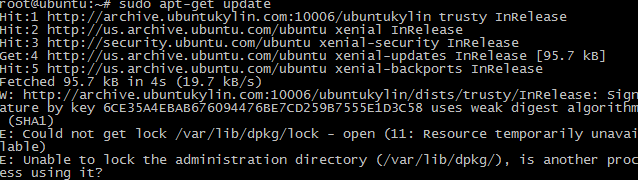
出现这个问题可能是有另一个程序正在运行,导致资源被锁不可用。而导致资源被锁的原因可能是上次运行安装或更新没有正常完成,解决办法就是删掉。
sudo rm /var/cache/apt/archives/lock
sudo rm /var/lib/dpkg/lock
××××××××××××××××××××××××××××××××××××××××××××××××解决方案××××××××××××××××××××××××××××××××××××××××××××××××××××××××××
- 获取Docker社区版
在Ubuntu上安装最新的Docker社区版
sudo apt-get -y install docker-ce- 测试你的Docker社区版是否安装成功
sudo docker run hello-world安装后可查看版本
xq@xq-VPCEG17YC:/etc/apt/sources.list.d$ docker version

Client:

 Version:      17.03.1-ce

 API version:  1.27

 Go version:   go1.7.5

 Git commit:   c6d412e

 Built:        Mon Mar 27 17:14:09 2017

 OS/Arch:      linux/amd64
配置镜像加速
sudo docker run hello-world的时候可能会出现timeout,应用国内访问Docker Hub不稳定。建议改成阿里云或者DaoCloud。本节以阿里云为例。
注册阿里云账户
访问https://cr.console.aliyun.com/#/accelerator
可以获得自己的加速器 https://××××××.mirror.aliyuncs.com
echo "DOCKER_OPTS=\"--registry-mirror=https://××××××.mirror.aliyuncs.com\"" | sudo tee -a /etc/default/docker

sudo service docker restart
安装成功如下:
xq@xq-VPCEG17YC:/etc/docker$ echo "DOCKER_OPTS=\"--registry-mirror=https://××××××.mirror.aliyuncs.com\"" | sudo tee -a /etc/default/docker

DOCKER_OPTS="--registry-mirror=https://bzf7wkv2.mirror.aliyuncs.com"

xq@xq-VPCEG17YC:/etc/docker$ sudo service docker restart

xq@xq-VPCEG17YC:/etc/docker$ sudo docker run hello-world

Unable to find image 'hello-world:latest' locally

latest: Pulling from library/hello-world

78445dd45222: Pull complete

Digest: sha256:c5515758d4c5e1e838e9cd307f6c6a0d620b5e07e6f927b07d05f6d12a1ac8d7

Status: Downloaded newer image for hello-world:latest

Hello from Docker!

This message shows that your installation appears to be working correctly.

To generate this message, Docker took the following steps:

 1. The Docker client contacted the Docker daemon.

 2. The Docker daemon pulled the "hello-world" image from the Docker Hub.

 3. The Docker daemon created a new container from that image which runs the

    executable that produces the output you are currently reading.

 4. The Docker daemon streamed that output to the Docker client, which sent it

    to your terminal.

To try something more ambitious, you can run an Ubuntu container with:

 $ docker run -it ubuntu bash

Share images, automate workflows, and more with a free Docker ID:

 https://cloud.docker.com/

For more examples and ideas, visit:

 https://docs.docker.com/engine/userguide/
Ubuntu安装Docker 适合Ubuntu17.04版本的更多相关文章
- Ubuntu安装docker(摘自官网,自用)
在 Ubuntu 上安装 Docker 引擎(按照标红顺序执行命令) 预计阅读时间:11分钟 适用于 Linux 的 Docker 桌面 Docker Desktop 可帮助您在 Mac 和 Wind ...
- Ubuntu安装docker笔记
前言 根据参考文档简单记录Ubuntu系统安装docker的步骤 系统版本 panzi@ubuntu:~$ cat /etc/issue Ubuntu 16.04.5 LTS \n \l 移除旧版 ...
- ubuntu 安装 docker 并配置镜像加速(使用 apt-get 进行安装)
ubuntu 安装docker CentOS docker安装 https://blog.csdn.net/weixin_44953227/article/details/108597310 你需要这 ...
- ubuntu安装docker以及基本用法
ubuntu安装docker以及基本用法 一.安装 安装前先更新apt-get源到最新版本 apt-get update 使用ubuntu自带的docker安装包安装docker apt-get in ...
- 总结关于Ubuntu 安装 Docker 配置相关问题及解决方法
总结关于Ubuntu 安装 Docker 配置相关问题及解决方法 Tomcat 示例 软件镜像(xx安装程序)----运行镜像----产生一个容器(正在运行的软件,运行的xx): 步骤: 1.搜索镜像 ...
- Docker笔记--ubuntu安装docker
Docker笔记--ubuntu安装docker 1.更换国内软件源,推荐中国科技大学的源,稳定速度快(可选) sudo cp /etc/apt/sources.list /etc/apt/sourc ...
- 【1】ubuntu 安装docker
官方支持安装docker的Ubuntu版本: ubuntu trusty 14.04(LTS) (64位) ubuntu precise 12.04(LTS) (64位) ubuntu raring ...
- Ubuntu 安装 Docker CE(社区版)
参考自 https://yeasy.gitbooks.io/docker_practice/install/ubuntu.html#ubuntu-1604- docker-io 是以前早期的版本,版本 ...
- Ubuntu 安装 Docker CE
注:本文转载自<Docker入门> 警告:切勿在没有配置 Docker APT 源的情况下直接使用 apt 命令安装 Docker. 准备工作 系统要求 Docker CE 支持以下版本的 ...
随机推荐
- iOS 在 ARC 环境下 dealloc 的使用、理解误区
iOS 在 ARC 环境下 dealloc 的使用.理解误区 太阳火神的漂亮人生 (http://blog.csdn.net/opengl_es) 本文遵循"署名-非商业用途-保持一致&qu ...
- CentOS 7通过yum安装fcitx五笔输入法
CentOS 7通过yum安装fcitx五笔输入法 下面通过了亲測: 1.设置源 Posted in Linux at 三月 5th, 2015 / No Comments ? 增加EPEL源 EPE ...
- 0=='aa'的结果是true
来源于一道面试题: PHP的类型转换规则 1.如果是一个数字与一个字符串进行比较,那么会把字符串转换为数字再比较 2.字符串的转换规则,若字符串以数字开头,则取开头数字作为转换按结果,若无,则取0
- BZOJ 1005 [HNOI2008]明明的烦恼 purfer序列,排列组合
1005: [HNOI2008]明明的烦恼 Description 自从明明学了树的结构,就对奇怪的树产生了兴趣......给出标号为1到N的点,以及某些点最终的度数,允许在任意两点间连线,可产生多少 ...
- Intel Media SDK安装步骤
!!!(gcc/g++版本要在4.8以上,本人使用的是5.4版本) 要先安装依赖,按以下步骤依次执行 1.LIBVA git clone https://github.com/intel/libva. ...
- JavaScript Simple
ylbtech-JavaScript: 1.返回顶部 1. 2. 2.返回顶部 3.返回顶部 4.返回顶部 5.返回顶部 6.返回顶部 作者:ylbtech出处:http: ...
- Linux Oracle服务启动&停止脚本与开机自启动
在CentOS 6.3下安装完Oracle 10g R2,重开机之后,你会发现Oracle没有自行启动,这是正常的,因为在Linux下安装Oracle的确不会自行启动,必须要自行设定相关参数,首先先介 ...
- 实体类中方法名尽量避免set,get,报错com.fasterxml.jackson.databind.JsonMappingException: (was java.lang.NullPointerException)
自己建了一个实体类 public class MissPoint implements Serializable{ private static final long serialVersionUID ...
- 二、SQL系列之~常见51道SQL查询语句
[写在前面~~] [PS1:建议SQL初学者一定要自己先做一遍题目,这样才有效果~~(做题时为验证查询结果是否正确,可更改表中数据)] [PS2:文末最后一条代码整合了全部51道题目及答案~~] [P ...
- Hadoop MapReduce编程 API入门系列之join(二十六)(未完)
不多说,直接上代码. 天气记录数据库 Station ID Timestamp Temperature 气象站数据库 Station ID Station Name 气象站和天气记录合并之后的示意图如 ...