
[Javascirpt] Developer-friendly Flow Charts with flowchart.js
Flowchart.js is a great tool for creating quick, simple flowcharts in a way that keeps you out of a WYSIWYG, and keeps your productive. No more drawing lines, no more determining how to draw a shape, no more deciding relative size and distance. Flowchart.js makes it easy to prototype new concepts and confirm product flows. Built in JavaScript, the library is complete with HTML rendering and a standard grammar and syntax for creating your flows.
<!DOCTYPE html>

<html lang="en">

<head>

  <meta charset="UTF-8">

  <title>Flowchart.js Example Project</title>

</head>

<body>

<div id="chart"></div>

<script type="text/javascript"

        src="//cdnjs.cloudflare.com/ajax/libs/raphael/2.2.7/raphael.min.js"></script>

<script type="text/javascript"

        src="//cdnjs.cloudflare.com/ajax/libs/flowchart/1.6.6/flowchart.min.js"></script>

<script type="text/javascript"

        src="//cdnjs.cloudflare.com/ajax/libs/axios/0.17.1/axios.min.js"></script>

<script type="text/javascript"

        src="script.js"></script>

</body>
axios.get('/data/additional-sample.txt').then(({data}) => {

    const fc = flowchart.parse(data);

    fc.drawSVG('chart');

  });
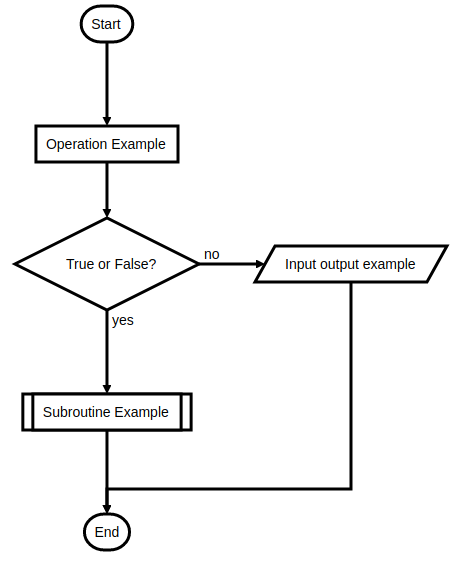
Flowchart 1:
start=>start

end=>end

operation=>operation: Operation Example

subroutine=>subroutine: Subroutine Example

condition=>condition: True or False?

inputoutput=>inputoutput: Input output example

start->operation->condition

condition(yes)->subroutine->end

condition(no)->inputoutput->end
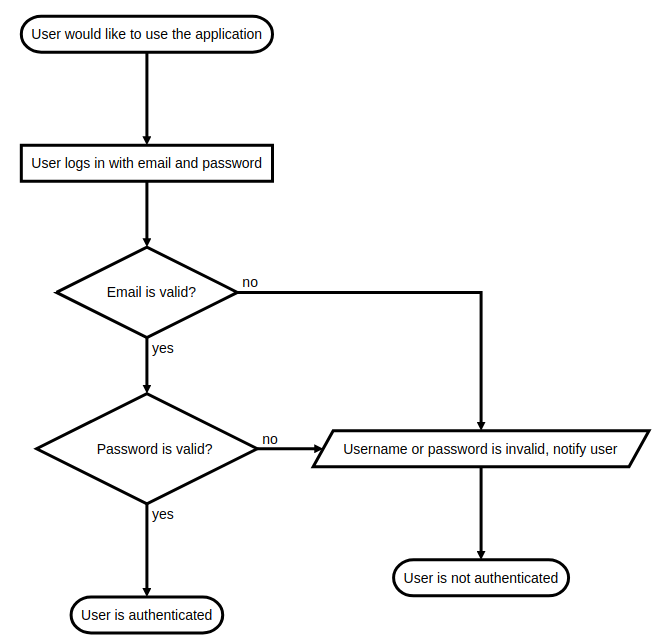
Flowchart 2:
s=>start: User would like to use the application

e=>end: User is authenticated

e2=>end: User is not authenticated

o1=>operation: User logs in with email and password

c1=>condition: Email is valid?

c2=>condition: Password is valid?

io1=>inputoutput: Username or password is invalid, notify user

s->o1->c1

c1(yes)->c2

c1(no)->io1->e2

c2(yes)->e

c2(no)->io1->e2
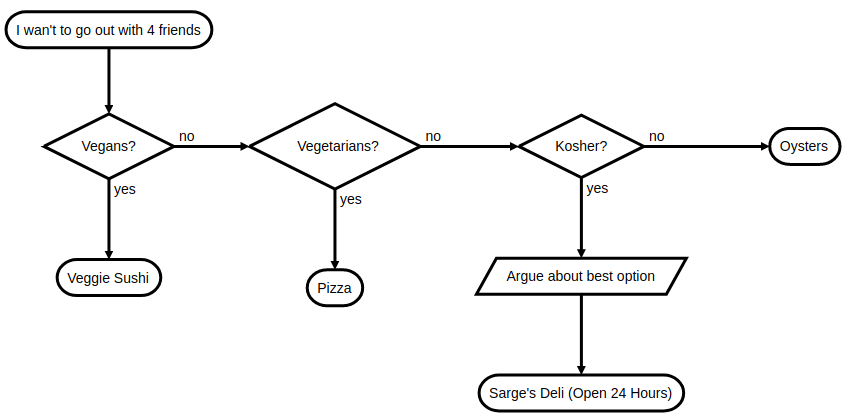
st=>start: I wan't to go out with 4 friends

cond1=>condition: Vegans?

cond2=>condition: Vegetarians?

cond3=>condition: Kosher?

e1=>end: Veggie Sushi

e2=>end: Pizza

e3=>end: Oysters

e4=>end: Sarge's Deli (Open 24 Hours)

io1=>inputoutput: Argue about best option

st->cond1

cond1(yes)->e1

cond1(no)->cond2

cond2(yes)->e2

cond2(no)->cond3

cond3(yes)->io1->e4

cond3(no)->e3
[Javascirpt] Developer-friendly Flow Charts with flowchart.js的更多相关文章
- Markdown Sublime flowchart.js 流程图
先亮出来一个 flowchart.js 的 Sample 给 Sublime 安装 MarkdownPreview,这个不必多说了 Sublime Text -> Preferences -&g ...
- Developer Friendly | 基础设施即代码的事实标准Terraform已支持京东云!
Developer Friendly | 基础设施即代码的事实标准Terraform已支持京东云! Chef.Puppet.Ansible.SaltStack 都可以称为配置管理工具,这些工具的主要目 ...
- 腾讯云部署golang flow流程,vue.js+nginx+mysql+node.js
这次总算把js-ojus/flow的ui部署到腾讯云上,比较吐槽的就是,为啥这么复杂,vue.js前后端分离,比golang编写的部署方面复杂几万倍.真是浪费人生啊. golang+sqlite写的东 ...
- flow 静态类型检查 js
1.flow介绍 https://ustbhuangyi.github.io/vue-analysis/prepare/flow.html#为什么用-flow 2.使用 (1)安装flow (2)项目 ...
- 初探flow.js
第一部分:前言 我们知道JS是弱类型语言,在声明变量时不论是什么类型的变量我们都用var即可,所以js是非常灵活的,但是同时问题就是弱类型语言有可能会出错,比如在调用函数时,且往往在运行起来时才可以检 ...
- js to svg flowchart
js to svg flowchart flowchart https://flowchart.js.org/ https://github.com/adrai/flowchart.js https: ...
- flow
Flow vs Stream https://wikidiff.com/flow/stream As nouns the difference between flow and stream is t ...
- 转:超级好用的流程图js框架
支叫图论(Graph Theroy).利用图我们可以做很多工具,比如思维导图,流程图,状态机,组织架构图,等等.今天我要做的是用开源的HTML5工具来快速构造一个做图的工具. 工具选择 预先善其事,必 ...
- markdown-it + highlight.js简易实现
markdown-it 官方demo markdown-it 文档 1.配置highlightjs,针对markdown中各种语言高亮,针对对应的标签 pre code 里面的样式 -- index. ...
随机推荐
- 【我所认知的BIOS】—> uEFI AHCI Driver(6) AtaAtapiPassThruSupported的局部变量们
[我所认知的BIOS]-> uEFI AHCI Driver(6) - AtaAtapiPassThruSupported的局部变量们 LightSeed 5/7/2014 前面5个篇文章把EF ...
- AS常见的错误
导入的项目使用的gradle版本和本地的要一致,不然会提示类似"Minimum supported Gradle version is 3.3. Current version is 2.1 ...
- 【前端福利】用grunt搭建自己主动化的web前端开发环境-完整教程
jQuery在使用grunt,bootstrap在使用grunt,百度UEditor在使用grunt,你没有理由不学.不用! 1. 前言 各位web前端开发者.假设你如今还不知道grunt或者听说过. ...
- Tomcat学习之ClassLoader
Tomcat学习之ClassLoader 2012-09-04 22:19 8993人阅读 评论(4) 收藏 举报 分类: WEB服务器(13) 版权声明:本文为博主原创文章,未经博主允许不得转载 ...
- SQL 递归使用
直接贴代码吧= = WITH CTE AS ( -->Begin 一个定位点成员 SELECT COUNTRYORDERID,HSNAME, COUNTRYNAME,PARENTORDERID, ...
- 剑指offer面试题14(Java版):调整数组顺序使奇数位于偶数的前面
题目:输入一个整数数组.实现一个函数来调整该数组中数字的顺序.使得全部奇数位于数组的前半部分.全部偶数位于数组的后半部分. 1.基本实现: 假设不考虑时间复杂度,最简单的思路应该是从头扫描这个数组,每 ...
- tflearn中一些CNN RNN的例子
lstm.py # -*- coding: utf-8 -*- """ Simple example using LSTM recurrent neural networ ...
- C/C++ 工具函数 —— 大端模式和小端模式的互换
小端模式:小在小,大在大:大端模式:小在大,大在小: uint32_t swap_endian(uint32_t val) { val = ((val << 8) & 0xFF00 ...
- java.lang.NoClassDefFoundError: javax/wsdl/extensions/ElementExtensible
转自:https://blog.csdn.net/zt13258579889/article/details/82688723 严重: Context initialization failed or ...
- 原生js实现复选框
简单排版 <style> .box { display: flex; align-items: center; } #allSelect, p { width: 20px; height: ...