
Android图片剪裁库
最近利用一周左右的业余时间,终于完成了一个Android图片剪裁库,核心功能是根据自己的理解实现的,部分代码参考了Android源码的图片剪裁应用。现在将该代码开源在Github上以供大家学习和使用,地址:https://github.com/Jhuster/ImageCropper,效果如下所示:
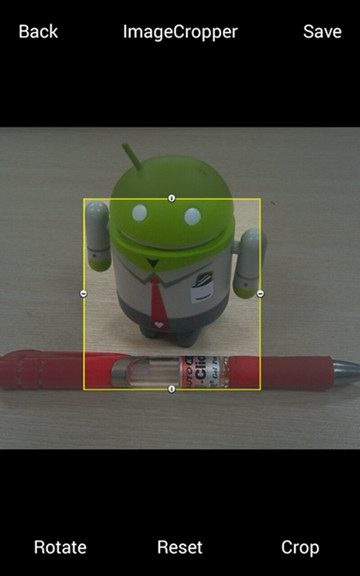
我的大致计划是首先介绍一下这个库的用法,然后再写几篇文章介绍一下其中的一些原理和关键技术,希望对Android开发新手有所帮助。
【特性】
支持通过手势移动和缩放剪裁窗口
支持固定剪裁窗口大小、固定窗口的长宽比率
支持设置最大的窗口长和宽
支持剪裁图片的旋转
易于集成和使用
【使用方法】
修改AndroidManifest.xml文件
<activity android:name="com.ticktick.imagecropper.CropImageActivity"/>
需要添加写SDcard的权限
<uses-permission android:name="android.permission.WRITE_EXTERNAL_STORAGE" />
2. 启动图片剪裁界面的方法
第一种方法,使用库中封装的CropIntent来构建Intent对象:
private void startCropImage() {

    // Create a CropIntent

    CropIntent intent = new CropIntent();

    // Set the source image filepath/URL and output filepath/URL (Required)

    intent.setImagePath("/sdcard/source.jpg");

    intent.setOutputPath("/sdcard/cropped.jpg");

    // Set a fixed crop window size (Optional)

    intent.setOutputSize(,);

    // Set the max crop window size (Optional)

    intent.setMaxOutputSize(,);

    // Set a fixed crop window's width/height aspect (Optional)

    intent.setAspect(,);

    // Start ImageCropper activity with certain request code and listen for result

    startActivityForResult(intent.getIntent(this), REQUEST_CODE_CROP_PICTURE);

}
第二种方法,自定义Intent对象:
private void startCropImage() {

    // Create explicit intent

    Intent intent = new Intent(this, CropImageActivity.class);

    // Set the source image filepath/URL and output filepath/URL (Required)

    intent.setData(Uri.fromFile(new File("/sdcard/source.jpg")));

    intent.putExtra(MediaStore.EXTRA_OUTPUT,Uri.fromFile(new File("/sdcard/cropped.jpg")));

    // Set a fixed crop window size (Optional)

    intent.putExtra("outputX",);

    intent.putExtra("outputY",);

    // Set the max crop window size (Optional)

    intent.putExtra("maxOutputX",);

    intent.putExtra("maxOutputY",);

    // Set a fixed crop window's width/height aspect (Optional)

    intent.putExtra("aspectX",);

    intent.putExtra("aspectY",);

    // Start ImageCropper activity with certain request code and listen for result

    startActivityForResult(intent, REQUEST_CODE_CROP_PICTURE);

}
3. 获取剪裁结果
剪裁结束后,如果用户点击了“Save”按钮,则可以通过MediaStore.EXTRA_OUTPUT得到保存的图片的URL地址;如果用户点击了“Cancel”,则Activity的返回值会被设置为 RESULT_CANCEL
protected void onActivityResult(int requestCode, int resultCode, Intent data) {

    if (resultCode != RESULT_OK) {

        return;

    }

    if (requestCode == REQUEST_CODE_CROP_PICTURE ) {

        Uri croppedUri = data.getExtras().getParcelable(MediaStore.EXTRA_OUTPUT);

        InputStream in = null;

    try {

            in = getContentResolver().openInputStream(croppedUri);

            Bitmap b = BitmapFactory.decodeStream(in);

            mImageView.setImageBitmap(b);

        }

    catch (FileNotFoundException e) {

            e.printStackTrace();

        }

    }

    super.onActivityResult(requestCode, resultCode, data);

}
Android图片剪裁库的更多相关文章
- Android 图片裁剪库 uCrop
引语 晚上好,我是猫咪,我的公众号「程序媛猫咪」会推荐 GitHub 上好玩的项目,挖掘开源的价值,欢迎关注我. 现在 Android 开发,离不开图片,必然也需要图片裁剪功能,这个实现可以调用系统的 ...
- [RN] React Native 使用开源库 react-native-image-crop-picker 实现图片选择、图片剪裁
React Native 使用开源库 react-native-image-crop-picker 实现图片选择.图片剪裁 该库可以实现启动本地相册和照相机来采集图片,并且提供多选.图片裁剪等功能,支 ...
- Android图片加载库的理解
前言 这是“基础自测”系列的第三篇文章,以Android开发需要熟悉的20个技术点为切入点,本篇重点讲讲Android中的ImageLoader这个库的一些理解,在Android上最让人头疼是 ...
- picasso-强大的Android图片下载缓存库
编辑推荐:稀土掘金,这是一个针对技术开发者的一个应用,你可以在掘金上获取最新最优质的技术干货,不仅仅是Android知识.前端.后端以至于产品和设计都有涉猎,想成为全栈工程师的朋友不要错过! pica ...
- fackbook的Fresco (FaceBook推出的Android图片加载库-Fresco)
[Android开发经验]FaceBook推出的Android图片加载库-Fresco 欢迎关注ndroid-tech-frontier开源项目,定期翻译国外Android优质的技术.开源库.软件 ...
- picasso_强大的Android图片下载缓存库
tag: android pic skill date: 2016/07/09 title: picasso-强大的Android图片下载缓存库 [本文转载自:泡在网上的日子 参考:http://bl ...
- 毕加索的艺术——Picasso,一个强大的Android图片下载缓存库,OkHttpUtils的使用,二次封装PicassoUtils实现微信精选
毕加索的艺术--Picasso,一个强大的Android图片下载缓存库,OkHttpUtils的使用,二次封装PicassoUtils实现微信精选 官网: http://square.github.i ...
- android图片加载库Glide
什么是Glide? Glide是一个加载图片的库,作者是bumptech,它是在泰国举行的google 开发者论坛上google为我们介绍的,这个库被广泛的运用在google的开源项目中. Glide ...
- Android 图片加载库Glide 实战(二),占位符,缓存,转换自签名高级实战
http://blog.csdn.net/sk719887916/article/details/40073747 请尊重原创 : skay <Android 图片加载库Glide 实战(一), ...
随机推荐
- SUSE 11 SP3 搭建weblogic服务
环境的搭建和业务需求相关,仅供参考 环境: SUSE 11 SP3 安装步骤 创建一个weblogic组 创建一个用户名为weblogic的用户, 创建相关目录 上传jdk,脚本等 安装 创建用户及其 ...
- python PIL图像处理-框选
框选图中位置 代码 from PIL import Image,ImageDraw,ImageFont,ImageFilter import random #--------------------- ...
- 【剑指Offer】19、顺时针打印矩阵
题目描述: 输入一个矩阵,按照从外向里以顺时针的顺序依次打印出每一个数字,例如,如果输入如下4 X 4矩阵: 1 2 3 4 5 6 7 8 9 10 11 12 13 14 15 16 则依 ...
- 3.在eclipse中创建Web项目,并部署到Tomcat上
1.找到创建web项目的菜单 2.创建web项目并选择web环境 3.查看创建好的web项目结构 4.在web项目的webContent文件夹下创建jsp页面 5.查看是否创建jsp页面成功,并编辑j ...
- luogu P4725 多项式对数函数 (模板题、FFT、多项式求逆、求导和积分)
手动博客搬家: 本文发表于20181125 13:25:03, 原地址https://blog.csdn.net/suncongbo/article/details/84487306 题目链接: ht ...
- 学习EXTJS6(7)基本功能-最常用的表单
开发过程中关于表单的处理无非: 1.表单和表单元素 2.实现表单验证 3.表单的提交和加载 -------------------------------------- 1.Ext.form.Basi ...
- 【hihocoder 1474】拆字游戏
[题目链接]:http://hihocoder.com/problemset/problem/1474 [题意] [题解] 题目的意思是说,那个块在最左端先出现,就先处理那个块; 每个连通块,处理出最 ...
- BA-WG-冷源
冷源群控系统最好由冷源厂家来做的理由 1.冷机厂家对空调的参数十分的清楚,明确的知道冷机的负荷曲线,可以优化冷机加减载的最合理时间达到最佳的节能效果 2.独立的CSM硬件模块,内置不同冷机的型号特性, ...
- 【日常学习】【搜索/递归】codevs2802 二的幂次方题解
转载请注明出处 [ametake版权全部]http://blog.csdn.net/ametake欢迎来看 题目描写叙述 Description 不论什么一个正整数都能够用2的幂次方表示. 比如:13 ...
- iOS 8 中 UIAlertView 和 UIActionSheet 河里去了?
iOS 8 中 UIAlertView 和 UIActionSheet 河里去了? 太阳火神的漂亮人生 (http://blog.csdn.net/opengl_es) 本文遵循"署名-非商 ...