
常用模块(hashlib、suprocess、configparser)
hashlib模块
hash是一种接受不了内容的算法,(3.x里代替了md5模块和sha模块,主要提供 SHA1, SHA224, SHA256, SHA384, SHA512 ,MD5 算法),该算法接受传入的内容,经过运算得到一串hash值
特点:1.只要传入的内容一样,得到的hash值必然一样--->文件完整性校验)
2.不能用哈希值反解成内容--->把密码做成hash值,不要用明文传输
3.只要使用的hash算法不变,无论校验内容有多大,得到的hash值长度是固定的
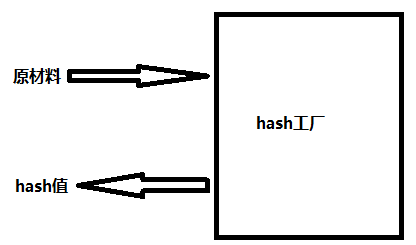
hash算法就像一座工厂,工厂接收你送来的原材料(可以用m.update()为工厂运送原材料),经过加工返回的产品就是hash值
hash的具体使用:
import hashlib

m=hashlib.md5()# m=hashlib.sha256()

m.update('hello'.encode('utf8'))

print(m.hexdigest())  #5d41402abc4b2a76b9719d911017c592

m.update('alvin'.encode('utf8'))

print(m.hexdigest())  #92a7e713c30abbb0319fa07da2a5c4af

m2=hashlib.md5()

m2.update('helloalvin'.encode('utf8'))

print(m2.hexdigest()) #92a7e713c30abbb0319fa07da2a5c4af

'''

注意:把一段很长的数据update多次,与一次update这段长数据,得到的结果一样

但是update多次为校验大文件提供了可能。

'''
以上加密算法虽然依然非常厉害,但时候存在缺陷,即:通过撞库可以反解。所以,有必要对加密算法中添加自定义key再来做加密。
import hashlib

# ######## 256 ########

hash = hashlib.sha256('898oaFs09f'.encode('utf8'))

hash.update('alvin'.encode('utf8'))

print (hash.hexdigest())#e79e68f070cdedcfe63eaf1a2e92c83b4cfb1b5c6bc452d214c1b7e77cdfd1c7
但我们可以通过密码加盐,来提升数据的安全性。
# import hashlib

# pwd='alex3714'

#

# m=hashlib.md5()

# m.update('一行白鹭上青天')

# m.update(pwd.encode('utf-8'))

# m.update('天'.encode('utf-8'))

#

# m.update('小雨一米五'.encode('utf-8'))

# print(m.hexdigest())

# import hashlib

#

# # m=hashlib.md5()

# # m.update('helloworld'.encode('utf-8'))

# # print(m.hexdigest()) #fc5e038d38a57032085441e7fe7010b0

#

# m=hashlib.sha256()

# m.update('helloworld'.encode('utf-8'))

# print(m.hexdigest()) #936a185caaa266bb9cbe981e9e05cb78cd732b0b3280eb944412bb6f8f8f07af

#

#

# m=hashlib.sha512()

# m.update('helloworld'.encode('utf-8'))

# print(m.hexdigest()) #1594244d52f2d8c12b142bb61f47bc2eaf503d6d9ca8480cae9fcf112f66e4967dc5e8fa98285e36db8af1b8ffa8b84cb15e0fbcf836c3deb803c13f37659a60
python 还有一个 hmac 模块,它内部对我们创建 key 和 内容 进行进一步的处理然后再加密:
1 import hmac

2 h = hmac.new('alvin'.encode('utf8'))

3 h.update('hello'.encode('utf8'))

4 print (h.hexdigest())#320df9832eab4c038b6c1d7ed73a5940
import hmac

m=hmac.new('天王盖地虎,小鸡炖模块'.encode('utf-8'))

m.update('alex3814'.encode('utf-8'))

print(m.hexdigest())
suprocess模块
import subprocess

# import time

#

# time.sleep(500)

# dos命令

# tasklist | findstr python

# taskkill /?

#D:\code>tasklist | findstr python

# python.exe                   12360 Console                    1     11,024 K

#

# D:\code>taskkill /F /PID 12360

# linux系统(了解)

# ps aux | grep python

# kill -9 PID

# import os

# while True:

#     cmd=input('>>>: ').strip()

#     if not cmd:continue

#     # print('%s run' %cmd)

#     res=os.system(cmd)

    # network.send(res)

# import os

#

# res=os.system('dixCVr')

# print('运行结果:',res)

import subprocess

obj=subprocess.Popen('dir',

                     shell=True,

                     stdout=subprocess.PIPE,

                     stderr=subprocess.PIPE

                     )

# print(obj)

res1=obj.stdout.read()

print('正确结果1111: ',res1)

res2=obj.stdout.read()

print('正确结果2222: ',res2) #只能取一次,取走了就没有了

# res2=obj.stderr.read()

# print('错误结果:',res2.decode('gbk'))
configparser模块
# 注释1

; 注释2

[section1]

k1 = v1

k2:v2

user=egon

age=18

is_admin=true

salary=31

[section2]

k1 = v1
读取
import configparser

config=configparser.ConfigParser()

config.read('a.cfg')

#查看所有的标题

res=config.sections() #['section1', 'section2']

print(res)

#查看标题section1下所有key=value的key

options=config.options('section1')

print(options) #['k1', 'k2', 'user', 'age', 'is_admin', 'salary']

#查看标题section1下所有key=value的(key,value)格式

item_list=config.items('section1')

print(item_list) #[('k1', 'v1'), ('k2', 'v2'), ('user', 'egon'), ('age', '18'), ('is_admin', 'true'), ('salary', '31')]

#查看标题section1下user的值=>字符串格式

val=config.get('section1','user')

print(val) #egon

#查看标题section1下age的值=>整数格式

val1=config.getint('section1','age')

print(val1) #18

#查看标题section1下is_admin的值=>布尔值格式

val2=config.getboolean('section1','is_admin')

print(val2) #True

#查看标题section1下salary的值=>浮点型格式

val3=config.getfloat('section1','salary')

print(val3) #31.0
改写
import configparser

config=configparser.ConfigParser()

config.read('a.cfg',encoding='utf-8')

#删除整个标题section2

config.remove_section('section2')

#删除标题section1下的某个k1和k2

config.remove_option('section1','k1')

config.remove_option('section1','k2')

#判断是否存在某个标题

print(config.has_section('section1'))

#判断标题section1下是否有user

print(config.has_option('section1',''))

#添加一个标题

config.add_section('egon')

#在标题egon下添加name=egon,age=18的配置

config.set('egon','name','egon')

config.set('egon','age',18) #报错,必须是字符串

#最后将修改的内容写入文件,完成最终的修改

config.write(open('a.cfg','w'))
import configparser

config = configparser.ConfigParser()

config["DEFAULT"] = {'ServerAliveInterval': '',

                      'Compression': 'yes',

                     'CompressionLevel': ''}

config['bitbucket.org'] = {}

config['bitbucket.org']['User'] = 'hg'

config['topsecret.server.com'] = {}

topsecret = config['topsecret.server.com']

topsecret['Host Port'] = ''     # mutates the parser

topsecret['ForwardX11'] = 'no'  # same here

config['DEFAULT']['ForwardX11'] = 'yes'

with open('example.ini', 'w') as configfile:

   config.write(configfile)

基于上述方法添加一个ini文档
基于上述方法添加一个ini文档
常用模块(hashlib、suprocess、configparser)的更多相关文章
- 常用模块(hashlib,configparser,logging)
常用模块(hashlib,configparser,logging) hashlib hashlib 摘要算法的模块md5 sha1 sha256 sha512摘要的过程 不可逆能做的事:文件的一致性 ...
- 常用模块xml,shelve,configparser,hashlib
XML 什么XML:全称 可扩展标记语言 标记指的是代表某种含义的字符 XML<> 为什么需要XML 为能够在不同的平台间继续数据的交换 为了使交换的数据能让对方看懂 就需要按照一定的语法 ...
- 20 常用模块 hashlib hmac:加密 xml xlrd xlwt:excel读|写 configparser subprocess
hashlib模块:加密 加密: 1.有解密的加密方式 2.无解密的加密方式:碰撞检查 hashlib -- 1)不同数据加密后的结果一定不一致 -- 2)相同数据的加密结果一定是一致的 import ...
- 7-3三个模块 hashlib ,logging,configparser和序列化
一 hashlib 主要用于字符串加密 1 import hashlib md5obj=hashlib.md5() # 实例化一个md5摘要算法的对象 md5obj.update('alex3714' ...
- pyhthon常用模块hashlib
python hashlib模块 一,hashlib模块主要用于加密,其中提供sha1,sha224,sha256,sha384,sha512,md5算法.常用的使用md5即可完成需求. 一,使用md ...
- Python全栈之路----常用模块----hashlib加密模块
加密算法介绍 HASH Python全栈之路----hash函数 Hash,一般翻译做“散列”,也有直接音译为”哈希”的,就是把任意长度的输入(又叫做预映射,pre-image),通过散列 ...
- python常用模块——hashlib模块
Python的hashlib提供了常见的摘要算法,如md5.sha1等 什么是摘要算法了?摘要算法又称哈希算法.散列算法. 它通过一个函数,把任意长度的数据转化魏一个长度固定的数据串(通常用十六进制的 ...
- 常用模块 - hashlib模块
一.简介 Python的hashlib提供了常见的摘要算法,如MD5.SHA1.SHA224.SHA256.SHA384.SHA512等算法. 什么是摘要算法呢?摘要算法又称哈希算法.散列算法.它通过 ...
- python常用模块集合
python常用模块集合 Python自定义模块 python collections模块/系列 Python 常用模块-json/pickle序列化/反序列化 python 常用模块os系统接口 p ...
- 文成小盆友python-num7 -常用模块补充 ,python 牛逼的面相对象
本篇内容: 常用模块的补充 python面相对象 一.常用模块补充 1.configparser模块 configparser 用于处理特定格式的文件,起内部是调用open()来实现的,他的使用场景是 ...
随机推荐
- thread.h
https://github.com/wookayin/pintos/blob/master/src/threads/thread.h #ifndef THREADS_THREAD_H #defi ...
- canvas图片滚动
<!DOCTYPE html> <html lang="en"> <head> <meta charset="utf-8&quo ...
- [ZJOI2006]物流运输 最短路 动态规划
Code: 定义状态 $dp[i]$ 为前 $i$ 天的最小代价. 状态转移为:$dp[i]=min(dp[i],dp[j]+spfa(j+1,i)$ 这里 $spfa(i,j)$ 是指 $(i,j) ...
- 列表的初识,列表的索引切片,列表的增删改查,列表的嵌套,元组的初识,range
1 内容总览 列表的初识 列表的索引切片 列表的增删改查 列表的嵌套 元组的初识(了解) 元组的简单应用(了解) range 2 具体内容 列表的初识 why: str: 存储少量的数据.切片出来全都 ...
- DCDCBigBig's first blog @cnblogs~
其实初二末的时候我就在CSDN上开了博客(主要是为了存模板),但是无奈CSDN的页面真的太辣眼睛了…… 然后我就加入博客园欢快的大家庭啦!!!顺便膜拜巨佬学长%%%(我是蒟蒻不要喷我) 页面设置感谢x ...
- LCT复习
LCT,虚实链剖分.支持连边和断边操作.Tarjan制造. [HNOI2010]弹飞绵羊 当然这题分块可以做,常数小,但是LCT更无脑. 建立一个虚拟的弹飞节点\(n+1\),初始化时对于一个点假如再 ...
- CF1019C Sergey's problem (图上构造)
题目大意:给你一个有向连通图,让你找出一个点集,保证点集内的点之间没有直接连边,且集合中存在一点,到一个 非点集中的点的距离小于等于2 思路很清奇 首先编号从小到大遍历每个点,如果这个点没有被访问过, ...
- 解决wps的ppt演示不能打开的问题libbz2.so.1.0
安装 wps-office-10.1.0.5707-1.a21.x86_64 无法打开ppt 其他正常
- linux中对socket的理解 socket高并发
1.socket是什么? 其实准确的来说,socket并不仅仅用于linux而已,它也应用于TCP/IP中.笼统的来说,socket就是指的“IP地址+端口号”.比如我有一个ssh服务器A,这时候我有 ...
- CloudStack云基础架构的一些概念
1. Zones(区域) 一个区域在CloudStack配置中是最大的组织单元.一个区域通常代表一个单独的数据中心,虽然在一个数据中心也允许有多个区域.将基础架构设施加入到区域中的好处是提供物理隔离和 ...