
android NDK 神经网络API——是给tensorflow lite调用的底层API,应用开发者使用tensorflow lite即可
eural Networks API
In this document show more
- Understanding the Neural Networks API Runtime
- Neural Networks API Programming Model
- More About Operands
Related API reference
Related sample
Note: The Neural Networks API is available in Android 8.1 and higher system images. The header file is available in the latest version of the NDK. We encourage you to send us your feedback via the Android 8.1 Preview issue tracker.
The Android Neural Networks API (NNAPI) is an Android C API designed for running computationally intensive operations for machine learning on mobile devices. NNAPI is designed to provide a base layer of functionality for higher-level machine learning frameworks (such as TensorFlow Lite, Caffe2, or others) that build and train neural networks. The API is available on all devices running Android 8.1 (API level 27) or higher.
NNAPI supports inferencing by applying data from Android devices to previously trained, developer-defined models. Examples of inferencing include classifying images, predicting user behavior, and selecting appropriate responses to a search query.
On-device inferencing has many benefits:
- Latency: You don’t need to send a request over a network connection and wait for a response. This can be critical for video applications that process successive frames coming from a camera.
- Availability: The application runs even when outside of network coverage.
- Speed: New hardware specific to neural networks processing provide significantly faster computation than with general-use CPU alone.
- Privacy: The data does not leave the device.
- Cost: No server farm is needed when all the computations are performed on the device.
There are also trade-offs that a developer should keep in mind:
- System utilization: Evaluating neural networks involve a lot of computation, which could increase battery power usage. You should consider monitoring the battery health if this is a concern for your app, especially for long-running computations.
- Application size: Pay attention to the size of your models. Models may take up multiple megabytes of space. If bundling large models in your APK would unduly impact your users, you may want to consider downloading the models after app installation, using smaller models, or running your computations in the cloud. NNAPI does not provide functionality for running models in the cloud.
Understanding the Neural Networks API runtime
NNAPI is meant to be called by machine learning libraries, frameworks, and tools that let developers train their models off-device and deploy them on Android devices. Apps typically would not use NNAPI directly, but would instead directly use higher-level machine learning frameworks. These frameworks in turn could use NNAPI to perform hardware-accelerated inference operations on supported devices.
Based on the app’s requirements and the hardware capabilities on a device, Android’s neural networks runtime can efficiently distribute the computation workload across available on-device processors, including dedicated neural network hardware, graphics processing units (GPUs), and digital signal processors (DSPs).
For devices that lack a specialized vendor driver, the NNAPI runtime relies on optimized code to execute requests on the CPU.
The diagram below shows a high-level system architecture for NNAPI.
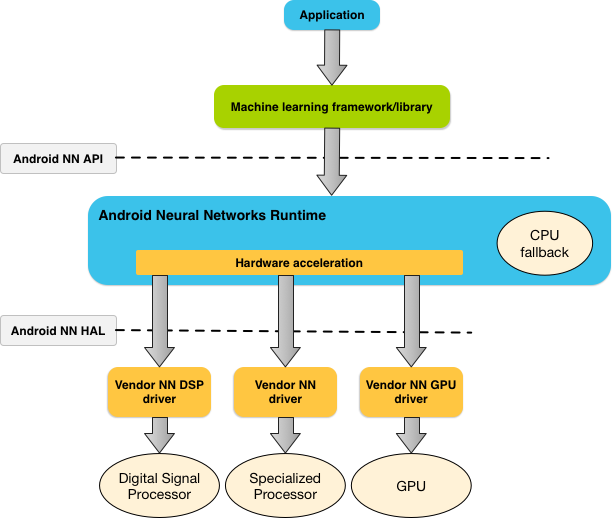 Figure 1. System architecture for Android Neural Networks API
eural Networks API
In this document show more
- Understanding the Neural Networks API Runtime
- Neural Networks API Programming Model
- More About Operands
Related API reference
Related sample
Note: The Neural Networks API is available in Android 8.1 and higher system images. The header file is available in the latest version of the NDK. We encourage you to send us your feedback via the Android 8.1 Preview issue tracker.
The Android Neural Networks API (NNAPI) is an Android C API designed for running computationally intensive operations for machine learning on mobile devices. NNAPI is designed to provide a base layer of functionality for higher-level machine learning frameworks (such as TensorFlow Lite, Caffe2, or others) that build and train neural networks. The API is available on all devices running Android 8.1 (API level 27) or higher.
NNAPI supports inferencing by applying data from Android devices to previously trained, developer-defined models. Examples of inferencing include classifying images, predicting user behavior, and selecting appropriate responses to a search query.
On-device inferencing has many benefits:
- Latency: You don’t need to send a request over a network connection and wait for a response. This can be critical for video applications that process successive frames coming from a camera.
- Availability: The application runs even when outside of network coverage.
- Speed: New hardware specific to neural networks processing provide significantly faster computation than with general-use CPU alone.
- Privacy: The data does not leave the device.
- Cost: No server farm is needed when all the computations are performed on the device.
There are also trade-offs that a developer should keep in mind:
- System utilization: Evaluating neural networks involve a lot of computation, which could increase battery power usage. You should consider monitoring the battery health if this is a concern for your app, especially for long-running computations.
- Application size: Pay attention to the size of your models. Models may take up multiple megabytes of space. If bundling large models in your APK would unduly impact your users, you may want to consider downloading the models after app installation, using smaller models, or running your computations in the cloud. NNAPI does not provide functionality for running models in the cloud.
Understanding the Neural Networks API runtime
NNAPI is meant to be called by machine learning libraries, frameworks, and tools that let developers train their models off-device and deploy them on Android devices. Apps typically would not use NNAPI directly, but would instead directly use higher-level machine learning frameworks. These frameworks in turn could use NNAPI to perform hardware-accelerated inference operations on supported devices.
Based on the app’s requirements and the hardware capabilities on a device, Android’s neural networks runtime can efficiently distribute the computation workload across available on-device processors, including dedicated neural network hardware, graphics processing units (GPUs), and digital signal processors (DSPs).
For devices that lack a specialized vendor driver, the NNAPI runtime relies on optimized code to execute requests on the CPU.
The diagram below shows a high-level system architecture for NNAPI.
Figure 1. System architecture for Android Neural Networks API
参考:https://developer.android.com/ndk/guides/neuralnetworks/index.html
android NDK 神经网络API——是给tensorflow lite调用的底层API,应用开发者使用tensorflow lite即可的更多相关文章
- Android NDK 初探,生成so文件以及调用so文件方法
因为最近业务上涉及安全的问题 然后有一些加密解密的方法和key的存储问题 本来想存储到手机里面,但是网上说一般敏感信息不要存储到手机Sdcard上 而且我这个如果从网络建立通信获取的话,又太耗时,所以 ...
- Android NDK学习(五):Java调用Native代码流程总结
编写一个Java类,并且在某个方法签名的修饰符中加上native修饰符. 使用Javac命令编译第一步中的Java类,使之成为一个class文件. 使用Javah -jni 包名.类名 生成Jni接口 ...
- TensorFlow Lite demo——就是为嵌入式设备而存在的,底层调用NDK神经网络API,注意其使用的tf model需要转换下,同时提供java和C++ API,无法使用tflite的见后
Introduction to TensorFlow Lite TensorFlow Lite is TensorFlow’s lightweight solution for mobile and ...
- 【译】Android NDK API 规范
[译]Android NDK API 规范 译者按: 修改R代码遇到Lint tool的报错,搜到了这篇文档,aosp仓库地址:Android NDK API Guidelines. 975a589 ...
- Android NDK开发初识
神秘的Android NDK开发往往众多程序员感到兴奋,但又不知它为何物,由于近期开发应用时,为了是开发的.apk文件不被他人解读(反编译),查阅了很多资料,其中有提到使用NDK开发,怀着好奇的心理, ...
- 初识Android NDK
本文介绍Windows环境下搭建Android NDK开发环境,并创建一个简单的使用Native代码的Android Application. 一.环境搭建 二.JNI函数绑定 三.例子 一.环境搭建 ...
- Android NDK开发入门实例
AndroidNDK是能使Android应用开发者把从c/c++编译而来的本地代码嵌入到应用包中的一系列工具的组合. 注意: AndroidNDK只能用于Android1.5及以上版本中. I. An ...
- [原]如何用Android NDK编译FFmpeg
我们知道在Ubuntu下直接编译FFmpeg是很简单的,主要是先执行./configure,接着执行make命令来编译,完了紧接着执行make install执行安装.那么如何使用Android的ND ...
- android ndk环境配置(转)
转载自:http://jingyan.baidu.com/article/3ea51489e7a9bd52e61bbac7.html android sdk 更新到 r23 时,eclipse 自带 ...
随机推荐
- [文章转载]-Java后端,应该日常翻看的中文技术网站 -江南白衣
Java后端,应该日常翻看的中文技术网站 1.内容生产者 InfoQ 中文技术第一站,佩服霍老板,真金白银地为中国程序员们生产内容. ImportNew 专门面向Java的内容生产者兼聚合者,偶然也有 ...
- get传数组
开发真的处处都是坑呀 ajax get请求,传数组,想当然的给了个json数组['','',''],结果500错误 正确的方式,多次赋值,见下图,后台会自动转数组
- pycharm执行代码可以跑,但放到linux跑就报文件找不到
代码中包含当前路径 使用pycharm执行python,当前路径就是pycharm项目所在的路径,所以不会报错 但使用shell执行python,当前路径就会从shell所在的路径去找文件,所以找不到 ...
- JAVA通用工具类
1.异常验证框架 框架1:com.google.common.base.Preconditions 框架2:org.apache.commons.lang.Validate 框架3:org.apach ...
- python包与模块
Python基础-包与模块 摘要 为重用以及更好的维护代码,Python使用了模块与包:一个Python文件就是一个模块,包是组织模块的特殊目录(包含__init__.py文件). 模块搜索路径,Py ...
- C#学习笔记_12_枚举&结构体
12_枚举&结构体 枚举 是一种数据类型 适用于某些取值范围有限的数据 语法: [访问权限修饰符] enum 枚举名 { 枚举值 } 枚举名遵循大驼峰命名法 枚举一般情况下是和switch c ...
- 70. Climbing Stairs(动态规划)
You are climbing a stair case. It takes n steps to reach to the top. Each time you can either climb ...
- C# 派生类的XmlSerializer序列化XML
近段对XML 序列化进行处理,用XmlSerializer这个挺好用的. 但是对于派生类对象的XML的生成总会报错.因为同一个节点名称,不能反射为不同的对象.这个在网上找了好久,都说要利用反射来处理. ...
- C#反射获取数据库字段
static string sqlselect = "insert into {0}({1}) values ({2})"; (这个方法可以适用于任何数据库的插入语句) publi ...
- Django——9 博客小案例的实现
Django 博客小案例的实现 主要实现博客的增删改查功能 主页index.html --> 展示添加博客和博客列表的文字,实现页面跳转 添加页add.html --> 输入文章标 ...