
VHDL之concurrent之operators
Using operators
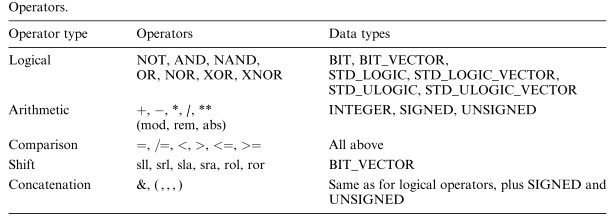
Operators can be used to implement any combinational circuit. However, as will become apparent later, complex circuits are usually easier to write using sequential code, even if the circuit does not contain sequential logic.
Example Multiplexer

 ---------------------------------------

 LIBRARY ieee;

 USE ieee.std_logic_1164.all;

 ---------------------------------------

 ENTITY mux IS

 PORT ( a, b, c, d, s0, s1: IN STD_LOGIC;

     y: OUT STD_LOGIC);

 END mux;

 ---------------------------------------

  ARCHITECTURE pure_logic OF mux IS

  BEGIN

   y <= (a AND NOT s1 AND NOT s0) OR

      (b AND NOT s1 AND s0) OR

      (c AND s1 AND NOT s0) OR

      (d AND s1 AND s0);

  END pure_logic;

  ---------------------------------------
Miscellaneous operators
** Exponentiation
abs Absolute value
The exponentiation operator has two operands. This operator is defined for any integer or floating point number. The right operand (exponent) must be of integer type. When the exponent is the positive integer, then the left operand is repeatedly multiplied by itself. When the exponent is the negative number, then the result is a reverse of exponentiation with the exponent equal to the absolute value of the right operand. If the exponent is equal to 0 the result will be 1.
The abs operator has only one operand. It allows defining the operand's absolute value. The result is of the same type as the operand.
2 **  =

3.8 **  = 54.872

 ** (-) =  / (**) = 0.0625
VHDL之concurrent之operators的更多相关文章
- VHDL之concurrent之generate
GENERATE It is another concurrent statement (along with operators and WHEN). It is equivalent to the ...
- VHDL之concurrent之when
WHEN (simple and selected) It is one of the fundamental concurrent statements (along with operators ...
- VHDL之concurrent之block
1 Simple BLOCK The simple block represents only a way of partitioning the code. It allows concurrent ...
- Concurrent.Thread.js
(function(){ if ( !this.Data || (typeof this.Data != 'object' && typeof this.Data != 'functi ...
- how to forget about delta cycles for RTL design
A delta cycle is a VHDL construct used to makeVHDL, a concurrent language, executable on asequential ...
- VHDL基础1
Description Structure 一个可综合的VHDL描述中一般由3部分组成:LIBRARY declarations.ENTITY.ARCHITECTURE Library(库)用来设计重 ...
- ConCurrent in Practice小记 (3)
ConCurrent in Practice小记 (3) 高级同步技巧 Semaphore Semaphore信号量,据说是Dijkstra大神发明的.内部维护一个许可集(Permits Set),用 ...
- ConCurrent in Practice小记 (2)
Java-ConCurrent2.html :first-child{margin-top:0!important}img.plugin{box-shadow:0 1px 3px rgba(0,0,0 ...
- 让WPS支持VHDL的关键词加粗
WPS的VBA在这里下载:http://bbs.wps.cn/forum.php?mod=viewthread&tid=22347925 语法高亮是参考Word的,这篇文章:http://bl ...
随机推荐
- Excel表格
自己一个一个试出来,并写上解释. 还不熟练,待多写代码多练习. #!/usr/bin/python # -*- coding:utf-8 -*- import os import xlwt impor ...
- (蓝桥)2017C/C++A组第一题迷宫
#include<iostream> #include<memory.h> using namespace std; char mi[10][10] ; int visited ...
- python 未知
import timeimport requestsfrom bs4 import BeautifulSoupimport threading def format_str(s): return s. ...
- qwb与整数对
qwb与整数对 Time Limit: 1 Sec Memory Limit: 128 MB Description qwb又遇到了一道数学难题,你能帮助他吗? 给出两个整数n和m,请统计满足0&l ...
- linux -- 视频尺寸-cif、2cif、dcif、D1、HD1、4D1
1 CIF简介 CIF是常用的标准化图像格式(Common Intermediate Format).在H.323协议簇中,规定了视频采集设备的标准采集分辨率.CIF = 352×288像素 ...
- asp.net--解决上传文件大小限制
原文地址 第一种方法,主要适用于IIS6.0版本 一.修改配置Web.Config文件中的httpRuntime节点 对于asp.net,默认只允许上传4M文件,增加如下配置,一般可以自定义最大文件大 ...
- [Angulalr] Speed Up Reducer Development Using Ngrx Schematics
When we use NGRX, we need to create some bolipates. Now with Angulalr6, we can use CLI to generate t ...
- Rust 中项目构建管理工具 Cargo简单介绍
cargo是Rust内置的项目管理工具.用于Rust 项目的创建.编译.执行,同一时候对项目的依赖进行管理,自己主动推断使用的第三方依赖库,进行下载和版本号升级. 一.查看 cargo 版本号 安装R ...
- 深入剖析Android四大组件(一)——Activity生命周期具体解释
1.管理Activity的生命周期 不管是正在执行的Activity还是没有执行的Activity,它们都接受Android的框架管理,这使得Activity处于不同的生命周期. ①Activity的 ...
- C语言之基本算法40—字符串删除元音字母倒序输出
//字符串,数组 /* ================================================================== 题目: 输入一行字符,将辅音字母按反序输出 ...