
Automation testing tool comparison - UFT & CodedUITest
Ease of Use
- Recording and Playback Functionality
UFT provides 4 models to record a new test.
Normal Recording: This is the default Recording mode that records the objects and the operations performed on the application under test.
Analog Recording: This records not only the keyboard actions but also the mouse movements relative to the screen or the application window.
Low-Level Recording: This records the exact co-ordinates of the objects independent of the fact whether UFT recognizes the object or NOT. It just records the co-ordinates, hence does NOT record mouse movements.
Insight Recording: UFT records operation based on its appearance and NOT based on its native properties.
Recording for CUIT can be done using two different tools. Microsoft Test Manager can be used to record actions that can be then converted to CUIT. The fast forward playback is available to run the test case in a semi-automatic mode even before converting to script. With Visual Studio CUIT provides Coded UI Test Builder to record the actions.
- IDE and tools with which the tester can write the scripts
UFT provides Keyword View to display test steps graphically or Expert View which shows VB Script lines. With UFT IDE for the first time 3 add-ins are provided ActiveX, Visual Basic and Web. Various links to best practices, new features for the current version are available with start page. We can either open existing test case or create a new one.
For CUIT we can easily use Visual Studio IDE to write scripts. And we have a very elaborative IDE as the recording can be done using Visual Studio. All the features of Visual Studio are applicable. The script writing support with Visual Studio is an excellent way of writing and debugging.
- Ease of Test Case execution
Depending upon the add-ins loaded in UFT IDE the record and run window shows tabs. Windows Application tab is always available. The tests can be executed with run button which in turn opens the run dialog box. We can specify the location for run specific results and provide parameters if any.
CUIT can either be executed with Visual Studio or by using Microsoft Test Manager (MTM). With MTM we can provide various settings for the test case execution so as to gather a lot of information while executing the test case behind the scene. CUIT provides various test settings to execute test cases so as to capture different data when we need to create a bug (commonly called as rich bug).
Platform Support
-Language Support
UFT scripts can be written with VBScript which is a high-level language with support to everything except polymorphism and inheritance.
For CUIT we can write the script with Visual Studio with which we can use all object programming concepts if required.
- Support for various application types
UFT supports almost any kind of applications.
CUIT supports Windows Applications, Web Application, WPF applications, SharePoint, Office Client Applications Dynamics CRM Web Client applications.
- Support for various browsers
UFT supports IE, Firefox, Chrome & Safari.
CUIT supports only IE8, IE 9, IE10 and IE 11 (IE 10 & 11 supported only on desktop). There is no support to IE6, IE7, Opera or Safari. For Chrome or Firefox recording is not supported but can be played back with Visual Studio 2012 Update 4 or later.
- Support for Data Driven Testing
Data Driven testing is implemented as Excel workbook that can be accessed by UFT. There are 2 types of data sheet global and local. Global sheet is a single one which can be accessed from every action in a test. There can even be a local data sheet associated with every action.
Coded UI Test supports any data source supported by .NET framework which can come in the form of a .CSV file, XML file or any other data source like SQL Server table, Access table etc.
- Exception Handling
UFT provides VBScript with the help of which we can use On Error statements. As CUIT supports high level languages like C# or VB.Net we can use try catch construct here.
- Validations or Assertions
For UFT there are checkpoints: to verify application under test. These are of 10 types – Standard, Table, Image, Bitmap, Database, Text, Text Area, Page, Accessibility, and XML. A checkpoint is a verification point that compares the current value with the expected value. If the current and expected value match it generates a PASS status otherwise FAIL status.
We can use Coded UI Test Builder to add assertions for your UI controls. We need to edit the assertion condition as required (equal to, in between, contains etc.), provide expected value and generate code for it. Mouse hover events can be recorded manually if required.
- Support for Objects
UFT objects have user friendly names. UFT stores test objects in object repository files. Object repository can be saved into XML file. And UFT provide plug-in tools to compare and merging object repositories. UFT support user defined objects in Windows platform.
Coded UI Test code is written with 3 main parts for UI controls. UIMap.designer.cs, UIMap.cs and UIMap.uitest. The first 2 are different physical files for same partial class while the third is a XML equivalent of all the actions recorded with CUIT Builder. Any changes required can be incorporated with the help of the partial class file. We can also edit the UIMap with the help of Coded UI Editor and find out object’s properties. The CUIT can be completely hand coded if required. Coded UI Test includes a rich API library to code against and a resilient record and playback tool. Coded UI Test can be extended to support custom controls.
Integration with Application Lifecycle Management and going beyond
- ALM Integration
UFT being a part of Quality Centre it supports requirement traceability matrix. UFT integrates seamlessly with QC. Test management and mapping the manual testing process with automation becomes a lot easier with this integration
For CUIT and MTM we can provide all the ALM support Team Foundation Server provides. It supports work item tracking, source control or version control, build automation, various reports. The support is in-built; we do not have to do anything extra.
- Going beyond
UFT provided plug-ins for ActiveX controls, web application and VB objects. Other than these plug-ins for other objects like Microsoft .NET, multimedia plug-ins and Windows Mobile are also available. These UFT plugins available at an additional cost.
Apart from hand coding complete CUIT there is another feature available. CUITe Coded UI Test enhanced is a thin layer developed on top of Microsoft’s Coded UI engine which helps reduce the code. It also increases readability and maintainability. It is very easy to install and will be referred with CUITe.dll in the project. CUITe provides simple object repository.
Each of the tools keeps on adding features as per need.
Summarizing the Comparison
The following table provides a bird’s eye view for the categories and the tools’ support for it.
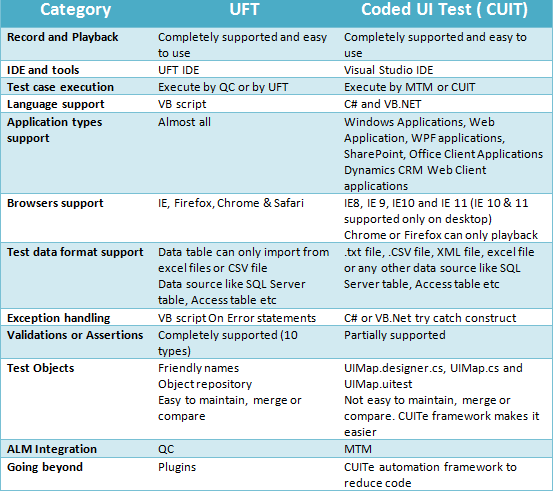
Automation testing tool comparison - UFT & CodedUITest的更多相关文章
- RabbitMQ Performance Testing Tool 性能测试工具
RabbitMQ Performance Testing Tool 介绍:https://www.rabbitmq.com/java-tools.html RabbitMQ Performance T ...
- Penetration Testing、Security Testing、Automation Testing
相关学习资料 http://www.cnblogs.com/LittleHann/p/3823513.html http://www.cnblogs.com/LittleHann/p/3828927. ...
- tsung: an open-source multi-protocol distributed load testing tool
ROPERTIES::type: KnowledgeBase_Cloud:END: 开源.多协议.分布式的压力测试工具 Item Summary tsung-recorder start 通过p ...
- Automation Testing - Best Practice(书写规范)
Coding Standards Coding Standards are suggestions that will help us to write automation Scripts code ...
- 所有selenium相关的库
通过爬虫 获取 官方文档库 如果想获取 相应的库 修改对应配置即可 代码如下 from urllib.parse import urljoin import requests from lxml im ...
- PuppeteerSharp+AngleSharp的爬虫实战之汽车之家数据抓取
参考了DotNetSpider示例, 感觉DotNetSpider太重了,它是一个比较完整的爬虫框架. 对比了以下各种无头浏览器,最终采用PuppeteerSharp+AngleSharp写一个爬虫示 ...
- https://www.testingcircus.com/tell-me-about-yourself-6-sample-answers-software-testers/
https://www.testingcircus.com/tell-me-about-yourself-6-sample-answers-software-testers/ Tell Me Abou ...
- 5 Best Automation Tools for Testing Android Applications
Posted In | Automation Testing, Mobile Testing, Software Testing Tools Nowadays automated tests ar ...
- 10 Unit Testing and Automation Tools and Libraries Java Programmers Should Learn
转自:https://javarevisited.blogspot.com/2018/01/10-unit-testing-and-integration-tools-for-java-program ...
随机推荐
- Sybase数据库工具DbVisualizer乱码问题
使用DbVisualizer来操作sybase数据库的时候,会出现乱码问题,中文变成 '口口'. 解决的方法例如以下: 将这三个字体都改成 "宋体" 或者改成 "PM ...
- [Angular] Set Metadata in HTTP Headers with Angular HttpHeaders
Besides sending (or requesting) the actual data to the server API, there’s also often the need to se ...
- 【Allwinner ClassA20类库分析】 2.free pascal语法及结构简析
上一节介绍了Lazarus一般的开发操作流程,对于不熟悉pascal语言的朋友可能看的还是不大明确.不知道pascal代码里都应该包括什么或起什么作用.这回就简单地介绍下语法及代码文件的结构. ...
- wikioi 1306 机智Trie树
题目描写叙述 Description 看广播操无聊得非常~你有认为吗?在看广播操一波又一波的人潮涌过再退去.认为非常没意思--于是,偶们的大神犇JHT发明了一个及其好玩的游戏~ 把每一班级的队形看成一 ...
- ThinkPHP新建控制器
ThinkPHP新建控制器 一.效果图 二.步骤 1.新建控制器文件 2.编写控制器文件 3.访问控制器 三.注意事项
- CxImage学习
官方下载地址是:http://www.xdp.it/cximage/ 打开工程后可以看到下例这些工程: - CxImage - CxImageCrtDll - CxImageMfcDll - dome ...
- PJNATH介绍 -- 开源的用于NAT穿透的ICE, STUN和TURN
原文地址:http://blog.pjsip.org/2007/04/06/introducing-pjnath-open-source-ice-stun-and-turn/ ICE是什么? 对于那些 ...
- Windows版Redis如何使用?(单机)
使用Windows版Redis 1.下载Windows版本的Redis 2.在redis目录里创建redis.conf ? 1 2 3 4 5 6 7 8 9 10 11 12 13 14 15 16 ...
- sql server 查询某数据库中包含某字段的所有表格
场景:查询DNMes数据库中所有包含RFID字段的表名 sql语句: select object_name(id) objName,Name as colName from syscolumns wh ...
- 洛谷P2939 [USACO09FEB]改造路Revamping Trails(最短路)
题目描述 Farmer John dutifully checks on the cows every day. He traverses some of the M (1 <= M <= ...