
DDD实战11 在项目中使用JWT的token 进行授权验证
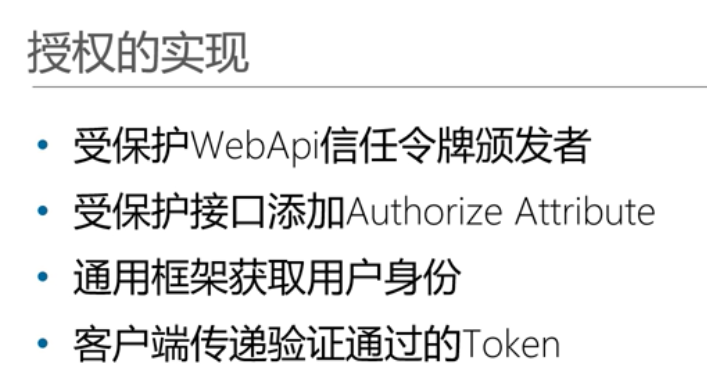
步骤:
1.首先要在webapi的管道中 使用认证(Authentication)
2.要在webapi的服务中注册验证条件
代码如下:
namespace Dealer.WebApi

{

    public class Startup

    {

        public Startup(IConfiguration configuration)

        {

            Configuration = configuration;

        }

        public IConfiguration Configuration { get; }

        // This method gets called by the runtime. Use this method to add services to the container.

        public void ConfigureServices(IServiceCollection services)

        {

            //2 注册验证条件

            services.AddAuthentication(JwtBearerDefaults.AuthenticationScheme)

                .AddJwtBearer(options =>

                {

                    options.TokenValidationParameters = new TokenValidationParameters

                    {

                        //是否验证颁发者

                        ValidateIssuer = true,

                        //是否验证被颁发者

                        ValidateAudience = true,

                        //是否验证过期时间

                        ValidateLifetime = true,

                        //是否密钥

                        ValidateIssuerSigningKey = true,

                        ValidIssuer = "颁发者",

                        ValidAudience = "受众",

                        IssuerSigningKey = JwtSecurityKey.Create("imyourfather_iwanttobegreat")

                    };

                });

            services.AddMvc().SetCompatibilityVersion(CompatibilityVersion.Version_2_1);

        }

        // This method gets called by the runtime. Use this method to configure the HTTP request pipeline.

        public void Configure(IApplicationBuilder app, IHostingEnvironment env)

        {

            if (env.IsDevelopment())

            {

                app.UseDeveloperExceptionPage();

            }

            AppSetting.SetAppSetting(Configuration.GetSection("ConnectString"));

            //1.使得webapi支持验证第一步,在管道中注册使用验证

            app.UseAuthentication();

            app.UseMvc();

        }

    }

}
3 为webapi控制器中的方法 设置授权 或者 允许匿名
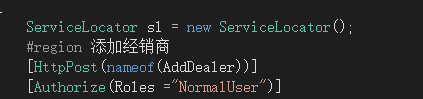
上图所示 为授权给角色为普通用户

上图为允许匿名
步骤4 客户端请求需要授权的地址时在请求头中带上token 下面为一段带token请求的单元测试
[TestMethod]

        public void AddDealerForAuthentication()

        {

            hc = new HttpClient();

            UserLoginDto userLoginDto = new UserLoginDto();

            userLoginDto.Telephone = "";

            userLoginDto.Password = "";

            string request = JsonConvert.SerializeObject(userLoginDto);

            HttpContent httpContent = new StringContent(request);

            httpContent.Headers.ContentType = new MediaTypeHeaderValue("application/json");

            var response = hc.PostAsync("http://localhost:56532/api/Dealer/UserLogin/", httpContent).Result;

            var responseValue = response.Content.ReadAsStringAsync().Result;

            var responseObj = JsonConvert.DeserializeObject<ResultEntity<UserLoginResultDto>>(responseValue);

            //从返回的数据中取出 token

            var token = responseObj.Data.Token;

            AddDealerDto addDealerDto = new AddDealerDto();

            addDealerDto.Name = "谢尔顿";

            addDealerDto.Tel = "";

            addDealerDto.Parentid = Guid.Parse("f060477a-14a8-4ef5-b4b1-1fce2f844c9e");

            addDealerDto.EleMoney = ;

            addDealerDto.ContactNames = new List<string>() { "谢尔顿" };

            addDealerDto.ContactProvinces = new List<string>() { "四川" };

            addDealerDto.ContactCities = new List<string>() { "成都" };

            addDealerDto.ContactStreets = new List<string>() { "熊猫大道" };

            addDealerDto.ContactTels = new List<string>() { "" };

            addDealerDto.ContactZeros = new List<string>() { "熊猫区" };

            addDealerDto.IsDefaultContact = new List<int>() {  };

            HttpClient client = new HttpClient();

            //请求的时候 在请求头中 带上授权信息  注意下面这行代码

            client.DefaultRequestHeaders.Authorization = new AuthenticationHeaderValue("Bearer", token);

            request = JsonConvert.SerializeObject(addDealerDto);

            httpContent = new StringContent(request);

            httpContent.Headers.ContentType = new MediaTypeHeaderValue("application/json");

            response = client.PostAsync("http://localhost:56532/api/Dealer/AddDealer/", httpContent).Result;

            responseValue = response.Content.ReadAsStringAsync().Result;

        }
步骤5 如果要在请求中获取token中的某项数据 可以参考一下代码:4
namespace Util.Bearer

{

    //为了要使用MVC Controller 要安装 Microsoft.AspNetCore.Mvc.Core包

    public class BearerUserInfoController :Controller

    {

        public string GetUserName()

        {

            var principal = HttpContext.User as ClaimsPrincipal;

            if (principal!=null)

            {

                foreach (var claim in principal.Claims)

                {

                    if (claim.Subject!=null)

                    {

                        var sunjectClaims = claim.Subject.Claims as List<Claim>;

                        return sunjectClaims[].Value;

                    }

                }

            }

            return null;

        }

    }

}
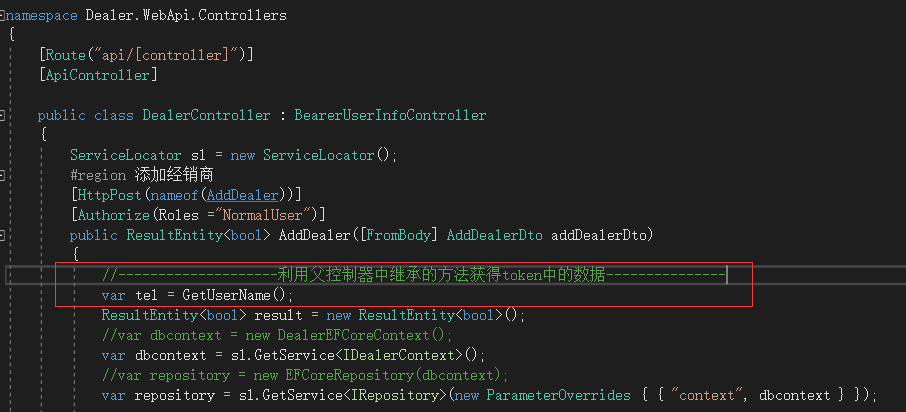
上面为在util项目中创建一个控制器类 继承了这个控制器类的 控制器可以使用其中的方法 获取token中的数据 例如以下:
DDD实战11 在项目中使用JWT的token 进行授权验证的更多相关文章
- DDD实战10 在项目中使用JWT的token
在使用过程中报过一个错误:The algorithm: 'HS256' requires the SecurityKey.KeySize to be greater than '128' bits 是 ...
- 【一起学设计模式】观察者模式实战:真实项目中屡试不爽的瓜娃EventBus到底如何实现观察者模式的?
申明 本文章首发自本人公众号:壹枝花算不算浪漫,如若转载请标明来源! 感兴趣的小伙伴可关注个人公众号:壹枝花算不算浪漫 22.jpg 前言 之前出过一个设计模式的系列文章,这些文章和其他讲设计模式的文 ...
- 实战派 | Java项目中玩转Redis6.0客户端缓存!
原创:微信公众号 码农参上,欢迎分享,转载请保留出处. 哈喽大家好啊,我是Hydra. 在前面的文章中,我们介绍了Redis6.0中的新特性客户端缓存client-side caching,通过tel ...
- sau交流学习社区--songEagle开发系列:Vue.js + Koa.js项目中使用JWT认证
一.前言 JWT(JSON Web Token),是为了在网络环境间传递声明而执行的一种基于JSON的开放标准(RFC 7519). JWT不是一个新鲜的东西,网上相关的介绍已经非常多了.不是很了解的 ...
- 实战:vue项目中导入swiper插件
版本选择 swiper是个常用的插件,现在已经迭代到了第四代:swiper4.常用的版本是swiper3和swiper4,我选择的是swiper3. 安装 安装swiper3的最新版本3.4.2: n ...
- 个人博客开发系列:Vue.js + Koa.js项目中使用JWT认证
前言 JWT(JSON Web Token),是为了在网络环境间传递声明而执行的一种基于JSON的开放标准(RFC 7519). 更多的介绍和说明,以及各种原理,我在此就不多赘诉了.JWT不是一个新鲜 ...
- spring cloud实战与思考(四) JWT之Token主动失效
需求: JWT泄露.密码重置等场景下,需要将未过期但是已经不安全的JWT主动失效. 本文不再复述JWT的基础知识,不了解的小伙伴可以自行Google一下.这里主要是针对以上需求聊一聊解决方案.如果服务 ...
- ASP.NET Core WebAPI中使用JWT Bearer认证和授权
目录 为什么是 JWT Bearer 什么是 JWT JWT 的优缺点 在 WebAPI 中使用 JWT 认证 刷新 Token 使用授权 简单授权 基于固定角色的授权 基于策略的授权 自定义策略授权 ...
- Asp.Net Core 3.1 学习3、Web Api 中基于JWT的token验证及Swagger使用
1.初始JWT 1.1.JWT原理 JWT(JSON Web Token)是目前最流行的跨域身份验证解决方案,他的优势就在于服务器不用存token便于分布式开发,给APP提供数据用于前后端分离的项目. ...
随机推荐
- 【AtCoder ABC 075 D】Axis-Parallel Rectangle
[链接] 我是链接,点我呀:) [题意] 让你找到一个各边和坐标轴平行的矩形.使得这个矩形包含至少K个点. 且这个矩形的面积最小. [题解] 把所有的"关键点""都找出来 ...
- AE地图查询
原文 AE地图查询 地图查询主要有两种查询:空间查询和属性查询 所用到知识点: 1 Cursor(游标)对象 本质上是一个指向数据的指针,本身不包含数据内容,提供一个连接到ROW对象或者要素对象(F ...
- 在 AppDelegate 设置屏幕切换
//禁止横屏显示 - (NSUInteger)application:(UIApplication *)application supportedInterfaceOrientationsForWin ...
- wireshark分析包中关于三次握手和四次终止标识
转自: http://hi.baidu.com/hepeng597/item/5ba27e0b98bc8de3ff240de0 三次握手Three-way Handshake 一个虚拟连接的建立是通过 ...
- get_mysql_conn_info.py
#!/usr/bin/env python#-*- encoding: utf8 -*- import xlrd """此模块作用:从excel文件获取数据库连接信息,第 ...
- LIVE555源代码研究之四:MediaServer (一)
LIVE555源代码研究之四:MediaServer (一) 从本篇文章開始我们将从简单server程序作为突破点,深入研究LIVE555源代码. 从前面的文章我们知道.不论什么一个基于LIVE555 ...
- 【2186】Popular Cows(强连通分支及其缩点)
id=2186">[2186]Popular Cows(强联通分支及其缩点) Popular Cows Time Limit: 2000MS Memory Limit: 65536 ...
- WEB应用图片的格式,以及各自的特点和优化(一) by FungLeo
WEB应用图片的格式,以及各自的特点和优化(一) by FungLeo 前言 12年前我入行三天.用table布局做了一个非常粗糙的网页.我说了一句话,"网页就是表格加文字加图片,图片分两种 ...
- javascript中0级DOM和2级DOM事件模型浅析 分类: C1_HTML/JS/JQUERY 2014-08-06 15:22 253人阅读 评论(0) 收藏
Javascript程序使用的是事件驱动的设计模式,为一个元素添加事件监听函数,当这个元素的相应事件被触发那么其添加的事件监听函数就被调用: <input type="button&q ...
- JDBC之一:JDBC快速入门 分类: B1_JAVA 2014-02-19 14:49 745人阅读 评论(0) 收藏
(1)下载Oracle的JDBC驱动,一般放在$ORACLE_HOME/jdbc/lib目录,关于驱动的版本请见: http://elf8848.iteye.com/blog/811037 ...