
Android笔记--自定义控件仿遥控器的圆形上下左右OK圆盘按钮
原文:Android笔记--自定义控件仿遥控器的圆形上下左右OK圆盘按钮
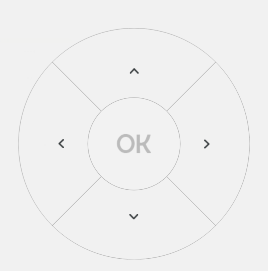
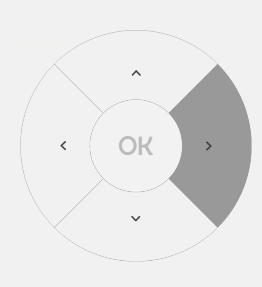
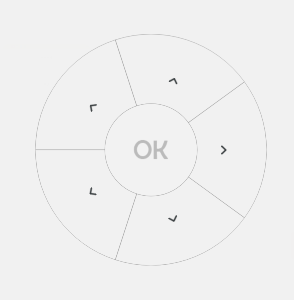
上面就是几张预览图!代码在最底下
主要就两个步骤,画图、监听点击
1、整个控件基本上是一步步画出来的,重写onDraw方法开始for循环画扇形出来,画扇形的时候同时画扇形内的图标,扇形画完了之后画中心圆按钮,中心画了圆之后吧OK按钮画上。
2、重写onTouch方法监听手指触发的位置,根据按下的位置确定按钮在哪个扇形的范围上,然后重绘一下onDraw把按下的灰色背景绘制出来。难点在于如何确定按下的位置是否处于扇形范围,换了好几种方案,奈何数学不好,最后选了现在使用的方案。
package com.imxiaoyu.common.widget;

import android.content.Context;

import android.graphics.Bitmap;

import android.graphics.Canvas;

import android.graphics.Matrix;

import android.graphics.Paint;

import android.graphics.RectF;

import android.util.AttributeSet;

import android.view.MotionEvent;

import android.view.View;

import java.util.ArrayList;

import java.util.Date;

import java.util.List;

/**

 * 仿遥控器上下左右ok圆形菜单

 * Created by 庞光渝 on 2017/3/9.博客:https://my.oschina.net/u/1462828/blog

 */

public class RoundMenuView extends View {

    /**

     * 变量

     */

    private int coreX;//中心点的坐标X

    private int coreY;//中心点的坐标Y

    private List<RoundMenu> roundMenus;//菜单列表

    private boolean isCoreMenu = false;//是否有中心按钮

    private int coreMenuColor;//中心按钮的默认背景--最好不要透明色

    private int coreMenuStrokeColor;//中心按钮描边颜色

    private int coreMenuStrokeSize;//中心按钮描边粗细

    private int coreMenuSelectColor;//中心按钮选中时的背景颜色

    private Bitmap coreBitmap;//OK图片

    private OnClickListener onCoreClickListener;//中心按钮的点击回调

    private float deviationDegree;//偏移角度

    private int onClickState = -2;//-2是无点击,-1是点击中心圆,其他是点击菜单

    private int roundRadius;//中心圆的半径

    private double radiusDistance;//半径的长度比(中心圆半径=大圆半径*radiusDistance)

    private long touchTime;//按下时间,抬起的时候判定一下,超过300毫秒算点击

    public RoundMenuView(Context context) {

        super(context);

    }

    public RoundMenuView(Context context, AttributeSet attrs) {

        super(context, attrs);

    }

    public RoundMenuView(Context context, AttributeSet attrs, int defStyle) {

        super(context, attrs, defStyle);

    }

    @Override

    protected void onDraw(Canvas canvas) {

        coreX = getWidth() / 2;

        coreY = getHeight() / 2;

        roundRadius = (int) (getWidth()/2 * radiusDistance);//计算中心圆圈半径

        RectF rect = new RectF(0, 0, getWidth(), getHeight());

        if (roundMenus != null && roundMenus.size() > 0) {

            float sweepAngle = 360 / roundMenus.size();//每个弧形的角度

            deviationDegree = sweepAngle / 2;//其实的偏移角度,如果4个扇形的时候是X形状,而非+,设为0试试就知道什么意思了

            for (int i = 0; i < roundMenus.size(); i++) {

                RoundMenu roundMenu = roundMenus.get(i);

                //填充

                Paint paint = new Paint();

                paint.setAntiAlias(true);

                if (onClickState == i) {

                    //选中

                    paint.setColor(roundMenu.selectSolidColor);

                } else {

                    //未选中

                    paint.setColor(roundMenu.solidColor);

                }

                canvas.drawArc(rect, deviationDegree + (i * sweepAngle), sweepAngle, true, paint);

                //画描边

                paint = new Paint();

                paint.setAntiAlias(true);

                paint.setStrokeWidth(roundMenu.strokeSize);

                paint.setStyle(Paint.Style.STROKE);

                paint.setColor(roundMenu.strokeColor);

                canvas.drawArc(rect, deviationDegree + (i * sweepAngle), sweepAngle, roundMenu.useCenter, paint);

                //画图案

                Matrix matrix = new Matrix();

                matrix.postTranslate((float) ((coreX + getWidth() / 2 * roundMenu.iconDistance) - (roundMenu.icon.getWidth() / 2)), coreY - (roundMenu.icon.getHeight() / 2));

                matrix.postRotate(((i + 1) * sweepAngle), coreX, coreY);

                canvas.drawBitmap(roundMenu.icon, matrix, null);

            }

        }

        //画中心圆圈

        if (isCoreMenu) {

            //填充

            RectF rect1 = new RectF(coreX - roundRadius, coreY - roundRadius, coreX + roundRadius, coreY + roundRadius);

            Paint paint = new Paint();

            paint.setAntiAlias(true);

            paint.setStrokeWidth(coreMenuStrokeSize);

            if (onClickState == -1) {

                paint.setColor(coreMenuSelectColor);

            } else {

                paint.setColor(coreMenuColor);

            }

            canvas.drawArc(rect1, 0, 360, true, paint);

            //画描边

            paint = new Paint();

            paint.setAntiAlias(true);

            paint.setStrokeWidth(coreMenuStrokeSize);

            paint.setStyle(Paint.Style.STROKE);

            paint.setColor(coreMenuStrokeColor);

            canvas.drawArc(rect1, 0, 360, true, paint);

            if (coreBitmap != null) {

                //画中心圆圈的“OK”图标

                canvas.drawBitmap(coreBitmap, coreX - coreBitmap.getWidth() / 2, coreY - coreBitmap.getHeight() / 2, null);//在 0,0坐标开始画入src

            }

        }

    }

    public boolean onTouchEvent(MotionEvent event) {

        switch (event.getAction()) {

            case MotionEvent.ACTION_DOWN:

                touchTime = new Date().getTime();

                float textX = event.getX();

                float textY = event.getY();

                int distanceLine = (int) getDisForTwoSpot(coreX, coreY, textX, textY);//距离中心点之间的直线距离

                if (distanceLine <= roundRadius) {

                    //点击的是中心圆;按下点到中心点的距离小于中心园半径,那就是点击中心园了

                    onClickState = -1;

                } else if (distanceLine <= getWidth() / 2) {

                    //点击的是某个扇形;按下点到中心点的距离大于中心圆半径小于大圆半径,那就是点击某个扇形了

                    float sweepAngle = 360 / roundMenus.size();//每个弧形的角度

                    int angle = getRotationBetweenLines(coreX, coreY, textX, textY);

                    //这个angle的角度是从正Y轴开始,而我们的扇形是从正X轴开始,再加上偏移角度,所以需要计算一下

                    angle = (angle + 360 - 90 - (int) deviationDegree) % 360;

                    onClickState = (int) (angle / sweepAngle);//根据角度得出点击的是那个扇形

                } else {

                    //点击了外面

                    onClickState = -2;

                }

                invalidate();

                break;

            case MotionEvent.ACTION_UP:

                if ((new Date().getTime() - touchTime) < 300) {

                    //点击小于300毫秒算点击

                    OnClickListener onClickListener = null;

                    if (onClickState == -1) {

                        onClickListener = onCoreClickListener;

                    } else if (onClickState >= 0 && onClickState < roundMenus.size()) {

                        onClickListener = roundMenus.get(onClickState).onClickListener;

                    }

                    if (onClickListener != null) {

                        onClickListener.onClick(this);

                    }

                }

                onClickState = -2;

                invalidate();

                break;

        }

        return true;

    }

    /**

     * 添加菜单

     *

     * @param roundMenu

     */

    public void addRoundMenu(RoundMenu roundMenu) {

        if (roundMenu == null) {

            return;

        }

        if (roundMenus == null) {

            roundMenus = new ArrayList<>();

        }

        roundMenus.add(roundMenu);

        invalidate();

    }

    /**

     * 添加中心菜单按钮

     *

     * @param coreMenuColor

     * @param coreMenuSelectColor

     * @param onClickListener

     */

    public void setCoreMenu(int coreMenuColor, int coreMenuSelectColor, int coreMenuStrokeColor,

                            int coreMenuStrokeSize, double radiusDistance,Bitmap bitmap, OnClickListener onClickListener) {

        isCoreMenu = true;

        this.coreMenuColor = coreMenuColor;

        this.radiusDistance = radiusDistance;

        this.coreMenuSelectColor = coreMenuSelectColor;

        this.coreMenuStrokeColor = coreMenuStrokeColor;

        this.coreMenuStrokeSize = coreMenuStrokeSize;

        coreBitmap = bitmap;

        this.onCoreClickListener = onClickListener;

        invalidate();

    }

    /**

     * 获取两条线的夹角

     *

     * @param centerX

     * @param centerY

     * @param xInView

     * @param yInView

     * @return

     */

    public static int getRotationBetweenLines(float centerX, float centerY, float xInView, float yInView) {

        double rotation = 0;

        double k1 = (double) (centerY - centerY) / (centerX * 2 - centerX);

        double k2 = (double) (yInView - centerY) / (xInView - centerX);

        double tmpDegree = Math.atan((Math.abs(k1 - k2)) / (1 + k1 * k2)) / Math.PI * 180;

        if (xInView > centerX && yInView < centerY) {  //第一象限

            rotation = 90 - tmpDegree;

        } else if (xInView > centerX && yInView > centerY) //第二象限

        {

            rotation = 90 + tmpDegree;

        } else if (xInView < centerX && yInView > centerY) { //第三象限

            rotation = 270 - tmpDegree;

        } else if (xInView < centerX && yInView < centerY) { //第四象限

            rotation = 270 + tmpDegree;

        } else if (xInView == centerX && yInView < centerY) {

            rotation = 0;

        } else if (xInView == centerX && yInView > centerY) {

            rotation = 180;

        }

        return (int) rotation;

    }

    /**

     * 求两个点之间的距离

     *

     * @return

     */

    public static double getDisForTwoSpot(float x1, float y1, float x2, float y2) {

        float width, height;

        if (x1 > x2) {

            width = x1 - x2;

        } else {

            width = x2 - x1;

        }

        if (y1 > y2) {

            height = y2 - y1;

        } else {

            height = y2 - y1;

        }

        return Math.sqrt((width * width) + (height * height));

    }

    /**

     * 扇形的对象类

     */

    public static class RoundMenu {

        public boolean useCenter = true;//扇形是否画连接中心点的直线

        public int solidColor = 0x00000000;//背景颜色,默认透明

        public int selectSolidColor = 0x00000000;//背景颜色,默认透明

        public int strokeColor = 0x00000000;//描边颜色,默认透明

        public int strokeSize = 1;//描边的宽度,默认1

        public Bitmap icon;//菜单的图片

        public OnClickListener onClickListener;//点击监听

        public double iconDistance = 0.63;//图标距离中心点的距离

    }

}
然后是调用,调用代码就简单的放几句吧,应该看得懂的
RoundMenuView.RoundMenu roundMenu = new RoundMenuView.RoundMenu();

        roundMenu.selectSolidColor = ColorUtils.getColor(getActivity(), R.color.gray_9999);

        roundMenu.strokeColor = ColorUtils.getColor(getActivity(), R.color.gray_9999);

        roundMenu.icon=ImageUtils.drawable2Bitmap(getActivity(),R.drawable.ic_right);

        roundMenu.onClickListener=new OnClickListener() {

            @Override

            public void onClick(View view) {

                ToastUtils.showToast(getActivity(),"点击了1");

            }

        };

        roundMenuView.addRoundMenu(roundMenu);

        roundMenu = new RoundMenuView.RoundMenu();

        roundMenu.selectSolidColor = ColorUtils.getColor(getActivity(), R.color.gray_9999);

        roundMenu.strokeColor = ColorUtils.getColor(getActivity(), R.color.gray_9999);

        roundMenu.icon=ImageUtils.drawable2Bitmap(getActivity(),R.drawable.ic_right);

        roundMenu.onClickListener=new OnClickListener() {

            @Override

            public void onClick(View view) {

                ToastUtils.showToast(getActivity(),"点击了2");

            }

        };

        roundMenuView.addRoundMenu(roundMenu);

        roundMenu = new RoundMenuView.RoundMenu();

        roundMenu.selectSolidColor = ColorUtils.getColor(getActivity(), R.color.gray_9999);

        roundMenu.strokeColor = ColorUtils.getColor(getActivity(), R.color.gray_9999);

        roundMenu.icon=ImageUtils.drawable2Bitmap(getActivity(),R.drawable.ic_right);

        roundMenu.onClickListener=new OnClickListener() {

            @Override

            public void onClick(View view) {

                ToastUtils.showToast(getActivity(),"点击了3");

            }

        };

        roundMenuView.addRoundMenu(roundMenu);

        roundMenu = new RoundMenuView.RoundMenu();

        roundMenu.selectSolidColor = ColorUtils.getColor(getActivity(), R.color.gray_9999);

        roundMenu.strokeColor = ColorUtils.getColor(getActivity(), R.color.gray_9999);

        roundMenu.icon=ImageUtils.drawable2Bitmap(getActivity(),R.drawable.ic_right);

        roundMenu.onClickListener=new OnClickListener() {

            @Override

            public void onClick(View view) {

                ToastUtils.showToast(getActivity(),"点击了4");

            }

        };

        roundMenuView.addRoundMenu(roundMenu);

        roundMenuView.setCoreMenu(ColorUtils.getColor(getActivity(), R.color.gray_f2f2),

                ColorUtils.getColor(getActivity(), R.color.gray_9999), ColorUtils.getColor(getActivity(), R.color.gray_9999)

                , 1, 0.43,ImageUtils.drawable2Bitmap(getActivity(),R.drawable.ic_ok), new OnClickListener() {

                    @Override

                    public void onClick(View view) {

                        ToastUtils.showToast(getActivity(),"点击了中心圆圈");

                    }

                });
http://doutugongchang.com
Android笔记--自定义控件仿遥控器的圆形上下左右OK圆盘按钮的更多相关文章
- Android笔记(六十七) 自定义控件
实际编程中,系统提供的控件往往无法满足我们的需求,一来是样子丑陋,二来是一些复杂的组合需要多次使用的话,每次都写一堆控件的组合会很耗费时间,所以我们将这些组件的组合自定义为一个新的控件,以后使用的时候 ...
- Android中自定义控件TextSize属性问题
本文主要说明一个自定义控件添加TextSize属性的坑,刚刚从坑里面爬出来,写个随笔,记录一下: *************************************************** ...
- android版高仿淘宝客户端源码V2.3
android版高仿淘宝客户端源码V2.3,这个版本我已经更新到2.3了,源码也上传到源码天堂那里了,大家可以看一下吧,该应用实现了我们常用的购物功能了,也就是在手机上进行网购的流程的,如查看产品(浏 ...
- Android笔记——Android中数据的存储方式(二)
我们在实际开发中,有的时候需要储存或者备份比较复杂的数据.这些数据的特点是,内容多.结构大,比如短信备份等.我们知道SharedPreferences和Files(文本文件)储存这种数据会非常的没有效 ...
- Android笔记:触摸事件的分析与总结----TouchEvent处理机制
原创作品,允许转载,转载时请务必以超链接形式标明文章 原始出处 .作者信息和本声明.否则将追究法律责任.http://glblong.blog.51cto.com/3058613/1559320 ...
- [Android] Android 手机下 仿 微信 客户端 界面 -- 微聊
Android 手机下 仿 微信 客户端 界面 -- 微聊 (包括聊天列表 + 聊天对话页 + 朋友圈列表页 + 我的/发现 列表页) 项目演示: 功能说明: 1)底部标签切换 (TabHost + ...
- Android 笔记之 R 文件
Android笔记之R文件 h2{ color: #4abcde; } a{ color: blue; text-decoration: none; } a:hover{ color: red; te ...
- Android 笔记之 Android 系统架构
Android笔记之Android系统架构 h2{ color: #4abcde; } a{ color: blue; text-decoration: none; } a:hover{ color: ...
- Android动画之仿美团加载数据等待时,小人奔跑进度动画对话框(附顺丰快递员奔跑效果)
Android动画之仿美团加载数据等待时,小人奔跑进度动画对话框(附顺丰快递员奔跑效果) 首句依然是那句老话,你懂得! finddreams :(http://blog.csdn.net/finddr ...
随机推荐
- Summary Day30
1.内存管理 1.1 进程中的内存区域划分 代码区 仅仅读常理区 全局区 BSS 堆 栈 1.2 字符串存储形式之间的比較 字符指针,字符数组.字符动态内存 1.3 虚拟内 ...
- HDU 1213 How Many Tables 并查集 水~
http://acm.hdu.edu.cn/showproblem.php?pid=1213 果然是需要我陪跑T T,禽兽工作人员还不让,哼,但还是陪跑了~ 啊,还有呀,明天校运会终于不用去了~耶耶耶 ...
- 35、在JZ2440上使用3G上网卡
1. 简单使用:1.1 选型:中国联通:E网时空 EW65 (64元), ZTE中兴 MF637U (160多)中国电信:Benton/本腾 EQ10B (35元)中国移动:华为 ET128 (99元 ...
- hdu 4811 数学 不难
http://acm.hdu.edu.cn/showproblem.php? pid=4811 由于看到ball[0]>=2 && ball[1]>=2 && ...
- ERROR:column "rolcatupdate" does not exist
1.错误描写叙述 watermark/2/text/aHR0cDovL2Jsb2cuY3Nkbi5uZXQv/font/5a6L5L2T/fontsize/400/fill/I0JBQkFCMA==/ ...
- [Javascript] Validate Data with the Every() Method
The every method returns true or false based on whether or not every item in the array passes the co ...
- LeetCode——Set Matrix Zeroes
Given a m x n matrix, if an element is 0, set its entire row and column to 0. Do it in place. 原题链接:h ...
- [Docker] Download and Remove Docker Images
Learn the basics of downloading and pulling Docker images from Docker Hub. Learn the difference betw ...
- ios开发网络学习二:URL转码以及字典转模型框架MJExtension的使用
一:url转码,当url中涉及到中文的时候,要考虑转码,用UTF8对中文的url进行转码 #import "ViewController.h" @interface ViewCon ...
- Tomcat生产中优化JVM的配置实例
root 1208 1 0 11月25 ? 00:15:32 /home/root/jvm/jdk1.7.0_79/bin/java -Djava.util.logging.config.file=/ ...