
微信小程序之购物车
这里演示从商品列表中添加到购物车
下面先做商品列表页。如下图:
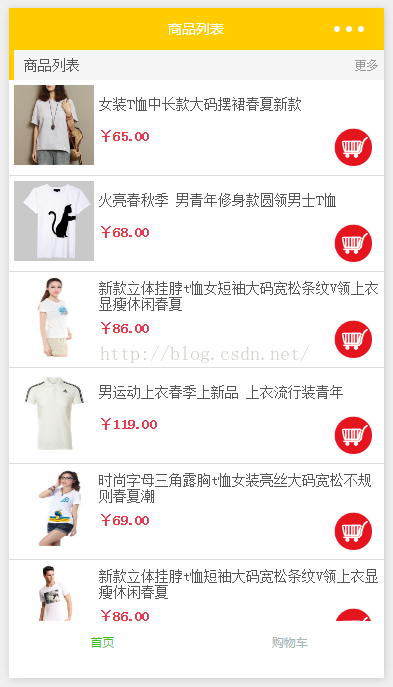
布局分析:
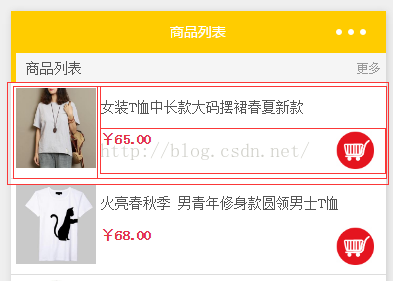
首先一个list的主盒子,接着是item盒子,这是必须的。
然后把item分成左侧的图片部分,和右侧的说明部分(item盒子使用横向弹性盒)
右侧的说明部分又分上下2部分(右侧说明部分盒子使用纵向弹性盒)
下面价钱购物车部分(下面价钱购物车部分也使用横向弹性盒,中间使用justify-content: space-between;填充空白)
index.wxml:
 <!--主盒子-->

 <view class="container">

   <!--head-->

   <view class="tit">

     <view class="title_val">商品列表</view>

     <view class="more">更多</view>

   </view>

   <!--list-->

   <view class="goodslist">

     <!--item-->

     <block wx:for="{{goodslist}}">

       <view class="goods">

         <!--左侧图片盒子-->

         <view>

           <image src="{{item.imgUrl}}" class="good-img" />

         </view>

         <!--右侧说明部分-->

         <view class="good-cont">

           <!--上--文字说明-->

           <view class="goods-navigator">

             <text class="good-name">{{item.name}}</text>

           </view>

           <!--下--价格部分-->

           <view class="good-price">

             <text>¥{{item.price}}</text>

             <image id="{{item.id}}" class="cart" src="/images/new_73.jpg" bindtap="addcart" />

           </view>

         </view>

       </view>

     </block>

   </view>

 </view>
index.wxss:
 /**index.wxss**/

 page{

     height: 100%;

 }

 .container{

     background: #f5f5f5;

 }

 .tit{

     display: flex;

     flex-direction: row;

     justify-content: space-between;

     height: 30px;

     position: relative;

 }

 .tit::before{

     content:'';

     background: #ffcc00;

     width:5px;

     height: 100%;

     position: absolute;

     left:;

     top:;

 }

 .title_val{

     padding: 0 15px;

     font-size: 14px;

     color: #555;

     line-height: 30px;

 }

 .more{

     font-size: 12px;

     line-height: 30px;

     color: #999;

     padding: 0 5px 0 0 ;

 }

 .goodslist{

     background: #fff;

     display: flex;

     flex-direction: column;

 }

 .goods{

     display: flex;

     flex-direction: row;

     border-bottom: 1px solid #ddd;

 }

 .good-img{

     padding: 5px;

     width: 80px;

     height: 80px;

 }

 .good-cont{

     display: flex;

     flex:;

     flex-direction: column;

     font-size: 14px;

 }

 .goods-navigator{

     display: flex;

     flex:;

     flex-direction: column;

     justify-content: center;

 }

 .good-name{

     display: flex;

     flex:;

     flex-direction: column;

     color: #555;

     justify-content: center;

 }

 .good-price{

     display: flex;

     flex:;

     flex-direction: row;

     justify-content: space-between;

     color:#e4393c;

     font-weight:;

 }

 .cart{

     width: 40px;

     height: 40px;

     padding-right: 10px;

 }
index.js:
数据部分,一般情况都是访问接口获取数据的,这里并没有使用网络访问,为了简化demo,直接把一组数据放在data对象中。同学们可以根据其数据结构自己编写后台接口
 Page({

     data: {

         goodslist: [

             {

                 id:"001",

                 imgUrl:"http://img5.imgtn.bdimg.com/it/u=2906541843,1492984080&fm=23&gp=0.jpg",

                 name:"女装T恤中长款大码摆裙春夏新款",

                 price:"65.00"

             },

             {

                 id:"002",

                 imgUrl:"http://img4.imgtn.bdimg.com/it/u=1004404590,1607956492&fm=23&gp=0.jpg",

                 name:"火亮春秋季 男青年修身款圆领男士T恤",

                 price:"68.00"

             },

             {

                 id:"003",

                 imgUrl:"http://img1.imgtn.bdimg.com/it/u=2305064940,3470659889&fm=23&gp=0.jpg",

                 name:"新款立体挂脖t恤女短袖大码宽松条纹V领上衣显瘦休闲春夏",

                 price:"86.00"

             },

             {

                 id:"004",

                 imgUrl:"http://img4.imgtn.bdimg.com/it/u=3986819380,1610061022&fm=23&gp=0.jpg",

                 name:"男运动上衣春季上新品 上衣流行装青年",

                 price:"119.00"

             },

             {

                 id:"005",

                 imgUrl:"http://img1.imgtn.bdimg.com/it/u=3583238552,3525141111&fm=23&gp=0.jpg",

                 name:"时尚字母三角露胸t恤女装亮丝大码宽松不规则春夏潮",

                 price:"69.00"

             },

             {

                 id:"006",

                 imgUrl:"http://img2.imgtn.bdimg.com/it/u=1167272381,3361826143&fm=23&gp=0.jpg",

                 name:"新款立体挂脖t恤短袖大码宽松条纹V领上衣显瘦休闲春夏",

                 price:"86.00"

             },

             {

                 id:"007",

                 imgUrl:"http://img0.imgtn.bdimg.com/it/u=789486313,2033571593&fm=23&gp=0.jpg",

                 name:"时尚字母三角露胸t恤女装亮丝大码宽松不规则春夏潮",

                 price:"119.00"

             },

             {

                 id:"008",

                 imgUrl:"http://img2.imgtn.bdimg.com/it/u=3314044863,3966877419&fm=23&gp=0.jpg",

                 name:"男运动上衣春季上新品 上衣流行装青年",

                 price:"69.00"

             },

         ]

     },

     // 加入购物车

     addcart:function(e){

         this.setData({

             toastHidden:false

         });

         // 遍历列表 与 购物车列表

         for (var i in this.data.goodslist){

             // 列表中某一项item的id == 点击事件传递过来的id。则是被点击的项

             if(this.data.goodslist[i].id == e.target.id){

                 // 给goodsList数组的当前项添加count元素,值为1,用于记录添加到购物车的数量

                 this.data.goodslist[i].count = 1;

                 // 获取购物车的缓存数组(没有数据,则赋予一个空数组)

                 var arr = wx.getStorageSync('cart') || [];

                 // 如果购物车有数据

                 if(arr.length>0){

                     // 遍历购物车数组

                     for(var j in arr){

                         // 判断购物车内的item的id,和事件传递过来的id,是否相等

                         if(arr[j].id == e.target.id){

                             // 相等的话,给count+1(即再次添加入购物车,数量+1)

                             arr[j].count = arr[j].count + 1;

                             // 最后,把购物车数据,存放入缓存(此处不用再给购物车数组push元素进去,因为这个是购物车有的,直接更新当前数组即可)

                             try {

                                 wx.setStorageSync('cart', arr)

                             } catch (e) {

                                 console.log(e)

                             }

                             // 返回(在if内使用return,跳出循环节约运算,节约性能)

                             return;

                         }

                     }

                     // 遍历完购物车后,没有对应的item项,把goodslist的当前项放入购物车数组

                     arr.push(this.data.goodslist[i]);

                 }

                 // 购物车没有数据,把item项push放入当前数据(第一次存放时)

                 else{

                     arr.push(this.data.goodslist[i]);

                 }

                 // 最后,把购物车数据,存放入缓存

                 try {

                     wx.setStorageSync('cart', arr)

                     // 返回(在if内使用return,跳出循环节约运算,节约性能)

                     return;

                 } catch (e) {

                     console.log(e)

                 }

             }

         }

     }

 })
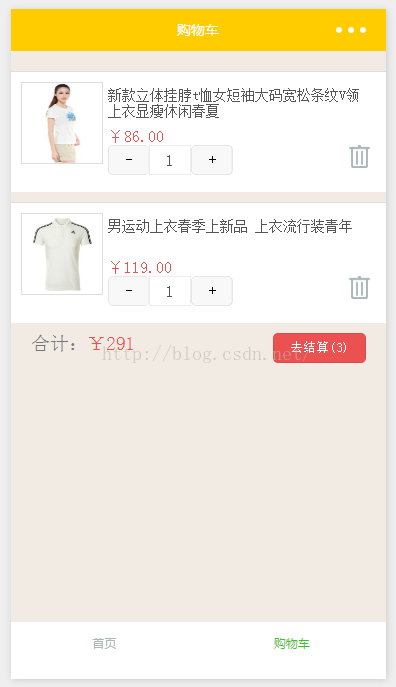
编写购物车部分,如下图所示:
布局分析:
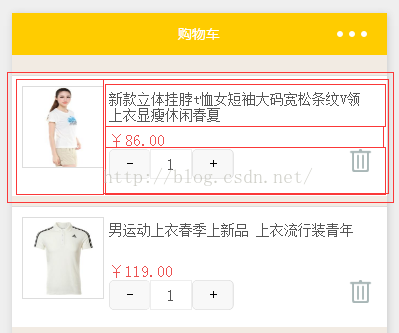
首先一个list的主盒子,接着是item盒子,这是必须的。
然后把item分成左侧的图片部分,和右侧的说明部分(item盒子使用横向弹性盒)
右侧的说明部分又分上下2部分(右侧说明部分盒子使用纵向弹性盒)
下面价钱、购物加减、购物车部分(使用纵向弹性盒)
最下面的购物加减、购物车部分(使用横向弹性盒,中间使用justify-content: space-between;填充空白)
cart.wxml:
 <!--要是够车内没有数据,就行显示没有数据-->

 <view class="cart" hidden="{{iscart}}">

     <image src="/images/cart.png"/>

     <view>购物车什么都没有,赶快去购物吧</view>

 </view>

 <!--要是有数据,就显示数据-->

 <view class="cartList" hidden="{{!iscart}}">

     <!--header-->

     <view class="baoyou"></view>

     <!--list item-->

     <block wx:for="{{cart}}">

         <view class="goods">

             <!--左侧图片-->

             <view>

                 <image src="{{item.imgUrl}}" class="good-img"/>

             </view>

             <!--右侧说明部分-->

             <view class="good-cont">

                 <!--文字说明-->

                 <view class="goods-navigator">

                     <text class="good-name">{{item.name}}</text>

                 </view>

                 <!--价钱和购物加减的父盒子-->

                 <view class="good-price">

                     <text class="price">¥{{item.price}}</text>

                     <view class="btn-box">

                         <view class="btn">

                             <button id="del{{index}}" type="default" size="mini" bindtap="delCount">-</button>

                             <input  value="{{item.count}}"/>

                             <button id="add{{index}}" type="default" size="mini" bindtap="addCount">+</button>

                         </view>

                         <image id="img{{index}}" src="/images/del2.png" bindtap="delGoods"/>

                     </view>

                 </view>

             </view>

         </view>

     </block>

     <!--footer-->

     <view class="total">

         <view class="total_text">合计:<text>¥{{total}}</text></view>

         <button class="total_js" size="mini">去结算({{goodsCount}})</button>

     </view>

 </view>
cart.wxss:
 page {

   background: #f2ebe3;

 }

 .cart {

   padding: 100px 0 0 0;

   display: flex;

   justify-content: center;

   flex-direction: column;

   align-items: center;

   color: #999;

 }

 .cart image {

   width: 66px;

   height: 66px;

   margin-bottom: 20px;

 }

 .baoyou {

   font-size: 18px;

   color: #db2929;

   padding: 10px;

 }

 .goods {

   background: #fff;

   border-top: 1px solid #ddd;

   margin-bottom: 10px;

   padding: 10px 10px 0 10px;

   display: flex;

 }

 .goods image {

   width: 80px;

   height: 80px;

   border: 1px solid #ddd;

 }

 .goods .good-cont {

   display: flex;

   flex:;

   flex-direction: column;

   color: #555;

   font-size: 14px;

   padding: 5px;

   height: 100px;

 }

 .goods .good-cont .goods-navigator {

   display: flex;

   flex:;

 }

 .goods .good-cont .good-price {

   display: flex;

   flex-direction: column;

   flex:;

 }

 .goods .good-cont .good-price .price {

   font-size: 16px;

   color: #ec5151;

 }

 .goods .good-cont .good-price .btn-box {

   display: flex;

   flex-direction: row;

   justify-content: space-between;

 }

 .goods .good-cont .good-price .btn-box image {

   width: 23px;

   height: 23px;

   border:;

   margin:;

 }

 .goods .good-cont .good-price .btn {

   display: flex;

   flex-direction: row;

 }

 .goods .good-cont .good-price .btn input {

   margin:;

   width: 40px;

   text-align: center;

   border: 1px solid #eee;

   font-size: 16px;

   height: 28px;

 }

 .goods .good-cont .good-price .btn button {

   margin:;

 }

 .total {

   height: 40px;

   display: flex;

   flex-direction: row;

   justify-content: space-between;

   padding: 0 20px;

 }

 .total .total_text {

   display: flex;

   color: #777;

 }

 .total .total_text text {

   color: #ec5151;

 }

 .total .total_js {

   color: #fff;

   background: #ec5151;

   height: 30px;

   margin:;

 }
cart.js:
 Page({

     data: {

         iscart: false,

         cart: [], //数据

         count: 1,   //商品数量默认是1

         total: 0,    //总金额

         goodsCount: 0 //数量

     },

     onLoad: function (options) {

     },

     onShow: function () {

         var that = this;

         // 获取产品展示页保存的缓存数据(购物车的缓存数组,没有数据,则赋予一个空数组)

         var arr = wx.getStorageSync('cart') || [];

         // 有数据的话,就遍历数据,计算总金额 和 总数量

         if (arr.length > 0) {

             for (var i in arr) {

                 that.data.total += Number(arr[i].price) * Number(arr[i].count);

                 that.data.goodsCount += Number(arr[i].count);

             }

             // 更新数据

             this.setData({

                 iscart: true,

                 cart: arr,

                 total: that.data.total,

                 goodsCount: that.data.goodsCount

             });

         }

     },

     onHide: function(){

         // 清除数据

         this.setData({

             iscart: false,

             cart: [], //数据

             total: 0,    //总金额

             goodsCount: 0 //数量

         });

     },

     /* 减数 */

     delCount: function (e) {

         console.log(e)

         // 获取购物车该商品的数量

         // [获取设置在该btn的id,即list的index值]

         if (this.data.cart[e.target.id.substring(3)].count <= 1) {

             return;

         }

         // 商品总数量-1

         this.data.goodsCount -= 1;

         // 总价钱 减去 对应项的价钱单价

         this.data.total -= Number(this.data.cart[e.target.id.substring(3)].price);

         // 购物车主体数据对应的项的数量-1  并赋给主体数据对应的项内

         this.data.cart[e.target.id.substring(3)].count = --this.data.cart[e.target.id.substring(3)].count;

         // 更新data数据对象

         this.setData({

             cart: this.data.cart,

             total: this.data.total,

             goodsCount: this.data.goodsCount

         })

         // 主体数据重新赋入缓存内

         try {

             wx.setStorageSync('cart', this.data.cart)

         } catch (e) {

             console.log(e)

         }

     },

     /* 加数 */

     addCount: function (e) {

         // 商品总数量+1

         this.data.goodsCount += 1;

         // 总价钱 加上 对应项的价钱单价

         this.data.total += Number(this.data.cart[e.target.id.substring(3)].price);

         // 购物车主体数据对应的项的数量+1  并赋给主体数据对应的项内

         this.data.cart[e.target.id.substring(3)].count = ++this.data.cart[e.target.id.substring(3)].count;

         // 更新data数据对象

         this.setData({

             cart: this.data.cart,

             total: this.data.total,

             goodsCount: this.data.goodsCount

         })

         // 主体数据重新赋入缓存内

         try {

             wx.setStorageSync('cart', this.data.cart)

         } catch (e) {

             console.log(e)

         }

     },

     /* 删除item */

     delGoods: function (e) {

         // 商品总数量  减去  对应删除项的数量

         this.data.goodsCount = this.data.goodsCount - this.data.cart[e.target.id.substring(3)].count;

         // 总价钱  减去  对应删除项的单价*数量

         this.data.total -= this.data.cart[e.target.id.substring(3)].price * this.data.cart[e.target.id.substring(3)].count;

         // 主体数据的数组移除该项

         this.data.cart.splice(e.target.id.substring(3), 1);

         // 更新data数据对象

         this.setData({

             cart: this.data.cart,

             total: this.data.total,

             goodsCount: this.data.goodsCount

         })

         // 主体数据重新赋入缓存内

         try {

             wx.setStorageSync('cart', this.data.cart)

         } catch (e) {

             console.log(e)

         }

     }

 })
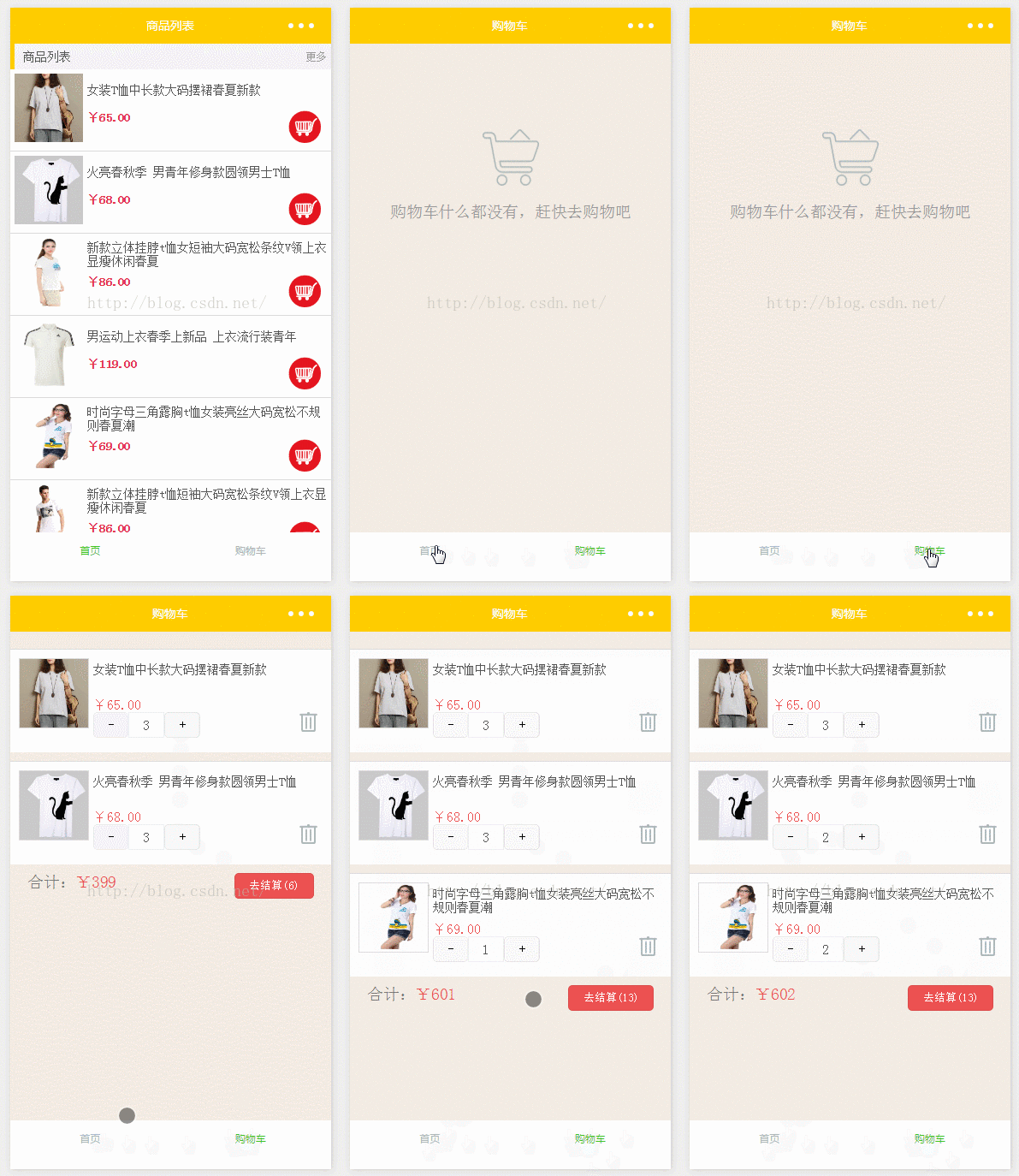
运行结果:
微信小程序之购物车的更多相关文章
- 微信小程序实战 购物车功能
代码地址如下:http://www.demodashi.com/demo/12400.html 一.准备工作 软件环境:微信开发者工具 官方下载地址:https://mp.weixin.qq.com/ ...
- 微信小程序之购物车功能
前言 以往的购物车,基本都是通过大量的 DOM 操作来实现.微信小程序其实跟 vue.js 的用法非常像,接下来就看看小程序可以怎样实现购物车功能. 需求 先来弄清楚购物车的需求. 单选.全选和取消, ...
- 微信小程序——加入购物车弹层
对于网上商城,加入购物车是一个必备功能了.俺今天就来说下在微信小程序里如何造一个购物车弹层. 先上图: 主要用到的微信API:wx.createAnimation(OBJECT) 说下思路: 1.wx ...
- [转]微信小程序之购物车 —— 微信小程序实战商城系列(5)
本文转自:http://blog.csdn.net/michael_ouyang/article/details/70755892 续上一篇的文章:微信小程序之商品属性分类 —— 微信小程序实战商城 ...
- [转]微信小程序之购物车功能
本文转自:https://www.cnblogs.com/linxin/p/6834206.html 前言 以往的购物车,基本都是通过大量的 DOM 操作来实现.微信小程序其实跟 vue.js 的用法 ...
- 【微信小程序】转载:微信小程序之购物车功能
前言 以往的购物车,基本都是通过大量的 DOM 操作来实现.微信小程序其实跟 vue.js 的用法非常像,接下来就看看小程序可以怎样实现购物车功能. 需求 先来弄清楚购物车的需求. 单选.全选和取消, ...
- 微信小程序 - 实现购物车结算
示例源码下载:小程序-实现购物车结算
- 微信小程序之购物车demo
这篇小demo主要使用了一下几个技术点 1.全局变量的使用 在这里定义的变量 任何一个页面和组件都可以访问到 在使用到的页面 const app = getApp(); 声明一个实例 然后 app.g ...
- 微信小程序 教程及示例
作者:初雪链接:https://www.zhihu.com/question/50907897/answer/128494332来源:知乎著作权归作者所有,转载请联系作者获得授权.微信小程序正式公测, ...
随机推荐
- [AngularJS] Using an AngularJS directive to hide the keyboard on submit
Pleasea refer to Link <form ng-submit="foo()" handle-phone-submit> <input type=&q ...
- ZOJ FatMouse' Trade 贪心
得之我幸,不得,我命.仅此而已. 学姐说呀,希望下次看到你的时候依然潇洒如故.(笑~) 我就是这么潇洒~哈哈. 感觉大家比我还紧张~ 我很好的.真的 ------------------------- ...
- (三)RabbitMQ消息队列-Centos7下安装RabbitMQ3.6.1
原文:(三)RabbitMQ消息队列-Centos7下安装RabbitMQ3.6.1 如果你看过前两章对RabbitMQ已经有了一定了解,现在已经摩拳擦掌,来吧动手吧! 用什么系统 本文使用的是Cen ...
- Vim常用匹配、查找、替换命令总结
以前都是从头开始找,最近处理log文件很多. 在vim 中输入 :1?XXXX 1的意思是文件的第一行 ?的意思是反向查找 XXXX就是你要找的关键字 更新:Linux 从末尾开始查找日志 tac c ...
- mariadb远程不能访问,出现Can't connect to MySQL server on '' (10061)
一,现象: 1. 1 远程连接数据库mariadb时,报错 二,定位: 2. 1 首先本地连接上数据库,然后操作权限表数据 ,然后远程再次连接依然连接不上: 2. 2 搜索mariadb的配置文 ...
- OpenStack 之 Nova Compute 的代码结构图
nova-compute 的代码结构图 如上图所看到的, 类图中最重要的三个Category Manager: 核心的业务类.提供实际的业务操作.比如启动虚拟机等等. Service: 每一个serv ...
- 【Heritrix基础教程之2】Heritrix基本内容介绍 分类: B1_JAVA H3_NUTCH 2014-06-01 13:02 878人阅读 评论(0) 收藏
1.版本说明 (1)最新版本:3.3.0 (2)最新release版本:3.2.0 (3)重要历史版本:1.14.4 3.1.0及之前的版本:http://sourceforge.net/projec ...
- php 根据给定的年份和月份获取该年份该月份的起始和结束时间
function getShiJianChuo($nian=0,$yue=0){ if(empty($nian) || empty($yue)){ $now = time(); $nian = dat ...
- ps如何制作gif(窗口->动画)(导出:存储为Web和设备所用格式)
ps如何制作gif(窗口->动画)(导出:存储为Web和设备所用格式) 一.总结 1.点击窗口,选择动画 2.导出的时候:存储为Web和设备所用格式 二.ps如何制作gif 1.首先我们安装并打 ...
- Windows 查看硬盘ID(diskpart命令)
使用diskpart命令Win+R键运行cmd,进入命令行界面:1.diskpart2.list disk 查看有几块硬盘3.select disk 0 选择第一块硬盘4.detail disk 显示 ...