
zookeeper(5) 客户端
zookeeper客户端主要负责与用户进行交互,将命令发送到服务器,接收服务器的响应,反馈给用户。主要分为一下三层:
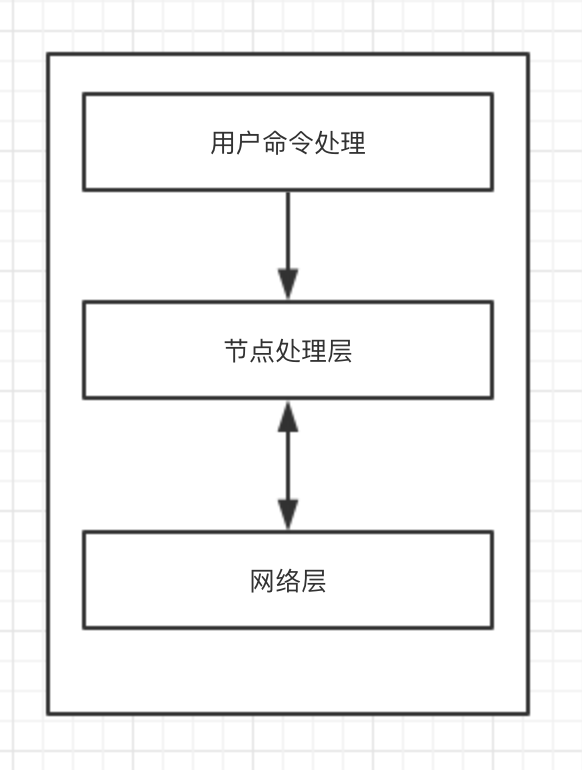
用户命令处理层
用户命令处理层的功能是读取用户输入的命令,解析用户命令和输入参数,根据命令和参数,进行一些校验,然后执行节点操作。
源码实例(ZooKeeperMain):
 public class ZooKeeperMain {

     // 命令解析器。用于解析命令

     protected MyCommandOptions cl = new MyCommandOptions();

     // 主函数

     public static void main(String args[]) throws KeeperException, IOException, InterruptedException {

         // 运行客户端

         ZooKeeperMain main = new ZooKeeperMain(args);

         main.run();

     }

     public ZooKeeperMain(String args[]) throws IOException, InterruptedException {

         // 解析启动参数

         cl.parseOptions(args);

         // 获取server参数,连接服务器

         connectToZK(cl.getOption("server"));

     }

     // 连接服务器

     protected void connectToZK(String newHost) throws InterruptedException, IOException {

         host = newHost;

         zk = new ZooKeeper(host, Integer.parseInt(cl.getOption("timeout")), new MyWatcher());

     }

     void run() throws KeeperException, IOException, InterruptedException {

         // 循环读取命令,

         BufferedReader br = new BufferedReader(new InputStreamReader(System.in));

         String line;

         while ((line = br.readLine()) != null) {

             // 执行命令

             executeLine(line);

         }

     }

     public void executeLine(String line) throws InterruptedException, IOException, KeeperException {

         if (!line.equals("")) {

             // 解析命令

             cl.parseCommand(line);

             // 执行命令

             processZKCmd(cl);

         }

     }

     protected boolean processZKCmd(MyCommandOptions co) throws KeeperException, IOException, InterruptedException {

         // 读取命令和参数

         Stat stat = new Stat();

         String[] args = co.getArgArray();

         String cmd = co.getCommand();

         boolean watch = args.length > 2;

         String path = null;

         List<ACL> acl = Ids.OPEN_ACL_UNSAFE;

         // 执行不同的命令,主要是进行一些校验,然后调用zookeeper方法

         if (cmd.equals("quit")) {

             zk.close();

             System.exit(0);

         } else if (cmd.equals("redo") && args.length >= 2) {

             Integer i = Integer.decode(args[1]);

             if (commandCount <= i) {

                 return false;

             }

             cl.parseCommand(history.get(i));

             history.put(commandCount, history.get(i));

             processCmd(cl);

         } else if (cmd.equals("history")) {

             for (int i = commandCount - 10; i <= commandCount; ++i) {

                 if (i < 0)

                     continue;

                 System.out.println(i + " - " + history.get(i));

             }

         } else if (cmd.equals("printwatches")) {

             if (args.length == 1) {

                 System.out.println("printwatches is " + (printWatches ? "on" : "off"));

             } else {

                 printWatches = args[1].equals("on");

             }

         } else if (cmd.equals("connect")) {

             if (args.length >= 2) {

                 connectToZK(args[1]);

             } else {

                 connectToZK(host);

             }

         }

         if (cmd.equals("create") && args.length >= 3) {

             int first = 0;

             CreateMode flags = CreateMode.PERSISTENT;

             if ((args[1].equals("-e") && args[2].equals("-s")) || (args[1]).equals("-s") && (args[2].equals("-e"))) {

                 first += 2;

                 flags = CreateMode.EPHEMERAL_SEQUENTIAL;

             } else if (args[1].equals("-e")) {

                 first++;

                 flags = CreateMode.EPHEMERAL;

             } else if (args[1].equals("-s")) {

                 first++;

                 flags = CreateMode.PERSISTENT_SEQUENTIAL;

             }

             if (args.length == first + 4) {

                 acl = parseACLs(args[first + 3]);

             }

             path = args[first + 1];

             String newPath = zk.create(path, args[first + 2].getBytes(), acl, flags);

         } else if (cmd.equals("delete") && args.length >= 2) {

             path = args[1];

             zk.delete(path, watch ? Integer.parseInt(args[2]) : -1);

         } else if (cmd.equals("set") && args.length >= 3) {

             path = args[1];

             stat = zk.setData(path, args[2].getBytes(), args.length > 3 ? Integer.parseInt(args[3]) : -1);

             printStat(stat);

         } else if (cmd.equals("aget") && args.length >= 2) {

             path = args[1];

             zk.getData(path, watch, dataCallback, path);

         } else if (cmd.equals("get") && args.length >= 2) {

             path = args[1];

             byte data[] = zk.getData(path, watch, stat);

             data = (data == null) ? "null".getBytes() : data;

             System.out.println(new String(data));

             printStat(stat);

         } else if (cmd.equals("ls") && args.length >= 2) {

             path = args[1];

             List<String> children = zk.getChildren(path, watch);

             System.out.println(children);

         } else if (cmd.equals("ls2") && args.length >= 2) {

             path = args[1];

             List<String> children = zk.getChildren(path, watch, stat);

             System.out.println(children);

             printStat(stat);

         } else if (cmd.equals("getAcl") && args.length >= 2) {

             path = args[1];

             acl = zk.getACL(path, stat);

             for (ACL a : acl) {

                 System.out.println(a.getId() + ": " + getPermString(a.getPerms()));

             }

         } else if (cmd.equals("setAcl") && args.length >= 3) {

             path = args[1];

             stat = zk.setACL(path, parseACLs(args[2]), args.length > 4 ? Integer.parseInt(args[3]) : -1);

             printStat(stat);

         } else if (cmd.equals("stat") && args.length >= 2) {

             path = args[1];

             stat = zk.exists(path, watch);

             printStat(stat);

         } else if (cmd.equals("listquota") && args.length >= 2) {

             path = args[1];

             String absolutePath = Quotas.quotaZookeeper + path + "/" + Quotas.limitNode;

             byte[] data = null;

             try {

                 data = zk.getData(absolutePath, false, stat);

                 StatsTrack st = new StatsTrack(new String(data));

                 data = zk.getData(Quotas.quotaZookeeper + path + "/" + Quotas.statNode, false, stat);

                 System.out.println("Output stat for " + path + " " + new StatsTrack(new String(data)).toString());

             } catch (KeeperException.NoNodeException ne) {

                 System.err.println("quota for " + path + " does not exist.");

             }

         } else if (cmd.equals("setquota") && args.length >= 4) {

             String option = args[1];

             String val = args[2];

             path = args[3];

             System.err.println("Comment: the parts are " + "option " + option + " val " + val + " path " + path);

             if ("-b".equals(option)) {

                 // we are setting the bytes quota

                 createQuota(zk, path, Long.parseLong(val), -1);

             } else if ("-n".equals(option)) {

                 // we are setting the num quota

                 createQuota(zk, path, -1L, Integer.parseInt(val));

             } else {

                 usage();

             }

         } else if (cmd.equals("delquota") && args.length >= 2) {

             // if neither option -n or -b is specified, we delete

             // the quota node for thsi node.

             if (args.length == 3) {

                 // this time we have an option

                 String option = args[1];

                 path = args[2];

                 if ("-b".equals(option)) {

                     delQuota(zk, path, true, false);

                 } else if ("-n".equals(option)) {

                     delQuota(zk, path, false, true);

                 }

             } else if (args.length == 2) {

                 path = args[1];

                 // we dont have an option specified.

                 // just delete whole quota node

                 delQuota(zk, path, true, true);

             } else if (cmd.equals("help")) {

                 usage();

             }

         } else if (cmd.equals("close")) {

             zk.close();

         } else if (cmd.equals("addauth") && args.length >= 2) {

             byte[] b = null;

             if (args.length >= 3)

                 b = args[2].getBytes();

             zk.addAuthInfo(args[1], b);

         } else {

             usage();

         }

         return watch;

     }

 }
除了基础的节点操作外,用户命令层还提供了节点配额的控制。节点配额的控制通过在/zookeeper/quaota对应的目录下记录当前节点数据大小和现在大小实现。
源码实例(ZooKeeperMain.createQuota):
 public static boolean createQuota(ZooKeeper zk, String path,

             long bytes, int numNodes)

         throws KeeperException, IOException, InterruptedException

     {

         //判断指定路径是否存在

         Stat initStat = zk.exists(path, false);

         if (initStat == null) {

             throw new IllegalArgumentException(path + " does not exist.");

         }

         String quotaPath = Quotas.quotaZookeeper;

         String realPath = Quotas.quotaZookeeper + path;

         try {

             //判断在子节点中是否有限量设置

             List<String> children = zk.getChildren(realPath, false);

             for (String child: children) {

                 if (!child.startsWith("zookeeper_")) {

                     throw new IllegalArgumentException(path + " has child " +

                             child + " which has a quota");

                 }

             }

         } catch(KeeperException.NoNodeException ne) {

             // this is fine

         }

         //判断夫节点中是否有限量设置

         checkIfParentQuota(zk, path);

         //如果当前节点限量设置为空,逐级创建节点数据

         if (zk.exists(quotaPath, false) == null) {

             try {

                 zk.create(Quotas.procZookeeper, null, Ids.OPEN_ACL_UNSAFE,

                         CreateMode.PERSISTENT);

                 zk.create(Quotas.quotaZookeeper, null, Ids.OPEN_ACL_UNSAFE,

                         CreateMode.PERSISTENT);

             } catch(KeeperException.NodeExistsException ne) {

                 // do nothing

             }

         }

         String[] splits = path.split("/");

         StringBuilder sb = new StringBuilder();

         sb.append(quotaPath);

         for (int i=1; i<splits.length; i++) {

             sb.append("/" + splits[i]);

             quotaPath = sb.toString();

             try {

                 zk.create(quotaPath, null, Ids.OPEN_ACL_UNSAFE ,

                         CreateMode.PERSISTENT);

             } catch(KeeperException.NodeExistsException ne) {

                 //do nothing

             }

         }

         //创建限量设置节点

         String statPath = quotaPath + "/" + Quotas.statNode;

         quotaPath = quotaPath + "/" + Quotas.limitNode;

         StatsTrack strack = new StatsTrack(null);

         strack.setBytes(bytes);

         strack.setCount(numNodes);

         try {

             zk.create(quotaPath, strack.toString().getBytes(),

                     Ids.OPEN_ACL_UNSAFE, CreateMode.PERSISTENT);

             StatsTrack stats = new StatsTrack(null);

             stats.setBytes(0L);

             stats.setCount(0);

             zk.create(statPath, stats.toString().getBytes(),

                     Ids.OPEN_ACL_UNSAFE, CreateMode.PERSISTENT);

         } catch(KeeperException.NodeExistsException ne) {

             byte[] data = zk.getData(quotaPath, false , new Stat());

             StatsTrack strackC = new StatsTrack(new String(data));

             if (bytes != -1L) {

                 strackC.setBytes(bytes);

             }

             if (numNodes != -1) {

                 strackC.setCount(numNodes);

             }

             zk.setData(quotaPath, strackC.toString().getBytes(), -1);

         }

         return true;

     }
节点处理层
节点处理层主要是提供节点操作功能,将节点操作参数封装成数据对象,然后通过网络层发送数据对象,并返回结果。网络层提供了同步和异步两种网络请求方式。
创建节点(ZooKeeper):
public void create(final String path, byte data[], List<ACL> acl,

            CreateMode createMode,  StringCallback cb, Object ctx)

    {

        final String clientPath = path;

//解析client相对路径到全路径

        final String serverPath = prependChroot(clientPath);

//设置请求头

        RequestHeader h = new RequestHeader();

        h.setType(ZooDefs.OpCode.create);

//设置创建节点请求体

        CreateRequest request = new CreateRequest();

        CreateResponse response = new CreateResponse();

        ReplyHeader r = new ReplyHeader();

        request.setData(data);

        request.setFlags(createMode.toFlag());

        request.setPath(serverPath);

        request.setAcl(acl);

//通过网络层发送请求

        cnxn.queuePacket(h, r, request, response, cb, clientPath,

                serverPath, ctx, null);

    }
删除节点(ZooKeeper):
 public void delete(final String path, int version)

         throws InterruptedException, KeeperException

     {

         final String clientPath = path;

       //解析client相对路径到全路径

         final String serverPath = prependChroot(clientPath);

        //设置请求头

         RequestHeader h = new RequestHeader();

         h.setType(ZooDefs.OpCode.delete);

         //设置删除节点请求体

         DeleteRequest request = new DeleteRequest();

         request.setPath(serverPath);

         request.setVersion(version);

         cnxn.queuePacket(h, new ReplyHeader(), request, null, cb, clientPath,

                 serverPath, ctx, null);

     }
其他方法(ZooKeeper):
 public void exists(final String path, Watcher watcher,

             StatCallback cb, Object ctx)

     {

         final String clientPath = path;

         PathUtils.validatePath(clientPath);

         // the watch contains the un-chroot path

         WatchRegistration wcb = null;

         if (watcher != null) {

             wcb = new ExistsWatchRegistration(watcher, clientPath);

         }

         final String serverPath = prependChroot(clientPath);

         RequestHeader h = new RequestHeader();

         h.setType(ZooDefs.OpCode.exists);

         ExistsRequest request = new ExistsRequest();

         request.setPath(serverPath);

         request.setWatch(watcher != null);

         SetDataResponse response = new SetDataResponse();

         cnxn.queuePacket(h, new ReplyHeader(), request, response, cb,

                 clientPath, serverPath, ctx, wcb);

     }

     public void getData(final String path, Watcher watcher,

             DataCallback cb, Object ctx)

     {

         final String clientPath = path;

         PathUtils.validatePath(clientPath);

         // the watch contains the un-chroot path

         WatchRegistration wcb = null;

         if (watcher != null) {

             wcb = new DataWatchRegistration(watcher, clientPath);

         }

         final String serverPath = prependChroot(clientPath);

         RequestHeader h = new RequestHeader();

         h.setType(ZooDefs.OpCode.getData);

         GetDataRequest request = new GetDataRequest();

         request.setPath(serverPath);

         request.setWatch(watcher != null);

         GetDataResponse response = new GetDataResponse();

         cnxn.queuePacket(h, new ReplyHeader(), request, response, cb,

                 clientPath, serverPath, ctx, wcb);

     }

     public void setData(final String path, byte data[], int version,

             StatCallback cb, Object ctx)

     {

         final String clientPath = path;

         PathUtils.validatePath(clientPath);

         final String serverPath = prependChroot(clientPath);

         RequestHeader h = new RequestHeader();

         h.setType(ZooDefs.OpCode.setData);

         SetDataRequest request = new SetDataRequest();

         request.setPath(serverPath);

         request.setData(data);

         request.setVersion(version);

         SetDataResponse response = new SetDataResponse();

         cnxn.queuePacket(h, new ReplyHeader(), request, response, cb,

                 clientPath, serverPath, ctx, null);

     }

     public void getACL(final String path, Stat stat, ACLCallback cb,

             Object ctx)

     {

         final String clientPath = path;

         PathUtils.validatePath(clientPath);

         final String serverPath = prependChroot(clientPath);

         RequestHeader h = new RequestHeader();

         h.setType(ZooDefs.OpCode.getACL);

         GetACLRequest request = new GetACLRequest();

         request.setPath(serverPath);

         GetACLResponse response = new GetACLResponse();

         cnxn.queuePacket(h, new ReplyHeader(), request, response, cb,

                 clientPath, serverPath, ctx, null);

     }

     public void setACL(final String path, List<ACL> acl, int version,

             StatCallback cb, Object ctx)

     {

         final String clientPath = path;

         PathUtils.validatePath(clientPath);

         final String serverPath = prependChroot(clientPath);

         RequestHeader h = new RequestHeader();

         h.setType(ZooDefs.OpCode.setACL);

         SetACLRequest request = new SetACLRequest();

         request.setPath(serverPath);

         request.setAcl(acl);

         request.setVersion(version);

         SetACLResponse response = new SetACLResponse();

         cnxn.queuePacket(h, new ReplyHeader(), request, response, cb,

                 clientPath, serverPath, ctx, null);

     }

     public void getChildren(final String path, Watcher watcher,

             Children2Callback cb, Object ctx)

     {

         final String clientPath = path;

         final String serverPath = prependChroot(clientPath);

         WatchRegistration wcb = null;

         if (watcher != null) {

             wcb = new ChildWatchRegistration(watcher, clientPath);

         }

         RequestHeader h = new RequestHeader();

         h.setType(ZooDefs.OpCode.getChildren2);

         GetChildren2Request request = new GetChildren2Request();

         request.setPath(serverPath);

         request.setWatch(watcher != null);

         GetChildren2Response response = new GetChildren2Response();

         cnxn.queuePacket(h, new ReplyHeader(), request, response, cb,

                 clientPath, serverPath, ctx, wcb);

     }

     public void sync(final String path, VoidCallback cb, Object ctx){

         final String clientPath = path;

         PathUtils.validatePath(clientPath);

         final String serverPath = prependChroot(clientPath);

         RequestHeader h = new RequestHeader();

         h.setType(ZooDefs.OpCode.sync);

         SyncRequest request = new SyncRequest();

         SyncResponse response = new SyncResponse();

         request.setPath(serverPath);

         cnxn.queuePacket(h, new ReplyHeader(), request, response, cb,

                 clientPath, serverPath, ctx, null);

     }
网络请求层
网络请求层最为复杂,主要实现nio异步网络请求以及结果回调,watcher管理。
提供了同步和异步两种通信方式。同步通信其实也是通过异步通信实现,首先会使用异步通信发送请求,然后判断返回结果是否ready,如果没有则通过wait进入阻塞状态。当异步通信返回请求时,会设置返回结果状态,并且唤醒阻塞的线程。
同步请求(ClientCnxn.submitRequest):
 public ReplyHeader submitRequest(RequestHeader h, Record request,

             Record response, WatchRegistration watchRegistration)

             throws InterruptedException {

         //异步发送请求包

         ReplyHeader r = new ReplyHeader();

         Packet packet = queuePacket(h, r, request, response, null, null, null,

                     null, watchRegistration);

         //如果请求包没有返回数据,则线上等待

         synchronized (packet) {

             while (!packet.finished) {

                 packet.wait();

             }

         }

         return r;

     }
异步请求的参数会被封装成一个Packet对象放入outgoingQueue队列中。会有一个发送线程从outgoingQueue队列中取出一个可发送的Packet对象,并发送序列化信息,然后把该Packet放入到pendingQueue队列中,当接收到服务端响应,反序列号出结果数据,然后在pendingQueue中找到对应的Packet,设置结果,最后对于有回调和watcher的命令封装成事件放入事件队列中,会有另一个事件线程,从事件队列中读取事件消息,,执行回调和watcher逻辑。
异步请求(ClientCnxn.queuePacket):
 Packet queuePacket(RequestHeader h, ReplyHeader r, Record request,

             Record response, AsyncCallback cb, String clientPath,

             String serverPath, Object ctx, WatchRegistration watchRegistration)

     {

         Packet packet = null;

         synchronized (outgoingQueue) {

             //设置一个全局唯一的id,作为数据包的id

             if (h.getType() != OpCode.ping && h.getType() != OpCode.auth) {

                 h.setXid(getXid());

             }

             //将请求头,请求体,返回结果,watcher等封装成数据包。

             packet = new Packet(h, r, request, response, null,

                     watchRegistration);

             packet.cb = cb;

             packet.ctx = ctx;

             packet.clientPath = clientPath;

             packet.serverPath = serverPath;

             //将数据包添加到outgoing队列中。

             outgoingQueue.add(packet);

         }

         sendThread.wakeup();

         return packet;

     }
发送线程执行流程如下:
1.启动线程,建立服务器连接。(状态为Connecting)
2.建立连接后,进行初始化,主要是向服务器发送默认watcher命令、auth命令、connect命令。(状态为Connected)
3. 从outgoing队列中读取数据包,发送到服务端。
4.接收服务端请求,处理返回结构,connect命令记录sessionid、sessionpwd、timeout等;如果是其他命令,然后在pendingQueue中找到对应的Packet,设置结果。
5.对于有回调和watcher的命令封装成事件放入事件队列中。
建立连接,进行初始化(ClientCnxn.SendThread.primeConnection):
         private void primeConnection(SelectionKey k) throws IOException {

             ConnectRequest conReq = new ConnectRequest(0, lastZxid,

                     sessionTimeout, sessionId, sessionPasswd);

             //序列化连接命令

             ByteArrayOutputStream baos = new ByteArrayOutputStream();

             BinaryOutputArchive boa = BinaryOutputArchive.getArchive(baos);

             boa.writeInt(-1, "len");

             conReq.serialize(boa, "connect");

             baos.close();

             ByteBuffer bb = ByteBuffer.wrap(baos.toByteArray());

             bb.putInt(bb.capacity() - 4);

             bb.rewind();

             synchronized (outgoingQueue) {

                 //发送设置监听器请求,将请求封装成数据包,放入outgoing队列中

                 if (!disableAutoWatchReset) {

                     List<String> dataWatches = zooKeeper.getDataWatches();

                     List<String> existWatches = zooKeeper.getExistWatches();

                     List<String> childWatches = zooKeeper.getChildWatches();

                     if (!dataWatches.isEmpty()

                                 || !existWatches.isEmpty() || !childWatches.isEmpty()) {

                         SetWatches sw = new SetWatches(lastZxid,

                                 prependChroot(dataWatches),

                                 prependChroot(existWatches),

                                 prependChroot(childWatches));

                         RequestHeader h = new RequestHeader();

                         h.setType(ZooDefs.OpCode.setWatches);

                         h.setXid(-8);

                         Packet packet = new Packet(h, new ReplyHeader(), sw, null, null,

                                 null);

                         outgoingQueue.addFirst(packet);

                     }

                 }

                 //发送认证信息

                 for (AuthData id : authInfo) {

                     outgoingQueue.addFirst(new Packet(new RequestHeader(-4,

                             OpCode.auth), null, new AuthPacket(0, id.scheme,

                             id.data), null, null, null));

                 }

                 //发送连接命令请求

                 outgoingQueue.addFirst((new Packet(null, null, null, null, bb,

                         null)));

             }

             //注册通道

             synchronized (this) {

                 k.interestOps(SelectionKey.OP_READ | SelectionKey.OP_WRITE);

             }

         }
处理返回结果,主要处理connect返回结果和其他请求返回结果。
connect命令主要返回sessionID, sessonpwd,timeout,(ClientCnxn.SendThread.readConnectResult):
 //读取connect命令的结果

 void readConnectResult() throws IOException {

 //反序列化connect命令结果

             ByteBufferInputStream bbis = new ByteBufferInputStream(

                     incomingBuffer);

             BinaryInputArchive bbia = BinaryInputArchive.getArchive(bbis);

             ConnectResponse conRsp = new ConnectResponse();

             conRsp.deserialize(bbia, "connect");

             //获取timeout,session等信息

             readTimeout = negotiatedSessionTimeout * 2 / 3;

             connectTimeout = negotiatedSessionTimeout / serverAddrs.size();

             sessionId = conRsp.getSessionId();

             sessionPasswd = conRsp.getPasswd();

             zooKeeper.state = States.CONNECTED;

 //向消息队列放入连接成功消息

             eventThread.queueEvent(new WatchedEvent(Watcher.Event.EventType.None,

                     Watcher.Event.KeeperState.SyncConnected, null));

         }
zookeeper(5) 客户端的更多相关文章
- .NET Core)的ZooKeeper异步客户端
支持断线重连.永久watcher.递归操作并且能跨平台(.NET Core)的ZooKeeper异步客户端 阅读目录 什么是ZooKeeper? 项目介绍 提供的功能 使用说明 FAQ 在公司内部 ...
- zookeeper curator客户端之增删改查
zookeeper curator客户端之增删改查 zookeeper安装:https://www.cnblogs.com/zwcry/p/10272506.html curator客户端是Apach ...
- ZooKeeper单机客户端的启动流程源码阅读
客户端的启动流程 看上面的客户端启动的脚本图,可以看到,zookeeper客户端脚本运行的入口ZookeeperMain.java的main()方法, 关于这个类可以理解成它是程序启动的辅助类,由它提 ...
- Zookeeper(一)客户端
Zookeeper-客户端 例子: // org.apache.zookeeper.ZooKeeperMain public class ZooKeeperMain { public static v ...
- 基于Zookeeper实现客户端动态监听服务器上下线
一.在具体实现之前,先来了解一下Zookeeper的监听器的原理: 图中Main()线程作为客户端,当在主线程中创建Zookeeper客户端时,会默认创建两个子线程:Listener和connect, ...
- Zookeeper开源客户端框架Curator简介
Curator是Netflix开源的一套ZooKeeper客户端框架. Netflix在使用ZooKeeper的过程中发现ZooKeeper自带的客户端太底层, 应用方在使用的时候需要自己处理很多事情 ...
- Zookeeper开源客户端框架Curator简介[转]
Curator是Netflix开源的一套ZooKeeper客户端框架. Netflix在使用ZooKeeper的过程中发现ZooKeeper自带的客户端太底层, 应用方在使用的时候需要自己处理很多事情 ...
- 为什么dubbo使用ZkClient作为zookeeper的客户端
本文内容并非原创,使用资料均来自互联网. dubbo使用了zkClient而不是使用zookeeper本身的客户端与zookeeper进行交互,为什么呢? 先看看zookeeper本身自带的客户端的问 ...
- Zookeeper Java客户端API的使用
1. 原生api 具体查看下面github代码 2. ZkClient ZkClient是Github上一个开源的ZooKeeper客户端.ZkClient在ZooKeeper原生 A ...
- Zookeeper .Net客户端代码
本来此客户端可以通过NuGet获取,如果会使用NuGet, 则可以使用命令Install-Package ZooKeeperNet(需要最新版本的NuGet) 如果不会,就去 NuGet官网了解htt ...
随机推荐
- Dataway与SpringBoot集成干掉后台开发
Dataway与SpringBoot集成干掉后台开发 Dataway让SpringBoot不在需要Controller.Service.DAO.Mapper了. 第一步:引入相关依赖 <depe ...
- java基础-03:注释
1.注释的意义: (1) 为了更好的阅读自己编写的代码,方便日后代码维护,建议添加注释. (2) 有利于团队协作. (3) 代码即文档.程序源代码是程序文档的重要组成部分. 2.注释分类 (1) 单行 ...
- hbase运行流程图
hbase运行流程图
- 关于ACID,BASE和CAP定理的探究
前言 当我看到"根据CAP理论,由于分布式系统必须保证分区容错性,所以只能选择AP原则或者CP原则"这种结论时,我感到很疑惑: 什么是分区容错性? 为什么分布式系统必须保证分区容错 ...
- latex:公式中的文字
公式环境中的说明文字应置于\mbox命令中.如果已经调用了数学工具宏包或者公式宏包,可改为选用一下3条功能更强的文本命令将简短文字插入公式中. \intertext{文本} 由amsmath宏包提供, ...
- jQuery源码分析系列(一)初识jQuery
一个工厂 (function(global, factory){ "use strict" // operation_1 })(typedef window !== "u ...
- 【小白学PyTorch】6 模型的构建访问遍历存储(附代码)
文章转载自微信公众号:机器学习炼丹术.欢迎大家关注,这是我的学习分享公众号,100+原创干货. 文章目录: 目录 1 模型构建函数 1.1 add_module 1.2 ModuleList 1.3 ...
- java初探(1)之登录补充
在登录之后,可能服务器是分布式的,因此不能通过一个本地的session来管理登录信息,导致登录的信息不能传递,即在这台服务器上可以得到用户登录信息,但在那台就得不到.因此,需要设置分布式的sessio ...
- 01_Python基础知识梳理
1.计算机知识基础 1.计算机组成 计算机底层: 点子电路,计算机只能识别两个数 0 1 硬件: 处理器(CPU), 运行内存(RAM), 主板(总线设备), 外部存储设备(硬盘U盘等 ...
- 转载:SQL优化的主旨
如果把查询看作是一个任务,那么它由一系列子任务组成,每个子任务都会消耗一定的时间. 如果要优化查询,实际上要优化其子任务, 要么消除其中一些子任务, 要么减少子任务的执行次数, 要么让子任务执行得更快 ...