
NIO(二):Channel通道
一.Channel概述
channel(通道):进行IO的连接通道,为NIO的几个核心(Buffer,selector,channel)之一,相比于IO的stream具有较高的性能。
IO |
单向传输 |
NIO |
异步双向传输 |
使用时需要和buffer(缓冲区一切使用),将数据暂存入Buffer中,通过channel通道连接传输buffer以此传输数据。

二.channel继承结构
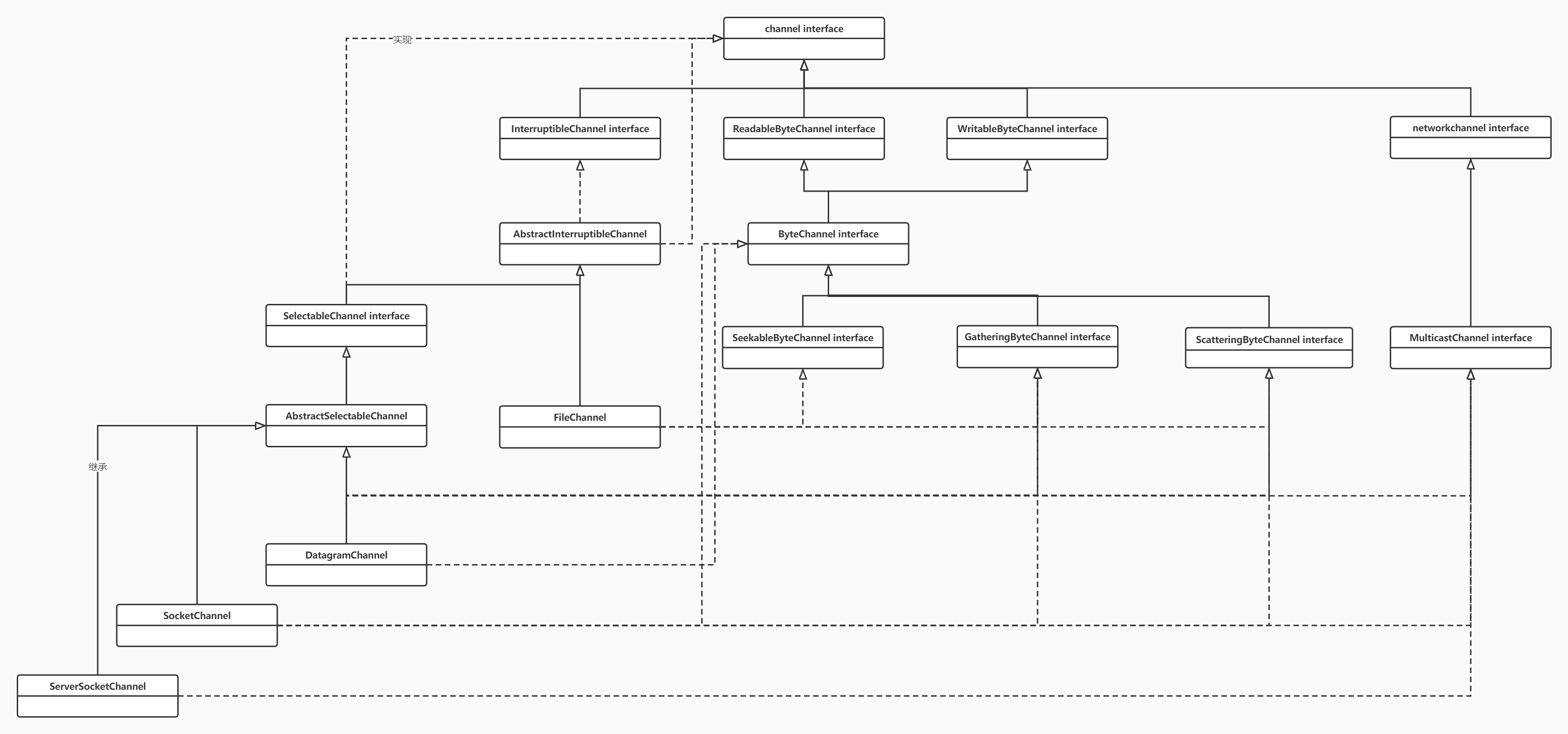
其中主要的几个实现类如下:
FileChannel: 本地文件传输通道
SocketChannel: 通过TCP传输通道
ServerSocketChannel: 监听新的TCP连接,并创建一个新的SocketChannel,通过.open()方法进行创建。
DatagramChannel: 发送和接收UDP数据包的channel
通过Buffer的两种传输数据方式:
非直接缓冲区传输数据 - - > ByteBuffer.allocate()方法;
直接缓冲区传输数据 - - > ByteBuffer.allocateDriect()方法;
几种获取channel的方式:
本地通过FileInPutStream/FileOutPutStream 使用getChannel()方法获取;
本地FileChannel 的open()方法获取;
本地RandomAccessFile的getChannel()方法获取;
网络socket、ServerSocket、DatagramSocket
三.FileInputStream获取通道方式
非直接缓冲区方式,再程序与本地磁盘中,并不是直接进行数据的交流。而是在用户和内核之间通过复制的形式。每次read 和write 都在中间进行复制。程序可以控制数据。
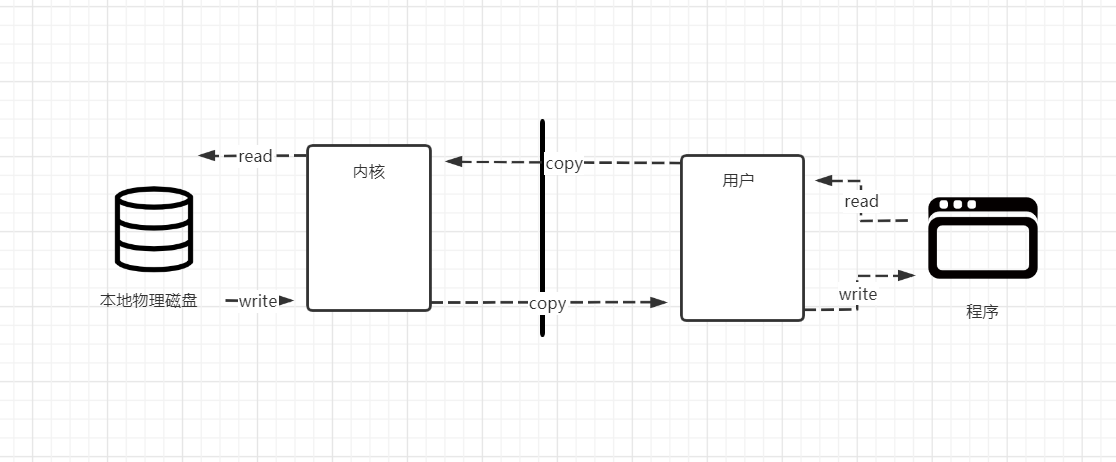
流程:FileInputStream写入文件 --> FileOutputStream的getChannel()获取通道 --> 开辟一个具有一定容量的buffer缓冲区 --> 将缓冲区的内容通过channel传输 --> 关闭流
 //使用非直接缓冲区 传输数据

     //通过流的方式

     @Test

     public void NoDirect(){

         FileInputStream fileInputStream = null;

         FileOutputStream fileOutputStream =null;

         FileChannel fileInputStreamChannel = null;

         FileChannel fileOutputStreamChannel = null;

         long start = 0;

         try {

             //查看耗时

              start = System.currentTimeMillis();

             //写入

             fileInputStream = new FileInputStream("D:/DataTestFile/1.zip");

             //读取到

             fileOutputStream = new FileOutputStream("D:/DataTestFile/2.zip");

             //使用通道进行文件传输

             //在传输前先获取传输通道channel

              fileInputStreamChannel = fileInputStream.getChannel();

              fileOutputStreamChannel = fileOutputStream.getChannel();

             //将数据写入缓冲区 -->   开辟缓冲区容量  --> 后使用通道传输

             ByteBuffer buf = ByteBuffer.allocate(1024);

             //将通道中的数据送入缓冲区  数据为空时跳出循环

             while(fileInputStreamChannel.read(buf) != -1){

                 //切换读写模式

                 buf.flip();

                 //读出缓冲区的数据写入通道中

                 fileOutputStreamChannel.write(buf);

                 //清空缓冲区

                 buf.clear();

             }

         } catch (FileNotFoundException e) {

             e.printStackTrace();

         } catch (IOException e) {

             e.printStackTrace();

         }

         //最终需要执行的步骤 需要关闭流  和通道

         finally {

             //写入流关闭

             if (fileInputStream != null){

                 try {

                     fileInputStream.close();

                 } catch (IOException e) {

                     e.printStackTrace();

                 }

             }

             //读出流关闭

             if (fileOutputStream != null){

                 try {

                     fileOutputStream.close();

                 } catch (IOException e) {

                     e.printStackTrace();

                 }

             }

            if (fileInputStreamChannel != null){

                try {

                    fileInputStreamChannel.close();

                } catch (IOException e) {

                    e.printStackTrace();

                }

            }

             //读出通道关闭

             if (fileOutputStreamChannel != null){

                 try {

                     fileOutputStreamChannel.close();

                 } catch (IOException e) {

                     e.printStackTrace();

                 }

             }

             //查看耗时

             long end = System.currentTimeMillis();

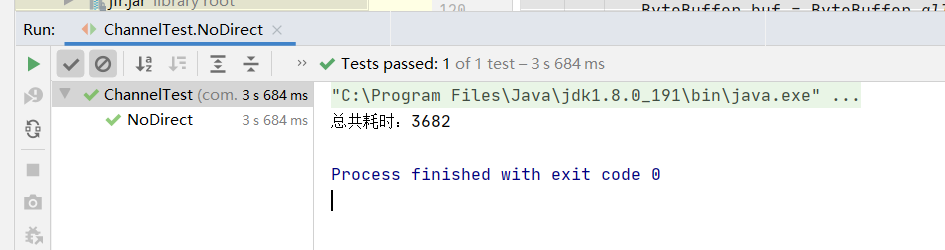
             System.out.println("总共耗时:"+(end-start));

         }

     }
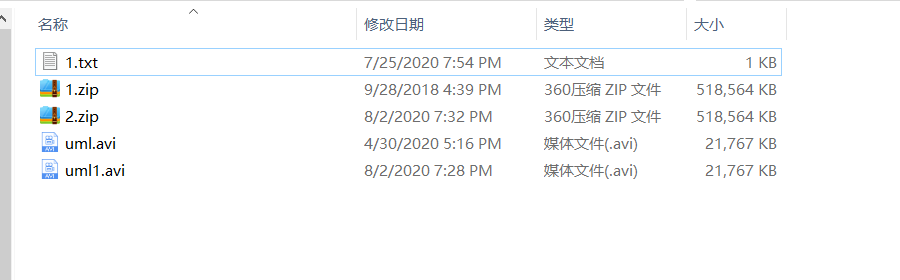
测试数据大小
使用IO流的方式(FileInPutStream/FileOutPutStream)写入文件或者读取文件,FileInPutStream实现方式:(FileOutPutStream 与之类似)
   public FileInputStream(String name) throws FileNotFoundException {

         this(name != null ? new File(name) : null);

     }

  //获取本地文件

 public File(String pathname) {

         if (pathname == null) {

             throw new NullPointerException();

         }

         this.path = fs.normalize(pathname);

         this.prefixLength = fs.prefixLength(this.path);

     }
三.FileChannel方式+mapped*ByteBuffer(内存映射文件)传输数据
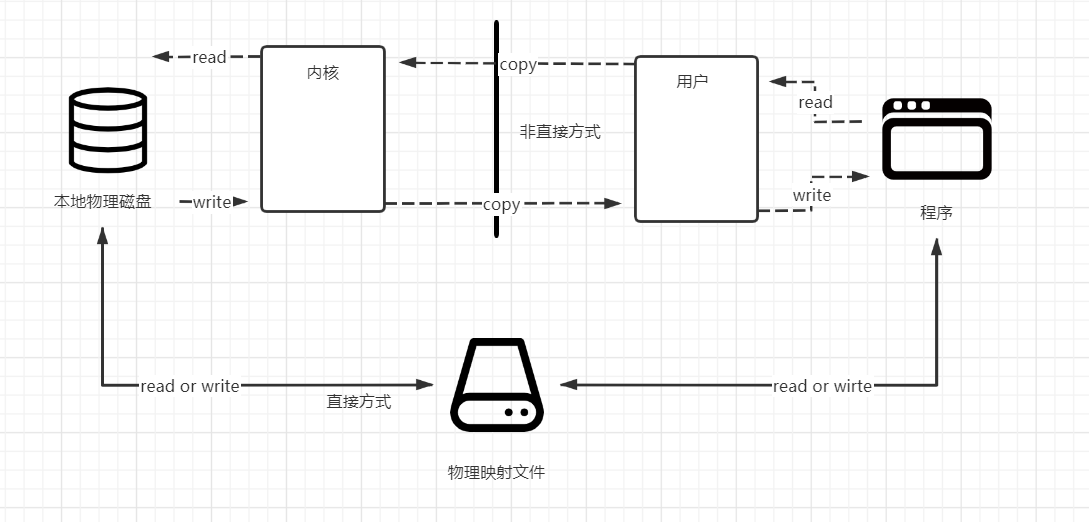
直接传输方式,在本地形成一个本地映射文件,程序通过本地映射直接传输给物理磁盘,没有复制的操作。在传输速度上优于非直接的传输
但是程序的数据一旦交给映射文件,程序将无法控制数据。
流程: FileChannel.open 获取通道 (写入和读取文件,并规定Read Or Write ,create等方式) - - > .map(将通道的一个区域映射到内存中) - - > 将映射文件中的数据存入数组,写入或读出到MappedByteBuffer
  /*

     * 通过直接缓冲区的方式进行传输数据

     * 通过使用映射文件的方式MappedByteBuffer传输

     * */

     @Test

     public void Driect(){

         FileChannel fileInChannel = null;

         FileChannel fileOutChannel = null;

         MappedByteBuffer mappedInByteBuffer = null;

         MappedByteBuffer mappedOutByteBuffer = null;

         long start = 0;

         try {

             //耗时查询

              start = System.currentTimeMillis();

              fileInChannel = FileChannel.open(Paths.get("D:/DataTestFile/1.zip"), StandardOpenOption.READ,StandardOpenOption.WRITE);

              fileOutChannel = FileChannel.open(Paths.get("D:/DataTestFile/2.zip"), StandardOpenOption.READ, StandardOpenOption.WRITE,StandardOpenOption.CREATE);

             //使用内存映射文件 ,杜绝非直接缓存区中的通过用户态 和核心态的相互复制影响性能的问题

             //直接通过本地映射文件。但是一旦传输后,不归程序所管理

              mappedInByteBuffer = fileInChannel.map(FileChannel.MapMode.READ_ONLY, 0, fileInChannel.size());

              mappedOutByteBuffer = fileOutChannel.map(FileChannel.MapMode.READ_WRITE, 0, fileInChannel.size());

             //直接对缓冲区进行读写操作

             //定义一个数组,将映射文件的数据存入其中

             byte[] bt = new byte[mappedInByteBuffer.limit()];

             //先从本地映射文件中读取  后写入传输

             mappedInByteBuffer.get(bt);

             mappedOutByteBuffer.put(bt);

         } catch (IOException e) {

             e.printStackTrace();

         }

         finally {

             if (fileInChannel != null){

                 try {

                     fileInChannel.close();

                 } catch (IOException e) {

                     e.printStackTrace();

                 }

             }

             if (fileOutChannel != null){

                 try {

                     fileOutChannel.close();

                 } catch (IOException e) {

                     e.printStackTrace();

                 }

             }

             //耗时结束查询

             long end = System.currentTimeMillis();

             System.out.println("总共耗时:"+(end-start));

         }

相比较于非直接的方式,在相同资源下的第一次传输,性能更高。传输速度更快。
五.分散传输
将一个整体文件,分散成多个部分,使用多缓冲区分别进行分散。
流程:使用RandomAccessFile读取写入文件 - - > 通过RandomAccessFile.getChannel 获取通道 - - > 将两个开辟的缓冲区,存入数组中,并循环读入通道 - - > 转换成可以直观查看的String类型
 package com.cllover.nio;

 import org.junit.Test;

 import java.io.FileNotFoundException;

 import java.io.IOException;

 import java.io.RandomAccessFile;

 import java.nio.ByteBuffer;

 import java.nio.channels.FileChannel;

 /*

  * @Author chengpunan

  * @Description //TODO 18609

  * @Date 7:29 PM 7/25/2020

  * @Param

  * @return

  *

  * 分散读写和聚集读写测试类

  * Disperse:分散读写

  * gather: 聚集读写

  **/

 public class DisperseAndGather {

 //    分散读写  将通道中的数据分散到缓冲区中,

     @Test

     public void Disperse(){

         RandomAccessFile randomAccessFile = null;

         FileChannel randomAccessFileChannel = null;

         try {

             //随机访问文件流以RW形式访问某文件

             randomAccessFile = new RandomAccessFile("D:/DataTestFile/1.txt","rw");

             //获取通道

             randomAccessFileChannel = randomAccessFile.getChannel();

             //开辟两个缓冲区

             ByteBuffer byteBuffer100 = ByteBuffer.allocate(100);

             ByteBuffer byteBuffer200 = ByteBuffer.allocate(200);


//数值初始化:存入两个缓冲区的数据
41             //分散读取

42             ByteBuffer[] byteBuffer = {byteBuffer100,byteBuffer200};

43

44             //存入读取通道

45             randomAccessFileChannel.read(byteBuffer);

46

47             for (ByteBuffer bf: byteBuffer) {

48                 bf.flip();   //切换读写方式

49             }

             //转换成字符串

             //public String(byte bytes[], int offset, int length)

             System.out.println(new String(byteBuffer[0].array(),0,byteBuffer[0].limit()));

             System.out.println("----------------------------------");

             System.out.println(new String(byteBuffer[1].array(),0,byteBuffer[1].limit()));

         } catch (FileNotFoundException e) {

             e.printStackTrace();

         } catch (IOException e) {

             e.printStackTrace();

         }

         finally {

             if (randomAccessFile != null){

                 try {

                     randomAccessFile.close();

                 } catch (IOException e) {

                     e.printStackTrace();

                 }

             }

             if (randomAccessFileChannel != null){

                 try {

                     randomAccessFileChannel.close();

                 } catch (IOException e) {

                     e.printStackTrace();

                 }

             }

             if (randomAccessFile != null){

                 try {

                     randomAccessFile.close();

                 } catch (IOException e) {

                     e.printStackTrace();

                 }

             }

         }

     }

 }
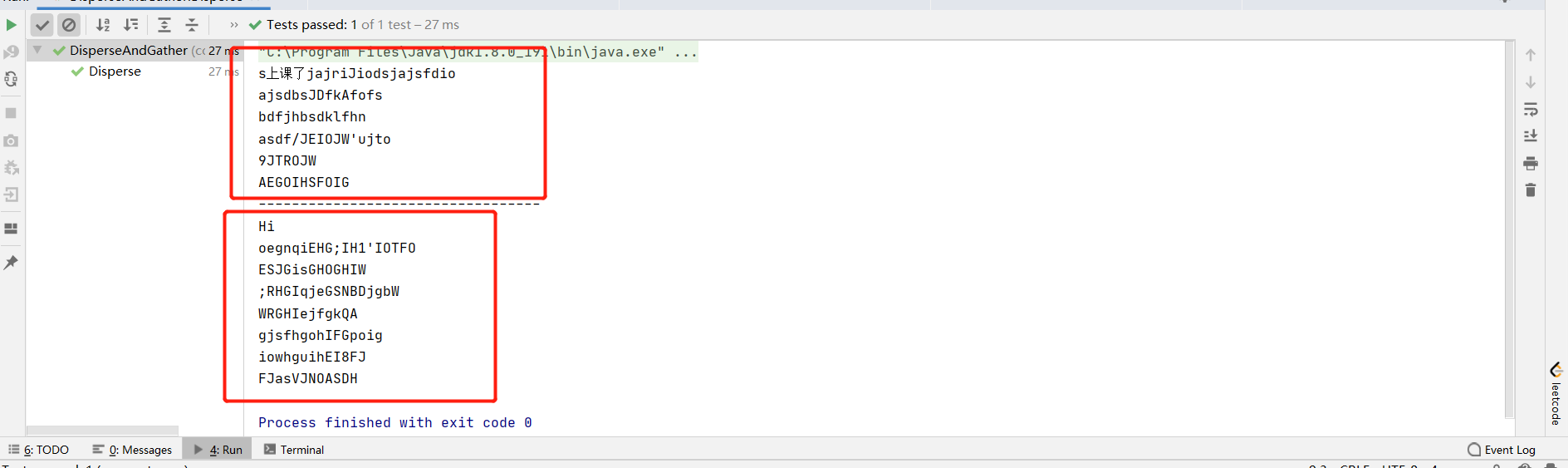
将单独两个开辟的缓冲区,存入数组之中。存入通道后,用foreach循环遍历index[0]和index[1]缓冲区上的内容,并进行写入。
 //分散读取:数组初始化

             ByteBuffer[] byteBuffer = {byteBuffer100,byteBuffer200};

             //存入读取通道

             randomAccessFileChannel.read(byteBuffer);

             for (ByteBuffer bf: byteBuffer) {

                 bf.flip();   //切换读写方式

             }
资源内容:

运行结果:
聚集写入:
  //聚集写入

             RandomAccessFile randomAccessFile1 = new RandomAccessFile("D:/DataTestFile/2.txt", "rw");

             FileChannel channel = randomAccessFile1.getChannel();

             //将全部内容。将上段代码红色部分,存入数组中的数据直接通过通道写入另一个文件中

             channel.write(byteBuffer);
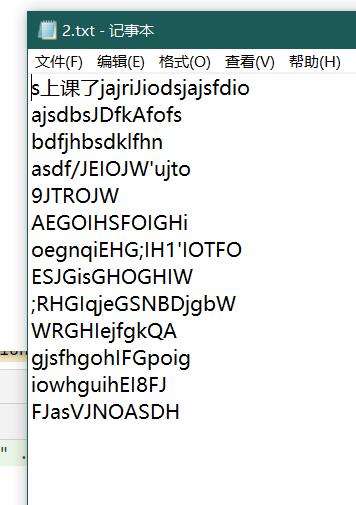
写入文件后,原本文件中的内容会被覆盖或者丢失。
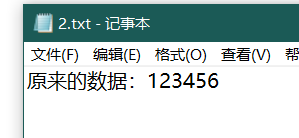
写入后:
六.总结
channel作为一个连接通道,支持异步传输。
总是基于Buffer缓冲区配合使用。
在传输时,需要在buffer中暂存入数据后开启channel通道,进行读写操作。
下一篇将会写关于网络传输 和 selector的用法。
NIO(二):Channel通道的更多相关文章
- JAVA NIO学习二:通道(Channel)与缓冲区(Buffer)
今天是2018年的第三天,真是时光飞逝,2017年的学习计划还没有学习完成,因此继续开始研究学习,那么上一节我们了解了NIO,那么这一节我们进一步来学习NIO相关的知识.那就是通道和缓冲区.Java ...
- Java NIO 之 Channel(通道)
历史回顾: Java NIO 概览 Java NIO 之 Buffer(缓冲区) 其他高赞文章: 面试中关于Redis的问题看这篇就够了 一文轻松搞懂redis集群原理及搭建与使用 一 Channel ...
- Java NIO Channel通道
原文链接:http://tutorials.jenkov.com/java-nio/channels.html Java NIO Channel通道和流非常相似,主要有以下几点区别: 通道可以读也可以 ...
- 【Java nio】Channel
package com.slp.nio; import org.junit.Test; import java.io.*; import java.nio.ByteBuffer; import jav ...
- java输入输出 -- java NIO之文件通道
一.简介 通道是 Java NIO 的核心内容之一,在使用上,通道需和缓存类(ByteBuffer)配合完成读写等操作.与传统的流式 IO 中数据单向流动不同,通道中的数据可以双向流动.通道既可以读, ...
- Java基础知识强化之IO流笔记73:NIO之 Channel
1. Java NIO的Channel(通道)类似 Stream(流),但又有些不同: 既可以从通道中读取数据,又可以写数据到通道.但流的读写通常是单向的. 通道可以异步地读写. 通道中的数据总是要先 ...
- JAVA NIO 之Channel
缓冲区本质上是一块可以写入数据,然后可以从中读取数据的内存.Channel 通道就是将数据传输给 ByteBuffer 对象或者从 ByteBuffer 对象获取数据进行传输. Channel 用于在 ...
- NIO组件Channel
基本介绍 NIO的通道类似于流, 但有些区别: 通道可以同时进行读写, 而流只能读或者只能写 通道可以实现异步读写数据 通道可以从缓冲区(Buffer)读数据, 也可以写数据到缓冲区 BIO中的str ...
- Golang 入门 : channel(通道)
笔者在<Golang 入门 : 竞争条件>一文中介绍了 Golang 并发编程中需要面对的竞争条件.本文我们就介绍如何使用 Golang 提供的 channel(通道) 消除竞争条件. C ...
随机推荐
- python 爬虫由于网络或代理不能用导致的问题处理方法
平时在爬取某些网页的时候,可能是由于网络不好或者代理池中的代理不能用导致请求失败.此时有们需要重复多次去请求,python中有现成的,相应的包供我们使用: 我们可以利用retry模块进行多次请求,如果 ...
- MYSQL 之 JDBC(十五):数据库连接池
在使用开发基于数据库的web程序时,传统的模式基本是按一下步骤: 在主程序(如servlet.bean)中建立数据库连接 进行sql操作 断开数据库连接 这种模式开发存在各种各样的问题,最重要的是:数 ...
- CCNA-Part4 -网络层 - IP 协议了解一下
网络层主要提供寻址,路由的功能.而 IP 协议就是为了实现该功能而设计的. IP 协议 IP 协议的特性 工作在网络层 面向无连接的协议 具有单独处理包的能力 分层的地址 不可靠,尽力而为的传送 独立 ...
- [spring cloud] -- 核心篇
核心功能: 分布式/版本化配置 服务注册合发现 服务路由 服务和服务之间的调用 负载均衡 断路器 分布式消息传递 ...... 技术体系 组件 服务注册与发现组件:Eureka.Zookeeper和C ...
- ajax工作原理/实例
ajax是什么? 是一种创建交互式网页应用的一种网页技术.简单来说,就是向服务器发起请求,获得数据使交互性和用户体验更好. ajax不是一种新的技术,是一些技术的集合体.有 1.XHTML和CSS 2 ...
- Android应用内部实现多语言,一键切换语言,国际化适配
1.首先提供多语言对应的string值 如en对应英语, fr对应法语 两个文件中包含同样的key, 对应不同的语言的value 2.java代码相应用户切换语言动作 private static v ...
- python如何支持并发?
由于GIL(Global Interpreter Lock)的存在使得在同一时刻Python进程只能使用CPU的一个核心,也就是对应操作系统的一个 内核线程,对于一个Python web程序,如果有个 ...
- ES5---Proxy的理解的使用
定义:Proxy原意为“代理”,在这可以理解为代理/拦截器的意思.Proxy在一个目标对象前放置了一个拦截,凡是外界对该对象的访问,都必须通过这层拦截,所以Proxy可以对外界的访问进行过滤和改写. ...
- org.apache.ibatis.reflection.ReflectionException: There is no getter for property named XXX 异常的解决办法。(亲测,一次成功!) #Mybatis
今天在用Mybatis的时,写测试验证插入操作时出现错误org.apache.ibatis.reflection.ReflectionException: There is no getter for ...
- P1359租用游艇(dp+dfs)
好久真的是好久没有做dp的问题了(QWQ)(我有学过这玩意???) 诶,人生呐! 今天来一个动归- 顺便可以回顾一下dfs. 这个题我觉得审题也非常重要 小可爱dp: #include <bit ...