
1,turicreate入门 - jupyter & turicreate安装
turicreate入门系列文章目录
1,turicreate入门 - jupyter & turicreate安装
3,turicreate入门 - 优化回归模型,使得预测更准确
1,Windows10 WSL 安装ubuntu18.04。Windows10如何安装,请自行百度。
2,更新apt源
sudo apt-get update
3,更改apt源为阿里源,提高下载速度
sudo mv /etc/apt/source.list /ect/apt/source.list.bak //对原文件备份

sudo vim /etc/apt/source.list //编辑apt源
deb http://mirrors.aliyun.com/ubuntu/ bionic main restricted universe multiverse

deb-src http://mirrors.aliyun.com/ubuntu/ bionic main restricted universe multiverse

deb http://mirrors.aliyun.com/ubuntu/ bionic-security main restricted universe multiverse

deb-src http://mirrors.aliyun.com/ubuntu/ bionic-security main restricted universe multiverse

deb http://mirrors.aliyun.com/ubuntu/ bionic-updates main restricted universe multiverse

deb-src http://mirrors.aliyun.com/ubuntu/ bionic-updates main restricted universe multiverse

deb http://mirrors.aliyun.com/ubuntu/ bionic-proposed main restricted universe multiverse

deb-src http://mirrors.aliyun.com/ubuntu/ bionic-proposed main restricted universe multiverse

deb http://mirrors.aliyun.com/ubuntu/ bionic-backports main restricted universe multiverse

deb-src http://mirrors.aliyun.com/ubuntu/ bionic-backports main restricted universe multiverse
:wq保存退出后,更新设置
sudo apt-get update
4,安装pip3
sudo apt-get install python3-pip
5,更改pip源为阿里源,提高下载速度
cd ~

mkdir .pip

cd .pip

sudo vim pip.conf
输入以下内容:
[global]

timeout = 6000

index-url = https://mirrors.aliyun.com/pypi/simple

trusted-host = mirros.aliyun.com
:wq保存退出后,更新pip设置
sudo pip3 install update
6,安装jupyter notebook
pip3 install jupyter
如果使用WSL,输入
sudo jupyter notebook --allow-root
如果是ubuntu,直接输入
jupyter notebook
这时候,一切正常的话,就可以打开网页了
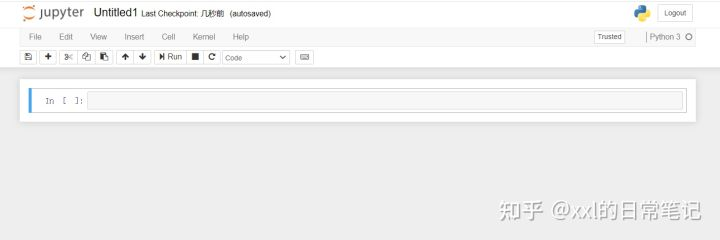
7,至此,安装完成了一半了!下面开始安装turicreate。先安装虚拟环境。
sudo pip3 install virtualenv

cd ~

virtualenv turienv

cd turienv

source ~/turienv/bin/activate  //激活虚拟环境
再安装turicreate。
//在虚拟环境下安装turicreate和ipykernel内核,并且配置jupyter notebook的显示

pip3 install update

pip3 install ipykernel

pip3 install turicreate

python -m ipykernel install --user --name turienv --display-name turienv
8,退出虚拟环境,启动jupyter
deactivate

//wsl输入

sudo jupyter notebook --allow-root

//ubuntu输入

jupyter notebook
可以看到turi内核
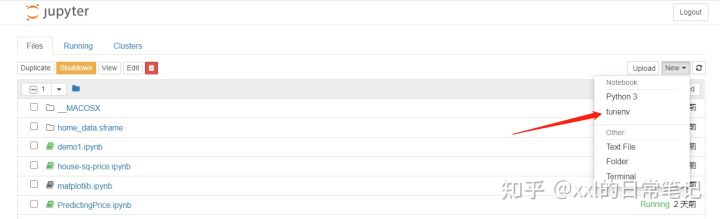
Done!
1,turicreate入门 - jupyter & turicreate安装的更多相关文章
- 3,turicreate入门 - 优化回归模型,使得预测更准确
turicreate入门系列文章目录 1,turicreate入门 - jupyter & turicreate安装 2,turicreate入门 - 一个简单的回归模型 3,turicrea ...
- 2,turicreate入门 - 一个简单的回归模型
turicreate入门系列文章目录 1,turicreate入门 - jupyter & turicreate安装 2,turicreate入门 - 一个简单的回归模型 3,turicrea ...
- Jupyter notebook安装扩展插件
1. 安装Jupyter Notebook pip install jupyter 2. 安装Jypyter Notebook扩展包 pip install jupyter_contrib_nbext ...
- Windows下的Jupyter Notebook 安装与自定义启动(图文详解)
不多说,直接上干货! 前期博客 Windows下的Python 3.6.1的下载与安装(适合32bits和64bits)(图文详解) 这是我自定义的Python 的安装目录 (D:\SoftWare\ ...
- jmeter安装教程与新手入门(附jdk安装教程)
一.前言 最近要对网站做性能测试,提到了并发数测试,查了下,还是决定使用jmeter来完成这项测试,这里总结了jmeter完整的安装教程,附上新手使用教程. 二.jmeter安装 1.jdk安装(jm ...
- MQTT入门1 -- mosquitto 安装
原文链接:https://www.cnblogs.com/NickQ/p/9247638.html MQTT入门1 -- mosquitto 安装 简介: MQTT(Message Queuing T ...
- [转] Spark快速入门指南 – Spark安装与基础使用
[From] https://blog.csdn.net/w405722907/article/details/77943331 Spark快速入门指南 – Spark安装与基础使用 2017年09月 ...
- 『NiFi 学习之路』入门 —— 下载、安装与简单使用
一.概述 "光说不练假把式." 官网上的介绍多少让人迷迷糊糊的,各种高大上的词语仿佛让 NiFi 离我们越来越远. 实践是最好的老师.那就让我们试用一下 NiFi 吧! 二.安装 ...
- Python3入门之软件安装
获得更多资料欢迎进入我的网站或者 csdn或者博客园 最近将我的Python笔记整理下,希望能对他人有所帮助,这是第一课,安装入门篇: windows下安装Python 1.下载,从这里下载:[下载链 ...
随机推荐
- frontends tools
frontends tools figma free online UI 可视化埋点 https://www.figma.com/files/recent cypress testing $ npm ...
- CSS rulesets
CSS rulesets https://developer.mozilla.org/en-US/docs/Web/CSS/Syntax#CSS_rulesets https://css-tricks ...
- macOS & timer & stop watch
macOS & timer & stop watch https://matthewpalmer.net/blog/2018/09/28/top-free-countdown-time ...
- linux cd root directory
linux cd root directory https://www.cyberciti.biz/faq/how-to-change-directory-in-linux-terminal/ htt ...
- Flutter: debounce 避免高频率事件
原文 函数 import 'dart:async'; Function debounce(Function fn, [int t = 30]) { Timer _debounce; return () ...
- vue的filter用法,检索内容
var app5 = new Vue({ el: '#app5', data: { shoppingList: [ "Milk", "Donuts", &quo ...
- django学习-18.*args和**kwargs的用法和使用场景
目录结构 1.前言 2.[*args]的用法 2.1.第一步:首先编写这样的函数[test1]. 2.2.第二步:给函数[test1]赋值相关入参值. 2.3.第三步:调用函数[test1],得到以下 ...
- [转]RoboWare Studio的使用和发布器/订阅器的编写与测试
原文地址:https://blog.csdn.net/han_l/article/details/77772352,转载主要方便随时查阅,如有版权要求,请及时联系. 开始ROS学习之前,先按照官网教程 ...
- Power Query 合并数据
1 导入数据 合并数据 筛选字段 关闭并上载
- c# winform中窗体切换后释放及防止重复生成
问题1:窗体切换后如何关闭,并释放资? c# winform中,2个窗体,form1和form2,互相切换的时候执行 this.Hide(); Form2 form2 = new Form2(); f ...