
CentOS7系统使用rpm方式安装MySQL5.7
参考:https://blog.csdn.net/wudinaniya/article/details/81094578
1、首先去mysql官网下载rpm包,一个是server包一个是client包。官网下载地址:https://www.mysql.com/downloads/
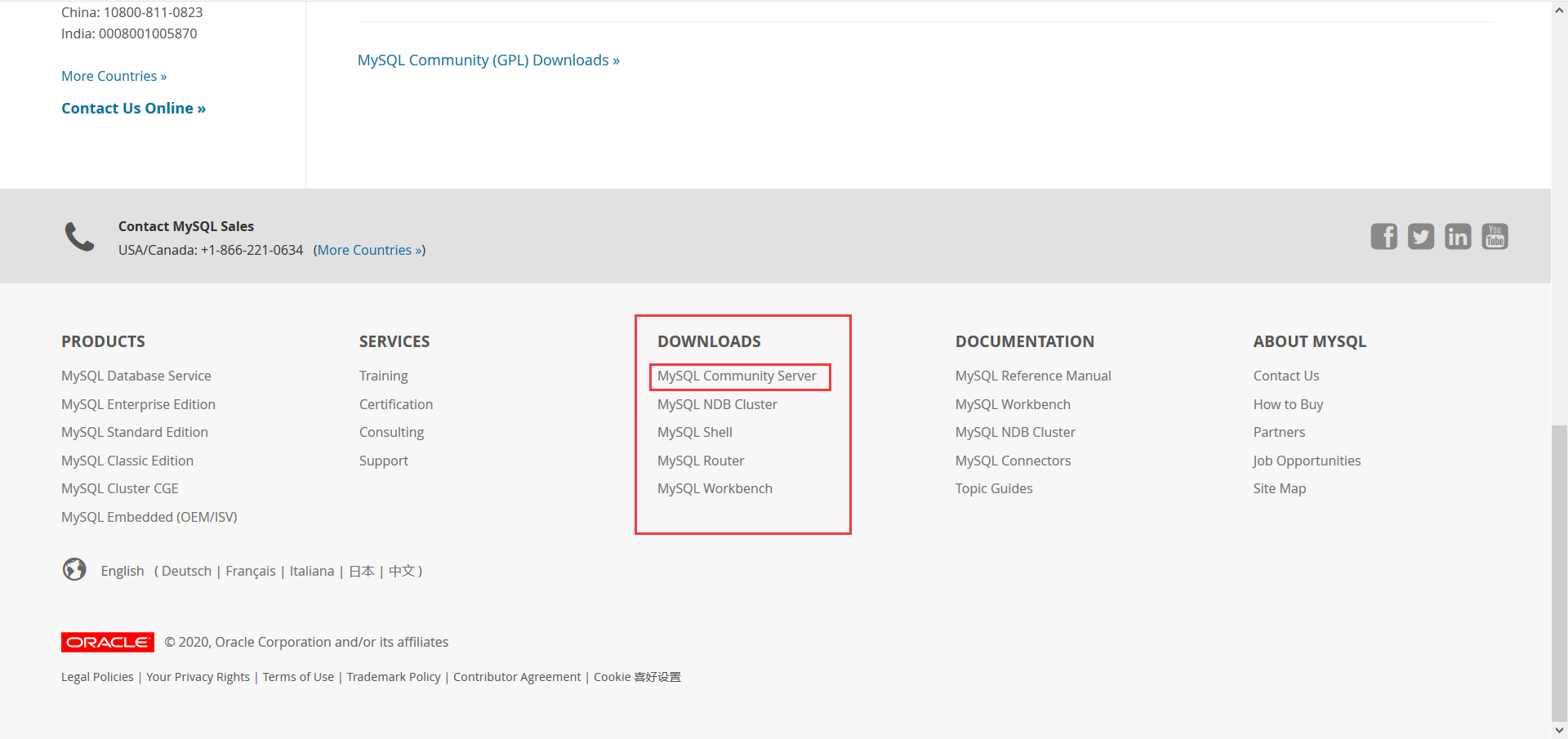
这里用mysql community server里边的。这里使用的是5.7.x版本了,不使用Mysql8.x版本了。
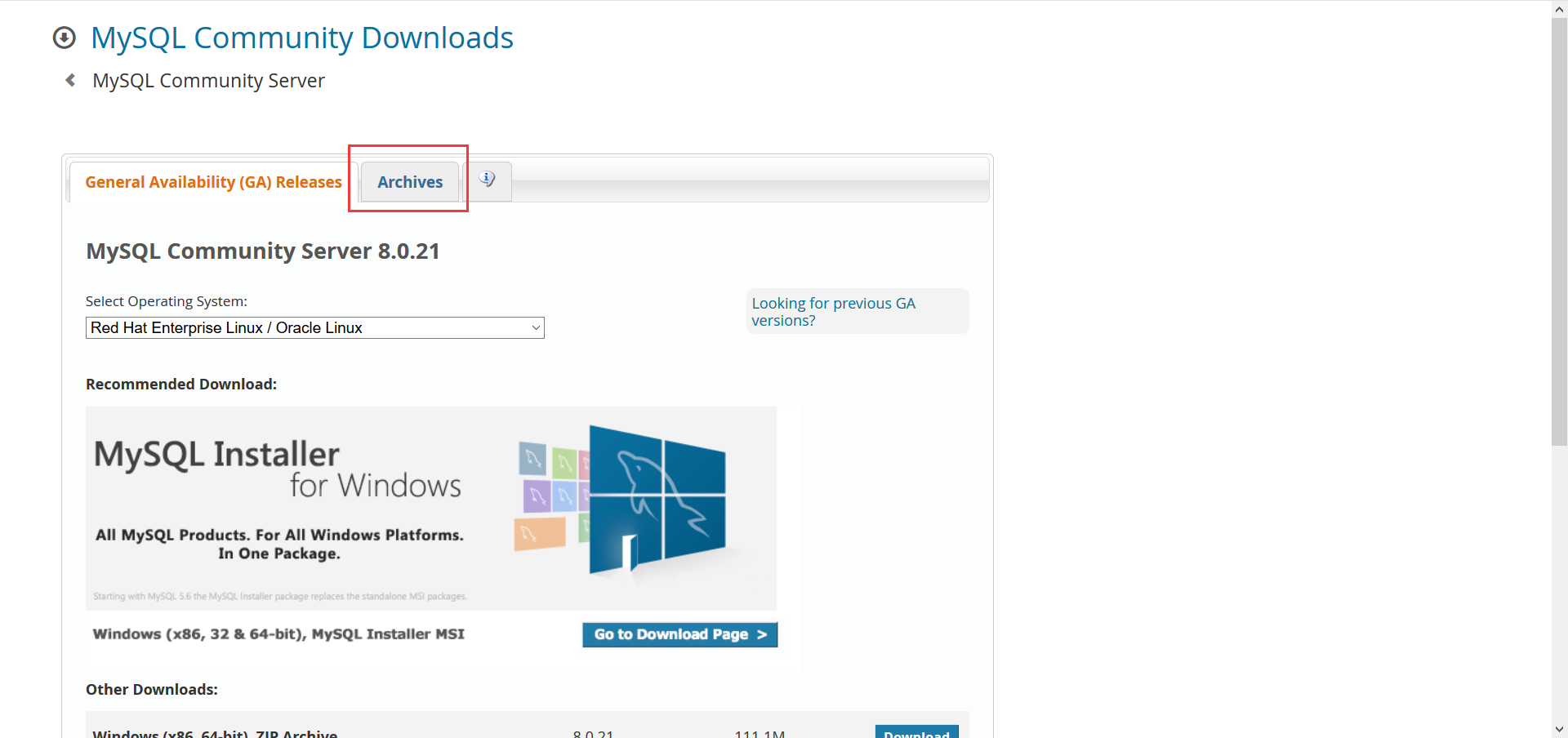
我这里使用的是Centos7.x版本的64位操作系统,使用mysql5.7版本的数据库。查看linux操作系统版本和系统内核版本,如下所示:
 [root@k8s-node3 ~]# cat /etc/redhat-release  # 查看操作系统版本

 CentOS Linux release 7.6. (Core)

 [root@k8s-node3 ~]# uname -r  # 检查系统内核版本

 3.10.-.el7.x86_64

 [root@k8s-node3 ~]#
选择对应的Linux版本和x86/x64进行下载,可以选择 RPM Bundle,下载完记得解压 tar -xvf xxx.tar。
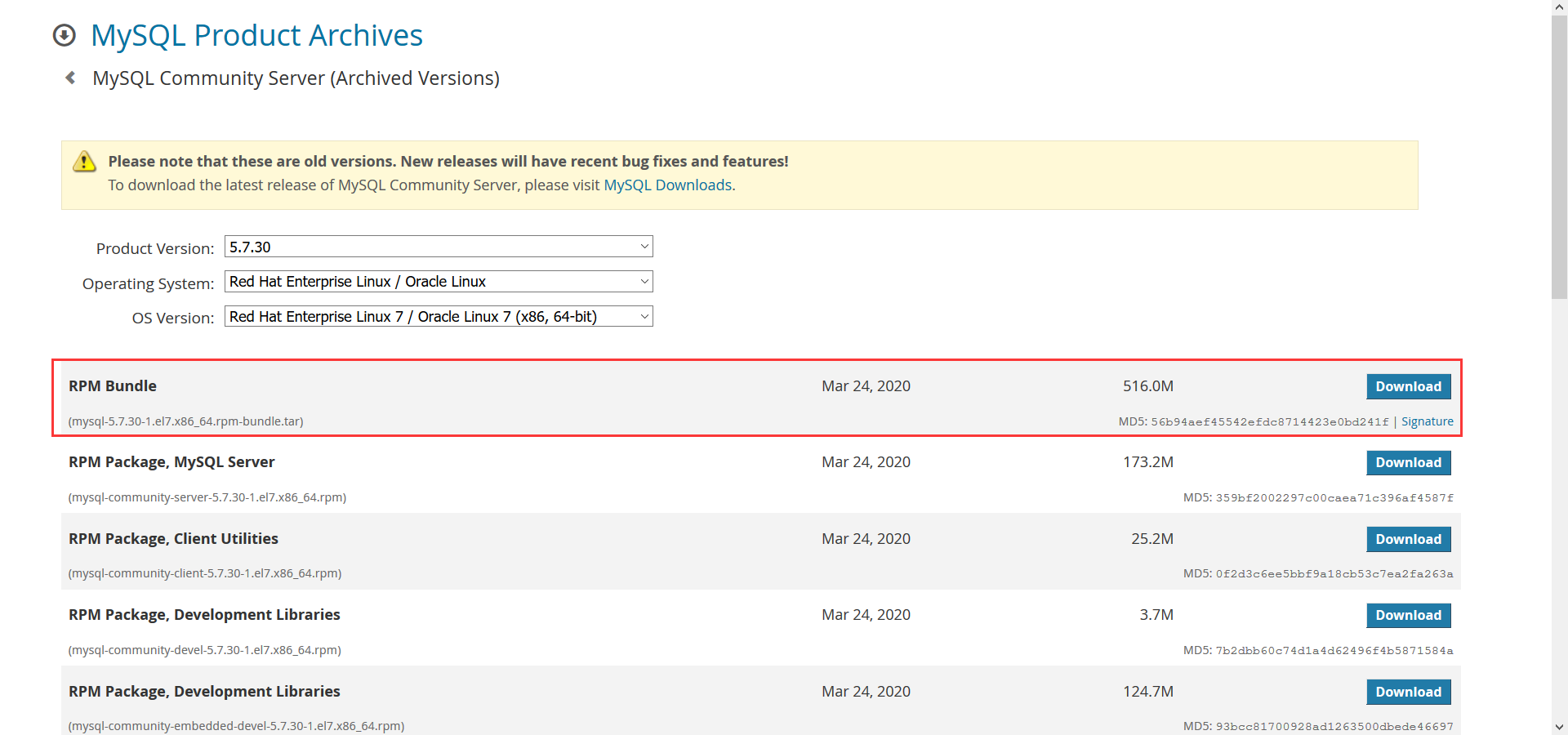
可以离线下载上传或者在线下载包,如下所示:
 [root@k8s-node3 package]# wget https://downloads.mysql.com/archives/get/p/23/file/mysql-5.7.30-1.el7.x86_64.rpm-bundle.tar

 ---- ::--  https://downloads.mysql.com/archives/get/p/23/file/mysql-5.7.30-1.el7.x86_64.rpm-bundle.tar

 Resolving downloads.mysql.com (downloads.mysql.com)... 137.254.60.14

 Connecting to downloads.mysql.com (downloads.mysql.com)|137.254.60.14|:... failed: Connection refused.

 [root@k8s-node3 package]# wget https://dev.mysql.com/get/Downloads/MySQL-5.7/mysql-5.7.22-1.el7.x86_64.rpm-bundle.tar

 ---- ::--  https://dev.mysql.com/get/Downloads/MySQL-5.7/mysql-5.7.22-1.el7.x86_64.rpm-bundle.tar

 Resolving dev.mysql.com (dev.mysql.com)... 137.254.60.11

 Connecting to dev.mysql.com (dev.mysql.com)|137.254.60.11|:... connected.

 HTTP request sent, awaiting response...  Found

 Location: https://cdn.mysql.com//archives/mysql-5.7/mysql-5.7.22-1.el7.x86_64.rpm-bundle.tar [following]

 ---- ::--  https://cdn.mysql.com//archives/mysql-5.7/mysql-5.7.22-1.el7.x86_64.rpm-bundle.tar

 Resolving cdn.mysql.com (cdn.mysql.com)... 104.85.161.42

 Connecting to cdn.mysql.com (cdn.mysql.com)|104.85.161.42|:... connected.

 HTTP request sent, awaiting response...  OK

 Length:  (570M) [application/x-tar]

 Saving to: ‘mysql-5.7.-.el7.x86_64.rpm-bundle.tar’

 % [=================>                                                                     ] ,, .17MB/s  eta 4m 55s
也可以细化下载,下载须要的mysql组件,有4个:分别是 server、client、common、libs。
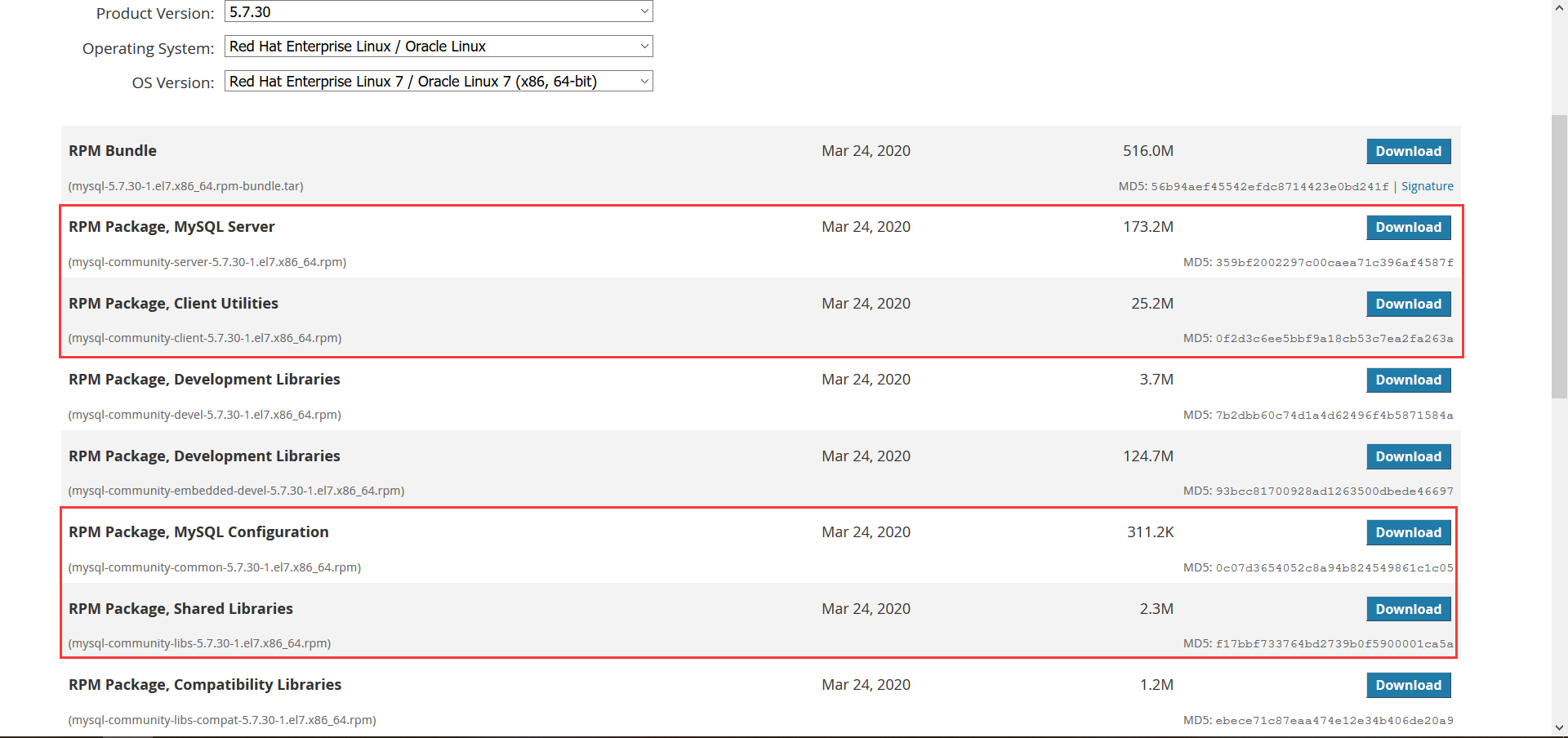
卸载旧版本的MySql,如果没有的话,则跳过即可,直接安装mysql。
 [root@k8s-node3 package]# rpm -qa | grep mysql

 [root@k8s-node3 package]#
如果有的话,将会列出旧版本MySql的组件列表,逐个删除掉旧的组件,使用命令rpm -e --nodeps {-file-name}进行移除操作,移除的时候可能会有依赖,要注意一定的顺序,{-file-name}是待删除的mysql的文件。我这里是没有,直接略过了。
2、使用 rpm 命令方式安装mysql组件,使用命令rpm -ivh {-file-name}进行安装操作。按照依赖关系依次安装rpm包 依赖关系依次common→libs→client→server。如下所示:
备注:在ivh中, i-install安装、v-verbose进度条、h-hash哈希校验。
 [root@k8s-node3 package]# rpm -ivh mysql-community-common-5.7.-.el7.x86_64.rpm

 warning: mysql-community-common-5.7.-.el7.x86_64.rpm: Header V3 DSA/SHA1 Signature, key ID 5072e1f5: NOKEY

 Preparing...                          ################################# [%]

     file /usr/share/mysql/czech/errmsg.sys from install of mysql-community-common-5.7.-.el7.x86_64 conflicts with file from package mariadb-libs-:5.5.-.el7_5.x86_64

     file /usr/share/mysql/danish/errmsg.sys from install of mysql-community-common-5.7.-.el7.x86_64 conflicts with file from package mariadb-libs-:5.5.-.el7_5.x86_64

     file /usr/share/mysql/dutch/errmsg.sys from install of mysql-community-common-5.7.-.el7.x86_64 conflicts with file from package mariadb-libs-:5.5.-.el7_5.x86_64

     file /usr/share/mysql/english/errmsg.sys from install of mysql-community-common-5.7.-.el7.x86_64 conflicts with file from package mariadb-libs-:5.5.-.el7_5.x86_64

     file /usr/share/mysql/estonian/errmsg.sys from install of mysql-community-common-5.7.-.el7.x86_64 conflicts with file from package mariadb-libs-:5.5.-.el7_5.x86_64

     file /usr/share/mysql/french/errmsg.sys from install of mysql-community-common-5.7.-.el7.x86_64 conflicts with file from package mariadb-libs-:5.5.-.el7_5.x86_64

     file /usr/share/mysql/german/errmsg.sys from install of mysql-community-common-5.7.-.el7.x86_64 conflicts with file from package mariadb-libs-:5.5.-.el7_5.x86_64

     file /usr/share/mysql/greek/errmsg.sys from install of mysql-community-common-5.7.-.el7.x86_64 conflicts with file from package mariadb-libs-:5.5.-.el7_5.x86_64

     file /usr/share/mysql/hungarian/errmsg.sys from install of mysql-community-common-5.7.-.el7.x86_64 conflicts with file from package mariadb-libs-:5.5.-.el7_5.x86_64

     file /usr/share/mysql/italian/errmsg.sys from install of mysql-community-common-5.7.-.el7.x86_64 conflicts with file from package mariadb-libs-:5.5.-.el7_5.x86_64

     file /usr/share/mysql/japanese/errmsg.sys from install of mysql-community-common-5.7.-.el7.x86_64 conflicts with file from package mariadb-libs-:5.5.-.el7_5.x86_64

     file /usr/share/mysql/korean/errmsg.sys from install of mysql-community-common-5.7.-.el7.x86_64 conflicts with file from package mariadb-libs-:5.5.-.el7_5.x86_64

     file /usr/share/mysql/norwegian-ny/errmsg.sys from install of mysql-community-common-5.7.-.el7.x86_64 conflicts with file from package mariadb-libs-:5.5.-.el7_5.x86_64

     file /usr/share/mysql/norwegian/errmsg.sys from install of mysql-community-common-5.7.-.el7.x86_64 conflicts with file from package mariadb-libs-:5.5.-.el7_5.x86_64

     file /usr/share/mysql/polish/errmsg.sys from install of mysql-community-common-5.7.-.el7.x86_64 conflicts with file from package mariadb-libs-:5.5.-.el7_5.x86_64

     file /usr/share/mysql/portuguese/errmsg.sys from install of mysql-community-common-5.7.-.el7.x86_64 conflicts with file from package mariadb-libs-:5.5.-.el7_5.x86_64

     file /usr/share/mysql/romanian/errmsg.sys from install of mysql-community-common-5.7.-.el7.x86_64 conflicts with file from package mariadb-libs-:5.5.-.el7_5.x86_64

     file /usr/share/mysql/russian/errmsg.sys from install of mysql-community-common-5.7.-.el7.x86_64 conflicts with file from package mariadb-libs-:5.5.-.el7_5.x86_64

     file /usr/share/mysql/serbian/errmsg.sys from install of mysql-community-common-5.7.-.el7.x86_64 conflicts with file from package mariadb-libs-:5.5.-.el7_5.x86_64

     file /usr/share/mysql/slovak/errmsg.sys from install of mysql-community-common-5.7.-.el7.x86_64 conflicts with file from package mariadb-libs-:5.5.-.el7_5.x86_64

     file /usr/share/mysql/spanish/errmsg.sys from install of mysql-community-common-5.7.-.el7.x86_64 conflicts with file from package mariadb-libs-:5.5.-.el7_5.x86_64

     file /usr/share/mysql/swedish/errmsg.sys from install of mysql-community-common-5.7.-.el7.x86_64 conflicts with file from package mariadb-libs-:5.5.-.el7_5.x86_64

     file /usr/share/mysql/ukrainian/errmsg.sys from install of mysql-community-common-5.7.-.el7.x86_64 conflicts with file from package mariadb-libs-:5.5.-.el7_5.x86_64

     file /usr/share/mysql/charsets/Index.xml from install of mysql-community-common-5.7.-.el7.x86_64 conflicts with file from package mariadb-libs-:5.5.-.el7_5.x86_64

     file /usr/share/mysql/charsets/armscii8.xml from install of mysql-community-common-5.7.-.el7.x86_64 conflicts with file from package mariadb-libs-:5.5.-.el7_5.x86_64

     file /usr/share/mysql/charsets/ascii.xml from install of mysql-community-common-5.7.-.el7.x86_64 conflicts with file from package mariadb-libs-:5.5.-.el7_5.x86_64

     file /usr/share/mysql/charsets/cp1250.xml from install of mysql-community-common-5.7.-.el7.x86_64 conflicts with file from package mariadb-libs-:5.5.-.el7_5.x86_64

     file /usr/share/mysql/charsets/cp1251.xml from install of mysql-community-common-5.7.-.el7.x86_64 conflicts with file from package mariadb-libs-:5.5.-.el7_5.x86_64

     file /usr/share/mysql/charsets/cp1256.xml from install of mysql-community-common-5.7.-.el7.x86_64 conflicts with file from package mariadb-libs-:5.5.-.el7_5.x86_64

     file /usr/share/mysql/charsets/cp1257.xml from install of mysql-community-common-5.7.-.el7.x86_64 conflicts with file from package mariadb-libs-:5.5.-.el7_5.x86_64

     file /usr/share/mysql/charsets/cp850.xml from install of mysql-community-common-5.7.-.el7.x86_64 conflicts with file from package mariadb-libs-:5.5.-.el7_5.x86_64

     file /usr/share/mysql/charsets/cp852.xml from install of mysql-community-common-5.7.-.el7.x86_64 conflicts with file from package mariadb-libs-:5.5.-.el7_5.x86_64

     file /usr/share/mysql/charsets/cp866.xml from install of mysql-community-common-5.7.-.el7.x86_64 conflicts with file from package mariadb-libs-:5.5.-.el7_5.x86_64

     file /usr/share/mysql/charsets/dec8.xml from install of mysql-community-common-5.7.-.el7.x86_64 conflicts with file from package mariadb-libs-:5.5.-.el7_5.x86_64

     file /usr/share/mysql/charsets/geostd8.xml from install of mysql-community-common-5.7.-.el7.x86_64 conflicts with file from package mariadb-libs-:5.5.-.el7_5.x86_64

     file /usr/share/mysql/charsets/greek.xml from install of mysql-community-common-5.7.-.el7.x86_64 conflicts with file from package mariadb-libs-:5.5.-.el7_5.x86_64

     file /usr/share/mysql/charsets/hebrew.xml from install of mysql-community-common-5.7.-.el7.x86_64 conflicts with file from package mariadb-libs-:5.5.-.el7_5.x86_64

     file /usr/share/mysql/charsets/hp8.xml from install of mysql-community-common-5.7.-.el7.x86_64 conflicts with file from package mariadb-libs-:5.5.-.el7_5.x86_64

     file /usr/share/mysql/charsets/keybcs2.xml from install of mysql-community-common-5.7.-.el7.x86_64 conflicts with file from package mariadb-libs-:5.5.-.el7_5.x86_64

     file /usr/share/mysql/charsets/koi8r.xml from install of mysql-community-common-5.7.-.el7.x86_64 conflicts with file from package mariadb-libs-:5.5.-.el7_5.x86_64

     file /usr/share/mysql/charsets/koi8u.xml from install of mysql-community-common-5.7.-.el7.x86_64 conflicts with file from package mariadb-libs-:5.5.-.el7_5.x86_64

     file /usr/share/mysql/charsets/latin1.xml from install of mysql-community-common-5.7.-.el7.x86_64 conflicts with file from package mariadb-libs-:5.5.-.el7_5.x86_64

     file /usr/share/mysql/charsets/latin2.xml from install of mysql-community-common-5.7.-.el7.x86_64 conflicts with file from package mariadb-libs-:5.5.-.el7_5.x86_64

     file /usr/share/mysql/charsets/latin5.xml from install of mysql-community-common-5.7.-.el7.x86_64 conflicts with file from package mariadb-libs-:5.5.-.el7_5.x86_64

     file /usr/share/mysql/charsets/latin7.xml from install of mysql-community-common-5.7.-.el7.x86_64 conflicts with file from package mariadb-libs-:5.5.-.el7_5.x86_64

     file /usr/share/mysql/charsets/macce.xml from install of mysql-community-common-5.7.-.el7.x86_64 conflicts with file from package mariadb-libs-:5.5.-.el7_5.x86_64

     file /usr/share/mysql/charsets/macroman.xml from install of mysql-community-common-5.7.-.el7.x86_64 conflicts with file from package mariadb-libs-:5.5.-.el7_5.x86_64

     file /usr/share/mysql/charsets/swe7.xml from install of mysql-community-common-5.7.-.el7.x86_64 conflicts with file from package mariadb-libs-:5.5.-.el7_5.x86_64

 [root@k8s-node3 package]# rpm -ivh mysql-community-libs-5.7.-.el7.x86_64.rpm

 warning: mysql-community-libs-5.7.-.el7.x86_64.rpm: Header V3 DSA/SHA1 Signature, key ID 5072e1f5: NOKEY

 error: Failed dependencies:

     mysql-community-common(x86-) >= 5.7. is needed by mysql-community-libs-5.7.-.el7.x86_64

     mariadb-libs is obsoleted by mysql-community-libs-5.7.-.el7.x86_64

 [root@k8s-node3 package]# rpm -ivh mysql-community-server-5.7.-.el7.x86_64.rpm

 warning: mysql-community-server-5.7.-.el7.x86_64.rpm: Header V3 DSA/SHA1 Signature, key ID 5072e1f5: NOKEY

 error: Failed dependencies:

     mysql-community-client(x86-) >= 5.7. is needed by mysql-community-server-5.7.-.el7.x86_64

     mysql-community-common(x86-) = 5.7.-.el7 is needed by mysql-community-server-5.7.-.el7.x86_64

 [root@k8s-node3 package]# rpm -ivh mysql-community-client-5.7.-.el7.x86_64.rpm

 warning: mysql-community-client-5.7.-.el7.x86_64.rpm: Header V3 DSA/SHA1 Signature, key ID 5072e1f5: NOKEY

 error: Failed dependencies:

     mysql-community-libs(x86-) >= 5.7. is needed by mysql-community-client-5.7.-.el7.x86_64

 [root@k8s-node3 package]#
在安装 mysql-community-libs-5.7.30-1.el7.x86_64.rpm 时有可能会报错,这个是mysql依赖错误,解决方法是:清除yum里所有mysql依赖包。
 [root@k8s-node3 package]# rpm -qa|grep mysql

 [root@k8s-node3 package]# yum remove mysql-libs

 Loaded plugins: fastestmirror, langpacks, product-id, search-disabled-repos, subscription-manager

 This system is not registered with an entitlement server. You can use subscription-manager to register.

 Resolving Dependencies

 --> Running transaction check

 ---> Package mariadb-libs.x86_64 :5.5.-.el7_5 will be erased

 --> Processing Dependency: libmysqlclient.so.()(64bit) for package: :postfix-2.10.-.el7.x86_64

 --> Processing Dependency: libmysqlclient.so.(libmysqlclient_18)(64bit) for package: :postfix-2.10.-.el7.x86_64

 --> Running transaction check

 ---> Package postfix.x86_64 :2.10.-.el7 will be erased

 --> Processing Dependency: /usr/sbin/sendmail for package: redhat-lsb-core-4.1-.el7.centos..x86_64

 --> Restarting Dependency Resolution with new changes.

 --> Running transaction check

 ---> Package redhat-lsb-core.x86_64 :4.1-.el7.centos. will be erased

 --> Finished Dependency Resolution

 base//x86_64                                                                                            | 3.6 kB  ::

 centos-gluster7//x86_64                                                                                 | 3.0 kB  ::

 extras//x86_64                                                                                          | 2.9 kB  ::

 extras//x86_64/primary_db                                                                               |  kB  ::

 updates//x86_64                                                                                         | 2.9 kB  ::

 updates//x86_64/primary_db                                                                              | 3.0 MB  ::

 Dependencies Resolved

 ================================================================================================================================

  Package                          Arch                    Version                              Repository                  Size

 ================================================================================================================================

 Removing:

  mariadb-libs                     x86_64                  :5.5.-.el7_5                     @anaconda                  4.4 M

 Removing for dependencies:

  postfix                          x86_64                  :2.10.-.el7                       @anaconda                    M

  redhat-lsb-core                  x86_64                  4.1-.el7.centos.                  @base                        k

 Transaction Summary

 ================================================================================================================================

 Remove   Package (+ Dependent packages)

 Installed size:  M

 Is this ok [y/N]: y

 Downloading packages:

 Running transaction check

 Running transaction test

 Transaction test succeeded

 Running transaction

   Erasing    : redhat-lsb-core-4.1-.el7.centos..x86_64                                                                   /

   Erasing    : :postfix-2.10.-.el7.x86_64                                                                                /

   Erasing    : :mariadb-libs-5.5.-.el7_5.x86_64                                                                         /

   Verifying  : redhat-lsb-core-4.1-.el7.centos..x86_64                                                                   /

   Verifying  : :postfix-2.10.-.el7.x86_64                                                                                /

   Verifying  : :mariadb-libs-5.5.-.el7_5.x86_64                                                                         /

 Removed:

   mariadb-libs.x86_64 :5.5.-.el7_5

 Dependency Removed:

   postfix.x86_64 :2.10.-.el7                           redhat-lsb-core.x86_64 :4.1-.el7.centos.

 Complete!

 [root@k8s-node3 package]#
注意:有的系统可能不太一样,没有mysql-libs,而是mariadb-libs,此时要移除的则是mariadb-libs。
 [root@k8s-node3 package]# rpm -qa|grep mariadb

 [root@k8s-node3 package]# yum remove mariadb-libs
清除完yum里所有mysql的依赖包后,再次安装mysql组件就不会报错了,如下所示:
 [root@k8s-node3 package]# rpm -ivh mysql-community-common-5.7.-.el7.x86_64.rpm

 warning: mysql-community-common-5.7.-.el7.x86_64.rpm: Header V3 DSA/SHA1 Signature, key ID 5072e1f5: NOKEY

 Preparing...                          ################################# [%]

 Updating / installing...

    :mysql-community-common-5.7.-.e################################# [%]

 [root@k8s-node3 package]# rpm -ivh mysql-community-libs-5.7.-.el7.x86_64.rpm

 warning: mysql-community-libs-5.7.-.el7.x86_64.rpm: Header V3 DSA/SHA1 Signature, key ID 5072e1f5: NOKEY

 Preparing...                          ################################# [%]

 Updating / installing...

    :mysql-community-libs-5.7.-.el7################################# [%]

 [root@k8s-node3 package]# rpm -ivh mysql-community-server-5.7.-.el7.x86_64.rpm

 warning: mysql-community-server-5.7.-.el7.x86_64.rpm: Header V3 DSA/SHA1 Signature, key ID 5072e1f5: NOKEY

 error: Failed dependencies:

     mysql-community-client(x86-) >= 5.7. is needed by mysql-community-server-5.7.-.el7.x86_64

 [root@k8s-node3 package]# rpm -ivh mysql-community-client-5.7.-.el7.x86_64.rpm

 warning: mysql-community-client-5.7.-.el7.x86_64.rpm: Header V3 DSA/SHA1 Signature, key ID 5072e1f5: NOKEY

 Preparing...                          ################################# [%]

 Updating / installing...

    :mysql-community-client-5.7.-.e################################# [%]

 [root@k8s-node3 package]#
我这里server安装失败了,我这里强制安装,先安装一下,如下所示:
 [root@k8s-node3 package]# ls

 mysql-5.7.-.el7.x86_64.rpm-bundle.tar        mysql-community-libs-5.7.-.el7.x86_64.rpm

 mysql-community-client-5.7.-.el7.x86_64.rpm  mysql-community-server-5.7.-.el7.x86_64.rpm

 mysql-community-common-5.7.-.el7.x86_64.rpm

 [root@k8s-node3 package]# rpm -ivh mysql-community-server-5.7.-.el7.x86_64.rpm --nodeps --force

 warning: mysql-community-server-5.7.-.el7.x86_64.rpm: Header V3 DSA/SHA1 Signature, key ID 5072e1f5: NOKEY

 Preparing...                          ################################# [%]

 Updating / installing...

    :mysql-community-server-5.7.-.e################################# [%]

 [root@k8s-node3 package]#
注意:执行 yum remove mysql-libs命令后,会自动删除掉 /etc/ 下的 my.cnf 文件,对于安装mysql组件,只有安装了 mysql-community-server-5.7.30-1.el7.x86_64.rpm 组件,才会在 /etc/下生成 my.cnf 文件 和 my.cnf.d 文件夹。
 [root@k8s-node3 package]# ls /etc/my.cnf

 /etc/my.cnf

 [root@k8s-node3 package]# ls /etc/my.cnf.d/

 [root@k8s-node3 package]# ls /etc/my*

 /etc/my.cnf

 /etc/my.cnf.d:

 [root@k8s-node3 package]#
在/var/lib/下可以看到以下三个文件夹mysql、mysql-files、mysql-keyring,如下所示:
 [root@k8s-node3 package]# cd /var/lib/

 [root@k8s-node3 lib]# ls

 AccountsService  color       flatpak   glusterd   lldpad       mysql-keyring   polkit-   rpm-state       tpm      yum

 alsa             colord      fprint    gssproxy   logrotate    net-snmp        postfix    rsyslog         tuned

 alternatives     containers  fwupd     hyperv     machines     NetworkManager  pulse      samba           udisks2

 authconfig       dbus        fwupdate  initramfs  misc         nfs             rasdaemon  selinux         unbound

 bluetooth        dhclient    games     iscsi      mlocate      os-prober       rhsm       setroubleshoot  upower

 boltd            dnsmasq     gdm       kubelet    mysql        PackageKit      rpcbind    stateless       vmware

 chrony           docker      geoclue   libvirt    mysql-files  plymouth        rpm        systemd         xkb

 [root@k8s-node3 lib]# ls mysql mysql-

 mysql-files/   mysql-keyring/

 [root@k8s-node3 lib]# ls mysql mysql-

 mysql-files/   mysql-keyring/

 [root@k8s-node3 lib]# ls mysql mysql-files/ mysql-keyring/

 mysql:

 mysql-files/:

 mysql-keyring/:

 [root@k8s-node3 lib]#
在/var/log/ 下可以看到 mysqld.log 文件,如下所示:
 [root@k8s-node3 lib]# cd /var/lo

 local/ lock/  log/

 [root@k8s-node3 lib]# cd /var/log/

 [root@k8s-node3 log]# ls

 anaconda           cron                libvirt            qemu-ga            spooler-      vmware-vgauthsvc.log.

 audit              cron-       maillog            rhsm               swtpm                 vmware-vmsvc.log

 boot.log           cron-       maillog-   sa                 tallylog              vmware-vmusr.log

 boot.log-  cron-       maillog-   samba              tuned                 wpa_supplicant.log

 boot.log-  cron-       maillog-   secure             vmware-network..log  wtmp

 boot.log-  cups                maillog-   secure-    vmware-network..log  Xorg..log

 boot.log-  dmesg               messages           secure-    vmware-network..log  Xorg..log.old

 boot.log-  dmesg.old           messages-  secure-    vmware-network..log  Xorg..log

 boot.log-  firewalld           messages-  secure-    vmware-network..log  yum.log

 boot.log-  gdm                 messages-  speech-dispatcher  vmware-network..log

 btmp               gitlab              messages-  spooler            vmware-network..log

 btmp-      glusterfs           mysqld.log         spooler-   vmware-network..log

 chrony             grubby_prune_debug  pluto              spooler-   vmware-network..log

 containers         lastlog             ppp                spooler-   vmware-network.log

 [root@k8s-node3 log]# ll mysqld.log

 -rw-r-----  mysql mysql  Jul  : mysqld.log

 [root@k8s-node3 log]#
在/var/run/ 下可以看到 mysqld 目录,如下所示:
 [root@k8s-node3 log]# cd /var/run/

 [root@k8s-node3 run]# ls

 abrt                     cups             gitlab           lock           NetworkManager  setrans         udev

 alsactl.pid              dbus             gluster          log            plymouth        setroubleshoot  udisks2

 atd.pid                  dmeventd-client  glusterd.pid     lsm            ppp             sm-notify.pid   user

 auditd.pid               dmeventd-server  glusterd.socket  lvm            radvd           spice-vdagentd  utmp

 avahi-daemon             docker           gssproxy.pid     lvmetad.pid    rhsm            sshd.pid        vmware

 blkid                    docker.pid       gssproxy.sock    mcelog-client  rpcbind         sudo            xtables.lock

 console                  docker.sock      initramfs        mcelog.pid     rpcbind.lock    sysconfig

 container-storage-setup  ebtables.lock    ksmtune.pid      mdadm          rpcbind.sock    syslogd.pid

 crond.pid                faillock         kubernetes       mount          runc            systemd

 cron.reboot              flannel          libvirt          mysqld         samba           tmpfiles.d

 cryptsetup               gdm              libvirtd.pid     netreport      sepermit        tuned

 [root@k8s-node3 run]# ls mysqld/

 [root@k8s-node3 run]# ll mysqld/

 total

 [root@k8s-node3 run]#
3、登录并创建 mysql 密码,启动mysql,安装完后,使用命令 service mysqld start 或 systemctl start mysqld.service 启动MySQL服务,如果mysql服务无法启动,就重启一下系统。
 [root@k8s-node3 ~]# systemctl start mysqld.service

 [root@k8s-node3 ~]# systemctl status mysqld.service

 ● mysqld.service - MySQL Server

    Loaded: loaded (/usr/lib/systemd/system/mysqld.service; enabled; vendor preset: disabled)

    Active: active (running) since Wed -- :: CST; 11s ago

      Docs: man:mysqld()

            http://dev.mysql.com/doc/refman/en/using-systemd.html

   Process:  ExecStart=/usr/sbin/mysqld --daemonize --pid-file=/var/run/mysqld/mysqld.pid $MYSQLD_OPTS (code=exited, status=/SUCCESS)

   Process:  ExecStartPre=/usr/bin/mysqld_pre_systemd (code=exited, status=/SUCCESS)

  Main PID:  (mysqld)

     Tasks:

    Memory: 259.3M

    CGroup: /system.slice/mysqld.service

            └─ /usr/sbin/mysqld --daemonize --pid-file=/var/run/mysqld/mysqld.pid

 Jul  :: k8s-node3 systemd[]: Starting MySQL Server...

 Jul  :: k8s-node3 systemd[]: Started MySQL Server.

 [root@k8s-node3 ~]#
启动、停止、查看状态命令如下所示:
 systemctl start mysqld.service     # 此命令是启动mysql

 systemctl status mysqld.service     # 此命令是查看mysql状态

 systemctl stop mysqld.service       # 此命令是关闭mysql
查看mysql进程 ps -ef | grep mysql,查看3306端口 netstat -anop | grep 3306。
 [root@k8s-node3 ~]# ps -ef | grep mysql

 mysql             : ?        :: /usr/sbin/mysqld --daemonize --pid-file=/var/run/mysqld/mysqld.pid

 root         : pts/    :: grep --color=auto mysql

 [root@k8s-node3 ~]# netstat -nultp | grep

 tcp6              :::                 :::*                    LISTEN      /mysqld

 [root@k8s-node3 ~]#
登陆mysql修改root密码,由于MySQL5.7.4之前的版本中默认是没有密码的,登录后直接回车就可以进入数据库,进而进行设置密码等操作。其后版本对密码等安全相关操作进行了一些改变,在安装过程中,会在安装日志中生成一个临时密码。使用命令grep 'temporary password' /var/log/mysqld.log找到这个临时密码。
 [root@k8s-node3 ~]# grep 'temporary password' /var/log/mysqld.log

 --15T06::.406927Z  [Note] A temporary password is generated for root@localhost: OUvw#frSq7iI

 [root@k8s-node3 ~]#
即可查询到类似于如下的一条日志记录,如下所示:
 [root@k8s-node3 ~]# grep 'temporary password' /var/log/mysqld.log

 --15T06::.406927Z  [Note] A temporary password is generated for root@localhost: OUvw#frSq7iI

 [root@k8s-node3 ~]#
OUvw#frSq7iI即为登录密码。使用这个随机密码登录进去,然后修改密码,如下所示:
 [root@k8s-node3 ~]# grep 'temporary password' /var/log/mysqld.log

 --15T06::.406927Z  [Note] A temporary password is generated for root@localhost: OUvw#frSq7iI

 [root@k8s-node3 ~]# mysql -uroot -p

 Enter password:

 Welcome to the MySQL monitor.  Commands end with ; or \g.

 Your MySQL connection id is

 Server version: 5.7.

 Copyright (c) , , Oracle and/or its affiliates. All rights reserved.

 Oracle is a registered trademark of Oracle Corporation and/or its

 affiliates. Other names may be trademarks of their respective

 owners.

 Type 'help;' or '\h' for help. Type '\c' to clear the current input statement.

 mysql> set password for root@localhost=password('');

 ERROR  (HY000): Your password does not satisfy the current policy requirements

 mysql> set global validate_password_policy=;    # 此时,新密码长度大于等于8位才有效,否则报错

 Query OK,  rows affected (0.00 sec)

 mysql> set global validate_password_length=;    # 修改有效密码长度。

 Query OK,  rows affected (0.00 sec)

 mysql>  set password for root@localhost=password('');

 Query OK,  rows affected,  warning (0.01 sec)

 mysql>
执行下面的命令set password for root@localhost=password('123456');修改MySql root密码,但是在5.6后,mysql内置密码增强机制,低强度密码会报错:ERROR 1819 (HY000): Your password does not satisfy the current policy requirements。
 第一步是,更改策略,设置 validate_password_policy=;

 mysql> set global validate_password_policy=;    # 此时,新密码长度大于等于8位才有效,否则报错

 然后修改有效密码长度:

 mysql> set global validate_password_length=;

 不管设置 validate_password_length=,还是2,, ,"使密码长度生效"这个参数的实际值都是4。超过4后设置是多少实际就是多少。

 第二步就可以重新设置密码了,如下所示:

 mysql> set password for root@localhost=password('');

 Query OK,  rows affected,  warning (0.01 sec)
使用修改之后的密码就可以顺利登录,如下所示:
 [root@k8s-node3 ~]# mysql -uroot -p123456

 mysql: [Warning] Using a password on the command line interface can be insecure.

 Welcome to the MySQL monitor.  Commands end with ; or \g.

 Your MySQL connection id is

 Server version: 5.7. MySQL Community Server (GPL)

 Copyright (c) , , Oracle and/or its affiliates. All rights reserved.

 Oracle is a registered trademark of Oracle Corporation and/or its

 affiliates. Other names may be trademarks of their respective

 owners.

 Type 'help;' or '\h' for help. Type '\c' to clear the current input statement.

 mysql>
此时,虽然防火墙我时关着的,但root用户只能用于本机访问,不能用于远程访问,否则会报以下错误。因此,接下来要做的是授予root用户远程访问权限。
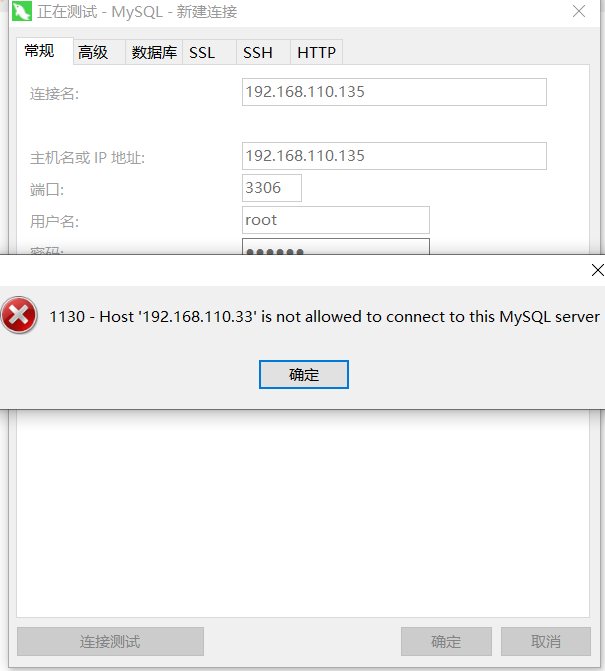
查看当前授予过的权限,如下所示:
 [root@k8s-node3 ~]# mysql -uroot -p123456

 mysql: [Warning] Using a password on the command line interface can be insecure.

 Welcome to the MySQL monitor.  Commands end with ; or \g.

 Your MySQL connection id is

 Server version: 5.7. MySQL Community Server (GPL)

 Copyright (c) , , Oracle and/or its affiliates. All rights reserved.

 Oracle is a registered trademark of Oracle Corporation and/or its

 affiliates. Other names may be trademarks of their respective

 owners.

 Type 'help;' or '\h' for help. Type '\c' to clear the current input statement.

 mysql> use mysql;

 Reading table information for completion of table and column names

 You can turn off this feature to get a quicker startup with -A

 Database changed

 mysql> select user,host from user;

 +---------------+-----------+

 | user          | host      |

 +---------------+-----------+

 | mysql.session | localhost |

 | mysql.sys     | localhost |

 | root          | localhost |

 +---------------+-----------+

  rows in set (0.00 sec)

 mysql> grant all privileges on *.* to root@'%' identified by '';   # 授予root用户远程访问权限。

 Query OK,  rows affected,  warning (0.00 sec)

 mysql> flush privileges;  # 刷新权限,使设置生效。

 Query OK,  rows affected (0.00 sec)

 mysql>
现在可以远程链接服务器上面的mysql数据库,如下所示:
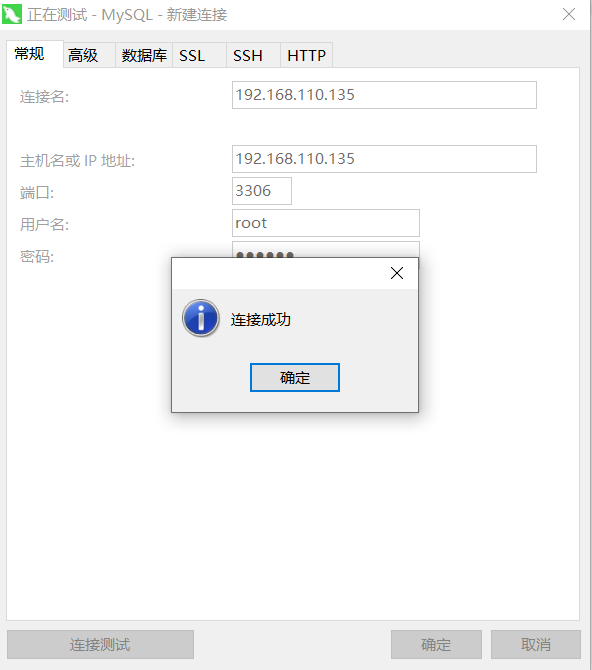
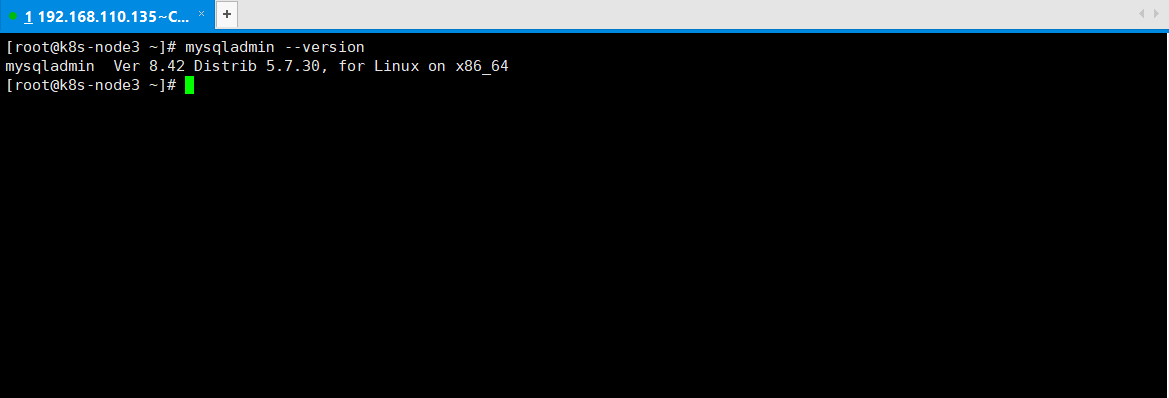
4、验证mysql安装成功,如下所示:
 [root@k8s-node3 ~]# mysqladmin --version

 mysqladmin  Ver 8.42 Distrib 5.7., for Linux on x86_64

 [root@k8s-node3 ~]#
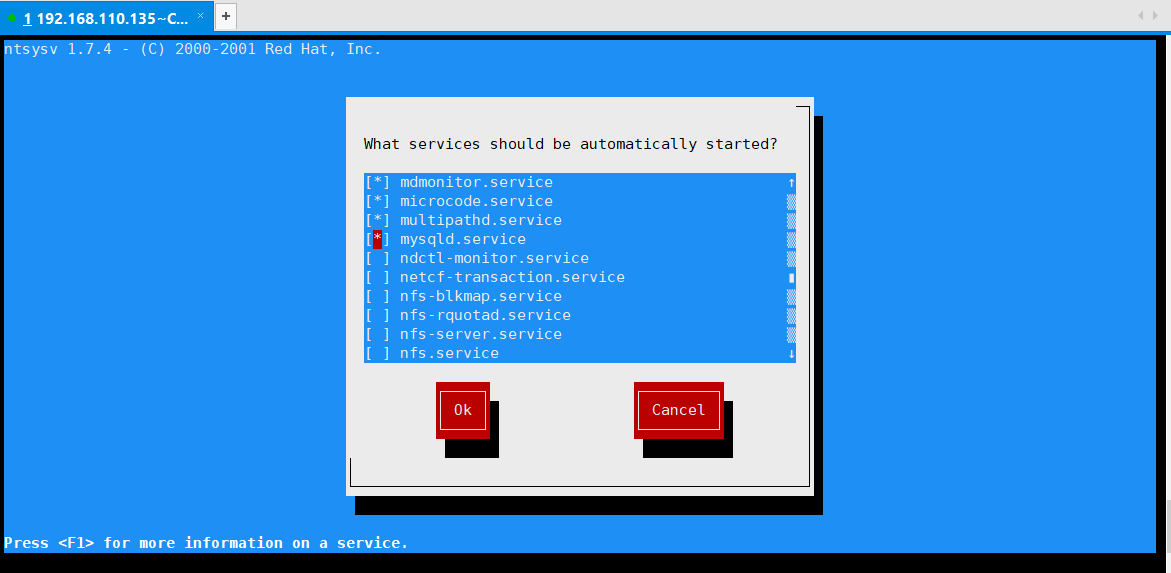
查看mysql检查是否开机自启动,服务前面存在*的是开机自启动的,没有*的是开机不自启动的,如下所示:
 [root@k8s-node3 ~]# ntsysv

 ntsysv 1.7. - (C) - Red Hat, Inc.

                                                                                         ─┐

                                                                                          │

                                         What services should be automatically started?   │

                                                                                          │

                                         [*] mdmonitor.service                          ↑ │

                                         [*] microcode.service                          ? │

                                         [*] multipathd.service                         ? │

                                         [*] mysqld.service                             ? │

                                         [ ] ndctl-monitor.service                      ? │

                                         [ ] netcf-transaction.service                  ? │

                                         [ ] nfs-blkmap.service                         ? │

                                         [ ] nfs-rquotad.service                        ? │

                                         [ ] nfs-server.service                         ? │

                                         [ ] nfs.service                                ↓ │

                                                                                          │

                                                 ┌────┐                ┌────────┐         │

                                                 │ Ok │                │ Cancel │         │

                                                 └────┘                └────────┘         │

                                                                                          │

                                       │                                                  │

                                       └──────────────────────────────────────────────────┘

 Press <F1> for more information on a service.
mysql的核心目录,如下所示:
 1)、/var/lib/mysql,mysql的安装目录。

 2)、/usr/share/mysql/,mysql的配置文件。

 3)、/usr/bin/,mysql的命令目录。

 [root@k8s-node3 ~]# ls /var/lib/mysql

 auto.cnf    client-cert.pem  ibdata1      ibtmp1      mysql.sock.lock     public_key.pem   sys

 ca-key.pem  client-key.pem   ib_logfile0  mysql       performance_schema  server-cert.pem

 ca.pem      ib_buffer_pool   ib_logfile1  mysql.sock  private_key.pem     server-key.pem

 [root@k8s-node3 ~]# ls /usr/share/mysql/

 bulgarian             french                       mysql-log-rotate              romanian

 charsets              german                       mysql_security_commands.sql   russian

 czech                 greek                        mysql_sys_schema.sql          serbian

 danish                hungarian                    mysql_system_tables_data.sql  slovak

 dictionary.txt        innodb_memcached_config.sql  mysql_system_tables.sql       spanish

 dutch                 install_rewriter.sql         mysql_test_data_timezone.sql  swedish

 english               italian                      norwegian                     ukrainian

 errmsg-utf8.txt       japanese                     norwegian-ny                  uninstall_rewriter.sql

 estonian              korean                       polish

 fill_help_tables.sql  magic                        portuguese

 [root@k8s-node3 ~]# ls /usr/bin/
5、查看Mysql的字符集编码,如下所示:
 [root@k8s-node3 ~]# mysql -uroot -p123456

 mysql: [Warning] Using a password on the command line interface can be insecure.

 Welcome to the MySQL monitor.  Commands end with ; or \g.

 Your MySQL connection id is

 Server version: 5.7. MySQL Community Server (GPL)

 Copyright (c) , , Oracle and/or its affiliates. All rights reserved.

 Oracle is a registered trademark of Oracle Corporation and/or its

 affiliates. Other names may be trademarks of their respective

 owners.

 Type 'help;' or '\h' for help. Type '\c' to clear the current input statement.

 mysql> show variables like '%char%';

 +--------------------------------------+----------------------------+

 | Variable_name                        | Value                      |

 +--------------------------------------+----------------------------+

 | character_set_client                 | utf8                       |

 | character_set_connection             | utf8                       |

 | character_set_database               | latin1                     |

 | character_set_filesystem             | binary                     |

 | character_set_results                | utf8                       |

 | character_set_server                 | latin1                     |

 | character_set_system                 | utf8                       |

 | character_sets_dir                   | /usr/share/mysql/charsets/ |

 | validate_password_special_char_count |                           |

 +--------------------------------------+----------------------------+

  rows in set (0.00 sec)

 mysql>
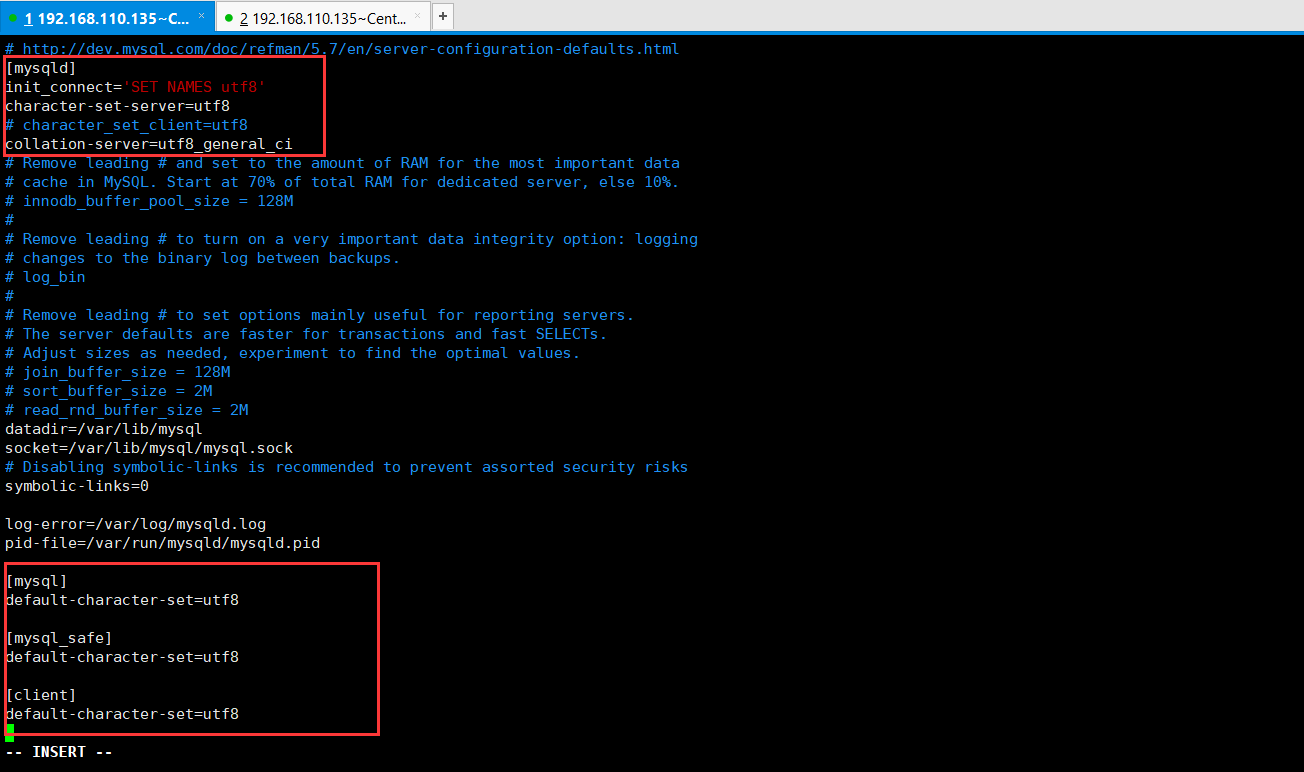
设置字符集编码为utf8格式的,如下所示:
 # For advice on how to change settings please see

 # http://dev.mysql.com/doc/refman/5.7/en/server-configuration-defaults.html

 [mysqld]

 init_connect='SET NAMES utf8'

 character-set-server=utf8

 # character_set_client=utf8

 collation-server=utf8_general_ci

 #

 # Remove leading # and set to the amount of RAM for the most important data

 # cache in MySQL. Start at % of total RAM for dedicated server, else %.

 # innodb_buffer_pool_size = 128M

 #

 # Remove leading # to turn on a very important data integrity option: logging

 # changes to the binary log between backups.

 # log_bin

 #

 # Remove leading # to set options mainly useful for reporting servers.

 # The server defaults are faster for transactions and fast SELECTs.

 # Adjust sizes as needed, experiment to find the optimal values.

 # join_buffer_size = 128M

 # sort_buffer_size = 2M

 # read_rnd_buffer_size = 2M

 datadir=/var/lib/mysql

 socket=/var/lib/mysql/mysql.sock

 # Disabling symbolic-links is recommended to prevent assorted security risks

 symbolic-links=

 log-error=/var/log/mysqld.log

 pid-file=/var/run/mysqld/mysqld.pid

 [mysql]

 default-character-set=utf8

 [mysql_safe]

 default-character-set=utf8

 "my.cnf" 41L, 1192C
修改内容,如下所示:
此时,需要重启mysql的,如下所示:
 [root@k8s-node3 etc]# systemctl restart mysqld.service

 [root@k8s-node3 etc]# systemctl status mysqld.service

 ● mysqld.service - MySQL Server

    Loaded: loaded (/usr/lib/systemd/system/mysqld.service; enabled; vendor preset: disabled)

    Active: active (running) since Wed -- :: CST; 2s ago

      Docs: man:mysqld()

            http://dev.mysql.com/doc/refman/en/using-systemd.html

   Process:  ExecStart=/usr/sbin/mysqld --daemonize --pid-file=/var/run/mysqld/mysqld.pid $MYSQLD_OPTS (code=exited, status=/SUCCESS)

   Process:  ExecStartPre=/usr/bin/mysqld_pre_systemd (code=exited, status=/SUCCESS)

  Main PID:  (mysqld)

     Tasks:

    Memory: 218.8M

    CGroup: /system.slice/mysqld.service

            └─ /usr/sbin/mysqld --daemonize --pid-file=/var/run/mysqld/mysqld.pid

 Jul  :: k8s-node3 systemd[]: Starting MySQL Server...

 Jul  :: k8s-node3 systemd[]: Started MySQL Server.
再次查看字符集编码,如下所示:
 mysql> SHOW VARIABLES LIKE 'character_set_%';

 +--------------------------+----------------------------+

 | Variable_name            | Value                      |

 +--------------------------+----------------------------+

 | character_set_client     | utf8                       |

 | character_set_connection | utf8                       |

 | character_set_database   | utf8                       |

 | character_set_filesystem | binary                     |

 | character_set_results    | utf8                       |

 | character_set_server     | utf8                       |

 | character_set_system     | utf8                       |

 | character_sets_dir       | /usr/share/mysql/charsets/ |

 +--------------------------+----------------------------+

  rows in set (0.01 sec)

 mysql> SHOW VARIABLES LIKE 'collation_%';

 +----------------------+-----------------+

 | Variable_name        | Value           |

 +----------------------+-----------------+

 | collation_connection | utf8_general_ci |

 | collation_database   | utf8_general_ci |

 | collation_server     | utf8_general_ci |

 +----------------------+-----------------+

  rows in set (0.01 sec)

 mysql>
注意,修改字符集编码,只对后面创建的数据库生效,之前创建的数据库字符集还是保持之前的不发生变化。
6、Mysql的命令行清屏命令system clear或者ctrl + L命令,如下所示:
 mysql> system clear

 mysql>
mysql的逻辑分层,分别是连接层、服务层、引擎层、存储层,如下所示:

查看mysql的存储引擎,首先查看mysql支持的引擎,如下所示:
 [root@k8s-node3 ~]# mysql -uroot -p123456

 mysql: [Warning] Using a password on the command line interface can be insecure.

 Welcome to the MySQL monitor.  Commands end with ; or \g.

 Your MySQL connection id is

 Server version: 5.7. MySQL Community Server (GPL)

 Copyright (c) , , Oracle and/or its affiliates. All rights reserved.

 Oracle is a registered trademark of Oracle Corporation and/or its

 affiliates. Other names may be trademarks of their respective

 owners.

 Type 'help;' or '\h' for help. Type '\c' to clear the current input statement.

 mysql> show engines;

 +--------------------+---------+----------------------------------------------------------------+--------------+------+------------+

 | Engine             | Support | Comment                                                        | Transactions | XA   | Savepoints |

 +--------------------+---------+----------------------------------------------------------------+--------------+------+------------+

 | InnoDB             | DEFAULT | Supports transactions, row-level locking, and foreign keys     | YES          | YES  | YES        |

 | MRG_MYISAM         | YES     | Collection of identical MyISAM tables                          | NO           | NO   | NO         |

 | MEMORY             | YES     | Hash based, stored in memory, useful for temporary tables      | NO           | NO   | NO         |

 | BLACKHOLE          | YES     | /dev/null storage engine (anything you write to it disappears) | NO           | NO   | NO         |

 | MyISAM             | YES     | MyISAM storage engine                                          | NO           | NO   | NO         |

 | CSV                | YES     | CSV storage engine                                             | NO           | NO   | NO         |

 | ARCHIVE            | YES     | Archive storage engine                                         | NO           | NO   | NO         |

 | PERFORMANCE_SCHEMA | YES     | Performance Schema                                             | NO           | NO   | NO         |

 | FEDERATED          | NO      | Federated MySQL storage engine                                 | NULL         | NULL | NULL       |

 +--------------------+---------+----------------------------------------------------------------+--------------+------+------------+

  rows in set (0.01 sec)

 mysql>
查看当前Mysql的存储引擎,如下所示:
 mysql> show variables like '%storage_engine%';

 +----------------------------------+--------+

 | Variable_name                    | Value  |

 +----------------------------------+--------+

 | default_storage_engine           | InnoDB |

 | default_tmp_storage_engine       | InnoDB |

 | disabled_storage_engines         |        |

 | internal_tmp_disk_storage_engine | InnoDB |

 +----------------------------------+--------+

  rows in set (0.00 sec)

 mysql>
查看某个数据表使用了什么存储引擎,在显示结果里参数engine后面的就表示该表当前用的存储引擎。
 mysql> show create table user_info;

 +-----------+-------------------------------------------------------------------------------------------------------------------------------------------------------------------------------------------------------------------------------------------------------------------------------------------------------------------------------------------------------------------------------------------------------------------------------------------------------------------------------------------------------------------------------------------------------------------------------------------------------------------------------------------------------------------------------------------------------------------------------------------------------------------------------------------------------------------------------------------------------------------------------------------------------------------------------------------------------+

 | Table     | Create Table                                                                                                                                                                                                                                                                                                                                                                                                                                                                                                                                                                                                                                                                                                                                                                                                                                                                                                                                          |

 +-----------+-------------------------------------------------------------------------------------------------------------------------------------------------------------------------------------------------------------------------------------------------------------------------------------------------------------------------------------------------------------------------------------------------------------------------------------------------------------------------------------------------------------------------------------------------------------------------------------------------------------------------------------------------------------------------------------------------------------------------------------------------------------------------------------------------------------------------------------------------------------------------------------------------------------------------------------------------------+

 | user_info | CREATE TABLE `user_info` (

   `user_id` int() NOT NULL AUTO_INCREMENT COMMENT '用户编号',

   `user_account` varchar() DEFAULT NULL COMMENT '用户账号',

   `user_pw` varchar() DEFAULT NULL COMMENT '用户密码',

   `user_number` varchar() DEFAULT NULL COMMENT '用户手机号',

   `user_name` varchar() DEFAULT NULL COMMENT '用户姓名',

   `user_age` int() DEFAULT NULL COMMENT '用户年龄',

   `user_sex` varchar() DEFAULT NULL COMMENT '用户性别',

   `user_mark` varchar() DEFAULT NULL COMMENT '用户标志',

   `create_time` datetime DEFAULT CURRENT_TIMESTAMP COMMENT '用户创建时间',

   `is_sync` int() DEFAULT '' COMMENT '用户标识',

   `is_money` varchar() DEFAULT NULL COMMENT '是否缴纳押金',

   PRIMARY KEY (`user_id`) USING BTREE,

   KEY `user_id` (`user_id`) USING BTREE

 ) ENGINE=InnoDB AUTO_INCREMENT= DEFAULT CHARSET=utf8 ROW_FORMAT=DYNAMIC COMMENT='用户信息表'                                                       |

 +-----------+-------------------------------------------------------------------------------------------------------------------------------------------------------------------------------------------------------------------------------------------------------------------------------------------------------------------------------------------------------------------------------------------------------------------------------------------------------------------------------------------------------------------------------------------------------------------------------------------------------------------------------------------------------------------------------------------------------------------------------------------------------------------------------------------------------------------------------------------------------------------------------------------------------------------------------------------------------+

  row in set (0.00 sec)

 mysql>
7、mysql的sql优化,原因可能是性能低,执行时间太长,等待时间太长,sql语句欠佳,比如连接查询,索引失效,服务器参数设置不佳。
Sql的编写过程、解析过程,如下所示:
 编写过程:select distinct ... from ... join ... on ... where ... group by ... having ... order by ... limit ...

 解析过程:from ... on ... join ... where ... group by ... having ... select distinct ... order by ... limit ...
SQL优化,主要就是在于优化索引,索引相当于是书的目录。索引,index是帮助Mysql高效获取数据的数据结构,索引是数据结构(树,常见的B树,默认是B树,Hash树)。
索引的弊端,索引本身很大,可以存放在内存或者硬盘中,通常为硬盘。索引不是所有情况均适用的,如果是少量数据不适用。如果是频繁更新的字段不适用。很少使用的列也不适合添加索引。索引会降低增删改的效率,提高查询的效率。
索引的优点,提高查询效率,降低IO使用率,降低CPU使用率,因为B树索引本事就是一个排好序的结构,因此在排序的时候,可以直接使用的。
8、mysql如何进行优化呢,查看使用索引的情况,查询执行计划,explain + SQL语句。
 mysql> explain select * from book_info;

 +----+-------------+-----------+------------+------+---------------+------+---------+------+------+----------+-------+

 | id | select_type | table     | partitions | type | possible_keys | key  | key_len | ref  | rows | filtered | Extra |

 +----+-------------+-----------+------------+------+---------------+------+---------+------+------+----------+-------+

 |   | SIMPLE      | book_info | NULL       | ALL  | NULL          | NULL | NULL    | NULL |    |   100.00 | NULL  |

 +----+-------------+-----------+------------+------+---------------+------+---------+------+------+----------+-------+

  row in set,  warning (0.01 sec)
详细信息介绍,如下所示:
 id :编号

 select_type :查询类型

 table :数据表,指的查询的那张表。

 partitions :

 type :类型

 possible_keys : 预测使用到的索引

 key  :实际使用的索引

 key_len : 实际使用索引的长度

 ref  : 表之间的引用

 rows : 通过索引查询到的数据量

 filtered :

 Extra :额外的信息
8.1、id编号的用法,多表关联查询(备注:多表联查都可以转换为子查询得到想要的结果)特点:
1)、id编号值相同,数据小的表,优先查询。
2)、如果是id编号值不同,id编号值越大越优先查询(执行本质,在嵌套子查询的时候,先查询内层,再查询外层)。
3)、id值有相同,又有不同,id值越大越优先。id值相同从上往下,顺序执行。这里的id编号指定的是explain的查询结果字段id哦。
 mysql> explain

     -> select * from book_info bi,book_sort bs WHERE bi.book_sort_id = bs.book_sort_id and bi.book_name = 'Java';

 +----+-------------+-------+------------+--------+------------------------+-----------+---------+----------------------+------+----------+-------------+

 | id | select_type | table | partitions | type   | possible_keys          | key       | key_len | ref                  | rows | filtered | Extra       |

 +----+-------------+-------+------------+--------+------------------------+-----------+---------+----------------------+------+----------+-------------+

 |   | SIMPLE      | bi    | NULL       | ref    | book_sort_id,book_name | book_name |       | const                |     |   100.00 | Using where |

 |   | SIMPLE      | bs    | NULL       | eq_ref | PRIMARY                | PRIMARY   |        | book.bi.book_sort_id |     |   100.00 | NULL        |

 +----+-------------+-------+------------+--------+------------------------+-----------+---------+----------------------+------+----------+-------------+

  rows in set,  warning (0.00 sec)

 mysql>
 mysql> explain

     -> select * from book_info bi WHERE bi.book_sort_id = (SELECT book_sort_id from book_sort bs WHERE bs.book_sort_name = '自然科学总论')

     -> ;

 +----+-------------+-------+------------+------+---------------+--------------+---------+-------+------+----------+-------------+

 | id | select_type | table | partitions | type | possible_keys | key          | key_len | ref   | rows | filtered | Extra       |

 +----+-------------+-------+------------+------+---------------+--------------+---------+-------+------+----------+-------------+

 |  | PRIMARY     | bi    | NULL       | ref  | book_sort_id  | book_sort_id |        | const |     |   100.00 | Using where |

 |   | SUBQUERY    | bs    | NULL       | ALL  | NULL          | NULL         | NULL    | NULL  |    |    10.00 | Using where |

 +----+-------------+-------+------------+------+---------------+--------------+---------+-------+------+----------+-------------+

  rows in set,  warning (0.00 sec)

 mysql>
8.2)、select_type查询类型的用法,如下所示:
1)、PRIMARY:包含子查询SQL中的主查询,一般是SQL嵌套的最外层。
2)、SUBQUERY:包含子查询SQL中的子查询,一般是SQL嵌套的非最外层。
3)、SIMPLE:简单查询,不包含子查询,不包含union查询。
4)、DERIVED:衍生查询。在查询的时候使用到了临时表。两种情况,第一种是from子查询中只有一张表。第二种是在from子查询中,如果有两张表table1 union table2连接查询,则table1这个左表就是衍生查询。
 mysql> explain

     -> SELECT b.book_name from (SELECT * from book_info WHERE book_name in ('Java') UNION SELECT * from book_info WHERE book_name in ('python') ) b;

 +----+--------------+------------+------------+------+---------------+------+---------+------+------+----------+-----------------+

 | id | select_type  | table      | partitions | type | possible_keys | key  | key_len | ref  | rows | filtered | Extra           |

 +----+--------------+------------+------------+------+---------------+------+---------+------+------+----------+-----------------+

 |   | PRIMARY      | <derived2> | NULL       | ALL  | NULL          | NULL | NULL    | NULL |     |   100.00 | NULL            |

 |  2 | DERIVED      | book_info  | NULL       | ALL  | NULL          | NULL | NULL    | NULL |    |    10.00 | Using where     |

 |   | UNION        | book_info  | NULL       | ALL  | NULL          | NULL | NULL    | NULL |    |    10.00 | Using where     |

 | NULL | UNION RESULT | <union2,3> | NULL       | ALL  | NULL          | NULL | NULL    | NULL | NULL |     NULL | Using temporary |

 +----+--------------+------------+------------+------+---------------+------+---------+------+------+----------+-----------------+

  rows in set,  warning (0.00 sec)

 mysql>
DERIVED代表了衍生表,table的值是derived2代表了是主查询涉及到衍生表,而2代表了指明了id编号是2,代表了衍生了那张表,临时表是从id为2的这个table是book_info来的。
8.3)、type成为索引类型,或者称为类型。system > const > eq_ref > ref > index > all,其中性能由左向右依次降低,但是system、const只是理想状态,实际可以达到的一般是ref、range。
1)、system,只有一条数据的系统表,基本达不到,或者衍生表只有一条数据的主查询,偶尔可以达到。
2)、const,仅仅可以查询到一条数据的sql,并且用于Primary key或者unique索引的时候就是const。必须针对Primary key或者unique索引的时候,与索引类型有关。
3)、eq_ref,唯一性索引,对于每个索引键的查询,返回匹配唯一行数据,唯一的意思是有且只有一个,不能多也不能为0。常见于唯一索引和主键索引。
4)、ref,非唯一性索引,对于每个索引键的查询,返回匹配的所有行(可以是0个或者多个)。
5)、range,检索指定范围的行,具体就是where后面是一个范围查询,比如between and、in、>、<等等。特殊的in有时候会失效,从而转换为无索引All,即in范围查询会导致索引失效,可以将in范围查询放到字段查询的后面。
6)、index,查询全部索引的数据。只需要扫描索引表,不需要扫描全部数据。
7)、all,查询全部表中数据。需要扫描全表,即需要所有表中的所有数据。
 mysql> explain select * from book_info where book_id > ;

 +----+-------------+-----------+------------+-------+---------------+---------+---------+------+------+----------+-------------+

 | id | select_type | table     | partitions | type  | possible_keys | key     | key_len | ref  | rows | filtered | Extra       |

 +----+-------------+-----------+------------+-------+---------------+---------+---------+------+------+----------+-------------+

 |   | SIMPLE      | book_info | NULL       | range | PRIMARY       | PRIMARY |        | NULL |    |   100.00 | Using where |

 +----+-------------+-----------+------------+-------+---------------+---------+---------+------+------+----------+-------------+

  row in set,  warning (0.00 sec)
8.4)、possible_keys,可能用到的索引,是一种预测,不准。
8.5)、key,实际使用到的索引。如果possible_keys或者key为NULL,说明没有使用到索引。
 mysql> explain select * from book_info where book_id > ;

 +----+-------------+-----------+------------+-------+---------------+---------+---------+------+------+----------+-------------+

 | id | select_type | table     | partitions | type  | possible_keys | key     | key_len | ref  | rows | filtered | Extra       |

 +----+-------------+-----------+------------+-------+---------------+---------+---------+------+------+----------+-------------+

 |   | SIMPLE      | book_info | NULL       | range | PRIMARY       | PRIMARY |        | NULL |    |   100.00 | Using where |

 +----+-------------+-----------+------------+-------+---------------+---------+---------+------+------+----------+-------------+

  row in set,  warning (0.00 sec)
8.6)、key_len,索引的长度。作用就是用于判断复合索引是否被完全使用。
1)、utf8中,一个字符占用三个字节。如果索引字段可以为null,则会使用1个字节用于标识。如果是固定长度char就是char(n)中的n乘以三,如果可以为null,再加一即可。
2)、utf8中,一个字符占用三个字节。如果索引字段可以为null,则会使用1个字节用于标识。如果是可变长度varchar,就是varchar(n)中的n乘以三,如果可以为null,再加一,然后varhar是可变长度,然后再加二,用两个字节来表示可变长度。比如book_name是varchar(15),15 * 3 + 1 + 2 = 48。如果是复合索引,book_type是varchar(200),组合book_name是varchar(15),就是200 * 3 + 1 + 2 + 15 * 3 + 1 + 2 = 651。
 mysql> EXPLAIN

     -> SELECT * from book_info WHERE book_name = 'Java' and book_type = '自然科学总论';

 +----+-------------+-----------+------------+------+-----------------------------------------+-----------+---------+-------+------+----------+-------------+

 | id | select_type | table     | partitions | type | possible_keys                           | key       | key_len | ref   | rows | filtered | Extra       |

 +----+-------------+-----------+------------+------+-----------------------------------------+-----------+---------+-------+------+----------+-------------+

 |   | SIMPLE      | book_info | NULL       | ref  | book_type,book_name,book_name_book_type | book_name | 48      | const |     |    12.50 | Using where |

 +----+-------------+-----------+------------+------+-----------------------------------------+-----------+---------+-------+------+----------+-------------+

  row in set,  warning (0.00 sec)

 mysql> EXPLAIN

     -> SELECT * from book_info WHERE book_name = 'Java' and book_type = '自然科学总论';

 +----+-------------+-----------+------------+------+-------------------------------+---------------------+---------+-------------+------+----------+-------+

 | id | select_type | table     | partitions | type | possible_keys                 | key                 | key_len | ref         | rows | filtered | Extra |

 +----+-------------+-----------+------------+------+-------------------------------+---------------------+---------+-------------+------+----------+-------+

 |   | SIMPLE      | book_info | NULL       | ref  | book_type,book_name_book_type | book_name_book_type | 651     | const,const |     |   100.00 | NULL  |

 +----+-------------+-----------+------------+------+-------------------------------+---------------------+---------+-------------+------+----------+-------+

  row in set,  warning (0.00 sec)

 mysql>
注意:utf8是一个字符三个节点,gbk是一个字符两个字节,latin是一个字符一个字节。
8.7)、ref,注意与type中的ref值进行区分,作用是指明当前表所参照的字段。如果是常量,值就是const。
 mysql> EXPLAIN

     -> SELECT bi.* from book_info bi,book_sort bs WHERE bi.book_sort_id = bs.book_sort_id and bi.book_name = 'Java';

 +----+-------------+-------+------------+--------+----------------------------------+---------------------+---------+----------------------+------+----------+-------------+

 | id | select_type | table | partitions | type   | possible_keys                    | key                 | key_len | ref                  | rows | filtered | Extra       |

 +----+-------------+-------+------------+--------+----------------------------------+---------------------+---------+----------------------+------+----------+-------------+

 |   | SIMPLE      | bi    | NULL       | ref    | book_sort_id,book_name_book_type | book_name_book_type |       | const                |     |   100.00 | Using where |

 |   | SIMPLE      | bs    | NULL       | eq_ref | PRIMARY                          | PRIMARY             |        | book.bi.book_sort_id |     |   100.00 | Using index |

 +----+-------------+-------+------------+--------+----------------------------------+---------------------+---------+----------------------+------+----------+-------------+

  rows in set,  warning (0.00 sec)

 mysql>

8.8)、rows,被索引优化查询的数据个数。
 mysql> EXPLAIN

     -> SELECT bi.* from book_info bi,book_sort bs WHERE bi.book_sort_id = bs.book_sort_id and bi.book_name = 'Java';

 +----+-------------+-------+------------+--------+----------------------------------+---------------------+---------+----------------------+------+----------+-------------+

 | id | select_type | table | partitions | type   | possible_keys                    | key                 | key_len | ref                  | rows | filtered | Extra       |

 +----+-------------+-------+------------+--------+----------------------------------+---------------------+---------+----------------------+------+----------+-------------+

 |   | SIMPLE      | bi    | NULL       | ref    | book_sort_id,book_name_book_type | book_name_book_type |       | const                |    1 |   100.00 | Using where |

 |   | SIMPLE      | bs    | NULL       | eq_ref | PRIMARY                          | PRIMARY             |        | book.bi.book_sort_id |    1 |   100.00 | Using index |

 +----+-------------+-------+------------+--------+----------------------------------+---------------------+---------+----------------------+------+----------+-------------+

  rows in set,  warning (0.00 sec)
8.9)、Extra,就是额外的,剩下的意思,常见的有using filesort(出现这种情况要避免)、Using temporary(出现这种情况要避免)、Using where、Using index。
1)、using filesort:表示性能低,消耗比较大,当前的sql语句需要额外的一次排序查询。理解起来就是先根据这个字段查询,然后根据这个字段排序。如果是先根据一个字段查询,根据另外一个字段排序,那么当前的sql语句需要额外的一次排序查询。常见于order by语句中。
 mysql> SELECT * from book_info WHERE book_name = 'Java' ORDER BY book_name;

 +---------+--------------+-----------+-------------+------------+--------------------+-----------------+----------+-----------+---------------------+------------+-------------------------------------+

 | book_id | book_sort_id | book_name | book_author | book_price | book_type          | book_publish    | book_sum | book_mark | create_time         | book_money | book_desc                           |

 +---------+--------------+-----------+-------------+------------+--------------------+-----------------+----------+-----------+---------------------+------------+-------------------------------------+

 |        |            | Java      | 别先生      |      29.90 | 自然科学总论       | 科学出版社      |         | NULL      | -- :: |     199.00 | <p>Java大神如何练成的?</p>         |

 +---------+--------------+-----------+-------------+------------+--------------------+-----------------+----------+-----------+---------------------+------------+-------------------------------------+

  row in set (0.00 sec)

 mysql> EXPLAIN

     -> SELECT * from book_info WHERE book_name = 'Java' ORDER BY book_author;

 +----+-------------+-----------+------------+------+---------------------+---------------------+---------+-------+------+----------+---------------------------------------+

 | id | select_type | table     | partitions | type | possible_keys       | key                 | key_len | ref   | rows | filtered | Extra                                 |

 +----+-------------+-----------+------------+------+---------------------+---------------------+---------+-------+------+----------+---------------------------------------+

 |   | SIMPLE      | book_info | NULL       | ref  | book_name_book_type | book_name_book_type |       | const |     |   100.00 | Using index condition; Using filesort |

 +----+-------------+-----------+------------+------+---------------------+---------------------+---------+-------+------+----------+---------------------------------------+

  row in set,  warning (0.00 sec)

 mysql>
总结:对于单索引,如果排序和查找是同一字段,则不会出现using filesort,如果排序和查找不是同一字段,则会出现using filesort。
对于复合索引,不能跨列(最佳左前缀,即从左到右依次使用,不能跨列使用,比如三个字段的索引,不能跨过第二个索引)。where和order by按照复合索引的顺序使用,不要跨列或者无序使用。
 mysql> EXPLAIN

     -> SELECT * from book_info WHERE book_name = 'Java' ORDER BY book_author;

 +----+-------------+-----------+------------+------+---------------------------------+---------------------------------+---------+-------+------+----------+---------------------------------------+

 | id | select_type | table     | partitions | type | possible_keys                   | key                             | key_len | ref   | rows | filtered | Extra                                 |

 +----+-------------+-----------+------------+------+---------------------------------+---------------------------------+---------+-------+------+----------+---------------------------------------+

 |   | SIMPLE      | book_info | NULL       | ref  | book_name_book_type_book_author | book_name_book_type_book_author |       | const |     |   100.00 | Using index condition; Using filesort |

 +----+-------------+-----------+------------+------+---------------------------------+---------------------------------+---------+-------+------+----------+---------------------------------------+

  row in set,  warning (0.00 sec)

 mysql> EXPLAIN

     -> SELECT * from book_info WHERE book_name = 'Java' ORDER BY book_type;

 +----+-------------+-----------+------------+------+---------------------------------+---------------------------------+---------+-------+------+----------+-----------------------+

 | id | select_type | table     | partitions | type | possible_keys                   | key                             | key_len | ref   | rows | filtered | Extra                 |

 +----+-------------+-----------+------------+------+---------------------------------+---------------------------------+---------+-------+------+----------+-----------------------+

 |   | SIMPLE      | book_info | NULL       | ref  | book_name_book_type_book_author | book_name_book_type_book_author |       | const |     |   100.00 | Using index condition |

 +----+-------------+-----------+------------+------+---------------------------------+---------------------------------+---------+-------+------+----------+-----------------------+

  row in set,  warning (0.00 sec)

 mysql>
2)、Using temporary:性能损耗大,用到了临时表。一般出现在group by的语句中。如何避免?查询那些列,就根据那些列进行group by进行分组。出现的原因就是已经有表了,但是不使用,必须再来一张临时表进行分组查询出结果。
 mysql> EXPLAIN

     -> SELECT book_name from book_info WHERE book_name = 'Java' GROUP BY book_name;

 +----+-------------+-----------+------------+------+---------------------------------+---------------------------------+---------+-------+------+----------+-------------+

 | id | select_type | table     | partitions | type | possible_keys                   | key                             | key_len | ref   | rows | filtered | Extra       |

 +----+-------------+-----------+------------+------+---------------------------------+---------------------------------+---------+-------+------+----------+-------------+

 |   | SIMPLE      | book_info | NULL       | ref  | book_name_book_type_book_author | book_name_book_type_book_author |       | const |     |   100.00 | Using index |

 +----+-------------+-----------+------------+------+---------------------------------+---------------------------------+---------+-------+------+----------+-------------+

  row in set,  warning (0.00 sec)

 mysql> EXPLAIN

     -> SELECT book_name from book_info WHERE book_name = 'Java' GROUP BY book_publish;

 +----+-------------+-----------+------------+------+---------------------------------+---------------------------------+---------+-------+------+----------+--------------------------------------------------------+

 | id | select_type | table     | partitions | type | possible_keys                   | key                             | key_len | ref   | rows | filtered | Extra                                                  |

 +----+-------------+-----------+------------+------+---------------------------------+---------------------------------+---------+-------+------+----------+--------------------------------------------------------+

 |   | SIMPLE      | book_info | NULL       | ref  | book_name_book_type_book_author | book_name_book_type_book_author |       | const |     |   100.00 | Using index condition; Using temporary; Using filesort |

 +----+-------------+-----------+------------+------+---------------------------------+---------------------------------+---------+-------+------+----------+--------------------------------------------------------+

  row in set,  warning (0.00 sec)

 mysql>
重点,解析过程:from ... on ... join ... where ... group by ... having ... select distinct ... order by ... limit ...
3)、Using index:表示性能提升了,意思是索引覆盖,原因在于不读取原文件,只从索引文件中获取数据,不需要回表查询。只要使用到的列全部都在索引中,就是索引覆盖Using index。只要使用到的列不都在索引中,就不会出现索引覆盖Using index。
 mysql> EXPLAIN

     -> SELECT book_name from book_info WHERE book_name = 'Java';

 +----+-------------+-----------+------------+------+---------------------------------+---------------------------------+---------+-------+------+----------+-------------+

 | id | select_type | table     | partitions | type | possible_keys                   | key                             | key_len | ref   | rows | filtered | Extra       |

 +----+-------------+-----------+------------+------+---------------------------------+---------------------------------+---------+-------+------+----------+-------------+

 |   | SIMPLE      | book_info | NULL       | ref  | book_name_book_type_book_author | book_name_book_type_book_author |       | const |     |   100.00 | Using index |

 +----+-------------+-----------+------------+------+---------------------------------+---------------------------------+---------+-------+------+----------+-------------+

  row in set,  warning (0.00 sec)

 mysql> EXPLAIN

     -> SELECT book_name from book_info WHERE book_name = 'Java' or book_type = '自然科学总论';

 +----+-------------+-----------+------------+-------+-------------------------------------------+---------------------------------+---------+------+------+----------+--------------------------+

 | id | select_type | table     | partitions | type  | possible_keys                             | key                             | key_len | ref  | rows | filtered | Extra                    |

 +----+-------------+-----------+------------+-------+-------------------------------------------+---------------------------------+---------+------+------+----------+--------------------------+

 |   | SIMPLE      | book_info | NULL       | index | book_type,book_name_book_type_book_author | book_name_book_type_book_author |      | NULL |    |    19.00 | Using where; Using index |

 +----+-------------+-----------+------------+-------+-------------------------------------------+---------------------------------+---------+------+------+----------+--------------------------+

  row in set,  warning (0.00 sec)

 mysql> EXPLAIN

     -> SELECT book_name from book_info WHERE book_type = '自然科学总论' or book_name = 'Java'  ;

 +----+-------------+-----------+------------+-------+-------------------------------------------+---------------------------------+---------+------+------+----------+--------------------------+

 | id | select_type | table     | partitions | type  | possible_keys                             | key                             | key_len | ref  | rows | filtered | Extra                    |

 +----+-------------+-----------+------------+-------+-------------------------------------------+---------------------------------+---------+------+------+----------+--------------------------+

 |   | SIMPLE      | book_info | NULL       | index | book_type,book_name_book_type_book_author | book_name_book_type_book_author |      | NULL |    |    19.00 | Using where; Using index |

 +----+-------------+-----------+------------+-------+-------------------------------------------+---------------------------------+---------+------+------+----------+--------------------------+

  row in set,  warning (0.00 sec)

 mysql>
如果用到了索引覆盖,索引覆盖Using index会对possible_keys、key造成影响,如果没有where,则索引只出现在key中,如果有where,则索引出现在key和possible_keys中。
 mysql> EXPLAIN SELECT book_name from book_info;

 +----+-------------+-----------+------------+-------+---------------+-----------------------+---------+------+------+----------+-------------+

 | id | select_type | table     | partitions | type  | possible_keys | key                   | key_len | ref  | rows | filtered | Extra       |

 +----+-------------+-----------+------------+-------+---------------+-----------------------+---------+------+------+----------+-------------+

 |   | SIMPLE      | book_info | NULL       | index | NULL          | book_name_book_author |       | NULL |    |   100.00 | Using index |

 +----+-------------+-----------+------------+-------+---------------+-----------------------+---------+------+------+----------+-------------+

  row in set,  warning (0.00 sec)

 mysql> EXPLAIN SELECT book_name from book_info WHERE book_name = '自然科学总论';

 +----+-------------+-----------+------------+------+-----------------------+-----------------------+---------+-------+------+----------+-------------+

 | id | select_type | table     | partitions | type | possible_keys         | key                   | key_len | ref   | rows | filtered | Extra       |

 +----+-------------+-----------+------------+------+-----------------------+-----------------------+---------+-------+------+----------+-------------+

 |   | SIMPLE      | book_info | NULL       | ref  | book_name_book_author | book_name_book_author |       | const |     |   100.00 | Using index |

 +----+-------------+-----------+------------+------+-----------------------+-----------------------+---------+-------+------+----------+-------------+

  row in set,  warning (0.00 sec)

 mysql>
4)、Using where:表示需要从原表中查询。即需要回表查询的。
 mysql> EXPLAIN

     -> SELECT book_name,book_type from book_info WHERE book_type = 'Java' ;

 +----+-------------+-----------+------------+------+---------------+------+---------+------+------+----------+-------------+

 | id | select_type | table     | partitions | type | possible_keys | key  | key_len | ref  | rows | filtered | Extra       |

 +----+-------------+-----------+------------+------+---------------+------+---------+------+------+----------+-------------+

 |   | SIMPLE      | book_info | NULL       | ALL  | NULL          | NULL | NULL    | NULL |    |    10.00 | Using where |

 +----+-------------+-----------+------------+------+---------------+------+---------+------+------+----------+-------------+

  row in set,  warning (0.01 sec)

 mysql>
5)、impossibal where,where子句永远为false。
 mysql> EXPLAIN

     -> SELECT book_name,book_type from book_info WHERE book_type = 'Java' AND book_type = 'Python' ;

 +----+-------------+-------+------------+------+---------------+------+---------+------+------+----------+------------------+

 | id | select_type | table | partitions | type | possible_keys | key  | key_len | ref  | rows | filtered | Extra            |

 +----+-------------+-------+------------+------+---------------+------+---------+------+------+----------+------------------+

 |   | SIMPLE      | NULL  | NULL       | NULL | NULL          | NULL | NULL    | NULL | NULL |     NULL | Impossible WHERE |

 +----+-------------+-------+------------+------+---------------+------+---------+------+------+----------+------------------+

  row in set,  warning (0.01 sec)

 mysql>
条件字段的顺序最好和组合索引的顺序一致,如果不一致,SQL优化器可以会对sql进行优化,使用到索引,但是强烈推荐保持条件字段顺序和组合索引顺序一致。如果复合索引和使用的顺序一致(且不跨列使用),则复合索引全部使用,如果部分一致,则使用部分索引。
9、mysql的单表索引优化案例,如下所示:
 SET NAMES utf8mb4;

 SET FOREIGN_KEY_CHECKS = ;

 -- ----------------------------

 -- Table structure for user_info

 -- ----------------------------

 DROP TABLE IF EXISTS `user_info`;

 CREATE TABLE `user_info`  (

   `user_id` int() NOT NULL AUTO_INCREMENT COMMENT '用户编号',

   `user_account` varchar() CHARACTER SET utf8 COLLATE utf8_general_ci DEFAULT NULL COMMENT '用户账号',

   `user_pw` varchar() CHARACTER SET utf8 COLLATE utf8_general_ci DEFAULT NULL COMMENT '用户密码',

   `user_number` varchar() CHARACTER SET utf8 COLLATE utf8_general_ci DEFAULT NULL COMMENT '用户手机号',

   `user_name` varchar() CHARACTER SET utf8 COLLATE utf8_general_ci DEFAULT NULL COMMENT '用户姓名',

   `user_age` int() DEFAULT NULL COMMENT '用户年龄',

   `user_sex` varchar() CHARACTER SET utf8 COLLATE utf8_general_ci DEFAULT NULL COMMENT '用户性别',

   `user_mark` varchar() CHARACTER SET utf8 COLLATE utf8_general_ci DEFAULT NULL COMMENT '用户标志',

   `create_time` datetime() DEFAULT CURRENT_TIMESTAMP COMMENT '用户创建时间',

   `is_sync` int() DEFAULT  COMMENT '用户标识',

   `is_money` varchar() CHARACTER SET utf8 COLLATE utf8_general_ci DEFAULT NULL COMMENT '是否缴纳押金',

   PRIMARY KEY (`user_id`) USING BTREE

 ) ENGINE = InnoDB AUTO_INCREMENT =  CHARACTER SET = utf8 COLLATE = utf8_general_ci COMMENT = '用户信息表' ROW_FORMAT = Dynamic;

 SET FOREIGN_KEY_CHECKS = ;
索引一旦进行升级优化,需要将之前废弃的索引删除掉,防止干扰。
首先进行需求查询,如下所示:
 mysql> EXPLAIN

     -> SELECT user_account from user_info WHERE user_age in (,) and user_name = '小别同志' ORDER BY user_age

     -> ;

 +----+-------------+-----------+------------+------+---------------+------+---------+------+------+----------+-----------------------------+

 | id | select_type | table     | partitions | type | possible_keys | key  | key_len | ref  | rows | filtered | Extra                       |

 +----+-------------+-----------+------------+------+---------------+------+---------+------+------+----------+-----------------------------+

 |   | SIMPLE      | user_info | NULL       | ALL  | NULL          | NULL | NULL    | NULL |    |     4.76 | Using where; Using filesort |

 +----+-------------+-----------+------------+------+---------------+------+---------+------+------+----------+-----------------------------+

  row in set,  warning (0.00 sec)

 mysql>
很明显是没有使用到索引的,那么如何才能进行优化呢。需要注意的是,需要根据sql实际解析的顺序,来调整索引的顺序。
 编写过程:select distinct ... from ... join ... on ... where ... group by ... having ... order by ... limit ...

 解析过程:from ... on ... join ... where ... group by ... having ... select distinct ... order by ... limit ...
如果索引顺序是这样的`user_age`, `user_name`, `user_account`,那么查询的时候是使用了索引的,符合sql的解析过程,首先是where后面的字段,然后才是select后面的字段。
INDEX `user_age_name_account`(`user_age`, `user_name`, `user_account`) USING BTREE
 mysql> EXPLAIN

     -> SELECT user_account from user_info WHERE user_age in (,) and user_name = '小别同志' ORDER BY user_age;

 +----+-------------+-----------+------------+-------+-----------------------+-----------------------+---------+------+------+----------+--------------------------+

 | id | select_type | table     | partitions | type  | possible_keys         | key                   | key_len | ref  | rows | filtered | Extra                    |

 +----+-------------+-----------+------------+-------+-----------------------+-----------------------+---------+------+------+----------+--------------------------+

 |   | SIMPLE      | user_info | NULL       | range | user_age_name_account | user_age_name_account |       | NULL |    2 |   100.00 | Using where; Using index |

 +----+-------------+-----------+------------+-------+-----------------------+-----------------------+---------+------+------+----------+--------------------------+

  row in set,  warning (0.00 sec)

 mysql>
如果是查询出所有的字段,就没有进行回表查询的,如下所示:
 mysql> explain SELECT * from user_info WHERE user_age in (,) and user_name = '小别同志' ORDER BY user_age;

 +----+-------------+-----------+------------+-------+-----------------------+-----------------------+---------+------+------+----------+-----------------------+

 | id | select_type | table     | partitions | type  | possible_keys         | key                   | key_len | ref  | rows | filtered | Extra                 |

 +----+-------------+-----------+------------+-------+-----------------------+-----------------------+---------+------+------+----------+-----------------------+

 |   | SIMPLE      | user_info | NULL       | range | user_age_name_account | user_age_name_account |       | NULL |     |   100.00 | Using index condition |

 +----+-------------+-----------+------------+-------+-----------------------+-----------------------+---------+------+------+----------+-----------------------+

  row in set,  warning (0.00 sec)

 mysql>
索引一旦进行升级优化,需要将之前废弃的索引删除掉,防止干扰。
如果索引顺序是这样的`user_account`, `user_age`, `user_name`,也使用到了索引,但是进行了Using filesort,查询行数rows由2变成了21,效率下降了。
INDEX `user_account_age_name`(`user_account`, `user_age`, `user_name`) USING BTREE
 mysql> EXPLAIN

     -> SELECT user_account from user_info WHERE user_age in (,) and user_name = '小别同志' ORDER BY user_age;

 +----+-------------+-----------+------------+-------+---------------+-----------------------+---------+------+------+----------+------------------------------------------+

 | id | select_type | table     | partitions | type  | possible_keys | key                   | key_len | ref  | rows | filtered | Extra                                    |

 +----+-------------+-----------+------------+-------+---------------+-----------------------+---------+------+------+----------+------------------------------------------+

 |   | SIMPLE      | user_info | NULL       | index | NULL          | user_account_age_name |       | NULL |   21 |     4.76 | Using where; Using index; Using filesort |

 +----+-------------+-----------+------------+-------+---------------+-----------------------+---------+------+------+----------+------------------------------------------+

  row in set,  warning (0.00 sec)

 mysql>
索引级别type最好达到ref或者range级别的,可以再次进行优化,这里效果不明显,但是in的范围查询可能会导致索引失效,最好放到后面,如下所示:
 mysql> EXPLAIN

     -> SELECT user_account from user_info WHERE  user_name = '小别同志' and user_age in (,)  ORDER BY user_age;

 +----+-------------+-----------+------------+-------+-----------------------+-----------------------+---------+------+------+----------+--------------------------+

 | id | select_type | table     | partitions | type  | possible_keys         | key                   | key_len | ref  | rows | filtered | Extra                    |

 +----+-------------+-----------+------------+-------+-----------------------+-----------------------+---------+------+------+----------+--------------------------+

 |   | SIMPLE      | user_info | NULL       | range | user_age_name_account | user_age_name_account |       | NULL |     |   100.00 | Using where; Using index |

 +----+-------------+-----------+------------+-------+-----------------------+-----------------------+---------+------+------+----------+--------------------------+

  row in set,  warning (0.00 sec)

 mysql>
总结:mysql的索引不能跨列使用即跳过中间的索引字段(最佳左前缀),保持索引的定义和使用的顺序一致性。索引需要逐步进行优化,将含In的范围查询放到where条件的最后,防止失效,如果失效了就需要回原表进行查询了。
此案例中同时出现了Using where需要回原表查询,Using index不需要回原表查询,是因为in范围查询可能会导致索引失效就需要回原表进行查询了,如果where后面的字段在索引中就不需要回原表,可以在索引表中查询到。
 mysql> EXPLAIN  SELECT user_account from user_info WHERE  user_name = '小别同志' and user_age =23  ORDER BY user_age;

 +----+-------------+-----------+------------+------+-----------------------+-----------------------+---------+-------------+------+----------+-------------+

 | id | select_type | table     | partitions | type | possible_keys         | key                   | key_len | ref         | rows | filtered | Extra       |

 +----+-------------+-----------+------------+------+-----------------------+-----------------------+---------+-------------+------+----------+-------------+

 |   | SIMPLE      | user_info | NULL       | ref  | user_name_age_account | user_name_age_account |       | const,const |     |   100.00 | Using index |

 +----+-------------+-----------+------------+------+-----------------------+-----------------------+---------+-------------+------+----------+-------------+

  row in set,  warning (0.00 sec)

 mysql>
10、mysql的双表索引优化案例,如下所示:
 SET NAMES utf8mb4;

 SET FOREIGN_KEY_CHECKS = ;

 -- ----------------------------

 -- Table structure for book_info

 -- ----------------------------

 DROP TABLE IF EXISTS `book_info`;

 CREATE TABLE `book_info`  (

   `book_id` int() NOT NULL COMMENT '图书编号',

   `book_sort_id` int() DEFAULT NULL COMMENT '图书类型编号',

   `book_name` varchar() CHARACTER SET utf8 COLLATE utf8_general_ci DEFAULT NULL COMMENT '图书名称',

   `book_author` varchar() CHARACTER SET utf8 COLLATE utf8_general_ci DEFAULT NULL COMMENT '图书作者',

   `book_price` decimal(, ) DEFAULT NULL COMMENT '图书价格',

   `book_type` varchar() CHARACTER SET utf8 COLLATE utf8_general_ci DEFAULT NULL COMMENT '图书类型',

   `book_publish` varchar() CHARACTER SET utf8 COLLATE utf8_general_ci DEFAULT NULL COMMENT '图书出版社',

   `book_sum` int() DEFAULT NULL COMMENT '图书数量',

   `book_mark` varchar() CHARACTER SET utf8 COLLATE utf8_general_ci DEFAULT NULL COMMENT '图书标识',

   `create_time` datetime() DEFAULT CURRENT_TIMESTAMP COMMENT '图书创建时间',

   `book_money` decimal(, ) DEFAULT NULL COMMENT '图书租金',

   `book_desc` text CHARACTER SET utf8 COLLATE utf8_general_ci COMMENT '图书说明'

 ) ENGINE = InnoDB CHARACTER SET = utf8 COLLATE = utf8_general_ci COMMENT = '图书信息表' ROW_FORMAT = Dynamic;

 -- ----------------------------

 -- Table structure for book_sort

 -- ----------------------------

 DROP TABLE IF EXISTS `book_sort`;

 CREATE TABLE `book_sort`  (

   `book_sort_id` int() NOT NULL COMMENT '图书类别编号',

   `book_sort_name` varchar() CHARACTER SET utf8 COLLATE utf8_general_ci DEFAULT NULL COMMENT '图书类别名称',

   `book_sort_extend` varchar() CHARACTER SET utf8 COLLATE utf8_general_ci DEFAULT NULL COMMENT '图书类别扩展信息',

   `book_sort_mark` varchar() CHARACTER SET utf8 COLLATE utf8_general_ci DEFAULT NULL COMMENT '图书类别标识',

   `create_time` datetime() DEFAULT CURRENT_TIMESTAMP COMMENT '创建时间'

 ) ENGINE = InnoDB CHARACTER SET = utf8 COLLATE = utf8_general_ci COMMENT = '图书类别表' ROW_FORMAT = Dynamic;

 SET FOREIGN_KEY_CHECKS = ;
两张表组合查询,进行左外关联,如下所示:
Using join buffer (Block Nested Loop),extra中的一个选项,作用就是mysql的引擎使用了连接缓存,其实就是你的sql太差了,mysql给你添加了一个缓存。
 mysql> EXPLAIN

     -> SELECT * from book_info bi LEFT OUTER JOIN book_sort bs ON bi.book_sort_id = bs.book_sort_id WHERE bi.book_name = 'Java';

 +----+-------------+-------+------------+------+---------------+------+---------+------+------+----------+----------------------------------------------------+

 | id | select_type | table | partitions | type | possible_keys | key  | key_len | ref  | rows | filtered | Extra                                              |

 +----+-------------+-------+------------+------+---------------+------+---------+------+------+----------+----------------------------------------------------+

 |   | SIMPLE      | bi    | NULL       | ALL  | NULL          | NULL | NULL    | NULL |    |    10.00 | Using where                                        |

 |   | SIMPLE      | bs    | NULL       | ALL  | NULL          | NULL | NULL    | NULL |     |   100.00 | Using where; Using join buffer (Block Nested Loop) |

 +----+-------------+-------+------------+------+---------------+------+---------+------+------+----------+----------------------------------------------------+

  rows in set,  warning (0.01 sec)

 mysql>
对于两张表的关联查询,索引向那张表加呢,这里有一个原则,叫做小表驱动大表,即where后面跟的是,小表放左边,大表放右表。索引建立到经常使用的字段上。一般情况下,对于左外连接,给左表加索引,右外连接给右表加索引。
此时可以将左表的查询字段添加上索引,增加查询速度。
 mysql> EXPLAIN

     -> SELECT * from book_info bi LEFT OUTER JOIN book_sort bs ON bi.book_sort_id = bs.book_sort_id WHERE bi.book_name = 'Java';

 +----+-------------+-------+------------+------+---------------+-----------+---------+-------+------+----------+----------------------------------------------------+

 | id | select_type | table | partitions | type | possible_keys | key       | key_len | ref   | rows | filtered | Extra                                              |

 +----+-------------+-------+------------+------+---------------+-----------+---------+-------+------+----------+----------------------------------------------------+

 |   | SIMPLE      | bi    | NULL       | ref  | book_name     | book_name |       | const |     |   100.00 | NULL                                               |

 |   | SIMPLE      | bs    | NULL       | ALL  | NULL          | NULL      | NULL    | NULL  |    |   100.00 | Using where; Using join buffer (Block Nested Loop) |

 +----+-------------+-------+------------+------+---------------+-----------+---------+-------+------+----------+----------------------------------------------------+

  rows in set,  warning (0.00 sec)

 mysql>

 mysql>
如果此时右表的book_sort_id添加主键索引,此时两条都使用了索引查询,增加了查询效率,如下所示:
 mysql> EXPLAIN

     -> SELECT * from book_info bi LEFT OUTER JOIN book_sort bs ON bi.book_sort_id = bs.book_sort_id WHERE bi.book_name = 'Java';

 +----+-------------+-------+------------+--------+---------------+-----------+---------+----------------------+------+----------+-------+

 | id | select_type | table | partitions | type   | possible_keys | key       | key_len | ref                  | rows | filtered | Extra |

 +----+-------------+-------+------------+--------+---------------+-----------+---------+----------------------+------+----------+-------+

 |   | SIMPLE      | bi    | NULL       | ref    | book_name     | book_name |       | const                |     |   100.00 | NULL  |

 |   | SIMPLE      | bs    | NULL       | eq_ref | PRIMARY       | PRIMARY   |        | book.bi.book_sort_id |     |   100.00 | NULL  |

 +----+-------------+-------+------------+--------+---------------+-----------+---------+----------------------+------+----------+-------+

  rows in set,  warning (0.01 sec)

 mysql>
11、避免mysql索引失效的一些原则。sql优化,是一种概率层面的优化,至于是否实际使用了我们的优化,需要通过explain进行推测。索引优化,是一个大部分情况适用的结论,但是由于SQL优化器等原因,该结论不是100%正确的。
1)、复合索引的时候不要跨列或者无序使用(最佳左前缀原则)。复合索引,尽量使用全索引匹配。对于复合索引,如果前面的字段索引失效,后面的字段索引就失效了。
2)、不要在索引上进行任何操作(进行计算,函数,类型转换),否则索引失效。
3)、复合索引不能使用不等于(!= 或者 <>)或者is null(is not null),否则自身以及右侧所有全部失效。复合索引中如果有>大于号,则自身和右侧索引全部失效。一般而言,范围查询>、<、in之后的索引失效。
4)、like尽量以"常量"开头,不要以'%'开头,可以将%加到常量的后面,否则索引失效。如果非要以%开头,可以使用索引覆盖,即模糊查询的字段作为查询出的字段,不用回表查询。
5)、尽量不要使用类型转换(显式转换、隐式转换),否则都会使索引失效。
6)、尽量不要使用or,否则索引失效。会将or左侧的索引失效了。
7)、对于exist和in,如果主查询的数据集大,则使用In,此时In的效率高些。如果子查询的数据集大,则使用exist,此时exist的效率高些。exist的含义就是将主查询的结果,放到子查询的结果中进行校验(看子查询是否有数据,如果有数据,则校验成功),如果复合校验,则保留数据。
8)、order by优化,using filesort有两种算法,双路排序、单路排序(根据IO的次数)。Mysql4.1之前默认使用的是双路排序,Mysql4.1之后使用的是单路排序。双路就是两次IO,会扫描两次磁盘,第一次从磁盘读取排序字段,对排序字段进行排序,第二次扫描其他字段,IO消耗性能。单路排序只读取一次,这一次就是全部的字段,在buffer中进行排序,但是单路排序,会有一定的隐患,不一定是真的一次IO,有可能是多次IO,如果数据量特别大,则无法将所有字段的数据一次性读取完毕,因此会进行分片读取。注意,单路排序会比双路排序占用更多的buffer,单路排序在使用的时候,如果数据量过大,可以考虑调大buffer的容量大小,set max_length_for_sort_data=1024,单位是字节。如果max_length_for_sort_data值太低,则mysql会自动从单路切换到双路,太低的条件是需要排序的列的总大小超过了max_length_for_sort_data定义的字节数。
总结:提高order by查询的策略,可以选择使用单路,双路,调整buffer的容量大小。避免select *的查询,只查询出需要的字段即可。复合索引,不要跨列使用,避免出现using filesort。保证全部的排序字段排序的一致性,都是升序排序或者都是降序排列。
12、mysql的慢查询日志,mysql提供的一种日志记录,用于记录mysql中响应时间超过阈值的sql语句long_query_time,默认是10秒。慢查询日志默认是关闭的,建议,在开发调优的时候打开,项目上线关闭即可。
检查是否开启了慢查询日志,如下所示:
 mysql> show variables like '%slow_query_log%';

 +---------------------+-----------------------------------+

 | Variable_name       | Value                             |

 +---------------------+-----------------------------------+

 | slow_query_log      | OFF                               |

 | slow_query_log_file | /var/lib/mysql/k8s-node3-slow.log |

 +---------------------+-----------------------------------+

  rows in set (0.00 sec)

 mysql>
开启mysql的慢查询日志,临时开启,重启mysql就关闭mysql的慢查询了,在内存中开启,如下所示:
 mysql> set global slow_query_log = ;

 Query OK,  rows affected (0.02 sec)

 mysql> show variables like '%slow_query_log%';

 +---------------------+-----------------------------------+

 | Variable_name       | Value                             |

 +---------------------+-----------------------------------+

 | slow_query_log      | ON                                |

 | slow_query_log_file | /var/lib/mysql/k8s-node3-slow.log |

 +---------------------+-----------------------------------+

  rows in set (0.01 sec)

 mysql>
开启mysql的慢查询日志,永久开启,修改配置文件/etc/my.cnf,如下所示:
 [mysqld]

 slow_query_log=

 slow_query_log_file=/var/lib/mysql/localhost-slow.log
重启mysql,然后查看是否已经开启了慢查询,如下所示:
 [root@k8s-node3 ~]# vim /etc/my.cnf

 [root@k8s-node3 ~]# systemctl restart mysqld.service

 [root@k8s-node3 ~]# mysql -uroot -h127.0.0. -p123456

 mysql: [Warning] Using a password on the command line interface can be insecure.

 Welcome to the MySQL monitor.  Commands end with ; or \g.

 Your MySQL connection id is

 Server version: 5.7.-log MySQL Community Server (GPL)

 Copyright (c) , , Oracle and/or its affiliates. All rights reserved.

 Oracle is a registered trademark of Oracle Corporation and/or its

 affiliates. Other names may be trademarks of their respective

 owners.

 Type 'help;' or '\h' for help. Type '\c' to clear the current input statement.

 mysql> show variables like '%slow_query_log%';

 +---------------------+-----------------------------------+

 | Variable_name       | Value                             |

 +---------------------+-----------------------------------+

 | slow_query_log      | ON                                |

 | slow_query_log_file | /var/lib/mysql/localhost-slow.log |

 +---------------------+-----------------------------------+

  rows in set (0.01 sec)

 mysql>
查看慢查询的默认超时时间,默认超时时间是10秒钟,如下所示:
 mysql> show variables like '%long_query_time%';

 +-----------------+-----------+

 | Variable_name   | Value     |

 +-----------------+-----------+

 | long_query_time | 10.000000 |

 +-----------------+-----------+

  row in set (0.00 sec)

 mysql>
mysql的慢查询日志,临时超时阈值时间设置set global long_query_time = 5.000000;,需要重新登录mysql才生效,如下所示:
 mysql> show variables like '%long_query_time%';

 +-----------------+-----------+

 | Variable_name   | Value     |

 +-----------------+-----------+

 | long_query_time | 10.000000 |

 +-----------------+-----------+

  row in set (0.00 sec)

 mysql> set global long_query_time = 5.000000;

 Query OK,  rows affected (0.00 sec)

 mysql> show variables like '%long_query_time%';

 +-----------------+-----------+

 | Variable_name   | Value     |

 +-----------------+-----------+

 | long_query_time | 10.000000 |

 +-----------------+-----------+

  row in set (0.00 sec)

 mysql> exit;

 Bye

 [root@k8s-node3 ~]# mysql -uroot -h127.0.0. -p123456

 mysql: [Warning] Using a password on the command line interface can be insecure.

 Welcome to the MySQL monitor.  Commands end with ; or \g.

 Your MySQL connection id is

 Server version: 5.7.-log MySQL Community Server (GPL)

 Copyright (c) , , Oracle and/or its affiliates. All rights reserved.

 Oracle is a registered trademark of Oracle Corporation and/or its

 affiliates. Other names may be trademarks of their respective

 owners.

 Type 'help;' or '\h' for help. Type '\c' to clear the current input statement.

 mysql> show variables like '%long_query_time%';

 +-----------------+----------+

 | Variable_name   | Value    |

 +-----------------+----------+

 | long_query_time | 5.000000 |

 +-----------------+----------+

  row in set (0.00 sec)

 mysql>
mysql的慢查询日志,永久超时阈值时间设置,需要重启mysql服务,如下所示:
 [mysqld]

 slow_query_log=

 slow_query_log_file=/var/lib/mysql/localhost-slow.log

 long_query_time=
重启mysql服务,如下所示:
 [root@k8s-node3 ~]# systemctl restart mysqld.service

 [root@k8s-node3 ~]# mysql -uroot -h127.0.0. -p123456

 mysql: [Warning] Using a password on the command line interface can be insecure.

 Welcome to the MySQL monitor.  Commands end with ; or \g.

 Your MySQL connection id is

 Server version: 5.7.-log MySQL Community Server (GPL)

 Copyright (c) , , Oracle and/or its affiliates. All rights reserved.

 Oracle is a registered trademark of Oracle Corporation and/or its

 affiliates. Other names may be trademarks of their respective

 owners.

 Type 'help;' or '\h' for help. Type '\c' to clear the current input statement.

 mysql> show variables like '%long_query_time%';

 +-----------------+----------+

 | Variable_name   | Value    |

 +-----------------+----------+

 | long_query_time | 3.000000 |

 +-----------------+----------+

  row in set (0.00 sec)

 mysql>
mysql的慢查询日志,查看慢查询的条数,如下所示:
 mysql> select sleep();

 +----------+

 | sleep() |

 +----------+

 |         |

 +----------+

  row in set (4.01 sec)

 mysql> show global status like '%slow_queries%';

 +---------------+-------+

 | Variable_name | Value |

 +---------------+-------+

 | Slow_queries  |      |

 +---------------+-------+

  row in set (0.00 sec)

 mysql>
慢查询的sql被记录在了日志中,我们可以通过日志查看具体的慢sql,目录var/lib/mysql/localhost-slow.log是我们自己配置的,如下所示:
 [root@k8s-node3 ~]# cat /var/lib/mysql/localhost-slow.log

 /usr/sbin/mysqld, Version: 5.7.-log (MySQL Community Server (GPL)). started with:

 Tcp port:   Unix socket: /var/lib/mysql/mysql.sock

 Time                 Id Command    Argument

 /usr/sbin/mysqld, Version: 5.7.-log (MySQL Community Server (GPL)). started with:

 Tcp port:   Unix socket: /var/lib/mysql/mysql.sock

 Time                 Id Command    Argument

 # Time: --19T13::.111649Z

 # User@Host: root[root] @ localhost [127.0.0.1]  Id:

 # Query_time: 4.003324  Lock_time: 0.000000 Rows_sent:   Rows_examined:

 SET timestamp=;

 select sleep();

 [root@k8s-node3 ~]#
也可以通过mysqldumpslow工具查看慢sql,此是mysql自带的工具,s代表了排序方式,r代表了逆序,l代表了锁定时间,g代表了正则匹配模式,如下所示:
 [root@k8s-node3 ~]# mysqldumpslow --help

 Usage: mysqldumpslow [ OPTS... ] [ LOGS... ]

 Parse and summarize the MySQL slow query log. Options are

   --verbose    verbose

   --debug      debug

   --help       write this text to standard output

   -v           verbose

   -d           debug

   -s ORDER     what to sort by (al, at, ar, c, l, r, t), 'at' is default

                 al: average lock time

                 ar: average rows sent

                 at: average query time

                  c: count

                  l: lock time

                  r: rows sent

                  t: query time

   -r           reverse the sort order (largest last instead of first)

   -t NUM       just show the top n queries

   -a           don't abstract all numbers to N and strings to 'S'

   -n NUM       abstract numbers with at least n digits within names

   -g PATTERN   grep: only consider stmts that include this string

   -h HOSTNAME  hostname of db server for *-slow.log filename (can be wildcard),

                default is '*', i.e. match all

   -i NAME      name of server instance (if using mysql.server startup script)

   -l           don't subtract lock time from total time

 [root@k8s-node3 ~]#
mysqldumpslow具体使用,如下所示:
 [root@k8s-node3 ~]# mysqldumpslow -s -r -t  /var/lib/mysql/localhost-slow.log

 Reading mysql slow query log from /var/lib/mysql/localhost-slow.log

 Count:   Time=.33s (26s)  Lock=.00s (0s)  Rows=1.0 (), root[root]@localhost

   select sleep(N)

 Died at /usr/bin/mysqldumpslow line , <> chunk .

 [root@k8s-node3 ~]# mysqldumpslow -s -c -t  /var/lib/mysql/localhost-slow.log

 Reading mysql slow query log from /var/lib/mysql/localhost-slow.log

 Count:   Time=.33s (26s)  Lock=.00s (0s)  Rows=1.0 (), root[root]@localhost

   select sleep(N)

 Died at /usr/bin/mysqldumpslow line , <> chunk .

 [root@k8s-node3 ~]# mysqldumpslow -s t -t  "left join" /var/lib/mysql/localhost-slow.log

 Reading mysql slow query log from left join /var/lib/mysql/localhost-slow.log

 Can't open left join: No such file or directory at /usr/bin/mysqldumpslow line 97.

 Count:   Time=.33s (26s)  Lock=.00s (0s)  Rows=1.0 (), root[root]@localhost

   select sleep(N)

 Died at /usr/bin/mysqldumpslow line , <> chunk .

 [root@k8s-node3 ~]# mysqldumpslow -s t -t  -g "left join" /var/lib/mysql/localhost-slow.log

 Reading mysql slow query log from /var/lib/mysql/localhost-slow.log

 Died at /usr/bin/mysqldumpslow line , <> chunk .

 [root@k8s-node3 ~]#
13、通过profiles分析mysql的海量数据。首先创建两个数据表,如下所示:
 SET NAMES utf8mb4;

 SET FOREIGN_KEY_CHECKS = ;

 -- ----------------------------

 -- Table structure for dept

 -- ----------------------------

 DROP TABLE IF EXISTS `dept`;

 CREATE TABLE `dept`  (

   `dno` int() NOT NULL,

   `dname` varchar() CHARACTER SET utf8 COLLATE utf8_general_ci DEFAULT NULL,

   `location` varchar() CHARACTER SET utf8 COLLATE utf8_general_ci DEFAULT NULL,

   PRIMARY KEY (`dno`) USING BTREE

 ) ENGINE = InnoDB AUTO_INCREMENT =  CHARACTER SET = utf8 COLLATE = utf8_general_ci ROW_FORMAT = Dynamic;

 -- ----------------------------

 -- Table structure for emp

 -- ----------------------------

 DROP TABLE IF EXISTS `emp`;

 CREATE TABLE `emp`  (

   `eid` int() NOT NULL,

   `ename` varchar() CHARACTER SET utf8 COLLATE utf8_general_ci DEFAULT NULL,

   `job` varchar() CHARACTER SET utf8 COLLATE utf8_general_ci DEFAULT NULL,

   `deptno` int() DEFAULT NULL,

   PRIMARY KEY (`eid`) USING BTREE

 ) ENGINE = InnoDB AUTO_INCREMENT =  CHARACTER SET = utf8 COLLATE = utf8_general_ci ROW_FORMAT = Dynamic;
创建一个存储函数,方便海量插入数据,如下所示:
 -- ----------------------------

 -- Function structure for randstring

 -- ----------------------------

 DROP FUNCTION IF EXISTS `randstring`;

 delimiter ;;

 CREATE DEFINER=`root`@`localhost` FUNCTION `randstring`( n INT ) RETURNS varchar() CHARSET utf8

 BEGIN

 DECLARE

 all_str VARCHAR (  ) DEFAULT 'abcdefghijklmnopqrstuvwxyzABCDEFGHIJKLMNOPQRSTUVWXYZ';

 DECLARE

 return_str VARCHAR (  ) DEFAULT '';

 DECLARE

 i INT DEFAULT ;

 WHILE

 i < n DO

 SET return_str = CONCAT( return_str, SUBSTRING( all_str, FLOOR(  + RAND( ) *  ),  ) );

 SET i = i + ;

 END WHILE;

 RETURN return_str;

 END

 ;;

 delimiter ;

 SET FOREIGN_KEY_CHECKS = ;

 -- 执行,如下所示:

 mysql> delimiter $

 mysql> CREATE FUNCTION randstring ( n INT ) RETURNS VARCHAR (  ) BEGIN

     -> DECLARE

     -> all_str VARCHAR (  ) DEFAULT 'abcdefghijklmnopqrstuvwxyzABCDEFGHIJKLMNOPQRSTUVWXYZ';

     -> DECLARE

     -> return_str VARCHAR (  ) DEFAULT '';

     -> DECLARE

     -> i INT DEFAULT ;

     -> WHILE

     -> i < n DO

     ->

     -> SET return_str = CONCAT( return_str, SUBSTRING( all_str, FLOOR(  + RAND( ) *  ),  ) );

     ->

     -> SET i = i + ;

     ->

     -> END WHILE;

     -> RETURN return_str;

     ->

     -> END $

 Query OK,  rows affected (0.03 sec)

 mysql>
创建一个生成随机数0-99的存储函数,如下所示:
 -- 防止分号造成语义中断。

 delimiter $

 CREATE FUNCTION rand_num ( ) RETURNS INT (  ) BEGIN

 DECLARE

     i INT DEFAULT ;

 SET i = FLOOR( rand( ) *  );

 RETURN i;

 END $
通过存储过程插入海量数据,把上面的两个存储函数使用上,注意,存储函数有返回值,存储过程没有返回值,如下所示:
 mysql>

 mysql> delimiter $

 mysql> CREATE PROCEDURE insert_emp ( IN eid_start INT (  ), IN data_times INT (  ) ) BEGIN

     -> DECLARE

     -> i INT DEFAULT ;

     ->

     -> SET autocommit = ;

     -> REPEAT

     -> INSERT INTO emp

     -> VALUES

     -> ( eid_start + i, randstring (  ), 'other', rand_num ( ) );

     ->

     -> SET i = i + ;

     -> UNTIL i = data_times

     -> END REPEAT;

     -> COMMIT;

     ->

     -> END $

 Query OK,  rows affected (0.01 sec)

 mysql>
 mysql>

 mysql> delimiter $

 mysql> CREATE PROCEDURE insert_dept ( IN dno_start INT (  ), IN data_times INT (  ) ) BEGIN

     -> DECLARE

     -> i INT DEFAULT ;

     ->

     -> SET autocommit = ;

     -> REPEAT

     -> INSERT INTO dept

     -> VALUES

     -> ( dno_start + i, randstring (  ), randstring (  ) );

     ->

     -> SET i = i + ;

     -> UNTIL i = data_times

     -> END REPEAT;

     -> COMMIT;

     ->

     -> END $

 Query OK,  rows affected (0.00 sec)

 mysql>
编写好存储过程之后,就可以开始调用存储过程了,开始批量插入数据,如下所示:
 mysql> delimiter ;

 mysql> CALL insert_emp(,);

 Query OK,  rows affected ( min 8.33 sec)

 mysql>

 mysql> delimiter ;

 mysql> CALL insert_dept(,);

 Query OK,  rows affected (0.01 sec)

 mysql>

 mysql> select count(*) from emp;

 +----------+

 | count(*) |

 +----------+

 |    |

 +----------+

  row in set (0.22 sec)

 mysql> select count(*) from dept;

 +----------+

 | count(*) |

 +----------+

 |        |

 +----------+

  row in set (0.00 sec)

 mysql>
海量数据已经生成了,这里通过profiles分析mysql的海量数据。 默认关闭,需要打开,如下所示:
 mysql> show profiles;

 Empty set,  warning (0.00 sec)

 mysql> show variables like '%profiling%';

 +------------------------+-------+

 | Variable_name          | Value |

 +------------------------+-------+

 | have_profiling         | YES   |

 | profiling              | OFF   |

 | profiling_history_size |     |

 +------------------------+-------+

  rows in set (0.04 sec)

 mysql> set profiling = on;

 Query OK,  rows affected,  warning (0.00 sec)

 mysql> show variables like '%profiling%';

 +------------------------+-------+

 | Variable_name          | Value |

 +------------------------+-------+

 | have_profiling         | YES   |

 | profiling              | ON    |

 | profiling_history_size |     |

 +------------------------+-------+

  rows in set (0.01 sec)

 mysql> show profiles;

 +----------+------------+-----------------------------------+

 | Query_ID | Duration   | Query                             |

 +----------+------------+-----------------------------------+

 |         | 0.00209325 | show variables like '%profiling%' |

 +----------+------------+-----------------------------------+

  row in set,  warning (0.00 sec)

 mysql>
show profiles会记录所有profiling打开之后的的所有sql查询语句。Query_ID是编号,Duration表示花费的时间,单位是秒,Query是查询的语句。
 mysql> show profiles;

 +----------+------------+-----------------------------------+

 | Query_ID | Duration   | Query                             |

 +----------+------------+-----------------------------------+

 |         | 0.00209325 | show variables like '%profiling%' |

 +----------+------------+-----------------------------------+

  row in set,  warning (0.00 sec)

 mysql> select count(*) from dept;

 +----------+

 | count(*) |

 +----------+

 |        |

 +----------+

  row in set (0.00 sec)

 mysql> show profiles;

 +----------+------------+-----------------------------------+

 | Query_ID | Duration   | Query                             |

 +----------+------------+-----------------------------------+

 |         | 0.00209325 | show variables like '%profiling%' |

 |         | 0.00075825 | select count(*) from dept         |

 +----------+------------+-----------------------------------+

  rows in set,  warning (0.00 sec)

 mysql>
缺点,是Duration显示的时间不够精准,只是将cpu、IO、内存等等消费的总和。只能看到总共消费的时间,不能看到各个硬件消费的时间。
如何进行精准分析呢,需要通过一个sql诊断show profile all for query 上一步查询的Query_ID。
 mysql> show profiles;

 +----------+------------+-----------------------------------+

 | Query_ID | Duration   | Query                             |

 +----------+------------+-----------------------------------+

 |         | 0.00209325 | show variables like '%profiling%' |

 |         | 0.00075825 | select count(*) from dept         |

 |         | 0.00071025 | select * from dept                |

 +----------+------------+-----------------------------------+

  rows in set,  warning (0.00 sec)

 mysql> show profile all for query ;

 +----------------------+----------+----------+------------+-------------------+---------------------+--------------+---------------+---------------+-------------------+-------------------+-------------------+-------+-----------------------+----------------------+-------------+

 | Status               | Duration | CPU_user | CPU_system | Context_voluntary | Context_involuntary | Block_ops_in | Block_ops_out | Messages_sent | Messages_received | Page_faults_major | Page_faults_minor | Swaps | Source_function       | Source_file          | Source_line |

 +----------------------+----------+----------+------------+-------------------+---------------------+--------------+---------------+---------------+-------------------+-------------------+-------------------+-------+-----------------------+----------------------+-------------+

 | starting             | 0.000102 | 0.000097 |   0.000000 |                  |                    |             |              |              |                  |                  |                  |      | NULL                  | NULL                 |        NULL |

 | checking permissions | 0.000017 | 0.000012 |   0.000000 |                  |                    |             |              |              |                  |                  |                  |      | check_access          | sql_authorization.cc |          |

 | Opening tables       | 0.000061 | 0.000064 |   0.000000 |                  |                    |             |              |              |                  |                  |                  |      | open_tables           | sql_base.cc          |         |

 | init                 | 0.000077 | 0.000077 |   0.000000 |                  |                    |             |              |              |                  |                  |                  |      | handle_query          | sql_select.cc        |          |

 | System lock          | 0.000019 | 0.000016 |   0.000000 |                  |                    |             |              |              |                  |                  |                  |      | mysql_lock_tables     | lock.cc              |          |

 | optimizing           | 0.000007 | 0.000006 |   0.000000 |                  |                    |             |              |              |                  |                  |                  |      | optimize              | sql_optimizer.cc     |          |

 | statistics           | 0.000054 | 0.000058 |   0.000000 |                  |                    |             |              |              |                  |                  |                  |      | optimize              | sql_optimizer.cc     |          |

 | preparing            | 0.000022 | 0.000018 |   0.000000 |                  |                    |             |              |              |                  |                  |                  |      | optimize              | sql_optimizer.cc     |          |

 | executing            | 0.000005 | 0.000005 |   0.000000 |                  |                    |             |              |              |                  |                  |                  |      | exec                  | sql_executor.cc      |          |

 | Sending data         | 0.000164 | 0.000169 |   0.000000 |                  |                    |             |              |              |                  |                  |                  |      | exec                  | sql_executor.cc      |          |

 | end                  | 0.000013 | 0.000009 |   0.000000 |                  |                    |             |              |              |                  |                  |                  |      | handle_query          | sql_select.cc        |          |

 | query end            | 0.000009 | 0.000009 |   0.000000 |                  |                    |             |              |              |                  |                  |                  |      | mysql_execute_command | sql_parse.cc         |         |

 | closing tables       | 0.000009 | 0.000009 |   0.000000 |                  |                    |             |              |              |                  |                  |                  |      | mysql_execute_command | sql_parse.cc         |         |

 | freeing items        | 0.000115 | 0.000118 |   0.000000 |                  |                    |             |              |              |                  |                  |                  |      | mysql_parse           | sql_parse.cc         |         |

 | cleaning up          | 0.000037 | 0.000034 |   0.000000 |                  |                    |             |              |              |                  |                  |                  |      | dispatch_command      | sql_parse.cc         |         |

 +----------------------+----------+----------+------------+-------------------+---------------------+--------------+---------------+---------------+-------------------+-------------------+-------------------+-------+-----------------------+----------------------+-------------+

  rows in set,  warning (0.01 sec)

 mysql>
如果只关心部分字段,可以进行部分字段的查询,如下所示:
 mysql> show profile cpu,block io for query ;

 +----------------------+----------+----------+------------+--------------+---------------+

 | Status               | Duration | CPU_user | CPU_system | Block_ops_in | Block_ops_out |

 +----------------------+----------+----------+------------+--------------+---------------+

 | starting             | 0.000102 | 0.000097 |   0.000000 |             |              |

 | checking permissions | 0.000017 | 0.000012 |   0.000000 |             |              |

 | Opening tables       | 0.000061 | 0.000064 |   0.000000 |             |              |

 | init                 | 0.000077 | 0.000077 |   0.000000 |             |              |

 | System lock          | 0.000019 | 0.000016 |   0.000000 |             |              |

 | optimizing           | 0.000007 | 0.000006 |   0.000000 |             |              |

 | statistics           | 0.000054 | 0.000058 |   0.000000 |             |              |

 | preparing            | 0.000022 | 0.000018 |   0.000000 |             |              |

 | executing            | 0.000005 | 0.000005 |   0.000000 |             |              |

 | Sending data         | 0.000164 | 0.000169 |   0.000000 |             |              |

 | end                  | 0.000013 | 0.000009 |   0.000000 |             |              |

 | query end            | 0.000009 | 0.000009 |   0.000000 |             |              |

 | closing tables       | 0.000009 | 0.000009 |   0.000000 |             |              |

 | freeing items        | 0.000115 | 0.000118 |   0.000000 |             |              |

 | cleaning up          | 0.000037 | 0.000034 |   0.000000 |             |              |

 +----------------------+----------+----------+------------+--------------+---------------+

  rows in set,  warning (0.00 sec)

 mysql>
查看全局的查询日志(默认关闭的,需要手动开启),记录开启之后的,全部sql语句。这些全局的记录操作,仅仅在调优和开发过程中打开即可,在正式环境要进行关闭的,如下所示:
 mysql> show variables like '%general_log%';

 +------------------+------------------------------+

 | Variable_name    | Value                        |

 +------------------+------------------------------+

 | general_log      | OFF                          |

 | general_log_file | /var/lib/mysql/k8s-node3.log |

 +------------------+------------------------------+

  rows in set (0.01 sec)

 mysql> set global general_log = ;

 Query OK,  rows affected (0.00 sec)

 mysql> show variables like '%general_log%';

 +------------------+------------------------------+

 | Variable_name    | Value                        |

 +------------------+------------------------------+

 | general_log      | ON                           |

 | general_log_file | /var/lib/mysql/k8s-node3.log |

 +------------------+------------------------------+

  rows in set (0.00 sec)

 mysql>
 mysql> set global log_output='table';

 Query OK,  rows affected (0.00 sec)
开启之后,会记录所有的sql语句的,会被记录到mysql.general_log数据表中,如下所示:
 [root@k8s-node3 ~]# cat /var/lib/mysql/k8s-node3.log

 /usr/sbin/mysqld, Version: 5.7.-log (MySQL Community Server (GPL)). started with:

 Tcp port:   Unix socket: /var/lib/mysql/mysql.sock

 Time                 Id Command    Argument

 --20T07::.834131Z        Query    show variables like '%general_log%'

 --20T07::.165503Z        Query    SELECT DATABASE()

 --20T07::.166003Z        Init DB    bigdata

 --20T07::.168232Z        Query    show databases

 --20T07::.169327Z        Query    show tables

 --20T07::.169786Z        Field List    dept

 --20T07::.171001Z        Field List    emp

 --20T07::.196072Z        Query    show tables

 --20T07::.721455Z        Query    select * from dept

 --20T07::.914896Z        Query    select * from emp limit

 --20T07::.237933Z        Query    show variables like '%general_log%'

 [root@k8s-node3 ~]#
如果开启了mysql> set global log_output='table';也可以查看mysql的数据表来查看sql语句,如下所示:
注意:这里既可以指定表也可以指定文件,看个人需求了:set global log_output='table';或者set global log_output='file';
 mysql> select * from mysql.general_log;

 +----------------------------+------------------------------------+-----------+-----------+--------------+---------------------------------+

 | event_time                 | user_host                          | thread_id | server_id | command_type | argument                        |

 +----------------------------+------------------------------------+-----------+-----------+--------------+---------------------------------+

 | -- ::52.374558 | root[root] @ localhost [127.0.0.1] |         |          | Query        | select * from mysql.general_log |

 | -- ::27.112186 | root[root] @ localhost [127.0.0.1] |         |          | Query        | select * from dept              |

 | -- ::30.430782 | root[root] @ localhost [127.0.0.1] |         |          | Query        | select * from emp limit     |

 | -- ::32.430116 | root[root] @ localhost [127.0.0.1] |         |          | Query        | select * from mysql.general_log |

 +----------------------------+------------------------------------+-----------+-----------+--------------+---------------------------------+

  rows in set (0.00 sec)

 mysql>
14、锁机制,解决因资源共享而造成的并发问题。锁的分类,根据操作类型分,可以分为读锁(读锁也称为共享锁)、写锁(写锁也称为互斥锁)。根据操作范围来分,可以分为表级锁、行级锁、页级锁。
 SET NAMES utf8mb4;

 SET FOREIGN_KEY_CHECKS = ;

 -- ----------------------------

 -- Table structure for user

 -- ----------------------------

 DROP TABLE IF EXISTS `user`;

 CREATE TABLE `user`  (

   `id` int() NOT NULL AUTO_INCREMENT,

   `name` varchar() CHARACTER SET utf8 COLLATE utf8_general_ci DEFAULT NULL,

   PRIMARY KEY (`id`) USING BTREE

 ) ENGINE = MyISAM AUTO_INCREMENT =  CHARACTER SET = utf8 COLLATE = utf8_general_ci ROW_FORMAT = Dynamic;

 -- ----------------------------

 -- Records of user

 -- ----------------------------

 INSERT INTO `user` VALUES (, '张三');

 INSERT INTO `user` VALUES (, '李四');

 INSERT INTO `user` VALUES (, '王五');

 INSERT INTO `user` VALUES (, '赵六');

 INSERT INTO `user` VALUES (, '孙七');

 SET FOREIGN_KEY_CHECKS = ;
14.1、根据操作类型分,可以分为读锁、写锁。
1)、读锁(共享锁):对同一个数据,多个读操作可以同时进行,互不干扰。
2)、写锁(互斥锁):如果当前写操作没有完毕,则无法进行其他的读操作,写操作。
14.2、根据操作范围来分,可以分为表级锁、行级锁、页级锁。
1)、表级锁:一次性对一张表整体加锁。MyISAM存储引擎(开销小,加锁快,缺点就是锁的范围大容易发生锁冲突,并发度低),是表级锁,性能优化。
2)、行级锁:一次性对一行数据进行加锁。InnoDB存储引擎(开销大,加锁慢,容易出现死锁,锁的范围较小,不易发生锁冲突,并发度高,很小的概率发生高并发问题,这些问题分别是脏读、幻读、不可重复读、丢失更新),是行级锁,事务优先,适合高并发操作。
14.3、如何查看加锁的表呢,如下所示:
mysql> show open tables;
+--------------------+------------------------------------------------------+--------+-------------+
| Database | Table | In_use | Name_locked |
+--------------------+------------------------------------------------------+--------+-------------+
| performance_schema | events_waits_summary_by_user_by_event_name | | |
| performance_schema | events_waits_summary_global_by_event_name | | |
| performance_schema | events_transactions_summary_global_by_event_name | | |
| performance_schema | replication_connection_status | | |
| performance_schema | events_waits_summary_by_account_by_event_name | | |
| mysql | engine_cost | | |
| performance_schema | metadata_locks | | |
| performance_schema | status_by_user | | |
| performance_schema | replication_group_member_stats | | |
| performance_schema | events_statements_summary_by_account_by_event_name | | |
| performance_schema | socket_summary_by_event_name | | |
| performance_schema | prepared_statements_instances | | |
| performance_schema | events_statements_history_long | | |
| performance_schema | objects_summary_global_by_type | | |
| performance_schema | file_instances | | |
| performance_schema | events_stages_summary_by_user_by_event_name | | |
| performance_schema | memory_summary_by_thread_by_event_name | | |
| performance_schema | events_stages_history_long | | |
| performance_schema | cond_instances | | |
| performance_schema | global_status | | |
| performance_schema | socket_summary_by_instance | | |
| book | user_info | | |
| performance_schema | session_status | | |
| performance_schema | session_connect_attrs | | |
| mysql | plugin | | |
| mysql | time_zone_name | | |
| performance_schema | events_statements_summary_by_program | | |
| performance_schema | events_stages_current | | |
| performance_schema | setup_instruments | | |
| book | book_sort | | |
| book | book_recommendation | | |
| mysql | func | | |
| performance_schema | events_waits_history_long | | |
| performance_schema | rwlock_instances | | |
| mysql | time_zone_leap_second | | |
| performance_schema | table_io_waits_summary_by_table | | |
| performance_schema | events_transactions_summary_by_account_by_event_name | | |
| mysql | time_zone_transition_type | | |
| performance_schema | events_waits_current | | |
| performance_schema | replication_connection_configuration | | |
| mysql | procs_priv | | |
| performance_schema | events_transactions_summary_by_user_by_event_name | | |
| performance_schema | replication_applier_configuration | | |
| performance_schema | events_statements_summary_by_user_by_event_name | | |
| performance_schema | events_stages_summary_global_by_event_name | | |
| performance_schema | replication_applier_status_by_worker | | |
| performance_schema | events_waits_summary_by_thread_by_event_name | | |
| performance_schema | session_account_connect_attrs | | |
| performance_schema | performance_timers | | |
| performance_schema | setup_consumers | | |
| performance_schema | events_statements_history | | |
| bigdata | emp | | |
| performance_schema | global_variables | | |
| mysql | gtid_executed | | |
| mysql | columns_priv | | |
| performance_schema | events_transactions_summary_by_thread_by_event_name | | |
| performance_schema | replication_applier_status_by_coordinator | | |
| mysql | db | | |
| mysql | general_log | | |
| performance_schema | events_stages_summary_by_account_by_event_name | | |
| performance_schema | variables_by_thread | | |
| book | user_book | | |
| performance_schema | events_stages_history | | |
| bigdata | dept | | |
| performance_schema | socket_instances | | |
| performance_schema | table_lock_waits_summary_by_table | | |
| mysql | time_zone | | |
| performance_schema | events_statements_summary_by_thread_by_event_name | | |
| performance_schema | users | | |
| performance_schema | setup_timers | | |
| performance_schema | memory_summary_by_host_by_event_name | | |
| performance_schema | setup_objects | | |
| performance_schema | host_cache | | |
| performance_schema | status_by_account | | |
| mysql | proxies_priv | | |
| performance_schema | memory_summary_by_account_by_event_name | | |
| performance_schema | accounts | | |
| performance_schema | replication_group_members | | |
| mysql | tables_priv | | |
| performance_schema | events_stages_summary_by_host_by_event_name | | |
| performance_schema | events_statements_current | | |
| mysql | proc | | |
| performance_schema | events_waits_summary_by_instance | | |
| performance_schema | events_statements_summary_by_host_by_event_name | | |
| performance_schema | memory_summary_by_user_by_event_name | | |
| performance_schema | events_transactions_history | | |
| mysql | event | | |
| performance_schema | status_by_host | | |
| performance_schema | setup_actors | | |
| performance_schema | threads | | |
| performance_schema | events_statements_summary_global_by_event_name | | |
| performance_schema | status_by_thread | | |
| performance_schema | file_summary_by_event_name | | |
| performance_schema | mutex_instances | | |
| performance_schema | table_handles | | |
| performance_schema | session_variables | | |
| bigdata | user | | |
| book | book_info | | |
| performance_schema | events_transactions_current | | |
| performance_schema | user_variables_by_thread | | |
| mysql | time_zone_transition | | |
| performance_schema | table_io_waits_summary_by_index_usage | | |
| performance_schema | events_transactions_history_long | | |
| performance_schema | memory_summary_global_by_event_name | | |
| performance_schema | events_statements_summary_by_digest | | |
| performance_schema | events_transactions_summary_by_host_by_event_name | | |
| performance_schema | events_waits_history | | |
| mysql | user | | |
| performance_schema | events_waits_summary_by_host_by_event_name | | |
| performance_schema | events_stages_summary_by_thread_by_event_name | | |
| performance_schema | file_summary_by_instance | | |
| mysql | server_cost | | |
| performance_schema | hosts | | |
| performance_schema | replication_applier_status | | |
| mysql | servers | | |
+--------------------+------------------------------------------------------+--------+-------------+
rows in set (0.01 sec) mysql>
如何加锁呢,如是,lock table 表1 read/write,表2 read/write...。首先研究的是MyISAM存储引擎的读锁,读锁(共享锁):对同一个数据,多个读操作可以同时进行,互不干扰。
 mysql> lock table user read;

 Query OK,  rows affected (0.00 sec)

 mysql> select * from user;

 +----+--------+

 | id | name   |

 +----+--------+

 |   | 张三   |

 |   | 李四   |

 |   | 王五   |

 |   | 赵六   |

 |   | 孙七   |

 +----+--------+

  rows in set (0.00 sec)

 mysql>
加了读锁,是不可以进行写的(写操作就是增加、修改、删除),读就是查询。
 mysql> delete from user where id = ;

 ERROR  (HY000): Table 'user' was locked with a READ lock and can't be updated

 mysql>
总结:MyISAM存储引擎,如果某一个会话,对A表加了read锁,则该会话可以对A表进行读操作,不能进行写操作,且该会话不能对其他表进行读、写操作。会话0给A表加了锁,其它会话,是可以对其他表(A表以外的表)进行读、写操作。对A表是可以读的,但是写操作的时候需要等待读锁的释放。
14.4、加写锁,会话0加写锁,如下所示:
总结:当前会话即会话0,可以对加了写锁的表进行任何操作(增删改查操作),但是不能操作(增删改查)其他表。对会话0中加写锁的表,可以进行增删改查的前提是,等待会话0释放写锁。
14.5、Mysql中表级锁的锁模式,MyISAM在执行查询语句Select前,会自动给涉及到的所有表加读锁,在执行更新操作DML前,会自动给涉及的表加写锁。所以对MyISAM表进行操作的时候会有以下情况:
a、对MyISAM表的读操作(加读锁),不会阻塞其他进程(会话)对同一表的读请求,但会阻塞对同一表的写请求。只有当读锁释放后,才会执行其他进程的写操作。
b、对MyISAM表的写操作(加写锁),会阻塞其他进程(会话)对同一表的读和写操作,只有当写锁释放后,才会执行其他进程的读写操作。
15、表锁情况分析及行锁解析,分析表锁定。
1)、查看那些表加了锁:show open tables;其中1代表加了锁。
2)、分析表锁定的严重程度:show status like 'table%';其中Table_locks_immediate表示立刻可以获取到的锁。Table_locks_waited代表了需要等待的表锁数,如果该值越大说明存在越大的锁竞争。
3)、一般建议使用Table_locks_immediate/Table_locks_waited比率来看,如果大于5000采用InnoDB引擎,如果小于5000采用MyISAM存储引擎。表锁是通过unlock tables解锁的,也可以通过事务进行解锁的,行锁是通过事务commit/rollback解锁的。
mysql> show open tables;
+--------------------+------------------------------------------------------+--------+-------------+
| Database | Table | In_use | Name_locked |
+--------------------+------------------------------------------------------+--------+-------------+
| performance_schema | events_waits_summary_by_user_by_event_name | | |
| performance_schema | events_waits_summary_global_by_event_name | | |
| performance_schema | events_transactions_summary_global_by_event_name | | |
| performance_schema | replication_connection_status | | |
| performance_schema | events_waits_summary_by_account_by_event_name | | |
| mysql | engine_cost | | |
| performance_schema | metadata_locks | | |
| performance_schema | status_by_user | | |
| performance_schema | replication_group_member_stats | | |
| performance_schema | events_statements_summary_by_account_by_event_name | | |
| performance_schema | socket_summary_by_event_name | | |
| performance_schema | prepared_statements_instances | | |
| performance_schema | events_statements_history_long | | |
| performance_schema | objects_summary_global_by_type | | |
| performance_schema | file_instances | | |
| performance_schema | events_stages_summary_by_user_by_event_name | | |
| performance_schema | memory_summary_by_thread_by_event_name | | |
| performance_schema | events_stages_history_long | | |
| performance_schema | cond_instances | | |
| performance_schema | global_status | | |
| performance_schema | socket_summary_by_instance | | |
| book | user_info | | |
| performance_schema | session_status | | |
| performance_schema | session_connect_attrs | | |
| mysql | plugin | | |
| mysql | time_zone_name | | |
| performance_schema | events_statements_summary_by_program | | |
| performance_schema | events_stages_current | | |
| performance_schema | setup_instruments | | |
| book | book_sort | | |
| book | book_recommendation | | |
| mysql | func | | |
| performance_schema | events_waits_history_long | | |
| performance_schema | rwlock_instances | | |
| mysql | time_zone_leap_second | | |
| performance_schema | table_io_waits_summary_by_table | | |
| performance_schema | events_transactions_summary_by_account_by_event_name | | |
| mysql | time_zone_transition_type | | |
| performance_schema | events_waits_current | | |
| performance_schema | replication_connection_configuration | | |
| mysql | procs_priv | | |
| performance_schema | events_transactions_summary_by_user_by_event_name | | |
| performance_schema | replication_applier_configuration | | |
| performance_schema | events_statements_summary_by_user_by_event_name | | |
| performance_schema | events_stages_summary_global_by_event_name | | |
| performance_schema | replication_applier_status_by_worker | | |
| performance_schema | events_waits_summary_by_thread_by_event_name | | |
| performance_schema | session_account_connect_attrs | | |
| performance_schema | performance_timers | | |
| performance_schema | setup_consumers | | |
| performance_schema | events_statements_history | | |
| bigdata | emp | | |
| performance_schema | global_variables | | |
| mysql | gtid_executed | | |
| mysql | columns_priv | | |
| performance_schema | events_transactions_summary_by_thread_by_event_name | | |
| performance_schema | replication_applier_status_by_coordinator | | |
| mysql | db | | |
| mysql | general_log | | |
| performance_schema | events_stages_summary_by_account_by_event_name | | |
| performance_schema | variables_by_thread | | |
| book | user_book | | |
| performance_schema | events_stages_history | | |
| bigdata | dept | | |
| performance_schema | socket_instances | | |
| performance_schema | table_lock_waits_summary_by_table | | |
| mysql | time_zone | | |
| performance_schema | events_statements_summary_by_thread_by_event_name | | |
| performance_schema | users | | |
| performance_schema | setup_timers | | |
| performance_schema | memory_summary_by_host_by_event_name | | |
| performance_schema | setup_objects | | |
| performance_schema | host_cache | | |
| performance_schema | status_by_account | | |
| mysql | proxies_priv | | |
| performance_schema | memory_summary_by_account_by_event_name | | |
| performance_schema | accounts | | |
| performance_schema | replication_group_members | | |
| mysql | tables_priv | | |
| performance_schema | events_stages_summary_by_host_by_event_name | | |
| performance_schema | events_statements_current | | |
| mysql | proc | | |
| performance_schema | events_waits_summary_by_instance | | |
| performance_schema | events_statements_summary_by_host_by_event_name | | |
| performance_schema | memory_summary_by_user_by_event_name | | |
| performance_schema | events_transactions_history | | |
| mysql | event | | |
| performance_schema | status_by_host | | |
| performance_schema | setup_actors | | |
| performance_schema | threads | | |
| performance_schema | events_statements_summary_global_by_event_name | | |
| performance_schema | status_by_thread | | |
| performance_schema | file_summary_by_event_name | | |
| performance_schema | mutex_instances | | |
| performance_schema | table_handles | | |
| performance_schema | session_variables | | |
| bigdata | user | | |
| book | book_info | | |
| performance_schema | events_transactions_current | | |
| performance_schema | user_variables_by_thread | | |
| mysql | time_zone_transition | | |
| performance_schema | table_io_waits_summary_by_index_usage | | |
| performance_schema | events_transactions_history_long | | |
| performance_schema | memory_summary_global_by_event_name | | |
| performance_schema | events_statements_summary_by_digest | | |
| performance_schema | events_transactions_summary_by_host_by_event_name | | |
| performance_schema | events_waits_history | | |
| mysql | user | | |
| performance_schema | events_waits_summary_by_host_by_event_name | | |
| mysql | slow_log | | |
| performance_schema | file_summary_by_instance | | |
| mysql | server_cost | | |
| performance_schema | hosts | | |
| performance_schema | replication_applier_status | | |
| mysql | servers | | |
| performance_schema | events_stages_summary_by_thread_by_event_name | | |
+--------------------+------------------------------------------------------+--------+-------------+
rows in set (0.01 sec) mysql> show status like 'table%';
+----------------------------+-------+
| Variable_name | Value |
+----------------------------+-------+
| Table_locks_immediate | |
| Table_locks_waited | |
| Table_open_cache_hits | |
| Table_open_cache_misses | |
| Table_open_cache_overflows | |
+----------------------------+-------+
rows in set (0.01 sec) mysql>
16、行锁的注意事项及使用情况分析:
1)、行锁的注意事项,如果没有索引,则行锁会转为表锁。如果索引列发生了类型转换,则索引失效。比如整数转换为字符串类型,导致索引失效,会导致行锁升级为表锁。
2)、行锁的一种特殊情况,间隙锁,值在范围内,但却不存在。行锁如果有where则实际加锁的范围就是where后面的范围,不是数据表中保存的实际的值。
3)、行锁的缺点比表锁性能损耗大,优点是并发能力强,效率高。InnoDB默认采用的是行锁。因此建议高并发采用InnoDB,否则使用MyISAM存储引擎。
17、行锁分析 show status like '%innodb_row_lock%';
1)、Innodb_row_lock_current_waits代表了当前正在等待锁的数量。
2)、Innodb_row_lock_time代表了等待的总时长,从系统启动到现在一共等待的时间。
3)、Innodb_row_lock_time_avg代表了平均等待时长,从系统启动到现在平均等待的时间。
4)、Innodb_row_lock_time_max代表了最大等待时长,从系统启动到现在最大一次等待的时间。
5)、Innodb_row_lock_waits代表了等待次数,从系统启动到现在一共等待的次数。
 mysql> show status like '%innodb_row_lock%';

 +-------------------------------+-------+

 | Variable_name                 | Value |

 +-------------------------------+-------+

 | Innodb_row_lock_current_waits |      |

 | Innodb_row_lock_time          |      |

 | Innodb_row_lock_time_avg      |      |

 | Innodb_row_lock_time_max      |      |

 | Innodb_row_lock_waits         |      |

 +-------------------------------+-------+

  rows in set (0.00 sec)

 mysql>
将Mysql的自动提交关闭的三种方式,第一种方式set autocommit=0;第二种方式start transaction;第三种方式begin;通过for update对query查询语句进行加锁。
CentOS7系统使用rpm方式安装MySQL5.7的更多相关文章
- 关于centos7中使用rpm方式安装mysql5.7版本后无法使用root登录的问题
最近在centos7中通过rpm方式安装了最新版本的mysql-server 5.7 (mysql57-community-release-el7-7.noarch.rpm) ,发现安装成功后无法使用 ...
- centos7上以RPM方式安装MySQL5.6
1. 下载MySQL http://ftp.ntu.edu.tw/MySQL/Downloads/MySQL-5.6/ MySQL-5.6.36-1.el7.src.rpm MySQL-5.6.36- ...
- RPM方式安装MySQL5.6和windows下安装mysql解压版
下载地址: http://cdn.MySQL.com/archives/mysql-5.6/MySQL-server-5.6.13-1.el6.x86_64.rpmhttp://cdn.mysql.c ...
- RPM方式安装MySQL5.6
原文转自:http://blog.csdn.net/liumm0000/article/details/18841197 未整理! RPM方式安装MySQL5.6 a. 检查MySQL及相关RPM包, ...
- CentOS 6 下RPM方式安装MySQL5.6
CentOS 6 下RPM方式安装MySQL5.6 1. 下载Linux对应的RPM包,如:CentOS6.7_64对应的RPM包,如下:[root@mysql ~]# ll总用量 113808-rw ...
- centeOS6.5 RPM方式安装MySQL5.6
RPM方式安装MySQL5.6 a. 检查MySQL及相关RPM包,是否安装,如果有安装,则移除(rpm –e 名称) 1 [root@localhost ~]# rpm -qa | grep -i ...
- CentOS 使用RPM方式安装MySQL5.6
转载自:http://blog.csdn.net/liumm0000/article/details/18841197 RPM方式安装MySQL5.6 a. 检查MySQL及相关RPM包,是否安装,如 ...
- Salt之CentOS7.5使用RPM包安装MySQL5.7.22
手动安装参考CentOS7.5使用RPM包安装MySQL5.7.22 目录结构为 install.sls文件 #按顺序分别安装commin libs client server #避免冲突安装comm ...
- centos7和centos6.5环境rpm方式安装mysql5.7和mysql5.6详解
centos环境安装mysql5.7 其实不建议安装mysql5.7 语法和配置可能和以前的版本区别较大,多坑,慎入 1.yum方式安装(不推荐) a.安装mysql5.7 yum源 centos6: ...
随机推荐
- PHP curl_share_init函数
(PHP 5 >= 5.5.0) curl_share_init — 初始化一个 cURL 共享句柄 说明 resource curl_share_init ( void ) 允许两个 cURL ...
- P4491 [HAOI2018]染色 广义容斥 NTT 生成函数
LINK:染色 算是比较常规的广义容斥. 算恰好k个 可以直接转成至少k个. 至少k个非常的好求 直接生成函数. 设\(g_k\)表示至少有k个颜色是满足的 那么有 \(g_k=C(m,k)\frac ...
- mysql8.0以上版本修改密码问题记录
参考链接: https://blog.csdn.net/qq_27820551/article/details/101488430 https://blog.csdn.net/mukouping82/ ...
- zabbix监控服务部署
目录 zabbix监控服务部署 1. zabbix介绍 1.1 zabbix的组件 1.2 zabbix的进程 1.3 zabbix常用术语 2. zabbix工作原理 3. zabbix监控架构 4 ...
- 谁说Cat不能做链路跟踪的,给我站出来
背景 链路跟踪,我们有很多可选项.常见的有 zipkin,pinpoint,skywalking,jaeger 等. 基本上都是根据谷歌的<Dapper 大规模分布式系统的跟踪系统>这篇论 ...
- 【CSP2019】括号树 题解(递推+链表)
前言:抽时间做了做这道题,把学长送退役的题. ----------------- 题目链接 题目大意:定义$()$是合法括号串.如果$A,B$是合法括号串,那么$(AB),AB$为合法括号串.现给定根 ...
- 网络安全传输系统-sprint3账号管理子系统设计
part1:sqlite嵌入式数据库移植 1.数据库系统构成:访问数据库应用-->管理数据库系统-->数据库存储(自上而下) 2.数据库中数据以表的形式而存在.表与表之间可能存在关联关系( ...
- 移动物体监控系统-sprint1声音报警子系统
一.声卡驱动开发 1.1 声卡驱动架构 ——OSS开放式音频系统,声卡驱动中传统的OSS构架在02年被收购后即不开源,并且OSS的混音效果不好,因为产生了ALSA ——AlSA Linux系统高级音频 ...
- VSCode C++环境配置(个人使用)
tasks.json { "version": "2.0.0", "command": "g++", "arg ...
- salesforce零基础学习(九十九)Git 在salesforce项目中的应用(vs code篇)
本篇参考: https://code.visualstudio.com/docs/editor/versioncontrol https://git-scm.com/doc https://git-s ...