
为什么 @Value 可以获取配置中心的值?
hello,大家好,我是小黑,好久不见~~
这是关于配置中心的系列文章,应该会分多篇发布,内容大致包括:
1、Spring 是如何实现 @Value 注入的
2、一个简易版配置中心的关键技术
3、开源主流配置中心相关技术
@Value 注入过程
从一个最简单的程序开始:
@Configuration

@PropertySource("classpath:application.properties")

public class ValueAnnotationDemo {

    @Value("${username}")

    private String username;

    public static void main(String[] args) {

        AnnotationConfigApplicationContext context = new AnnotationConfigApplicationContext(ValueAnnotationDemo.class);

        System.out.println(context.getBean(ValueAnnotationDemo.class).username);

        context.close();

    }

}
application.properties 文件内容:
username=coder-xiao-hei
由 AutowiredAnnotationBeanPostProcessor 负责来处理 @Value ,此外该类还负责处理 @Autowired 和 @Inject。
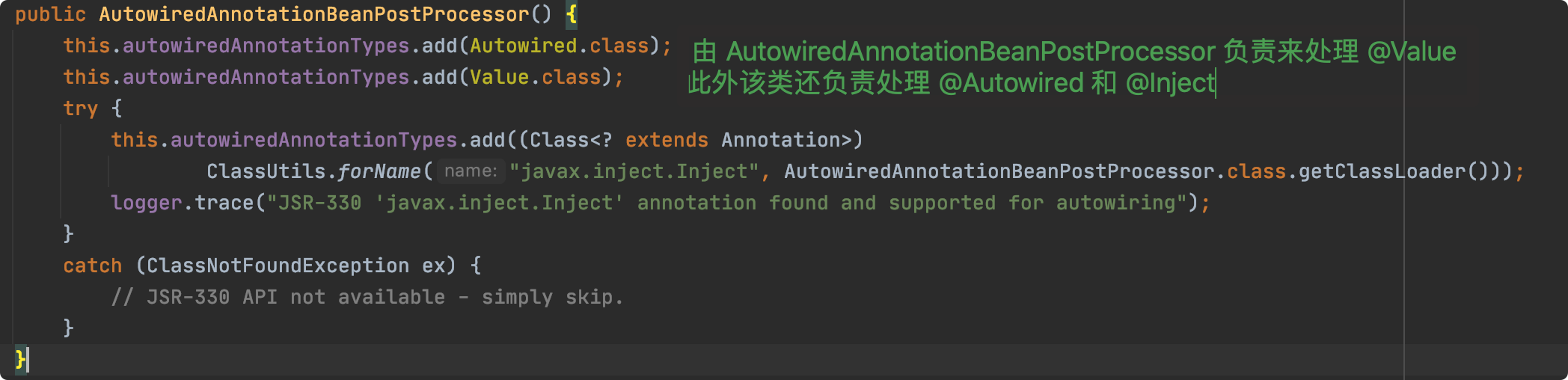
在 AutowiredAnnotationBeanPostProcessor 中有两个内部类:AutowiredFieldElement 和 AutowiredMethodElement。
当前为 Field 注入,定位到 AutowiredAnnotationBeanPostProcessor.AutowiredFieldElement#inject 方法。
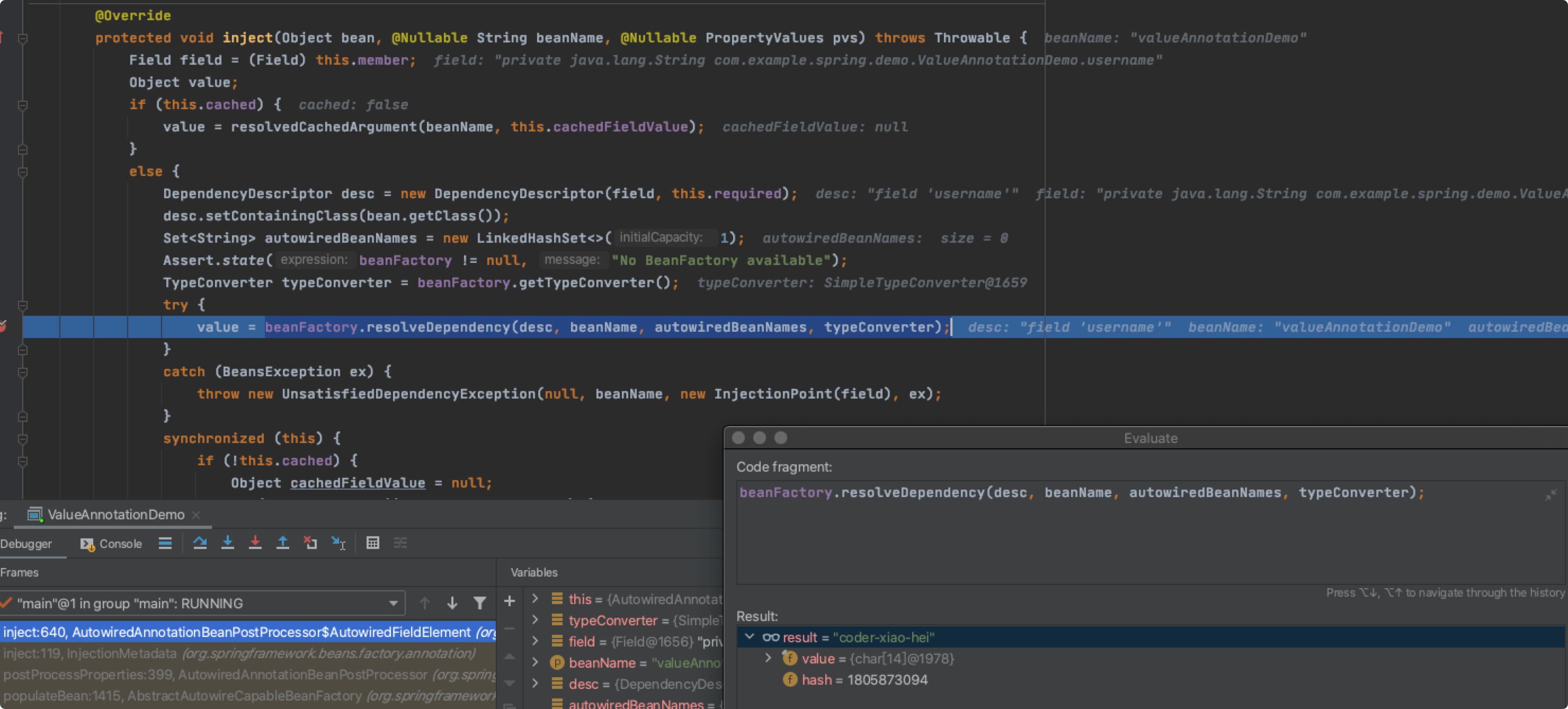
通过 debug 可知,整个调用链如下:
AutowiredFieldElement#injectDefaultListableBeanFactory#resolveDependencyDefaultListableBeanFactory#doResolveDependencyAbstractBeanFactory#resolveEmbeddedValue
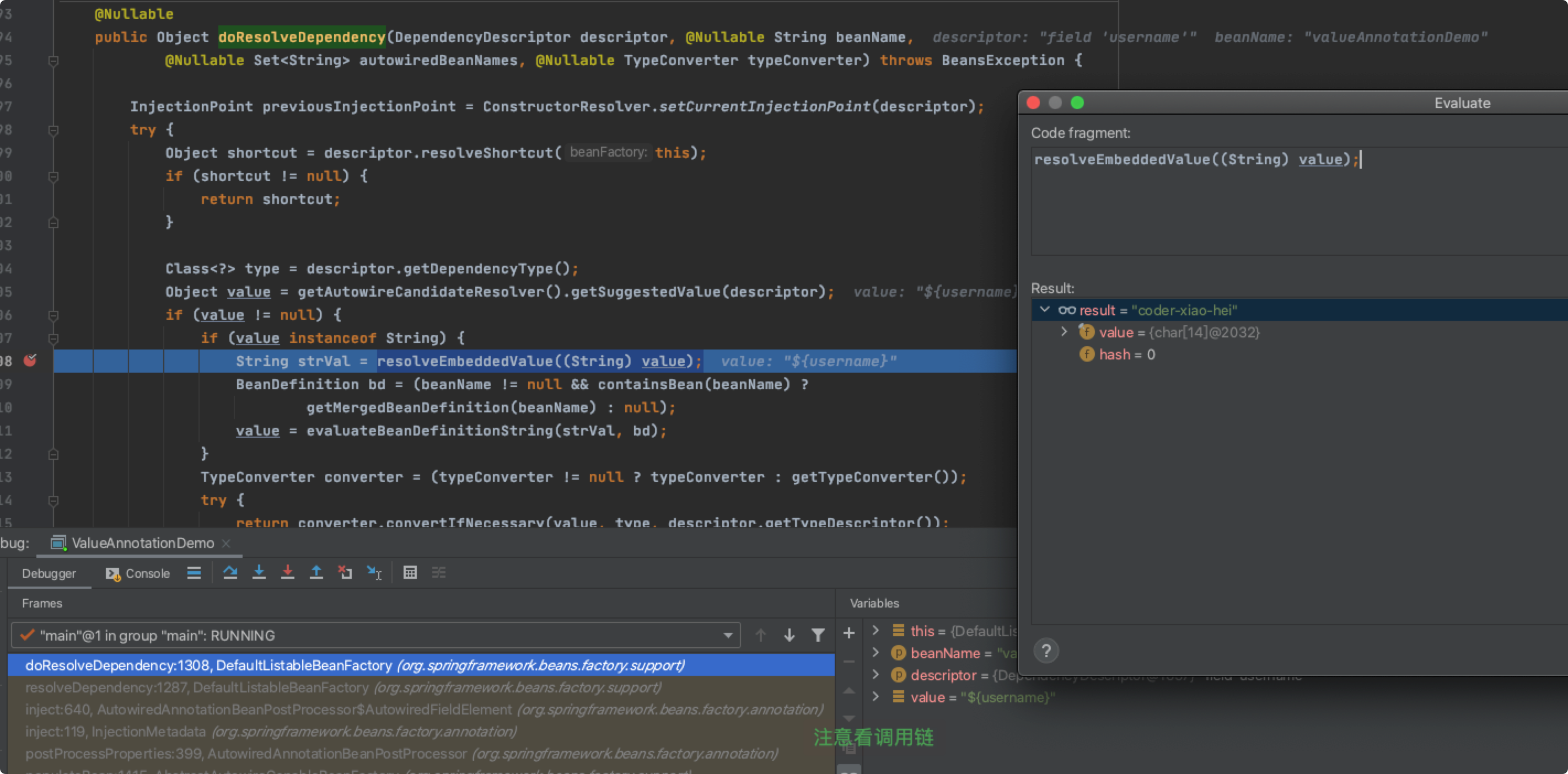
通过上述的 debug 跟踪发现可以通过调用 ConfigurableBeanFactory#resolveEmbeddedValue 方法可以获取占位符的值。
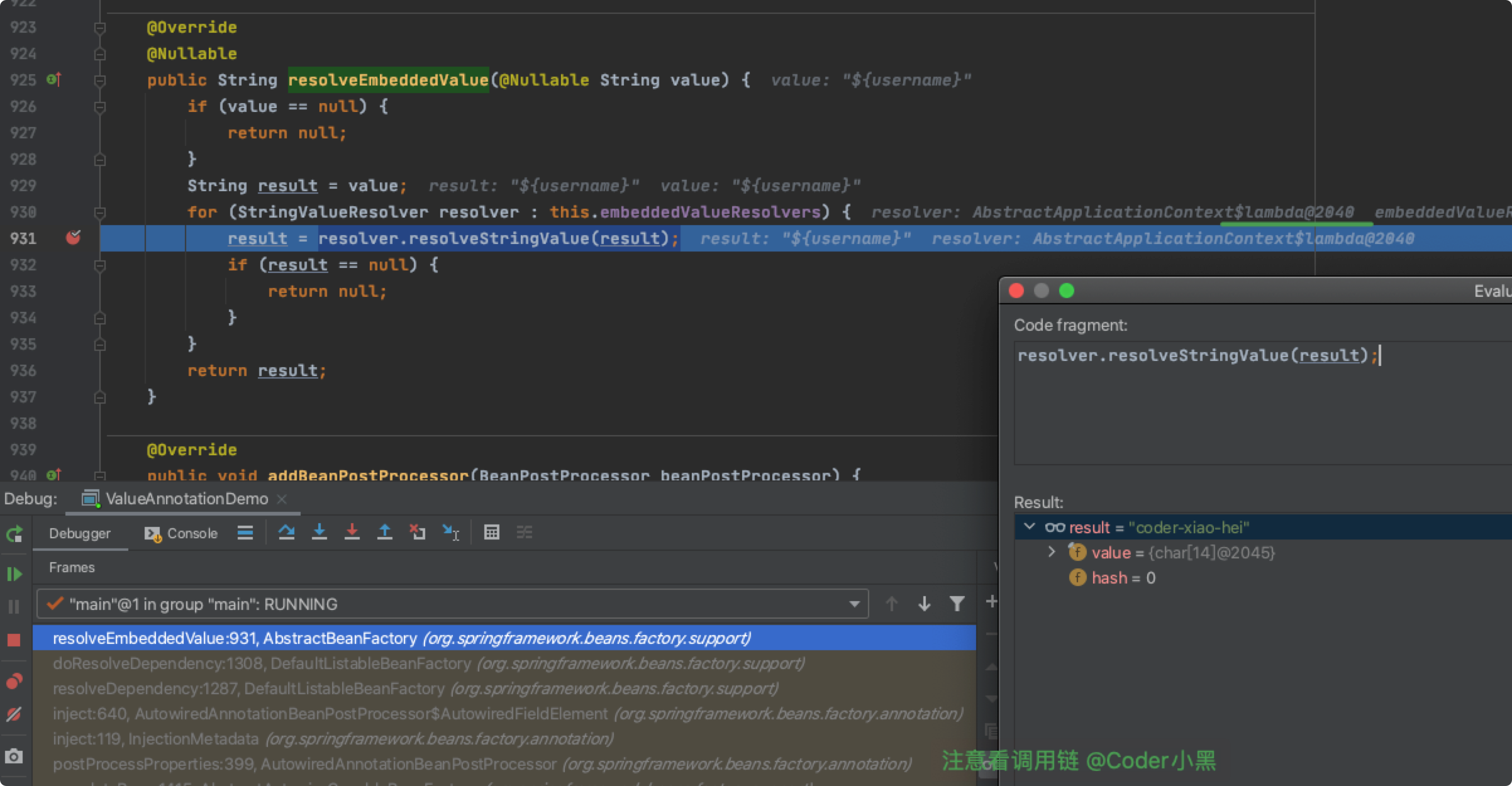
这里的 resolver 是一个 lambda表达式,继续 debug 我们可以找到具体的执行方法:
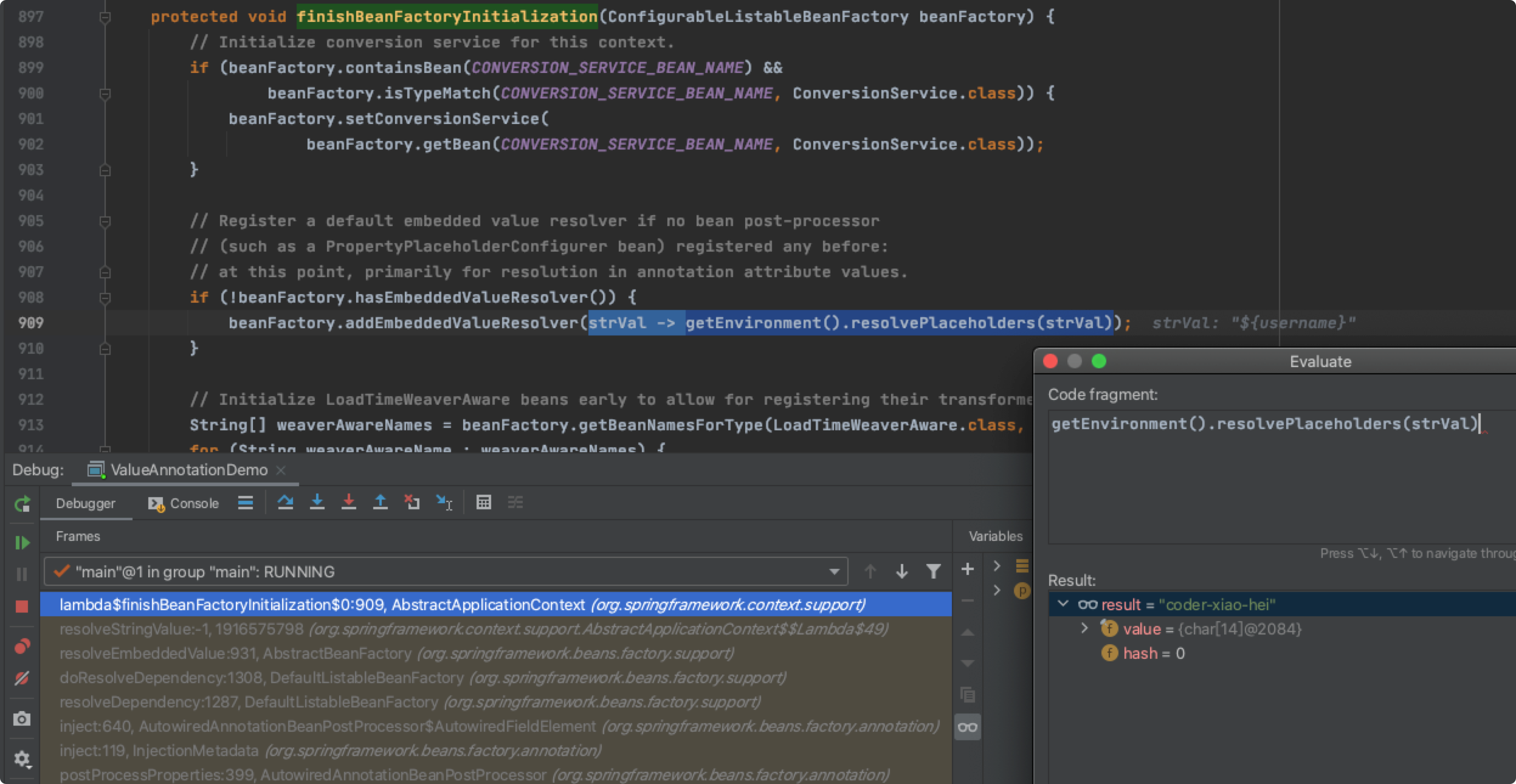
到此,我们简单总结下:
@Value的注入由AutowiredAnnotationBeanPostProcessor来提供支持- 在
AutowiredAnnotationBeanPostProcessor中通过调用ConfigurableBeanFactory#resolveEmbeddedValue来获取占位符具体的值 ConfigurableBeanFactory#resolveEmbeddedValue其实是委托给了ConfigurableEnvironment来实现
Spring Environment
Environment 概述
https://docs.spring.io/spring-framework/docs/current/reference/html/core.html#beans-environment
The Environment interface is an abstraction integrated in the container that models two key aspects of the application environment: profiles and properties.
A profile is a named, logical group of bean definitions to be registered with the container only if the given profile is active. Beans may be assigned to a profile whether defined in XML or with annotations. The role of the Environment object with relation to profiles is in determining which profiles (if any) are currently active, and which profiles (if any) should be active by default.
Properties play an important role in almost all applications and may originate from a variety of sources: properties files, JVM system properties, system environment variables, JNDI, servlet context parameters, ad-hoc Properties objects, Map objects, and so on. The role of the Environment object with relation to properties is to provide the user with a convenient service interface for configuring property sources and resolving properties from them.
Environment 是对 profiles 和 properties 的抽象:
- 实现了对属性配置的统一存储,同时 properties 允许有多个来源
- 通过 Environment profiles 来实现条件化装配 Bean
现在我们主要来关注 Environment 对 properties 的支持。
StandardEnvironment
下面,我们就来具体看一下 AbstractApplicationContext#finishBeanFactoryInitialization 中的这个 lambda 表达式。
strVal -> getEnvironment().resolvePlaceholders(strVal)
首先,通过 AbstractApplicationContext#getEnvironment 获取到了 ConfigurableEnvironment 的实例对象,这里创建的其实是 StandardEnvironment 实例对象。
在 StandardEnvironment 中,默认添加了两个自定义的属性源,分别是:systemEnvironment 和 systemProperties。
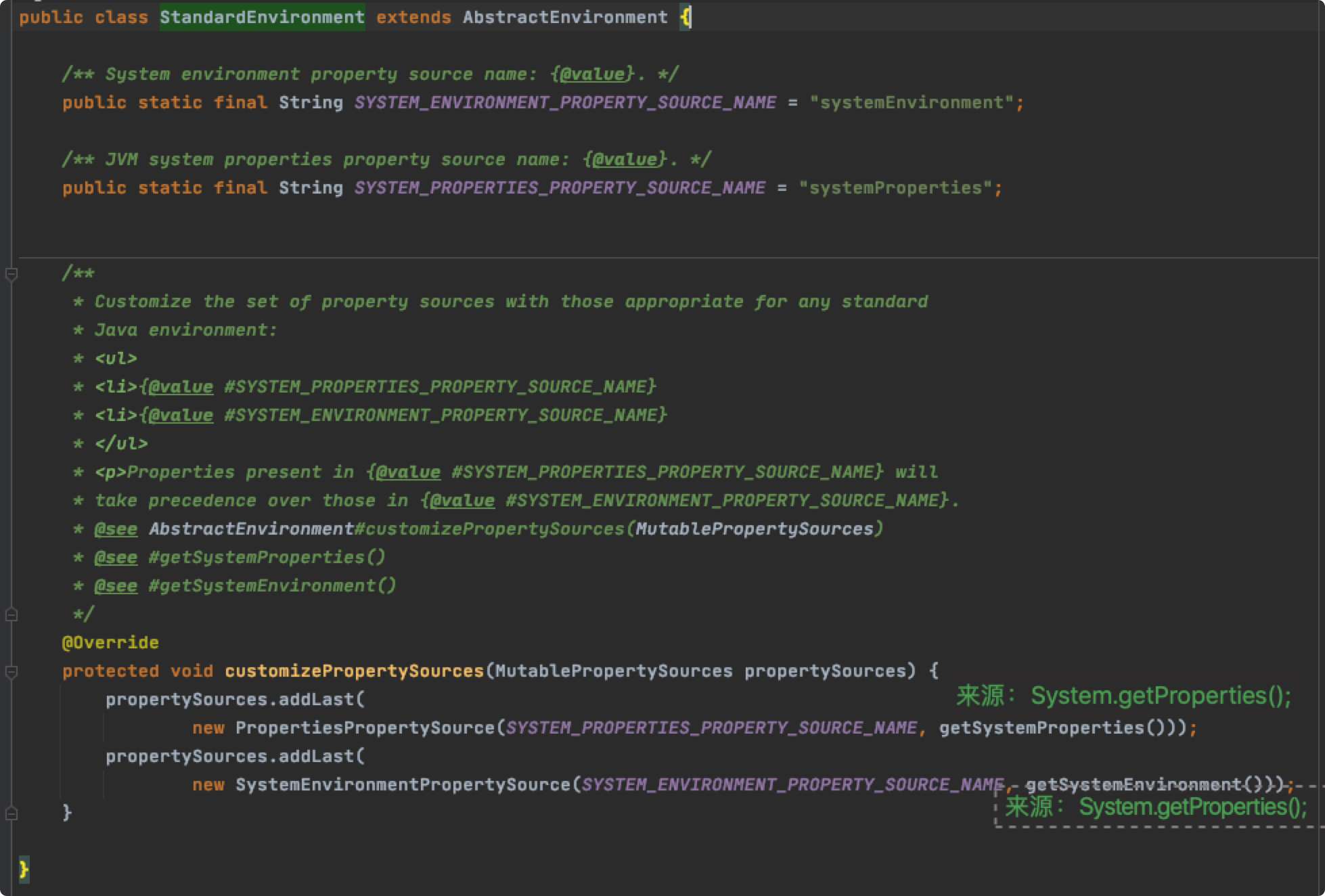
也就是说,@Value 默认是可以注入 system properties 和 system environment 的。
PropertySource
StandardEnvironment 继承了 AbstractEnvironment 。
在 AbstractEnvironment 中的属性配置被存放在 MutablePropertySources 中。同时,属性占位符的数据也来自于此。

MutablePropertySources 中存放了多个 PropertySource ,并且这些 PropertySource 是有顺序的。
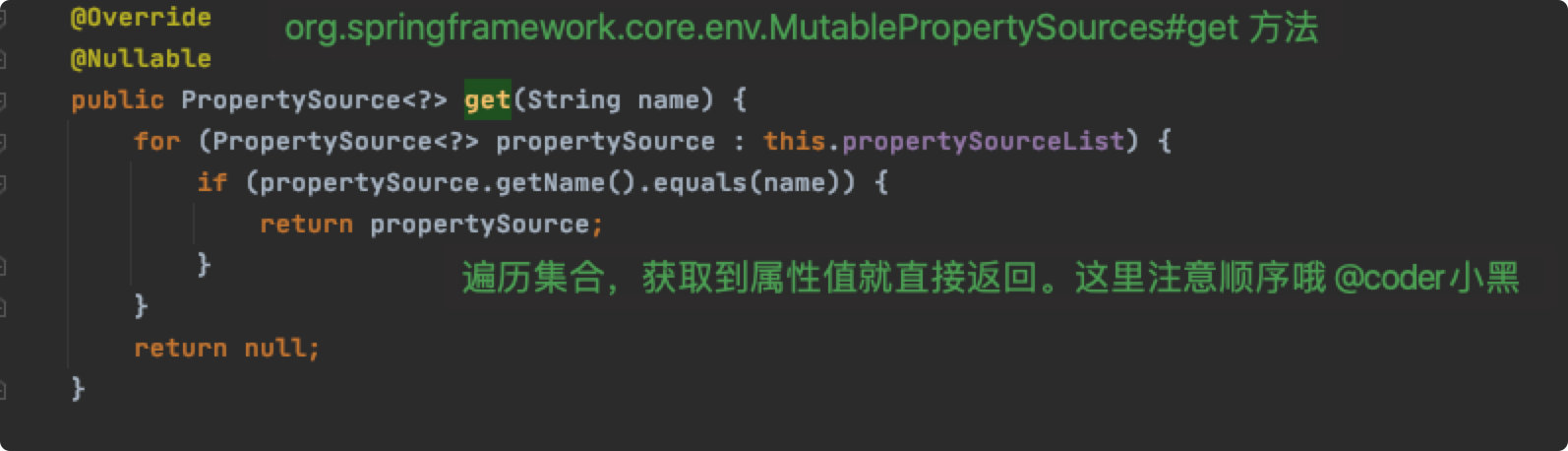
PropertySource 是 Spring 对配置属性源的抽象。
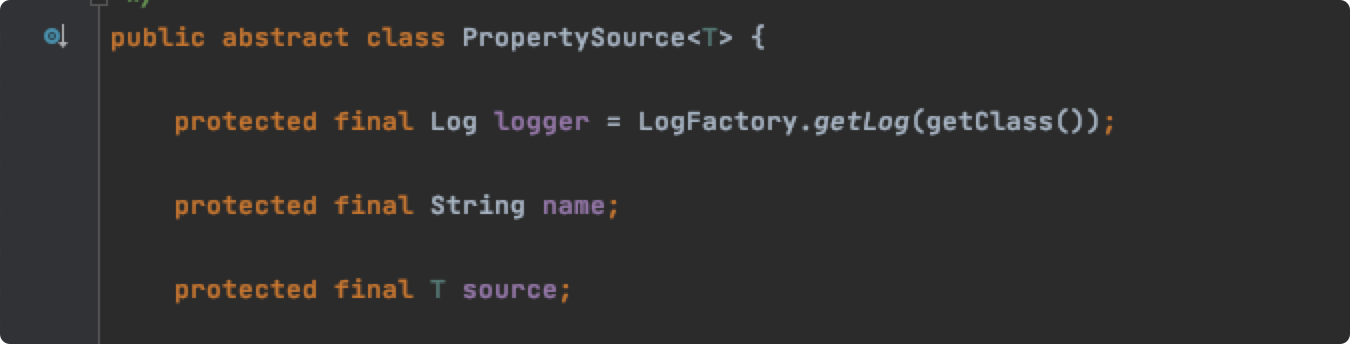
name 表示当前属性源的名称。source 存放了当前的属性。
读者可以自行查看一下最简单的基于 Map 的实现:MapPropertySource 。
配置属性源
有两种方式可以进行属性源配置:使用 @PropertySource 注解,或者通过 MutablePropertySources 的 API。例如:
@Configuration

@PropertySource("classpath:application.properties")

public class ValueAnnotationDemo {

    @Value("${username}")

    private String username;

    public static void main(String[] args) {

        AnnotationConfigApplicationContext context = new AnnotationConfigApplicationContext(ValueAnnotationDemo.class);

        Map<String, Object> map = new HashMap<>();

        map.put("my.name", "coder小黑");

        context.getEnvironment()

                .getPropertySources()

                .addFirst(new MapPropertySource("coder-xiaohei-test", map));

    }

}
总结
- Spring 通过
PropertySource来抽象配置属性源,PropertySource允许有多个。MutablePropertySources - 在 Spring 容器启动的时候,会默认加载 systemEnvironment 和 systemProperties。
StandardEnvironment#customizePropertySources - 我们可以通过
@PropertySource注解或者MutablePropertySources API来添加自定义配置属性源 Environment是 Spring 对 profiles 和 properties 的抽象,默认实现是StandardEnvironment@Value的注入由AutowiredAnnotationBeanPostProcessor来提供支持,数据源来自于PropertySource
public class Demo {

    @Value("${os.name}") // 来自 system properties

    private String osName;

    @Value("${user.name}") // 通过 MutablePropertySources API 来注册

    private String username;

    @Value("${os.version}") // 测试先后顺序

    private String osVersion;

    public static void main(String[] args) {

        AnnotationConfigApplicationContext context = new AnnotationConfigApplicationContext();

        context.register(Demo.class);

        ConfigurableEnvironment environment = context.getEnvironment();

        MutablePropertySources propertySources = environment.getPropertySources();

        Map<String, Object> source = new HashMap<>();

        source.put("user.name", "xiaohei");

        source.put("os.version", "version-for-xiaohei");

        // 添加自定义 MapPropertySource,且放在第一位

        propertySources.addFirst(new MapPropertySource("coder-xiao-hei-test", source));

        // 启动容器

        context.refresh();

        Demo bean = context.getBean(Demo.class);

        // Mac OS X

        System.out.println(bean.osName);

        // xiaohei

        System.out.println(bean.username);

        // version-for-xiaohei

        System.out.println(bean.osVersion);

        // Mac OS X

        System.out.println(System.getProperty("os.name"));

        // 10.15.7

        System.out.println(System.getProperty("os.version"));

        // xiaohei

        System.out.println(environment.getProperty("user.name"));

        //xiaohei

        System.out.println(environment.resolvePlaceholders("${user.name}"));

        context.close();

    }

}
简易版配置中心
@Value 支持配置中心数据来源
@Value 的值都来源于 PropertySource ,而我们可以通过 API 的方式来向 Spring Environment 中添加自定义的 PropertySource。
在此处,我们选择通过监听 ApplicationEnvironmentPreparedEvent 事件来实现。
@Slf4j

public class CentralConfigPropertySourceListener implements ApplicationListener<ApplicationEnvironmentPreparedEvent> {

    private final CentralConfig centralConfig = new CentralConfig();

    @Override

    public void onApplicationEvent(ApplicationEnvironmentPreparedEvent event) {

        centralConfig.loadCentralConfig();

        event.getEnvironment().getPropertySources().addFirst(new CentralConfigPropertySource(centralConfig));

    }

    static class CentralConfig {

        private volatile Map<String, Object> config = new HashMap<>();

        private void loadCentralConfig() {

            // 模拟从配置中心获取数据

            config.put("coder.name", "xiaohei");

            config.put("coder.language", "java");

            new Thread(() -> {

                try {

                    TimeUnit.SECONDS.sleep(10);

                } catch (InterruptedException e) {

                    e.printStackTrace();

                }

                // 模拟配置更新

                config.put("coder.language", "java222");

                System.out.println("update 'coder.language' success");

            }).start();

        }

    }

    static class CentralConfigPropertySource extends EnumerablePropertySource<CentralConfig> {

        private static final String PROPERTY_SOURCE_NAME = "centralConfigPropertySource";

        public CentralConfigPropertySource(CentralConfig source) {

            super(PROPERTY_SOURCE_NAME, source);

        }

        @Override

        @Nullable

        public Object getProperty(String name) {

            return this.source.config.get(name);

        }

        @Override

        public boolean containsProperty(String name) {

            return this.source.config.containsKey(name);

        }

        @Override

        public String[] getPropertyNames() {

            return StringUtils.toStringArray(this.source.config.keySet());

        }

    }

}
通过 META-INF/spring.factories 文件来注册:
org.springframework.context.ApplicationListener=com.example.config.CentralConfigPropertySourceListener
实时发布更新配置
一般来说有两种方案:
客户端拉模式:客户端长轮询服务端,如果服务端数据发生修改,则立即返回给客户端
服务端推模式:发布更新配置之后,由配置中心主动通知各客户端
- 在这里我们选用服务端推模式来进行实现。在集群部署环境下,一旦某个配置中心服务感知到了配置项的变化,就会通过 redis 的 pub/sub 来通知客户端和其他的配置中心服务节点
- 轻量级实现方案,代码简单,但强依赖 redis,pub/sub 可以会有丢失
自定义注解支持动态更新配置
Spring 的 @Value 注入是在 Bean 初始化阶段执行的。在程序运行过程当中,配置项发生了变更, @Value 并不会重新注入。
我们可以通过增强 @Value 或者自定义新的注解来支持动态更新配置。这里小黑选择的是第二种方案,自定义新的注解。
@Target(ElementType.FIELD)

@Retention(RetentionPolicy.RUNTIME)

@Documented

public @interface ConfigValue {

    String value();

}
@Component

public class ConfigValueAnnotationBeanPostProcessor implements BeanPostProcessor, EnvironmentAware {

    private static final PropertyPlaceholderHelper PROPERTY_PLACEHOLDER_HELPER =

            new PropertyPlaceholderHelper(

                    SystemPropertyUtils.PLACEHOLDER_PREFIX,

                    SystemPropertyUtils.PLACEHOLDER_SUFFIX,

                    SystemPropertyUtils.VALUE_SEPARATOR,

                    false);

    private MultiValueMap<String, ConfigValueHolder> keyHolder = new LinkedMultiValueMap<>();

    private Environment environment;

    @Override

    public Object postProcessBeforeInitialization(Object bean, String beanName) throws BeansException {

        ReflectionUtils.doWithFields(bean.getClass(),

                field -> {

                    ConfigValue annotation = AnnotationUtils.findAnnotation(field, ConfigValue.class);

                    if (annotation == null) {

                        return;

                    }

                    String value = environment.resolvePlaceholders(annotation.value());

                    ReflectionUtils.makeAccessible(field);

                    ReflectionUtils.setField(field, bean, value);

                    String key = PROPERTY_PLACEHOLDER_HELPER.replacePlaceholders(annotation.value(), placeholderName -> placeholderName);

                    ConfigValueHolder configValueHolder = new ConfigValueHolder(bean, beanName, field, key);

                    keyHolder.add(key, configValueHolder);

                });

        return bean;

    }

    /**

     * 当配置发生了修改

     *

     * @param key 配置项

     */

    public void update(String key) {

        List<ConfigValueHolder> configValueHolders = keyHolder.get(key);

        if (CollectionUtils.isEmpty(configValueHolders)) {

            return;

        }

        String property = environment.getProperty(key);

        configValueHolders.forEach(holder -> ReflectionUtils.setField(holder.field, holder.bean, property));

    }

    @Override

    public void setEnvironment(Environment environment) {

        this.environment = environment;

    }

    @AllArgsConstructor

    static class ConfigValueHolder {

        final Object bean;

        final String beanName;

        final Field field;

        final String key;

    }

}
主测试代码:
@SpringBootApplication

public class ConfigApplication {

    @Value("${coder.name}")

    String coderName;

    @ConfigValue("${coder.language}")

    String language;

    public static void main(String[] args) throws InterruptedException {

        ConfigurableApplicationContext context = SpringApplication.run(ConfigApplication.class, args);

        ConfigApplication bean = context.getBean(ConfigApplication.class);

        // xiaohei

        System.out.println(bean.coderName);

        // java

        System.out.println(bean.language);

        ConfigValueAnnotationBeanPostProcessor processor = context.getBean(ConfigValueAnnotationBeanPostProcessor.class);

        // 模拟配置发生了更新

        TimeUnit.SECONDS.sleep(10);

        processor.update("coder.language");

        // java222

        System.out.println(bean.language);

    }

}
为什么 @Value 可以获取配置中心的值?的更多相关文章
- SpringBoot Logback无法获取配置中心属性
SpringBoot Logback无法获取配置中心属性 前言 最近在做项目中,需要把项目中的日志信息通过RabbitMQ将规定格式的消息发送到消息队列中,然后ELK系统通过消息队列拿日志并且保存起来 ...
- spring cloud --- config 配置中心 [本地、git获取配置文件]
spring boot 1.5.9.RELEASE spring cloud Dalston.SR1 1.前言 spring cloud config 配置中心是什么? 为了统一管理配 ...
- springcloud(八):配置中心服务化和高可用
在前两篇的介绍中,客户端都是直接调用配置中心的server端来获取配置文件信息.这样就存在了一个问题,客户端和服务端的耦合性太高,如果server端要做集群,客户端只能通过原始的方式来路由,serve ...
- SpringCloud系列——Config 配置中心
前言 Spring Cloud Config为分布式系统中的外部化配置提供了服务器端和客户端支持.有了配置服务器,您就有了一个中心位置来管理跨所有环境的应用程序的外部属性.本文记录实现一个配置中心.客 ...
- Spring Cloud配置中心(Config)
Spring Cloud配置中心(Config) Spring Cloud是现在流行的分布式服务框架,它提供了很多有用的组件.比如:配置中心.Eureka服务发现. 消息总线.熔断机制等. 配置中心在 ...
- 二十、springcloud(六)配置中心服务化和高可用
1.问题描述 前一篇,spring-cloud-houge-provider(称之为客户端)直接从spring-cloud-houge-config(称之为服务端)读取配置,客户端和服务端的耦合性太高 ...
- Spring Boot + Spring Cloud 构建微服务系统(九):配置中心(Spring Cloud Config)
技术背景 如今微服务架构盛行,在分布式系统中,项目日益庞大,子项目日益增多,每个项目都散落着各种配置文件,且随着服务的增加而不断增多.此时,往往某一个基础服务信息变更,都会导致一系列服务的更新和重启, ...
- 【NET CORE微服务一条龙应用】第二章 配置中心使用
背景 系列目录:[NET CORE微服务一条龙应用]开始篇与目录 在分布式或者微服务系统里,通过配置文件来管理配置内容,是一件比较令人痛苦的事情,再谨慎也有湿鞋的时候,这就是在项目架构发展的过程中,配 ...
- 七、springcloud之配置中心Config(二)之高可用集群
方案一:传统作法(不推荐) 服务端负载均衡 将所有的Config Server都指向同一个Git仓库,这样所有的配置内容就通过统一的共享文件系统来维护,而客户端在指定Config Server位置时, ...
随机推荐
- Java9系列第7篇:Java.util.Optional优化与增强
我计划在后续的一段时间内,写一系列关于java 9的文章,虽然java 9 不像Java 8或者Java 11那样的核心java版本,但是还是有很多的特性值得关注.期待您能关注我,我将把java 9 ...
- arcgis activeX 安全提示消除办法
点击任何的一个ArcToolBox 工具,光标落在参数输入框时,会提示 "在此页面上的ActiveX控件和本页上的其他部分的交互可能不安全.你想允许这种交互操作吗? " 消除办法 ...
- 【应用服务 App Service】如何移除App Service Response Header中包含的服务器敏感信息
问题描述 有些情况下,当应用部署到App Service上后,在有些Response Header中,可以看见关于服务器的一些信息,这样会导致隐藏的安全问题,所以可以在web.config中移除某些关 ...
- JS图片的放大与缩小
<!doctype html><head><meta charset=utf-8" /><title>javascript控制图片缩小或者放大 ...
- C# 判断当前目录是否存在不存在则创建
/// <summary> /// 判断目录是否存在不存在则创建 /// </summary> /// <param name="Path">& ...
- 5G-第五代移动通信系统(5th generation mobile/wireless/cellular system)
通信系统 有意义的信息交流被称为通讯. 自然界:狼嚎.狗叫.虫鸣.鸡叫. 人类社会:说话.眼神.写信.烽火台. 目的:信息的传递. 人类发明电以后,开始使用电来传递信息,特别快. 于是有了电报.电话以 ...
- 全球首个优秀的华人.net微服务框架 作者:百大僧
话不多说,直接上地址 https://gitee.com/shoubashou/NetCoreMicroService,目标斩获10000star, 通往牛逼的路上,风景差得让人只说脏话. 是全球首个 ...
- java数据结构-04单循环链表
单循环链表与单链表的不同是,单循环链表尾结点的next指向第一个结点(或头结点) 代码: 无头结点: public class SingleCircleLinkedList<E> ext ...
- Dev中配置graphcis.h
下载地址:http://winbgim.codecutter.org/ 搞得自己有点奔溃 没成功 尝试了全网的所以的方法都没成功
- MyBatis 原理浅析——基本原理
前言 MyBatis 是一个被广泛应用的持久化框架.一个简单的使用示例如下所示,先创建会话工厂,然后从会话工厂中打开会话,通过 class 类型和配置生成 Mapper 接口的代理实现,最后使用 Ma ...