
uni-app开发经验分享二十: 微信小程序 授权登录 获取详细信息 获取手机号
授权页面
因为微信小程序提供的 权限弹窗 只能通用户确认授权 所以可以 写一个授权页面,让用户点击 来获取用户相关信息 然后再配合后台就可以完成登录
<button class="btnInfo" open-type="getUserInfo"/>
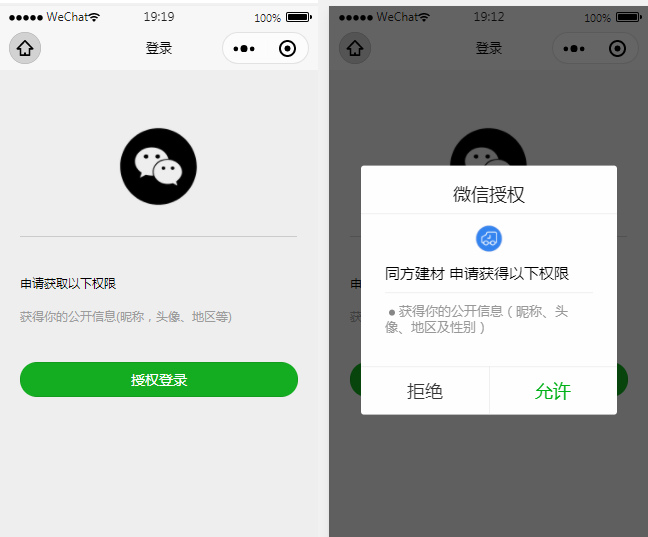
素材

页面代码示例
这个接口要在后端调用(https://api.weixin.qq.com无法加入白名单)
https://api.weixin.qq.com/sns/jscode2session?appid="+appid+"&secret="+secret+"&js_code="+code+"&grant_type=authorization_code
<template>

	<view>

		<view>

		  <view>

			<view class='header'>

			  <image src='../../static/wx_login.png'></image>

			</view>

			<view class='content'>

			  <view>申请获取以下权限</view>

			  <text>获得你的公开信息(昵称,头像、地区等)</text>

			</view>

			<!-- withCredentials=true  获取到除用户基本信息之外的encryptedData以及iv等数据 -->

			<button class='bottom' type='primary' open-type="getUserInfo" withCredentials="true" lang="zh_CN" @getuserinfo="wxGetUserInfo">

			  授权登录

			</button>

			<!-- <button class='bottom' type='primary' open-type="getPhoneNumber"  @getphonenumber="getPhoneNumber">

			  授权登录

			</button> -->

		  </view>

		</view>

	</view>

</template>

<script>

	import { htxcx } from "@/store/api.js"

	import { mapMutations } from 'vuex'

	export default {

		data() {

			return {

				code:"",

				SessionKey: '',

				encryptedData:"",

				iv:"",

				OpenId: '',

				nickName: null,

				avatarUrl: null,

				isCanUse: uni.getStorageSync('isCanUse')//默认为true  记录当前用户是否是第一次授权使用的

			}

		},

		onLoad() {

			this.login()

		},

		methods: {

			...mapMutations(["setName"]),

			wxGetUserInfo(){ //第一授权获取用户信息===》按钮触发

				let _this = this;

				// 获取用户信息

				uni.getUserInfo({

					provider: 'weixin',

					success: function (infoRes) {

						_this.encryptedData = infoRes.encryptedData

						_this.iv = infoRes.iv

						_this.nickName = infoRes.userInfo.nickName; //昵称

						_this.avatarUrl = infoRes.userInfo.avatarUrl; //头像

						uni.setStorageSync('isCanUse', false);//记录是否第一次授权 false:表示不是第一次授权

						_this.updateUserInfo();

					},fail:function (fail){console.log("fail:",fail)}

				});

			},

			login(){

				let _this = this;

				uni.showLoading({

				  title: '登录中...'

				});

				// 1.wx获取登录用户code

				uni.login({

					provider: 'weixin',

					success: function(loginRes) {

						_this.code = loginRes.code;

						if (!_this.isCanUse) {

							//非第一次授权获取用户信息

							uni.getUserInfo({

								provider: 'weixin',

								success: function(infoRes) {

									console.log('login用户信息:',infoRes);

				            //获取用户信息后向调用信息更新方法

									_this.nickName = infoRes.userInfo.nickName; //昵称

									_this.avatarUrl = infoRes.userInfo.avatarUrl; //头像

									_this.updateUserInfo();//调用更新信息方法

								}

							});

						}

						// 将用户登录code传递到后台置换用户SessionKey、OpenId等信息

						uni.hideLoading();

					},

				})

			},

			updateUserInfo(){ //向后台更新信息

				this.setName(this.nickName,this.avatarUrl)

				let _this = this;

				var obj ={

					appid:"wx1*********0f06",

					secret:"07bd3*************096",

					code:this.code

				}

				// 这个接口要在后端调用(https://api.weixin.qq.com无法加入白名单)

				// https://api.weixin.qq.com/sns/jscode2session?appid="+appid+"&secret="+secret+"&js_code="+code+"&grant_type=authorization_code

				// 请求微信端地址获取用户唯一标识的

				htxcx(obj.appid,obj.secret,obj.code).then(res=>{

					console.log("res:",res)

					res.data.openid // 唯一

					res.data.session_key

					this.encryptedData

					this.iv

					uni.reLaunch({//信息更新成功后跳转到小程序首页

						url: '/pages/index/index'

					});

				},err=>{

					console.log("err:",err)

				})

			}

		}

	}

</script>

<style scoped>

	.header {

	    margin: 90rpx 0 90rpx 50rpx;

	    border-bottom: 1px solid #ccc;

	    text-align: center;

	    width: 650rpx;

	    height: 300rpx;

	    line-height: 450rpx;

	  }

	  .header image {

	    width: 200rpx;

	    height: 200rpx;

	  }

	  .content {

	    margin-left: 50rpx;

	    margin-bottom: 90rpx;

	  }

	  .content text {

	    display: block;

	    color: #9d9d9d;

	    margin-top: 40rpx;

	  }

	  .bottom {

	    border-radius: 80rpx;

	    margin: 70rpx 50rpx;

	    font-size: 35rpx;

	  }

</style>
获取手机号
微信文档:https://developers.weixin.qq.com/miniprogram/dev/framework/open-ability/getPhoneNumber.html
前提条件 先要登录
onLoad() {

	this.login()

},
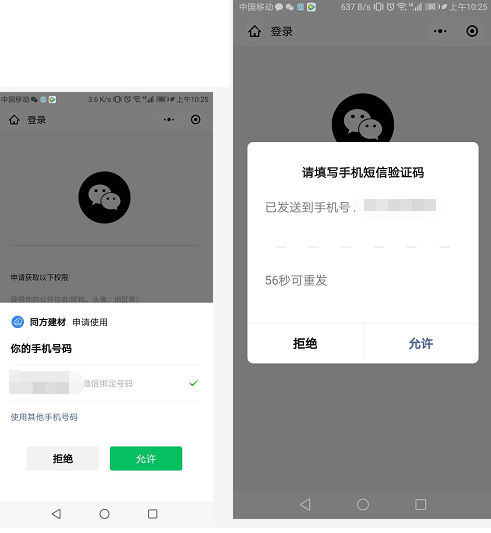
还是用上面的授权页面
<button class='bottom' type='primary' open-type="getUserInfo" withCredentials="true" lang="zh_CN" @getuserinfo="wxGetUserInfo">授权登录</button>

<button class='bottom' type='primary' open-type="getPhoneNumber" @getphonenumber="getPhoneNumber">获取手机号</button>

事件

getPhoneNumber(val){

	console.log(val)

},
这个需要 真机测试 或 预览
<template>

	<view>

		<view>

		  <view>

			<view class='header'>

			  <image src='../../static/wx_login.png'></image>

			</view>

			<view class='content'>

			  <view>申请获取以下权限</view>

			  <text>获得你的公开信息(昵称,头像、地区等)</text>

			</view>

			<!-- withCredentials=true  获取到除用户基本信息之外的encryptedData以及iv等数据 -->

			<!-- <button class='bottom' type='primary' open-type="getUserInfo" withCredentials="true" lang="zh_CN" @getuserinfo="wxGetUserInfo">

			  授权登录

			</button> -->

			<button class='bottom' type='primary' open-type="getPhoneNumber"  @getphonenumber="getPhoneNumber">

			  授权登录

			</button>

		  </view>

		</view>

	</view>

</template>

<script>

	import { htxcx } from "@/store/api.js"

	import { mapMutations } from 'vuex'

	export default {

		data() {

			return {

				code:"",

				SessionKey: '',

				encryptedData:"",

				iv:"",

				OpenId: '',

				nickName: null,

				avatarUrl: null,

				isCanUse: uni.getStorageSync('isCanUse')//默认为true  记录当前用户是否是第一次授权使用的

			}

		},

		onLoad() {

			this.login()

		},

		methods: {

			...mapMutations(["setName"]),

			wxGetUserInfo(){ //第一授权获取用户信息===》按钮触发

				let _this = this;

				// 获取用户信息

				uni.getUserInfo({

					provider: 'weixin',

					success: function (infoRes) {

						_this.encryptedData = infoRes.encryptedData

						_this.iv = infoRes.iv

						_this.nickName = infoRes.userInfo.nickName; //昵称

						_this.avatarUrl = infoRes.userInfo.avatarUrl; //头像

						uni.setStorageSync('isCanUse', false);//记录是否第一次授权 false:表示不是第一次授权

						_this.updateUserInfo();

					},fail:function (fail){console.log("fail:",fail)}

				});

			},

			getPhoneNumber:function(e){

				this.encryptedData = e.detail.encryptedData

				this.iv = e.detail.iv

				uni.setStorageSync('isCanUse', false);

				this.updateUserInfo()

			},

			login(){

				let _this = this;

				uni.showLoading({

				  title: '登录中...'

				});

				// 1.wx获取登录用户code

				uni.login({

					provider: 'weixin',

					success: function(loginRes) {

						console.log("登录",loginRes.code)

						_this.code = loginRes.code;

						if (!_this.isCanUse) {

							//非第一次授权获取用户信息

							uni.getUserInfo({

								provider: 'weixin',

								success: function(infoRes) {

									console.log('login用户信息:',infoRes);

				            //获取用户信息后向调用信息更新方法

									_this.nickName = infoRes.userInfo.nickName; //昵称

									_this.avatarUrl = infoRes.userInfo.avatarUrl; //头像

									_this.updateUserInfo();//调用更新信息方法

								},

								fail(err) {

									console.log(err)

								}

							});

						}

						// 将用户登录code传递到后台置换用户SessionKey、OpenId等信息

						uni.hideLoading();

					},

				})

			},

			updateUserInfo(){ //向后台更新信息

				this.setName(this.nickName,this.avatarUrl)

				let _this = this;

				var obj ={

					appid:"wx1b02a26b03110f06",

					secret:"07bd35d41e7fb6a9bff173c728d6a096",

					code:this.code

				}

				// 这一步一般是在后台  这里是为了测试

				// 正常给 后台 5个测试 appId appsecret code(登录接口获取) encryptedData iv

				htxcx(obj.appid,obj.secret,obj.code).then(res=>{

					console.log("res:",res)

					res.data.openid // 唯一

					res.data.session_key

					this.encryptedData

					this.iv

					// 把这些参数通过接口传给后台 解密 获取手机号

					return

					uni.reLaunch({//信息更新成功后跳转到小程序首页

						url: '/pages/index/index'

					});

				},err=>{

					console.log("err:",err)

				})

			}

		}

	}

</script>
至于后台解密
我的项目后台解密
package jstfsn;

import java.io.UnsupportedEncodingException;

import java.security.Security;

import java.security.spec.AlgorithmParameterSpec;

import java.sql.Connection;

import java.text.ParseException;

import javax.crypto.BadPaddingException;

import javax.crypto.Cipher;

import javax.crypto.IllegalBlockSizeException;

import javax.crypto.KeyGenerator;

import javax.crypto.NoSuchPaddingException;

import javax.crypto.spec.IvParameterSpec;

import javax.crypto.spec.SecretKeySpec;

import javax.naming.NamingException;

import org.apache.commons.codec.binary.Base64;

import org.apache.log4j.Logger;

import GCcom.CommonValue;

import GCcom.DBOperation;

import StxsysBass.StxsysAdmin.CheckingLineService;

import com.alibaba.fastjson.JSONObject;

import com.justep.baas.action.ActionContext;

public class Login {

	/**

	 * 查询历史线路未巡检的巡检点

	 *

	 * @param params

	 * @param context

	 * @return

	 * @throws NamingException

	 */

	/**

	 * 日志

	 */

	public static Logger logger = Logger.getLogger(CheckingLineService.class);

	/**

	 * 数据库名

	 */

//	public static String DATASOURCE = CommonValue.MYSQL_DATA_BASE_JSTFSN;

	/************************************************************************************

	 * 函数名:	getWxUserInfo

	 * 参数名:	JSONObject params: 参数集

	 * 			ActionContext context : 上下文

	 *

	 * 功能:	通过用户授权加密信息解密获取用户信息

	 *

	 * 开发者:	Leechen8@gmail.com 20200317

	 *

	 * 修改者:

	 *

	 * @return

	 * @throws ParseException

	 *

	 *

	 ************************************************************************************/

	public static JSONObject getWxUserInfo(JSONObject params, ActionContext context) throws NamingException {

		// 获取参数

		String strCipher = "";

		String strEncrypdata = params.getString("encrypdata");

		String strIvdata = params.getString("ivdata");

		String strSessionkey= params.getString("sessionkey");

		byte[] byEncrypdata = Base64.decodeBase64(strEncrypdata);

		byte[] byIvdata = Base64.decodeBase64(strIvdata);

		byte[] bySessionkey = Base64.decodeBase64(strSessionkey);

		JSONObject jsData = new JSONObject();

		AlgorithmParameterSpec ivSpec = new IvParameterSpec(byIvdata);

		Cipher cipher;

		try {

			SecretKeySpec keySpec = new SecretKeySpec(bySessionkey, "AES");

			cipher = Cipher.getInstance("AES/CBC/PKCS5Padding");

			cipher.init(Cipher.DECRYPT_MODE, keySpec, ivSpec);

			strCipher = new String(cipher.doFinal(byEncrypdata),"UTF-8");

			jsData.put("phone", strCipher);

		} catch (Exception e) {

			// TODO Auto-generated catch block

			e.printStackTrace();

			jsData.put("error", e.getMessage());

		}

		return jsData;

	}

}
可参考 https://blog.csdn.net/qq_38194393/article/details/81382108
获取详细信息 获取手机号 优化封装
页面
<template>

	<view>

		<view>

			 <view>

				<view class='header'>

					<image src='../../static/wx_login.png'></image>

				</view>

				<view class='content'>

					<view>申请获取以下权限</view>

					<text>获得你的公开信息(昵称,头像、地区等)</text>

					<text>获得你微信绑定的手机号</text>

				</view>

				<!-- <picker class="view_input" @change="bindPickerMPChange" :value="type" :range="typeArr">

					<view :class="typeArr[type]?'uni-input':'uni-input options'">{{typeArr[type]? typeArr[type]:"请选择用户身份"}}</view>

				</picker> -->

				<button class='bottom' type='primary' open-type="getUserInfo" withCredentials="true" lang="zh_CN" @getuserinfo="wxGetUserInfo">

					授权登录

				</button>

				<button class='bottom' type='primary' open-type="getPhoneNumber"  @getphonenumber="getPhoneNumber">

					手机号授权

				</button>

			</view>

		</view>

	</view>

</template>

<script>

	import {wxlogin, getPhone, wxUserInfo} from "@/store/wxlogin.js"

	import {htxcx} from "@/store/api.js"

	export default {

		data() {

			return {

				appid:"wx1b02a26b03110f06",

				secret:"07bd35d41e7fb6a9bff173c728d6a096",

				type:0,

				phone:"",

				typeArr:["承运人","管理员"],

				phoneParams:{

					sessionkey:"",

					ivdata:"",

					encrypdata:""

				},

				loginStatus:false,

				phoneStatus:false

			}

		},

		onLoad() {

			try{

				this.init()

			}catch(e){

				console.log("init错误信息:",e)

			}

		},

		methods: {

			async init(){

				var code = await wxlogin()

				// 获取sessionkey

				var key = await htxcx(this.appid,this.secret,code)

				this.phoneParams.sessionkey = key.data.session_key;

			},

			async getPhoneNumber(e){

				this.phoneParams.encrypdata = e.detail.encryptedData

				this.phoneParams.ivdata = e.detail.iv

				var phone = await getPhone(this.phoneParams)

				this.phone = phone.purePhoneNumber

				console.log("phone:",this.phone)

				if(this.phone){

					this.phoneStatus = true

					this.reLaunch()

				}

			},

			async wxGetUserInfo(){

				var info = await wxUserInfo()

				this.loginStatus = true

				this.reLaunch()

			},

			reLaunch(){

				if(this.loginStatus && this.phoneStatus){

					uni.setStorageSync("tongfang-phone",this.phone)

					// 后续业务代码

					// uni.reLaunch({//信息更新成功后跳转到小程序首页

					// 	url: '/pages/index/index'

					// });

				}

			},

			bindPickerMPChange(e){

				this.type =  e.target.value

			}

		}

	}

</script>

<style>

	.header {

	    margin: 90rpx 0 50rpx 50rpx;

	    border-bottom: 1px solid #ccc;

	    text-align: center;

	    width: 650rpx;

	    height: 300rpx;

	    line-height: 450rpx;

	}

	.header image {

	    width: 200rpx;

	    height: 200rpx;

	}

	.content {

	    margin-left: 50rpx;

	    margin-bottom: 50rpx;

	}

	.content text {

	    display: block;

	    color: #9d9d9d;

	    margin-top: 40rpx;

	}

	.bottom {

	    border-radius: 80rpx;

	    margin: 35rpx 50rpx;

	    font-size: 35rpx;

	}

	.bottom:first-child{

		margin-top: 50rpx;

	}

	.view_input{

		margin: 0 50rpx;

		background-color: white;

		padding: 10px;

		height: 1rem;

		line-height: 1rem;

	}

</style>
wxlogin.js
import {getPhone as getphone} from '@/store/api.js'

/*

微信登录

	返回 code

*/

export const wxlogin = ()=> {

	return new Promise((resolve, reject)=>{

		uni.showLoading({

		  title: '登录中...'

		});

		uni.login({

			provider: 'weixin',

			success: function(loginRes) {

				resolve(loginRes.code);

				uni.hideLoading();

			},

			fail(err) {

				reject(err)

				uni.hideLoading();

			}

		})

	})

}

/*

获取微信用户信息 要先调用登录接口

	返回用户信息

*/

export const wxUserInfo = ()=>{

	return new Promise((resolve, reject)=>{

		uni.getUserInfo({

			provider: 'weixin',

			success: function(res) {

				resolve(res);

			},

			fail(err) {

				reject(err)

			}

		});

	})

}

/*

获取微信用户手机号 要先调用登录接口

	参数:obj{

		sessionkey,

		ivdata,

		encrypdata

	}

	返回手机号相关信息

*/

export const getPhone = (obj)=>{

	return new Promise((resolve, reject)=>{

		getphone(obj).then(res=>{

			resolve(JSON.parse(res.data.data.phone))

		},err=>{

			reject(err)

		})

	})

}
api.js
// 接口获取 sessionkey

export const htxcx = (appid,secret,code)=>uniAjax("https://api.weixin.qq.com/sns/jscode2session?appid="+appid+"&secret="+secret+"&js_code="+code+"&grant_type=authorization_code")

// 解密手机号

export const getPhone = (obj)=>uniAjax(BASE_URL_dev+"/getWxUserInfo",obj,"POST")
转载于:https://blog.csdn.net/weixin_42448623/article/details/104928750
uni-app开发经验分享二十: 微信小程序 授权登录 获取详细信息 获取手机号的更多相关文章
- 微信小程序授权登录以及用户信息相关接口调整导致授权框不弹出
前言:4月8号升级了小程序业务后提交了版本并上线.突然一个同事说体验版的点击"登录"按钮无效.当时觉得应该不会呀,这几天一直用手机调试,每天也在不停的登录授权,弹框一直有的呀.然后 ...
- 完整微信小程序授权登录页面教程
完整微信小程序授权登录页面教程 1.前言 微信官方对getUserInfo接口做了修改,授权窗口无法直接弹出,而取而代之是需要创建一个button,将其open-type属性绑定getUseInfo方 ...
- uni-app 微信小程序授权登录
1.微信小程序 获取用户信息 与获取手机号 详细信息看官方公告:https://developers.weixin.qq.com/community/develop/doc/000cacfa20ce8 ...
- 微信小程序授权登录将open_id传至后台并入库
要求能把用户昵称.头像以及open_id写入数据库,服务端保持用户登录状态 wxml: <block wx:else> <button type="primary" ...
- 微信小程序授权登录
目录 自定义授权页面 点击授权登录后出现微信自带的授权登录弹窗 <!--index.wxml--> <!-- 授权界面 --> <cover-view class='au ...
- 微信小程序API 登录-wx.login(OBJECT) + 获取微信用户唯一标识openid | 小程序
wx.login(OBJECT) 调用接口获取登录凭证(code)进而换取用户登录态信息,包括用户的唯一标识(openid) 及本次登录的 会话密钥(session_key).用户数据的加解密通讯需要 ...
- 微信小程序授权登录--PHP后端接口
由于之前做过公众号的一个开发,所以再开发小程序就没有那么多坑了,在这也记录一下开发过程,以方便后续进行参考. 废话不多说,直接上官方文档,任何使用第三方开发的,不看文档就是耍流氓.小程序开发文档,可以 ...
- day87_11_7微信小程序之登录,支付(获取ip,requests使用),授权
一.登录接口. 官方文档https://developers.weixin.qq.com/miniprogram/dev/framework/open-ability/login.html 在登录接口 ...
- 使用Shiro+JWT完成的微信小程序的登录(含讲解)
使用Shiro+JWT完成的微信小程序的登录 源码地址https://github.com/Jirath-Liu/shiro-jwt-wx 微信小程序用户登陆,完整流程可参考下面官方地址,本例中是按此 ...
随机推荐
- 模拟sql注入实现远程桌面登录
首先用sql注入文件命令y url+一句话 into outfile 绝对路径/test.php 用蚁剑连接打开连接的终端 先看用户的权限 创建一个用户将它放入队列中 查看3389端口是否开启 0xd ...
- 详解Python Google Protocol Buffer
为什么要使用PB? PB(Protocol Buffer)是 Google 开发的用于结构化数据交换格式,作为腾讯云日志服务标准写入格式.因此用于写入日志数据前,需要将日志原始数据序列化为 PB 数据 ...
- Raft算法系列教程2:状态机复制 (State Machine Replication)
分区容错如何保证? 在分布式系统设计中,需要遵循CAP理论,如果我们要让一个服务具有容错能力,那么最常用最直接的办法就是让一个服务的多个副本同时运行在不同的节点上.但是,当一个服务的多个副本都在运行的 ...
- 本地H5模式写的APP体验可以比APP还好
很多APP使用H5编写,但APP链接的是远程的url的模式,导致了APP的用户体验极差,因为当你使用远程的H5 url的时候,打开H5页面的速度由网络决定,而不是由手机性能决定,假如用户在没有网络的地 ...
- 【electron+vue3+ts实战便笺exe】二、electron+vue3开发内容
不要让自己的上限成为你的底线 本来以为有万字的..没想到才堪堪近6000字.为了水文的嫌疑,只挑了重点的地方讲,比如component内的组件就挑了右键弹窗去说明,建议在看本文的时候边查看项目,有不懂 ...
- Centos7 根目录存储空间扩展方法
Centos7 根目录存储空间扩展方法 一.首先通过 df -hl 命令查看磁盘占用情况,其中根目录已经被占满,此时需要对其进行扩容 二.针对虚拟机环境的centos7系统根存储空间扩容,可利 ...
- 将两个ListMap中同下标的map去重合并
public static void main(String[] args) { Map<String,Object> oneMap = new HashMap<>(); on ...
- Fast Bokeh Effects Using Low-Rank Linear Filters
Fast Bokeh Effects Using Low-Rank Linear Filters paper地址:https://www.researchgate.net/publication/27 ...
- Java 从 Redis中取出的Json字符串 带斜杠的问题解决方案
Java 从 Redis中取出的Json字符串 带斜杠的问题: { "code": 200, "message": "成功", " ...
- 仅4步,就可通过SQL进行分布式死锁的检测与消除
摘要:本文主要介绍在 GaussDB(DWS) 中,如何通过 SQL 语句,对分布式死锁进行检测和恢复. 分布式数仓应用场景中,我们经常遇到数据库系统 hang 住的问题,所谓 hang 是指虽然数据 ...