
JavaScript Array methods performance compare
JavaScript Array methods performance compare
JavaScript数组方法的性能对比
env
$ node -v

# v12.18.0
push vs unshift
"use strict";

/**

 *

 * @author xgqfrms

 * @license MIT

 * @copyright xgqfrms

 * @created 2020-07-20

 * @modified

 *

 * @description push-vs-unshift

 * @difficulty Easy Medium Hard

 * @complexity O(n)

 * @augments

 * @example

 * @link

 * @solutions

 *

 */

const log = console.log;

function test (arr = [], type = `push`) {

  const begin = new Date().getTime();

  log(`begin`, begin);

  if(type === `push`) {

    // 在数组后面插入元素

    arr.push(arr.length + 1)

  } else {

    // 在数组前面插入元素

    arr.unshift(arr.length + 1)

  }

  const end = new Date().getTime();

  log(`end`, end);

  log(`\n${type}, end - begin`, end - begin);

}

function multiTest (arr = [], num = 1, type = `push`) {

  const begin = new Date().getTime();

  log(`begin`, begin);

  if(type === `push`) {

    // 在数组后面插入元素

    for (let i = 0; i < num; i++) {

      arr.push(arr.length + 1 + i)

    }

  } else {

    // 在数组前面插入元素

    for (let i = 0; i < num; i++) {

      arr.unshift(arr.length + 1 + i)

    }

  }

  const end = new Date().getTime();

  log(`end`, end);

  log(`\n${type}, end - begin`, end - begin);

}

const noForArrayAutoGenerator = (len = 100) => {

  // return [...``.padStart(len, ` `)].map((item, i) => i + 1).map((item, i) => i % 2 === 0 ? item : item + ``);

  return [...``.padStart(len, ` `)].map((item, i) => i % 2 === 0 ? i + 1 : i + 1 + ``);

}

// const arr = noForArrayAutoGenerator(10000 * 10);

const arr = noForArrayAutoGenerator(10000 * 1000);

const arr1 = [...arr];

const arr2 = [...arr];

// test(arr1, `push`);

// test(arr2, `unshift`);

const nums = 100;

multiTest(arr1, nums, `push`);

multiTest(arr2, nums, `unshift`);
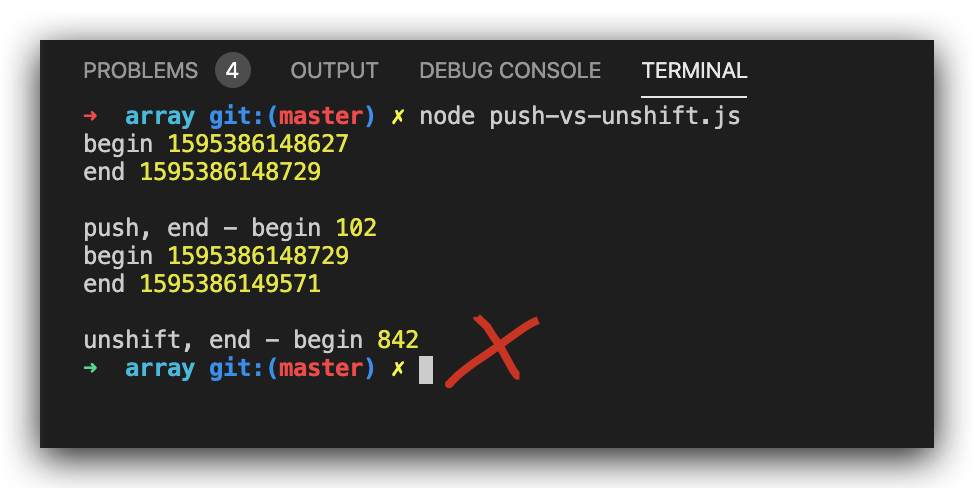
one item, test result
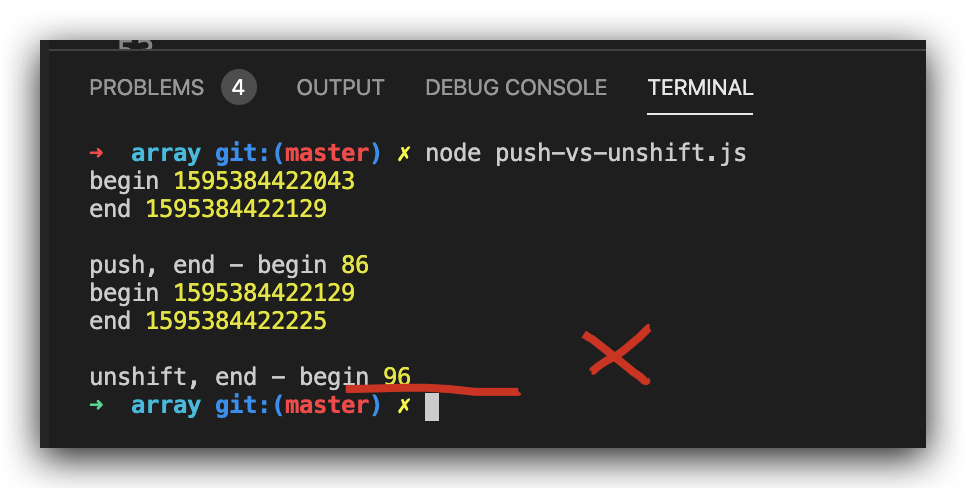
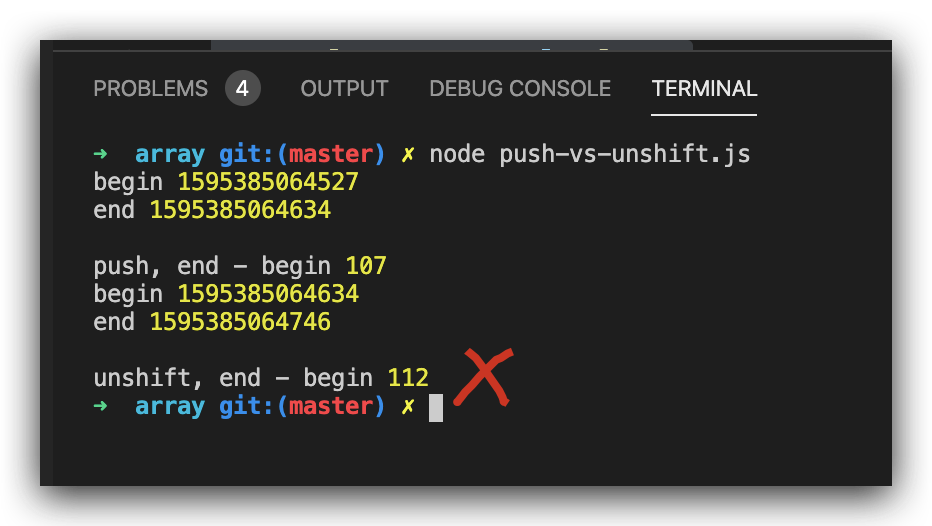
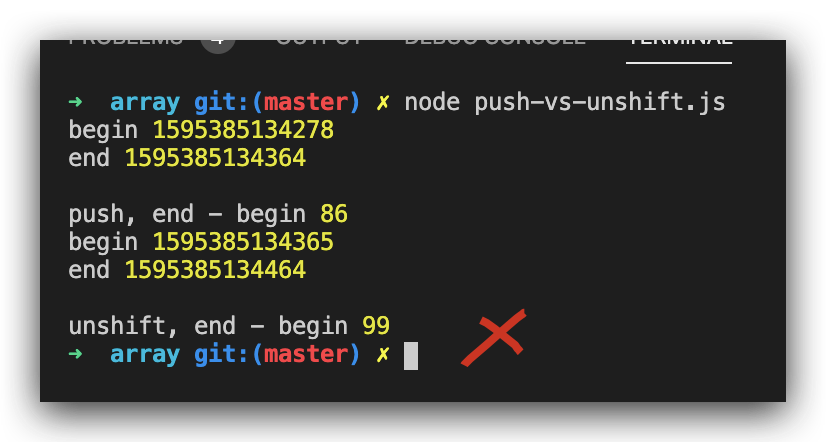
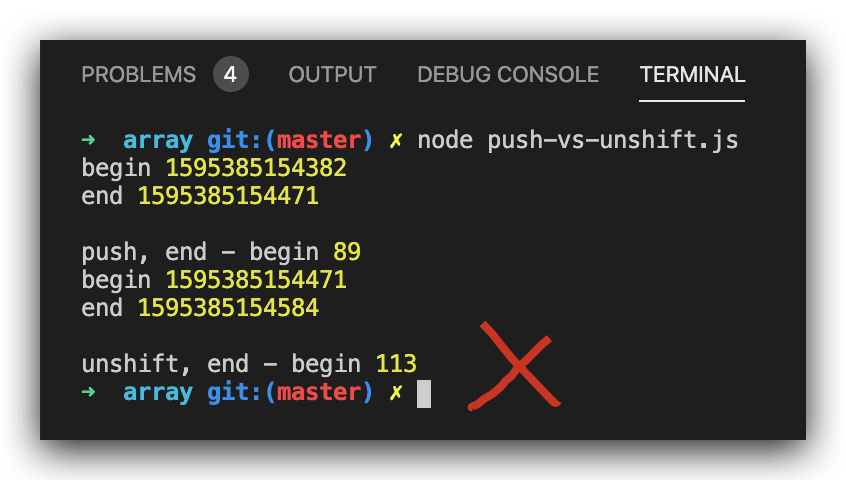
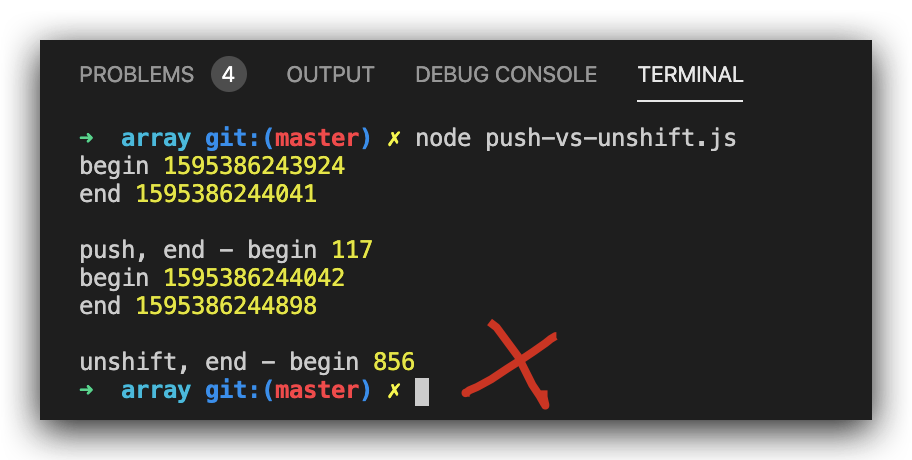
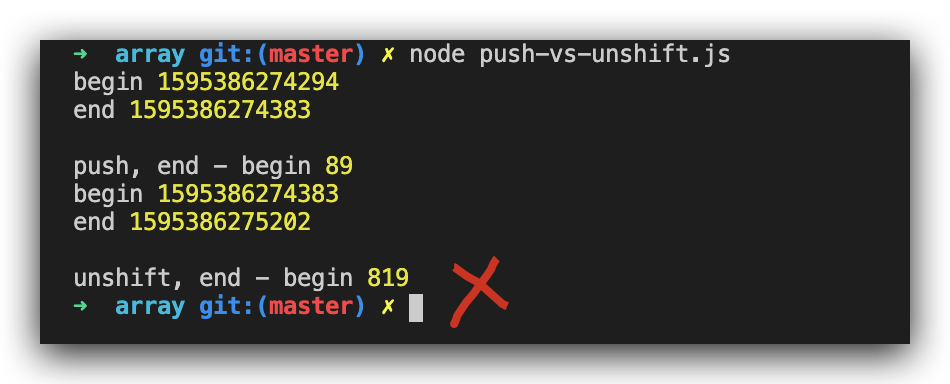
multi items, test result
GC & stack overflow bug
// const arr = noForArrayAutoGenerator(10000 * 10000);

// FATAL ERROR: CALL_AND_RETRY_LAST Allocation failed - JavaScript heap out of memory

/*

<--- Last few GCs --->

nce start of marking 998 ms) (average mu = 0.409, current mu = 0.065) allocation[9479:0x102d59000]    15026 ms: Mark-sweep 2062.8 (2065.0) -> 2062.8 (2065.0) MB, 768.1 / 0.0 ms  (+ 0.0 ms in 0 steps since start of marking, biggest step 0.0 ms, walltime since start of marking 834 ms) (average mu = 0.287, current mu = 0.079) last resor[9479:0x102d59000]    16001 ms: Mark-sweep 2062.8 (2065.0) -> 2062.8 (2065.0) MB, 974.9 / 0.0 ms  (average mu = 0.155, current mu = 0.000) last resort GC in old space requested

<--- JS stacktrace --->

==== JS stack trace =========================================

    0: ExitFrame [pc: 0x1009d6059]

    1: StubFrame [pc: 0x100a17a54]

Security context: 0x2480d7d808d1 <JSObject>

    2: anonymous (aka anonymous) [0x2480d5c82c81] [/Users/xgqfrms-mbp/Documents/GitHub/AFES/js-basic/array/push-vs-unshift.js:~40] [pc=0x320f7c803a7b](this=0x24805b8004b1 <undefined>,46758526,46758525)

    3: map [0x2480d7d95609](this=0x2480d5c82c61 <JSArray[100000000]>,0x2480d5c82c81 <JSFunction (sfi = 0x24804...

*/
https://developer.mozilla.org/en-US/docs/Web/JavaScript/Reference/Global_Objects/Array/unshift
https://developer.mozilla.org/en-US/docs/Web/JavaScript/Reference/Global_Objects/Array/push
pop vs shift
"use strict";

/**

 *

 * @author xgqfrms

 * @license MIT

 * @copyright xgqfrms

 * @created 2020-07-20

 * @modified

 *

 * @description pop-vs-shift

 * @difficulty Easy Medium Hard

 * @complexity O(n)

 * @augments

 * @example

 * @link

 * @solutions

 *

 */

const log = console.log;

function test (arr = [], type = `pop`) {

  const begin = new Date().getTime();

  log(`begin`, begin);

  if(type === `pop`) {

    // 在数组后面删除元素

    arr.pop();

  } else {

    // 在数组前面删除元素

    arr.shift()

  }

  const end = new Date().getTime();

  log(`end`, end);

  log(`\n${type}, end - begin`, end - begin);

}

function multiTest (arr = [], num = 1, type = `pop`) {

  const begin = new Date().getTime();

  log(`begin`, begin);

  if(type === `pop`) {

    // 在数组后面删除元素

    for (let i = 0; i < num; i++) {

      arr.pop();

    }

  } else {

    // 在数组前面删除元素

    for (let i = 0; i < num; i++) {

      arr.shift()

    }

  }

  const end = new Date().getTime();

  log(`end`, end);

  log(`\n${type}, end - begin`, end - begin);

}

const noForArrayAutoGenerator = (len = 100) => {

  // return [...``.padStart(len, ` `)].map((item, i) => i + 1).map((item, i) => i % 2 === 0 ? item : item + ``);

  return [...``.padStart(len, ` `)].map((item, i) => i % 2 === 0 ? i + 1 : i + 1 + ``);

}

// const arr = noForArrayAutoGenerator(10000 * 10);

const arr = noForArrayAutoGenerator(10000 * 1000);

// const arr = noForArrayAutoGenerator(10000 * 10000);

// FATAL ERROR: CALL_AND_RETRY_LAST Allocation failed - JavaScript heap out of memory

const arr1 = [...arr];

const arr2 = [...arr];

// test(arr1, `pop`);

// test(arr2, `shift`);

const nums = 100;

multiTest(arr1, nums, `pop`);

multiTest(arr2, nums, `shift`);
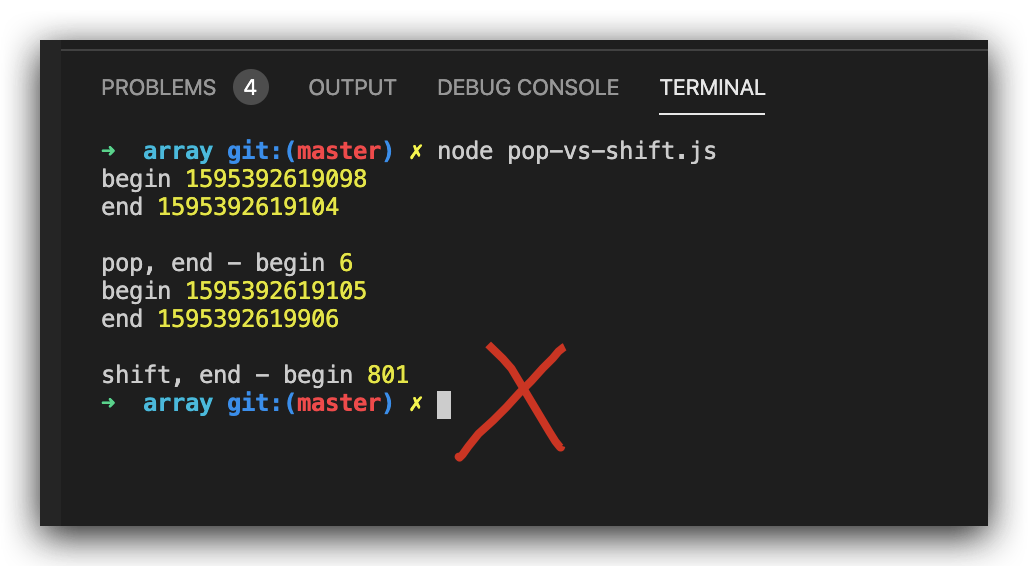
single item, test result
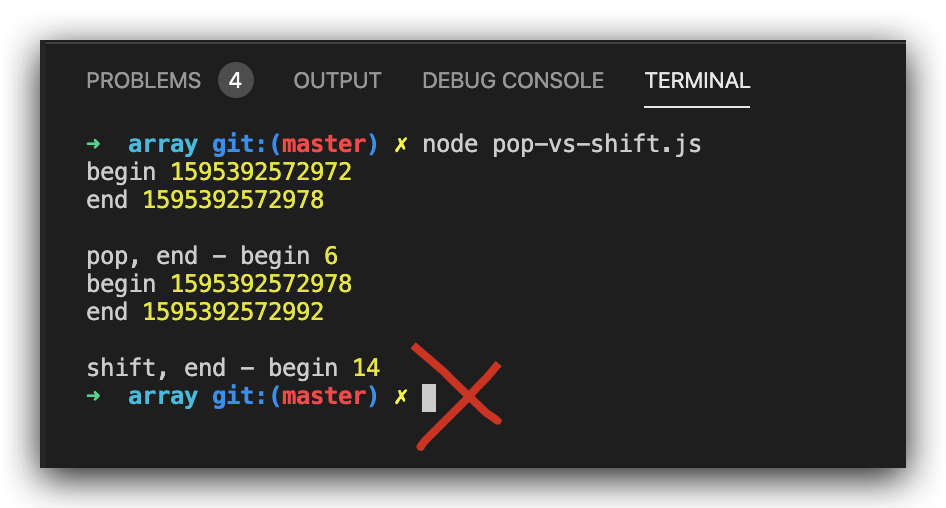
multi items, test result
https://developer.mozilla.org/en-US/docs/Web/JavaScript/Reference/Global_Objects/Array/shift
https://developer.mozilla.org/en-US/docs/Web/JavaScript/Reference/Global_Objects/Array/pop
refs
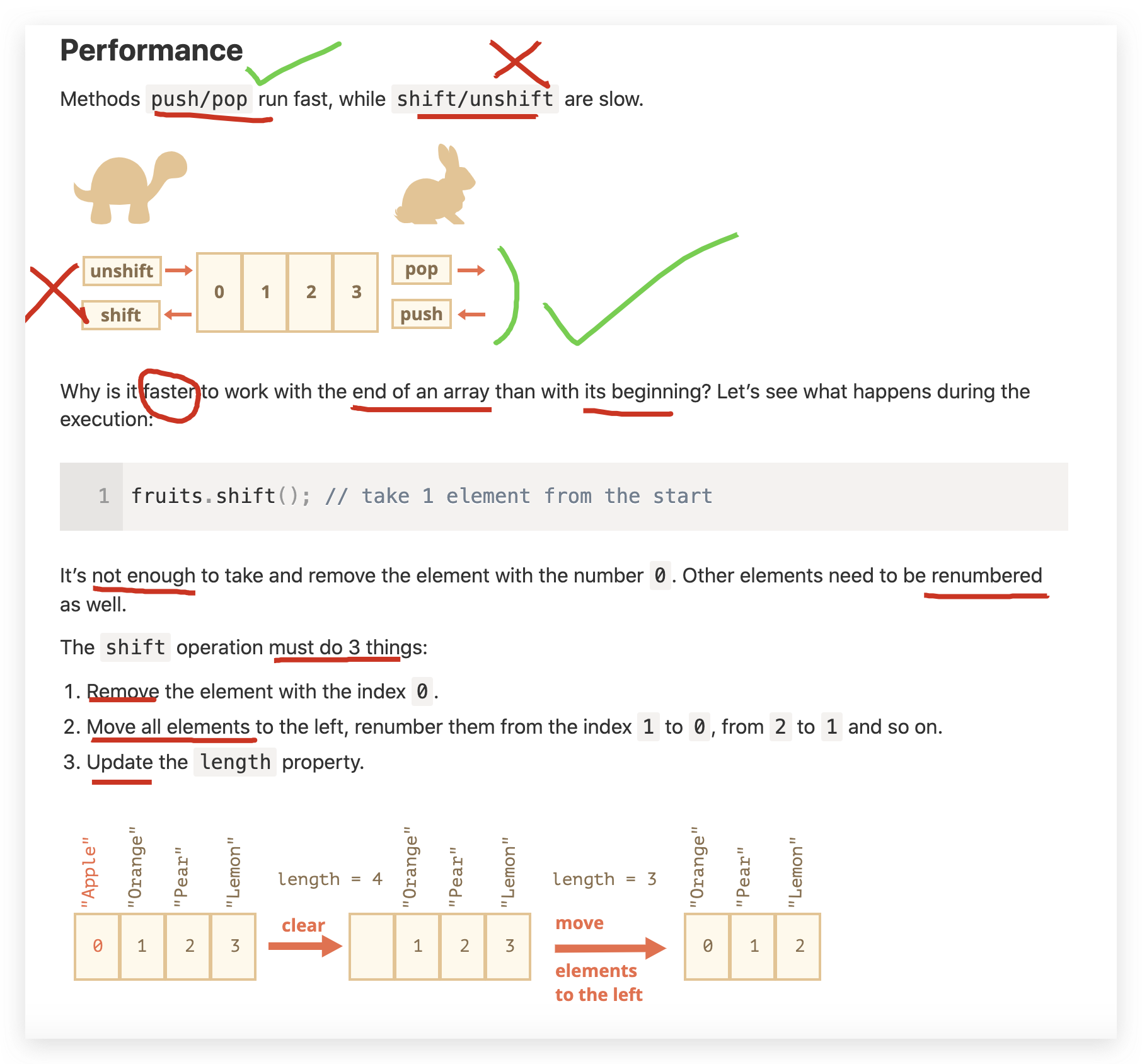
https://javascript.info/array#performance
xgqfrms 2012-2020
www.cnblogs.com 发布文章使用:只允许注册用户才可以访问!
JavaScript Array methods performance compare的更多相关文章
- [Javascript ] Array methods in depth - sort
Sort can automatically arrange items in an array. In this lesson we look at the basics including how ...
- [Javascript] Array methods in depth - filter
Array filter creates a new array with all elements that pass the test implemented by the provided fu ...
- [Javascript] Array methods in depth - slice
Array slice creates a shallow copy of an array. In this lesson we cover, in detail, exactly what a ' ...
- javascript Array Methods(学习笔记)
ECMAScript 5 定义了9个新的数组方法,分别为: 1.forEach(); 2.map(); 3.filter(); 4.every(); 5.some(); 6.reduce() ...
- [Javascript] JavaScript Array Methods in Depth - push
Array push is used to add elements to the end of an Array. In this lesson we'll see how the push met ...
- [Javascript] Array methods in depth - indexOf
indexOf is used to search for a value or reference inside of an array. In this lesson we first look ...
- [Javascript] Array methods in depth - some
some returns a boolean value after passing each item in the source array through the test function t ...
- JavaScript Array 对象
JavaScript Array 对象 Array 对象 Array 对象用于在变量中存储多个值: var cars = ["Saab", "Volvo", & ...
- JavaScript Array(数组)对象
一,定义数组 数组对象用来在单独的变量名中存储一系列的值. 创建 Array 对象的语法: new Array(); new Array(size); new Array(element0, elem ...
随机推荐
- 微博CacheService架构浅析 对底层协议进行适配
https://mp.weixin.qq.com/s/wPR0j2bmHBF6z0ZjTlz_4A 麦俊生 InfoQ 2014-04-21 微博作为国内最大的社交媒体网站之一,每天承载着亿万用户的服 ...
- (转载)微软数据挖掘算法:Microsoft 神经网络分析算法原理篇(9)
前言 本篇文章继续我们的微软挖掘系列算法总结,前几篇文章已经将相关的主要算法做了详细的介绍,我为了展示方便,特地的整理了一个目录提纲篇:大数据时代:深入浅出微软数据挖掘算法总结连载,有兴趣的童鞋可以点 ...
- deepin定制deepin-terminal
一. 背景介绍 本人以前在win10上经常使用xshell来登陆服务器.xshell提供了很丰富的功能和快捷键.个人比较喜欢的包括三个功能 终端透明 双击时根据分隔符选中文字 突出显示 但是自从使用d ...
- bzoj2654(loj20069)
2654: tree Time Limit: 30 Sec Memory Limit: 512 MB Description 给你一个无向带权连通图,每条边是黑色或白色.让你求一棵最小权的恰好有ne ...
- MySql(一)表类型(存储引擎)
MySql(一)表类型(存储引擎) 一.MYSQL存储引擎概述 二.存储引擎的特性对比 2.1 MyISAM 2.2 InnoDB 2.2.1 自动增长列 2.2.2 外键约束 2.2.3 存储方式 ...
- 使用 html5 svg 绘制图形
有一次看一个项目的时候,看到图片的格式为svg,作为萌新的我瞬间有点小懵,这可是之前从没有见到过的格式,于是就开始上某度进行学习,发现某博主的优秀文章,进行转载方便自己学习,感谢原博主的优秀文章. · ...
- hbase伪分布式环境的搭建
一,实验环境: 1, ubuntu server 16.04 2, jdk,1.8 3, hadoop 2.7.4 伪分布式环境或者集群模式 4, hbase-1.2.6.tar.gz 二,环境的搭建 ...
- P3195 [HNOI2008] 玩具装箱(斜率优化DP)
题目链接 设\(d[i]\)为将前 \(i\) 个玩具装入箱中所需得最小费用 容易得到动态转移方程: \[d[i] = min(d[j] + (s[i]-s[j]+i-j-1-L)^2), (j< ...
- 2019 Multi-University Training Contest 1 Path(最短路+最小割)
题意:给你n个点 m条边 现在你能够堵住一些路 问怎样能让花费最少且让1~n走的路比最短路的长度要长 思路:先跑一边最短路 建一个最短路图 然后我们跑一边最大流求一下最小割即可 #include &l ...
- 【uva 1612】Guess(算法效率,2种想法)
题意:已知 N 位选手的3题的预期得分,得分要不全拿,要不为0.且知道最后的实际名次,而且得分相同的选手,ID小的排在前面.问这样的名次可能吗.若可能,输出最后一名的最高可能得分.(N≤16384) ...